UPDATE: This model has been discontinued. For more current recommendations, please refer to our handheld GPS buyers guide or our Garmin handheld GPS comparison chart.
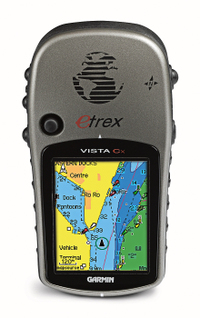
The Garmin eTrex Vista Cx updates the very popular eTrex Vista C, adding expandable memory via a micro-SD card, which will provide plenty of room for optional highway and/or topo maps. This is a nice compact unit, ideal for use in the great outdoors and for navigating city streets.
 updates the very popular
This receiver is identical to the Legend Cx, except that the Vista Cx adds an electronic compass and barometric altimeter.
Compare prices on the Garmin eTrex Vista Cx
The only caution I want to provide is that, like all members of the eTrex x-series, the Vista Cx does not include the hot new SiRFstar III chipset. For that (in a unit with comparable features) you’ll have to step up to the GPSMAP 60CSx. Of course, you’ll pay a price for that in several ways — a less compact unit, shorter battery life and a $160 difference in the suggested retail price.
More Garmin eTrex Vista Cx reviews
- Garmin Vista Cx reviews are starting to show up at Amazon.
- Trailspace.com reviews the Vista Cx.
I’ll be posting more hands on reviews as they appear, but in the meantime, here are some other helpful resources:
- A PDF version of the eTrex Vista Cx owners manual.
- Want to see how the Vista Cx stacks up against other units? Try this Garmin handheld GPS comparison tool.
- There is an active eTrex Legend / Vista message forum at Yahoo.
- Here is a Garmin eTrex Vista Cx FAQ page.
- The official Garmin eTrex Vista Cx web page.
Compare prices on the Garmin eTrex Vista Cx at these merchants:
- Find the low price for a Vista Cx at GPS Now.com, where shipping is free on orders over $99 (and the upgrade to overnight
shipping is dirt cheap!). Order by 5 p.m. Central Time for same day
shipment. - Check the current eTrex Vista Cx price at Amazon.com.
- Find the Garmin eTrex Vista Cx for an amazing price at eBay.
- Check the deals on Garmin GPS receivers at REI.com.
 About Rich Owings

I would like to use the maps I created with MapInfo and Geomedia on Garmin Etrex Legend. Is there a way to do it?
I would like to use the maps I created with MapInfo and Geomedia on Garmin Etrex Legend. Is there a way to do it?
I would like to use the maps I created with MapInfo and Geomedia on Garmin Etrex Legend. Is there a way to do it?
Sonny, If they are vector files (http://gpstracklog.com/2005/12/can_i_put_any_b.html), theoretically, you can convert them. Having said that, there are definitely ways to convert MapInfo files; some are covered in my book (http://www.makeyourownmaps.com). I’m not familiar with GeoMedia or any programs that convert its file format, which I assume is GWS.
I gave a Vista Cx to a friend for Christmas…
now, here is my questins…
In order to “View Hunt and Fish” best times , good times ……..
Do you need GPS on ?
How far into the future are these times good ?
Thanks,
bradley moore
Bradley,
I’m not sure how you could do it with the GPS off. As far as how far in the future? I just checked out the times on my 60CSx for December 28, 2099!
As far as this unit’s lack of the SiRF star III hardware is concerned, it’s a non-issue. I also have a Nuvi 350 and it uses the above chipset, but its acquisition times are the same as the Vista Cx. Not only this, but in urban jungle conditions, the Nuvi 350 has the same problems acquiring satellites as the Vista Cx.
Both units are able to acquire signals inside my home with little or no problem. The only advantage, as far as the navigation ability is concerned, is that the Nuvi has better maps than the Vista Cx built-in. This can always be upgraded, of course.
David,
Interesting comments. Thanks for posting.
I can see a world of difference between my 60CS and 60CSx. I understand that the eTrex line did get an upgrade in its antenna with the x-series line, even if it didn’t get the SiRF III chipset. Have you compared your nuvi and Vista Cx under canopy? I’m curious to hear if there are differences there.
Hi,
I bought the Garmin Etrex Vista CX for my husband for Christmas. Neither of us have any experience with GPS but are very keen to learn. He would like to use the unit when he goes on a hiking trip in the Lakes. However, when he tries to register and set up the unit (we bought it with Europe mapping) via the internet it is asking for a MAP SOURCE code which niether of us can see anywhere. I have contacted Garmin ages ago but they have not replied.
Can anybody help us with how to set it up, do you know was a code supposed to have come with the unit?
Sorry to be such a layman but we really don’t have a clue and he is keen to use it.
Many thanks for any help gratefully appreciated.
It sounds like your maps are locked. The unlock code is usually on a slip of paper that came with the unit. I would contact Garmin again. Their customer service is usually very good.
I’m not familiar with the UK softweare. Are these topo or highway maps?
Hi,
Thanks for your response. There was no slip of paper with the unit – I thought that there must be something missing but at least you’ve confirmed that thanks.
They are topo maps and highway maps.
Thanks again, I will keep trying Garmin.
Hi
I have an older Garmin eTrex Vista – the one with the monochrome display and the serial data cable. I have moved to Belgium from Singapore and have trouble with the unit powering off. I have WAAS enabled and I have Garmin selected as the data interface option.
Does anyone have any ideas? I use the unit in Normal mode, track log on and set to auto and wrap. Is WAAS causing problems becuase of the lack of line of sight with the WAAS satellites?
Thanks – Bruce
Bruce,
If my memory serves me correctly, the eTrex line has a problem with the batteries coming loose. Some people have solved this with a little cardboard shim in the battery case for some extra pressure. I’m wondering if it could be as simple as that.
Richard – thanks for the tip. I will give that a try. I have just updated to software version 3.7 and everything else looks in good condition.
I am off to the USA next week for work and will go mountain biking in Colorado next weekend so I can test it out there. I also have my Edge 205 which is great on the bike. But I do like the elevation plot on the eTrex. I will keep you updated with progress.
Cheers – Bruce
Are there any “plug-in” software for the Legend Cx available providing:
– A page that graphically show a “car speedometer” (needle)
– An “old-fashioned” page showing LAT/LONG and time with large digits
(now I only wind LAT/LONG in the satellite page)
Regards,
JH, Norway
JH-
There are no plugins that I know of — wouldn’t that be great though?. And while I don’t know of any way to get a speedometer, you can get the lat/long and time in large digits. On the Trip Computer screen, choose Big Numbers. Then, choose Change Data Fields and select Location (lat/lon) and Time of Day.
is there any way co converto MapInfo files (maps) so you can load them to a Garmin gps ?
You can convert MapInfo files and show them on a Garmin mapping GPS like the Vista Cx. This is all covered in my book, GPS Mapping – Make Your Own Maps. OziExplorer can convert MIF files to shapefiles. If it is a simple line file you can just convert the shapefile to a track file then. If it’s more complex, like contour lines, there are ways to do that too. I believe this can all be done with freeware, shareware or the trial version of programs.
I will be getting a GPS for an upcoming trip to Brazil. Because I may not have an opportunity to recharge, I like the 32 hour battery life listed for Etrex Vista CX. But because I will be in the rainforest I like the SiRF Star III chipset for reception which is on the GPSMAP 60CSx. Which do you suggest? Do both come with South America Maps? Do you have any alternative suggestions?
Go with the SiRFstar III. When are you going? An eTrex series with SiRFstar III is due out as early as mid-July (http://gpstracklog.com/2007/05/new_garmin_etre.html), but the battery life is rated at only 25 hours. The only South American maps installed on it will be a very general basemap. Garmin has a City Navigator Brazil map package, but it only covers a limited area. You can use the map viewer on their website to see if their WorldMap is any better.
I have an etrex vista. When I create a route on the pc with mapsource using waypoints, the route displays on top of the streets.
When I transfer it to the gps, though, the route dispalys as straight lines between the waypoints.
Is it possible to make the route line up with the streets on the etrex vista?
Thanks,
Wendell
Wendell,
Since you can route along streets in MapSource, I’m assuming you have City Navigator or City Select. And if you can see those streets on your Vista, you must have transferred the maps to your Vista. Which leaves us with menu options as the likely culprit.
I don’t currently own an eTrex, but according to the manual, there should be a Follow Roads option on the Routing Setup page. Please let me know if that takes care of it.
Thanks for the reply Rich. Yes, I have transferred maps to the etrex.
The only similar option I could find is the “lock on road” option that makes the navigation triangle icon stay on the streets.
It just seems like the route should display on top of the streets on the gps if it does on the pc, but maybe that’s a limitation of a lower end gps.
Regards,
Wendell
Hi,
I have the etrex Vista Cx. Can you tell me if I can download/upload memory maps onto this?
Thanks,
Mash
Mash,
You can’t use the Memory Map brand. You have to use Garmin maps or a custom map designed to be used on a Garmin. Garmin maps are listed here: http://www8.garmin.com/cartography/
HTH
Hello, I have a garmin 60CSx. When I use MapSource on the computer (with a Topo map for my area), the contour lines are displayed. However, the topo lines do not show on my gps at all, nor when I download a saved track with waypoints. I’ve looked through my entire manual but can’t find anything. do you know if this model shows topo lines on the handheld? Thanks.
Shantal,
You have to transfer the maps to the unit. Connect your 60CSx and click the “Map Tool” button. Then click on the map. The portion to be transfered will turn pink. Add more sections if so desired. Then click “Send to device.”
Hi,
I’ve got the vista Cx and GB topo maps. Do you know what zoom I need to match 1:25K paper maps?
Also, do you know of any other maps that give better detail in the countryside for the UK as I tend to use it for walking. So features such as forests, walls, fences etc are an important thing.
Thanks,
Mash
Mash,
Unfortunately, I haven’t had the pleasure of trying the GB topo maps. Maybe Garmin will foot the bill for a trip for me! 😉
Ahem, anyway… a better place to ask may be http://www.pocketgpsworld.com/modules.php?name=Forums&file=viewtopic&t=34220
Sorry about that.
I have a Garmin eTrex Vista C that has been wonderful to date, but recently started doing something strange. While in the Altimeter display, with Total Ascent and Max Elevation selected as the two displayed data fields, both displays continually read “0”, regardless of actual elevation changes. I’ve tried resetting and restoring defaults, but it does not change. Hint- I know that these fields used to work in the past, and this situation may be related to using the unit on a commercial flight where I was having problems getting the altitude to show the actual elevation (~29K feet) where I had to force it to accept the GPS elevation. Any thoughts?
Thanks!
That’s bizarre. Is it recording the elevation? If you choose elevation as a field on the map screen, will it display there?
Do you have the latest firmware? Maybe a firmware upgrade would “reset” it and get those fields working again.
Sir,
I use the Legend Cx with a 1:50 000 Topo Pro map of my area. I experience minimal problems with my GPS, but one major problem remain: I am unable to mark a waypoint by moving the cursor to a position on the map. I move the cursor, press and hold the “joystick” and select OK (also tried MAP)… it then make a waypoint at my current location. So, I have to create the waypoint on my MapSource PC software and then transfer to the GPS. Is this a fault or is it just me not understanding the manual?
Don’t press and hold the joystick. Press and release, then hit Save. At that point, you can edit the waypoint name, etc.
I have a problem with my Etrax Vista Legend Cx, probably after an upgrade of the software to latest V2.6. I have several waypoints stored. When I make Find Waypoint, a purple route line is drawn from my current location to the waypoint. The fault is that now, when I move away from the waypoint, the purple line is not rendered from my location to the waypoint, but it remains jammed and shiftes with the map drawing/waypoint if I move further off track. It seems nobody experienced this problem.
The links below gives illustrations of the fault in live.
http://www.marz-kreations.com/P/Garmin_Fault2.JPG
http://www.marz-kreations.com/P/Garmin_Fault1.JPG
I have a problem with my Etrax Vista Legend Cx, probably after an upgrade of the software to latest V2.6. I have several waypoints stored. When I make Find Waypoint, a purple route line is drawn from my current location to the waypoint. The fault is that now, when I move away from the waypoint, the purple line is not rendered from my location to the waypoint, but it remains jammed and shiftes with the map drawing/waypoint if I move further off track. It seems nobody experienced this problem.
The links below gives illustrations of the fault in live.
http://www.marz-kreations.com/P/Garmin_Fault2.JPG
http://www.marz-kreations.com/P/Garmin_Fault1.JPG
I have a problem with my Etrax Vista Legend Cx, probably after an upgrade of the software to latest V2.6. I have several waypoints stored. When I make Find Waypoint, a purple route line is drawn from my current location to the waypoint. The fault is that now, when I move away from the waypoint, the purple line is not rendered from my location to the waypoint, but it remains jammed and shiftes with the map drawing/waypoint if I move further off track. It seems nobody experienced this problem.
The links below gives illustrations of the fault in live.
http://www.marz-kreations.com/P/Garmin_Fault2.JPG
http://www.marz-kreations.com/P/Garmin_Fault1.JPG
I recently bought a Cx, updated my, um.. er ver 4.something MapSouce to the ver 6.something.. uploaded my maps to the Cx, but the indicated location of my position as shown on the GPS is a couple of streets off of where I actualy live.. any clues as to how or why the GPS is not showing my location acurately?
Which map software are you using? Topo? It has some registration problems, but isn’t usually that far off. Does this happen in other locations? What is the accuracy of your GPS when this happens?
I am using an older US Roads & Recreation progam… I contact Garmin and they said that with older programs, such as Roads & recreation, the program does not have the “lock to road” feature as with the newer mapsour City Navigator programs. So the Garmin rep told me I needed to purchase a newer map program (ala City Navigatory North America) so help solve this apparent mapping offset problem.
Now come to find out that the newer City Nav program does not show the level of detail that the older Roads & rec program did!! ARGH!!! So I can either live with an offset map and keep the better detailed maps, or upgrade to the newer map program, hopefully solve the offset problem, and lose detailed maps.
Any other suggestions? Would uploading garmin topo maps provide more detail that what is available with the City Nav product?
Rockdog,
I don’t believe that Topo will lock to road either. Topo 2008 does have more road detail than previous versions, but you’ll be missing CN’s POIs. You can use the Map Viewer on the Topo 2008 page to check out the detail at any location on the map…
http://www8.garmin.com/cartography/mapSource/topous.jsp
i have vista cx and topo national parks. routes as transferred from mapsource do not follow trails on the hand unit, only see indirect routes. doesn’t seem to change with any “follow road” options. what am i doing wrong. also, cannot get unit to hold more than one map on my 2 gig memory card. if transfer from say topo 2008, erases the maps from the topo national parks, please help. thanks
Kevin,
The routes should work. Do they follow trails in MapSource? Have you tried it in the field, in parks where it should be auto-routing? Did you have Topo 24K loaded to the device when this happened?
I can be more help at this point with the other question. In MapSource, use the drop down box in the upper left to select a map product. Then select the maps to load to the unit. Before transferring them, switch to another map product and select more maps. Only then should you transfer them; they must all be transferred at once. Each time you transfer maps, it will erase any other maps on the device.
I have a legend 60 cx. It does a great job but I was loading a map onto it from the internet and now I can’t get the thing to turn on….no, it isn’t the batteries
thanks for any advice
Is it a Legend or a 60Cx? If the map is on a micro-SD card, pull the card and try to turn it on. Does it do anything? Do you get a splash screen, etc.?
saya mau servis kalao ada di kirimkan harga barang garmin vista cx
garmin vista Hcx
I don’t sell anything. I just link to people who do.