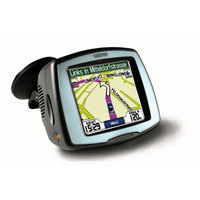
Here’s a hack to give your Garmin StreetPilot c510 or c530 text-to-speech capabilities, enabling it to call out street names. That way you’ll get "Turn left on Highway 128 in 500 feet" instead of just "Turn left in 500 feet."
Now when I say hack, I mean H-A-C-K! This isn’t a make your own maps kind of hack, this is one that can lead to the death of your unit. Phil Hornby, the hacker who came up with this, suffered the following while working it out:
- Several lock-ups – remove the front Fascia and press RESET to recover.
- Crash/reboot and loss of ALL user settings – Favourites, Navigation settings, Garmin Lock!!! , you name it. Nothing for it, but to reset everything manually. It even needed to relearn the initial satellite position (As in "Make sure you have a clear view of the sky")
- A very scary TOTAL lock-up that necessitated removing the four screws that hold the C510 together and then unplugging and re-plugging the battery. I suppose I could have waited for the battery to go flat!. Actually, I’ve heard of this fault affecting real C550’s …
- It didn’t happen to me during this experiment, but a related issue is the loss of the licence key file for the City Navigator NT maps.
Yikes! I’m not recommending this one to anybody.
Via GPSReview.net.
 About Rich Owings
Looks like you are sharing FUD..
If the garmin has a function to completely reset the unit to factory settings then how can it cause damage to the unit?
I understand where you are coming from, but since I haven’t tried the hack, broken a unit and successfully restored it, I’m erring on the side of caution.
BTW, I saw somewhere the other day that this hack no longer works, though I’m assuming that’s dependent on which version of the firmware you’re on.
works. hardly a h-a-c-k. easy as pie. just follow the instructions…
Is there any way to do this with the Nuvi 710? Frustrating – in South Africa, the only model that comes with the ZA (not Europe or US) maps, but no TTS. Bloody hell…
Sorry Oz. It doesn’t look like the 710 has that capability, even in Europe. But you could try. Let us know if you do.
Has another tried this for the nuvi 710 yet?
Issues with Garmin Nuvi 205W. which I have to tell you up until this trying to update thing, Ive always loved its been awesome.
Paid the 120 bucks for map updates, it come up telling me it didnt have enough space to download map . I done as they said and deleted the voice, text and help languages except for english . Which since its not talking at this point I am not sure I didnt do something wrong on that too . anyway done a software update and tried again after deleting everyhting . Still comes up saying not enough space use another one . Says east , west or what have you but none of them do the complete US which is what I am wanting . any advice would be great . WITS END HERE .
I think you’re going to need to call Garmin support at this point. I’m sure they can help. I recommend calling rather than emailing them though.