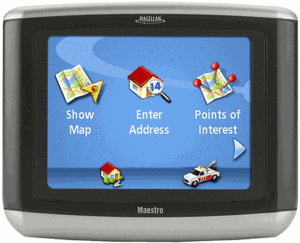
UPDATE: This model has been discontinued. For current recommendations, please refer to our auto GPS buyers guide or check out our other Magellan auto GPS reviews.
The Magellan Maestro 3100
I have not been very impressed with receivers with such a low number of POIs. Even units with 1.5 million POIs have frequently failed to turn up the store, restaurant, etc. that I was looking for, meaning that I would need to enter the address for navigation (if I even had it). Other reviewers, linked to below, didn’t seem to have many problems with the Maestro 3100 though. Perhaps they are in areas without as many new stores, etc.
Moving up to the Maestro 3140 will get you 4.5 million POIs, maps of all 50 states, Canada and Puerto Rico, Bluetooth for hands-free cell phone use, AAA travel information, and the ability to call out upcoming street names (so you’ll get “turn right on Main Street” instead of just “turn right”).
The Magellan Maestro 4000 series expands the screen size to 4.3″. To see how the 3100 stacks up against other units, check out my Magellan auto GPS comparison chart.
Compare prices on the Magellan Maestro 3100
More Magellan Maestro 3100 reviews
- The first consumer-written Magellan Maestro 3100 reviews
- Scott at GPS Lodge has posted a Magellan Maestro 3100/3140 review.
- GPS Magazine has posted an in-depth Magellan Maestro 3100 review, dubbing it “a bargain.”
- Consumer-authored Magellan Maestro 3100 reviews are also showing up at CNet, where the editors gave the unit a 6.0 out of 10 rating.
- ComputerActive gave a low 3.0 out of 5 star rating in their Magellan Maestro 3100 review.
- UsedShoe reviews the Magellan Maestro 3100.
- Read Magellan Maestro 3100 Compact Automotive GPS System
reviews at TigerGPS.
- A UK perspective on the Magellan Maestro 3100.
- The Oklahoma Outdoorsman compares the Magellan Maestro 3100 to two other GPS recievers.
- A video review of the Magellan Maestro 3100, comparing it to the nuvi 250
:
I’ll be posting more hands on GPS reviews as they appear, but in the meantime, here are some other…
Magellan Maestro 3100 resources
- A PDF version of the Magellan Maestro 3100 owners manual.
- There is a Magellan Maestro message forum at GpsPasSion.
- There is also a Magellan GPS message forum at Yahoo, and an alt.satellite.gps.magellan UseNet group.
- Our other Magellan Maestro reviews.
- The official Magellan Maestro 3100 web page.
Compare prices on the Magellan Maestro 3100 at these merchants:
- Check the current Magellan Maestro 3100
- Buy the
Magellan Maestro 3100 Compact Automotive GPS System
- Find a great deal on the
Thales Magellan Maestro 3100 Automobile Navigator
at TheNerds.net.
- Get the Magellan Maestro 3100 for an amazing price on eBay.
 About Rich Owings
I had a previous gps from Magellan which cost me about $2000 from 2001 and until it didn’t get any more signal, it worked great. I opted to purchase the Magellan maestro 3100 because it was on sale for $200 and was very easy to use. Once I started to use it, I was very very disappointed. Not only did it not have alot of very well know POI’s but it does not take you to the correct location. I used it daily, and on each and every address it took me to the wrong place. It was between a block and a 1/2 mile wrong. Unfortunately it’s going back…
Angie,
Thanks for letting us know. I agree that 750K POIs just isn’t enough.
Purchased the magellan 3100 at best buys $210.00 but they give you a $20.00 best buy gift card.
Used it to drive from Miami to Orlando, when I arrived at Orlando the unit stopped the real time navigation. It automatically switched to the reading directions, which was dissapointing. For some reason the system did not get signal. The next morning I reset (toothpick) and it picked up signal again.
Read the instructions,(since I am a man I use the system first then I read the manual…LOL). And yes I bought this because I do not ask for directions.
Next morning another “Big Dissapointment” went to the POI (point of interest) to look for coffee and it showed 3 Starbucks, I picked the picked the closest one and to my surprise….NO STARBUCK in site. The voice told me I had arrived!!!! checked the POI and picked another coffee place (one bad ass coffee) and it took me there. The fact that I passed about two hundred places that sold coffee along the way I had my hopes on Starbucks (Wally World syndrome). Mayby the Gods were telling me to save my money and skip Starbucks, they did raise those prices, Gas is cheaper than a cup of coffee at Stabucks.
Well Magellan one more DISAPPOINTMENT and back to Best Buys you go. I have 14 days and I will lose 14% for restocking. For satisfaction I will make it a point not to recommend on many blogs ( copy and paste) and to large circle of friends. Magellan you need to have the POI’S updated and a reset that does not require a tooth pick or paper clip. Can’t believe the company does not have a software update for this system. Just because it is cheap does not mean it should get you lost. If this could be accurate I would be buying two more for my daughters ,soon to be on the rod to college. Magellan think long term with the Maestro.
Purchased the magellan 3100 at best buys $210.00 but they give you a $20.00 best buy gift card.
Used it to drive from Miami to Orlando, when I arrived at Orlando the unit stopped the real time navigation. It automatically switched to the reading directions, which was dissapointing. For some reason the system did not get signal. The next morning I reset (toothpick) and it picked up signal again.
Read the instructions,(since I am a man I use the system first then I read the manual…LOL). And yes I bought this because I do not ask for directions.
Next morning another “Big Dissapointment” went to the POI (point of interest) to look for coffee and it showed 3 Starbucks, I picked the picked the closest one and to my surprise….NO STARBUCK in site. The voice told me I had arrived!!!! checked the POI and picked another coffee place (one bad ass coffee) and it took me there. The fact that I passed about two hundred places that sold coffee along the way I had my hopes on Starbucks (Wally World syndrome). Mayby the Gods were telling me to save my money and skip Starbucks, they did raise those prices, Gas is cheaper than a cup of coffee at Stabucks.
Well Magellan one more DISAPPOINTMENT and back to Best Buys you go. I have 14 days and I will lose 14% for restocking. For satisfaction I will make it a point not to recommend on many blogs ( copy and paste) and to large circle of friends. Magellan you need to have the POI’S updated and a reset that does not require a tooth pick or paper clip. Can’t believe the company does not have a software update for this system. Just because it is cheap does not mean it should get you lost. If this could be accurate I would be buying two more for my daughters ,soon to be on the rod to college. Magellan think long term with the Maestro.
I think the problem with this unit is the incredibly low number of POIs — only 750,000. Thanks for sharing your experience. Hopefully it will keep others from making the same mistake.
Just got mine. Works well. What do you want for $200? It does exactly what it says it will. Point A to Point B. If you want more…you gotta pay more. I would be willing to pay for “upgraded” POI file…not available. Maestro 4040 or 4050 seem to have the features that folks are complaining the 3100 doesn’t have.
Very true. You get what you pay for.
Since I don’t live in a major metro area, all the gas stations and POI’s near me are covered.
The POI just suuuuuuucks and it swallows!
comment mettre a jour mon gps magellan maetro 3100 sur internet
I just did the update from my USB last night. It added a TON of new stuff. However its still not showing up the name of alot of older roads and such as well as an old popular grocery store chain by my house. However that doesn’t really bother me either. What bugs me is that it added a lot more POI categories, one of which is “Nightlife” however when I go to arm in in my user settings, it will not show up in my POI categories. Does or has anyone else had this problem? If so, please let me know how I can rememedy it. Its not showing up a few other categories in the POI interests that it has listed in the user options to arm as well.
thanks..