Sunday, March 18, 2012

Garmin nuvi 205W review

Garmin-nuvi-205W-review

Hands on with the Garmin nuvi 2×5 series — the best entry level GPS on the market

UPDATE: The nuvi 2×5 series has been officially discontinued. For current recommendations, see our auto GPS buyers guide.

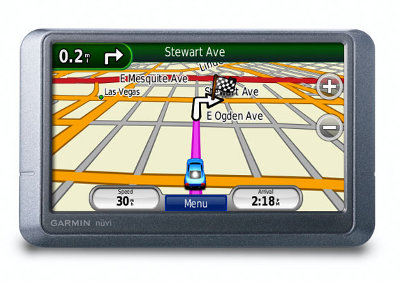
The Garmin nuvi 205W is one of Garmin’s entry level navigators and, as part of the nuvi 2×5 series, it’s loaded with features previously unavailable in the nuvi line or found only in high-end models. More about that in a moment; first the basics. The 205W sports a 4.3" wide touch screen (hence the "W"), and includes pre-loaded maps of the entire U.S. except Alaska. It does not feature text-to-speech, so you’ll hear "drive one-half mile, then turn left" instead of "drive one-half mile, then turn left on Oak Street."

Related units

  • Step up to the nuvi 255W for text-to-speech and maps of the entire U.S. and Canada
  • The nuvi 205 and nuvi 255 mimic the feature set of the 205W and 255W, albeit with a smaller, 3’5" screen

Regardless of which member of the 2×5 series you choose, you’ll have a winner. Read on to see why. And if you want to compare these to other models, check out my Garmin nuvi comparison chart.

Advanced features found on the Garmin nuvi 205W

None of the features below are found on this unit’s predecessor, the Garmin nuvi 200W.

Redesigned map screen

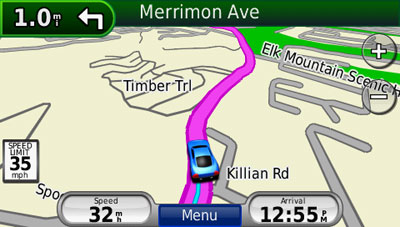
New to the map screen are the direction of and distance to next turn indicator in the upper left corner of the screen, which when pressed brings up a detailed turn preview as the unit speaks the next turn instructions. Moving this to the upper left freed up the bottom left data field which now shows your current speed. You can see all this in the screen shot below.
Nuvi_205w_map_screen

Speed limit

Speed limit icons display the speed limit for many roads, as shown above. I really like the proximity of this to the current speed display.

Trip log display

Trip log, or as I prefer to call it ;-) , tracklog display, can show where you’ve been and can be downloaded to your computer (tracklogs can be cleared and the feature disabled for those of you with something to hide!). The tracklog is the thin blue line trailing behind the car / current position icon, in the screen shot above.

Recent cities and streets

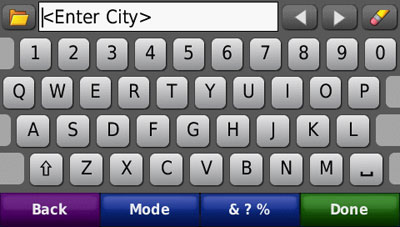
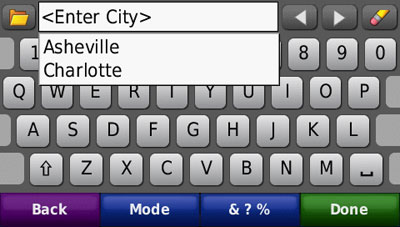
This feature was first seen on the nuvi 700 series. Tap the folder icon, as shown below, and a list of recent entries comes up.
Nuvi_205w_recent_entries

Nuvi_205w_recent_cities

Where am I?

This emergency location feature provides your exact latitude and longitude coordinates, the nearest address and intersection, and the closest hospitals, police stations and fuel stations.
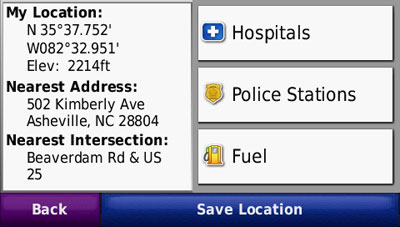
Nuvi_205w_where_am_i

Photo navigation

Though it’s not a feature that I find useful, you can download Google™ Panoramio™ pictures via Garmin Connect™ Photos and navigate to them.

Terrain modeling

The nuvi 2×5 series includes a built-in digital elevation model, allowing you to visualize the surrounding terrain, as shown below. Unfortunately, this only works in 2–D mode when zoomed out to at least 8 miles. The result is a nice piece of eye-candy, as shown below, but one that you are unlikely to really use.
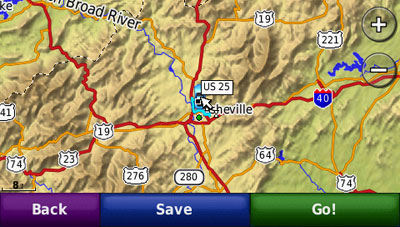
Nuvi_205w_terrain

MSN Direct or FM/TMC traffic option


You can buy an MSN Direct or FM/TMC traffic receiver as an add-on. This is often a better deal than buying a unit with MSN or FM/TMC, since the add-ons come with a full year subscription, rather than the 3 month trial included with a high-end nuvi. Physically, you end up with the same receiver.

Garmin nuvi 205W pros

  • High-end features (see above) at an entry-level price
  • Fast startup and satellite lock
  • The speaker is quite loud; I had no trouble hearing it under any circumstances
  • The ability to delete individual Favorites using the "My Data" feature
  • In addition to the above, you get a quality product and intuitive interface, as we’ve come to expect from Garmin

Garmin nuvi 205W cons

  • No text-to-speech; you’ll have to step up to the 255 or 255W for that feature
  • The power cord is not integrated into the mount, so you have to attach the power cord each time you mount the device

Recommendation

The Garmin nuvi 205W is a joy to use. I recommend it, or any other member of the nuvi 2×5 series, without hesitation. Garmin has set a new standard with this product line; the nuvi 2×5 series is the best entry level GPS on the market.

More Garmin nuvi 205W reviews

I’ll be posting more hands on GPS reviews as they appear, but in the meantime, here are some…

Other Garmin nuvi 205W resources

Compare prices on the Garmin nuvi 205W at these merchants:


About Rich Owings

Rich is the owner, editor and chief bottle-washer for GPS Tracklog. Connect with him on Twitter, Facebook or Google Plus.

Comments

  1. Rich Owings says:

    No, you don’t have to turn it off.

  2. Danny says:

    I just purchased a 205W and really enjoy the ease of use. Overall I would give it a B or B-rating.

    I would like to note some concerns:

    It comes with a quick guide, but no owners manual. I thought maybe it was an oversight, but when I called they said it did not come with one. They would send me one for $16.95 plus shipping. I’m not sure this is the norm with new units, but I think it is lame.

    My first trip from VA to Myrtle Beach, SC. The Speed Limit indicator is a kewl tool, very useful when your on the road and are going from town to town and don’t know the posted speed limit changes. It was correct probably 75 to 85% of the time. When it was incorrect, it was usually incorrect so that you would be safe. ex: Speed limit 55mph and it was actually 65mph. I found one time when it was incorrect the other way: actual speed limit 55mph – GPS posted speed limit 65mph. I could have been busted – big time!

    I also noted while in the city of Myrtle Beach with my GPS set on the quickest route it would take me back to a major route to get to a destination that was attainable through traveling three blocks, instead of 5-7 miles. It also was missing several streets that were streets that have been existing in Myrtle Beach for years(4 lane avenues). This is somewhat dissapointing!

    One time it sent me in the wrong direction for several miles which ended up on a dead end.

    Would I recommend this GPS to somebody else? I’m really mixed. I’m not sure. Garmin seems to be a little greedy.

    I know I can download an owners manual, but I really believe that a new GPS with many features should include this with the purchase. My CSX 60 had it. The size of the original owners manual as compared with the downloaded manual is needed if I’m going to carry it and utilize it while I’m on the road.

    I like it, but I would definitly research other brands prior to purchasing another GPS!

  3. Rich Owings says:

    Thanks for taking the time to share!

  4. joye says:

    what size of SD card do you need to download the newest maps

  5. Rich Owings says:

    No SD card is needed. It goes on the nuvi’s internal memory. You may want to copy the complete contents of the nuvi to your computer first as a backup. Here’s a GPS Magazine post that may help with the installation… http://www.gpsmagazine.com/2009/08/how_to_manually_extract_instal.php

  6. How do I download version of owners manual

  7. Is downloading the owners manual possible

  8. Rich Owings says:
  9. scott martin says:

    Im driving a truck in an unfamiliar part of our state, doing 30 to 35 stops a day. Im looking for a gps unit that can have all the stops programmed in and route my truck in a logical manner so as not to backtrack. What is available and what is the price range.

    Thanks,
    scott

  10. Rich Owings says:

    You need a unit with multi-destination routing. Those are listed on the charts here: http://gpstracklog.typepad.com/gps_comparisons/garmin-nuvi-comparsion-chart.html

  11. Lorne says:

    I’ve loaded new voice files IAW the manual, but I can’t figure out how to use them? Can you help?
    Thanks,
    Lorne

  12. Rich Owings says:

    If they are downloads form Garmin, just go into Settings and select them.

  13. Santiago says:

    Hi! I bought a nuvi 205w and when I plug it and turn it on, it boots, shows a “Loading Maps…” message and resets automatically, doing this in to an endless loop….
    Any clues? Thanks in advance!

  14. Rich Owings says:

    Is this new behavior? Will it go into mass storage mode when connected to a PC?

    1. Try updating with new firmware if available.

    2. If that doesn’t work, do a master reset. This will erase all favorites, etc. From Garmin support:

    To do a Master Reset on the nuvi® 200, 205, 465, 500, 600, 700, 705 or 12/13/14/1600 series device:

    Note: A master reset will erase all waypoints or favorites and will restore your unit to the default factory settings.

    Start with the unit OFF and unplugged from power
    Touch and hold the lower right corner of the screen with an index finger or the eraser end of a pencil
    Continue touching and holding the lower right hand corner of the screen then power the unit ON
    Release the power button when the device powers ON
    You will see a new message: Do you really want to erase all user data?
    Remove your finger from the touchscreen when this message displays
    Touch Yes
    The device will automatically reset. Please follow the on screen prompts on the nüvi and when completed place your device in an area with a clear view of the sky until it acquires satellites.

    3. Call Garmin.

  15. Michele says:

    First, thank you so much for all the information. I am researching GPS units for my sister’s Christmas present. Your detailed info has been a huge help. Can you answer one more question? Will she have to pay to update the maps every month or so? I am not clear on subscriptions and the updates.

  16. Rich Owings says:

    Updates are usually purchased annually, but are not required. They are most important for folks living in rapidly developing urban areas and least important in rural areas. Garmin also has a lifetime map update product that gets you up to four updates a year. It is available at a discount from online retailers.
    http://www.garmin.com/garmin/cms/us/maps/numaps-lifetime

  17. Blake Brokaw says:

    I pull a 4,000 lbs. trailer and would like to get a route that is friendlier even if less direct. More highways and less twisty back roads.
    Can I help choose a route? The navigation window doesn’t help.

  18. Rich Owings says:

    Have you tried setting your vehicle type to truck?

    • Blake Brokaw says:

      Do you mean the truck icon as opposed to the car or the arrow or the walking feet? I thought those were there for “cuteness”.
      I downloaded an RV from the Garmin Garage, but it looked weird and took up to much room on the map to be precise. But if it will keep me from having to navigate some of the hairy situations this gps has gotten me into then I’m all for it.

  19. Rich Owings says:

    No, this should be an option under Tools > System > Settings > Usage Mode, but looking at the 2×5 manual, it looks like this feature was left out of that series!

  20. Blake Brokaw says:

    Crap!

  21. Brett says:

    Because this is an older model, I recommend you search for other new models from Garmin that may have newer and better features. If the good price is just too good to resist, I will also say that you won’t be disappointed. Picking out cities in different states is something you must get used to but overall, the 205w will get you wherever you want to go. I’ve had mine since 10/09 and hasn’t failed me since in ‘highway mode’ – the ‘shortest distance’ mode is standard and can get you in a bunch of trouble. If you’ve just bought it or have had it for a while, I do recommend that you update the software and maps to be sure you have the latest. I used this to get my updates at the Garmin website for free;
    http://www.brighthub.com/electronics/gps/reviews/55477.aspx?p=2

    As for the hardware, it offers a very responsive touch screen and easy to plug and unplug suction unit. The other nice feature is that it has a mini 5-pin USB connection (wire is included) so if you have another device in your home that uses it, you don’t have to bring in the wire from your car when updating or configuring the unit.

  22. Tom says:

    Hi RIch. I have been doing a good amount of research on the various GPS out there and so far, the Garmin Nuvi is looking like the leader. I am leaning toward the 205w and have a few questions. If I mount the unit above the rear view mirror, is there a way to wire the unit to just go on and off with ignition? I have an FJ Cruiser, so am thinking I may need an external antenna since the wndshield is so vertical. What are your thoughts? Until the “hybrid” technology improves, (I really like the digital compass and topo but it seems to need more developement) I will stick with a fairly basic unit. Thanks!

  23. Rich Owings says:

    Go here and search for the term wiring in the subject…
    http://www.gpspassion.com/forumsen/search.asp?FORUM_ID=172

    That will turn up a few helpful threads. I think all nuvis power on automatically when the car starts up, as long as the power lead is attached.

    That positioning may or may not cause problems with reception. I don’t believe that unit will accept an external antenna. I think the only ones that can are the 300, 600, 700 and 800 series.

    • Tom says:

      Thanks. There were a few threads but I need pictures since I am not savvy in electrical :)
      Do you have any opionion on the 300, 600, 700, and 800 series one way or another? I am not familair with these.

  24. Rich Owings says:

    The 300 and 600 are older, and have a flip up antenna that may be better. But the newer 700 and 800 series (especially the 7×5 and 8×5 models) have better firmware for faster satellite lock, so the difference may be a wash. Check out my comparison chart here…
    http://gpstracklog.com/compare/garmin-nuvi-comparison-chart

  25. liz says:

    when i try to put in city it says not found

    • Rich Owings says:

      Some city names aren’t there. There are recognized place names (that often have a post office) and municipalities. It could be under one name or the other.

      Assuming you have maps for the country in question, try not entering a city or state, and just search for the address.

Speak Your Mind

Tell us what you're thinking...
and oh, if you want a pic to show with your comment, go get a gravatar!

*
