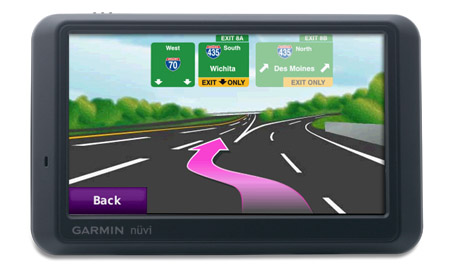
Hands on with another winner from Garmin
UPDATE: This model has been discontinued. For current recommendations, please refer to our auto GPS buyers guide.
The Garmin nuvi 755T
Related units
- Stepping up to the nuvi 765T gets you all these features plus stereo Bluetooth
- To see how the 755T compares to other nuvis, check out my Garmin nuvi comparison chart
Let’s look at the newest features on the nuvi 7×5 line…
Lane assist
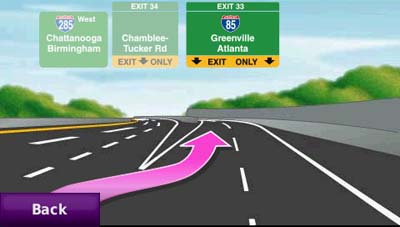
To me, the lane assist feature is the nicest addition to the the 7×5 series. It shows up in two places on the device. The flashiest is for major freeway interchanges, as shown below. This screen appears as you approach your exit.
Just as useful, and perhaps more so, is the lane indicator shown in the upper left portion of the map screen (see below). These don’t just show up on interstate highways; I found them to be ubiquitous in downtown Atlanta.
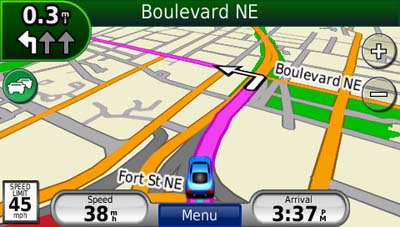
While the lane assist feature was very helpful, I only saw it appear in Atlanta. It did not show up during my testing in the smaller cities of Greenville, SC and Asheville, NC.
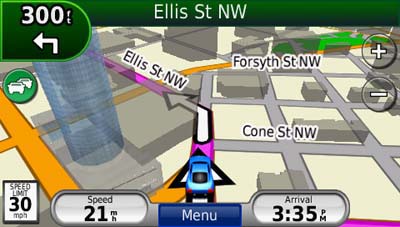
3-D buildings
This feature adds some flash, but in my mind is less helpful than lane assist.
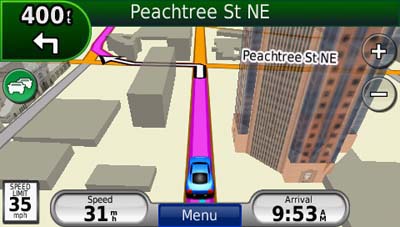
I’ll give Garmin credit for making the 3-D buildings transparent, but the feature can still obstruct navigation somewhat, as shown below.
Ad-supported lifetime traffic
Without a doubt the most controversial feature on the nuvi 7×5 series is the ad-supported lifetime NAVTEQ traffic, yet I found the ads to be low key and unobtrusive. I only saw ads appear when my vehicle was stopped; they showed up in the following places:
- On startup at the top of the main menu
- At the bottom of the traffic menu page
- On the map screen once you have reached your destination
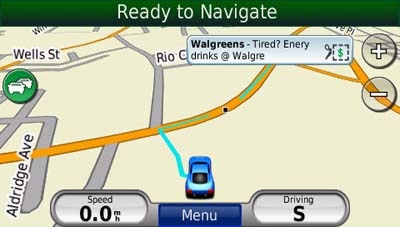
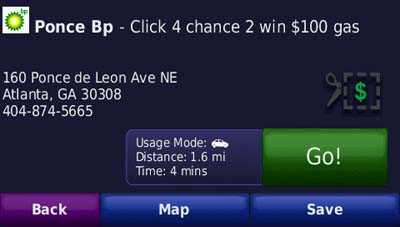
If you touch the ad, you’ll go to a screen showing the nearest locations for that advertiser. Choosing a location will take you to the detail screen. In the case of the BP gas ad below, a click on the coupon gave me a number to text to enter the contest.
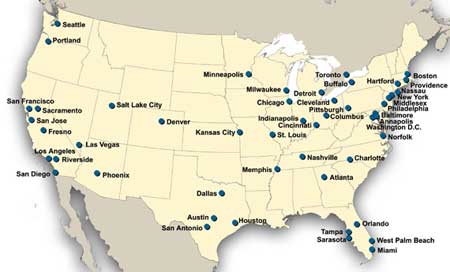
The ads are so low key that I would much rather have them and free lifetime traffic than pay $60 a year for traffic service. The biggest problem I have with the ad-supported traffic is the limited coverage (see image below). With data for only 50 U.S. cities, NAVTEQ coverage lags far behind that of other traffic services. Detailed coverage maps are available on the NAVTEQ website.
There is also an option to add MSN Direct traffic service (which includes gas prices, weather and more), but you’ll need to buy the receiver, which comes with a one year subscription.
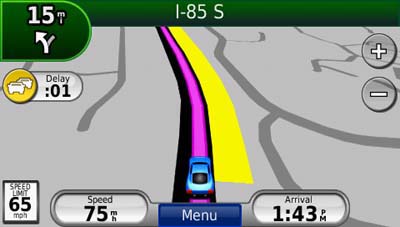
If you enable the traffic map, the moving map screen goes to greyscale, so that traffic flow (indicated in yellow or red) will show up better.
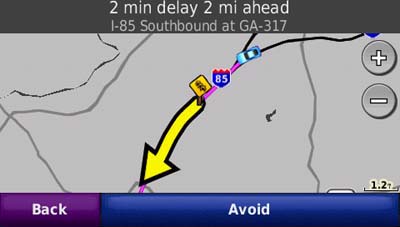
Here’s an incident detail screen…
New customization options
New to the 7×5 series are customization options for the lower right field on the map screen. Press this field to bring up the options listed below. When not navigating, the options are:
- Direction of travel (default)
- Elevation
- Time of day
When navigating, the options are as follows:
- Estimated time of arrival (default)
- Distance to destination
- Estimated time to destination
- Direction of travel
- Elevation
- Time of day
Garmin nuvi 755T mount
The nuvi 755T mount has an integrated power/traffic receiver connection, so you don’t have to plug a cable into the device each time you mount it. Unlike the nuvi 2×5 series, all you need to do is snap it into the mount.
Other nuvi 755T features of note
The nuvi 7×5 series has inherited some other features of note from the 2×5 and/or 800 series units.
These include a redesigned map screen that adds a third data field (current speed). And while photo navigation is not a feature that I find useful, you can download Google™ Panoramio™ pictures via Garmin Connect™ Photos and navigate to them.
Finally, as I mentioned earlier, the nuvi 755T has all the great features already found on the first generation nuvi 700 series. These include:
- Multi-destination routing
- Automatic sorting of multiple destinations to provide an efficient route
- Tracklog recording
- Speed limit display for many interstates and highways
- Automatic marking of your last position when the unit is turned off (to help you find your car in mega-mall parking lots)
- A “Where am I” safety feature that gives your current location, nearest address, nearest intersection, along with quick access to POIs for the nearest hospitals, police stations and gas stations
Conclusion and recommendation
The Garmin nuvi 755T is a superior navigation device and I highly recommend it. The only caveat is that it is more appropriate if you are in an area with NAVTEQ traffic coverage. The lane assist feature is the best reason to upgrade from the 2x5T series which, like the 755T, also has the lifetime traffic feature. Like all Garmin nuvis, the 755T is intuitive and a joy to use. Garmin has created yet another excellent product, and it’s no wonder that they dominate our top ten GPS list.
More Garmin nuvi 755T reviews
- Consumer-authored Garmin nuvi 755 reviews
- Several more consumer-authored Garmin nuvi 755T reviews have been posted at GPS Now
- GPS Lodge has posted a full Garmin nuvi 755T review
- PC Magazine gave an Editor’s Choice award to the unit in their review of the nuvi 755T
- Cause and Defect gives an 8.5 out of 10 rating in their Garmin nuvi 755T review
- Garmin nuvi 7×5 reviews are being posted by owners at GpsPasSion
- ZDNet says the nuvi 755T is “the only GPS that should be on your holiday shopping list this year”
- A nuvi 755T review has been posted at the Bethel Seminary site
I’ll be posting more hands on GPS reviews as they appear, but in the meantime, here are some…
Other Garmin nuvi 755T resources
- Confused about so many models and choices? Use this Garmin nuvi comparison tool or check out my own Garmin nuvi comparison chart
- There is a dedicated Garmin nuvi message forum at GpsPasSion
- And another nuvi forum at GPS Review
- A comparison of the nuvi 7x5T series with the previous generation 7×0 series
- The Garmin nuvi 755 owners manual, in the language of your choice
- The official Garmin nuvi 755T web page
- How to access archived nuvi trip logs
- Five tips for nuvi newbies
Compare prices on the Garmin nuvi 755T at these merchants:
- Check the current Garmin nuvi 755T
- Get a great deal on the Garmin nuvi 755T North America City Navigator GPS
at BuyDig.com
- Find the low price on a Garmin nuvi 755T at GPS Now,, where shipping is free on orders over $99 (and the upgrade to overnight shipping is dirt cheap!); order by 5 p.m. Central Time for same day shipment
- Buy the Garmin nuvi 755T Portable Automotive GPS System with Lane Assist & Lifetime Traffic
at TigerGPS, where you get free shipping on orders above $250
- Get the Garmin nuvi 755T
for an amazing price on eBay
 About Rich Owings
Thanks for the quick posting Rich ! One other thing…I’ve been reading about the bad routing on the Garmins (sending you on and off a direct freeway route for no reason) by so many people on different GPS sites. I was all ready to get the 755T until I came across those postings dating back around a year (to the current). Would you think (I can’t believe I’m writing this) that the Magellan 1445t/1475T are any better, as you can set them for “mostly highways)? I am now realizing what a great GPS I have witht the Navgion 7200T as some others have noted. I just saw my brother’s Garmin and thought it would route a little better. Have you come across the highway routing problem AND touch screen problems ? If so, are the 1xxx models better with the touch screens ? Thanks again!
I’ve seen routing problems with every brand. It happens.
I did see the touch screen issue with one 7×5 model; don’t recall which one. I haven’t heard of any such issues with the 1xxx series.
You might want to wade through the 100+ comments here before going for the Magellan 1475T…
http://gpstracklog.com/2009/06/magellan-roadmate-1475t-with-lifetime-traffic.html
To be brief, I’ve never seen a perfect unit. My best advice? Buy from someone with a liberal return policy. Hope this helps! 😉
Thanks again ! Can’t expect a perfect anything, but hope touch screen registers what is touched, and routing is decent. I’ve also read about problems with certain “models” of the Magellan 1475T (probably your forum). Certain “cases” of the 1475T are identified as the defective units. Would you (anyone) know about that or the 1445T? Is the only difference the screen size? Anyone know of the same freezing problems with 1445T that seems to affect the 1475T? Thanks for all the help.
I can’t find any other differences in the specs, but Magellan doesn’t do a very good job of completely listing them either.
I am debating between the 755 and the 775 which has the Europe maps installed. If I buy the 755, can I buy and install them to this unit? If yes, how much do they usually cost?
Yes, you can buy and install them. Prices vary, but shop around. They are available online from places other than Garmin.
Thanks. Just had this thought. I have an old europe cd from garmin that I used on my iQue 3600. Any chance I could get these maps to install on the 755?
Maybe. Until a couple of years ago, most of these products came with two unlock codes. Now they are locked to one unit.
I have a 350 that I want to replace. It has an extremely difficult time acquiring satellites, about 50% of the time. I’ve updated the firmware, reset to factory specs, etc. So, is this an issue wit the 755T? I want to throw my nuvi out the window sometmes. Othertimes, I love it!
If you rarely use your unit, it will take longer to lock onto satellites. Could that be the issue? They download ephemeris data from satellites for the near future, allowing them to predict satellite locations for faster lock.
The 755T definitely has improved technology in this regard though.
Hello Rich and thanks.
Nah, it can acquire satellites before I go somewhere, and then for the return trip it can be 15 minutes… I googled this and the 350 seems to have more than it’s fair share of this problem. So instead of updating my maps this year for 70 bucks, I’d rather put that towards a newer model. Don’t know if I’ll spring for how much the 755 is, but I like this model.
Thanks again. Nancy.
Rich – What have you heard about a new GPS, the Cydle T43H with HD traffic and a ton of customizable features ? I can’t seem to find any reviews and found only one GPS site where a discussion has been started. Can you describe some of the features not found on most other GPS units ? I saw their site, but that could just be a great marketing job??? Thanks
This may be the site you saw, but the site owner, who I have a lot of respect for, hasn’t been very impressed.
http://forums.gpsreview.net/viewtopic.php?t=17350
Sorry, but I can’t dig into it any more right now. I’m on a tight deadline with a trip coming up this weekend. And I doubt that I’ll add Cydle coverage later on either.
I’m thinking of buying the Garmin 755T. I’ve seen online prices from some electronic stores that are about &175.00. Can it be trusted? Is the price too good to be true?
I bought mine about a year ago from Costco.com for $199 and that was the cheapest at the time so it was a good deal. Occasionally the wrong letter or number comes up on the screen when touched but that’s easy to delete and due to my big fingers. Unless you need a zillion apps, it’s been great. I’ve had plenty of notice for turns.
I have seen the 755T as low as $160 on sale for a few days recently. I tried it out (a friend’s) and had problems with the touch screen as many others have had. Still I would have bought one for myself except the notification for turns is rather late, by that I mean just as you approach the corner of the street at which you need to make the turn. Also on the highway it is hard to take an exit at the last second if you are going 60 MPH. Those are a few things a paid Garmin reviewer would not mention in their in-depth review.
@Adrienne – No, that sounds reasonable and like a good deal. I bought a 765T recently for $184.99.
@Ruben – Some 7×5 units have had touchscreen issues. I believe that was restricted to early production runs, but I’m not sure. I see occasional problems with my 765T, but it doesn’t happen very often. Like most auto units, it calls out turns well ahead of time, and then again immediately before the turn. Oh, and in five years covering the industry, I’ve seen no evidence that Garmin pays reviewers. They certainly don’t pay this one. Here’s my disclosure statement.
My biggest problem with my Garmin 755T is that it does not show the lane I should be in when there are multiple lanes.
How long have you had it and have you updated the maps? Lane Assist coverage has expanded dramatically in the past year or so.
It used to show those lanes until I downloaded the economy mode,not sure if you know what I mean.No I have not downloaded the updates.How much are they?
I do like the fact that with what I have ,it gives you travel time and cost of the trip.All I have to do is enter the MPG of my car and the price of gas.
That’s weird. I don’t know why ecoRoute would mess that up. I’m seeing nuMaps updates at Amazon for $75 for lifetime and $50 for one-time updates.
With the map updates does Garmin now have around the same amount of Lane Assists as Tom Tom who I read had many more at one time.
I haven’t done any quantifiable studies, or even a feeling about it. Sorry. Anybody else want to chime in?
Thank you all for the comments.I just don’t understand why one would need an update.There are the same towns, and the same streets.When the terrain has not really changed,why do I need and update? On a previous Garmin,the update helped nothing.Just a waste of money.I am open minded if you can tell me the advantages of getting an update.Isn’t this just an added money maker for garmin?
As I said, the Lane Assist coverage has expanded significantly, but you may not see any improvement in the areas you drive.
I checked that out,and it seems like the $50 update is not model specific, and it is not a download.You have to order a DVD.That makes me wonder if it would do for my Garmin what I’m looking for.Frankly I am very disappointed in this unit.A much cheaper model would do just as well.I bought this when it first came out.The catchy ads got me I guess.
Do the ads disappear when the car starts moving again? or do you have to close out of them? And because it only has info for 50 us cities, what happend when you’re not drivig in one of those cities?
Yes, they go away on their own. You’ll only get ads if the traffic receiver is picking up a traffic signal.
Are you saying if I do not plug in the traffic adapter in the car I will not get ads? If it is plugged in, how slow can I go before it shows ads since you should not get them when the car is moving/
Correct.
You will occasionally see ads when moving, but I think this only happens if you are on the traffic details screens. Otherwise, I think the only time I’ve seen them is when fully stopped. Seems like its usually at the beginning or end of a trip. But I don’t live in a big metro, so I’m not experiencing them everyday — my memory on it may be fuzzy.
H-E-L-P !
I googled and found this forum at the top of the list of gps sites so here goes. I bought a Garmin Nuvi 755T Dec. ’09 and got the 1 free map update in the spring of 2010 but did not use it much at all at that time.
In summer of ’10 I was one of those annoying door knockers for the US Census Bureau and used it A LOT and never had any troubles. In fact I liked it so much that I got one for my 72 year old Mom for Christmas ’10.
At the start of 2011 I started working as a process server and started using it a LOT again. That’s when all kinds of freaky troubles started up~!
This is a list, in chronological order, of the “unraveling” of my Garmin Nuvi:
(please forgive the length of this but I want to include all the things leading up to the failures I have now so someone might be able to see what the problem might be):
1st – touching any letter or button on the screen is now a 50/50 gamble on what this possessed critter decides to register for my touch. The first year I owned it, the touch screen was perfect. Now I never know what I’ll get.
2nd – The next month, the unit would randomly pop-up the disconnected alert for lost power and ask to stay on or turn off. I messed around with the connector and found it was the flawed/failed. I am not a ‘gorilla’ with tech toys (I repair laptops and tablet PCs with tweezers) and use them with some degree of finesse. Through normal, customary use, either the power cord tip or the cradle port had become worn out. The power cord design is LAME…it failed AFTER JUST A YEAR? WORN OUT? Could it be made any more fragile and cheaper? So now I use a Cigarette lighter USB-to-mini USB cord and have lost the very useful free Traffic report feature.
3rd – Soon after that, I had an annoying Garmin pop-up alert that it was time for me to BUY a new map. I ignored this intrusion 2 or 3 times and it stopped doing it. Why update a map for a CHEAP GPS?
4th – At that same time I joined a Geo Caching club and started to download GPX files to my Garmin using the approved/required Garmin Communicator. These were Lat/Long coordinates for GeoCaches.
5th, and finally (the “last straw” for me, this Garmin is 1 step away from becoming an ugly paper weight!) about 1 month after the annoying map update alerts stopped and a lot of fun with the new GeoCaching GPX downloads, the unit suddenly just rebooted while in use (I think I had just pressed the ‘stop’ button when it rebooted). ALL of my client, family, GeoCaches, favorites, home address, etc. ALL were LOST! It restarted with the “select a country” setup screen just like when new, in the ‘out-of-the-box’ mode!
1 week after PAINFULLY re-adding all family, friends, Business, caches, etc. back into all new, custom categories / favorites folders, it DID IT AGAIN! This time I had simply touched the blue “menu” button at the bottom while in route. REPEAT the PAINFUL recreation for all new address, photos, phone#s, etc. for family, friends, business, caches, etc. etc.
5 Days later, BANG!@ Did it again! And this time I had gone into the settings and changed modes from driving to pedestrian mode – REBOOT – everything GONE!
So it is USELESS in my opinion after only about 1 1/2 years. That is SAD and pathetic for a major company like Garmin. I could get this same poor quality from a lower priced, cheap, Chinese-made, replica, knock-off bought on the black market!
If anyone has any idea of what the heck is going on, how to fix this one issue with rebooting and resetting to the out-of-the-box state, PLEASE advise. If this is not the best place to post this, tell me where.
Also, if I use a an SD card (not using one right now), is it possible to keep all my favs, coords, etc on the card? So when it commits suicide again, I can just reload from the card? How?
If anyone wants to email direct I can give you an email address and I can also provide all the units detailed rev., serial, test info from the diagnostic utility (which when I run it, it passes all tests BTW!).
I have also loaded the newest software updates as of this date and it is still doing this.
Any help PLEASE.
THANKS
-SJR
Regarding screen accuracy, if your firmware is up to date, you might want to re-calibrate the screen…
https://support.garmin.com/support/searchSupport/case.faces?caseId={b4d5cd00-064a-11dd-dc9c-000000000000}
There is a fuse in the power cord, but it doesn’t sound like that is the issue. Are you still using the mount? I had problems with power on my 765t and it turned out to be the mount.
This might interest you re: geocaching…
http://geocaching.totaltechworld.com/
Have you tried a master reset?…
https://support.garmin.com/support/searchSupport/case.faces?caseId={e377b090-0fa7-11dd-dc9c-000000000000}
I don’t think you can store Favorites on the SD card, but you can convert them to custom POIs and then save them there.
Thanks so much Rich for the quick post/reply.
I did try the recalibrate for the screen but will give it another go this week to see if that issue gets rectified.
The geocaching total paperless article, tips and POI techniques are not new to me (I previously researched that in depth and one needs to use an older POI Loader to make it work right). But I have not used that yet because I do not have a premium account at geocahing.com; the GPX files simply copy over to the unit when I’m at the website and click the “send to GPS”.
When I do take the plunge and get that premium account I will certainly use that technique with the POI loader and the swiss army knife to get more data from those GPXs.
But for right now, until this unit stops that infernal, random, ‘reboot-reset-lose-all-data’ horror, I will just keep on backing up the current.gpx file over to my laptop as a backup. That’s what I was doing but I was wondering if there was a way to store that file on an SD card and just invoke/copy that file from the card to the unit itself.
It would save steps required to connect to PC and rename it and copy it over to the GPX folder of the unit. I could also recover favs on the fly when mobile on the road and don’t have the laptop with me.
Anyway, thanks again for the fast reply and help.
And oh, the cradle-vs-power cord prob: Yea, not the fuse, already eliminated that as the fault. I just ordered a new cradle from ebay (cheaper than the cable) and if that does not fix it, then I can only suspect the male connector end of the power tip of the cord itself (it’s one or the other).
That power cable is too pricey to replace – I’d rather use the mini-USB and forgo traffic updates.
Interesting to see that Garmin completely redesigned that mount/cradle so it no longer has a power port on it at all; new models plug straight into the unit itself. Seems they knew that the design was “weak” and prone to failing so they changed it.
The master reset – yes, btdt; I read previously that after an update, most folks had probs until a hard master reset. I think I’ll try to re-update my unit on line (if they let me do that – it is current right now) and do another master reset. Maybe the first time around hit a glitch somehow/somewhere.
I’ll do that this week and post more later in about 10 days to let ya know what that does for me.
Thanks
SJR
Glad to help, though I’m not sure I offered much that was useful. I would look into converting your favorites to custom POIs and storing them on an SD card. They’ll then show up under Favorites on the device…
http://www8.garmin.com/products/poiloader/
Also, I’d run WebUpdater several times. It often takes a second time to come up with additional updates.
Hope this helps.