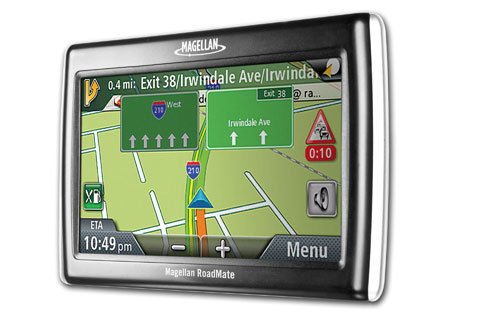
Magellan has announced the RoadMate 1475T, their first product with lifetime traffic. The 1475T is identical to the RoadMate 1470 I recently (and favorably) reviewed, with the addition of the traffic receiver. It carries a suggested retail price of $299 and will be available immediately.
 About Rich Owings
I have to agree with you Spitfire. Months later, and many business trips later, the Magellan 1475T has proved invaluable. It’s fast and direct re-calculations has been amazing, not missing a beat before taking you to the next turn and not trying to take you back to its predetermined route. It lets you change and picks up following your directions as though its working with you. I can’t say the same for the others. I love the 1475T and know I made a great choice going with it.
[[ I have to agree with you Spitfire. Months later, and many business trips later, the Magellan 1475T has proved invaluable ]]
Im sure the same can be said for other manufacturers. I do not doubt that what you or others say is true, but, the proper response to ‘my device works as well, and has more features for free’ shouldn’t be ‘oh well mine works fine’, it could be, ‘maybe I purchased the wrong unit, but I’m happy with what I have’
getting traffic for free, or an MP3 player, or any other number of differences that make something else better, cannot be dismissed blithely.
Many people here get a paycheck from Magellan here? 😀
Dear Robert,
I do not work for Magellan; i am a 73 years old Doc practicing medicine for the last 45 years and still making house calls. I travel a lot in the rural areas of our state. I own two 1475T and the great 7 inch version in my SUV which i highly recommend for people who need a larger screen.
I had a few minor problems in the past which were solved by the upgrade of the software.
Our units are in use daily and they perform flawlessly, i purchased the GPS units to get me where I want to go and this they do very well.
In my humble opinion Magellan does not need your or someone else’s opinion about their products, this was done in market tests well before the product was released.
The old Doc advise “Enjoy life and drink the wine from the half full Glass instead of the half empty one”.
Sorry it upset you Robert … but the truth of the matter is, I bought a GPS, and that GPS performs pretty much flawlessly. It has not gotten me lost as a TomTom did, it is perfect in its quick recalculation utilizing the direction you took if it is enroute, rather than trying to take you back to the original way it computed as being the ONLY way, it gets me where I want to go and is very easy to set, easy to choose prior places as when you are in a hotel and want to find your way back as you are not familiar with the area yet … it does a great job despite the people who love to complain here.
I did not buy an MP3 player, I have one, plus most car radios have them built in so I don’t need an extra one for the car. I do not need to look at photos when I’m driving, so don’t need, nor want, the extra distraction of a photo viewer in a device intended for use in a car. I am a tech rep for a small software company, nothing related to Magellan nor GPS’s, nor mapping, nor public use software even. I do not get a paycheck from Magellan as those who seem to hate Magellan like to imply when someone says they like the Magellan product. It IS a great product. You don’t like it and prefer your brand X … fine, move on, that’s your option. My opinion is just as valid as yours, and no, I am not taking it personally, just stating the fact as you seem to ignore the fact that others can have opinions as well, even though they don’t match yours, and even though they don’t work for the company being rated. Are you on brand X’s payroll trying to convince others that they shouldn’t like brand Y? And yes, I actually did work for a company whose salesmen actually did that, put down other companies modems and stated how great their own was when the company switched to cheap crap that was nothing but problems. I was on the troubleshooting end and could only replace the many faulty ones. That is not my goal here … is it yours though?
I have the true 1475t and really like it. I had returned 2 others:
1st- No TTS. I returned it not knowing about the upgrade, bummer. It was the true 1475t.
2nd- Got another but this time it was the 1470 reboxed in a 1475t box. All worked well but their are differences especially in the address book layout with the 1475 being far superior.
Costco replaced both and I waited, checked serial numbers and got the 1475 finally.
Is it perfect? No. There is a lag on the map but the TTS and chime is accurate. Since I listen more than I look it’s not a big deal.
Another drawback is the traffic cord is very short. i’d get another cord but the traffic option is built into the cord so can’t be done. A coil cord would be nice.
I had 2 Coach leather Palm Pilot zipper pouches left over and this unit fits in just fine protecting the unit.
Otherwise it works flawlessly and I like it. This is my 3rd Magellan. Friends who have Garmin love theirs. Go figure we all made the right decisions for us!
This board was extremely helpful/ valuable in my getting the real 1475t by serial number, upgrades etc.
Thanks to all.
I ordered a replacement Windshield Mount directly from Magellan as mine has become loose in one of the pivot joints. Not sure if it is due to the design of the mount or the weight of the GPS unit.
Does anybody know of a sturdier mount that will work better that the factory one? After all the heavy rains we had in New England the streets are full of potholes which is taking a toll on the bracket mount. Any suggestions would be appreciated.
Windshield mount update
My new bracket mount arrived today but when I took a close look at the old mount it was not worn out after all. The pivot joint was loose and all I had to do was to tighten it by turning round knob clockwise. Now I spent $31 on a replacement mount that I didn’t need in the first place. Nonetheless, I will keep it or just in case or install it in my other car.
After reading the many messages about various GPS’s as well as many on Amazon and other sites and looking for a replacement for my 4 year old Garmin Street Pilot I purchased a Magellan 1474T from BJ’s last week for $148 after a $50 instant rebate. I loved the Garmin and traveled all around the country with it and for the most part it worked great. There were issues with the Garmin, which caused me to get a new unit and not a new Garmin. On one trip to Cincinnati the car rental agent gave us printed directions to the hotel we were staying at and indicated it was due East and 20-25 minutes away. I had programed the GPS in advance and set it up and proceeded to follow its instruction. 1 hour and 40 minutes later we arrived at the hotel. The Garmin took us North past Cincinnati then East and finally South to our destination. This was the first time that the Garmin disappointed us with its ridiculous routing. I updated the maps when we got home and made sure that I had the latest firmware. In the past year we have made 3 trips South of our Connecticut home. All 3 times as soon as we get within 5 miles of the Tappan Zee bridge till about 15 miles past it the car icon gets separated from the road and the instructions get strange. with numerous recalculations for no apparent reason. Also when returning to CT from the Philadelphia area the garmin routing to CT is Northwest to Albany NY, then to the Mass turnpike, then to Interstate 91 South to Interstate 95 West to my home. This is 3 and half hours and a couple hundred miles out of the way!!! Totally unacceptable. It makes no difference as to the navigation option of fastest or shortest as they both give the same result. If we didn’t have a paper map the first time to check against we would have followed the directions and waster a lot of time and money. These are major errors and forced me to look at other companies products.
I am testing the Magellan every day and its routing is much better and more controllable than Garmin units. On one route to work from a particular starting point the Garmin always took me on particular route, again it was the same route regardless of the navigation option and it was neither the fastest or shortest and I would ignore it and follow the route that I knew was the fastest. The first time I used the 1475T it directed me exactly on the actual correct route. I programed a trip from Philadelphia to CT and checked the routing and sure enough there was no routing to Albany. It just programmed the correct roads home. This GPS works great and some of the options give it a flexability that Garmin’s and Tom Toms just don’t have.
There are a couple of issues that have been pointed out but they are minor to the actual navigation function. The car icon is a tad behind the actual location but the voice and chime prompts are right on the money and I really don’t look at the GPS when making a turn but at the road, so its not an issue. The traffic ads are brief and small and they are not an issue for me. The car speed calculation is all over the place and I wouldn’t trust it.
One feature that I haven’t seen mentioned anywhere that’s really great is that when following a route where your speed drops to 20% or more below the speed limit the Magellan assumes that you are in a traffic situation and an icon flashes on the left side of the screen. Tapping this brings up a list of detours that you can take to get you back on schedule. This is a great feature in my opinion especially where there is no traffic reporting or you are in a strange area. The interface is superior to the Garmin units and I’m definitely keeping this unit.
Well I have the 1470, I’ve updated it twice, and it still doesn’t work. I will never buy a magellan again. It can’t find a satellite – then keeps asking me if I am indoors. After about 15 minutes it will finally find the satellite. But it’s usually too late. And I live in the middle of Chicago – a major metropolitan area. And I have the traffic adapter, and that is lousy too, doesn’t work – or actually it does, but after about 10 or 15 minutes as well. Not helpful at all.
When the 1470 asks if you are ‘indoors’ – the only option is to check the affirmation box to get back to the screen where it will at least try to acquire the signal. Because I am never indoors, it’s insulting to have to ‘check’ the box.
I would never recommend this product.
Sarah, I’m not trying to defend Magellan, but any GPS can have trouble with reception if you haven’t used it in the last few days, turn it on and start moving before it acquires satellites. Just wanted to share that in case this is what is happening.
Did anyone else try the new app(content manager) and F/W(2.22)?
For those who don’t like ads, you might want to skip 2.22 because it shows them (Red lobster so far) even without the traffic on. It doesn’t bother me but FYI… I didn’t see any doc so I don’t know what else is changed/fixed but you will lose one touch settings – my address book and previous locations were intact.
I just purchased a Buick Lacrosse CXS with a built-in NAV system and I must confess I like my Magellan Roadmate 1475T much better, at least for the time being. The GM system is unnecessarily complicated and the maps are confusing especially the round-a-abouts (rotaries) that are displayed in black and white. However, the XM/Serious traffic is way better than the Roadmate.
So right now I am using the Roadmate as a back-up but primarily for finding POIs. OnStar offers the same service but sometimes I like to do it myself rather than ask an OnStar assistant.
I purchased a 1475T and the traffic function did not work. After speaking with tech support and going through their check list, I was advised to return the unit for another one. The second unit arrived and still the traffic function does not work. I’m not new to Magellan, I had subscription traffic for two years on my old Maestro. These are refurbished units purchased with a Magellan warranty. Can anyone advise on what may be wrong? I’m in Los Angeles…..plenty of traffic to report.
After having problems with inaccurate map data on my Garmin Nuvi 200 when I travel to Canada, I picked up a 1475 about eight months ago to see if it was any better.
While the Canadian data was vastly superior to what the Garmin offered, I am going to sell this 1475T. I have been using the Magellan side by side with my older Garmin for ten months — I often drive on very rural/remote roads and it has been interesting to compare the two in real time. I often use the GPS to get a preview of the upcoming road character (turns, interesections, etc)
1. The ads it displays drive me absolutely crazy. It will advertise restaurants or hotels that are hundreds of miles from the current location. Sometimes the ad obscures important information on the map. It is not worth it and if I had known that it was impossible to turn off this “feature” I would have returned it during my window to do so.
2. The address book feature is nowhere as easy to use as the Garmin’s.
3. The display does not get dim enough at night. The Garmin’s screen is much more versatile as far as illumination settings.
4. The Ads. Drive. Me. Crazy.
5. The Garmin offers a selection of voices/accents not present in the Magellan.
6. The lane assist needs refinement. “Stay on current road” should be sufficient, without multiple warnings to not get off at a major interchange.
7. Did I mention the ads that can’t be turned off? Yeah, I’ll never visit another Olive Garden, Red Lobster, or Best Western ever again.
8. The Magellan has a lag in updating the screen/position. Unlike some of the others who have left reviews, I need to see the roads/intersections and this lag has led me astray on at least five occasions when I was using just the Magellan and didn’t have the Garmin as backup.
Has anyone tried the latest 2.42 firmware update, which Magellan published on 26 Oct 2010?
Yes – it installed quickly – no issues. I was using 2.22 – the 2.42 update did not cause me to lose address book data or even previous locations. I could be wrong but traffic data seems to be working better but I don’t use that much so I’m not sure.
I also installed the latest software which activate the traffic service….but it is really a terrible, terrible traffic service. I live in Los Angeles with constant traffic accidents and I hardly ever get useful reports…..but they don’t fail to flash those stupid ads for the Olive Garden and Red Lobster restaurants….if traffic is important, pass on this unit.
My 1475t has version 2.20 instaleld. When I hook up wto content manager, it does not find the new version 2.42. It only find new map updates. Anyone have any ideas?
When I go to “Home” the address for some reason changes to the last address I went to and not my Home.
This is annoying as on other units I used Home all of the time to get home.
Now I have to manually type in the address.
My Home get set to another address before the 2.42 update but I just fixed it in settings – it hasn’t changed again.
I am having same problem as Steve—my unit has 2.20 installed. Content manager does not find 2.42 version. Anyone else having this issue and have resolution?
Where in settings did you change it so that My Home setting doesn’t change each time I go somewhere.
I like to just Hit Home but it automatically changes to the last address it took me too for some reason.
ALSO- did the Content Manager Download. I’m then taken to Magellans site and asks if I want to pay to upgrade to 2.42! How do I know it will help to upgrade without buying the upgrade?
Why pay? I’ll just go back to Costco.
Home was in my address book so I fixed it there. I doubt they are charging for the 2.42 update – mine was free and I’ve had the unit for a year or so. They don’t list any pre-req’s here: http://support.magellangps.com/support/index.php?_m=downloads&_a=viewdownload&downloaditemid=169&nav=0,2,16,19 but I did have the last version that I know of 2.22
After I arrive at my destination she says YOU HAVE ARRIVED IF POSSIBLE make a leagle U turn Why I want to do that ijust ARRIVED.
Any comments about that.
George
Sounds like a Magellan problem to me.
HI Rich Thanks for your fast responds How would I proseed to have this Corrected??? I,M new to this Help is greatly welcome.
I tryed to download Content Manager but with no luck it tells me TRY AGAIN later—also a Megellan Proplem???
George
You could try updating the firmware, but I’m not sure if you can do that without content manager. Yeah, Magellan isn’t my top brand choice.