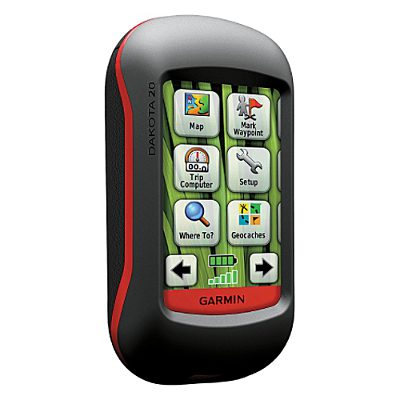
Hands on with the Garmin Dakota 20
The Garmin Dakota 20
Both units in the two-model Dakota series sport a 2.6” screen. On the Dakota 20, you get a tri-axial electronic compass, barometric altimeter, wireless data transfer between units and the ability to accept a micro-SD card, all features lacking on the Dakota 10. Neither model comes with pre-loaded topo maps.
EDIT: The Dakota 20 also supports Garmin’s new BirdsEye aerial imagery.
Comparing to the Oregon series
Before we get into the details, let’s compare the Dakota to the Oregon series. The Dakota units have (theoretically) longer battery life and weigh less (5.25 oz. vs. 6.8 oz.), while the Oregons have a larger screen (3.0”) and add 3D views, Wherigo support, a photo viewer, and NMEA / Spanner support.
To see how the Dakota 20 stands up against other Garmin models, check out my Garmin handheld GPS comparison chart.
The image below (Dakota, left; Oregon, right) compares how screen size affects the area you can see covered in terms of map display. 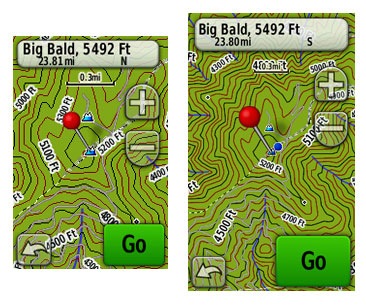
The other difference worth mentioning is screen visibility…
Touchscreen display
While the Oregon has a brighter backlight, the Dakota is a bit more visible under daylight and outdoors conditions. All of the newer generation high-resolution GPS screens suffer a bit when it comes to visibility, but it seems like Garmin is making some progress in this arena. I do a fair bit of mountain biking, and the Dakota is the first hi-res touch screen unit I consider suitable for fixed mount, non-powered use (e.g., bike handlebars). Visibility isn’t a big deal when you carry one of these units in your hand, as you’ll intuitively tilt it for the best view without thought. Nor is it an issue when powered with a car adapter, etc. But after being disappointed with previous touch screen models, I was pleased to see how readable the display was on my bike’s handlebars, even when wearing tinted glasses.
Visibility was good in direct, full sunlight (there were points where it was as bright as my 60CSx in full sun). It looked great in dark shade too. The Dakota screen’s performance was weakest at points in between – light shade or indirect light.
A couple more comments on visibility – my testing was done with the backlight on; I expect this is how most people will use it. I kept it set to time out at two minutes. The other point is that maps can dramatically affect visibility. Garmin’s Topo US 2008 is beautiful, but the green background in national forest and park areas makes it much less legible (see below at left). The free 1:24,000 scale topo maps available from GPS File Depot (example below at right) generally do not have this, and they can improve visibility significantly in marginal lighting. 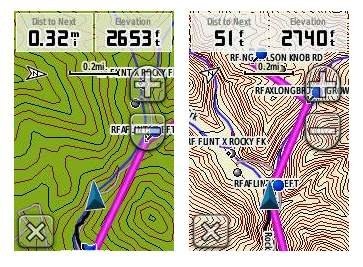 This is a bit off-topic, but it sure would be nice to have a low profile handlebar mount that would allow you to adjust the angle, in two planes, on the fly.
Before leaving the subject, I’ll add that I recommend using a screen protector for handheld touchscreen GPS receivers.
Garmin Dakota 20 interface
The interface is basically the same as that of the Garmin Oregon, with a main menu of 24 items spread across four screens (see below). It’s pretty intuitive and easy to use, but it gets much better if you take the time to customize it. Here are some tips:
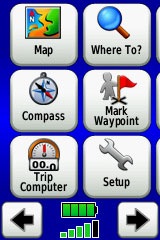 Use profiles – There is a “Change profiles” item on the main menu, and you can create a new one via Setup > Profiles. Tap the new profile to give it a name. Now start changing various preferences. Want track up when geocaching and north up when biking? No problem. The possibilities are nearly endless.
- Rearrange the main menu – Set this different for each profile. I make extensive use of the Track Manager, so that gets moved to the first main menu screen for my hiking and biking profiles.
- Create sun and shade profiles – A great use of this tool is to create a sun profile (perhaps even one for each activity). Create this profile and then go to Setup > Maps > Advanced Map Setup. Set Shaded Relief to Do Not Show to enhance visibility in bright light. Credit GPS Fix with originating this tip. EDIT: Another great tip from Scott (GPS Fix) is to “go to Setup>Map>Advanced Map Setup>Zoom Levels>Land Cover and turn it off you shouldn’t see the green background any longer.”
The keypad is a little more cramped on the Dakota than the Oregon, due to the smaller screen, but I found that I quickly got used to this and it did not result in a significant increase in errors.
Shown below are the compass and trip computer screens. The data fields can, of course, be customized, as can the background color. The trip computer screen can be also switched to show fewer (but larger) fields.
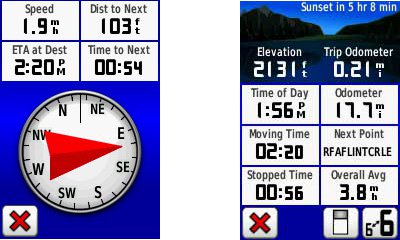
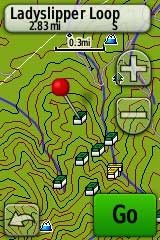
Finally, here’s a random interface tip… When you select a location on the map, a push pin appears. You can now slide the map around underneath the pin, and zoom in as needed, to fine tune the selected location..
Route, Track and Waypoint management
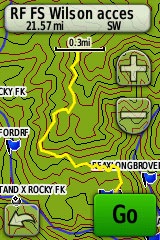 The Dakota 20 has the same excellent route, track and waypoint management tools found on the Oregon series. These include:
- Waypoints – The ability to project a waypoint, and to reposition one at your current location.
- Tracks – You can choose to hide or show a track on the map and give it a custom color (17 colors are available). The image at the right shows the View Track preview option.
- Routes – You can view a map of the entire route, edit the route, reverse it and view an elevation plot.
Dakota 20 tri-axial compass
Having a tri-axial compass means you don’t have to hold the unit level while navigating. Here’s a quick video showing the calibration process:
Geocaching with the Dakota 20
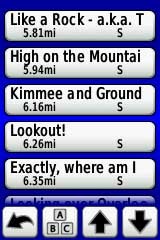
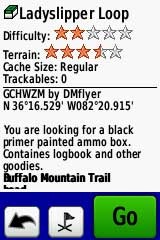
The Dakota is set up for full paperless geocaching support, meaning you can see the description, logs, and hint, and you can log your attempt (find, DNF, etc.) for later transfer back to geocaching.com. Speaking of which, full access to these features requires a premium membership at geocaching.com. Shown below, clockwise from top left: Closest geocaches, geocache description, menu for a specific cache, and preview map.

Wireless data transfer
The Dakota 20 is capable of wireless data transfer with other compatible Garmin units. You can transfer waypoints, tracks, routes and geocache summaries (paperless caching details cannot be transferred).
Free maps and custom maps
One of the nice things about the Dakota are two types of free maps for them….
GPS File Depot, mentioned earlier, has 1:24,000 scale topo maps posted for most of the US. I included a screen shot for one of these above in the touchscreen display section of this review.
Also of note, is the new ability to create and load custom raster maps to Garmin Colorado, Dakota and Oregon units, using their latest beta firmware.
GPS receiver and battery performance
Battery life was tested using fully charged 2,000 mAh Eneloop NiMH rechargeable batteries
Satellite lock was achieved in 14 seconds, with testing done under no canopy.
In tests for accuracy, the Dakota 20 performed very well. A sample comparison is shown below, matching it up against the Garmin 60CSx. Track point collection was set for five second intervals on both devices. This test took place under fairly dense canopy.
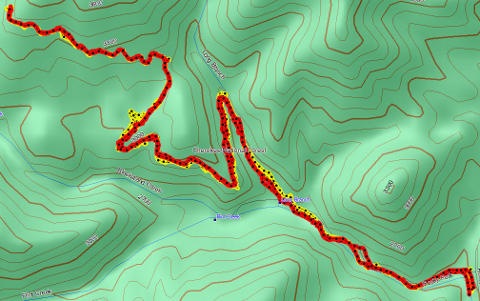 Since it’s very difficult to see the relevant details in such a small image, I’m providing links below where you can download the .gpx or .gdb (MapSource) files below. The 60CSx is in yellow and the Dakota track is red. While the Dakota went wide at one point by about 140 feet, the 60CSx exhibited much more “spidering” during stops, wandering around 240 feet at one point. Maybe my 60CSx is showing signs of age, but regardless of the comparison, I was quite impressed with the Dakota’s performance.
The track files are available at:
Garmin Dakota 20 pros
- Compact and light weight
- Tri-axial compass
- Barometric altimeter
- Great touch screen interface
- Slightly better sunlight visibility than Oregon series
- Ability to customize display and menus using profiles
- Excellent track management tools
- Paperless geocaching support
- Availability of free maps
- Accepts Garmin custom raster maps with v 3.22 beta
- Good battery life
Garmin Dakota 20 cons
- Much poorer sunlight visibility than eTrex and GPSMAP color units
- Small screen limits map area that can be seen
Recommendation
Highly recommended. The Dakota 20 is the first touch screen unit I’ve found suitable for fixed-mount, non-powered use (e.g., mountain bikes). It will also appeal to those looking to economize, or folks desiring a lightweight or more compact unit than the Oregon series. The Dakota is a great choice for hikers, bikers, geocachers and just about any other category of handheld users.
More Garmin Dakota 20 reviews
- Consumer-authored Garmin Dakota 20 reviews
- About.com gives a 4 out of 5 star rating in their Garmin Dakota 20 review
- A first impressions review of the Garmin Dakota 20
- Comparing the Garmin Dakota 20 to the DeLorme PN-40
- The Search Jaunt offers a brief review of the Dakota 20
- Testing the Dakota 20 on the ski slopes
- GPSInformation.org has posted a thorough Garmin Dakota 20 review
- BikeRadar gives a 3-1/2 out of 5 star rating in their Dakota 20 review
- RickRukes007 has posted a four part video review of the Garmin Dakota 20
- A Garmin Dakota 20 review on the Great Wall forum
- A Dakota 20 review from the creator of TopoFusion.com
- Lets Go Mobile has posted their own review of the Dakota 20
- Geocacher reviews of the Garmin Dakota 20
- A Garmin Dakota 20 review from a Laplander
I’ll be posting more hands on GPS reviews as they appear, but in the meantime, here are some…
Other Garmin Dakota 20 resources
- The Garmin Dakota 20 owners manual, in the language of your choice
- Compare the Dakota 20 to other Garmin mapping units
- This Garmin Dakota wiki includes a message forum
- An interactive Garmin Dakota demo page
- The official Garmin Dakota 20 web page
- Garmin Dakota training videos
- It’s pretty rugged according to this mountain biker
Compare prices on the Garmin Dakota 20 at these merchants:
- Check the current Garmin Dakota 20
- Find the Garmin Dakota 20 at GPS City, one of our favorite low cost vendors
- Check out the deal on the Garmin Dakota 20 GPS
at REI.com, where satisfaction is guaranteed and members get 10% back on eligible purchases
- Buy the Dakota® 20
direct from Garmin
- Find the Garmin Dakota 20 Touch-Screen Handheld GPS Receiver
at TigerGPS, where you get free shipping on orders above $250
- Get the Garmin Dakota 20
for an amazing price on eBay
 About Rich Owings

Does the size/weight differnece feel significant? Would it be more comfortable carrying this around?
It does. Despite the smaller screen, I liked it as much (or more) than my Oregon. I can’t really explain why, but maybe it was size/weight.
Most thorough review of the Dakota I’ve seen to date–thank you. At REI yesterday, I had a Dakota and an Oregon in each hand, and it seemed to me the Dakota had slightly lower resolution, most noticeable in the text. Have you noticed? Does it matter? And did the smaller screen size seem to matter?
Thank you!
Yes, it does have a little lower resolution. I should have mentioned that. It’s the reason visibility is better too. I don’t think the resolution is a big deal.
The only place the screen size really seemed to matter is in the map view, and a little bit when entering data.
Rich,
Great review as usual. One tip which might help when you are using the built-in Garmin Topos. If you go to Setup>Map>Advanced Map Setup>Zoom Levels>Land Cover and turn it off you shouldn’t see the green background any longer. I add this to my “sunlight” profile.
-Scott
And yes, the resolutions are different. The Dakota is about 112dpi and the Oregon is 156dpi.
Thanks Scott. Good tip! I added it above.
On the basis of the review, I bought one. But on the basis of the data management, I’m planning to return it. The following was confirmed by a Garmin rep this morning: If you download a bunch of waypoints, you see them on onscreen. Obviously. But if you download a bunch of tracks, they’re not visible until you set each one–Track Manager//Show on Map….one by one. For me, that defeats the advantage of a device that can hold 200 tracks.
I thought maybe BaseCamp would provide a fix. But that program, which replaces Mapsource for uploading data from the Dakota, is still a work in progress (and hasn’t been upgraded since August). For example, in Mapsource, I can change the symbol and other shared properties for multiple waypoints. Not so in BaseCamp. And when you download using BaseCamp, the process is painfully slow? Very slow and the program seems to freeze. The Garmin rep agreed that BaseMap is essentially in beta. No problem there, unless you marry a device to it. The Dakota and, apparently, the Oregon 500, are married–and it’s not a happy relationship.
That must have been your post on the Dakota wiki I saw this morning!
I’d have to check, but I think this is a problem with all Garmins, or certainly the latter ones. You have to set the tracks to show one by one. I would like to see the default behavior for this changed. I wonder if Garmin could be persuaded. I can see reasons why they might not want to do this, but they could make it the default for transfered tracks, as opposed to ones saved via the device.
I agree that BaseCamp is not quite there yet. I’m still using MapSource to transfer tracks.
My Oregon 550T shows all of my tracks on the display until I archive them. That was the default setting. I did not change that.
>That must have been your post on the Dakota wiki I saw this morning!
It was–I didn’t want to post here until I had confirmed my suspicions with Garmin. Not sure about the Colorado and Oregon, but tracks downloaded from MapSource are defaulted to visible on my Etrex Vista HCX.
Re: Basemap on the Dakota–here’s Garmin’s statement on its site (see URL below):
“MapSource can’t receive tracks, waypoints, and routes from the Oregon 500 series and the Dakota series devices as MapSource only reads and writes to the Current.gpx file.”
A workaround is suggested–import in Basecamp, save to a .GDB, and open in MapSource. But this is one pain too many for me. I’m back to the eTrex until Garmin gets its software act together.
http://www.garmin.com/garmin/cms/site/us/support/searchsupport?search_key=dakota&Go=Submit
Thanks for the details. If I recall correctly, tracks transfered from MapSource to my 60CSx retain the color set for them in MapSource, but they don’t on the Dakota. Surely Garmin can fix this stuff. I will add that this isn’t unusual for a new platform; it typically takes a while to work out all the bugs. But you would think that these tried and true features would make it into the production release.
Completely agree, Rich. What’s odd is that the un-tried and true–the beta Custom Map feature–worked quite well. I walked around the block yesterday following my position on an onscreen raster map. Finally! I was delighted. So it didn’t even occur to me until later that evening that Dakota was looking to the future while failing the data management 101.
Dakota 20 touchscreen…maybe it’s me, but I’m having a hard time with the touchscreen. I touch a selection, and the one above it is activated. Happens alot. Trying to input data is a complete joke. Like I said, maybe I have to practice it, or something, but right now, I’m not too happy. I had a similar problem with a touch screen phone. Ended up returning it.
I find that the more precise I try to be with touchscreens, the worse it gets. If I try using my fingertips/fingernail, I have less success than if I just touch it. On my new Droid I find that I have to aim a little high, but after a week’s use, I’m pretty accurate with it now.
i had that problem. Turns out someone had calibrated wrong. There is an option in the setup menu somewhere to calibrate the tougchscreen. After that it works fine
I will never buy anything with a resistive touchscreen. Ever. If Garmin turns their whole lineup into resistive touchscreens, I guess I just won’t buy anything from Garmin again.
I do not like is the way you do multi’s. You have to go back to the cache page and find the info. Or did they change that? The PN-40 you just go to the cache page and change the coords. Then have all the info right there.
Afraid I didn’t test multis on it.
Which model I should buy for skiing, biking, hiking-
60CSx,oregon 300,Dakota 20?
Thanks
I’d go with the Dakota, though the smaller touch screen might be tough with gloves when skiing.
Similar question to the previoulsy one. Which model do you recommend if I would only use it in agriaculture and when workingb in the forrest (use it to find borders of the property)?
I am consider the 60CSx, Oregon 400, Dakota 20
Thanks in advance
Tough call. Probably the 60CSx, even though they’ve changed the chipset they are using now (which may make it comparable to the other two you mentioned in terms of accuracy). Be aware that your accuracy is likely to be no better than 20-30′ under canopy with any of these models.
I do find the 60CSx to be more reliable for elevation readings (in case you are in a mountainous area).
Oops, forgot to say that the size is irrelevant.
Is the worldwide basemap that comes with the Dakota and the Oregons the same? Can you see shaded relieves on the Dakota basemap? And do you have 3D view in the Dakota, and if not is it a big drawback?
The basemap should be the same. And yes, there is shaded relief on the Dakota. It doesn’t have 3D, but you won’t be missing anything there; it’s pretty useless.
Thanks Rich.
It seems there aren’t almost any substantial differences between the Dakota 20 and the Oregons (at least the 300). I wonder why Garmin describes the Dakotas as ‘entry level’ and the Oregons as ‘advanced’? Is it really justified? Is the Dakota 20 really an entry level GPS, whatever they mean by entry level?
I’m considering either a Dakota 20 and an Oregon, and for what I’ve read the Dakota 20 seems just fine, the only thing that makes me hesitate is the screen size (and to a lesser extent its resolution).
I want the GPS primarily for hiking, including hiking in remote wilderness areas (mountains, desert, jungle, etc). Which device would you recommend?
Many thanks!
I think they consider it entry level because of the screen size. I really like the Dakota a lot, but I’m a biker and the more legible screen makes a big difference in a fixed mount situation. For desert hiking, the Dakota might be nice for the same reason — easier to view in very bright conditions. It also has the tri-axial compass, so you don’t have to hold it level, though calibration is more of a pain. The Oregon has the bigger screen, but is heavier and bulkier. Those are the trade offs I see. Hope that helps!
New to hiker gps units, looking for something that would also allow for overlay of property boundries for gc ing or metal detecting. Any recomendations ?
The easiest way to do this, if it’s just a few, is to convert them to tracks. You can do that with just about any brand of GPS.
For larger boundary files, I’d suggest getting a Garmin and creating a transparent overlay. There are a couple of methods described in these threads:
http://forums.groundspeak.com/GC/index.php?showtopic=218965
http://forums.groundspeak.com/GC/index.php?showtopic=211363
Hope that helps. Feel free to follow up with more questions.
Great review. Based upon your recommendation, I bought this unit and I’ve been comparing it with my GPSMap60scx. The 60scx always gives the accuracy as +/- feet while the Dakota just states an a number without the plus and minus–is the Dakota doing the math for you? For example, I just connected outside and the 60scx gave me +/- 9 ft and the Dakota reported 18 ft. Are they reporting the same level or accuracy? Or is the Dakota less assured of its location? I hope that makes sense! Thanks!
I don’t “think” they are reporting the same level of accuracy. But they may be using different algorithms to calculate accuracy, which is merely an estimate. Not sure that really helps you though!
Probably the best way to test them is to compare tracklogs. It’s also nice to compare to previous tracklogs if there is an area you have frequented with lots of historical data. For new comparisons, I’d go in and set the tracklog recording interval to manual, and use identical settings. Also, make sure WAAS settings are either on or off for both units. The units should be in a comparable position and not close to each other — one in each hand works well, but is tiring and hard to pull off. Unless you don’t need you hands for anything else! 😉
How do you like the Dakota otherwise?
After reading this I purchased a Dakota 20 at REI. I could have got it cheaper but I’m glad I got it there because I could take it back! There are huge problems with the Dakota for me personally. One: the screen is very difficult to see in many situations (yeah, I know it’s fine in bright daylight but in a car or in a boat it’s quite poor). Two: the way the menus work drove me batty! Just to change the way the map is displayed you have to exit from the map, work your way to the setting you want to adjust, then work your way back to the map again – lots of pushes on a really bad touch screen! I’m surprised none of the reviews mentioned this. Chris at my local REI mentioned this, said he preferred the eTrex Vista HCx. Should have listened to him, would have saved me some time/effort (and $100!). After two days of giving the Dakota a serious workout, I returned it and got the Vista HCx. I am SO much happier with it! And, and least with these two samples, the Vista is much faster at initializing and re-acquiring satellites.
Obviously YMWV, but at least try the Dakota before you shell out money for it. I think it’s a nice beginning but it needs more development…
W
Thanks William. I think Garmin is trying to address the menu issue with the new 62 / 78 series. Hey, I’m curious, did you have it hooked into external power in your car and/or boat?
Rich, thank you for the review (and GPS Mapper). I used batteries for all my tests so far, both alkaline and nimh. On the boat I’ll use external power.
http://www.astronomicaltours.net/2010/Yacht/aboard.html
We are nearing retirement and enjoy casual geocaching but need to purchase a new GPS. I’m considering the Dakota 20 or the Oregon 450 for paperless geocaching and touchscreen. Does the difference in display size make the Oregon a better choice for older eyes and fingers? Any other thoughts for us?
I think so. I’m also seeing a few reports indicating that the Dakota units aren’t as sturdy as the Oregons. I’d go with the 450. Hope that helps!
Great review! I was wondering if it’s possible to have an external power supply for the dakota and also Etrex vista. I am a biker and I want to hook it up to the power supply of my hub dynamo, juust wondering if it would work, and if it works with usb or with ac/dc.
Any USB connection will put it into mass storage, since the Dakota has no Spanner mode. I think this is the only external power option…
https://buy.garmin.com/shop/shop.do?pID=15429
I’m not sure if you can convert it or not.
Thanks for the comprehensive review, Rich. I’ve been thinking about getting a dakota 20 gps, and this will help me a lot in making my final decision. It’s nice to have someone out there that can compare these for us!
Glad to help!
Hey Rich,
Like your site. Based on your advice, I’ve just upgraded from an aging Geko 201 to the Dakota 20. So thanks for the sensible and balanced review. My only concern was using the touchscreen in cold weather, but several posters at geocaching.com have assured they’ve had no problems.
I do have two questions for you:
1. Is it possible to transfer geocache files to the Dakota and have them recognised as geocaches (i.e., under the geocache window) WITHOUT a premium membership at geocaching? Currently, I can transfer them to the GPX directory, but they only show as waypoints. (The other complication is that I use a Mac.)
2. What do profiles do, exactly? Under “Setup” I can create, delete, rename, or move profiles, but I have no insight as to what setting a given profile actually does. Any ideas?
1. I don’t know of any way. You should try out the 30 day free membership that comes with buying the Dakota though. If there’s enough caches around you, you could use OpenCaching.com, which is free.
2. Profiles allow you to store settings. For example, you could have a profile for geocaching that uses the geocaching dashboard, and one for hiking that doesn’t. Sun/shade profiles are popular. As are profiles for different types of maps and aerial imagery. See the section above on the Dakota 20 interface for more info.
Thanks, Rich.
Don’t think I got the 30 day offer (I’m in Canada). I’ll look at opencaching too.
So to set up profiles: I select a profile, then go back to the map or compass or trip computer page (or whatever), make the changes I want, and the Dakota will remember them?
Exactly. Even though it’s geared for the Oregon series, this should help…
http://garminoregon.wikispaces.com/Profiles
Also, try this…
http://www.geocaching.com/garmin/freetrial.aspx
Does this have voice navigation? Curious… If it’s just the beep that would suck, thinking maybe this one GPS to rule them all for what I need (Bicycle, Jeep, Roads)
No, it doesn’t. The Montana does (with the right mount and City Navigator), but it’s a pricey solution…
http://gpstracklog.com/2011/08/garmin-montana-first-looks.html
Not long ago Dad got a Dakota 20 & put an Oregon Topo map on it from BaseCamp. We also went to Geocaching.com, downloaded the latest communicator plug~in & even downloaded some caches on the device. Recently we tried to put Oregon & Idaho Topos on it from BaseCamp & we even did the updater it wanted us to do, but now for some reason BaseCamp won’t hardly recognize the unit. Then when it finally does it builds the maps but then won’t send them to the unit. Then BaseCamp & the computer goes to “not responding,” & everything shuts down. To top it off now Geocaching.com says “No Device Found.” The Dakota still works when not plugged into the computer. For Dad’s sanity & mine, we beg you for any advice on what is going on with this thing?
Thanks, Sis Ban
Does the device show up in mass storage mode? If so, and it’s the topo maps causing a problem, you could go in and remove the gmapsupp.img file. Or if the maps were put on a microSD card, just pull the card and see if that fixes it.
Also, can you tell us what firmware version it is running?
Those are the places I would start. You might also check BaseCamp for updates.
Hey, I’m glad you mentioned to check the SD card. Either taking out the card & putting it back in or ~ (I think) it seems “Dad” didn’t have the card “clicked” in all the way. We are back in business. We are so thankful for you takin’ care of idiots like us ~ YOU ROCK! By the way…when you asked “what firmware version it is running?” Did you mean the brand of SD card or what? Like I said we’re idiots! I will say in the meantime Dad had already got a hold of Garmin ~ on the phone even ~ & they were willing to fix it or replace it! Another reason we love Garmin!
Thanks again for your time,
Sis Ban
Excellent. Firmware = software in this case. I was just wondering what software version the Dakota was running, but no need to know since it’s working.
On my Oregon you find it by going to Setup > About (scroll all the way to the bottom).
Thanks for your review. I purchased one and im quite pleased with it. I put expertgps on it so i can get high resolution aerial photos which is great.
Nice!
Just purchased a Dakota 20 and a premium membership to Geocaching.com. I installed the plug in and my computer “finds” my Dakota 20 but I cannot get the caches transferred from the computer to the GPS. When I click on transfer to my device the plug in finds my GPS and click on the on “write” button and nothing happens. Any idea what I’m doing wrong?
Thanks for any help!
And the cache didn’t show up on the Dakota? You could try a different browser. But really, since you’re a premium member, the best thing to do is run a pocket query and then just drag and drop the pocket query file to the .gpx folder on the device…
http://www.geocaching.com/pocket/
I am using a Mac, does that make a difference? I tried both Firefox and Safari and neither are working. Really getting upset!
I am new to this and I have no idea how to do a pocket query, guess I’ll have to look into that.
Thanks
Hmm, just tried it with Firefox on my Mac. Didn’t work. I’d suggest contacting Garmin or asking about it at http://forums.groundspeak.com/GC/index.php?showforum=11.
Here’s more info on PQs…
http://www.markwell.us/pq.htm
Rich, has it worked for you in the past and this is a new bug, or have you never tried to transfer data from a MAC to the Dakota 20 before?
Just wanted to pass along to you that I used your site extensively when I looking into purchasing a GPS to use for Geocaching. Thanks for all the work you do. You have a great site here.
Found the answer..posted a new topic in geocaching.com and someone had the answer! Here it is….
Version 4.0.1 of the plugin has problems. I downgraded to version 3.0.1 and it works. I found it at: http://www.technoler…gin-available/. I found this with a google search, but I couldn’t find it on the garmin website.
THANKS TO EVERYONE FOR THE HELP!
Excellent!
I haven’t had any trouble transferring using drag and drop or BaseCamp. But I don’t tend to use the Communicator plugin much. Glad you’re finding the site useful.
Once you figure out PQs, they are very easy. I think you’ll like them. Beats pulling in data one cache at a time.
I have been using my Dakota 20 for about a year now for bicycle touring. It works fine, but I have issues with the display. The bike tour company prepares daily routes as GPX files that I download to the Dakota, where they appear as tracks. I have City Navigator Europe NT maps installed. On the screen the tracks display as pale purple lines. This is satisfactory in the country, but in towns, the streets display as pale blue-gray lines. In less than ideal lighting, there isn’t enough contrast between the desired track and the city streets, and it is easy to get lost. There ought to be a way to make the track a bright, distinctive color that won’t be confused with city streets. There is an undocumented feature that lets you choose the color of the track currently being recorded, but it is not possible to change the color of downloaded GPX files. Is this a hardware limitation, or could a software upgrade improve the situation?
You can’t change the color of an active route. Many people have asked for this feature though.
Hi Rich I really enjoyed your review of the Dakota 20.
It’s now 2013! For a person looking to spend about $200-250 on a new Garmin handheld GPS, do you still recommend the Dakota 20? I plan to use my GPS for walking, jogging, biking, and just goofing around. I’m just trying to confirm the Dakota 20 is still a desirable unit or is there something else that is better at this price point?
I would choose the eTrex 20 or 30 over the Dakota series.
Rich,
Excellent site! I have spent some time trying to decide which GPS I should purchase to replace my ageing etrex Vista C. My prime use is with the unit fitted to a bicycle to provide turn by turn navigation using “cheap” open source mapping. I have concluded that an etrex 30 will probably best meet my needs but wonder given your comments above how it compares with the larger touch screen Garmins in this role.
best wishes
Simon
If you’re used to and comfortable with eTrex button controls, there’s no reason not to update to a new one, although the 20 may serve your needs unless you are in mountainous terrain and tracking elevation gain.
I prefer the 62s (buttons on the front) or the new Oregon 600 series for biking. I would stay away from other touch screen units for fixed mount use though (due to poor visibility).
I was moving towards the 62s so your comments have helped me decide. Thanks.
New to GPS handhelds. Come to think of it new to GPS period. Old fashion map reader here! Got a Dakota 20 for Christmas and need BASIC help with using such a unit. Will mostly be used for hiking and maybe some geocaching once I get the hang of using a GPS unit. Anyone point me in a direction to get basic tutorials on using a GPS unit? I’ve been to Garmin but it’s still all greek to me at this point. Thanks in advance…
Dug in KY
Yes! Check out our Handheld GPS 101 series… http://gpstracklog.com/category/handheld-sport-gps/handheld-gps-101
And our handheld FAQs: http://gpstracklog.com/handheld-gps-faqs
Then feel free to come back around with any questions you might have.
New to the Dakota 20, and to GPS for geocaching and hiking as well. But I did have an Edge 305 that I used for caching, with my I-Phone in the other hand [ 🙂 ] but I got tired of that. While the comments here are few and far these days, I’ll be interested in them . . . I tried the e-trex 30 but that was “all geek” to me, but so far the D-20 is lots easier and more user friendly to me.
thanks for all the tips and on-line help, Rich – – the wonders of the net!
John
Rich, I need some guidance on selecting a hand-held GPS. I want to take one on snowmobiling trips. I only go once or twice a year and am thinking of buying a trail map for the area. That map can be downloaded from the mapmakers website or they will provide a sd card with the maps. I use rental sleds on these trips so I can’t install a GPS on the sled. Given that I have a unit for my truck, the only time I will use the handheld is on these trips. I don’t want to get involved financially any more than needed. I just want to be able to follow the snowmobile trails. Thanks for the very informative forum.
I’d look into the Garmin eTrex 20.
Thanks Rich. I see that Garmin has a discount on the Dakota 20 right now. Your thoughts on it versus the eTrex 20 please.
Go for the eTrex 20. Brighter screen, GLONASS, quite possibly more durable.
Thanks so much Rich. You have a great column here. I am really glad that I stumbled onto it. I will keep it bookmarked for future reference.
Hello Rich, This is Herman from the Netherlands/Europe. Thanks for the great reviews and comments.
This is my question: Just after my decision to purchase a Dakota 20, a friend of mine made me aware of the new Garmin Edge Touring (plus). This unit differs at some essential points with the Dakota. I want to use the gps for bicycle rides and it seems that the Touring is much better for this purpose. Now I am unsure about the type of unit I have to choose. What is your opinion?
For road rides and touring, either unit should do fine. For mountain biking, the Dakota would be better.
What a wonderful site you have, I’ve been researching GPS devices (my first), for a two week backpacking trip through the Bob Marshall wilderness and your site has given me a far better understanding of the product, thank you!
I’ve been looking into the Dakota 20 and the GPSmap62 so far… I would love to hear your opinion as to “any” device that you think would suit my needs best. I’m looking for lightweight although I don’t want to sacrifice quality or accuracy and I will be using it mainly with topo maps…do I need to purchase an app to use topo maps with GPS devices?
I would very much appreciate your help!
Forgot to hit the “notify” box so I’m posting again to make certain I don’t miss your reply. 🙂
Don’t buy this device, and seriously consider avoiding this brand. The device itself is now old, and it is quite slow. Locking on to satellites if you’ve moved or had it turned off for a while can take a long time (even their own manual says 20 minutes, and Garmin play a little loose with the truth generally).
However, the real problem is with the maps and the mapping software on your computer. Maps are very expensive, and outside the UK, of poor quality. Basecamp (their computer software that “works” with their devices) is difficult to use and buggy. The included global map has wild inaccuracies (e.g. Henley-on-Thames and Oxford are in completely the wrong place, and shown as joined by utterly the wrong roads).
Worse, if you download a map to your device, you may well not be able to use it in Basecamp, except by using the Dakota as an external disk drive. You will probably not be able to install the map on your computer (that requires you to buy the DVD version of the map, a fact well hidden on their website). And you cannot transfer the map to another device later if you upgrade. Since there is relative little memory free in the device, significantly sized maps require an SD card. Together with the fact that the version of the USB protocol used is ancient, this means incredibly slow rendering of maps. It can take several minutes to redraw if you move position or zoom in or out. Walk planning becomes an exercise in extreme patience.
Worse, however, than the map problems, is their customer service. Not only can you not get a refund or exchange, but they are also rude and patronising, when they eventually do reply (IME the quickest response is 2 days)
In summary, this device is too old and slow to be useful. Beware of downloading maps, they are expensive and might not be usable everywhere. If you buy a new device, you will have to replace your maps. Support is extremely poor. Customer service is non-existent.
Zero stars if it were allowed.
I’m a geologist who uses an Etrex 20 for hiking, biking and sometimes for work. I’ve got a gold exploration job coming up in Indonesian jungle (I’m from New Zealand) and would like a touch screen GPS which I would assume would be a lot better for data entry. I want to be able to enter brief notes about outcrops. The Etrex 20 is a very good device except for slow data entry, small screen and slow scrolling about the screen. The question is – should I buy an as new Dakota 20 for a good price, or a new Oregon 600? I don’t need the newest technology, and I expect the Dakota would do the job, but the larger screen etc sounds good. I don’t think the Dakota has GLONASS, but I’m unsure that this is much use around the equator or in the southern hemisphere. I’ve read some worrying things about the Oregon 600 freezing up, being useless in rain etc – definite negatives. Do you know if this unit now has stable software?
Thanks very much for your very good website.
Many thanks Rich Owings. We observe that Garmin includes a low cost about the Dakota 20 at this time.