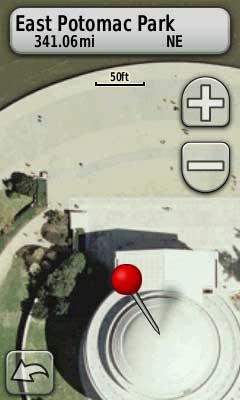
 There are a lot of new map makers out there now that Garmin has opened the door to custom maps on their latest generation handhelds.
And the results are cool. Just don’t expect those people standing around the Jefferson Memorial to be in the same place when you visit!
The process for adding aerial photos and topo maps is simple enough, once you find the imagery. To get you up and running faster, I’ve posted a list of sources for aerial imagery and various types of maps below. But first, let’s look at some of the acronyms and terms you’re bound to come across as you delve into this…
Terminology
- Raster maps – These are image files (USGS topo maps, aerial photos, etc.); this is what we’re using to make these custom maps. They require more memory and computing resources than…
- Vector maps – These are made up of lines, points and polygons; these are datasets and not images, though they are used to create the map on your GPS screen. These require much less memory than raster graphics. Examples include Garmin Topo and City Navigator products.
- DEM (Digital elevation model) – A dataset of elevation points; these are not needed for making custom raster maps, so you can safely ignore them for this purpose.
- DRG (Digital raster graphic) – A typical digital format for a scanned topo map. Usually available as a GeoTIFF, GeoPDF or .tif + .tfw (see below).
- DOQQ (Digital Orthophoto Quarter Quadrangles) – Digitized aerial photos; because of the large file size, each 7.5’ USGS quad is broken into four quadrants.
- GeoPDFs – A newer format used to present maps in PDF format.
- GeoTIFFs – An image format (.tiff/.tif) with georeferencing information embedded. An alternative format is a .tiff + .tfw, where the latter (world file)contains the georeferencing information.
- GIS (Geographical Information System) – A broad term useful to us because many government GIS sites offer free imagery (see Finding state and local imagery, below).
- MrSID (Multi-Resolution Seamless Image Database) – Highly compressed raster images; cannot be opened with standard graphics programs.
- NAIP (National Agricultural Imagery Program) – Often one of the few sources of color imagery for non-metro parts of the U.S.
- Orthoimagery – An aerial photo that has been corrected for scale, distortion, etc.
- SHP (Shapefile) – A vector data format (.shp) common to GIS; not of direct use in making custom raster maps.
- Aerial v. satellite imagery – In general, the former will offer a much higher resolution.
Sources of custom maps
- GPS Visualizer KML overlay tool – The easiest way right now to make custom maps using USGS topos and 1 meter (per pixel resolution) B/W aerial imagery. Scott at GPS Fix has posted a tutorial. I believe these images are being sourced from TerraServer, so you’ll get cleaner looking, higher resolution images by downloading a DRG or DOQQ from another source, but these images (especially the topos) may be “good enough” for many purposes.
- The National Map Seamless Server – Use the pan and zoom tool on the left and the layer extent on the right to narrow things down. Then use the download tool to define the area you want to download data for. This is very important: When the summary page comes up, click Modify Data Request. Uncheck NED and select the orthoimagery or the maps that you are after.
- EarthExplorer – This may be the best source for high-resolution color urban imagery, despite the clunky interface. Registration is required, including a billing address (no credit card info though), but it appears that downloads are free.
- US Forest Service topo maps – These are often much more current, and have better trail and road info, than USGS maps.
- Store.USGS.gov – Offers USGS topos as GeoPDFs.
Finding local and state imagery
States and many local jurisdictions have websites that allow you to download GIS imagery. Here are some tips and resources for finding them:
- Google advanced search is your friend. Enter terms such as file types, your city or town, your state, the term GIS, try limiting the search to .gov and .edu domains, etc.
- A state by state list of GIS data resources.
- An older list, with a lot of dead links, but there’s too many good ones working to leave it off.
Have fun!
Related posts:
 About Rich Owings

I’ve been able to download USGS topo maps in geopdf format, and load them onto my microSD card in the Garmin 450, but they don’t show up on the unit. When I try to use Garmin MapInstall (I have a Mac) to install the map, the program won’t recognize the geopdf file. I’ve done the same process successfully with a .tgz file and it works fine. I’m puzzled. How can I load geopdf files onto my Garmin?
My other problem is that when using my finger on the screen to navigate the one fairly useless map that I have managed to load, it jumps around, zooms in and out, and the red pin pointer jumps around as well, making it almost impossible to use. Do you think my unit is defective or am I doing something wrong?
You need to use .kmz format. Did you follow the instructions here?…. http://www.garmin.com/us/products/onthetrail/custommaps
Doesn’t sound defective. You can slide the map under the red pointer pin. Does that help?
I hadn’t stumbled on those directions before; they moved the process along but I still haven’t gotten a map to show up on the handheld. I created .kmz files of a USGS topo and US Topo, loaded them onto the Garmin > Custom Maps > Directory (I created a folder, these was no directory there). When I connect the handheld I get the following message: “An image in the Custom Map is too big. Images that are too big will not be on the map.” Both maps are about 18 MB. The .tgz file (the only thing I’ve ever managed to get onto the handheld) is 207 MB. The instructions you indicated do not mention Garmin’s MapInstall. I believe I used it to successfully install “ortopo11.tgz” tho that was so long ago now that I hardly remember. Unfortunately that map is useless for hiking. I would just like to use the USGS maps I’m used to, at least to get started, but so far (one month in)…zilch. When I open MapInstall it just says “This device already has your latest maps fully installed.” Any more suggestions?
Yes, there are file size limitations. Custom maps are a pain. For USGS topos, I recommend this… http://gpstracklog.com/2011/05/garmin-birdseye-topo-us-and-canada.html