Sunday, March 18, 2012

Apple iPad, A-GPS, and ambiguity

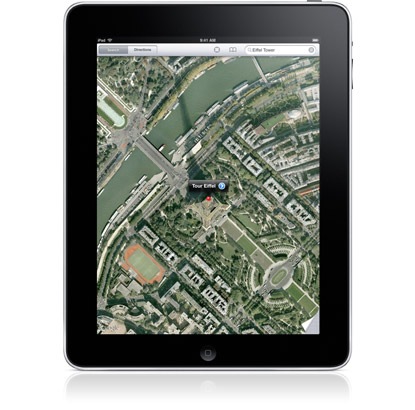
iPad aerial imagery

UPDATE: The WiFi model can determine your approximate location via Skyhook WiFi positioning, but does not have a GPS chip. The WiFi + 3G model has true GPS.

The Apple iPad was announced today, and Apple’s specs led to some confusion over whether or not this thing has GPS. For the record, here are the “location” specs for the iPad:

  • Wi-Fi
  • Digital compass
  • Assisted GPS (Wi-Fi + 3G model)
  • Cellular (Wi-Fi + 3G model)

It’s that assisted-GPS (A-GPS) thing that was confusing. A-GPS can mean a couple of things:

  • A software-based system designed to speed satellite lock, by providing alternative positioning data, projecting satellite locations, etc.
  • A system that relies solely on cell tower triangulation

The fact is, we don’t know yet which the iPad has. If it does have a GPS chipset, it seems clear that it’s limited to the 3G models. And the more I look into it, the more I’m inclined to think it does.

If the iPad does have GPS

But even if it does have GPS, what would you do with this 9.7” touchscreen beast? If you think your smartphone is fragile for geocaching, the iPad seems even less appropriate for field use. If you drive an RV or an 18-wheeler, perhaps you could justify the screen real-estate; it will be interesting to see if any of the nav app providers come up with a dedicated iPad version of their software. The iPad is bound to be used as a portable device though, even if its just for the coffee shop set, and as such I can see location-based services (including social media apps) being quite useful. What would you use an iPad with GPS for?

About Rich Owings

Rich is the owner, editor and chief bottle-washer for GPS Tracklog. Connect with him on Twitter, Facebook or Google Plus.

Comments

  1. Terry Parker says:

    I exchanged emails with iNavX and they informed me that it will work well on the iPad. He stated that he had already ordered the most expensive version of the iPad (64g) although it has not yet shipped. He says that iNavX will work as a genuine GPS marine chart plotter.

  2. Harry Hersbach says:

    Ok, i understand the Skyhook, i did not leave my house with my Ipad, to figure out if it works al the time.
    But google maps is OK and it points out my house very quick..So Skyhook, or GPS or GPS-A it is al OK for me…As it is accurate and working…
    Thanks, strange that Apple is not telling this…

  3. Harry Hersbach says:

    Oh and i Forgot to tell again, it is only the Ipad 32Gb WI-FI i have.. and i am using it in the Netherlands Rotterdam…

  4. Rich Owings says:

    Yes, location accuracy will likely vary quite a bit on the WiFi model depending upon where you are located.

  5. Stephen says:

    iPad 3G with true GPS and the $29.99 Co-Pilot Live for iPad make a great navigator for any vehicle. Best of all it uses no 3G data so #G plan does not even have to be turned on.

    Multitasking will come to iPad in Fall according to Apple, as a simple FREE software update.

    Can’t wait for TomTom and Navigon to update their iPhone apps for optimized iPad viewing.

  6. Terry Parker says:

    My iPad arrived and all of the iPhone applications transferred to the iPad. Navionics Gold and iNavX work great on the iPad. The extra size of the iPad make navigating on my sailboat much better. The battery on the iPad lasts much longer than the iPhone’s. As soon as the new Otterbox ships, the iPad will sail with me.

  7. Mio Fernando says:

    Hi everyone, GPS = Global Positioning System. A speed-based radio positioning system which provides suitably equiped users with highly accurate positons, velocity and time data. It consist of three major segments: a space segment, a control segment and a user segment. A space segment comprises of 24 satellites. Spacing of the satellites on their orbits is arrange so that at least four satelites are in view to the user at any time anywhere on the Earth. To make it short, GPS satellites transmit pseudorandom noise (PRN) sequence-modulated radio frequencies designated L1 (1575.42 Mhz) and L2 (1227.60 Mhz). I’ve been using several GPS equipments onboard my ship for more than 20 years that is why I knew what is GPS. My question, is iPAD GPS capable even in open Ocean? Thanks.

  8. T says:

    I’m a pilot and tested the the iPad WiFi and iPad 3G in flight, 2000..20000ft off the ground, and both of them are simply *unable to get a GPS fix* on the location.

    It turns out that the iPad 3G *DOES NOT HAVE GPS* — they just do cell-phone tower triangulation.

    Whatever Apple does to try to locate you, it does not use Global Positioning Satellites!!

    Very very very very annoying, and IMHO false advertisement!

    For those who don’t know how GPS works, here’s a link: http://en.wikipedia.org/wiki/GPS

    Nowhere in this article does it mention cell phone towers!

    • T says:

      this also means that when you’re out in the middle of nowhere hiking, or driving cross-country, or on the open ocean, or up in the air flying — you will not be able to get any kind of location fix.

      Apple simply used the term “GPS” to cheat buyers to believe they would get GPS location service. GPS means “never lost” … Apple’s location service means: “you will be lost” once out of cell phone land

      • Muero says:

        T is a good example of someone who may be knowledgeable in one area but is very ignorant in another. ALL GPS devices struggle inside metal tubes, and not all GPS chips are as sensitive as others. The iPad’s GPS chip (a real freakin GPS chip) isn’t sensitive enough to work in an airplane. My eTrex isn’t either. That’s why they used an A-GPS chip, which assists the in getting a GPS fix (although doesn’t help in an airplane where assistance isn’t available). Anyone who’s used cell tower/WiFi positioning (like the original iPhone) and then used an Apple product with A-GPS (which, by definition, is REAL GPS) can tell you there is a big difference. Stop confusing people by lying about a subject area in which you are ignorant.

        • T says:

          While flying, I had 3 GPSes with me in the cockpit: two hand-helds and the build-in avionics GPS. The hand-helds had their GPS antenna in the cockpit window, and that’s where the iPad was also located when I tested this. No metal tube around it, just a very clear view of a large segment of the open sky — perfect conditions for acquiring a GPS fix.

          @Muero: you should not contribute if you don’t know what you are talking about! Maybe you want to read this article to understand how GPS works: http://en.wikipedia.org/wiki/GPS

          • T says:

            Apple’s aGPS is apparently not falling back on directly acquiring the positions of Global Positioning Satellites (=: GPS) — hence AppleFail

  9. Mircea A says:

    Is there any possibility that pair an external Bluetooth receiver with a wifi iPad thru iPad,s internal Bluetooth device ?
    Tks

    • T says:

      I’ve seen an article talking about this – but it requires jailbreaking the iPad, as Apple’s firmware does not allow a third-party GPS bluetooth mouse to deliver location information :-/

  10. Rich Owings says:

    Please keep it civil folks.

  11. Mio Fernando says:

    Hey guys, Honestly you must all listen to what T says is telling you. He is completely right…. I navigates in the ocean and he navigate in the sky. So don’t fool us about Global Positioning System. I am starting to believe that iPAD is a fantastic toy BUT the GPS capability.

  12. Rich Owings says:

    Okay, lets see if I can make some sense of all this. The 3G iPad has Assisted-GPS. This means that it uses cell tower locations and WiFi to narrow down your location, speeding satellite lock by the GPS receiver. So that could be one strike against you if you’re out of cell tower range.

    Second, acquisition will go much faster if you are stationary. If you’re in motion, that’s another strike against you.

    So the best way to ensure satellite lock is to start out while in cell tower range and be stationary.

    Remember also that metal and your body are very effective at blocking GPS signals.

    Finally, most GPS satellites are not stationary, so there are good days and bad days for the system. Some days it’s just harder to get a lock. A single test could lead you astray because of this.

  13. Muero says:

    First of all, if you are using your iPad in an airplane, it wouldn’t be unreasonable to think you may have it in “Airplane Mode.” While airplane mode is on, no phone, radio, Wi-Fi, or Bluetooth signals are emitted and Global Positioning System (GPS) reception is turned off. Location Services, including GPS, do not work while in airplane mode. You can use applications like Maps by re-enabling Wi-Fi while in airplane mode, but you will be unable to determine your position using Location Services.

    I don’t know why none of you checked, but information is out about the iPad and its GPS. For example, the iPad uses a Broadcom BCM4750 A-GPS chip. You can read about it here: http://www.broadcom.com/products/GPS/GPS-Silicon-Solutions/BCM4750 The iPad also has a GPS antenna (seen here http://s1.guide-images.ifixit.com/igi/RQOtZxoxaBHpCDWr.huge (from left to right, there’s the Wi-Fi/Bluetooth antenna, the GPS antenna, and then the cell radio antenna)). Why would an iPad have a GPS chip and a GPS antenna if it didn’t have GPS?

    But sometimes the most important thing is to actually test whether a data connection is needed rather than digging through hardware specs and teardown chip listings. The popular technology website Ars Technica (which has much more technical information than the mainstream tech sites like Gizmodo) tested this out (on an iPhone, but still relevant here), and here’s what they found:

    “But will the iPhone 3G’s GPS functionality also work without network assistance? Turns out that it does. If the iPhone has had a GPS location fix not too long ago and not too far away, an unassisted fix happens not much slower than an assisted one. But, if you haven’t used any location services for a few days or if you’ve just disembarked from an airplane, locking on to the GPS satellites takes a lot longer. Depending on how much sky is visible, this can take two to more than five minutes. In one of last month’s firmware updates, however, the Maps application was modified so it won’t always wait this long, but complain that a location fix couldn’t be made after 15 seconds or so. This can be solved by using another app that doesn’t have a time limit to do the initial fix.”

    The inside of an airplane is just about the most difficult place in the world for a GPS device to work, so testing it there is not a good way to test if an iPad can get a GPS fix without cell towers. As you can see, the small and not-that-sensitive GPS chips in iPhones and iPads can take several minutes to acquire a GPS fix without assistance (and probably not at all in an airplane), and the Maps application refuses to wait that long for a fix (probably in an attempt to save battery life). You can complain about the lack of high-sensitivity GPS chips small and power-efficient enough to be used in mobile devices like these, and you can complain about Apple’s software not trying long enough to achieve a GPS fix or their decision to always turn off GPS in airplane mode, but you cannot say that the iPad (with 3G) lacks GPS, because that’s just wrong.

    • Rich Owings says:

      Good point about if it’s “had a GPS location fix not too long ago and not too far away” — definitely another factor. Have you verified that the GPS doesn’t work in airplane mode? It does with my phone (a Motorola Droid). I imagine there are some GPS status apps you could test this with.

    • T says:

      I’m sure it does have the GPS chip you mention, and it does have the GPS antenna you mention – never doubted that – that’s besides the point.
      Your post is very speculative.

      My point is that the iPad is simply not able to get a location fix purely based on GPS satellites if it is out of cell phone range. I tried it multiple times – it is a fact. This could be a firmware bug, but I don’t want to speculate. I am simply stating that I tried everything possible to try to get a lock, and it did not work.

      I did have a location fix while on the ground (in the run-up area) and 5 minutes afterwards when airborne, the iPad could not get a location fix anymore.

      Muero, you seem to be misinformed or just a troll. It is ridiculous to say “…The inside of an airplane is just about the most difficult place in the world for a GPS device to work..” Have you ever been in the cockpit of an airplane in flight? Have you ever tried using a handheld GPS in the cockpit?
      Have you ever tried to put a GPS antenna even in the side-window of an airplane?
      Apparently not. Because you would then know that it is ridiculously easy to get a GPS fix inside the cockpit, even with a handheld device! The cockpit window has a very unobstructed view of the sky.

      • Muero says:

        Yes, I’ve used GPS devices on an airplane. On a plane though, depending on where you are and how the windows/cockpit windscreen are situated, you’re always going to have some amount of the sky blocked, sometimes a lot, sometimes not a lot. I don’t know the exact situation you’re trying, so I don’t know how much of the sky is blocked. The guy who runs GPSreview.net says this:

        “While A-GPS uses the same network of GPS satellites, A-GPS chips are typically very low power and thus really take advantage of the “assisted” part to get a GPS fix. Without the network connection I suspect the iPad will behave much like the iPhone 3G/S does when you try to get a GPS fix when you are in a “No Service” area– you need a very unobstructed view and patience to sit in one spot for awhile while it fixes in on your location.”

        Obviously sitting in one spot isn’t an option in a moving airplane, and having a “very unobstructed view” could be hard too, depending on the airplane and the iPad’s position inside the plane.

        I’m not a troll and I’m not even defending Apple. The GPS receiver they use isn’t very sensitive and their software often gives up trying before a GPS fix can be made. Apple chooses what GPS chips to put in and writes the software, so that’s all their fault. But that’s not the same thing as saying it does not in fact have true GPS capabilities, because it does. Apple made a decision to sacrifice GPS sensitivity for size of GPS chip and power usage. With assistance, that sacrifice isn’t noticeable, which is why they put the assistance in.

        Does using the GPS totally suck (and even fail more often than not) when out of cell tower assistance range? Yes. Does that mean that it doesn’t have GPS? No. It’s just a crappy GPS receiver (without assistance). The Wright brothers’ plane totally sucked at flying compared to anything we think of as an airplane today, but it is still defined as an airplane. That’s why I’m hoping GPS chip makes keep improving sensitivity, power usage, and size. For example, the SiRFstarIV has big improvements over the SiRFstarIII in all these areas, but it still might be too big and power hungry for little devices like iPhones and iPads.

  14. carl bowser says:

    T, I agree. Many a time I’ve used my Garmin GPS on commercial plane flights, and I’ve always been amazed at how easy it is to track the flight. Just putting the Garmin against the window does the trick.
    The true test of satellite GPS is to get a position away from cell towers, such as at sea. Sounds like the iPad “A-GPS” fails at this test, leaving the question as to how Apple pulls it off. Frankly some of the discussion doesn’t shed much light on the problem, too much speculation. Is Apple willing to provide the critical information? Seems to me that if there was a true GPS in the iPad someone could query parameters about what satellites are providing the fix, what their positions are, and some measure of how many satellites are being tracked to give a position.
    My two cents!

  15. Mio Fernando says:

    Good idea T. I will wait what Apple says.

  16. Rich Owings says:

    Here’s the link to Tim Flight’s excellent post on A-GPS:

    http://www.gpsreview.net/a-gps/

  17. Mio Fernando says:

    If iPAD satisfies all the features and function as explained by Konsberg regarding Differential GPS in http://www.km.kongsberg.com/ks/web/nokbg0240.nsf/AllWeb/F82743DED767CC65C1256B82002DEDBD?OpenDocument&gclid=CNnBnam346ECFY-X2AodUxrIIQ

    then I will be 101% convinced that iPAD is GPS capable.

  18. Ed says:

    I spoke to a salesperson at my local Apple Store, and he said that the iPad does not handle GPS through satellites. Instead, Wi-Fi iPads use Wi-Fi, and 3G iPads use Wi-Fi and cell phone towers. You need to subscribe to AT&T’s 3G service to get GPS via cell phone towers. I was surprised when he told me this, so I thought I’d look around on the web for confirmation. Instead, I just found a lot of confused people. So if you’re confused, you’re not alone.

  19. Terry Parker says:

    I took the iPhone and iPad on a day sail in Tampa Bay, I used Navionics Gold East Coast US which was purchased for the iPhone and when the iPad was synced it was on the iPad. In accordance with the recommendation of publisher of iNavX, I bought the 64g iPad 3G. I have not subscribed to AT&T, so the 3G system was not used for GPS location.

    The iPhone was used for the initial part of the sail and worked quite well, but its battery capacity is limited when a GPS app is being used. It keeps active, continuously updated for the boat’s position. The iPhone’s charge only lasts a couple of hours.

    As soon as the iPad was turned on and Navionics Gold East was opened, our position was displayed on the iPad. Our course was also indicated by a thin red line eminated from the boat symbol. The Navionics Gold was displayed in the 2X mode and the chart was quite sharp. There was no distortion and the iPad worked perfectly. SInce we are not subscribed to 3G I can only conclude that we were using the GPS satellites. We were 5 miles from land in the middle of Tampa Bay.

    Until a waterproof case like the iPhone’s Otterbox is available, we need to be very careful with the iPad. It probably helps the iPhone’s signal strength because the case is not aluminum. When we used the iPad for navigation, we were in the cockpit and there was no reduction of signal strength being in the open air. The strength of the signal was probably diminished significantly by the aluminum skin of an airplane.

    The only difficulty stems from the sunglasses used by most boaters. They generally used polarized sunglasses to reduce glare and see shoals and fish beneath the surface. With my polarized sunglasses, I can only see the iPhone in the portrait position and the iPad in the landscape position. If the iPad is turned to landscape position, it goes totally black. The iPhone and the iPad have polarized screens.

  20. Terry Parker says:

    Rick:

    I ment to say that when the iPad is turned from landscape to portrait, the screen seems to turn totally black.

  21. Terry Parker says:

    I have purchased Magellan for the iPhone. It works great and anounces that it is using 30 gps satellites. It of course is now on the iPad and tells me the same thing. I have noticed that wifi signals seem to be a bit stronger on the iPhone than on the iPad.

  22. Michael Pickel says:

    Thanks, Terry. Your review and test on Tampa Bay answered my question: I just ordered a 3G model of the iPad, but was beginning to fear that any GPS functionality would be decreased if I was not on an active 3G data connection at the time I used it.

    From your report, it appears that the GPS functionality on the 3G model does not require simultaneous cellular data access.

    I want to use my iPad for navigation is parts of the country where AT&T has no service–well, that could be a lot of places ;-) and this summer, we’re going to be driving through the south of France and hoped to use my iPad 3G (without expensive roaming data service) as a reliable navigation device.

    Thanks again for tackling this matter.

    Michael

  23. Icallledappleandasked says:

    True GPS: NO ! (so offshore marine navigation: nope)

    Geolocalization using cellphone network: Yes.

    If you don’t believe it ==>

    1-800-MY-APPLE (1-800-692-7753)
    Hours of Operation: 7 days a week from 4:00 a.m. to 11:00 p.m. Pacific time

  24. Cap10john says:

    Using Foreflight with my WiFi only iPad and a Dual external GPS connected with bluetooth. Works like a charm and no jailbreaking required.

    What I’m lacking is the ability to record my tracks or even better for someone else to be able to track me.

    • Rich Owings says:

      I’m not an iOS person, so I don’t know about someone else tracking you, but there are many mapping apps and others that will let you record your tracks. Just search for GPS tracks or GPS tracking.

Trackbacks

Speak Your Mind

Tell us what you're thinking...
and oh, if you want a pic to show with your comment, go get a gravatar!

*
