Hands on with the best Oregon yet
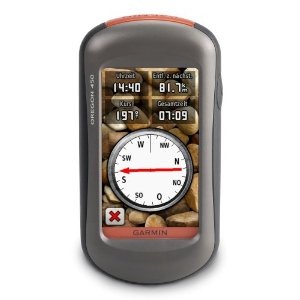
The Garmin Oregon 450 is one of the newest members of the touchscreen Oregon family, featuring the latest improvements such as better visibility, a tri-axial compass, custom dashboards, advanced track navigation features and the ability to load custom maps and BirdsEye aerial imagery. I’ll delve into those details shortly, but first I want to clarify the differences between the Oregon 450 and some closely…
Related units
- The Oregon 450t adds pre-loaded, 1:100,000 scale topo maps of the US to the 450’s feature set (see the next section for reasons not to spend the extra money!)
- The Oregon 550 adds a 3.2 MP geotagging camera
- Going the other direction, dropping down to the Oregon 300, you’ll go back to an earlier generation (less legible) screen and you’ll get a standard electronic compass
- To see how the Oregon 450 stands up against other Garmin models, check out my Garmin handheld GPS comparison chart.
Save your money
The 450t’s pre-loaded topo maps of the entire U.S. may appeal to those who travel a lot, but there are few other reasons to step up to that model. The reason? There are better quality 1:24,000 scale topo maps available for free for most states. GPS File Depot is a great source for such maps.
Custom maps and BirdsEye imagery
Then there is the recent introduction of Garmin custom maps. Basically, this allows you to put any map image on your Oregon. Found a park trail map online? Add it to your GPS! The image at left below shows a custom map — a USGS topo map (raster) image. You can read more about this feature by checking out my posts on Garmin custom maps.
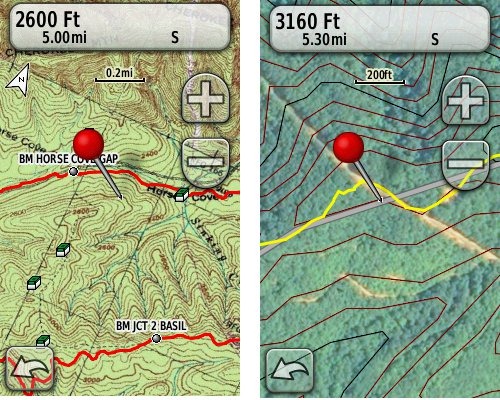
Garmin also recently announced their BirdsEye aerial imagery program, a $29.99 annual subscription that will allow you to add aerial imagery to the Oregon series. The image at right, above, shows a screenshot.
Now that we have that out of the way, lets look at some of the other new features in the Oregon line, which are all found on the 450…
Oregon 450 touchscreen display
All of the newer generation high-resolution GPS screens suffer a bit when it comes to visibility. The 550 series is slightly better than the x00 first generation, but the newer 450 series seems better yet. As a matter of fact, it’s the first Oregon I’m going to recommend for fixed mount, non-powered use, such as bike handlebars. In the past, I’ve recommended Oregons primarily for handheld use, where you will intuitively tilt it for the best view.
Let me back up a bit and share what I saw when testing the Oregon 450. The first time out on my bike, I was surprised by the visibility, but when I took the 450 off my handlebars, and held it side by side with my 400t, I couldn’t tell much difference looking at them straight on. Once I tried different angles though, it became clear to me that the 450 was viewable over a wider range than the older model. I don’t recall seeing this when I tested the 550t, so I asked Garmin if there had been changes between the 450 and 550 series in regards to screen technology. Here’s the response I got:
While the most notable enhancement in our Oregon screens was from the x00 to the x50 lineup, customers may notice other improvements that are a result of various hardware and software improvements.
The difference is seen in sunny, bright conditions only. I could not detect much difference in shade. And regardless, in at least some conditions, the 450 still isn’t as bright as older units that don’t have such high resolution screens (e.g., the 60/76C and eTrex C series). But the huge number of improvements the Oregon series is accumulating leaves me with little reservation in recommending them over previous model lines. With the recent improvements in screen technology, visibility just isn’t a deal killer, even for bikers. Even so, I still recommend that users create sun and shade profiles to improve visibility (discussed a little later in this review).
Portions of the following are taken from my Oregon 550t review.
Oregon 450 tri-axial compass
Having a tri-axial compass means you don’t have to hold the unit level while navigating. The downside is that the calibration process is more complicated than that for a two-axis electronic compass. It’s the same procedure that is used on the Dakota 20 — here’s a brief video I shot of it. The compass should be recalibrated every time you change the batteries in the unit.
Garmin Oregon 450 Interface
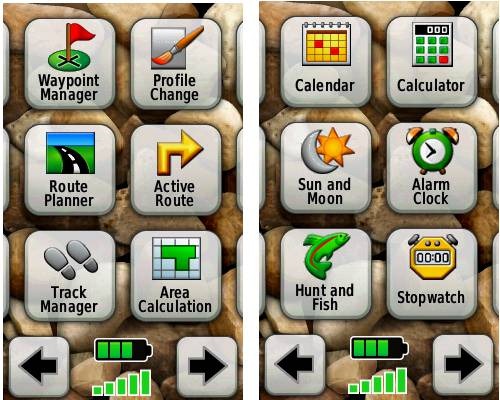
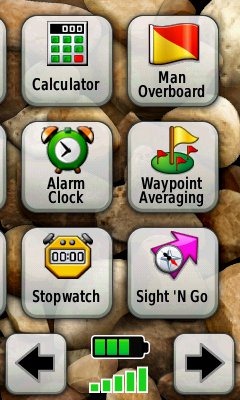
Handheld GPS receivers typically offer lots of options, and can be overwhelming for a first-time user. Even so, the Oregon is about as intuitive as they get, and I love the touch screen menus. The main menu is spread across five screens (as shown below); these can be customized, so if you don’t need “Man Overboard”, you don’t have to display it.
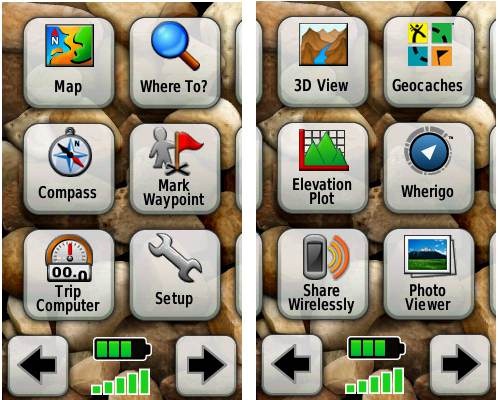
Customizing the Garmin Oregon 450
Take the time to do some additional customization and it gets even better. Here are some tips:
Use profiles – There is a “Change profiles” item on the main menu, and you can create a new one via Setup > Profiles. Tap the new profile to give it a name. Now start changing various preferences. Want track up when geocaching and north up when biking? No problem. The possibilities are nearly endless.
Rearrange the main menu – Set this different for each profile. I make extensive use of the Track Manager, so that gets moved to the first main menu screen for my hiking and biking profiles.
Create sun and shade profiles – A great use of this tool is to create separate sun and shade profiles (perhaps even one for each activity). Create a Sun profile and then go to Setup > Maps > Advanced Map Setup. Set Shaded Relief to Do Not Show to enhance visibility in bright light. If you’re in an area with lots of national parks and forest, you can also improve visibility by getting rid of the green background. Go to Setup > Map > Advanced Map Setup > Zoom Levels > Land Cover and set it to Off. Credit GPS Fix with originating these tips for sun / shade profiles.
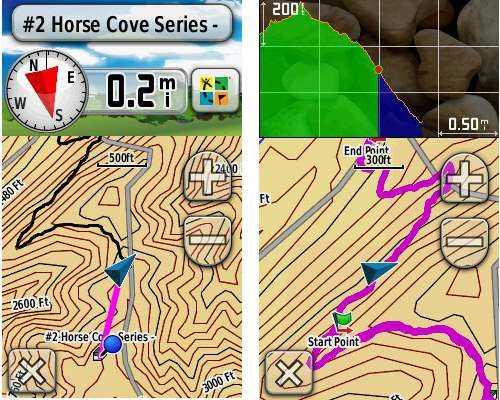
Dashboards – The map screen can be set up to show 0, 2 or 4 data fields, or to display a dashboard. Choices for the latter are recreational, automotive, stopwatch, compass, large data field, geocaching (nearest or active) or elevation plot. I’ve included screenshots showing the last two below.
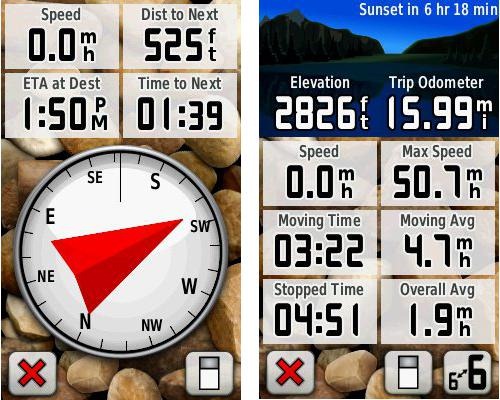
Shown below are the compass and trip computer screens. The data fields can, of course, be customized, as can the background. The trip computer screen can be also switched to show fewer (but larger) data fields. The top section of each can be modified display one of the previously mentioned dashboards.
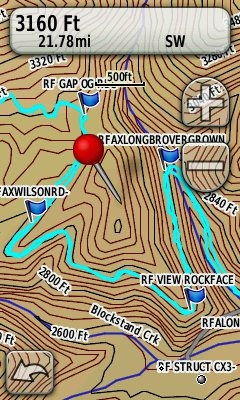
Finally, here’s a random interface tip… When you select a location on the map, a push pin appears. You can now slide the map around underneath the pin, and zoom in as needed, to fine tune the selected location..
Route, Track and Waypoint management
The Oregon series has excellent route, track and waypoint management tools, including:
- Waypoints – The ability to project a waypoint, and to reposition one at your current location.
- Tracks – You can choose to hide or show tracks on the map and give them a custom color (17 colors are available). The image at the right shows a track in light blue (a record of a previous trip).
- Routes – You can view a map of the entire route, edit the route, reverse it and view an elevation plot.
Track Navigation
The Oregon 450 features some recent improvements in track navigation. Select a track to navigate and a route will be created. Waypoints are created for the high and low elevation points and any user waypoints along the track are added to the route. I’m a heavy user of track navigation. If I head out for a trail I’ve never traveled before, I do a search online for tracks (favorite search terms are .gpx, gps, trail name, and park name) and load the track to the device. One advantage of this new track navigation feature is that, unlike typical backcountry route navigation, you’ll get an estimate of actual trail distance rather than “as the crow flies” mileage.
Geocaching with the Oregon 450
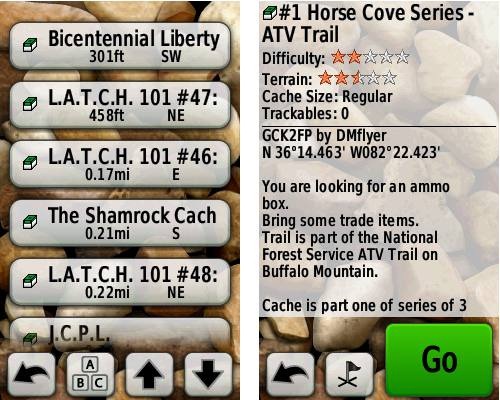
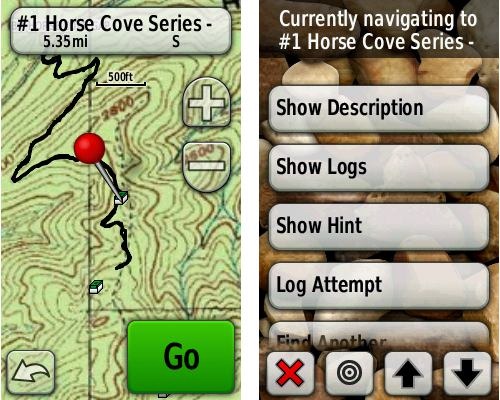
The Oregon 450 is set up for full paperless geocaching support, meaning you can see the description, logs, and the hint, and you can log your attempt (find, DNF, etc.) for later transfer back to geocaching.com. Speaking of which, full access to these features requires a premium membership at geocaching.com. Shown below, clockwise from top left: Closest geocaches, geocache description, menu for a specific cache, and custom map using a USGS topo.
Wireless data transfer
The Oregon 450 is capable of wireless data transfer with other compatible Garmin units. You can transfer waypoints, tracks, routes and geocache summaries (paperless caching details cannot be transferred).
Garmin Oregon 450 in your car
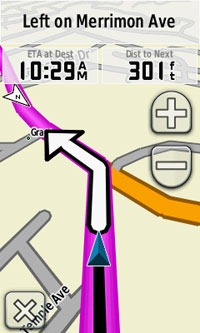
The Oregon 450 makes an excellent dual-use unit, though you’ll probably want City Navigator and a car kit if you want to use it as a turn-by-turn navigator in your car. If I wanted a single unit for trail and road, an Oregon plus City Navigator (screenshot at right) would be my top choice.
Garmin Oregon 450 performance
The Oregon 450 performed very well for me in testing against multiple units including the Garmin GPSMAP 60CSx and the Magellan eXplorist GC. I noticed no significant differences in accuracy at ground zero when geocaching.
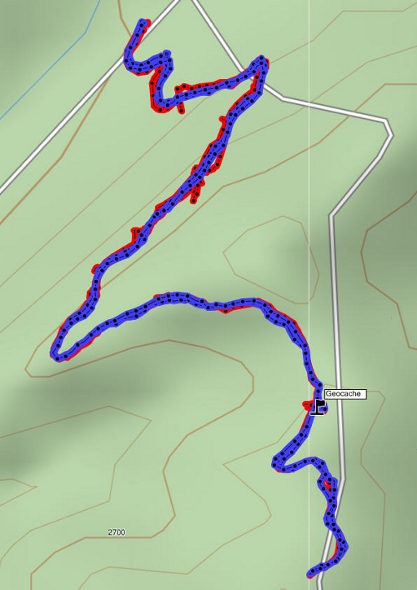
Multiple tracklogs were collected, comparing the Oregon 450 and the Garmin 60CSx. Tracking was set to collect points every five seconds while mountain biking. Steep terrain ridden in both directions, combined with frequent stops to record notes, resulted in good testing environments. In the images below, the Oregon 450 tracklog is in blue, the 60CSx is in red. I’ve compiled these four tracks in a single .gdb file, which you can download and open in MapSource or BaseCamp for closer examination.
In one test, shown below, the 60CSX wandered a bit more than the Oregon in a few spots, while the Oregon track separated more at one point on the uphill and downhill runs. This test was a draw.
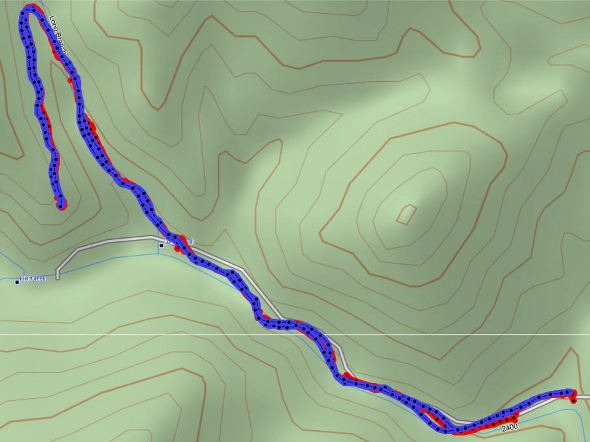
In the test below, the Oregon significantly outperformed the 60CSx. I’ve labeled a geocache at one point, because I moved around a fair bit there. Still there were two other points where the 60CSx wandered significantly. Each unit had a single instance of track separation on the uphill and downhill segments.
Battery life is rated by Garmin at 16 hours. In my testing it ranged from 10 hours, 27 minutes (backlight always on) to 16 hours, 51 minutes (backlight timeout set for two minutes, battery saver mode enabled). Battery life tests were conducted with the unit stationary, using Eneloop low discharge rechargeable batteries.
One other performance note — I’ve always been very impressed with how accurately my 60CSx reports overall elevation gain, and disappointed with the inaccurate numbers generated by my Oregon 400t. I was pleasantly surprised to see that the Oregon 450 is extremely close to my 60CSx in terms of reported elevation gain. I hope to do some more testing before I send the review unit back to Garmin, and will post a full report here.
UPDATE: Well, I set out on the trail to test this out and to my surprise, the 400t, 450 and 60CSx were all within 2% of each other. Perhaps Garmin fixed this on the Oregon x00 series in their most recent firmware update. Go figure!
Garmin Oregon 450 pros
- Tri-axial compass
- Barometric altimeter
- Great touch screen interface
- Ability to customize display and menus using profiles
- Excellent track management and routing tools
- Paperless geocaching support
- Availability of free maps
- Accepts Garmin custom raster maps
- Accepts Garmin Birds Eye imagery
- Improved visibility over previous Oregon series
Garmin Oregon 450 cons
- Somewhat poorer sunlight visibility than eTrex and GPSMAP color units
Recommendation and conclusion
Highly recommended. The Oregon 450 is a great workhorse, at a reasonable price. The interface is very user friendly and it has a lengthy feature set. It is an excellent choice for nearly any outdoor activity, including geocaching and hiking. This is the first Oregon I’m recommending for bikes too, due to the improved screen visibility, which makes it more appropriate for fixed-mount use.
More Garmin Oregon 450 reviews
- Consumer-authored Garmin Oregon 450 review
have been posted at Amazon
- More consumer reviews of the Oregon 450
have been posted at at REI.com
- A first impressions user review of the Oregon 450
- It’s Not About the Numbers reviews the Garmin 450 from a geocacher (and Blackberry user’s) perspective
I’ll be posting more hands on GPS reviews as they appear, but in the meantime, here are some…
Other Garmin Oregon 450 resources
- The Garmin Oregon 450 owners manual, in the language of your choice
- A Garmin Oregon message forum
- This tool will show you how the Oregon 450 compares to other Garmin handhelds
- The Garmin Oregon wiki has an Oregon FAQ
- Trying to decide between the Oregon 450 and the Garmin 62 series? Maybe this will help
- Garmin Oregon training videos
- The official Garmin Oregon 450 web page
Compare prices on the Garmin Oregon 450 at these merchants:
- Check the current Garmin Oregon 450
price at Amazon
- Find the Garmin Oregon 450t at GPS City, one of our favorite low cost vendors
- Buy the Garmin Oregon 450
direct from Garmin
- Get a great deal on the Garmin Oregon 450 Handheld GPS
at J&R Computer
- Check out the deal on the Garmin Oregon 450 GPS
at REI.com, where satisfaction is guaranteed and members get 10% back on eligible purchases
- Get the Garmin Oregon 450
for an amazing price on eBay


I read your review of the Garmin Oregon, and then looked through the comments to see if there are any problems using a Mac, but didn’t see anything substantial. Perhaps the fact that there’s little mention means that it’s not an issue these days? How about DeLorme? I know that in the past the software only worked on PCs.
thanks for the help
I’ve been using an Oregon for the past 2 years and Mac support has steadily gotten better. Out of the box, the Oregon looks just like a disk drive, and you can drag GPX files onto and off of it – so data transfer is simple. I’ve been using BaseCamp + the Garmin 24k topo maps for the past few months and that’s really nice; it’s a Mac-native application and while I wish they would add features faster, it’s fine for my uses (planning hiking trips).
I had a DeLorme unit in the 2008-2009 timeframe and that was not Mac-friendly at all. Things may have changed, but I haven’t seen anything to that effect.
thanks stever, very helpful, especially the assurance re ease of data transfer, and using the Garmin 24k maps. My interest is hiking also.
Generally speaking, Garmin has the best Mac compatibility out there. For data transfer and using the 24K maps, there should be no problems.
great, thanks for the info, and many thanks for the very helpful website
I haven’t encountered any problems using the Oregon 450 (or a Nuvi 255w, either) with a Mac.
David
I would like to change the default symbol for Waypoints but have yet to figure out a way to do it — if it’s even possible. It does get a bit tiresome editing the symbol each time I save a waypoint.
Is there a way? Thanks!
David
It looks like you can, but it will take a little bit of work to set it up…
http://www.gpsfix.net/custom-symbols/
There is a a Garmin GB Discoverer National Parks: Peak District map on ebay. The person states in the details that the map has been used in his 450t. To buy the map in the uk is £129.99 a lot of money, if i buy this map pack and i believe it to be 100% genuine will this work with my 450t and Basecamp ok, or will it block it because its been used in another device. Sorry just trying to save a bit of cash in these hard times. !!
If it is a Garmin micro-SD card, it should work fine. If they downloaded it, it is locked to one device.
Based on this review, I just purchased an Oregon 450. It apparently did not come with MapSource. I went to GPSFileDepot to download maps. First I attempted to download MapSource from their link to Garmin. It would let me download, but not let me install because I did not have a previous MapSource product. So I downloaded BaseCamp, and then the California Topo. Basecamp did not recognize the Califonia Topo as a valid file type. Yes, I seem to be a bonehead at this, but I do not know what to do next. Can anyone help?
Thanks
Unfortunately you did not read the tutorial carefully enough at GPSFileDepot. You need to download and install Basecamp first, THEN downoad and install Mapsource. Since you have installed Basecamp now, go back and you will now be able to install Mapsource: http://www8.garmin.com/support/download_details.jsp?id=209
If you installed the maps properly, they would just appear all by themselves in Mapsource and Basecamp. This is what the whole process should look like: http://www.gpsfiledepot.com/tutorials/how-to-open-maps-in-mapsource/
If you have problems with specific maps, the GPSFiledepot forums are a good place to get help: http://forums.gpsfiledepot.com/index.php/board,5.0.html
Thanks Boyd. Jay, do you have it working now?
No. Mapsource installed (thanks, Boyd, I missed that line in the instructions), but it does not recognize the California Topo map I installed. There seems to be a discussion thread on the GPSFileDepot website about this problem, but I don’t see a clear resolution to it. Mapsource recognizes the map in the “utilities/manage map products window”, but shows nothing in the maps window. Any ideas?
Thanks
Are you perhaps running Windows 7 64 bit? There appear to be several registry-related issues with that specific version of Windows. I have Vista 64 and Windows 7 32, and these don’t show the same problems so I haven’t followed it closely. But the issue is related to the installer script that many of us have used at GPSFiledepot.
I believe one suggestion was to uninstall anything you’ve put into Mapsource, then install the MyTrails maps from GPSFiledepot. This map was evidently created with a newer version of the installer, and installing it first somehow provides registry keys that are not correctly provided in the problem map.
See the GPSFileDepot forums for more info.
My operating system is Windows 7 32 bit. I tried uninstalling california topo and downloading My Trails per your suggestion. Mapsource doesn’t recognize it as a map either. It does show up in the utilities, similar to the california topo. I downloaded the US planimetrics sw map, and mapsource doesn’t find it anywhere (and neither can I, actually).
I am starting to think I should return the 450 to Amazon and just stay off the trail (or go back to the paper maps that used to work just fine for me. Yes, I am actually that old).
Are you sure you’re doing this right, as per the link I posted? You do not “open” maps in Mapsource. They are installed into the program and then they will appear on the dropdown map selection menu like this screenshot: http://www.gpsfiledepot.com/images/articles/image/open-mapsource2.jpg
Do you see the dropdown menu in mapsource? If not, then use View > Show Toolbars > View. What is listed on your dropdown menu? There should not be any issues with Mapsource and GPSFiledepot maps on WIndows 7 32 bit. The problems are specific to the 64 bit version.
I am “actually that old” myself. Mapsource is kind of a strange program that confuses many people, but you can figure this out! The alternative, of course, is to actually buy Garmin’s products as they will provide whatever hand-holding you need. But that won’t be free and you won’t have access to all the good third party stuff.
Boyd
I think it is finally working. I’m headed off to the Sierra tomorrow to test. Thanks for your patience and your help (or your patient help). For the first time I got a button in Mapsource that actually referenced the downloaded maps. Now I just have to get familiar with Mapsource.
Hello Rich,
Just wanted to let you know about some wierd file behavior on my otherwise perfectly running 450 (for a couple of years now). The wierd behavior is that for no apparent reason, my Waypoints are not showing up when I go to any of the menus that should link to them. This is in spite of the fact that many Waypoints show up in my GPX folder, and in spite of the fact that some of them were created very recently. When I copied some of them from my backup laptop onto the Garmin unit, they appeared again as expected. So I copied all of them that I had backed up to my laptop, and lo and behold, they are all working as expected, again. I wonder what would cause this behavior?
There could be a corrupt .gpx file. You could try removing them all and then do a master reset if the problem shows up again.
Hi Rich,
I am relatively new to the GPS scene and I have joined a group of local motorcycle riders who have formed a land conservation company, SMCC. Seven Mountains Conservation Corp is holding several types of events (motorcycle, mountain bike, trail running, horseback riding, etc) to raise money to purchase surrounding land because the State of Pennsylvania is slowly taking away public land for use by these special interest groups.
My primary career is in the IT field, so naturally I was volunteered to look into a GPS unit to map our events and share with our participants the day of the event. I have two main questions…
1. Which handheld unit would you recommend that could log and save the route while pre-riding OR if I’m not able to pre-ride, I could map the same route from my desktop without having to ride
2. Once I have mapped and saved a route, do I have to convert the output file to a “standard” GPS file format so that I can share with participants no matter what make/model of GPS unit they have? If so, what is the “standard” GPS file extension and how do I convert to this? Is there a popular file converting application?
I appreciate any information you can provide and I look forward to hearing from you.
Don R.
SMCC – IT Facilitator
1. Any model with a high-sensitivity chipset would work for recording the track. You probably can’t adequately map it on the desktop in areas with tree canopy. But there are reasons to get a newer model…
http://gpstracklog.com/2011/04/five-reasons-to-upgrade-your-garmin-handheld.html
I’d definitely suggest a Garmin due to the availability of free topos…
http://gpstracklog.com/2011/04/five-reasons-to-upgrade-your-garmin-handheld.html
2. .gpx is the standard file format.
This might also help for terminology…
http://gpstracklog.com/category/handheld-sport-gps/handheld-gps-101
I purchased a Toshiba Thrive, Android tablet, because it has a USB port. I was hoping to be able to use the “send to gps’ option with my Garmin 450 to load information in the same manner that I do with my computer. Do you know if this is possible?
Thank you
Great question. Will it go into mass storage mode when you connect it? If so, you should be able to use Astro or some other file manager app to see and move files.
REI mail-out Labor Day Sale flyer shows the Oregon 450 going on sale for $249.99 starting this Friday (August 26th). REI offers free standard U.S. shipping on oreder over $50.
As if that wasn’t enough… I believe Garmin is still offering a $50 rebate on the Oregon 450, bringing the total down to $199.99.
My order will be placed as soon as the website reflects the sale!
Yep, working on a post now. If you want to be really nice, use the link below to help support the site.
Garmin Oregon 450 GPS
Looks like a pretty good price at Cabella’s this week for the Oregon 450T- $299. I was glad to see in the manual that it is reasonably waterproof. The question is, is it tough enough to survive on the handlebars of my KLR650 motorcycle during some pretty rough on and off road riding? My trusty Magellan Meridan is still running strong after 9 years of severe vibration and shock on the handlebar mount, which I find quite amazing. But it’s about time for an upgrade.
Anyone using their Oregon 450 on a motorcycle?
Thanks.
How about $199.99?…
http://gpstracklog.com/2011/08/garmin-oregon-450-for-199-99.html
I know it’s not the same level of vibration, but the Oregon seems plenty tough enough for mountain biking, in my experience.
Thanks for the feedback, Rich.
It looks like the only external power connection on the 450 is shared with the mini-USB port on the unit. I generally run external power with my current GPS, as I’m frequently on full day trips on my motorcycle, and I want the GPS on with full brightness (not in a low power mode) for hours at a time.
My Magellan has a very robust, spring tensioned power interface that can handle vibration and shock.
I worry that the mini-USB interface would not be able to handle the task. Other than that, it looks like a terrific unit.
I wonder if a RAM motorcycle mount, with some vibration dampening built in, would help.
I have recently purchase the 450, and wanted to leave a couple of comments.
- if you are on the trail and need to change batteries, simply save the track, waypoints, etc., change the batteries, recall the saved track, and the unit will pick up from it left off (according to Garmin tech support, I have not tried this)
- I have a Duracell, lithium ion, 60-hour, usb, power pack, which i can plug into the usb connection of the Oregon 450. The 450 will display the ‘computer connection’ screen. At this point, hold the POWER button and the unit will reboot into the normal ‘trail ready’ screen and is powered by the power pack. (I tried it and it works). If you unplug the power pack, the 450 will display a message indicating that it has lost its power source and ask you if it can switch to battery power. This all appear to work as well.
Thanks Robert. In regards to your first comment, I use TopoFusion to download tracks, which offers me the opportunity to merge track sections or save them individually. No need to save in the field. You can do this with the free version, BTW. Here’s a link..
TopoFusion
I recommend the following as a supplement to the User Manual for the 450:
http://garminoregon.wikispaces.com/
Yep, great site!
Is there a way to organize the waypoints and tracks on the Oregon 450? Like maybe set up folders on the unit or by computer interface. As of now it appears as one list with listed in the order of closest to your position. Thanks
Alas, no.
From what I can tell, the Oregon 450 has two odometers: a trip odometer and a total odometer. The total odometer is visible in the MAP screen by selecting the ODOMETER field.
The trip odometer can be reset in the SETUP menu. How can the total odometer be reset?
Thanks
geo
Only by doing a hard reset…
http://garminoregon.wikispaces.com/Miscellaneous
Thanks.
But a hard reset would eliminate all my settings, correct? Some things would be kept in the profile, but not all?
geo
Yes it will. Save all your .gpx files and save the .gpf profile files from the Profiles folder before doing the hard reset. I’m not sure what all is included in profiles and what isn’t.
Rich,
First of all, many thanks for your website and tips! I find it great when someone takes the time to help others and after quite a struggle to choose a GPS device your reviews were the only that really helped! Congratulations!
The contenders were Dakota 20, Oregon 450, Edge, Etrex 30…
Finally I went with Oregon 450 to use mainly in MTB, Geocahing, Trekking, 4×4…I’m just waiting for its arrival to take on a trip trough Morocco! If any relevant info on how it works comes up, I’ll post it here!
Do you know where can I find free maps (topo,trail..) from Portugal(there’s nothing on gps depot)??
Again, thank you from across the Atlantic…(Portugal)
Miguel
http://www.island-olaf.de/travel/marokko/gps.html
Here is a discussion about it…
http://www.advrider.com/forums/showthread.php?t=423895
There’s also this, but it’s not free:
https://buy.garmin.com/shop/shop.do?pID=37276
hi,
trying to decide if I should buy Oregon 300 for $219 or Oregon 450 for $314, what other differences are there except for brighter display and 3-axis compass ? and track log and way-points count ?
Get the 450. The 300′s display is horrible. Here’s another comparison…
https://buy.garmin.com/shop/compare.do?cID=143&compareProduct=14903&compareProduct=63349
I expect to see a $250 deal on the Oregon 450 this Friday. I’ll post it here and at my GPS Deals site.
thanks for quick response, I hope the deal spreads to Canada as well
if you use it for walking only, is the display such a big issue ?
Yes, even for walking. I *think* it might extend to Canada. If not, watch http://www.gpscity.ca on Friday to see what they put on sale.
I will
that’s where I found these two
I had an Oregon 400t for over 3 years – same as the Oregon 300 but with pre-loaded maps. The screen was always readable while hiking, but left a lot to be desired under certain conditions. The most difficult condition was a bright, cloudy day. In bright sun, you can tilt the screen to reflect the light and it looks fine. On dark days the backlight is adequate. But the backlight isn’t strong enough for bright diffuse light, and without the point source of light (the sun on a clear day), it doesn’t help tilting the unit into different positions.
I would get the 450 if possible, and you will also have the newer, and much better, compass as a bonus.
Hi Rich,
You may have answered this one already, but we are an American family living abroad (Japan) and are fairly new but excited geocachers. We are looking for a device that would allow us to load international maps as well as be used in the USA. It would be our main Christmas present, so I would prefer to get something really good (i.e. expensive is OK) but not so complicated that a 13 and an 8 year old could not enjoy it. They do all the interfacing with geocacher.com and I want them to continue to take the lead. On the other hand, my husband might go back country camping anywhere from Taiwan to Alaska….I have been sifting through reviews and frankly I am exhausted with it and very unsure. I would love your advice!!!!
Thank you!!!!
Jacqueline
Garmin units are definitely the best in terms of availability of international maps. Here’s one Japanese map (there may be others): http://uud.info/en/map/
Beyond that, it comes down to features and how much you want to pay. I’d say the leading candidates should be the Oregon 450, GPSMAP 62s and the Montana 600. The simplest (i.e., kid-friendly) of the three is probably the Oregon.
Hi Rich,
So we have the Garmin 450, we loaded up some geocaches in my area, but the maps have absolutely no detail. So I guess I wasn’t specific enough in my original question. I wanted an out-of-the box geocache experience for my kids, not some incredibly complicated navigational device that needs all kinds of map uploading (what is base camp? what is map source?) and other things I need to learn to install. This is no fun at all for those of us fundamentally uninterested in that stuff. I know I am sounding like the grinch, but as always, technology gets so fancy as to render it useless for basic users. What do you think I should do? Return the 450? Is there some simple way to get maps with the detail I just get for free off of google (that is how we have been geocaching without a device, just printing google maps at great detail).
So sorry to be a pain – but advice from you or anyone would be soooo appreciated!
Thanks,
Jacqueline
The 450t has preloaded topo maps, but they are 1:100K scale (not very detailed). You can get better free (24K scale) topos at http://gpsfiledepot.com. There’s are tutorials on loading maps at http://gpsfiledepot.com/tutorials/how-to-load-maps-on-my-garmin-gps-unit/.
Another good (but not free) alternative is Garmin’s new 24K topo maps series, which includes detailed topos AND highway maps. It will even do turn-by-turn routing with the Oregon, like an auto GPS.
Hope this helps.
While I don’t disagree, you might also look at the Dakota 20. It’s a smaller version of the Oregon and might be a better fit in a child’s hands.
Good point Boyd.
I have been informed I will be getting a Oregon 450 for Christmas. For the most part I am total new to the GPS world. I will be using this for hunting and snowmobiling mostly but very well might try geocaching as well. I have been reading and I see there is free maps to be had. I have read some on Base camp and map source and the two seem to be totally different. I really like 3D images in Google hybrid. As a newbie to this. Where do I start?? Thanks everyone.
Great unit!
This is a good starting point…
http://gpstracklog.com/category/handheld-sport-gps/handheld-gps-101
Also, watch for a post (probably on the 26th) for things to do with your new GPS.
I find BaseCamp a bit more complex than MapSource, but it works better with the Oregon than MapSource does.
Here is a good detailed resource too…
http://garminoregon.wikispaces.com/
And if you get stumped, you can always ask here.
I’ve been thinking about getting an Oregon 450 to replace my DeLorme PN-40. Now I’m torn between the Oregon and the Montana. The unit will be mainly used for hiking and hunting. Any opinions will be appreciated.
If you can afford it, don’t mind the size, and think you would use it with highway maps or use the extra customization features, I would go with the Montana.
Rich. I have read GPS school 101 and I am ready for more. I will be installing Basecamp soon as I need to learn it. Is there any reason to learn Mapsource?? I also was over on the Garmin web site to see what updates I will possible need to be installed and I am wondering if the (Beta Software: Oregon x50 Ver. 4.49 Beta as of Apr 28, 2011) is a reliable software upgrade?? Thanks again for the help. Al
No, I wouldn’t worry about MapSource.
Betas are generally less reliable.
That’s a nice device but mine just broke down after 8 months; Garmin doesn’t want to repair it, and anyone else can’t because of unique components. That’s just shit.
What broke? They’ll replace it won’t they?
I just got a 450 for Christmas & I already have Basecamp on my computer. When I hooked up I got a WebUpdater notice & it sounds good but it wants me to delete the GPX folder from the handheld’s mass storage. This thing is brand new & I don’t want to screw anything up! I’m not much of a “Techi” so does this sound like the right thing to do?
Thanks,
Sis Ban
It does. Garmin made some changes to how their models interact with BaseCamp recently. If I recall correctly, it will automatically create a new .gpx folder.
Thanks so much for the quick reply! Love the website & all the great info. Hope you had a Merry Christmas & have a Happy New Year!
Sis Ban
Well I got my Oregon 450 for Christmas, I hooked it up today and registered it and then went to update to make sure I had the latest software. After downloading it said to unplug from the computer USB and it will shut down and then restart. Well it shut off and 15 minutes later it never restarted to finish. I went ahead and restarted it and it seems ok but I am not sure. I then turned it off and tried again to reinstall the update and it said it is updated?? What do you think??? Thanks AL
I think you need to restart it manually, so it sounds like it updated and is working properly.
Thank you Rich. I am going to try to upload a topo map next so if I have any questions I will post. Thanks for having a great site for us to use. AL