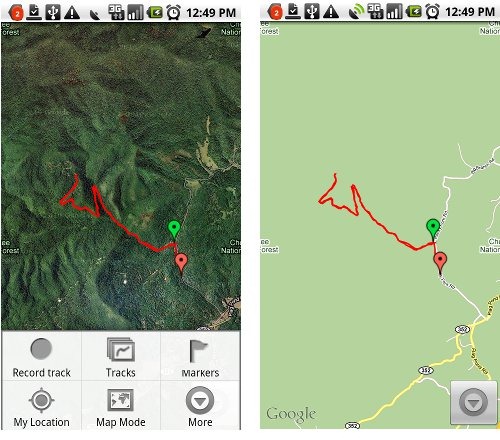
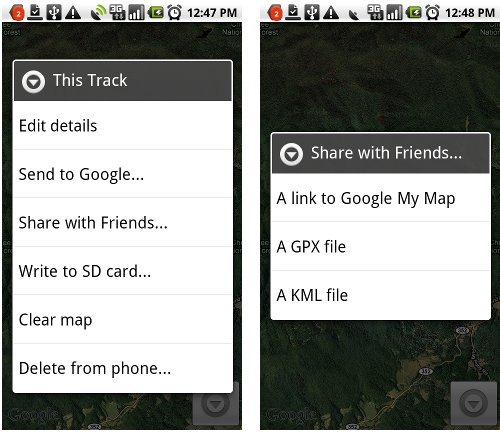
 My Tracks is a free Android app that allows you to record and share GPS tracks. Incredibly easy to use, it layers your track onto Google Maps or satellite view (as shown above). Getting the track off your phone is as simple as saving the track, selecting the drop down More button and then Share with Friends, which gives you the options shown below at right. The GPX and KML options attach the file to an email; I love how easy it is to send a track to my computer this way. You can also create waypoints (“markers”) with the app. My Tracks is not a navigation app, but it is a great way to share locations and check the GPS accuracy of your Android phone. I’ve included the QR code below, so you can use a bar code scanner to download the app.

 About Rich Owings
i lost my cell phone that is htc tattoo in my city only so could you please guide me to find my cell phone location
i have internet connection at house so please tell me can i find cell phone location by using internet
(edited to remove email address)
I suggest not including your email address in public comments unless you want a lot of spam.
You would need to have an app installed that allows tracking. Have you enabled Google Latitude by any chance? Otherwise, you could talk to your carrier, but I’d be surprised if they would help.
nice app. my wife uses it for jogs around the farm. Does the app work out in NW Montana where there is no service? i’m a wildland firefighter who sometimes needs to figure acreage or find a fire from a lat/long given to me by a helecopter. Thanks
jon
I’m pretty sure it does. Put it in airplane mode to test this.
The one problem you may have is that it will take longer to lock onto GPS without cell tower assistance. So plan on leaving it under open sky, motionless, for a few minutes. That will give you the best conditions for locking onto satellites. I’d be a bit surprised if it would lock on in a moving helicopter without cellular service.
Wish I could figure out how to get the Lat/Lon from my markers/waypoints.
Export it as a .gpx file and the data will be in the file. You can open it in a mapping program or a text editor.
This whole app is open source! Awesome
Just figured that out. I pulled down the source code. It compiled fine and runs perfect on my phone. I’m going to modify the marker/waypoint edit screen to display the coordinates.
I want to be able to load gpx i make in other programs, like Earth, into this. I’m definitely going to work on that
Sweet! Maybe you should release it as an add-on.
It would be nice to be able to edit waypoints the way we can in Google Earth. Then I can make waypoints for places I’ve never been. I’ll chip away at this on the side
what is the resolution of the recorded tracklog? is it per sec?
You can set a minimum time between points and a minimum AND maximum distance between points.
is there a way to automate the send file. I deliver with a tractor trailer and would like to have my days driving recorded and then upload to my PC through a bluetooth or wired connection (prefer not internet). I also would like to add notes at certain locations for the next driver and maybe a picture of the building.
I don’t think so. Interesting need. There are plenty of sites that let hikers do just that (e.g., EveryTrail, Garmin Adventures, etc.) but I haven’t heard of any for truckers.
thanks for sharing the post with us keep posting such nice informative articles. good work indeed.
I really loved reading your blog. I also found your posts very interesting. In fact after reading, I had to go show it to my friend and he ejoyed it as well!
I think this is an informative post and it is very useful and knowledgeable. I really enjoyed reading this post. big fan, thank you!
I think this is one of the most significant information for me. And i’m glad reading your article. Thank for sharing!
Thank you for such a well written article. It’s full of insightful information and entertaining descriptions.
It’s actually a nice and helpful piece of info. I’m satisfied that you simply shared this helpful info with us. Please keep us up to date like this. Thanks for sharing.