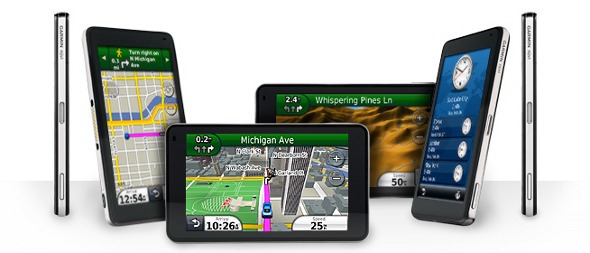
UPDATE: A new model, the Garmin nuvi 3490LMT, has superseded this one (despite the lower model number!).
Hands on with the best nuvi yet
The Garmin nüvi 3790T
Before we get into more details, lets look at some closely…
Related units
- Garmin nuvi 3790LMT – Adds lifetime map updates to the 3790T’s feature set
- Garmin nüvi 3760T – This model drops voice commands, 3D terrain and 3D buildings
- Garmin nüvi 3750 – This model offers even less, dropping Bluetooth and lifetime traffic from the 3760T’s feature set
What’s new on the 3790T
Form factor and display
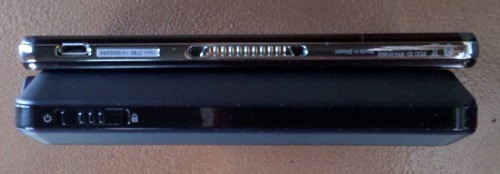
One of the first things you notice with the 3700 series is just how thin they are. You can see this in the image below, comparing it to my nuvi 765T. Also note the standard micro-USB connection (a cable is included to allow you connect it to the USB port on your computer). Micro-USB connections are becoming quite common as PNDs and mobile phones get thinner and thinner.
The capacitive glass display is beautiful, but is quite the fingerprint magnet; of course, these don’t really show much unless the unit is off. It is very bright, even in full sun. I’ve always found the nuvi series to have the brightest screens of any portable navigators, but at certain angles this model makes my 765T looked washed out.
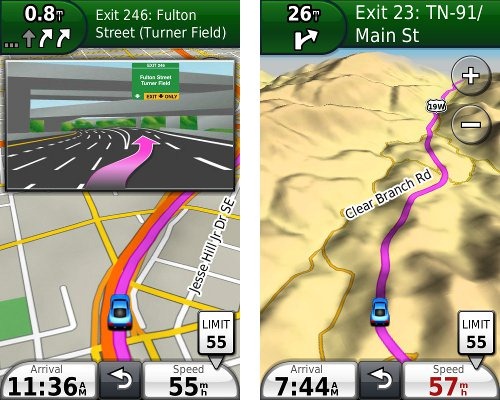
Also new is the built-in accelerometer, allowing the display to rotate and be viewed in portrait or landscape mode, as seen below. At left you see junction view, which comes up in split screen mode when in portrait orientation. To the right is the map view, giving you a peek at 3D terrain on the 3790T.
The screen is much more responsive than previous nuvis; tapping takes less pressure and dragging / panning the map is much easier. The multi-touch display allows you to zoom in by pinching or double-tapping. Here’s a video demo showing quite a few additional multi-touch tips:
trafficTrends
The 3700 series is the first to use historical road speed data in calculating routes, which should result in improved routing, especially in areas with routine traffic problems. I saw definite improvements in routing behavior over my nuvi 765T, with the 3790T sending me on locally known shortcuts and alternative routes, routing me on freeways where my 765T would keep me on a parallel road, etc. While I occasionally saw some wonky choices, for the most part the trafficTrends feature selected faster routes.
myTrends
This feature enables routine routing (home to work, work to home) to be automatically set at that time of day. This feature can be enabled/disabled under Tools > Settings > Navigation > Automobile > nuRoute > myTrends. I did not see this happen with my test unit but then, my schedule has been quite erratic lately.
UPDATE: It has also recently become clear that myTrends does more than just that. It actually learns your preferred routes.
New voice command interface
Garmin has dropped the awkward steering wheel remote found on the nuvi 8xx series units, opting instead for a customizable wakeup phrase to initiate voice command. Once you say the magic words, the following screen appears.
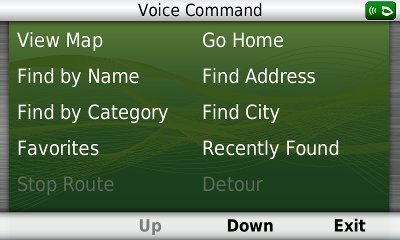
If you say or tap “down,” you’ll also see options for volume and brightness.
In some ways I found the voice command mode easier to use than on the 8xx series, with less delays while the unit processed the commands. However, many things seemed to work less well than on 8xx series units I’ve tested.
Some phrases were more difficult than others for the unit to understand – unfortunately for me, one of those was the frequent response “yes.” The good news is that after selecting a destination, you can say “navigate” instead. I found that I often had to repeat commands a second time for the 3790T to understand me.
On the 8xx series, you can use voice command for nearly any menu item on any screen. Your options are much more limited on the 3790T. I especially missed the familiar Near option, which allows you to search near your destination, along your route, etc.
Here’s a video showing the mount and a quick look at the voice command interface:
New speaker / mount
This is probably the loudest nuvi I’ve ever heard. Much of the reason for this is the powered mount which has a second speaker integrated into it. I generally kept the unit at 80% in my noisy truck and 50% in my somewhat quieter car. This despite me usually having music or a podcast going and the fact that my hearing isn’t the greatest.
New menus
The menus have changed a bit, and share a similar interface to those found on Garmin-Asus phones. In the sample Where To? screenshot below, on the left side are icons for menu, up, down and back. As with other nuvis, you can hold down the back icon to return to the main screen.
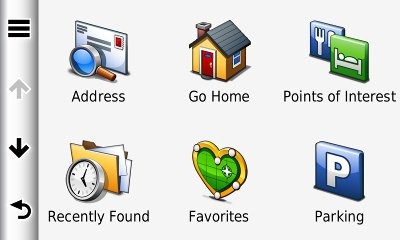
The new menus may take some getting used to. For example, consider this path for navigation preferences: Tools > Settings > Navigation > Automobile > nuRoute > Calculation Mode > Off Road.
More Street labels
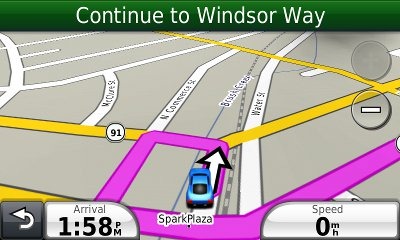
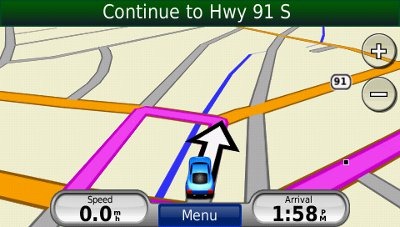
It appears that Garmin has finally listened to years of complaints by nuvi owners and started showing more surrounding street names. You can see this in the screenshots below; the top one is the nuvi 3790T, the bottom, a nuvi 765T.
3D terrain
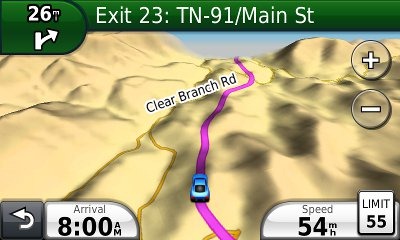
The 3D terrain imagery, found only on the 3790T model, is quite beautiful. I especially enjoy it in the mountainous terrain where I live and work. It doesn’t have that much functionality, but I like it!
Features from previous generation nuvis
In addition to the above, you’ll also find:
- Customizable data fields – Tap the left data field to see the options; these are different depending upon whether or not you are navigating. Only the left data field can be changed.
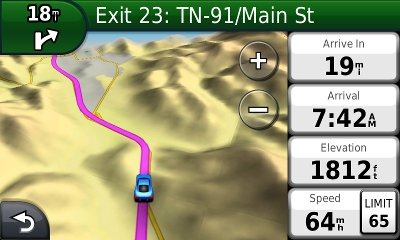
- Additional data fields (shown below) – Switch the data fields to the right side of the screen and get two additional fields which can be customized; you can do this from Tools. Settings > Navigation > Automobile > Map data layout > More data.
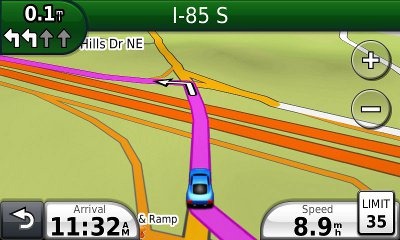
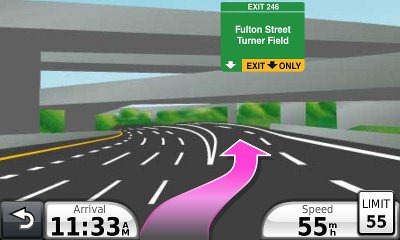
- Lane Assist and Junction View – These features (respectively) are shown in the two images below; coverage seems to have expanded somewhat too.
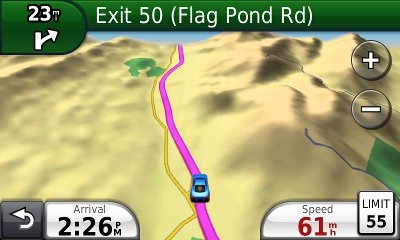
- Speed limit display and warning – In the image below you can see the posted speed limit and the fact that your current speed field turns red when exceeding the posted limit. In my testing, Garmin has had greater speed limit coverage for secondary roads than TomTom, though they also tend to be less accurate as to the posted speed limit.
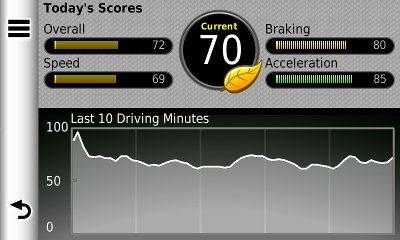
- ecoRoute – This feature adds a “less fuel” option to your routing choices and gives you fuel and mileage reports, estimated fuel cost for trips, and even a “driving challenge” to improve your fuel efficiency.
- CityXplorer map compatibility – These add-on maps offer advanced pedestrian routing options including mass transit.
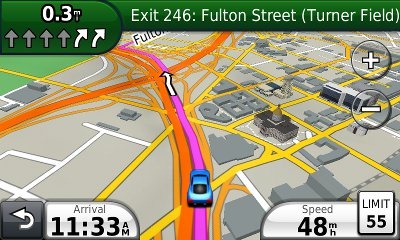
- 3D buildings (see below) – These show up in major metropolitan areas.
Navigating with the nuvi 3790T
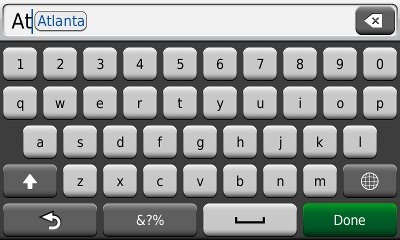
When typing a city or street name previously entered, you’ll see it pop up on the screen (shown below) after entering a few characters. Gone is the file icon to locate previously entered names.
The 3790T performed fairly well in all my tests. The historical road speed database, trafficTrends, generally resulted in superior routing, though it would have sent me on a slower route on at least one occasion. Still, it did so much better that I would definitely prefer it to a unit without this feature.
As a result of trafficTrends though, the 37xx series must crunch a lot more data to generate a route. This does result in a time delay. It was only a second or two for local destinations, but more distant ones took nearly 10 seconds for the initial route calculation (compared to just a second or so for my 765T). Recalculations took up to 7 seconds for long routes.
In local testing I expected to see missed turns when recalculating as a result of these delays, but didn’t experience any more than I did with my 765T.
Bluetooth
The 3790T paired with my Motorola Droid with little trouble. There are separate volume controls available for your phone and navigation once you make a Bluetooth connection — use the menu (three line/equalizer) button on the volume control screen.
The sound quality for the person on the other end of the line was disappointing though – fuzzy, tunnel-like and distant, and not as good as I would have expected on this unit. It is definitely inferior to my 765T, which has two microphone holes in the housing, probably for noise cancellation.
Multi-destination routing
The 3790T allows you to add multiple via points from Where To?, without going into the Trip Planner, but there is no route optimization option if you do it this way.
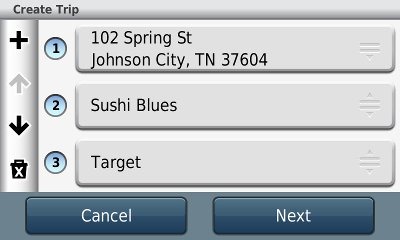
Alternatively, you can select Tools > Trip Planner to create a route. Once a route is created with a beginning, end and at least two via points, you can access the Menu for the options shown below.
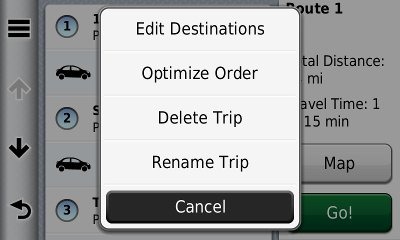
You can tap a via point to select an item and specify an arrival time or duration of stop. This is quite the useful feature. I plugged in the duration of several stops, the time I wanted to arrive at my final destination, and was able to easily determine when I needed to start my trip.
I have seen quite a few message forum comments about problems with multi-destination routing on the 37xx series though, and there do appear to be some bugs. For one thing, you can’t import routes from MapSource. For another, the handles on the right below are a little tricky. It’s hard to drag an item up in the list without starting to drag it down first. Route optimization also appears to not work very well. Hopefully Garmin will address these issues in a firmware update in the near future.
Nuvi 3790T hardware notes
A couple of things are worth mentioning here. First, you may think the power button is non-responsive. I had no problem powering the unit on or off once I started pressing the right side of it. Startup is nearly instantaneous, by the way, on the order of a couple of seconds.
To carry the earlier iPhone analogy a bit further, there appear to have been some compromises made in the GPS antenna in the 37xx series. I did notice it being a few seconds slower to lock on occasion. This could cause problems if say, you fire it up in an urban canyon with expired ephemeris data, because you hadn’t used the unit in the past few days. It did not however, cause any significant problems in my testing.
Lifetime Traffic
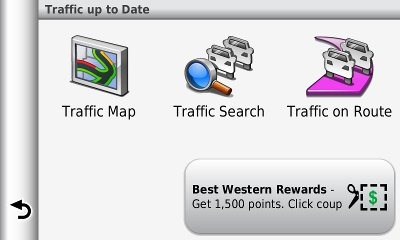
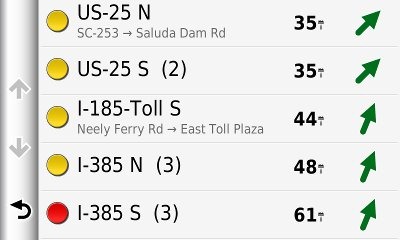
I do not live in an area with FM traffic coverage, though I did get to fringe reception areas while testing the 3790T. Traffic functions appear identical to recent nuvis and, as with all Garmin lifetime traffic units, the subscription is ad-supported, as you can see below.
Garmin nuvi 3790T pros
- Very thin
- Gorgeous, bright screen
- The loudest nuvi yet
- Terrain view
- trafficTrends historical road speeds result in improved routing
- More streets are labeled than on recent nuvis
- Improved junction view and lane assist coverage
- Voice command eliminates 8xx series remote
Garmin nuvi 3790T cons
- Voice command performance and options weaker than expected
- Disappointing Bluetooth performance
- trafficTrends results in increased route calculation time
- Slightly weaker GPS receiver performance than other recent nuvi series
- Multi-destination routing needs improvement
Conclusion and recommendations
Highly recommended — the best nuvi yet. The 3790T feels like a work of art; the screen is drop dead gorgeous. Routing has been significantly improved with the addition of historical road speed data (trafficTrends). I expect that a couple of my complaints (the missing Near option for voice commands and multi-destination routing bugs) can be fixed with firmware updates, but the core functionality is very good.
For the past year or so, it’s been hard to point to a top of the line nuvi, with the 765T, 885T and 1690 all being able to lay claim to the mantle. No more though – while a few features may be missing, it’s pretty clear that the 3790T is now the top dog. If I could only convince the minister of finance of the need to buy one!
Garmin nuvi 3790T reviews from other sites
- Amazon
- PC World
- TechRadar
- Engadget
- GpsPasSion
- PC Mag
- GPS Magazine
- Crowded Brain
- Stuff.tv
- WebSneak
- About.com
- CNet
- GPS Lodge
- Pocket GPS World
- ComputerActive

I’ll be posting more hands on GPS reviews as they appear, but in the meantime, here are some…
Other Garmin nuvi 3790T resources
- The Garmin nuvi 3790T owners manual, in the language of your choice
- Want to see how the 3790T stacks up against other models? Check out this Garmin auto GPS comparison tool or my own Garmin nuvi comparison chart
- There is a dedicated Garmin nuvi message forum at GpsPasSion
- And another nuvi forum at GPS Review
- The official Garmin nuvi 3790T web page
- How to access archived nuvi trip logs
- Five more tips for nuvi newbies
Compare prices on the Garmin nuvi 3790T at these merchants:
- Check the current Garmin nüvi 3790T
- Find the Garmin nuvi 3790T at GPS City, one of our favorite low cost vendors
- Get a great deal on the Garmin nuvi 3790T
at one of our premier vendors, BuyDig.com
- Buy the nüvi® 3790T
direct from Garmin
- Get the Garmin nuvi 3790T Wide-Screen Bluetooth GPS Navigation System w/ Multi-Touch, Lifetime Traffic & Voice Recognition
for a great price at TigerGPS
- Check out the deal on the Garmin nuvi 3790T GPS
at REI.com, where satisfaction is guaranteed and members get 10% back on eligible purchases
- Get the Garmin nuvi 3790T at GPS Now, where shipping is free on orders over $99 (and the upgrade to overnight shipping is dirt cheap!); order by 5 p.m. Central Time for same day shipment
 About Rich Owings
Hi Rich, first off, thanks for managing this site. Here’s my situation: I’m a road warrior in LA (CA) and a total GPS virgin. I’m on the road all the time and have always relied on yahoo/google maps. I’m at the point where I’m ready to make an investment in a GPS in the $200 – $300 price range. I really like this 3790T Garmin model, but $450 is a bit much. Other than price, my key criteria is live actual Traffic (not trends; living in LA this is critical) and I like the idea of Voice Command. What’s the best model, regardless of brand? (I was liking the TomTom’s but got confused between the different seris)
Personally, I think that Garmin’s voice command implementation beats every one else’s. If you don’t mind the steering wheel button / remote, you could go with a nuvi 855 and pick up a GTM 20 traffic receiver, and be well within your budget. The 3790T price will drop. I’d expect to see them discounted by $100 in a month or so.
Also, please note that live traffic is getting better and better, but you should still expect quite a few false positives and false negatives.
Rich, checked out that combo. The traffic receiver seems like an antiquated way of going about things. I’d like 1 unit that does it all. What do you think of the TomTom’s – with lifetime traffice and maps – for me needs – like the 740TM for $250.00 or so?
Almost all the units with traffic come with a traffic receiver that doubles as the power cord. The only way to avoid that is with a unit that has a cellular modem, but even then you would need a power cord.
The TomTom you mentioned will require an ongoing fee. Otherwise, it’s a nice unit.
Ongoing fee? I thought the TM was for Lifetime Traffic and Maps?
It will require an ongoing fee for traffic delivered via the LIVE services. The FM-traffic, delivered via the power cable, is the “free” lifetime traffic. But then you’re in the same boat as the nuvi 855 plus GTM-20.
I had a Mio GPS and decided to go for the best Garmin had. The 3790T is a good unit but I agree with the pros and cons above. I tried the Blue tooth and found the Garmin picked up to much road noise to be useful. I was also totally surprised to find the unit would not work with the Eco Route HD unit to get accurate vehicle data. The most expensive does less than the less expensive 1490T.
I *think* I saw that garmin is going to make ecoRoute HD work through a firmware update.
“I especially missed the familiar Near option, which allows you to search near your destination, along your route, etc.”
It’s there. Click the three horizontal line icon BEFORE choosing something like poi.
I meant while using voice commands. There’s no way to access it then is there?
You know what – you are right. It’s a different interface, and there seems to be no way to trigger that. Hopefully they’ll address that in a firmware update. That said, to anyone reading this – this really is the best GPS I’ve ever used, better than the Nuvi 855, 680, the StreetPilot C530, an old $1300 StreetPilot 1100 or something, a Tom Tom 740 Live, a Dash, a Magellan Maestro 4250, and many, many Windows CE PDA based software products. I do miss the promise of Dash’s crowd sourced traffic and the Dash or Tom Tom live search, but not nearly enough to want to replace this beautiful, powerful, fast unit. 🙂
Wow, high praise from someone who has tried a lot of brands and models. I’m currently testing a 3750 and remain very impressed with this series myself.
If by testing, you mean reviewing a Garmin provided unit, that’s one thing. If by testing you mean considering keeping, I would say for $50 more the 3760T is a must, if only for the lifetime traffic, which is still over $100 as an add-on). I bought the 3790T … because they didn’t have the 3760T in stock at the time, and I hate waiting, and my TomTom had just broke (thankfully).
I’m actually glad I did. While the 3d buildings aren’t visible in my area, nor is the 3d terrain (South Florida has very little in the way of hills that aren’t garbage dumps), the voice command is fantastic, especially if you go into settings and turn off the voice prompts, which greatly speed it up.
Going to Europe this fall, and bought the $10 CityXplorer for Venice, with this form factor, it will be nice to walk around with a navigator full of maps and POI for a scant $10.
Cool, I didn’t know you could turn off the voice prompts for voice commands!
Yep, Tools -> Voice Command -> Three Horizontal Line icon -> Settings -> Mute Instructions.
It’s unbelievably fast to use voice command with this on. Since the GPS is so quick, you don’t have to glance at the screen to wait for the prompt to go green, allowing you to speak – you can speak, and know it’s ready for your next spoken command.
I have found a bug, though. I’m updating firmware today (heard a new release came out yesterday), but it wasn’t on the list of fixes. When I’m on the phone, but disconnect the GPS and switch to a bluetooth ear piece, for as long as the call is on, the volume settings in use are the phone volume, not the navigation volume. Considering I have the overall system volume around 80%, with voice at 90% and navigation around 20%, this is quite loud, and intrusive. For now, I’ve turned off Bluetooth, and turn it on if I forget my headset. Quite annoying.
Rich,
In a month or so when the price drops on the 3790T, do you think it will come with the latest firmware updates or is this something that will have to be done by the consumer via download?
Thanks,
It depends on how quickly they turn around supply, but there’s a good probability you’d have to update it. The firmware updates are pretty painless though. Just install and run http://garmin.com/webupdater. It’s very simple; much easier than updating maps, though you should check those too…
http://gpstracklog.com/2008/06/upgrade-your-ma.html
I have a friend that lives in Chile, she wants me to buy for her a Garmin GPS to use out there. I don’t see any maps for Chile, are you aware if there are any ? No sense in me buying a GPS for her if there aren’t any maps for Chile.
If there are maps for Chile, what Garmin GPS should I get for her? She would want the best.
Thanks for any help you might be able to give me.
Roe
I do a lot of driving in remote areas of Arizona and New Mexico. I notice that my 1690 can take a lot of time to start showing a map and location when I power it up. While it eventually does show the information it takes noticeably longer in areas where FM and Cell reception are weak to non-existent. Do you do any testing in remote locations like this?
I would have thought that a GPS with preloaded maps would not take longer to show location. Apps on my iPhone and iPad have the ability to preload maps of areas with known weak signals so that they work quite well even where cell service is poor.
I’ve done plenty of testing in remote locations. I can see it affecting connected services, but not GPS reception or loading of maps. Have you updated your firmware?
Best practices for speedy reception:
– Frequent use (satellite lock will take longer if its been days or weeks since use)
– Wait until you have satellite lock to start moving. Driving before hand will dramatically slow lock.
These aren’t big issues normally, but if you’re in a mountainous environment or urban canyon, they can definitely have an impact.
Hope this helps.
Have you seen any news on the 3790LMT (with Lifetime Map updates included)? It was listed on Garmin’s website a week ago, but it looks like they took the page down as I can’t find it now. A new version that they’ll be introducing soon?
Looks like they’ve got a place holder for the page, so I expect it will be coming. I’d say by the holidays anyway, maybe much sooner.
Paid $500 for the nuvi 3790T and the Junction View does not work. I called and spoke to Garmin as this function is “supposed” to work out of the box on this unit. They claim it has been implemented sparingly across North America and if you want it, you will either need to pay $100 for lifetime map updates or purchase individual updates when it has been implemented. When asked where it did work, they said that information was not available, but could tell me where it didn’t work, when I gave them a specific city. Garmin stated to me it doesn’t even work in Kansas City, which is where their headquarters is. How can you sell a product with key functionality that doesn’t even work nor can it be tested in the area in which you operate……… VERY DISHONEST ADVERTISING – STAY AWAY!
I didn’t want to wait for the LMT version, so I bought the 3790T last week. First trip with it went well. Voice commands works ok for me, as does Junction View (at least in the Baltimore area). I did buy a Lifetime Updates subscription and update the software and maps first thing out of the box. The built in speaker make it very easy to hear in the car at highway speeds, even at 50% volume. At this point, I tend to like the vertical orientation better than horizontal. For a approximately $530 for the 3790T, Lifetime Updates, and a beanbag mount, I’m happy with the deal.
If you go to http://navteq.com, and zoom into urban areas, you’ll get symbols for intersections with junction view coverage. I just checked Atlanta around where I-20, 75 & 85 come together.
I am looking for a GPS with North America and Europe Maps, which also can help when I visit a new city. I also would like it to be very thin. Any recommendations?
Yes, check out the Garmin nuvi 1370T… http://gpstracklog.com/2010/02/garmin-nuvi-1370t-review.html
Or, if you want the latest and greatest (and thinnest), you can get the 3790T and add Garmin City Navigator Europe NT maps with a micro-SD card.
Hey Rich. First I have to say thank you for your wonderful reviews! I was wondering if you could explain what this talk about a LMT model is about. I thought if I bought the 3790T, lifetime traffic and maps were already included, for free. Can you explain how this works?
Lifetime traffic is included in the 3790T, but not lifetime maps. I’m not sure that clears it all up for you. Feel free to follow up with more questions.
Oh, ok. I understand. How much does it usually cost for lifetime maps? Also, how much more is the LMT model of the 3790 expected to be than than “regular”? I’m waiting until I see a great sale (probably won’t buy until Black Friday) to buy.
I am a newbie to a nav system. I just bought a new car and, due to all the info on how out of date and expensive the car manufacture nav systems are, I decided to go with a portable unit for now, which will allow me to take it on walks and not just have it in the car.
One of the reasons I want a nav unit is to get traffic info when I am trying to get somewhere and run into a lot of traffic. At home I pull up the WA state DOT cams and know where to go or not go. Is there anything like that for nav units?
When people are saying they want traffic, are they talking about being able to see where highways are crowded or not? and if you have lifetime, does that mean you get access to traffic but you need to update some software to get it? and you have to pay for it on top of paying for the unit? I do not ask thinking it is ‘wrong’ just trying to understand all the pieces of this new ‘toy’ in my life 😉
thanks for any help you can give this newbie.
TomTom and Garmin nuvi units (except for x85 models) with a T or LT in the model name feature lifetime traffic, meaning that you don’t have to pay an annual subscription fee. The cost is included in the unit. Such units can show traffic problems and can reroute you if they are severe enough. You do not need to update your software to get traffic, although its probably a good idea to keep the unit software up to date. There are no models that show live traffic cams, though we may soon see that in some smartphone apps.
Live traffic still isn’t all that good, but it is better in larger metros like Seattle. Even so, you can expect a fair amount of false negatives and false positive reports.
I just got my GPS friday. My Garmin Nuvi 3790T will not acquire satilites when it is hand held outside with no external connections. Does this mean that I always have to use it in a car with the supplied connector from the cigar lighter cable to the GPS? Is the only receiver in the cable not in the GPS unit itself. If so, how can one use it for walking near home or in the city?
Just to turn the unit on, it takes a lot of screen buttons to push. While you are driving, this is very distracting. Is ther any way to eliminate some of these?
The cable shouldn’t matter. That’s just for charging and getting traffic reports. If it works in your car, just try setting it down for a few minutes outside. It should lock onto satellites fine.
The first tip in this post is the best shortcut…
http://gpstracklog.com/2010/08/five-tips-for-nuvi-newbies.html
Of course since you have a voice command model, you could try some of those shortcuts.
I tryed again and after about seven minutes, the first satallite bar appeared. Then by about ten minutes I had three bars. Did not realize how long it would take. I tapped on the bars and got a satallite bar chart and a circle diagram of the satillite pattern. Was able to get the chart the first time, but now, I can not get it again Must be another way to get it, but can’t find it in tools. Back to the Owner’s Manual.
It shouldn’t take that long if you are outdoors and have used it for more than half an hour in the past few days (long enough for it to download satellite ephemeris data). Hold down the satellite bars for a few seconds and you should get that screen back.
Just ordered this unit. Should have it in hand by mid-week and look forward to test driving it over the weekend.
Previously, I owned the nuvi 885t and loved it. Apparently so did individual that stole it from my valet parked car.
So – – now for my questions:
1. My 885t was “bluetoothed/synced” with my Blackberry. When I go to Bluetooth connection options on my BB the link for the nuvi displays a # and then a bunch of digits. What do those digits mean, and will they help in locating the stolen unit.
2. At the time of purchasing the nuvi 885t, I also purchased the cd for european maps. Can I use this same cd for my new 3790T?
Thanx for this website – – –
Ooh, you’re gonna love the 3790T!
1. I think its a unique identifier, but I doubt that it will help with recovery.
2. Did you ever load the maps to the 885T? If so, they are locked to that device. You can buy another unlock code though. You could contact Garmin support, telling them the 885T was stolen, to see if they can transfer the unlock code to the 3790T, but I doubt it. The locked to one device rule probably stems from their relationship with road data supplier NAVTEQ, and I doubt that they have that much flexibility.
I’ve been reading all the threads on this site and they’ve all been very informative. I’m a current owner of a TomTom 920T. This is the first GPS system I’ve ever own. I’ve had it since it first came out just over 3 years ago. Surprisingly, it still works today. However, TomTom discontinued the RMS traffic application for this device. I can no longer use the antennas for it. This REALLY SUCKS! So now I just use it for map purposes.
I could connect it to my phone if it had internet access and get traffic that way. But my phone does not have internet access. I don’t what to pay the extra monthly bill. I want something where I don’t have to connect to anything. Something that has everything built-in already. I must admit; I’m a sucker for geography and my GPS is one of my favorite toys.
I’m looking to buy my next GPS device as a Christmas gift for myself this year. I must admit I’ve been doing my reseach and homework. I found out that TomTom is #1 in Europe and #2 in America, and that Garmin is #1 in America. TomTom and Garmin are the top 2 GPS manufacturers in the world. I’m looking for the latest and greatest out there in the market. The best I can find so far is the nuvi 3790LMT from Garmin. Should I wait a few months for one of the 2 manufacturers to come out with something better?
I found that I used my 920T (when I did have traffic) for traffic use more than navigation. It was great! I’ve even used it on the plane (when electronic devices were allowed to be used) and it would tell me my actual ground speed. Amazing!!! Yeah, I didn’t realize a commercial plane could go 615 mph at 27.5K-ft altitude. Seeing all the traffic on my route before I left my drive way. And it would update every 2 minutes. I really miss that. Now they have systems that have lifetime maps & traffic with no subscriptions needed.
What I’m wondering is when will they have GPS systems where you can use them ANYWHERE in the world? Even on the Ocean. When will they make GPS systems you can use on land, air, or sea?? You know; access to over 50 satillites globally. I guess that would mean the end of the GPS if they could do all of that. I’m talking about something that would put Google Earth to shame.
Will Garmin make a nuvi 4000 series? Maybe Rich can answer this one for me….
You can use a GPS anywhere now. But you would probably want maps for wherever you are.
I don’t expect to see new Garmin units announced till January, though TomTom could have something new come out in the next couple of weeks.
I’d be surprised to see something above the 3700 series in January, unless perhaps they add wifi to those models.
Hey Rich,
I noticed it didn’t mention this anywhere on the Garmin site, but how much internal memory does the nuvi 3790LMT/T have exactly? What’s its internal memory capacity?? How may gigabytes does the nuvi 3790LMT/T use???
Thanks for the review threads….
I’m not sure, but I know its big because of the digital elevation model. It does have a micro-SD slot for expansion.
can the 3790T be used on a motorcycle and if it can is there a handlebar mount
Yes, but it is not ruggedized, and isn’t waterproof or fuel resistant. Check out RAM mounts.
Advise to Larry: Check out RAM gps mounts. Trust me; you won’t be disappointed.
http://www.ram-mount.com
Hey Rich. Love your website! I was wondering if you could advise me on which Garmin GPS would come in second after the 3790T, in your opinion? I am waiting until the holiday season when prices decrease to mkae my purchase and would like a second choice in the case that the 3790T doesn’t come down much in price.
First of all, prices are typically lowest around Black Friday / Thanksgiving weekend. They generally go up after that. I’ll be tracking deals on my other site, http://bestgpsdeals.net.
As far as a second choice goes, much depends on the feature set you want. There are lower 37xx models, which I really like due to the historic road speed database and its ability to learn preferred routes. Or perhaps the connected nuvi 1690 or the new 1695?
Thanks for the quick reply.
I think a 5″ screen might be a little too big for me. So, even though the 1695 is a very nice option, I think I can eliminate it and narrow the options down to either the 3790T, the 3760T, or the 1690T. I ruled out the 3750 since it doesn’t include lifetime traffic.If they’re close in price, I would definitely go for the 3790T over the 3760T. Do you think those are Garmin’s three best GPS’s? Is their a HUGE difference between the 3790T and 1690T?
I was just browsing the Garmin site and saw that they have a new series coming soon- the 2000 series. The 2360 has all the features (as far as I can tell) as the 3790 EXCEPT the display type and it is not as thin. The display looks like it’s better than the 1690 and a little worse than the 3790. It is much cheaper though.
It says it’ll be released in the 4th quarter. I wonder if it’ll be on sale for Black Friday.
Newer units generally aren’t discounted as much as ones that have been out a while. Look for little discount on the 22/23xx series, more on the 37xx and big discounts on the 1690. There are always exceptions though.
I ordered the 2360lmt from Amazon back in Sept and now have had 4 different ship dates on it. I just got another one today saying it was now unknown as to when they would be shipping it. I went ahead and switched over to the 3790lmt at more money but at least it is out and available.
Yes, the myTrends and trafficTrends are a pretty big difference.
Ok so I think the best units in order of desirability are 1. 3790. 2. 2360 (if available, has voice command). 3. any other 3700 series. 4. 1690.
Would you agree?
I tried out the 3750 today at Best Buy and LOVED the screen compared to the 1690. I also decided, I wouldn’t mind a 5″ screen. But, the 1695 only comes with one year of traffic and is then $60 per year.
Sounds reasonable to me.
Does the 3790T include all of the Nulink services that the 1690T does? I am also curious as to how you think the 3790T stacks up against the 1690T?
No, the 3790T is not connected to nuLink services. To get the best of both worlds, get the just released Garmin nüLink 1695 model.
Between the 3790 and 1690, I’d go with the 3790 for the historic road speed database and its ability to learn your preferred routes — features also found on the 1695.
Santa, I promise I’ll be good of you “Make me a Garmin nuLink 3790LMT with wifi and the nuLink services are lifetime and free.”
There’s the perfect GPS!
Now a nuLink 3790LMT with wifi and free nuLink services is worth $500.
I find that TomTom has committed false advertisement with its XXL 540 WTE edition with the lifetime traffic and map updates. BUYER BEWARE OF THIS PRODUCT FROM TOMTOM!
TomTom has no disclaimer, small print, or warning of any kind that their lifetime map updates DO NOT INCLUDE THE MAP OF EUROPE!!! The average consumer is not aware of this. You would think LIFETIME map updates means lifetime map updates of ALL maps.
You’re right. I see *** by lifetime map updates on the TomTom site, but no explanation. On Amazon the *** directs you to fine print saying “Lifetime Maps available for the U.S., Canada, and Mexico only.”
I just hope Garmin takes notice of this and does not make the same mistake.
I have ram mounts for my video and still picture cameras but my main concern is the viberation from the handles bars.I just updated the maps for the GPS in the van and the GPS on the bike can’t be updated anymore.
It looks like many RAM motorcycle mounts have a rubber ball designed to dampen vibration.
Hey Rich,
Which retailers of the nuvi 3790LMT are sure to have a Black Friday sale for this particular unit?
No idea. We won’t know for awhile and the 3790LMT may not even be offered as a BF special.
Hey Rich,
Does the nuvi 3790T have a “map always facing north” option instead of the “arrow icon always facing north”?
Yes, but only in 2D mode.
Hey Rich,
Do you think the nuvi 3790LMT is still better than TomTom’s new Go 2505TM for the price?
Can’t say until I test one of the TomToms.
I have question about TomToms new Go 2405 & 2505. I noticed that both are limited to 4GB of internal memory with no SD or micro SD card slot for expandable memory. What happends when you update the maps with the lifetime updates that will require more memory? Is the GPS deemed useless once the memory maximizes??
Does anyone know???
Which manufacturer has the largest traffic coverage nation wide: TomTom, Garmin, or other?
I wouldn’t even begin to make a blanket judgment on that one! Here are links to coverage details:
Most Garmin units use NAVTEQ http://www.navteq.com/rdstraffic/
I believe TomTom is mainly using Clear Channel http://totaltraffic.com/coverageareas/
I really appreciate your honesty. Thanks!
Garmin: 98 cities of traffic
TomTom: 93 cities of traffic
Also realize that those lists and maps may or may not be up to date.
I want to know how to activate a fm traffic in my 3790T model that I just purchased from the garmin website. Also, does anyone know how to make the ecoroute HD (car diagnostic system adapter) work? It says the 3790T is compatible, but I cant make it work. Thanks. Ivan
You just need to have the power cord/traffic receiver plugged in and attached to the unit, and be within the coverage area. There is no activation required.
ecoRoute HD requires an add on to wirelessly transmit data from your car:
https://buy.garmin.com/shop/shop.do?pID=38354
Hope this helps.
Thanks for the answers. I got the add on and plugged in the car’s OBDII. I see the ecoroute hd led light on, but my 3790 doesnt connect to it. The gps is upgraded, so is there something I am missing. Hope you can help. Thx, Ivan
I assume you followed the instructions at http://www8.garmin.com/services/ecoroute/i/ecoRoute_HD_supp.pdf (PDF). If so, your best bet may be to call Garmin support (I usually have better luck with calls than emails on issues like this.)
Rich great review of this product by far. I’ve read the other reviews and now ready to buy. Thanks for your inputs and looking foward to getting my hands on this unit.
I used to play music in my old GPS (which is stolen from my car) in my car all the time and really miss it. I wish this expensive Unit had the same MP3 future.
Yeah, I did too. I guess it wasn’t that popular of a feature though. I don’t think we’ve seen it since the 7×5 series.
What is the difference between a 3790T and 3790LMT?
The 3790T adds lifetime map updates.
Hey Rich,
Is there a way to turn off the advertising adds on the Nuvi 3790T/LMT without turning off the traffic feature completely? The adds are annoying and distracting. Does any of the TomTom lifetime traffic units have the add “pop-up” issue? If TomTom is able to supply their customers lifetime traffic without the add pop-ups, why isn’t Garmin able to?
Nope, no way to get rid of them. As for TomTom, I don’t believe they have ads. I’m not sure about their business model on this. Since they own Tele Atlas, maybe the maps cost them less and they can afford to take a hit offering traffic.
I had a feeling there wasn’t a way to turn them off. Thank you!
Is there any way to set the unit’s clock to the exact minute? My unit allows only selection on 15 minute increments, but it’s never the minute that I want.
Where are you finding this? The time is based on the clocks on the GPS satellites and as such should be your most accurate timepiece.
Dear Rich,
Thanks for the prompt replies to my other questions.When do you think you will have tested the 2350/2360 nuvi’s.My choices are now down to 1450LMT,3760 LMT,and possibly the new 2360 LMT.
Thanks,Don
I probably won’t receive one to test until around the end of the year. I should have a 2200 model in hand before Christmas. Reviews generally tale around a month for testing and posting.
Hi Everybody,
I just have a new Garmin Nuvi 3790T.. when I first turned it on and it loaded the software the language of operation is all in Arabic (I purchased it in Middle east) Can someone guide me how to go to language selection from the home screen to change the languate to English. (you can mention the icons to make it easier)
Thanks and hope to hear from some one having this model or similar model (as like phones it might be similar in terms of language selection)Thanks … Connie.
Try this. From the start screen, hit the Toolbox icon. Then the Wrench, then the Lips. I’m looking at a 1695, but it should be similar. Once you do those steps, the first three fields are Voice Language, Text Language and Keyboard language. Hope this helps.
Enjoy reading these comments and seeing the newest and best. I’m always looking for a GPS with new features I can’t do without, but right now I have the Tom Tom 540TM and am very happy with it. This new Garmin seems interesting but it doesn’t yet come with lifetime maps does it? The screen may be beautiful but how often will you really be looking at it, unless you are the passenger ? I thought the Navigon 8100 always had the best screen. Keep up the great reviews.
Thanks David.
It’s actually is available in LMT version (lifetime maps+traffic). Check Amazon. Also, there is no comparison with Navigon, sorry, 3700 series’s screen quality has no peers right now among similar devices.
Right you are Gen. I must have been asleep when I answered that one.
http://gpstracklog.com/2010/11/garmin-nuvi-3760lmt-and-3790lmt.html
Hello. Need alittle help here. Just bought a (nüvi® 3790LMT )
today and did all of the updates plus the firware update.After this update my Nuvi is not functioning properly and some of the icons are not showing up properly. Can the firmware be rolled backwards or reloaded in some way.
Thank you for your time and help.
Dave
I would make sure the unit is fully charged and then try running the update again.
If you decide to revert, here’s the old file: http://www.garmin.com/software/nuvi37xx_regionfileonly__250.gcd
Here’s some info from http://forums.gpsreview.net/viewtopic.php?t=21369
“To backdate, connect the nuvi to the PC, then drag the file to your WebUpdater icon. If you don’t have WebUpdater, get it here:
http://www8.garmin.com/products/webupdater/howtoinstall.jsp
After WebUpdater is finished, disconnect the nuvi and power-cycle it. On the power-cycle, you will get the following message:
“The software on the device is newer than the software you are attempting to install. Installing the older software will erase all user data. Install the older software?”
Answer “Yes” and the nuvi will proceed to flash v2.50 to itself. Note that you’ll need to reset all your user settings afterwards. It’s also a good idea to clear all user data (hard reset) after the backdate:
On the moving map screen, press the Speed in the lower-right corner. On the trip computer page, press and hold the compass heading on the speedo dial just above the numerical speed for ~7 seconds. At the diagnostics page, press “Clear all user data”, then answer “Yes”.”
Hope this helps.
GREAT WEB SITE!
As the 3790 is 6 months old, are you aware of a replacement? I would like a state of the art unit and can wait.
Paul
There will probably be some new Garmins announced the first week of January. Whether there will be a new high-end model is unknown.
There is a 3790LMT just hitting the market now too. It’s the 3790 plus lifetime map updates.
So far, I think TomTom’s interface is more pleasing to the eyes than Garmin’s. It just seems much more crisper and cleaner. I like the traffic timeline to the side of the screen. I also find that TomTom’s traffic is more responsive than Garmin’s. That’s just my opinion…
Does the Nuvi 3790T/LMT offer alternative routing on its own if there is traffic like the TomTom devices do, or does it just show traffic and you have to choose an alternative route obtion on your own?
Yes, the nuvi will automatically reroute you. But I do like the fact that when TomTom detects traffic issues it says “you are still on the fastest route.” Reassuring.
I’ll wait and see what Garmin and TomTom comes out with next. I’m in no rush. Lets see if Garmin can top it’s Nuvi 3790LMT and TomTom can top its Go 2405/2505TM units. This could get very interesting.
@Dale, yeah the date keeps getting pushed back for some reason. Now it’s looking like it will be mid-January.
Just updated to the 2011.30 map. Before the update I thought I saw the phone icon on the moving map view, but now it’s not there although I could dial from the main menu. Was this due to the update? I like seeing the phone icon on the moving map screen so that I know my phone is connected while driving. The other thing is that when I end the call, Nuvi 3790 will drop the bluetooth and no phone is detected? If I tap on power to make it go to sleep, the connection is reestablished when it’s awake. Isn’t that strange? Please help.
The map update shouldn’t have affected it. Did you do a firmware update too? I’d run WebUpdater (http://garmin.com/webupdater) several times. Its possible you might get a Bluetooth update. Also, can you tell me what firmware version you have? On the 765T I have with me, its under Tools > Settings > System > About.
The firmware version I have is 2.60. I wrote to Garmin and they told me to do a hard reset, but that still doesn’t do the trick; I still don’t see the phone icon in the moving map screen and each time I do make a phone call through 3790, the bluetooth connection will be disconnect as soon as the phone call ends. Frustrating.
The current firmware is 3.60.
Are you sure? I have software version 3.6 but gps firmware showing 2.6. Why is it when I hook up my 3790 the webupdater and mydash both say my software and maps are up to date? If you do mean the GPS Firmware to be 3.6, then how do I force it to download it?
Hi Rich,
i’m really having difficulty picking between this and the new Tom-Tom go live 1000, which would you suggest and why?
Many thanks and happy New Year
I’d pick the nuvi, but I generally prefer Garmins. I like the 3790T’s thin form factor and its ability to learn your preferred routes. I found the US version of the GO 1000 a bit buggy, but the model you are considering does have HD Traffic, which might be a plus for you. That would be the biggest advantage IMHO.
@ Jenny M,
No, that sounds right. I’ve checked some other forums like this one but don’t see other reports of the issue…
http://forums.gpsreview.net/viewtopic.php?t=21369
Have you tried un-pairing and re-pairing the phone? Another thing to try is rebooting the phone.
Does anyone know if Garmin release a software update for the 3790xxx so the ecoRoute HD works? Also, how can I find out what information the OBDII when used with a car?
Thank you,
Yes, it is now compatible.
There are some links here to the manual etc., which may help with your other question…
https://buy.garmin.com/shop/shop.do?pID=38354
This may also help…
http://www.gpspassion.com/forumsen/topic.asp?TOPIC_ID=132371&whichpage=1
What are people’s experince with garmin 2460LMT and can someone provide comments comparing the 2460 with the garmin 3790 (i.e. differences/similarities, value, etc.)
I hope to have a review of the 2460LT posted in the next week or so. Theoretically, the 24xx series is a better value, but I’d wait for some hands on reviews.
Rich! Love your site. As a GPS nut myself, I love your insights.
1) Can you comment or have you reviewed the Pedestrian Mode using CityXplorer Map on the 37xx series? Feeling or thoughts?
2) Can you shed some light on screen size verses resolution. I see many with larger screens but lower resolution. So is it truly a fair comparison just on screen measurements?
I haven’t tried it with the 37xx series, but my general impressions are that (a) the routing isn’t perfect. It will get you there, but maybe not as quick as someone with local knowledge and (b) it’s a great deal if you’re travelling to a single city overseas.
5″ screens are nice, especially when using the onscreen keyboard. I don’t see a lot of advantages to the 37xx’s resolution. Given the choice, I’d take the 24xx series (but not because of screensize; I’d chose it for the feature set). Hope this helps.
Thanks again.
We are packing for a month long cruise to the Baltic. I’ve loaded the Europe maps to the Oregon 450T and CityXplorer maps to the 3790T. The 3D mapping in the 3790 is cool. Most of the sights we going to see including statues are in 3D, able to do a walk around. Like a previous poster note, it would be way nice if the Oregon had that functionality too. Do to battery life issue, I know I’ll be shutting down the 3790 at each stop along the way.
BTW: I can easily transfer waypoints from Base Camp to the 3790 but transferring routes doesn’t seem to fly. They just disappear. I can recreate the route as a multi stop trip but it’s a small pain.
Is there other software programs that work better than Base Camp or Map Source you can recommend?
BTW: I see people others jumping at the 24xx series, other than price and screen size, what features are you gaining? I see less battery life on the 24xx and no 3D buildings (which isn’t required to get you from place to place but has the cool factor). Thanks again Rich!
You’re gaining the ability to create custom avoidances and exclude roads on the fly. There are some other things as well. Details here…
http://gpstracklog.com/2011/03/garmin-nuvi-2460lt-review.html
Why won’t Garmin just release an uber-Premium device. Doesn’t have to be as think as the 3790, but man would I jump at a device wtih all of the features in both 24XX and 37XX, plus the NuLink connected features and a 37XX style high res screen. It seems like every couple of years they redo their device with a new “high end model”, and then release mid grade models in the subsequent months with features that never quite make it into their “high end”. I’m looking at the new detour features (new being relative) in the 24XX that I can’t do in my “top of the line” Garmin.
@MickeyLive – No. Garmin has promised an update to allow you to send multi-destination routes from MapSource, but it hasn’t shown up yet.
@Scott – I suspect they’ve found that they’ll sell more this way.
Well they’re right, but it still drives me nuts every time I “upgrade”. 🙂
I bought the 3790T to replace my 765T. I HATE THIS 3790T GPS. It takes Forever to acquire satellites when you turn it on. (Like 5 minutes sometimes.) It is WAY less sensitive than the 765 so it looses satellite reception in city driving. The routing takes FOREVER. (At least 3 times as long as the 765.) If you miss a turn the recalculation takes FOREVER. (Like you arrive at your destination before it finishes the recalculation.) The advertisement pop up windows always seem to happen right when you are making a turn and you need to see the map… (And you get a popup advertising a coupon for a discount to something you never want…) These advertisement popup windows cover the map so you can’t see it at critical decision moments. I don’t understand why a unit with 4X the resolution of my 765 can find a place on the screen to advertise that does not block the MAP! My 765 never had this problem.
I guess you can disable trafficTrends & myTrends… And you end up with a 765T for 3X the cost. I simply cannot recommend this GPS. I am selling it and keeping my 765T.
Sounds like a lemon to me. I’ve heard one other report of slow acquisition times. Are you in an urban canyon? Recalcs don’t sound right either. And I don’t see the ads coming up at critical times either. I’d contact Garmin. Something just doesn’t sound right.
This is my second unit. I took the first one back to the store and got another one. It acts the exactly same. I believe the only lemon is the engineer who picked a slow processor and a poor GPS chipset. I have contacted Garmin twice for help. Their advise was to turn off the 3D map view and disable the trafficTrends for faster routing. (And this does speed up the routing… But what’s the point of trafficTrends if it’s too slow to use…)
Cycling power on/off/on sometimes gets a faster satellite lock. But this 3790 just takes longer to get a satellite lock. The 765 is way faster and the GPS reception is superior.
Am I in urban canyons? Yes… sometimes. Sometimes I drive on country roads. Some times I drive on freeways… and yes… Sometimes I drive in the city. And all of my previous Garmin GPS products (765T, 2620…) all performed well in most of these environments. The 3790 does perform well in many situations. And the popup advertisements always seem to happen at the worst possible moments. The 765 had the same free traffic reporting system with popup ads… But the 765 did not put the ads up while you were moving and the ads seemed to block less of the map.
There is nothing wrong with the TWO units I have tried to use. The DESIGN is just a lemon. (In my opinion.) And I firmly stand behind everything I am saying.
One more thing… I what to confirm that I DO perform the software updates. In fact… I check every week or two. My unit has the latest firmware and the latest map updates possible.
I still have to wonder if you didn’t get two out of a bad batch. Recalcs for me aren’t very different from other units, unless it is a long route (a couple hundred miles). Then it can take 7-8 seconds. I wonder if Garmin would swap it out for another one (or better yet, a 2460LT).
About two weeks ago I bought a 2460LMT rather than a 3790 based on Rich’s very positive review of the 2450 and 2460. I strongly considered a 3790, but the larger screen on the 2400 series was a major winning point. I am very pleased with the decision after two weeks.
Since it it still Springtime in the Rockies (aka the mud season) I have not yet been far enough off-road to check its performance with no signal. Also it has not been hot enough yet to see how it does with high temperatures. Both environment were problematic with my 1690 causing frequent restarts and confused directions.