
Hands on with the Garmin GPSMAP 62s
It’s finally here… The Garmin GPSMAP 62s brings a long-awaited update to the fabled and much-loved GPSMAP 60CSx, which has reigned supreme as the gold standard handheld GPS for more than four years. During that time, Garmin experimented with new interfaces, first with the Colorado series, and later with the Oregon and Dakota lines. These have been fine-tuned through many software updates, adding things like paperless geocaching and
the ability to add custom maps and aerial imagery.
With the 62 series (and the boater friendly companion 78 series, which shares the same interface), Garmin has married the best features of the 60/76 models, with many of the advantages of the Oregon line.
The problematic high-resolution screens found on the Colorado and Oregon lines did not make it to the 62 series (although I should note that this problem has largely been solved in the latest model, the Oregon 450). Before we get into the details, lets look at some closely…
Related models
- Drop down a notch to the GPSMAP 62 and you’ll lose wireless data sharing, the barometric altimeter, tri-axial electronic compass and the micro-SD slot; still, this one has enough internal memory to satisfy most people’s needs
- Going the other direction, the GPSMAP 62st adds pre-loaded 1:100,000 scale US topo maps to the features found on the 62s, but with all the free maps available, there’s little reason to bump up to this model
- To see how the GPSMAP 62s stands up against other Garmin models, check out my Garmin handheld GPS comparison chart
I’ll discuss the display and feature set first, then look at performance
Portions of the following were adapted from my review of the previously released Garmin GPSMAP 78s and other units with shared features.
Garmin GPSMAP 62s display
With transflective TFT screens, the greater the pixel density, the less light that can be reflected back to the user. In order to maintain the bright screen found on the 60/76 series, Garmin left the resolution (160 x 240 pixels) alone. Screen size remains unchanged too, at 1.6 x 2.2”. The 62 and 78 series do enjoy an increased range of colors that can be displayed (65,000 vs. 256 in the 60/76 series). The result is a bright display, not quite as large or as high resolution as the Oregon series, but with much better visibility in a wide range of conditions. I definitely noticed the lower resolution, but these are the tradeoffs you make. The only time the screen seems cramped to me is when I have a dashboard showing on the map screen (discussed more below).
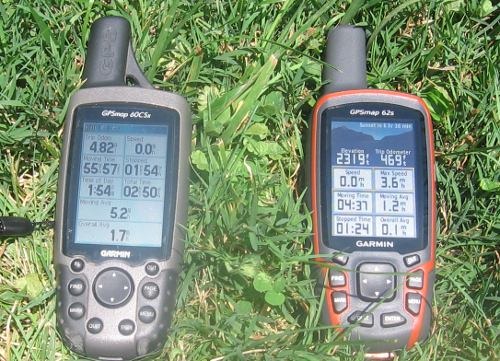
Shown above is a photo taken in full sun, without backlight, comparing the 60CSX and 62s. It is difficult to capture screen visibility on film, but I find these two displays comparable in a wide range of conditions.
Garmin GPSMAP 62s interface
Garmin hit a home run on the interface. They did an excellent job taking the best aspects of the Oregon series and making it work on a non-touchscreen unit. I think it is actually better than the Oregon except for when it comes to text-entry, where the touchscreen excels. The 62/78 series interface makes it much quicker to navigate main menu items.
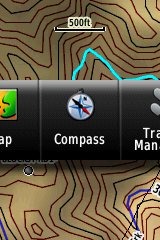
A Page Ribbon menu appears when you press the Page or Quit buttons (see image at right). Just like on the 60/76 series, these buttons advance through pages in forward or reverse order, respectively.
The Page Ribbon menu item that appears is the next screen in the sequence. After a second or two, that screen will automatically open. Or you can press Enter to go there right away, or continue pressing Page or Quit to advance to other pages in the sequence; stop on one and it will open. Page Ribbon items and their order can be customized. I prefer this interface to the old style, but you may not. In that case, you can set the unit to a classic style menu and get the old 60/76 series functionality, eliminating the Page Ribbon.
Here’s a quick video I shot, showing a bit of the interface:
Newer features on the Garmin GPSMAP 62s
The 62 series inherited a number of features from the Colorado, Dakota and/or Oregon series. These include the ability to utilize Garmin custom maps and BirdsEye aerial imagery, a tri-axial compass, new customization options, advanced track navigation, wireless data transfer and paperless geocaching. None of these were available on the 60/76 series; I’ll explore each in more detail.
Custom maps and BirdsEye imagery
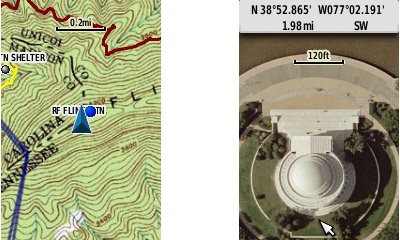
Garmin custom maps allows you to put just about any map image on the 62s. Found a PDF park trail map online? Add it to your GPS! The image at left below shows a custom map — a USGS topo (raster) image. You can read more about this feature by checking out my posts on Garmin custom maps.
With Garmin’s BirdsEye aerial imagery program, a $29.99 annual subscription allows you to add aerial imagery to the GPSMAP 62s. Since I don’t yet have a BirdsEye subscription for my unit, I’m showing a Jefferson Memorial aerial image using Garmin custom maps, but hey, you get the idea.
Tri-axial compass
Having a tri-axial compass means you don’t have to hold the unit level while navigating. The downside is that the calibration process is more complicated than that for a two-axis electronic compass. It’s the same procedure that is used on the Dakota 20 and Oregon x50 series — here’s a brief video I shot of it. The compass should be recalibrated every time you change the batteries in the unit.
Customizing the Garmin GPSMAP 62s
The 62s offers lots of options for customization. I highly recommend you take the time to set up the following.
Page sequence – You can customize the page sequence by choosing Main Menu > Setup > Page Sequence. This will allow you to select which pages appear in the page sequence and their order. The Page and Quit buttons move forward and backwards (respectively) through pages. I usually put the map screen as my first page and the trip computer last; this way I can toggle between them with the page and quit buttons.
Profiles – The 62s comes with recreational, geocaching, automotive, marine, fitness and classic profiles. You can switch profiles by going to Main Menu > Profile Change. Or create a new one by going to Main Menu > Setup > Profiles. Select the new profile to give it a name. Any changes you make in menus or other settings will be retained in that profile. So start changing things! Want track up when geocaching and north up when biking? No problem. How about a separate profile that just shows USGS topos or aerial imagery? The possibilities are nearly endless.
Data fields – You can change data fields on just about any screen that has these; simply press Menu > Change Data Fields.
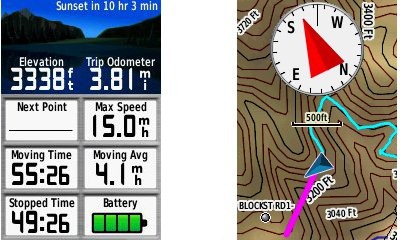
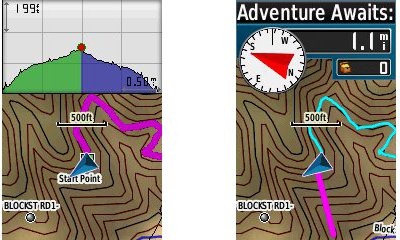
Dashboards – Instead of data fields (and in some cases in addition to), you can select a dashboard for the map, compass and trip computer screens. Choices (depending upon page) may include automotive, stopwatch, small or large data field, recreational, compass, geocaching or elevation plot. I’ve included screenshots showing the last four below. For the trip computer and compass pages, you access this via Menu > Change Dashboard. For the map screen, choose Menu > Setup Map > Data Fields > Dashboard. The one downside here is the small screen on the 62 series; using a dashboard can significantly reduce map real estate.
Track navigation
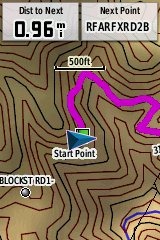
With the GPSMAP 62s, you can select a track to navigate and a route will be created. Waypoints are automatically generated for major high and low elevation points, and start and finish; these and any user waypoints along the track are added to the route. I’m a heavy user of track navigation. If I head out for a trail I’ve never traveled before, I do a search online for tracks (favorite search terms are .gpx, gps, trail name, and park name) and load the track to the device. One advantage of this new track navigation feature is that, unlike typical backcountry route navigation, you’ll get an estimate of actual trail distance rather than “as the crow flies” mileage. Screenshot at right.
Paperless Geocaching
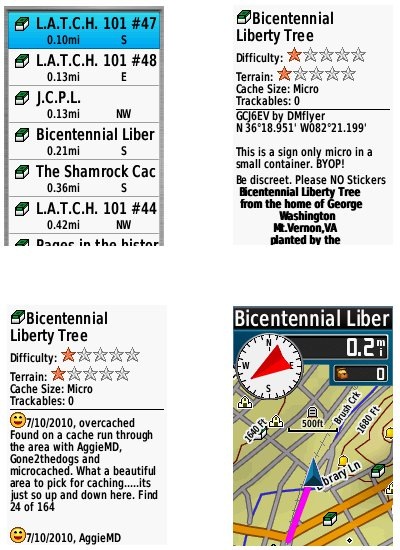
The 62 series is set up for full paperless geocaching support, meaning you can see the description, logs, and hint, and you can log your attempt (find, DNF, etc.) for later transfer back to geocaching.com. Speaking of which, full access to these features requires a premium membership at geocaching.com. Shown below, clockwise from top left: closest geocaches, geocache description, map with geocaching dashboard, recent logs.
Wireless data transfer
The GPSMAP 62s is capable of wireless data transfer with other compatible Garmin units. You can transfer waypoints, tracks, routes and paperless geocache details.
Other features of note
Most of the following aren’t that new, but they are worth mentioning anyway:
Route, Track and Waypoint management 
The GPSMAP 62 series has excellent route, track and waypoint management tools, including:
- Waypoints – The ability to project a waypoint, average location, set proximity alerts, and to reposition a waypoint at your current location.
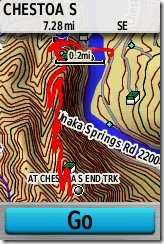
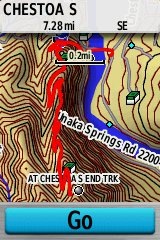
- Tracks – You can choose to hide or show multiple tracks on the map, view an elevation plot, and give them a custom color (17 colors are available). The image at the right shows a track in red (a record of a previous trip). The color of the active track may also be changed. There’s a good thread at the GPSMAP wiki that delves more into track archiving and storage. The 2.44 beta firmware update brought additional archiving improvements; hopefully this will make it to a non-beta release soon.
- Routes – You can view a map of the entire route, edit the route, reverse it and view an elevation plot.
Ability to utilize free maps
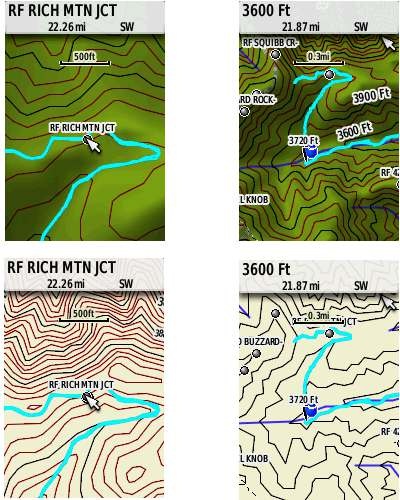
One of the most awesome things about Garmin mapping units is the huge number of free maps available. My favorite site for these is http://gpsfiledepot.com where you can find 1:24,000 scale vector topo maps for most states. You can see a sample in the bottom two screen shots below. If you want shaded relief though (shown in the first two shots), you’ll need to go with Garmin’s own product, either Topo US 100K or their new 1:24,000 scale series.
Auto use
While I would prefer the Oregon 450 as a dual use unit, due to its touch screen (which is significantly larger too), the 62 series is capable of giving turn-by-turn directions when loaded with City Navigator maps.
Under the flap and inside
Under the protective weather cap is a mini-USB port and MCX external antenna connection. Just so it doesn’t trigger questions, I’ll mention that the item beside the antenna connection is a screw. Inside the battery compartment is a micro-SD slot for additional map and data storage.
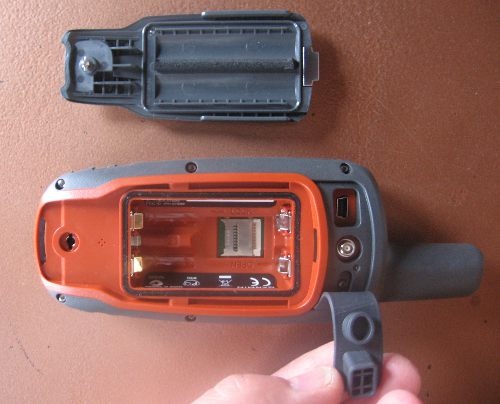
One hardware note here. The battery holders can be very tight with rechargeable NiMH batteries. I actually had to pry the batteries out of one unit I tested, though my wife could remove them with her amazingly strong fingernails! The batteries popped out of the other test units with a good slap, and I expect that even tight ones will loosen up over time.
Carabiner and mounting system
A rail mount on the back of the unit allows the included carabiner to slide onto the device (shown below). This is the same system used on the Colorado, Dakota and Oregon lines so the related accessories are interchangeable. I’ve heard some people say they don’t trust the carabiner mount, but after using it on my Oregon for a couple of years, I can say that I’ve never had any problems with it. Personally, I really like it and find it very convenient for clipping onto my pack.
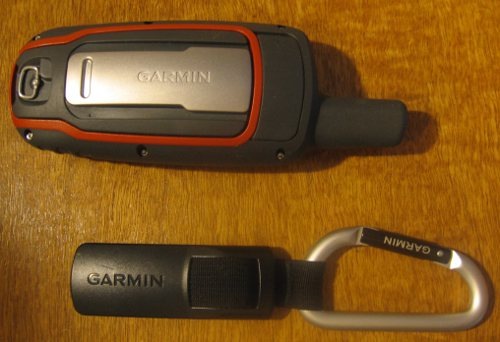
Garmin’s bike mount uses the same system, as shown below. I didn’t like this at first, since it’s just a zip tie system, but after a reader suggested using pliers (to pull the zip tie tight) and a screw driver (to press against the base of the zip tie slot), I’ve found that I can get it quite tight. I’ve never had a unit pop off the mount, though it is possible to slide it on incorrectly, so be aware of that. Also, low profile mounts such as this one seem much safer to the rider, in case of a crash, than ones that protrude.
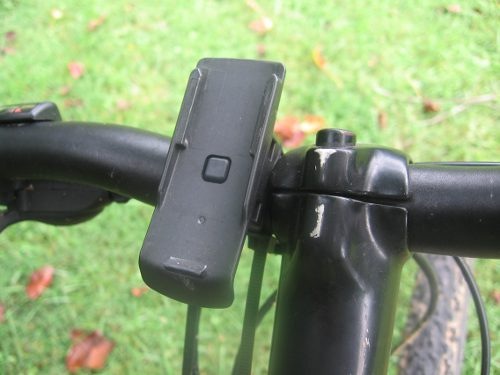
Auto mount kits that utilize this rail mount connection are also available.
Garmin GPSMAP 62s performance
UPDATE: The issues discussed below seem to have been resolved, and I am now very happy with my own 62s.
A tale of three units
I requested a GPSMAP 62s from Garmin and immediately put it on my mountain bike and went out for a test run. I was pretty shocked at the tracklog errors I saw. The unit also exhibited some abnormal behaviors just sitting still under open sky, with a lot of cycling between low and high readings. I talked to Garmin support, tried a hard reset – everything I could think of, but still saw these problems. At this point, I assumed I had a defective unit and arranged for them to send me a replacement…
Unit # 2 was better, but I still saw high accuracy readings (80’+) and some tracklog errors when mountain biking. I was seeing no such problems reported in GPS forums, so what was going on? Unlike the first one, the second unit appeared to be a pre-production model, further muddying the waters. I was beginning to feel pretty unlucky. Had I really received two dogs in a row? The sister unit, the GPSMAP 78s, had been so good. What in the world was going on?
Third unit and a theory
So I decided I needed another unit to test and, suspecting that Garmin might take a dim view of sending me a third unit, I went down to REI and plunked down my own money’; I figured I’d end up buying one anyway. When it gave me less than stellar results, a theory started forming in my oh too slow gray matter.
I never tested the 78s on my bike, because it didn’t work with standard mounts. Could it be that these new models had problems under canopy, at speed? While I was seeing wide swings in accuracy readings, the tracklogs looked pretty good except on downhill runs. After a couple of weeks of struggle, I had a theory to test. So lets break down performance by use and environment:
Mountain biking (speed + canopy)
Notes on methodology – Tracks were set up to record points every five seconds, WAAS was enabled. The 62s and my 60CSX were both mounted on opposite sides of my handlebars, in a position closer to horizontal than vertical.
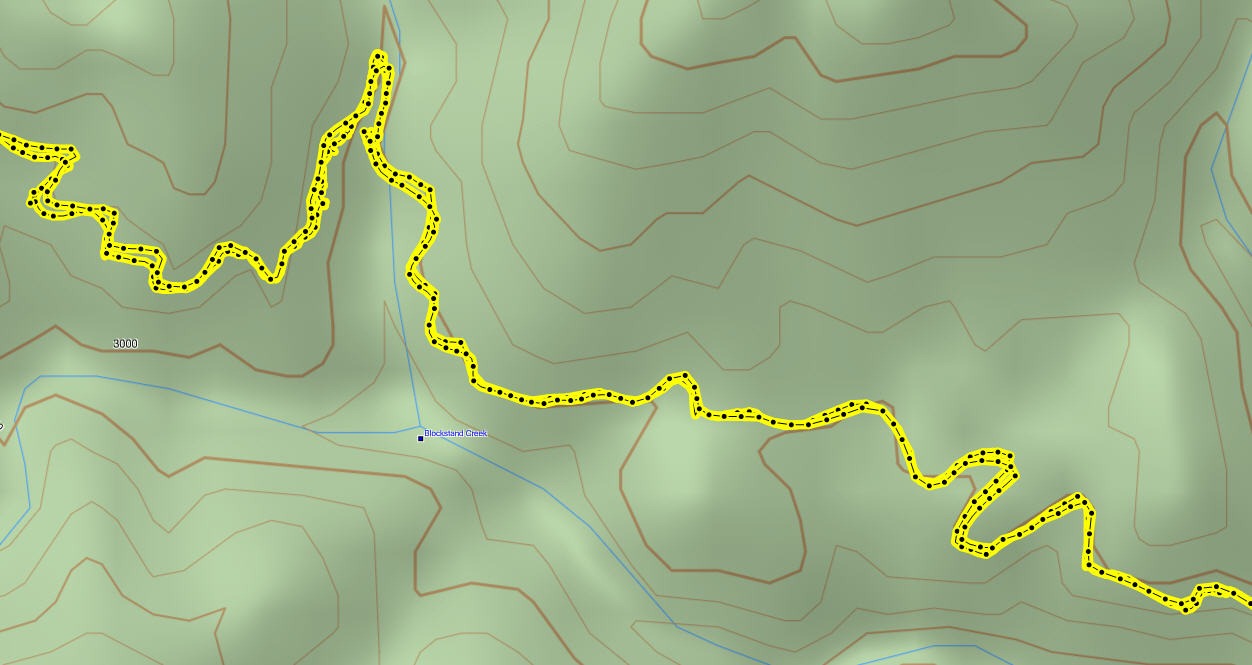
The image below shows a portion of the 62s tracklog from a representative out and back trip. On the downhill run there are numerous places where the track doesn’t match well with what was recorded on the way up. In one place the error approaches 250’.
Compare this to the same section of 60CSx track below, where track separation maxes out at around 65’.
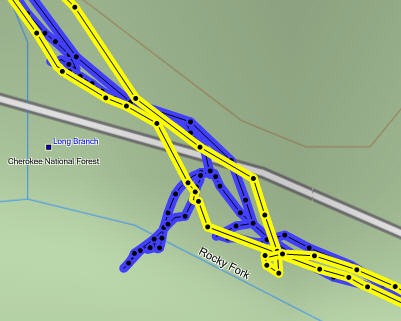
However, the 60CSx exhibited much worse spidering / scattering at rest stops, up to 150’ at one point, shown below (60CSx in blue, 62s in yellow).
Enter the beta
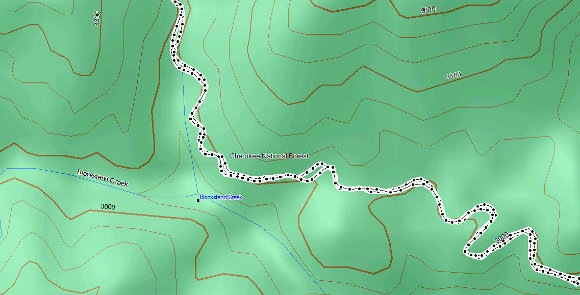
In my final round of tests before posting this review, I installed the 2.44 beta firmware, which also updated the GPS firmware to version 4.52. You can see in the 62s track below that these wild errors appear to be gone. I did see track separations of up to 110’ on the uphill and downhill runs, but nothing as large as the previous errors.
On the same ride, the 60CSx also showed track separation errors of around 110’, and once again exhibited significant spidering/multipath errors when stopped.
It appears that the 2.44 beta has significantly improved performance for mountain bikers and others who use their GPS receivers under canopy at faster than walking speeds. Except where indicated, the remainder of the tests discussed below were made using non-beta software.
Hiking under canopy
Here I used the same methodology I did when testing the 78s:
Recordings were made out and back, on foot, with the 78s in my right hand, and the 60CSx in my left. This meant that one unit may have been closer to a cut slope on the trip up, but the other unit was in this position on the trip down.
Tests were made in multiple locations. Basically, I saw more instances of tracklog separation with the 62s; these were in the 35-50’ range. I saw less of these with the 60CSX, but it threw larger variances, up to about 80’. And again, the 60CSx exhibited much more “spidering” when stopped.
Speed or canopy?
So going fast under canopy was problematic in my early testing, but going slow under canopy wasn’t so bad. How about speed alone? To test this, I stuck both units on my car’s dashboard and recorded tracks while driving. Both performed very well, though the 62s went off by about 70’ at one point. The issue appeared to be more about the combination of speed and leaf canopy, than about either alone, but again, it looks like the recent beta has largely fixed this.
Geocaching performance
I did some geocaching testing, but it is much harder to draw a conclusion here. Generally, the 62s put me a little closer and tended to settle down significantly faster than the 60CSx. One time, when standing 3 feet from a cache, it showed me 2’ away, with the compass pointing almost directly to the cache. Impressive! But alas, I am at the whims of the accuracy of the published coordinates when geocaching.
Battery life
I tested battery life using freshly charged Sanyo Eneloop batteries with the backlight off, and left it sitting under light canopy, undisturbed until the unit shut down. The unit was set to collect trackpoints every 30 seconds. The tracklog and total time data field showed that the unit ran for 17 hours and 59 minutes, a couple hours shy of the rated battery life of up to 20 hours.
Altimeter
In my most recent tests, with the 2.40 and 2.44 firmware, I found total ascent readings to be very accurate, on par with the 60CSx, which has always been my most reliable indicator of elevation gain. I was pleased to see this, since the Oregon series has bounced back and forth between accurate and inaccurate readings, depending upon firmware version.
Creaks and bugs
There have been a lot of reports on message boards about units that creak when pressed on opposite sides of the case. I have seen, um, heard this on each of the three units I tested. On the first, you could hear it when powering the unit of and off. It wasn’t as bad on the other two I tested. Whether this portends other problems over the life of the unit is unknown.
With new handhelds, you can typically expect some bugs in the early firmware. The 62s certainly has these, but many are minor or esoteric. One of the more common and unresolved complaints I’ve heard is that the reported battery level stays on full, and then drops to 3/4 charge shortly before the battery dies. Until this is fixed, when the battery level shows any drop, it’s nearly time to change to a new set!
Garmin GPSMAP 62s tips
I imagine there are more, but here’s a few tips:
- Use the zoom buttons to jump a full page in a menu
- When entering a name, the zoom buttons will switch between keypads
- You can create a custom startup message (e.g., if found, please call…) by connecting it to your computer and editing the Garmin/startup.txt file
- The 60 series header showing battery status is gone; you can check the 62 series battery level by briefly pressing the power button, but you may also want to dedicate a data field to it.
Garmin GPSMAP 62 pros
- Excellent menu system; fast access to features
- Bright screen
- Ability to load Garmin custom maps and BirdsEye aerial imagery
- Paperless geocaching
- Tri-axial compass
- Extensive customization options
- Advanced track navigation
- Wireless data transfer with compatible units
- Accurate total ascent readings
- Generally accurate tracklogs, especially with latest beta firmware
Garmin GPSMAP 62s cons
- Small, low resolution screen
- Text entry more difficult than on a touchscreen Oregon
- Relatively heavy (compared to Oregon series)
- Most units seem to sport a creaky case
- Firmware still seems a bit immature
Conclusion and recommendations (updated)
Updated to reflect my testing of production (non-beta) firmware version 2.50.
Recommended. Garmin has nailed the user interface, and the improved performance under the 2.50 firmware has eliminated my previous reluctance about tracklog accuracy. Is it as good as the 60CSx under any and all conditions? Possibly not, but it does show a lot less multipath error when standing still. And it seems to settle down a lot quicker. Those two factors alone could make this a great unit for geocachers.
The 62 series models are some of the best handheld units available today. If you’re sitting on a 60CSx and have been wanting to get a Garmin with new features like BirdsEye aerial imagery, custom maps, advanced track navigation, and paperless caching, it’s probably time to pull the trigger. The performance of the new models is pretty darn close to the 60CSx. You might want to wait for the price to drop a bit, but if you’re holding out for firmware nirvana, I can almost guarantee that when (and if) that day comes, there will be something newer and shinier waiting in the wings, with all the troubles we typically see on new units.
More Garmin GPSMAP 62s reviews
- GPS Information reviews the GPSMAP 62s
- A comparison of the 62s and the older 60CSx
- CacheMania reviews the Garmin 62s
- A New Zealand geocacher has posted a Garmin GPSMAP 62s review
- Free Geography Tools tackles the 62s in a three part review: Parts I, II and III, with conclusions
- A very short 62s review from a marine perspective
- A long distance biker reviews the Garmin 62s
- Using the 62s while sightseeing in Europe
- FellFinder has posted their own Garmin GPSMAP 62s review
- The Wirecutter reviews the GPSMAP 62s
I’ll be posting links to more hands on GPS reviews as they appear, but in the meantime, here are some…
Other Garmin GPSMAP 62s resources
- Trying to decide between the 62 series and the Oregon 450? Maybe this will help.
- The Garmin GPSMAP 62s owners manual
- This chart will show you how the Garmin GPSMAP 62s compares to other Garmin handhelds
- A Garmin GPSMAP 62 and 62 series wiki
- The official Garmin GPSMAP® 62s
web page
Compare prices on the Garmin GPSMAP 62s at these merchants:
- Check the current Garmin GPSMAP 62s
price at Amazon
- Find the Garmin GPSMAP 62s at GPS City, one of our favorite low cost vendors
- Get a great deal on the Garmin GPSMAP 62s 2.6-Inch Handheld GPS Navigator – World Wide
at BuyDig.com
- Check out the deal on the Garmin GPSMAP 62S GPS
at REI.com, where satisfaction is guaranteed and members get 10% back on eligible purchases
- Get the GPSMAP® 62s
direct from Garmin
- Buy the Garmin GPSMAP 62S Rugged High Performance Handheld GPS Receiver
at Tiger GPS


Art,
It is strange on what Garmin has done. If you contact Garmin, try to have a conversation with them. If the person on the other side of the phone seems to be ill prepared, simply thank him and call back later until you get someone who you feel comfortable with.
In days gone by — all of Garmin’s support staff were outdoor people who actually used the gps and understood our concerns. But like with everything that gets a big market share, they have to get people who are good customer service people but not exactly a gps user. Some have never hiked/backpack and used the gps to land navigate!
Patience is required, but you also have to know when you need hipwaiters. 62s users really need to take our concerns to Garmin.
Rich Owings does a great job, but only Garmin can directly address our concerns.
Rich,
You said “I’ve been doing sone ongoing testing of several Garmin units for elevation gain and hope to have a future post up on this subject, although I anticipate it will be a month or more before it sees the light of day.” On another post, you mentioned Garmin engineers. It would be great if you could expedite the tests you mentioned. And maybe you can change the language in your review to highlight the Total Ascent problem? Thanks for anything you can do. I’m calling Garmin tomorrow and report this problem.
I can’t believe they are not already aware of this problem. I’m doubting that Garmin will get to the bottom of this and own up to the problem.
I just went on a hike and got the follow numbers for distance and total ascent. Elevation page 6.95 miles and 915 feet, Review Track 6.7 miles and 1657 feet, Base Camp 6.7 miles and 1142 feet. This is just awful performance. Normally my Review Track elevation is lower than the elevation page.
Roy,
If you think that is bad. On your 62s after you save the track, call it up on the unit View track, press menu and it will take you to the data, miles hiked elevation and etc. for that track.
Also you need to calibrate your altimeter for each use, check your elevation on the altimeter page and or trip computer screen, then off the main menu check the satellite page. This page has the gps elevation. It is more accurate, but the number does not feed any other calculation.
Rich,
Check these numbers out. Yesterday, we did a local hike. I had my 62st and 2 of my friends had their 60csx. Here are the numbers from the hike:
On the 62st “trip computer” screen – it read 10.01 miles, altimeter page had 1,378ft for total ascent. On the 62st “track review” screen – go to the main menu, then track mgr, then view track for the numbers: 9.6 miles, and 2,348ft.
In BASECAMP the numbers were 9.6 miles and 1,760ft. But also review the other numbers for the track eg. time stopped, max elevation, etc. Then compare them with the trip computer screen on the 62st. Nothing is even close.
My friends 60csx read 9.8 & 10.03 miles and total ascent about 1,380 ft.
Go figure…
I have never trusted tracklog derived mileage or elevation gain. I’ve always found the odometer and total ascent fields on the device to be the most reliable. It sounds like the numbers on your 62s were pretty much spot on, no?
“run Basecamp and create a list in your collection that contains the waypoints you want (easy). Now go to Export > (your list) > .gpx”
Thanks for that. .gpx files don’t load into MAPINFO 8.5 and possibly not into later versions. You have to convert to .xls or .dbf.
Am not familiar with Basecamp.
I use Garfile, which automatically creates .mif files, which makes life very easy for the Mapinfo user. DNR Garmin, or at least the version I have been using, cannot cope with .gpx either.
I bit the bullet after asking around, and searching the web for two solid days, to find what might make the 62s “me-friendly” and bought a 60csx. The 62s is still in its box if anyone wants to buy it. I used it for a week and that was that. It cost me additional work for which I could not charge (searching the web, among other things) as it was my problem, not the client’s. I wouldn’t recommend the 62s to anyone; the 60csx is perfectly adequate.
As for GPSes in general; the British search and rescue service has been getting a lot more call-outs since people began using GPSes, rather than paper maps, for navigation . Funny, don’t you think? One still needs map-reading skills to use GPSes effectively, particulalrly when the batteries go flat.
Bob says:
Am not familiar with Basecamp.
__________________________________________
Wow, not even sure where to begin with this.
Basecamp is the free program that Garmin provides for the purpose of managing data on their GPS devices. Mapsource was their old program which is now discontinued.
A google search for “convert .gpx to .xls” gets lots of helpful hits, including GPS Visualizer which is a free website for converting various file formats.
I don’t know anything about Mapinfo, but was responding above to the notion that “GIS users” shouldn’t buy a 62 series unit. I would expect anyone who seriously uses GIS to be sophisticated enough to find the correct software to support these newer devices. Sorry if that was a bad assumption on my part.
.gpx is a standard that uses .xml files for exchanging data, has been around for awhile and is widely supported. If it’s not supported by your software of choice, I think your issue should be with the author of Mapinfo and not Garmin. Garmin has started using a file-based approach to storing data on their new devices, which is something that needed to be done to bring them up to speed with modern software and standards.
Old devices, like the 60csx use a Garmin protocol where the GPS actually “talks” to software running on the computer. The computer queries the GPS about its capabilities, then can request it to either send of receive data.
This was very innovative in the 1990′s when we were using serial interfaces and DOS, but kind of antiquated by today’s standards. Garmin no longer supports this system in their new devices. I understand the “if it ain’t broke, don’t fix it” mindset, but this system needed updating. It’s much faster to just copy files back and forth between the GPS, and it’s easy for third party software to support a file-based system regardless of platform (WIndows, Mac, Linux).
Of course, if the 60csx works better for you, go for it. But I think there are certainly ways you could use the 62s and enjoy the advantages of of Garmin’s newer devices if you just took a bit of time to understand how it works.
Just a thought on using the altitude capacity in hand-held GPSes. I have worked in situations where people have tried using the 60csx GPS to site drill rigs. Ho hum. When one finds that the drill-site is 90m above (and also below) the topography it makes one wonder. As noted earlier in yesterday’s post, no barometric system is going to mean anything unless you have totally stable weather or at the very least operate a base station barometer at a precisely surveyed location and read the variance in pressure every 1/2 hour, so that whoever is GPSeing around in the great outdoors has a possibly meaningful curve in barometric pressure against which to try to calibrate the GPS barometer. If you are under tree cover with the 60csx and the 62s do not expect dead-accurate location. Again, comparing GPSed locations of drill sites and trench sites with the same sites surveyed accurately by chain and compass from a properly surveyed base station shows that these two GPSes do not live up to peoples’ expectations all the time, even though the gadget may try to tell you otherwise and the manufacturer certainly will. The GPS is a very useful gadget, but it is not everything in accurate location-finding.
@Roy Carter,
I just had outpatient surgery Friday, and the doc is telling me to take it easy in terms of hiking and biking, so I doubt that the altimeter post will get pushed up much. I’m hoping I have enough field data in hand to complete a couple of reviews in the interim though.
When I wrote up my Montana 600 review, I criticized the performance of its barometric altimeter, which triggered this email response from a contact at Garmin (I’m posting this in hopes that it may help some of the folks following this thread):
“In our most recent Montana unit we have improved the functionality of the altimeter.We have now improved elevation detection with the one caveat that pressure changes can still slightly affect elevation until we detect that it is in fact only pressure that is changing.
To ensure your unit is working properly. Make sure the unit has a calibrated barometer. You can do this by letting the unit sit at a fixed elevation for at least half an hour with a clear view of the sky to let the elevation trend to the correct number, or manually calibrating the barometer so that the elevation is correct. If weather is adversely affecting your altimeter ( pressure is changing due to weather instead of elevation changes ), you may disable it by setting the device to “fixed elevation” mode which will use GPS only for elevation data.
If you want to check the Total Ascent/Descent data fields set the track log record interval to once per second. This records all of the elevation data used to calculate the Ascent/Descent data fields in the track log which can then be used as a good reference.
Another improvement that was made to Montana unit is that when a unit is held without moving the elevation field is much more constant. In previous implementations the elevation field could fluctuate while not moving ( which sometimes lead to adding erroneous Total Ascent/Descent on the unit ). We are able to filter some of this noise from the elevation data field now which in turn allows for a more accurate Total Ascent/Descent on the unit when you stop for periods of time along a trail.”
Well that’s great if I want to sit around for 30 minutes or so. But I use the 62st and not the Montana. But your text does point out that Garmin has decided not to use the satellite data for elevation data!!!!
Back to my original position, we want a way to disengage the barometer and let the satellite determine the elevation.
Setting the track record to one second does little good if you are hiking for 4 hours or more!
The world wide gps satellite system uses the time differentiation between the various “locked-on” satellites and the system’s clock. The clock’s accuracy goes 12 positions to the right of the decimal place. Some how I would venture a guess that this would be just a bit more accurate then the barometric pressure — just a guess?@#
The problem with using GPS-derived elevation is that it is much less accurate than horizontal positioning. Perhaps this is why they are leaving that option out of more units.
Also, once the tracklog becomes full, it will archive it, so you aren’t losing any data.
Boyd, thanks for your very helpful comments. Mapinfo is a very commonly used mapping/GIS software that still has the glitches that existed when the thing was built as a poor man’s alternative to Arcinfo in around 1993. Later versions have indeed added glitches.Software developers are usually imperfect, being human beings. I will check out your suggestions and see if I can reactivate the 62s and if so will take back all I have said.
Reading some of the worries about altitude and distance makes it sound like one is better off with paper maps…………
Cheers,
Bob
I called Garmin today asking about the difference in data reading for elevation, Total Ascent, Total Decent, etc for the 62s.
The Tech guy said there was a new software update, 3.90 that I should load onto my GPS. I had 3.80. He said the 3.90 deals with elevation…So I went to garmin and downloaded the new 3.90 software.
I was then anxious to do a test to see if this helps So I got in the car an drove about 15 miles up a large hill to gain elevation.
I go to my destination, stopped and then I matched my trip computer and elevation data to my Review Track data…They both matched fairly close, off by 20 feet only, which is tremendously better than it has been in the past.
Trip odometer was within .2 miles, Total Ascent was off by 21 feet, Total Descent was off by 7 feet…I can live and be very happy with this difference.
I am crossing my fingers that the updated software has solved the problem for the 62s.
Art
Art,
Sounds almost too good to be true! Your variation in numbers is no big thing, I can live with that.
I just updated to 3.90. I am looking forward to try it out.
Thanks Art for your efforts.
Dave
And it may be too good to be true. I’ve seen them fix the altimeter issue in one version and then break it in the next!
Rich,
You are really right on that count! At one time my 62st was dead on in all aspects when matched against hiking guides, topo maps and my trusty 60csx. Then somewhere around update 3.5 or so, things went to hell in a hand basket. Garmin is still struggling with this stuff.
Oh with 3.90, when I hiked this morning, the 62st said that my elevation was 1,345ft. But on the satellite screen read 646ft elevation. My 24k topo map — the closest contour line was 650ft. so which is more accurate???
Like I mentioned before, the one time I turned on my 62st, the altimeter read a negative 40ft! The previous hike was at 850ft, so I did not come back from the mountains or Death Valley. It was just another local hike.
So, satellite or barometer??? I’m still on the side of the satellite.
Point taken!
That accuracy is good enough for a nuclear-tipped cruise missile……….must be good enough for the bushwalker……….
Bob
Guys, I’ve got my fingers crossed for Art, but I went out yesterday with the goal of trying to replicate 62s readings and to see how the Elevation Page, Review Track and BaseCamp Total Ascents compared (this was with the 3.90 update). We’re still not there (at least not in a car; I plan to do more with a golf cart this afternoon). I have to do something else now but I’ll post more info later. If anyone would like to see my Excel spread sheet, let me now and I’ll email them the data. Right now, I don’t trust any of the TAs since they don’t correspond to basic elevation data from Google Earth and USGS maps.
Roy
I have never taken apart a GPS and have never really worried about the altimeter aspect as I figure that if I know my grid reference, I know within sanity my altitude from my paper map. I use both paper map and GPS professionally, every day for 4 weeks in 6 generally. If the GPS has a barometric altimeter then it depends soley on air pressure which depends on temperature and weather. You CANNOT expect a barometer to be an accurate recorder of altitude as air pressure can vary considerably during the day. Even if you set the barometer accurately at a known location and altitude before you go out for the day, unless you maintain another barometer at your start location, with readings being taken every half hour, you have no hope, irrepewctive of what Garmin might say, of being able to keep a reliable barometric check on your altitudes during the day. The best you can do is to use the variations in air pressure at your base station to plot a curve in air pressure variations at that location against which to calibrate your mobile GPS barometer. And even doing that will not be relible as local conditions, particularly in mountains, can vary considerably. So if you expect that your GPS barometer will regularly log your altitudes accurately, you expect too much of physics. If the GPS has an altimeter that works off satellites, then try using that on its own. But don’t expcect accuracy down to a few metres (particularly under tree cover or in narrow gullies). You need a differential GPS for that, and those are still somewhat slow, though they are remarkably accurate.
If you want to use your GPS barometer alone, you will have to stop at known altitudes, record the time, and get barometric altitude readings at those controlled locations, from which you can then construct a curve that can tell you what the variations are in atmospheric pressure. You can then use that curve to recalibrate your uncontrolled GPS barometric altimeter. Tedious and not worth the bother unless you are trying to survey something with your GPS. readings.
Here are my results (elevations are in feet). If this comes through garbled, there are three columns of information. EP means Elevation Page, RT Review Track, BC BaseCamp. TA is Total Ascent.
EP Avg. TA RT Avg. TA(% over EP) BC Avg. TA(% over EP)
Feb 21
Uphill 1,3,5 208 256 (+23) 228 (+9.6)
Feb 21
Uphill 7,9,11 105 123 (+17) 114 (+8.5)
Feb 21
Downhill 2,4,6 107 151.5 (+41.6) 119.5 (+11.6)
Feb 20
Uphill 1,2,3,4 110 145 (+31.8) 131 (+19.1)
Feb 20
Downhill 6,8,10 145 234 (+61.3) 191 (+31.7
Feb 20
Uphill 7,9,11 283 383 (+35.3) 343 (+21.2)
The Feb 20 readings were taken in a truck and the Feb 21 readings were taken in a golf cart. I can provide the distances and raw data in a spread sheet.
I submitted a complaint to the Garmin web site today about the discrepancies in the Total Ascent data from my 62s. Will post the results.
Roy
I did a test this morning on my bike with the 62s – those data numbers came in very close to the track that I just did on my motorcycle, so
I am only showing this current track.
First – I cleared all data fields and tracks to zero, calculated my Altimeter to a known elevation.
Here are my results: The numbers are greater on the Review Track Page and BaseCamp, which is a reversal since I updated to 3.90.
1) Trip Computer and Elevation Plot Page
• Odometer Trip – 9.89 miles
• Total Ascent – 632 feet
• Total Decent – 596 feet
2) Review Track Page
• Odometer Trip – 9.9 miles
• Total Ascent – 677 feet
• Total Descent – 681 feet
3) BaseCamp
• Odometer Trip – 10.0 miles
• Total Ascent – 672 feet
• Total Decent – 662 feet
My readings between the three different methods of recording are much closer than they ever have been since updating to 3.90. It looks like the Review Track Page and BaseCamp are the closes together.
This is only one test, but like I said, the test this morning was very close to theses figures. I realize a lot more test need to be done before I declare the 62s to be OK, but for now, I am somewhat satisfied.
One thing I have learned, the GPS is not 100% like I use to think. I bet if you did enough test you would find that the 60CSx has some flaws also. I don’t think many people have been dissecting this Total Ascent issue on their GPS like we have been doing on ours lately.
I would like to see this relationship of data done on a 60CSx. It would be very interesting to see if there were difference like on the 62s.
Percentage difference
Total Ascent:
EP to TR in TA = 93%
EP to BC in TA = 94%
TR to BC in TA = 99%
Percentage difference
Total Decent:
EP to TR in TA = 86%
EP to BC in TA = 90%
TR to BC in TA = 97%
Thanks. I will try to add the 60CSx to my testing.
EP = Elevation Plot Page
TR – Track Review
TA = Total Ascent
TD – Total Decent
BC = BaseCamp
If people want to test the accuracy of the odometer, I recommend going round in loops and seeing if your start point is the same as your end point. Then repeat the loops several times to see how your tracks and waypoints match.The ^)cxs will not give you exactly the same track and the end point is commonly some metres different from the start point. I have not really worried about that
From what I have seen of my 60csx I don’t really bother with altitude readings. What I have also seen of the 60csx is that it is not good enough to accurately survey and plot drillholes and trenches; the results, which have to repeatable to 1 metre at worst, are not so repeatable.
And as said before, if you are relying on a barometer in your GPS, you will be lucky to get accurate altitude readings.
The 62s data Art provided look pretty reasonable to me. I wouldn’t complain.
Bob,
Art’s single measurement looked pretty good. My 20 measurements paint a different picture (see the table in my earlier post). One of the series was off by an average of 61%. That result was an average of 3 identical replicates, where, for one of the replicates, the total ascent from the Elevation Page was 130 feet and the total ascent from the Review Track Page was 267 feet (over 100% off). That type of error and variability does not give me comfort in my 62s TA output.
I should mention that all the 20 or so tests I made were with normal sampling rate, version 3.90, barometer set in variable elevation mode, auto calibration on, and a recreational profile. The effect of barometric pressure changes should be nil since all of the comparisons were made within a two hour period on each day. In no case did I compare a number taken one day with a number taken the next day.
We are not concerned about distance measurements; those are very accurate and reproducible for the 62s. Our club bases its ratings of hike difficulty for the club database on total ascent. Right now I don’t know which to use, the 130 feet or one that can be twice as high. It doesn’t make much difference for 130 feet gains, but it does for 1300 feet gains.
I agree, you’re never going to get inside a meter error with a GPS. I’m just hoping for 20 feet or so, some consistancy, and a confidence about which output (EP, RT, or BC) is most accurate for total ascent.
Roy
I’m really glad to see these discussions about the poor performance of the altimeter of the 62s.
A year ago I wrote about this subject: I raised no interest in this forum and a moron of the Garmin Italy support suggested to install the latest SW (which I always do), make a system reset and, in case, return the device for repair.
According to my tests the problem lies with the calibration: it looks to me that the calibration gap is added as an altitude difference.
Let’s suppose your 62s reads 1000ft but you know you are at 800ft if you calibrate the device the 200ft difference is added to the total descent.
That way if you set the device for auto calibration the TA / TD becomes totally unreliable. If you use the manual calibration and do not calibrate during the trek, you get much more accurate readings.
If that is really the case the Garmin sw designers must be real genius!
The weather variation has a little practical influence in the elevation readings, at least here in Europe where we do not have tornados. For more than 40 years I used a barometric altimeter during my treks and the readings were never off set for more than 5% compared to my maps.
Now I also use a Suunto X10 and the difference TA – TD is never more than 2% at the end of a loop: definitely Garmin has some work to do with its SW.
As I already wrote in the past I’m disconsolately convinced that my 62s is an overpriced toy, no more than that.
Enjoy. Luciano.
Rich, sorry to hear about the surgery. Hope everything turns out well.
I just thought of something that might help out. You could set up a series of tests involving contributors to this message board. That way, everyone interested in the 62s could provide data from hikes and rides they are doing and all you would have to do is analyze the data. Announce a “user group” project where you would provide a spread sheet with elements to be filled in for various tests and ask people to provide actual data for subsequent analysis. You could send out an email to contributors to your message board inviting participation. The data files could be provided to anyone interested in analyzing it. I admit that I’m interested but I’m retired and have some time to devote to this. I realize a lot of people still work and could not participate.
You could ask for data on: type of test (mostly uphill, ups and downs, mostly downhill), Elevation Page total ascent and distance, Review Track total ascent, descent, max elev, min elev, distance, and Base Camp data etc. It would be important to ask for GPS settings such as sampling rate, software version, use profile, etc. so that the data could be separated into like sets. Other data as you see fit.
The beauty of this is that you could have all this data coming in and wouldn’t have to go outside your home/office to assess what is going on with the 62s total ascent discrepancy. I’m worried that Garmin is not on top of this, and I want to know which TA output is most accurate for my 62s.
How about it? I’ve got 20 sets of readings ready to send you.
Roy
Thanks Roy, but I don’t think I can take that on right now., My plate is pretty full. You guys are giving me some great ideas for testing though.
Well, guys, my frustration is back up there. I just don’t understand this 62s issue with TA.
Here are my latest figures. I lead a group to Pontatoc Ridge Trail today. Just when I was beginning to have confidence in the 62s – this!
250′ difference in just 4.3 miles. Why was it more accurate yesterday, but today on a shorter hike, so far off?
Now I am really confused!!! Garmin really has a problem – or maybe it is us, with this 62s, that has the problem.
I have got t say, all other function I have used on the 62s work good but the TA on the elevation Page leave a lot to be desired.
1) Trip Computer and Elevation Plot Page
Odometer Trip – 4.87miles
Total Ascent – 1431feet
2) Review Track Page
Odometer Trip -4.3 miles
Total Ascent – 1687feet
3) BaseCamp
Odometer Trip – 4.3miles
Total Ascent – 1685 feet
Review Track and BaseCamp were dead on, but the other method of measuring TA fails the test.
Art,
This past week, several of us Garmin users got together to do a local 10 mile hike. There was my 62st and 60csx(altimeters were re-calibrated), one 60cx and three other 60csx’s. Some re-calibrated their altimeters (with the closest topo contour/satellite elevation)and some didn’t. All had 24k topo maps, our contour lines = 10ft.
My 60 & 62 were set to record every 2 seconds, some were set to record auto, most points, and another 60 was set to record every 2 seconds.
My 62st recorded the most miles on the unit, and in track review, in MapSource and Base Camp = 9.4 miles, with a total ascent 1,231ft. But in track review total ascent read 2,358ft.
All of the 60 series units recorded 9.1 miles on the unit with 8.9 miles when you saved the track (only 500 points) but 9.1 with an uploaded non-saved track. This is typical for the 60csx.
The 60′s that recorded total ascent were around 1,250ft or so. But an un-calibrated unit recorded – get this 2380ft. Similar to my track review.
Outcome: We’ve seen this closeness a number of times. For now the current Garmin’s most recent update appears to work —
My observations… When you turn on your unit, give it a minute or two to acquire multiple satellites to get your best accuracy reading, Re-calibrate the altimeter to the satellite number OR the closest contour line on your topo map. Set your track record to every 2 seconds if you plan to hike 4 hours or more.
Let’s hope the current fix stays fixed.
Good advice and yes, lets hope it sticks.
I don’t know how your GPS is measuring elevation. If it using an inbuilt barometer which works off air pressure there is no way it is ever going be either reliable or consistent.There is nothing that can be done to correct this within the GPS itself unless it is either getting altitude from a satellite fix, in which case the barometer is redundant, or someone is periodically wirelessing your GPS the changing air pressures at known altitudes in your hiking area, so some algorithm in the GPS can do the correction inside the GPS-which isn’t happening.
If you are using satellites to get altitude then from what I have been told by those who use serious GPSes for altitude, you need a differential GPS. Last time I saw these used was in 2002, so I may be 10 years behind technology, but these things then had to sit at the same point for a couple of days to get accurate readings. Though we are talking millimetre accuracies, which is irrelevant to the hike.
I am interested to learn of the capabilities of the hand-held GPS in respect of altitudes derived from satellite readings, as is nice to know what precision is on offer. My experience has been that the precision has been somewhat imprecise. But forget using a barometer. Rather, use a GPS to get a grid reference and then look at the contours on your map. Nor is it hard to calculate total altitudes climbed and descended from paper maps. Probably just as accurate as the hand-held GPS if you have 10 to 20m contour intervals.
This is what Garmin has to say on the topic of accuacy…
________________________________________
Support
Frequently Asked Questions
How accurate is the GPS elevation reading?
02/02/2011
GPS heights are based on an ellipsoid (a mathematical representation of the earth’s shape), while USGS map elevations are based on a vertical datum tied to the geoid (or what is commonly called mean sea level). Basically, they are two different systems, although they have a relationship that has been modeled.
The main source of error has to do with the arrangement of the satellite configurations during fix determinations. The earth blocks out satellites needed to get a good quality vertical measurement. Once the vertical datum is taken into account, the accuracy permitted by geometry considerations remains less than that of horizontal positions. It is not uncommon for satellite heights to be off from map elevations by +/- 400 ft. Use these values with caution when navigating.
_______________________________________________
As far as the map itself, DEM (digital elevation model) is capable of proving very accurate high resolution altitudes. I have been working with LIDAR DEM on my own maps recently, and the USGS 1/9 arc second data has a resolution of about 10 feet per pixel. So you have a unique elevation value available for every 10 foot x 10 foot grid square on the map. Unfortunately, Garmin is not using this new data in their own maps.
I don’t think they’ve ever published a spec, but it appears to me that they use the USGS 1/3 arc second DEM in their 24k products which has a resolution of about 30 feet per pixel – still not too bad.
Garmin has never published their format for inserting DEM data into a map, and nobody has been able to reverse engineer it either, so only Garmin products will contain DEM data.
Boyd,
Great article… but the bottom line IS — I pay a lot of money to Garmin for them to figure this stuff out. I don’t care how difficult it is. Garmin has to understand the simple fact — I/we do not have intimate knowledge on how a car engine works, or how a computer does things or any other type of gizmo. That is for the manufacturer to figure out. And then we buy their product.
Maybe Rich has some better insights, but the inaccuracy of GPS altitude readings seems to be more a fault of the technology itself, or maybe the available chipsets, as opposed to something that Garmin can control.
My feeling is that, given the current limitations, you may get the best (or at least the most consistent) data by using one of the Garmin 24k map products that have embedded DEM data. As explained above, they should contain elevation readings roughly equivalent to a 30 ft x 30 ft grid. But that won’t account for every little bump or gulley you pass through. Now, if Garmin started using the 1/9 arc second LIDAR DEM, that would get you pretty close.
Or even better, if we could figure out how to put that data in our own maps, I’d make them myself. You can read elsewhere here about my work-arounds for that and the maps I’m making using this high resolution LIDAR data.
Yes, there are inherent limitations in terms of deriving elevation from GPS, exacerbated by the fact that the satellites aren’t in geosynchronous orbit. There are going to be good days and bad days. And others here have already pointed out the limitations of barometric altimeters. I’m not sure if Garmin uses DEMs for elevation calculations in all models or not, but they have started relying on it more in the Montana series, which they may be using as a trial before rolling it out to more lines.
Oh and here is the LIDAR post Boyd referenced…
http://gpstracklog.com/2012/02/lidar-based-maps-for-your-garmin.html
Thanks Rich. My second map in this series should be ready pretty soon; it covers the area around Acadia National Park in Maine. It uses my new system where each polygon on the map contains data for average elevation and average slope that can be displayed by “mousing over” or clicking on the map. Each USGS quad contains between 12,000 to 18,000 discrete elevation samples.
Unfortunately, this doesn’t get integrated with things like tracks or waypoints though, since we don’t know how Garmin does that.
Looking forward to seeing screenshots.
Guys, there are serious problems with the total ascent readings from the Garmin GPSmap 62s, and Garmin doesn’t seem concerned at all. I have 26 readings from a combination of road, bike speed, and hike speed tests that show a 40 percent average increase of Review Track total ascent over Elevation Page total ascent and a 20 percent average increase of BaseCamp total ascent over Elevation Page. I’ve calculated the standard deviation and the difference is not consistent. The estimates are not close to my friends who have a 60CSx. I have spread sheets with the data if anyone is interested. The problem is not changes in barometric pressure, alignment of satellites, etc, it is the 62s.
Roy, You are right. The 62s has a definite problem with calculating and displaying elevation gain or decent. Like you I have had numerous test and they all come out different and inconsistent, with nothing coming close to what my friend’s 60csx is showing.
It is frustrating because I don’t believe we are the only users out there that have found this problem and are calling Garmin for support or complaints. Garmin seems to be ignoring the issue or at least they are not fessing up to it. Surely they know what we know and are working on it. I just wish I had an idea as to what we could do to light a fire under them to give us some reasonable answers. I am at the point of almost giving up and just using the 62s to navigate my tracks and to get me back home. Maybe that is all we can hope for.
Art,
People with this concern really need to press Garmin. Get an incident report number. Follow up with e-mails via Garmin’s “Contact Us” e-mail and don’t let the good fight die.
Dave
The answer to the problem is to tell people not to buy the 62s.
Had a helicopter trip yesterday and had a look at what my 60cxs was doing in relation to the helicopter’s altimeter. Seemed to be around 150 feet higher than the helicopter for a good 20 minutes, and seemed to have this constant difference all the way in a gently descending track.I had no idea whether the GPS was doing it barometrically or by satellite, or how the helicopter’s altimeter had been set up. I have never attempted to set-up the altimeter in my GPS;I don’t worry about it as it is not overly important to me.
Well Bob,
I guess it is not that important unless you need to take the correct trail at a trail junction that the hike description says it is at 10,750ft, and you are on the side of a mountain and your altimeter is 200ft or so in error. THEN the faulty reading can be a problem. I guess the old saying is true… If you don’t have a dog in the fight, it doesn’t matter who wins.
Dave
Having wandered around mountains in several countries since around 1966, I have never worried too much about what altitudes my GPS has been giving me, particularly if I have been lucky enough to have been on a track. Paper maps and compasses usually solve many problems. Don’t forget, the Dinosaurs survived 150 million years without a GPS……………
The GPS is very useful for position in whiteout or heavy rainforest, or on absolutely flat ground in savannah and desert country, and if one has a paper map or a contour map in one’s GPS, the altitude gadget becomes irrelevant. Which doesn’t justify GPS manufacturers offering tools that are misleading and hence dangerous, particularly in these days when people are brought up to believe in electronic gadgets alone and reagrd them as gospel truths.
Proud to be a Dinosaur!
Bob
We have reported it to Garmin and have an incident number. So far the responses have been to calibrate the altimeter and do a hard reset. They won’t even use the term Total Ascent in the discussion.
Here is why the total ascent is important to me. Our hiking club uses total ascent as one measure of hike difficulty and have a 500 hike database. When we tell people that the climb is 3000 feet and it really is 1700 or 4000, we are not helping anyone decide whether the hike is for them.
I can accept the different readings, but I really want to know which of the three is most accurate.
Roy,
EXACTLY! Couldn’t have said it better!
Dave
ps Garmin just has to understand it now.
Roy, I forgot to mention that before my last message, I did a complete reset just like Garmin explained, but there was no difference. Still a large inconsistent reading.
I even changed my satellite setting to the newer, European mode (I forget what it is called) – no difference.
I am thinking that the total ascent and decent, may not be that important to Garmin for them to have to recall a lot of the 62s. I imagine that people buying the 62s for Geocaching is probably a larger market that us hikers climbing mountains.
What I have found since upgrading to the 3.90 system, is the TA on the Elevation page is much closer that the Review page, which is now, always very far off. This has been a flip from before.
