UPDATE: Read my full Insignia NS-CNV10 review.
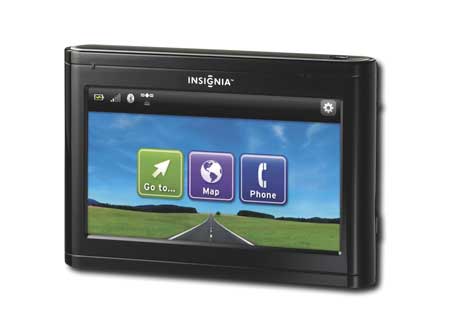
I've been spending the past few days getting to know the Best Buy Insignia NS-CNV10 GPS. This 3.5" model, like its bigger brother, sports text-to-speech, a cellular connection, Google Local search and no connection fees for the first year. The 4.3" model is pictured above, but except for the phone button (Bluetooth is found only on the NS-CNV20) it gives you a good idea of what it looks like.
The Insignia appears to utilize deCarta's Connected Navigation (CNAV) service. So far, the device has been fairly intuitive and has done a good job of navigation, recalculating quickly whenever necessary. And I love having Google Local search at my fingertips. I also like being offered multiple route options, though it sometimes takes a couple of steps to get to them.
Physically, the device is slightly larger than a Garmin nuvi, but much smaller than the bulky Dash Express, the only other GPS on the U.S. market offering built-in cellular connectivity. But the huge antenna array in the Dash seems to make a performance difference. Cellular reception with the Insignia has been spotty so far, though there seems to be some improvement following a firmware upgrade from 1.01 to 1.3.
And while the Insignia is one of the first units to hit the market with this level of connected services, in some ways it is far from state of the art. Consider the following:
- When you tap the top menu bar, it brings up the list of turn-by-turn directions. But regardless of how many turns you have already made, it shows them all, starting with your point of origin. Not very helpful if you're trying to look a few turns ahead.
- Multiple route options are slow to update too, often showing the original routes.
- Hardware-wise, the battery is rated at two hours, and there is a volume lever on the side. While it's nice to have such easy access to the volume controls, it feels a little cheap.
- You cannot view your current speed anywhere on the device.
- Satellite lock was very slow on a rainy day; I got a couple of miles down the road before it locked.
- Local search result lists give the distance to the destination, but not the direction.
- When I upgraded the firmware, all of my data (home, favorites, etc.) was lost.
- The unit doesn't automatically power on or off.
- Though the unit claims to "Auto Sort Multiple Destinations," I've seen no evidence of this. Perhaps this means something other than auto-sorted multi-destination routing.
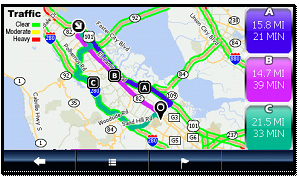
The screenshot above is a sample from deCarta. I haven't seen traffic info yet as I'm not in an area with coverage (NAVTEQ Traffic only covers 50 metro areas), but the multiple route options look exactly like they do on the Insignia.
That's it for now; I'll have a full review posted in a few weeks.
More info: GPS Navigation at BestBuy.com
 About Rich Owings
This thing is pure junk. Its the worst thing out there and you can get better for less. Tomtom has $99 GPS that is 100% better than this. If you search the reviews of all the negative things such as sound, directions, touch screen, etc … they are 100% true. I used this for about 20 minutes and went right back to best buy and returned it. No restocking fee and behind the counter were piles of insigna items returned and many of them this GPS system. They have seen majority ofthese bought returned.
I received the NS-CNV20 as a Christmas gift this year. While I don’t have experience with the smaller screened NS-CNV10, my understanding is that they’re essentially the same device, screens and Bluetooth aside.
In that context, I’d have to disagree with the previous comment, having had the (unfortunate) opportunity to use several different PNDs while traveling for work. Insignia’s device compares very favorably to the basic Garmins and TomToms of the world. The interface is a bit clunky at times (there’s a somewhat confusing lag after a button is pressed but before the screen is fully refreshed that makes it appear that you’ve accidentally made another selection on the next screen), but overall I’m more than satisfied with the usability.
The device profile is much more appealing as well, if looks matter.
Considering that this thing could conceivably be a low-cost Dash Express alternative (given cellular connectivity and Google searches), I’m encouraged. The nav software seems to be in its infancy, and I’m using 1.2 instead of the current 1.3 due to lack of an SD card reader, but the opportunity for hacks and/or continual upgrades in encouraging.
I mean, the upgrade process is, a) download firmware, b) delete old firmware on SD card, c) save new firmware on SD card. Insignia has rolled out the red carpet to any of those interested in building out additional functionality.
Glad to hear you like it. I’ve got to get back to it and finish my review.
i would agree with the second commentor. i got myself one and got one for my father for christmas. so far i have been quite pleased with it over all. i think one of my largest complaints would be that though they have an “option” to change the voice on the device there is only one voice available.(and being as that is one of my largest concerns it’s obvious i havent had many problems.)
im surprised that no one has mentioned one of the best features of this device. while the cellular connectivity is nice for traffic reporting(where available) and google searches, i have yet to read a review that mentions the google maps e-mail feature. this is one of the best features i have seen made available on a gps even trumping the onboard google search(which may or may not find what you are looking for) by allowing you to research ahead of time and e-mail the directions directly to your GPS.
i can see it being very usefull for an out of town spouse or business partner who needs directions quickly to a specific location(again, i’ve found the google search can be pretty vague, i couldnt even find “korean restaurants”) one quick call home and the at home spouse/business partner can e-mail directions directly to the device from google maps. i hope to see more features like this in the future.
deCarta’s CNAV is available in Canada, but it’s not available on INSIGNIA. DeCarta said it is upto BestBuy to “activate” this option on DeCarta’s CNAV service.
Too bad you can’t take a vacation “north” of the border with your new Insignia GPS! 🙁
Yeah, it’s unclear whether the recently announced Garmin nuLink service will work in Canada either.
I have the insignia ns-cnv10 and upgraded the firmware manually a few months ago, they are now saying you can’t update the firmware on your own. I think this is BS, another way to charge us. Anyone know of the site I can go to to upgrade my firmware on my own?
http://insigniaproducts.com/cms/files/CNAV_1.3_39879_35_prod.zip
ENJOY
🙂
Nice!
the firmware is available, but good luck getting Insignia/BestBuy support. They will not assist you over the phone on how to install the firmware.
1.Download firmware from the Insigniaproducts.com
2.Unzip the file and save it into your Mac/PC.
3.Remove SD Card from GPS (located on the side of the GPS).
4.Insert SD card into your computer. (generic SD Card Reader).
5.Delete ONLY the CNAV folder from the SD card.
6.Copy the new CNAV folder (from the new zip file) to the SD Card.
7.Insert the SD card back into the GPS.
9.Turn on GPS. The firmware updates on initial power up.
Enjoy
🙂
I just received this Insignia GPS as a gift. The instructions say to fully charge it for 3 hours before its first use. How do you do that when the DC adaptor plugs into your car battery. s there another adapto that I need to buy? I’m not planning a driving arond for 3 hours.
Thanks
just leave it plugged in the car adapter over night. It’s not going to drain the car battery and it will always be good to go. When you are driving, you can plug the plug out of the car outlet and let it run on it’s own battery while you are driving. I charge over night and drain it during the day.
I think it will be fine if you just charge it whenever you are driving.
It too bad Insignia/Best Buy don’t listen to their customer feedback.
This product would be so useful if BestBuy expanded it’s coverage into Canada using deCarta’s CNAV.
I guess I’m not having too good of luck with this. I carefully pulled it out of the cig. lighter and the head of it fell apart and when I tried to reach in and pull out the parts, I got a shock. I took it back and got another one just like the first. Hope it is better. Will let you know.
The Insignia NAv-01 was given to me when I bought my new car in December. Today I decided to use it. First it had to charge for 3 hours but it came with charger that is used with the car only. For me this is a real inconvenience. I do not drive very much on a daily basis – I use 1/2 tank of gas a month most of the time. In summer I do drive a little more and wanted to use this device on a trip I will be taking. Once I reach my destination I will be driving a short distance total perhaps of 30 miles/day. I fear I will drain the car battery using it to charge the GPS or that I will forget to unplug the GPS before I start the car as the instructions warn. After some of the comments about the charger falling apart in the cigarette lighter I would rather not use ut. Why wouldn’t they include a charger that can be used in the home? Why can’t I find a store with a home charger for the Insigna product and why can’t I use the cell phone charger?
Wow, they really say to unplug it before starting the car? I’m betting it would work fine with a cell phone charger. They don’t include an AC charger due to the cost and the fact that few people use them. I never do. I just connect my GPS when I get in my car. And I often have it connected when I start the car.
1st. you’ll note I’ve made several comments on this GPS over the past year.
2nd I’ve gone 12 times to BestBuy, Duluth, Fargo, Grandforks and Winnipeg asking for my FREE map updates.
3rd Not one store, geek squad or Insignia support could update the maps.
There is NO SUPPORT, NO UPDATES, NO PHONE SUPPORT for this product. BUYER BEWARE.
Rich,
Thanks for your comments. Yes, the instructions say to be sure to disconnect the GPS from the cigarette lighter before starting the car. I am going to try the cell phone charger. If it works fine, if it destroys the GPS fine. I’ll give it back to the car dealer. This was a “freebie” with a new car. I doubt I would ever go buy one. I’ve managed fine without one up to now and I have maps in my car in case I get lost. I surely do not need the GPS for everyday driving.
Carol
Let us know how it goes if you don’t mind. Personally, I wouldn’t worry about it being hooked up while starting the car. I did this plenty of times while testing the Insignia unit I reviewed.
I charged the GPS using my cell phone charger and it seems to have worked. I spent a few minutes trying to input a “home” address but the thing does not recognize it or another valid address. I need to take time to sit and fool with it a bit but right now, I’m rushing about here to get things together for my trip and to be ready for guests arriving very soon after I return home. I suppose I should opened the box when I got the thing last December. If I get the thing working I can connect it to the car charger, while I am driving.
Do you have to have internet to use this product? Or is that an option for it to do more adavanced things? In other words, if you just plug it in and go will it work?
PLEASE HELP:-)
It should work fine for navigation without Internet access.
Thank you for your response:-)
BestBuy sold the GPS for $80 dollars. I wondered at the time why it was so cheap, since it apparently was Internet connected and updates were simple. The reason the device was sold so cheap is because there is NO SUPPORT, NO UPDATES and once the subscription for the internet service expires, you are on your own. Be smart and ask the sales person to do a MAP UPDATE before you buy the device. THEY CAN NOT DO THE UPDATE because the files are not available.
I’ve returned to the store several times over the past year and no one was able to update the maps. This is why the device was cleared on at $80. Consider it a disposable GPS.
I just got back from a trip where I used a GPS for the first time. I got this free when I bought my new car in December. I charged it the first time using my cell phone charger. That worked. I entered my destinations addresses but it would not accept my home address or my mail box address which is on a main road where all the shopping is. Strange. I knew where I was going but needed help with one tricky spot and the GPS was great. When I got to my destination it got me where I wanted to go with no problems. On my return trip home, it told me to turn left when clearly I needed to continue in the direction I was traveling. But, I decided to see if perhaps the GPS knew a better way so I turned left. About 1/4 mile down the road it told me to make a U turn if possible. Low and behold just up ahead was a place to make a U turn. So I did. As I approached the intersection where I made the left turn on to the road I was on, I was instructed to make a left turn at the intersection. In other words, had I proceeded straight when told to make the left turn I would have avoided this U turn business. I have no idea what that was all about. When I got back into my own area, I wanted to go to a store and I decided to try a back road which I thought might get me there but never tried before. The GPS directed me to exactly where I wanted to be. So now I can try out more back roads. This Sunday I used it in the city and found it useless. I wanted to go from a town I am only slightly familiar with to the bus station in a city I don’t know well but had a sense of the direction I needed to go. The GPS wanted to put me on the turnpike which would take me through 3 towns before I could get on a highway to the bus station. All I needed to do was cross a bridge and navigate through the city. The GPS was not able to recalculate. All it wanted to do was get me on the turnpike. So I had to remove it from the window, away from a signal to quiet it down. I did get to the bus station after driving around for a little while. I got to see new things anyway. I suppose this device has a place in the world but I won’t be rushing put to buy another one when this one dies. I had trouble understanding what it was saying. When I have nothing to do, I will see if another voice works better. If you enjoy all the devices available now, I am sure you will like this tool. If you are like me and happy without all kinds of stuff and can read a map or ask for directions, you can easily do without a GPS.
The moral of the story is the MAP data in the insignia is not worth the money.
In the end buy a TomTom or a Garmin and get GOOD MAP DATA.
The Insignia data and route calculator is buggy to say the least.
Hopefully you will not judge all other brands of GPS but the Insignia quality.
I agree that the Insignia makes a great coffee coaster.
TomTom or Garmin thanks
Exactly.