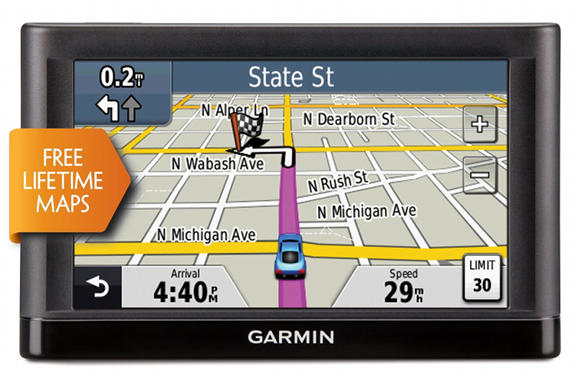
 Hands on Garmin nuvi 52LM review
The Garmin nuvi 52LM is one of the company’s 2013 Essential series models, and while considered an entry-level device, it includes features such as speed limit display, junction view and lane assist – things that were relegated to high-end models not that long ago. It’s a great choice for someone who needs a basic navigator without the bells and whistles, and it’s got an extra-large 5″ display to boot. It also comes with preloaded maps of the entire US except Alaska and lifetime map updates.
Related units
- The Garmin nuvi 54LM adds maps of Canada and Alaska to the 52LM’s 49 state map set
- The Garmin nuvi 52 has all the 52LM’s features, minus the lifetime map updates
- Or drop down to the nuvi 42LM to get the 52LM’s feature set in a model with a 4.3″ screen
- To see how the 52LM stacks up against other models, use this compare Garmin nuvi chart
What’s new?
The 52LM updates last year’s nuvi 50LM. Here’s what’s new:
Processor upgrade?
There’s not a whole lot new on the nuvi 52LM compared to the previous generation 50LM. I did notice a snappier response though, so it’s quite possible they’ve beefed up the processor a bit.
New style mount
There’s a new style mount and here’s a short video demonstrating it…
New interface style
Garmin has also polished the interface a bit, as you can see below:
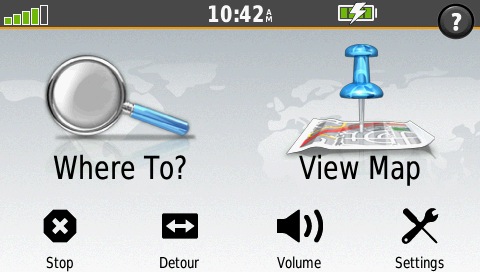
Garmin nuvi 52LM main menu
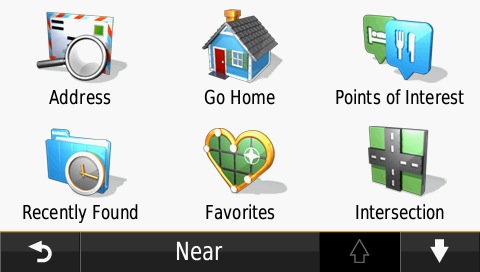
Garmin nuvi 52LM “Where To?” menu
What’s missing?
Why would you move up to one of the Advanced or Prestige series units? To get any of the following features:
- Traffic (you cannot use a traffic receiver with the Essential series)
- Multi-destination routing (with the Essential series you can only add a single via point)
- The Advanced and Prestige series allow for extensive customization of the Where To screen
- Ability to clear the Trip Log (shown below; you can hide it but the only way to clear it is to do a factory reset and clear all user data)
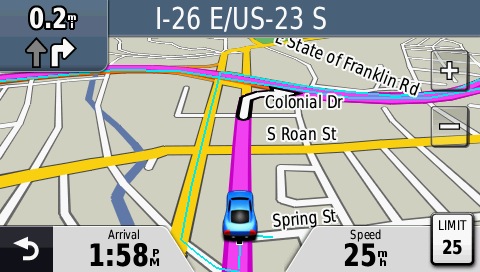
Garmin nuvi 52LM trip log (the thin blue line shows where you’ve been)
There are many other features found on the Advanced and Prestige series, but these are some of the more basic ones. The remaining differences will be covered in my upcoming reviews of those models.
Other Garmin nuvi 52LM features
More data
You can shift the data fields to the right and get two additional fields by selecting Settings > Map (scroll down) > Map Data Layout > More Data.
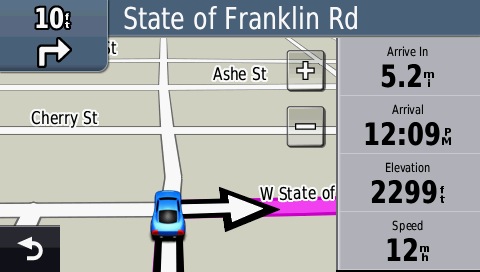
The “more data” layout
Lane Assist
This feature shows you which lane to be in for upcoming turns, as shown below in the upper left portion of the image below.
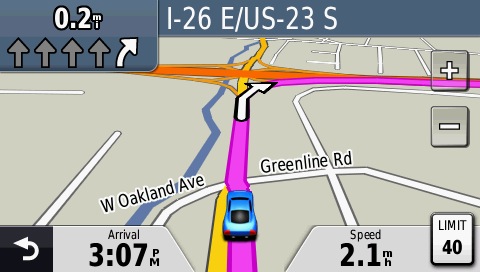
Lane Assist on the Garmin nuvi 52LM
Junction View
This split screen view pops up for many limited access highway exits. Note that the junction view images are generic and not the photo-realistic ones found on more advanced models.
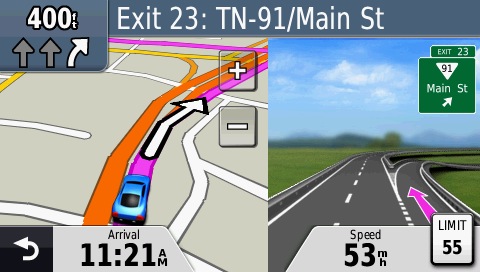
Junction View
Garmin nuvi 52LM pros
- 5″ screen
- Lifetime map updates
- Lane assist and junction view
- Speed limit display
- Speedy processor
Garmin nuvi 52LM cons
- While you can hide the trip log the only way to clear it is with a hard reset
Recommendation
Highly recommended. The only trouble I had with my test unit was that it wouldn’t connect to the computer once. But after I used it in the car, I was able to bring it in and connect it with no problem. This is a basic navigator but it has all the features most people will need. An improved mounting system and faster processor mark the most significant updates since the nuvi 50LM.
More Garmin nuvi 52LM reviews

I’ll be posting links to other reviews as they show up.
Other Garmin nuvi 52LM resources
- Want to see how the nuvi 52LM stacks up against other models? Check out this Garmin auto GPS comparison tool
- Or check out my own comparison chart for links to more reviews of Garmin GPS car units
- There is a dedicated Garmin nuvi message forum at GpsPasSion and another nuvi forum at GPS Review
- Our auto GPS FAQs, which includes quite a few nuvi tips and tricks
- A PDF version of the Garmin nuvi 52LM owners manual
- The official Garmin nuvi 52LM web page
Compare prices on the Garmin nuvi 52LM at these merchants:
- Check the current Garmin nüvi 52LM
price at Amazon
- Get the Garmin nuvi 52LM at GPS City
- Buy the Garmin nuvi 52LM
direct from Garmin
 About Rich Owings
Right now the 52LM is $40 more on Amazon than the 50LM. You highlight especially the snappier response time and a better mount for the newer model. Do you think these differences are worth the extra cost?
No. If I were going to spend $40 more I’d probably try to find the 2555LM on sale.
No going to argue with Rich’s answer, but I’ll give you a bit of a different opinion.
I haven’t had a chance to see the 52LM.
I did test the 2555 against the 50LM. Assuming the processor speed increase is similar – it was significant. I.e. with the 2555, I would start to type in a POI name and it would prompt me with it and route to the address in the same amount of time as the 50LM required me to enter the full name as was still searching for it.
I decided for that GPS to wait for the 2557LMT with active lane guidance and birds-eye traffic, but the 52LM and the 2555LM are roughly the same price now.
If the question is are the 2555LM or the 52LM worth $40 more than the 50LM – they would be to me.
Also look at – these have lifetime map updates, so you won’t have to buy a new GPS b/c of outdated maps, so that $40 increase can be spread over 5 or 6 years of usage rather than one or two years.
Forgot to mention – if you have the opportunity, go to Best Buy or similar where they have a 50LM and a 52LM or 2555LM on display. Doesn’t matter if they can see the satellites or not – pick a nearby POI that is fairly unique – I use my auto repair shop, and enter the name in both GPS’s and decide how much the time lag will bother you.
Rich,
I’m debating between the Garmin Nuvi 52LM for $150 and Garmin Nuvi 2555LMT for $140.
I know the 52LM is newer, but has less functions than the 2555LMT. Do the newer Nuvi’s only have a faster processing system.
Please help me pick the best one.
Thanks
I would go with the 2555LMT, to get the extensive customization options and Exit Services.
Thanks,
If I decided I wanted to get the updated version of that, nuvi 2557LMT, what is the big difference between that and the nuvi 2555lmt? Is it worth the extra $$ for the newer version?
It’s covered here under new features… http://gpstracklog.com/2013/04/garmin-nuvi-2557lmt-review.html
Rich covered most of the new features – additional ones are birds-eye junction view and active lane guidance with voice prompts. We were planning to hold out for the 2557LMT for my son, but prices on the 2555LMT dropped fast an we ended up going with that. The 2557LMT is typically $200, although I’ve seen it on sale for $180. The 2555LMT is currently $130 – maybe less. For $20-$30 more, I’d get the 2557LMT, for more than that, the 2555LMT is probably fine.
Will the Nuvi 52LM accept topo maps that would display stream crossings at roads? I could use this for trout fishing access. The Garmin website indicates topo maps are compatible with the 50LM, but doesn’t list them for the 52LM.
Thanks!
Yes it will — their list of compatible units is incomplete. All nuvis will accept topo maps. The Garmin 24K series is your best bet for being able to see topo features and navigate at the same time. Unless you can find a free transparent topo at http://gpsfiledepot.com.
Just got a Nuvi 52LM, now I can’t find a mount & the suctioncup one that came with it won’t work on my KLR650 motorcycle. I noticed it’s only .1 inches deeper than a Nuvi 50, would a ram mount for a Nuvi 50 fit the Nuvi 52?
Not necessarily. I’d wait on a 52 series RAM mount.
You should really contact RAM mount on this.
That said, I’m going to say it probably will work. I’m looking to get a 2557LMT to replace my son’s 205W (I believe that’s what he has).
I noticed in Rich’s review for the 2557LMT that he mentioned a new windshield mount for the 2557LMT and wanted to make sure that the existing Garmin Friction mount that he has for the 205W will work with the 2557LMT.
Basically, I found out that the new friction mount for the 2557 would not work with the 205W (according to Garmin), but the old friction mount for the 205W or the new one will work with the 2557.
So I think the new units are backward compatible (old mounts work with the new units, but new mounts don’t (at least directly) work with the old ones.
YMMV, etc.
It might have been this review and not the 2557LMT review – I just remember reading there was a different mount for the new models and wanting to check if my son’s existing mount was still useable with them and it is.
True for Garmin mounts, but RAM mounts don’t all use the ball systen that stock Garmin mounts use.
I wasn’t aware of that – that is good info to consider. Thanks Rich!!!
The Garmin mount (the gball on the back) is a 17mm ball, won’t work with Ram ball set up. I was looking at the ones that clamp onto the gps, kinda like a bracket assembly.
Rich,
I’m considering buying Garmin Nuvi for my 67 Corvette convertible for an extended road trip. Any recommendations between the 50LM and the 52LM? Also, your thoughts on ability to see the screen with the top down.
Thanks,
Rick
We basically covered this above, the 50LM was the 2012 Entry-level model and does okay. The 52LM is the 2013 Entry-level model. For the price difference between the 52LM and the 50LM, I’d go with a better 2012 model, such as the 2555LM or 2555LMT. i.e. 2555LMT is a better choice than 52LM. Now between the 2555LMT and the 50LM – it comes down to whether the extra features are worth the extra cost to you – they would be to me.
I agree with Tiger-Heli. But on the question of 50LM vs 52Lm, the 52LM seems to have a faster processor.
I was in the Eastern KY Mountains, using a NUVI 50LM when its “Startup Screen” froze. I was able to find and purchase a NUVI 52LM. Immediately I noticed a difference in the way the Map was presented. Roads were better identified/named and there was less other map detail shown (lakes, golf courses and such), which made it easier to sort through the screen’s road info / map and made it better for determining your “driving navigation”. The spoken instructions are better on the NUVI 52LM. The NUVI 52LM seems to provide spoken instructions with more of a sense to the speed at which you are driving and thus I noticed less missed / overshot turns. The pattern of the spoken instructions are better in the sense that the instructions are spoken as if someone understood that the NUVI 50 spoken instructions were often confusing, especially when you were in heavy traffic and could not glance at the map to “verify” your turns. The NUVI 52LM spoken instructions give a driver the details, in a good “Sentence structure”, at thr right time, where as the NUVI 50LM does not. When using the NUVI 52LM in a High Speed, Multi-road junction setting, it certainly out performs the NUVI50LM and makes it worth any difference in price. Also, my NUVI 50LM had always required me to push its keyboard and coordinate buttons, when entering data, in a rhythm that matched it’s internal keyboard button electronic scan rate (approx .5 sec).–this was very annoying! Finally: When I got back to my shop, I decided to see if others had a problem with their NUVI 50LM freezing at it’s start screen. I went to GARMIN SUPPORT and quickly found that they posted a solution for getting my GARMIN NUVI 50LM working again (stuff to download and tricky to do, but it worked). Now that I’ve revived my NUVI 50LM, my keyboard and coordinate entries can be performed without the need to pace my button pushes–it will now take entries as quickly as I can press the keys. I still feel that the NUVI 52LM is a better driving aid and worth the extra cost over that of the NUVI 50LM. I used the NUVI 50LM for over 1/12 years before it acted up and then made the emergency purchase of the NUVI 52LM and immediately realized that the NUVI 52LM was a much better version. Buy the NUVI 52LM, it will not agrivate you like the NUVI 50LM does when the roads are a spiderweb of junctions and traffic is going way to fast for you.
Do both the devices recommended work with a windows 7 64 bit computer? Having to scrap 2nd TomTom in good working order because I cannot make it connect to my computer.
I have seen sporadic reports of issues with Garmins and 64 bit Windows, but those seemed to be early on. The Garmin USB drivers and Communicator plugin are 64 bit compatible. Be aware that newer Garmins don’t show up as mass storage devices though: http://forums.gpsreview.net/viewtopic.php?t=26385
A couple comments …
I’m going to refer more to the map update, but if you can update the maps, obviously you can connect the GPS to the computer.
I use Win XP still, but I have read of people updating with Windows 8.1 pre (I assume 64-bit), so I don’t think that is an issue.
However, the preferred (by Garmin) application is Garmin Express and I (and many others) have had issues with that. Garmin MapUpdater has worked flawlessly for myself and others, but I typically have both installed and try Express first.
I have a question for Rich or anyone who can tell me. I’ve never owned a navigator before but am in Europe for three months and it costs nearly 10 euros a day to hire with one with car hire. I like the Garmin I borrowed for a few days and have just bought a Garmin52LM for Western Europe but I’m worried I won’t be able to use it when I go back to Australia. It cost 129Euros which is a lot of money for me (though clearly less than if I rented one :). I’d just like the reassurance that I have in fact bought something I’ll get lasting use from. thank you in anticipation.
http://forums.gpsreview.net/discussion/28222/osm-on-nuvi-52lm-/p1
I was hoping someone else would answer this and so far nobody has. I was curious as I don’t know the true answer myself. I’m also not sure the blog allows the answer.
From what I can tell – if you can load Australia maps to the Garmin 52LM, they will work fine on it.
https://buy.garmin.com/en-US/US/on-the-road/automotive/2013-line/nuvi-52lm/maps/on-the-road-maps/city-navigator-nt/city-navigator-sup-sup-australia-new-zealand-nt/prod116482_010-D1257-00.html – You can buy the Australia maps, but they don’t have the junction views or pre-loaded features and they cost more than a new 52LM would cost.
http://www.ga.gov.au/topographic-mapping.html
There may be free (non-Navitel/Non-Garmin) maps that you can download to an SD card and use on the 52LM. There may be ways to use the official maps also, but I doubt Rich wants that discussed on here – and that portion of my comment might be deleted.
You might contact Garmin and see if they would have a way to re-program the Garmin as an Australian model. Sadly, if that can’t be done, I think your best option might be to sell the 52LM on E-bay.uk before you leave and then buy an Australian model when you return.
From Google Translate:
“Dear, maybe a silly question, but how do I turn off toll roads? with my previous garmin, I switched just tick nur route and that was it, now I can not get that with the nuvi 52 lm”
http://static.garmincdn.com/pumac/nuvi_42_52_OM_EN.pdf
On Page 18 – it should just be Tools/Settings/Navigation/Avoidances and you should be able to untick it there.
Google Translate:
Op pagina 18 – het moet gewoon Extra / Instellingen / Navigatie / Te vermijden en je moet in staat zijn om het daar uitvinken.
Hi, I’ve bought a Garmin Nuvi 52 LM and I cannot work out for the life of me how to enable junction view and lane assist. I would be very grateful if someone could help me out with this!
Thanks 🙂
Try going into settings and looking for ‘driving preferences’ or something similar. You should be able to enable both settings from there.
Rich:
I have a Garmin 1450, which needs Map updating. Garmin will charges $89.95 to update my 1450 to receive Life Time Map updates. I should have purchased a 1450LM in September of 2011; it would have been cheaper to spend the extra dollars then updating today. That being said: Would I be better off today purchasing a Garmin 52LM or 54LM for $100-$150? I don’t see any big differences between the Garmin 50 and my 1450. I see that the 52 and 54 do not have the safety lock or 3D.
Yes – that is one of the bad things with Garmin – it is only maybe $10 or $20 more to get the lifetime maps version new, but it is almost cheaper to buy a new GPS than to add the map udpates later – sorry you had to find out the hard way about this.
You have three options:
– The $90 update is painless, but you still have a 4-year old GPS – I would only do this if you really like the features of your GPS.
– A new 52LM is around $106 – so for $15 more you get a new warranty and a new unit.
– I’ve had good luck with refurbished units, but you have to know the features and age a bit better – but you can get a refurbished 52LM for around $88, and/or a refurbished 2455LMT or 54LM for under $100, or a 2597LMT for around $130.
It’s a matter of balancing the features/cost/age and making the best choice for you.
Thanks for the comments. The 1450 has such great features. I think when I purchased it the Life Time Maps were $40 extra (Pennywise /Pound foolish). I came across a55LM at best Buy for $144 and checking out what features it has compared to my 1450. Thanks again.
It’s hard to keep up with all the new models (although this site is a great reference).
One other thing to keep in mind is that the features on this year’s $300 unit will be standard on the $130 unit in a few years, so sometimes it is smart not to overbuy.
I live in Hawaii where this doesn’t work. That said, I bought this because I was doing a lot of driving in Illinois, Wisconsin and Iowa where there’s simply no cell signals, so the GPS on my phone won’t work. This was perfect!!! This will now be my travel companion every time I’m on the mainland.
Worth every penny!
When you update your Maps on Garmin, does the previous map version get overlaid/replaced or are the updates just applied to the current version?
I have a 2350LMT, but I assume a 52LM would be the same.
The maps get replaced, which means it takes an hour or so to update the maps. OTOH, it is better for config/control than having a 2012 map and 8 incremental updates on the Garmin.
Thanks for the update, I talked to you about a week ago. After research, I decided to keep my 1450 and update it to Life Time Maps. Garmin has Life Time Maps on sale about three times a year for $59.95. I have already scaled back data on my 1450 by eliminating the non-English languages, keyboards voices and any text files. This freed up about over 45 million bytes.
Good deal – You could also add a Micro SD card to the 1450 and put the maps on that – they are cheap now. I ended up doing that on my 2350 and it works well.
I just purchased a 2GB Micro SD Card which I want to use on my 1450 for the larger JCV file (750MB). When I purchase the Life time Map option from Garmin will it give me the option of where I want the 49 states ( I don’t need Canada or Mexico) and where I can put the JCV file and supporting software if I have my Nuvi connected or will I have to load to my PC and move individually?
Radioshack has the 52LM on sale for $65, which seems to be a great price, but I notice that it doesn’t have WAAS enabled. Is WAAS enabled a useful feature for an automobile gps? In particular, I want this for travel in remote mountain areas. Does it make sense to pay more for a newer model with WAAS enabled?
Great price – I wouldn’t worry too much about WAAS –
Had to google it, but:
http://www8.garmin.com/aboutGPS/waas.html
http://www8.garmin.com/graphics/WAASaccuracy2.gif
Essentially, you are talking about 3 meter accuracy as opposed to 5 meter accuracy. Either one is probably fine for car use – roads don’t run that close together – and it would probably be more of an issue in cities (arriving at destination when your destination was really the building across the street).
WAAS might be more useful in the mountains for a personal GPS for hiking trails and things like that.
Can I turn of the beep, beep, beep yet keep the voice on my farming nevi 52lm?
Hello how are you ? I want to know if can I use it this for my tractor trailer ?
Anyone reading this that knows how to customize the nuvi 52 model ws08019
please email me. I am helping a trucker get truck rote maps on his and he leaves in 32 hours and I can not find any guides to help with this. Thatnks. Tfrentz at hotmail
Hi, I’ve bought a Garmin Nuvi 52 LM because I was doing a lot of driving in Wisconsin and Iowa where there’s simply no cell signals, so the GPS on my phone won’t work. This was perfect!!! I would be very grateful if someone could help me out with this
Thanks:)
Thanks for useful review about Garmin nuvi 52LM, I’ve purchased it and satisfied so far. Thanks for sharing. I like your blog, Rich Owings.
How do I erase some of my favorite
sites
http://static.garmin.com/pumac//nuvi_42_52_OM_EN.pdf – Page 15 Electronic, Page 11 Printed
Hi, I bought this because i travel so much exspecialy in forest and desert. It is very useful because i don’t know the road of that areas. I would like to discover the new land so it is a great product for me
-Got a Garmin Nuvi 52L a year or more ago, and it works nicely most of the time, but the one trick I have not yet discovered how to do is to CANCEL a planned route, once it’s running. If I change my mind and decide not to be guided to a destination but rather just look at the map as I drive, I’ve not learned how to tell what’s-her-face in the GPS unit to quit telling me where to go. As far as I can tell, the instruction for cancelling a route is not included in the manual.
-Anyone out there know the answer to this problem? I suppose a hard reset would do the trick, but I’d rather find a more elegant solution.
Thanks!
I have a 2350LMT, not a Nuvi 52L, AND I haven’t specifically wanted to do that, but …
Can’t you just go back to the main screen (return arrow – bottom right), click the STOP button at the bottom right, and then click View Map?
i bought a NUVI 52LM i live in uk and all i have had is problems it freezes constanly, so u miss directions. Not the best thing to happen when u are on a motorway. plus u dont want to be constanly checking to see if your sat nav has frozen.
Already i have had one changed by garmin, be warned garmin change new for old , in that they send u a recondisioned unit back. that is still doing the same.
phoned garmin andspoke to a stevie u said try reset map update, besides that they not bothered.
so be warned garmin after service not best.
up to now i have always bought garmin sat navs right from pilot.
hope u have better joy than me folks
Hello,
I’m not sure if this feature is in the device (Nuvi52) but would the device be able to alert or warn me if I was trespassing on someone else land? Can I indicate some kind of boarders, lines into the system in order to keep AWAY from them?
Cheers,
Ramiz
The only issue I have with mine is that it lists your favorites by distance, not by alphabet. I would think it would be a matter of a simple fix. I asked customer service about it and they said that question is asked so, so so many times, maybe the engineers will do something about it.
This has and is a great unit with a solid mount that fits easily on most vehicles. The Nuvi-52lm has a great sized screen and cool icons. Having a car that doesn’t have factory navigation is a pain but these little Garmins sure do the trick and are becoming quite affordable. Nice post!