Sunday, March 18, 2012

Magellan RoadMate 360 Review

Roadmate_360

UPDATE: The Magellan RoadMate series has been officially discontinued. For a more current model, check out our Magellan auto GPS comparison chart or our list of current Magellan receivers.

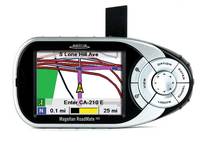
The Magellan RoadMate 360 GPS auto navigation system is a relatively new addition to Magellan's popular RoadMate line. An entry level model, the 360 updates the old RoadMate 300 model by incorporating a hard drive that holds pre-loaded maps for the entirety of U.S. and Canada.

Customer reviews of the RoadMate 360 at Amazon have been mixed. The editors there had this to say:

"Sporting a convenient windshield mount and preloaded maps of all 50 U.S. states, Puerto Rico, and Canada, the Magellan RoadMate 360 GPS makes vehicle navigation a snap. To get from point A to point B, simply touch the screen to enter an address or select from nearly two million points of interest (POI). Once the destination is clear, the RoadMate 360 delivers friendly voice prompting and turn-by-turn guidance, helping you find your way across town or across the country. The directions are displayed in TrueView 3D format, with three convenient guidance screens, while the voice prompts help keep your eyes focused on the road when the traffic is heavy. Plus, the POIs aren't limited to restaurants, hotels, and gas stations only; they also include such locations as grocery stores, golf courses, museums, amusement parks, parking garages, ski resorts, and more…"

Compare prices on the Magellan RoadMate 360

Here's what other early reviewers have to say:


Here are a few other resources that may come in handy:

Compare prices on the Magellan RoadMate 360 at these merchants:

  • From the official Magellan RoadMate 360 web page:
  • Put satellite navigation in any car. The Magellan RoadMate 360 portable auto navigation system makes navigation easy and fun, with friendly voice prompting, turn-by-turn guidance and the latest touch screen technology.

    Your Magellan RoadMate 360 comes pre-loaded with a complete detailed map of the 50 United States, Puerto Rico, and Canada. There’s no need to download additional data.

    Touch the screen to enter an address or select from nearly 2 million points of interest (POI) and let your Magellan RoadMate 360 guide you there. Unique on-screen icons show the location of restaurants, gas stations, ATMs and more on the map. Simply touch an icon to quickly route to any location.  Or select multiple destinations using the easy Trip Planner.   

    Lightweight and truly portable, your Magellan RoadMate 360 goes wherever you go, from your personal vehicle to your business car, to your recreational vehicle.

    The features of the Magellan RoadMate 360 give you all of the great advantages of GPS auto navigation in a complete yet simple, compact, lightweight, portable package:

    • Easy-to-useIntuitive design and friendly technology are combined with an extra large bright color touch screen and dynamic backlit keypad for easy operation.
    • Turn-by-turn guidance with voice prompting
      Dynamic turn-by-turn guidance with TrueView® 3D navigation and friendly voice prompting clearly indicates when to make your next turn. The voice prompt tells you when to turn and you can confirm the direction at a glance. There’s no need to watch the screen as you follow your route with confidence.
    • Pre-loaded mapping data for the U.S. and Canada
      The Magellan RoadMate 360 comes pre-loaded with detailed maps of the 50 United States, Puerto Rico and Canada. There’s no need to download additional data. Just Turn It On and Go™!
    • Nearly 2 million points of interest
      The location of nearly 2 million businesses, banks, hotels, airports, gas stations, ATMs, restaurants, and more are pre-loaded! Simply browse through the categories and sub-categories, or spell a name to find just what you’re looking for and get there quickly and easily.
    • Airports Restaurants
      Bank / ATM Gas Stations
      Hotel or Motel Car Rental
      City Center Vehicle Services
      Amusement Parks Border Crossing
      Businesses Bus Station
      Commuter Rail Station Court House
      Entertainment Exhibition Center
      Ferry Terminal Golf Course
      Grocery Store Higher Education
      Historical Monument Hospital/Polyclinic
      Library Marina
      Museum Parking Garage
      Parking Lot Parks
      Park and Ride Performing Arts
      Police Station Rest Area
      School Shopping
      Ski Resorts Sports
      Tourist Attractions Train Station
      Winery
    • Magellan Trip Planner
      The new Magellan Trip Planner makes navigating multiple destination journeys easier than ever. Now you can get gas, visit the ATM, pick up a relative and stop by the florist before meeting the family at the restaurant to celebrate mom’s birthday; all without re-entering destination points while on the journey.
    • True mobility
      Lightweight and truly portable, the Magellan RoadMate 360 is easily transferred from car to car. Move it from work car to home car or tuck it in your briefcase for use in your rental car on your next business trip.
    • Exceptional GPS accuracy and reliability
      Magellan TrueFix™ technology provides reliable up to 3-meter accuracy by tracking 12 Global Positioning Satellites (GPS) plus 2 Wide Area Augmentation Satellites (WAAS) to show your position on the map. You will always know where you are and where you’re going.
    • 4 ways to select your route
      Shortest Time – an advanced algorithm calculates your route using speed limit factors.
      Avoid Toll Roads – determines your best route while avoiding toll roads.
      Least Use of Freeways – calculates your route through city and side streets enabling you to stay off the highways when possible.
      Most Use of Freeways – provides directions over freeways, highways and interstates.
    • 3 guidance screens with easy to use interface
      TrueView – shows a detailed view of actual road layout for upcoming turns and information about intersection maneuvers.
      Map View – super bright, high-resolution display screen with bold and easy-to read icons and text. Zoom in or out on a detailed map. Plus select from several different color combinations to view your favorite look.
      Maneuver List – details when and where to expect turns along the route.
    • Route Exclusion
      Want to avoid a certain road or maneuver? With the press of a button your Magellan RoadMate 360 will find another route.
    • Easily enter addresses with QuickSpell® and Autofill
      QuickSpell aids in rapid address entry with minimal keystrokes and accelerates your data entry by intelligently sorting matching letters to the available word and number entries. Autofill will suggest matches as you type to speed up your address selection
    • Auto Re-route
      The Magellan RoadMate 360 automatically calculates a new route when you decide to take a detour because of heavy traffic, a closed road or just to grab a cup of coffee.
    • Address Book
      Store up to 200 personal or business destinations per user for a total of 600. Up to 50 previous destinations are stored to ease routing back to them later. 
    • Instant Locate
      Provides information about your present location so you can easily direct emergency services and roadside assistance. Or, save your current location to your address book to easily come back to it later.
    • Automatic startup and shutdown
      This unit automatically turns on when you start the car, so the Magellan RoadMate 360 is ready to go when you are.
    • Easy installation
      Do it yourself installation is quick and easy, and the included windshield mount makes it easy to put in any car. There is no wiring required, simply plug in the power cord and you’re ready to go.


    About Rich Owings

    Rich is the owner, editor and chief bottle washer for GPS Tracklog. Connect with him on Twitter, Facebook or Google Plus.

    Comments

    1. CC says:

      I just received my Magellan 360 and cannot figure out how to work the turn-by-turn voice prompting. Can someone email me about suggestions on how to do that?

    2. Rich Owings says:

      CC-
      I’m at my day job right now, but you might try on the Yahoo Magellan GPS Users discussion group or alt.satellite.gps.magellan UseNet group referenced above.

    Speak Your Mind

    Tell us what you're thinking...
    and oh, if you want a pic to show with your comment, go get a gravatar!

    *
