UPDATE: Read our hands-on Magellan RoadMate 1470 review. I’ve also posted a page for the Magellan RoadMate 1440.
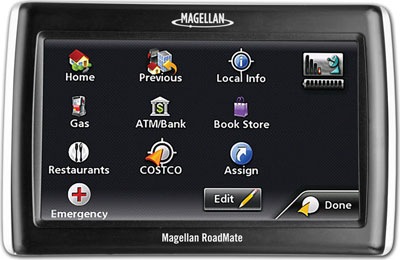
It’s official now; Magellan has introduced three new models – the RoadMate 1340, 1440 and 1470. Each of the new models offers their One Touch interface, AAA TourBook, text-to-speech, Highway Lane Assist, exit POIs and multi-destination routing.
Here are the details:
- RoadMate 1470 – 4.3-inch, MSRP $299.99
- RoadMate 1440 – 4.3 inch, MSRP $249.99
- RoadMate 1340 – 3.5 inch, MSRP $179.99
And here’s a link to the Magellan RoadMate 1340, 1440 and 1470 product pages.
Finally, here is the full news release.
Thanks Allory!
 About Rich Owings
Magellan 1470. Bought it. Returned it.
-Many glitches in the software. Menu ghosting and such. Would also hear the audio of selecting a button (such as a click or the letter within POI search) but it didn’t always register in the software that I clicked (I’d click the back button, hear a click sound, but I would remain on the current screen)
-position was always where I used to be, not where I presently am. I would be past an intersection when it would show me at an intersection.
-Try to find Washington, DC in the city search. Now try it without pulling your hair out. DC doesn’t show up when search District of Columbia or Washington, therefore I couldn’t plan a route to anything in the district unless I was already in the district.
-3D map view is an afterthought. Not a true map view option in the settings. Instead the user has to tap the map while viewing it (which activates map scrolling and selection of POIs you may have displayed on the map) and then click the 3D button. Getting out of this mode leave the 3D view in tact. Very strange.
-Twitchy map as you drive. Some weird map corrections, as in I’m on a straight road but the map does a quick jog to correct the road layer to where it should.
-Bought it with Traffic Link. Never received traffic information in the area of DC, an area known to have information and ‘good’ coverage.
HOWEVER,
-The AAA stuff was really cool. Like having a AAA tour guide information right there. Always felt this would have been/is useful.
-The custom menu is an awesome idea and I wish others had it. I could set a custom POI search to find the nearest Dunkin Donuts (I run on Dunkin). This is really cool and done really well.
-Customize which POIs go on the map, select which categories you want to see on the map. Note there is a layer hierarchy thing here where the road sometimes gets drawn over top of the icon, which in my mind is the way it should be but others may not like.
Oh and two more little annoyances.
1-Phone numbers are available for some POIs but they are shown in the following format: (###) #######. Why they put the area code in parentheses and didn’t put a hyphen between the last 7 #’s is beyond me.
2-The traffic icon shows up when you have a traffic link cable connected, NOT when you get traffic info. So you never really know if you’re receiving traffic info unless you stay in the traffic menu.
kcw,
Sorry for the delay in approving your comment. It came in the middle of some major backend work on the site. I appreciate you sharing this. I have a 1470 in hand and hope to have a full review posted within a few weeks.
There is a firmware version 1.10 update available. Out of the box, my firmware is 1.07. I just bought this now so I am going to update first and then try everything out. I am in the DC area too so this should be a good apple to apples comparison.
Thanks for the tip. I’ve got a 1470 in for testing and will update it.
Bought the 1340 at Costco.
Great unit, better than Garmin in it class. Lot of great features and fast
Gotta have Auto Zoom, but What I don’t like it the Auto Zoom feature, it should zoom in and out according to distance from turn or once zoom in for turn, zoom back out to where you would like it.
And once in a few layer of menus, please in the one touch pull down, add back to map feature. Without this, you have to hit back several times which is a bore..
Yeah, I hate backing out of menus. I really liked the 1470, BTW.
I have the 1340 from costco and I am very happy with it. Lots of cool features and the lane assist really helps. For the money you can’t go wrong. I updated the firmware as soon as I got it.
I got the Magellan Roadmate 1340 today…for 99.00 bucks at Costco… best money I ever spent. Great product.
Woot!
I just bought the 1340 at Costco for 99. Unbeatable. For the money, it’s far superior to it’s neighbor the TomTom One 130 which sells for 109 right now at Target. Trumping the One quickly is the price, then the “Speak the road name,” the highway help, and lane help; all of which come only when paying no less than 169 for the Tom Tom brand. Also, one thing I noticed for all of you coffee addicts such as my self is that there is no category for coffee on the TomTom software. You have to type it in which would be impossible while driving. With this, you only have to go to the POI and select “coffee.” How novel! I love it. Thanks Maggie.
Yeah, I was pretty impressed when I tested the 1470.
The Magellan 1440 does a good job for navigating but the database is years out of date. It doesn’t show major restaurants and gas stations that have been there for many years, even in major cities. It directed me to one 15 miles away when I was a block from the same name restaurant. No update available from Magellan.
Hmm, I wonder if its got a low number of POIs. Magellan frequently ships units with as few as 1.3M and as many as 6M. The specs on this unit just says “millions.”
I just purchased the magellan 1440, I updated the software version to 2.20 for free from magellan website. It was very easy with the cable they supplied in the box. After the download of 2.20, This GPS has everything you could want. Instead of 3 one touch assign tabs, I now have 16! this is a big help! I now have whats called POI VISIBILITY, This lets you pick from 30 POI such as freeway exit POI,sports and recreation,parking,hotels,health services, ect… it puts those up on the map before you reach the exit, Big thumbs up! I have tried to stump this GPS, I have tried to look at it with a negitive attitude, Nothing with this Magellan 1440 w/2.20 FREE update, upsets me. Ill have this with me till the day it dies, Then go and buy the same one again! You cant go wrong. GREAT PRODUCT!!!
I am truly upset and dissappointed with Magellan. My husband had purchased me the Roadmate 1470 for this past Christmas. I went ahead and registerd my product on your website where I had read that there is a newer version, the 2.2 update, for my GPS. I went ahead and uploaded it to my unit and sure enough the 2.2 version was corrupt. It ate my machine!!! My unit was permanently frozen on the uploading screen. So I called the 1-800 number and listened to the automated voice that said to visit “Maggie” on-line where I can also download the newest version. After listening to that I was connected to a person. I had explained the situation to the woman and she said I can mail it to Magellan at my cost of shipping. I demanded that I speak with a supervisor because I am not paying shipping for something that YOUR website did to my unit!!! They emailed me a packing label. I mailed it in and it took two full weeks for me to have recieved the new one. The new one at which was REFURBISHED and did not work correctly. What a major dissappointment! So once again I called Magellan and demanded that they take this one and exchange it for another one that had the 2.2 version on it and was brand new. My husband did not pay $200.00 plus accessories for me to have a refurbished unit. So they emailed me another shipping label. I sent it off and waited another 2 full weeks. I recieved this 3rd one this past monday, Feb 8th. This one rattles. It rattles when I drive over bumps, it rattles when I turn corners, it rattles all of the time. So this time my husband called in because at this point I am so upset and mad that I knew I did not have the patience to deal with your stupid company. So now they emailed me once again another packing label and I sent it off on wednesday, Feb 10th. My husband had said that your company would send us out the Roadmate 1475T for all of the misshaps. Now I am currently waiting on my unit. This whole experience has been extremely upsetting and irritating. It’s hard to believe that a company so large could have so many defective units. I understand that in this econmy that there is a lot of cut backs but if it takes away the quality of the product, then quit making it. There is no reason for manufacturing junk! If this unit is not up to my expectations then your company can send me out a check for the unit and I will by a GPS unit elsewhere. Natalie
anyone know how to download cool and fun voices!????
Am thinking in buying a Magellan PND, but am wondering if the navigation software is user-friendly? Can anyone help me here? I am interested in one of these models:
-Roadmate 1440
-Roadmate 1424
-Maestro 5310
-Maestro 3225
I’ve read Magellan bought Navigon. So am wondering if all these models come come with Navigon software? THanks
Yes, I think it is relatively user-friendly. But if I wanted the easiest, most intuitive, I’d get a Garmin.
I think the newer Magellans are much better than the old ones, so of the ones you mentioned, I’d go with the 1424 or 1440.
Magellan has not bought Navigon. Not unless it happened this morning anyway!
I have a Roadmate 1440, one of the program problems is a linguistic one which could cause a reflex pilot error! The machine says”TURN RIGHT in 2 miles” it should be “In TWO miles make a right turn” the relex to turn right at first is quite strong, especially if you are looking for a new destination. Another thing which needs tweaking is the turn alarm, it is too late, you cannot comply in a real life situation if you are not familiar with the area. ihave not tried it in six lane trafic yet, should be a litmus test.Overall it is a good thing to have.
speaking of grammer errors… it would be reflex not relex. I to have a Magellan RoadMate 1440 and have no problems with itat all
Chris, speaking of grammar vs. grammer! the first sentance had it right, so a typo does not detract from the substance…also”…no problems with it at all” not itat all as you have it! Notice how drivers react to a green arrow even though the light is still red! It is a psychological detractor which could be modified in the Magellan to make it better, regardless of typos! Maybe a spell check would benefit this site.
have a Magellan roadmate 1440 used this thing one time, next time it locked up and well not work just shows home and for updates here they do not work with windows 10 !!!!!!!!
I purchased the Magellan 1470. This Unit stopped speaking (No Sound) after 4 weeks of use. Where can I have it Repaired or is there a Software problem to download? Please help! Thank you.
G. H.
The latest update is 2.20: http://www.magellangps.com/support/notes.asp?supportID=881
Otherwise, you could do a factory update (you might lose all favorite addresses), return it to where you purchased it or contact Magellan.
The 1440 is the unit we bought. Great GPS! It’s accurate, quick and a nice compact unit. We paid $110.00 Cdn. at WalMart, Cornwall, Ontario and I strongly recommend it. I love the 4’3” screen, easy to read and understand.
Amazingly enough, when we don’t listen to ‘Her’, she doesn’t get upset!
Seriously, this is a great tool to have if you enjoy road trips.
The only Cons is it doesn’t have capability of updating (streets, restaurants, especially Tim Hortons etc.) for free. Something I’m sure they are working on!
Di
Magellan used to support the addition of custom points of interest (POIs), allowing you to add POI files for Tim Hortons, etc., but they seem to have dropped that.
I purchased the Magellan 1470,the only thing im really dissapointed is with the highway lane assist,it only shows the green sign we see on the highways but theres no arrows showing witch lane to go..do i need to update or this option not available in Canaians highways?because if thats the case im taking it back because that was one of the reasons i purchase this gps.
Sorry on my message above i ment ‘Canadian highways’.
i don’t know about your model but on my model the RoadMate 1440 the green signs light up in responce to the correct lane to be in (one is darker in color) …
Just purchased the 1440 on sale at Sears. I was seeking 4.3 screen, basic GPS features, easy to use and (this was important to me) good signal/compute/re-route performance. This is it.
I am very pleased with the performance for the price. The reroute time is stellar and directions are easy to understand and accurate.
If you are looking for a basic GPS with good value and performance, check this one out.
I bought 2 1445T packages which include a Magellan 1440 in each but only opened one. I immediately updated the software to version 2.2 and checked for map updates, the latest of which is Spring 2009 (this is June 2010). I took it out on the beltway leg in Charlotte which was finishe in the Fall of 2008 and it looked like I was driving on air – NO ROAD! I have a Garmin Nuvi with lifetime updates but wanted a bigger screen for a second car. I had updated the Garmin recently and the beltway leg is as it should be. I am concerned of the health of a company that can’t bring out as up to date of maps as the competition. I am taking the unopened unit back tomorrow for a refund. I don’t want to wait until 2011 to get the maps updated to 2010. If the store will refund my money for the opened unit I’ll take it back too and get a Garmin or Tom-Tom.
Bought the 1440. Have had it for one year now. Gets the job done but I think it gets sick too often. Often has to reboot itself when I input a new adress. VERY ANNOYING!!! More than likely the unit you buy will not have any map updates on it. (Not Cool) So, to get new ones you have to pay as much as the unit cost you for the map updates. RIP OFF. Don’t buy it. Don’t look at one. Just get a gps that has updated maps on it.
I have the 1440. It’s seems the chinese devs left it at alpha-version stage.
It’s SLOW – I mean – what lame GPS chip they put in there when it takes it up to 5-10 minutes and several restarts just to get the damn signal! Really frustrating – esp if you’re on highway.
It gets crazy on the highways – it says nonsense, wrong directions and exits – this GPS is unreliable “crazy woman” which works only when it wants to!
And her robot-voice sucks. There’s so many good voice engines and they put the most annoying one!
Avoid this half-assed chinese scam – don’t buy magellan.
Why do you think it’s the Chinese? I have a 1440 and have had no problems with it. It boots up in about 30-45 seconds and does what it’s supposed to. It sounds like you either have a weak signal, a defective unit (no, not that one..unless you think so), or live in another galaxy. The voice is pretty generic but who’s voice would you expect for a $129 Costco priced mid-level product? Pamela Anderson, Jessica Alba, your mother??
I have owned 3 Garmins, 2 Magellans, the present one is the 1440. I just purchased the TomTom XXL 540 for the 5″ screen and lane assit feature that I have heard that is to better other than brands.
The previous Magellan was a Maestro 4040. It was good unless I was in Yosemite and lost signal and I had to reset it at a later date. With 1440 I love the POI feature. As an ex charter bus driver I used this quiet a bit and like to store many multiple routes. The lane assist is good as are all the other features. The only quirky thing I have found is the voice does not say “turn left” it says “turn list”. I will not go into details of going through menus etc, all brands have their way of doing things. Some good and some not so good.
All I can say is the TomTom POI sections is far inferior the the Magellan and Garmin.
Most every one that writes in seems to get a defective unit. You need to send it back, get a refund or put it under your back tire of your car and back over it.
I bought the 1440 from Costco because of their return policy and mainly it was on sale for about $80. I have had no problems with it, especially going into San Francisco at lot and to Las Vegas. POI’s are right on the money, I like the 2 mile warning and the ping when you need to turn. I am a happy camper with this unit.
Side comment: If you would like to see what the Australian lady looks like (one of many voices) get on the internet and google her in. Very interesting and nice.
Thanks for your comment, and the laugh it brought when I read “or put it under your back tire of your car and back over it”!
I have a Magellan 1440. At times it tells me it can only run for several seconds.
Questions: Is there a replaceablebattery in the unit?
How is it recharded?
Must it be used with the car electric system?
Or can it be carried by hand and used on its own?
Thank you
It has an internal battery, but it sounds like it is not being adequately charged. Are you using the car charger?
Your GPS charges while it’s connected to the car charger and when in your engine or accessory mode. There are aftermarket products that can be fitted to this GPS to be charged through your home wall outlet. Lastly, it can be used on its own. I find that it lasts less than 8 hours if left on while not connected to the car electrical system.
i have a 1440 and it is the best one ive had . i tried a tomtom and big differance tomtom takes u all around the world and the 1440 goes rite to the location . a differance of 15 to 30 min or miles
the 1440 says it has the text to speech. thats bs .mine doesnt very unhappy
Try switching voices in settings. Look for voices that say “computerized” or “TTS”.