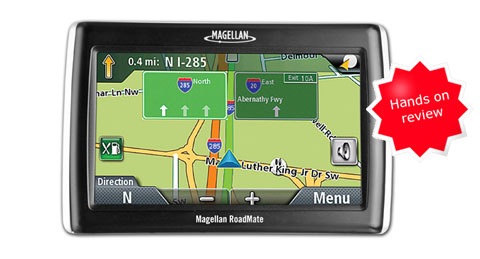
 The Magellan RoadMate 1470
It also includes text-to-speech, so you’ll hear “approaching right turn, Maple Street” instead of just “approaching right turn.” Live traffic coverage is available with an optional accessory and annual fee.
Compare prices on the Magellan RoadMate 1470
Stepping down to the RoadMate 1440, you’ll get the same feature set with a 4.3” screen, while the 1340
Magellan interface improvements
Let me go ahead and get this out of the way — this new RoadMate series brings a huge improvement in the Magellan interface. I went through my list of previous complaints, and nearly every one has been fixed. The interface is intuitive and no longer burdened with the excess steps that previously dogged their units. Read on for the happy details.
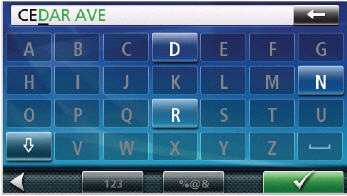
(Screenshots courtesy of Magellan)
There have long been many things to like about the Magellan interface. Here’s a list of the many positive features, old and new:
- QuickSpell feature (pictured above) simplifies input by graying out invalid characters when spelling out a city or an address; I also like that it calls out the letters as I type them – I know instantly if I’ve made an error
- Automatically powers on and off
- As you near a turn a chime sounds as a final reminder to turn; I found this feature helpful
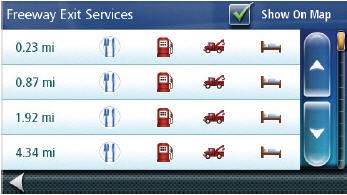
- Exit POIs (see below) give you quick access to key POIs at upcoming freeway exits
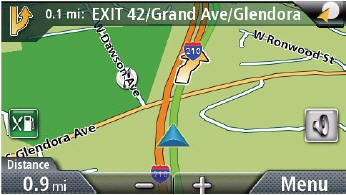
- The data field in the lower left corner can be customized to display speed, distance to destination, estimated time of arrival (ETA), time remaining, and direction of travel
- You can cancel navigation from the main menu
- Volume controls can be easily accessed from the map screen
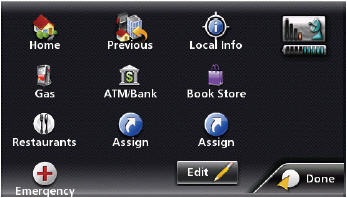
- The OneTouch menu, shown below, provides icons for Home, Gas, ATM/Bank, Previous, Emergency and four user-designated locations (office, best friend, etc.) or POI categories or subcategories.
- When you do a POI search for a business and save the item to your address book, you no longer have to enter the name; it defaults to the POI name
- These new models have inherited much of the elegant graphical interface of the latest Magellan Maestro models
- A number of improvements have been made in how destinations and routing choices are selected; one of the big ones is discussed below
Changes in route selection
One of the nicest changes in the new RoadMate series is how you select routing preferences. Previously, you had to go through a couple of extra screens and choose fastest time, shortest distance, mostly freeways or less use of freeways. Now you select your standard preference in the Settings > Navigation Preferences menu. You can still change the type used when selecting a destination by tapping the Options button on the screen that comes up after pressing Go To. In addition to eliminating the excess steps in selecting a destination, you can now get an overview map showing the different options. The best way to show this is via the video below.
What’s not to like?
Overall, I was very impressed with the RoadMate 1470. Nevertheless, every unit has its quirks. Here are my quibbles with this one:
|
|
- Lane guidance is not very realistic — it has a 2–D appearance; nevertheless, I will give them credit for their extensive coverage (much more than I see locally with Garmin units)
- It annoyingly shows the distance to minor junctions; with 100 miles to go on an Interstate, the unit showed 20 miles to the next turn, even though all I had to do there was keep going straight at a non-Interstate exit
- You must choose whether to show current speed or your estimated time of arrival; the unit cannot display both simultaneously (still, this is an improvement — on previous models you could not even view your current speed)
- The font for distance to next turn (on the left side of the top bar) is smaller than other numbers displayed on the screen, making it more difficult to pick out this critical number at a glance
- The bottom of the unit power cord attachment is a bit of a pain; it can only be connected after sliding the unit into the mount
- I wish the RoadMate showed the speed limit, but you’ll have to step up to the Maestro line for this feature.
- The screen is relatively dim and gets washed out in bright sunlight
- Startup time is relatively slow, on the order of 30 seconds
- I experienced some bugs when testing the unit – a “fatal application error” and a time when it said “your device needs to be restarted to increase performance. Please wait while your data is saved.”
- Another time, I got “Route error. Your destination may be in a restricted area or unreachable.” This was for my home address via the Go To screen; selecting Home from OneTouch worked though.
Having said this, I should add that a newer firmware version is available, which may correct some of these problems.
Conclusion and recommendations
I am very impressed with the huge number of improvements in the RoadMate 1470 over previous Magellan models. Magellan fans should be very happy with this unit. I’m not quite ready to recommend it over Garmin and TomTom models, but clearly, Magellan has quickly become a much more competitive player in the GPS marketplace.
More Magellan RoadMate 1470 reviews
- Dozens of positive consumer-authored Magellan RoadMate 1470 reviews
have been posted at Amazon.
- PCmag.com gibes 4 out of 5 stars in their Magellan RoadMate 1470 review
- GPS Magazine calls it “the best Magellan GPS yet” in their Magellan RoadMate 1470 review
- The Pittsburgh Post-Gazette reviews the RoadMate 1470
- High Tech Dad has posted his own Magellan RoadMate 1470 review
- iTechTalk has also posted a Magellan RoadMate 1470 review
- GpsPasSion has a user review thread for the Magellan RoadMate 1340, 1440 and 1470
I’ll be posting more hands on GPS reviews as they appear, but in the meantime, here are some…
Other Magellan RoadMate 1470 resources
- A PDF version of the Magellan RoadMate 1470 owners manual
- Want to see how the 1412 stands up against other units? Use this handyMagellan auto GPS comparison chart.
- A Magellan RoadMate 1470 FAQ
- Our other Magellan auto GPS reviews
- There is a Magellan RoadMate message forum at GpsPasSion
- There is also a Magellan GPS message forum at Yahoo, and an alt.satellite.gps.magellan UseNet group
- The official Magellan RoadMate 1470 web page
Compare prices on the Magellan RoadMate 1470 at these merchants:
- Check the current Magellan RoadMate 1470
- Get the Magellan RoadMate 1470
for an amazing price on eBay
 About Rich Owings