Thursday, September 2, 2010

Magellan eXplorist 210 Review

December 20, 2005 by Rich Owings  

Explorist_210_4
UPDATE: The Magellan eXplorist line has been officially discontinued. For an overview of our current recommendations, check out our handheld GPS buyers guide.

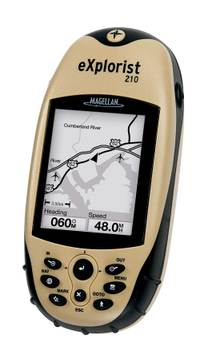
The Magellan eXplorist 210 GPS is a low cost handheld that can do double-duty as an auto navigation system (with the added purchase of Magellan DirectRoute software). This attractive combination makes the 210 one of the most popular Magellan handhelds.

The 210 comes with a cable to transfer maps, waypoints and other data to and from a PC, a capability the eXplorist 200 lacks. The 210 is very similar to the eXplorist 400, except that the 210 has 22MB of built-in memory, whereas the 400 utilizes an SD card for memory.


Compare prices on the Magellan eXplorist 210

Before we hear from others, here's what Amazon has this to say in their Magellan eXplorist 210 review:

"…The
unit offers 32 MB of memory, which includes 10 MB taken up by the
basemap of major highways, airports, interstates, parks, rivers and
lakes across North America. The remaining 22 MB is reserved for you to
download and store Magellan MapSend programs and maps, or specific
waypoints, routes and tracks for your next excursion. A USB PC cable is
included, which will allow you to perform software updates, as well as
download additional maps. This convenient feature allows you to
download exactly the maps and data that you need for your excursion. If
you're hiking a section of the Grand Tetons, you'll want to have the
area's hiking trails, ranger stations, and elevation contours at your
disposal. The eXplorist 210 lets you fine tune the data that you'll
need for your trip…"


More eXplorist 210 reviews

Here are some other resources that may prove useful:


From the official Magellan eXplorist 210 web page:

22 MB of available memory in the compact, easy-to-use eXplorist 210 make it an incredible value. Add detailed MapSend® maps (using high-speed USB connection) to the available memory for topo or street navigation. Other great features include advanced file memory system to easily access your data and vertical profiles to see how tough the route ahead will be.   

Real GPS plus 22 MB Available Memory

  • TrueFix™ Technology – Accurate & Reliable
    TrueFix GPS technology takes advantage of 14 parallel channels, 2 dedicated for WAAS and EGNOS Satellite-Based Augmentation Systems for fast signal acquisition, minimal signal loss and reliable accuracy to within 3 meters.
  • Built-in mapping
    The robust built-in North American basemap provides a convenient way to navigate while viewing roads, parks, waterways, airports and more.
  • Easy-to-use
    Full keyboard with joystick for one-button access to the map, marking points of interest, goto routes and menu. Even the first-time user can easily navigate with the eXplorist 210.
  • Track Logging
    Store up to 150 track log files, each with 2000 track-points, to easily find your way to your favorite spots or take that great hike again and again.
  • Four navigation screens
    View speed, direction, distance to destination and all the GPS information you need on four easy-to-read customizable navigation screens.
  • No access fees
    Your eXplorist 210 is ready to go with no satellite access fees and no activation fees, so go ahead, use it all the time.
  • Satellite status
    Monitor the GPS satellites in view and get information about their status.
  • Languages
    No matter your language, there’s a good chance your eXplorist displays it. Choose from English, French, German, Spanish, Italian, Swedish, Finnish, Portuguese, Dutch or Norwegian.

Built to perform on the most challenging and rigorous adventure.

  • Large backlit display
    Easily view all the GPS information you need to make your adventure fun and safe, even at night. The amber glow of the backlight protects your vision at night so you can see both your eXplorist and the path in front of you.
  • Rugged construction
    Rubber armored, impact resistant plastic allows you to confidently take your eXplorist 210 on every adventure.
  • Water Resistant
    eXplorist 210 is water-resistant, so you never have to worry about it getting wet.
  • Warranty
    We pride ourselves on building rugged and reliable navigation products that you can depend on, backed by a full one-year warranty in North America (2 years in Europe).

Related posts:


Comments

3 Responses to “Magellan eXplorist 210 Review”
  1. shirley says:

    Subject: Enquiry , Magellan Explorist 210 GPS
    This is Shirley of California Surveying Instruments.
    My customer needs 2 units Magellan Explorist 210 GPS .
    Could you please advise me the price ?
    Best Regard
    Shirley
    Purchasing Associate
    California Surveying Instruments
    Phone: (310)465-0992
    Fax : (310)347-4084
    email: shirleymagellan@aol.com

  2. Magellan uses a very complex file system. Some may not like it. Still, you have the internal GPS memory plus cards, and the file system makes it easy to find something. If I upload a route where the roads don’t really show on the detail maps, I can put a lot of them in one file, say 200. Now I just find the waypoint file and tell the Magellan explorist 500 http://www.highspeedsat.com/explorist500.htm to make that the active POI (it calls waypoints ‘points of interest’). I really like this, because there is no limit to how many waypoints could be on a card, each neatly filed away. If I don’t want waypoints cluttering the screen, I get rid of any active file of POI’s.

  3. Magellan uses a very complex file system. Some may not like it. Still, you have the internal GPS memory plus cards, and the file system makes it easy to find something. If I upload a route where the roads don’t really show on the detail maps, I can put a lot of them in one file, say 200. Now I just find the waypoint file and tell the Magellan explorist 500 http://www.highspeedsat.com/explorist500.htm to make that the active POI (it calls waypoints ‘points of interest’). I really like this, because there is no limit to how many waypoints could be on a card, each neatly filed away. If I don’t want waypoints cluttering the screen, I get rid of any active file of POI’s.

Speak Your Mind

Tell us what you're thinking...
and oh, if you want a pic to show with your comment, go get a gravatar!
