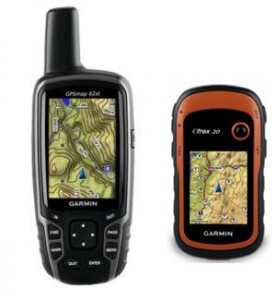
What is the best handheld GPS for you?
Listed below are our choices for the best handheld GPS receivers, from entry-level models to the cadillacs of the backcountry. I’ll make a recommendation in each category, based upon value, feature set and user reviews. Any prices listed are current as of the last update of this page.
Keep in mind that most handhelds don’t come with detailed maps. Fortunately for Garmin owners, there are many free maps available, including 1:24,000 scale topo maps or most states.
Budget handheld GPS receivers
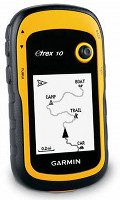 Our choice: Garmin eTrex 10
- Monochrome screen
- Will not accept detailed maps
- Paperless geocaching
- The retail price is $110, but I often see the Venture HC on sale for $99
Other budget units:
- The Garmin eTrex 20 adds a color screen and the ability to load detailed maps. As of this posting the eTrex 20 can be found for about $170. If you can swing the price, this is the one to get.
- The Garmin eTrex Venture HC is a discontinued model, but it can accept detailed maps, unlike the eTrex 10.
Mid-range handheld GPS receivers
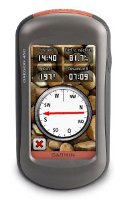
Our choice: Garmin Oregon 450
- Touchscreen
- Barometric altimeter and tri-axial electronic compass
- BirdsEye aerial imagery capability
- Garmin custom maps capability
- Advanced track navigation
- This unit has recently been on sale for as low as $250, but you may need to wait for Black Friday to see pricing that low again
Other mid-range units
- The Garmin Dakota 20 is a smaller version of the Oregon.
- The eTrex 30 is more compact and lighter weight than the Oregon
- The Delorme PN-60 can accommodate aerial imagery and real USGS topos. It has a smaller screen than the Oregon (albeit more legible in most daylight conditions) and comes with powerful but complex software. Available for around $260 at the time of last update.
High-end handheld GPS receivers
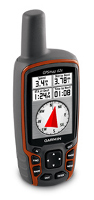
There are several units to consider here; all have a barometric altimeter and tri-axial electronic compass.
- Garmin Oregon 600 or 650 – The latest and greatest from Garmin, these units offer a capacitive touchscreen and a huge array of customization options. The 650 adds an 8MP geotagging camera.
- Garmin GPSMAP 62s – Perfect for those who don’t want a touch screen unit. It brings all the latest features such as paperless geocaching, BirdsEye aerial imagery, custom maps and advanced track navigation. Step to the 62st for pre-loaded 1:100,000 scale topo maps of the entire US.
- Garmin Montana series – I bought the Garmin Montana 600 and have been very impressed with it. Yes, it’s a bit on the big side, but it’s the best dual-use unit Garmin has ever offered.
- The DeLorme PN-60w with SPOT Satellite Communicator is a special case. This combo allows you to comunicate with the outside world, even where there is no cell signal. If you venture far off the beaten track, or go it alone, this one is hard to pass up.
Other high end units:
- Another option is to get a couple of Rino 650 units for you and your outdoor adventure partner. That way, you get most of the advantages of the 62s, plus you can see their position on your screen (and vice versa)!
Related posts:
Still have questions? Chime in below and let us know how you plan to use yours, and we’ll try to find the best handheld GPS for you.


Looking for a handheld I can take in the backcountry of British Columbia to mark trails. I would like to be able to load maps.
I am looking for GPS for my boys who do alot of back country snowboarding and fly fishing in Wyoming Any suggestions?
Wearable v’s Hand held? I not looking for big short cuts and I’m not terrible at old school nav. That said, recently at 8,000ft in the French Alps, in cloud, in very low vis, I missed my intended trail by about 500ft and got on an animal track. Whilst not dire, the consequence was descending in the wrong valley which (although parallel to the original) added 3.5 hours to a 5 hour hike. It could have been worse! The time has come for gadgetry back up. Any opinions on the Garmin Fenix 2 vs a GPSMAP 64 vs Oregon 600? Is the accuracy of either substantially better than the other? I think I’d really only like a Lat ; Long fix but does a digiMap change things for the better? Uploading the trak post return would be fun but I think all 3 do it? Any thoughts appreciated.
hi Rich. I just found your review (08/10/12) of the original Fenix v GPSMAP 62 v Oregon 450. Possibly encouraging for the Fenix 2. Any plans to put all three updated versions head to head?
I do (very) little hiking but lots of off road Jeep trails. My Garmin Oregon 400t is ready for retirement and I would like your recommendation for a replacement. I have used the Oregon for highway travel and off-roading with satisfaction. Budget is minor consideration.
What say you?
looking for a gps receiver with the following capabilities;
• Portable hand held device
• measures crop fields with maximum ESTIMATED POSITION ERROR (EPE) of less than 5 metres
• WIDE AREA AUGMENTATION SYSTEM (WAAS) enabled
• 8 MB capacity
• AA rechargeable batteries
• Cigarette light cable (charging)
• Built-in antenna
• External antenna for car use
• Minimum 500 waypoints with name and graphic
• Minimum 50 reversible routes upon top 50 points each
• Saves minimum 10 tracks
• Lat./Long. UTM/UPS position format
• Receiver WAAS enabled
• 12 parallel channel up to 12 satellites
• SOUTHERN AFRICA base map
Any suggestions please send me an email at [email protected]
David G
Hi, just stumbled across your excellent site, (just in time to avoid total breakdown)! I’ve done a fair bit of research but I’m still a little confused… I’m after a handheld that I will use primarily for storing and finding my fishing marks and as a back up to the main GPS on board my boat. I don’t need cameras, compasses or too many extras. Maps and the ability to upload custom ones would be useful but most of all I’d like it to connect to my Mac and to be able not only to edit names etc on the handheld unit but also to download the marks/waypoints on to a chart on my Mac. I have a large list of waypoints in a book I need to upload and organize. I’d welcome any and all comment/suggestions. Many thanks in advance!
Could you please recommend The best GPS that measurement will be included in its functions.
Thank you
I need the most recent model hand held GPS for mining in Guyana to be used in forest and mountain area.
I am a inspector in the landfill business. I measure hdpe liner deployment panels on slopes. Was wondering if a gps would accurately measure distances on 3to1 vertical slopes and make as-built maps.
After many excellent reviews, I purchased an Etrex20 for a 2-week hike in the alps. It was a major disappointment (full review on Amazon under title “major disappointment”). I’d be willing to buy a more costly unit, but I no longer trust the reviews I read as to whether or not a unit will do what I want. Welcome anyone’s thoughts suggestions.
Thanks a lot for this handheld gps buyers guide!
I didn’t even knew there were so many different types of those gps.
I was going to life for a few weeks in the wild with a couple of friends, this system could really come in handy, and life-saving.
Thanks
Bert
I am in need of a GPS that I can upload tracks to a computer for further editing. Does Garmin offer such a devise? Maps can be downloaded and tracks recorded on the maps and this information can be transferred wirelessly to another Garmin product but can the data be transferred to a computer to make a paper map.
This Handheld GPS Buyers Guide is awesome!
I’m already looking a long time for GPS, but never could decide which functions I wanted.
With this guide I know which functions exists
The barometric altimeter function is very handy for me.
Thanks for this
Erik
Hi,
I have a non-standard need. I want to outfit 240 forest rangers in China with simple GPS loggers to record their tracks. This is to link their wildlife sightings to where they have walked (no need to record each sighting. I just need to know their overall tracks. Each ranger is a “data point,” as it were.)
The idea is to turn on the GPS loggers, stick them in their rucksacks, and let them track until i collect them the next day or next week. If the ranger needs to drive to the trail head, we can see that on the log and delete it. And i need something cheap, because i want to buy so many. Also, i want something that needs no intervention on the ranger’s part.
Any suggestions?
I am in real estate and we sell a lot of vacant land. Most of the properties are surveyed but that was back in the seventies and the pins are hard to find. I’ve heard you can find boundaries and lot numbers, even the owner of the property with a handheld. Any advice as to which unit would work best for this?
I’m looking for a GPS which reports satellite coverage in a specific area (i.e. how many satellites) – also is there an equivalent device for GLONASS, or better still – one which uses both technologies.
Thanks
I will be sailing from San Diego to Cabo San Lucas, Mexico. I need a simple handheld GPS back up which gives me simple latitude and longitude data as we are sailing south along the Mexican Baja. I then take the lat./long. data and plot it on my paper chart in case the electronics takes a dive on our boat. My question is; will the
“Garmin eTrex10” take care of these needs? Most importantly, do I need to purchase any data base updates to facilitate GPS coverage in Mexican waters?
Hi. Looking for some options for Dual Purpose GPS units. We would use it most for driving, but would really like to start geocaching. What are the best you’ve found for ease of use, battery life, etc… Would like to stay under $300. Thanks
Hi, i am looking for for a high end gps receiver, i am a land surveyor based in Cameroon, Africa.
Hello
I `m looking for a good GPS for my ATV for the bush.
I don`t want a hand held GPS.
Looking for around 4 inch or bigger.
With Ontario maps.
I live in Sudbury ,Ontario.
What would you recommend to me.
Any info would be good.
Thank you for you help
Dano
I am looking for a hand-held unit capable of holding and displaying >1500 POIs or waypoints and routes with an easy way to load files of such from an attached laptop. I am not interested in geocaches, detailed maps, or commercial lists of such. This is for a scientific experiment so cost is an issue, and I do not want a unit that tries to do too much for me. I am just trying to find instruments out in the field.
I am looking for a new GPS. Well, this article give me full information about GPS and their ranges. Thanks for posting this tremendous information.
hallo,
I am looking for a GPS that has the capability to map tracks routs and waypoints simultaneously. I want to be able to map a track, pause and map a waypoint, and map a route and pause to avoid going back to a place more than once to map my areas of interest.
Hello,
I would like to know if the Rino GPS is the only one that allows you to see the positions of friends in real time?
Tom
Hello , i am looking for getting the lat and long values of the location with good accuracy .
And i want to send that values to the Android app .
It is suitable or not?