UPDATE: This model has been discontinued. For current recommendations, please refer to our TomTom comparison chart.
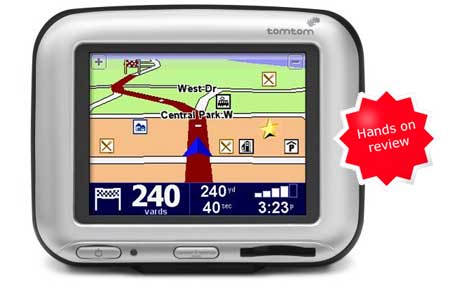
I’ve been playing with a TomTom GO 300
The unit locked onto satellites promptly, even in a new location all the way across the country. It topped my trusty Garmin on this score. And it was very fast to re-route — whenever I missed or ignored a turn, a new route was calculated quickly, generally within half a block.
Otherwise, routing was a mixed bag. The TomTom picked up a major
turn in my hometown that my Garmin always misses. In general however, it didn’t route quite as well. One time, the TomTom routed me down a narrow rural road, paralleling a nice, fast highway. And sometimes it would not show major forks (missing the change from I-95 to I-476!). While the routing was a little weak, it was easy enough to correct flaws that I knew about using the “Find Alternative” screen shown at right below. Of course, that wouldn’t help in a strange area. 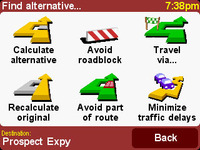
My regular GPS is a handheld, so I can’t really compare the TomTom to other dedicated automotive units. I can however, tell you about a few features missing on my 60CS, that I really enjoyed on the TomTom GO 300. One was the fact that it would give me an indication of what was happening one turn ahead — “Turn left, then stay in left lane.” Another great feature is the amount of info available on the navigation screen. I especially like being able to see my current speed on the main screen. Finally, the previously mentioned “Find Alternative” screen is very helpful. One feature missing on the TomTom GO 300 however, is submenus. For example, you can’t search for a category of restaurants (e.g., Asian).
Quite frankly, the poor routing keeps me from recommending this unit. Otherwise, it’s a winner. Hopefully, these flaws have been corrected in the new TomTom GO 510
Here’s what others are saying about the TomTom GO 300:
- There are dozens of customer reviews of the TomTom GO 300
- ZDNet gave a 7 out of 10 rating in their TomTom GO 300 review , but readers posting there weren’t quite as kind.
- A UK site has an extensive TomTom GO 300 review, complete with screen shots.
- Laptop Magazine gives a 4 out of 5 star rating in their TomTom GO 300 review.
- “Stuff” has posted their own TomTom GO 300 review.
Here are some other resources that may prove helpful:
- An HTML version of the TomTom GO 300 owners manual and a PDF version of the TomTom GO owners manual.
- There is a TomTom GO message board at expansys.com.
- And another active TomTom discussion forum hosted by My TomTom GO.
- Use the TomTom product advisor to help determine which unit works best for you.
- The official TomTom GO 300 web page.
Compare prices on the TomTom GO 300 at these merchants:
- Check the current TomTom GO 300 price
- Find the TomTom GO 300 at amazing prices at eBay.
 About Rich Owings