Tuesday, February 9, 2010

TomTom GO 910 review

April 21, 2006 by Rich Owings  

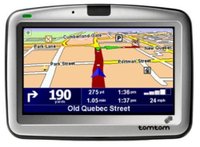
Tomtom_go_910_1UPDATE: The TomTom GO 910 has been superseded by a new model, the TomTom GO 920T (with traffic) and TomTom GO 920 (without traffic).

The TomTom GO 910, featuring multi-continental map coverage including the US, Canada and the whole of Europe, this all-in-one navigation device has a long list of features. The 910 has a 20 GB hard-drive and includes a remote control, an MP3 player,  iPod compatibility, a wide four-inch screen, and text-to-speech functionality. One especially nice feature is hands-free calling via a Bluetooth connection. To top it off, the TomTom GO 910 is equipped with the new SiRFstar III GPS chipset.

To see how the TomTom GO 910 stacks up against other units, check out our TomTom comparison chart.


Compare prices on the TomTom GO 910

Before we hear from others, here’s what Amazon has this to say in their TomTom GO 910 review:

"The TomTom GO 910 Portable GPS Vehicle Navigator improves upon TomTom’s line of all-in-one portable navigation solutions that work straight out of the box. The 910 features a new cutting-edge design that includes a high-quality, extra-wide, four-inch LCD touch screen that offers the ultimate in readability and ease of use. The GO 910 also includes the software application TomTom HOME and the HOME dock, which serves as a portal that enables you to easily manage, download and store content from your home computer. The GO 910 is the first ever portable navigation device featuring multi-continental map coverage, including the whole of Europe, the USA and Canada. It also has a range of smart extras, including a fully integrated MP3 player for playing audiobooks, music and podcasts, as well as text-to-speech functionality. With this navigator, TomTom has improved their renowned hands-free calling functionality for additional safety, and the pre-installed Safety Camera database makes it easier and safer than ever to navigate to your destination. In short, with hundreds of features and software improvements, the GO 910 has greatly improved on TomTom’s already outstanding GPS performance."

More TomTom GO 910 reviews

I’ll be posting more hands on reviews as they appear, but in the meantime, here are some…

Additional TomTom GO 910 resources


Compare prices on the TomTom GO 910 at these merchants:

Features list from the official TomTom GO 910 web page:

Easy to use:

  • Plug & GO: Works straight out of the box.
  • Portable: Easy to take from car to car.
  • Touchscreen: Easy to operate. And no awkward buttons!
  • Extra wide LCD screen: 4 inch high quality LCD screen with crystal-clear 3D graphics, 480×272 pixels and 64,000 colors. For optimal visibility.
  • Intuitive user interface: Combined with the large touchscreen, it gives you the perfect navigation experience.
  • Anti-glare screen: Always gives an optimal view, even in direct sunlight.
  • High quality Li-Ion battery: Long lasting; 4 hour battery life.
  • High quality speaker: Get voice instructions and enjoy songs and hands-free phone calls with remarkable sound quality at the volume you want.
  • High sensitive SiRF Star 3 GPS receiver: Ensures a quick GPS fix and optimal and accurate reception.
  • Car speed linked volume: Built-in microphone notes the noise level in the car and adjusts the volume of voice instructions accordingly.
  • Customizable status bar: Improve readability by customizing your status bar to show only the information you need.
  • Tip feature: Discover everything your GO has to offer with useful on-screen tips.
  • Extensive guided tour: Pick up features quickly and get the most out of your TomTom GO from the start.
  • Start-up configuration: Customize how and where your GO opens up when you turn it on: last location, with a slideshow or your preferred chosen menu.
  • Extensive preferences: From temperature (C/F) to air pressure (Pascal or Mbar), and more.

Best routes:

  • The latest and most complete maps: Detailed maps of the USA, Canada and Europe, all pre-installed on a 20 Gb hard disk. Allowing you seamless door-to-door navigation throughout these regions without having to switch maps.
  • Route choice: Plan your route to fit your requirements, such as: quickest, shortest, and avoiding toll roads, by required arrival time, etc.
  • View routes: Preview and test your TomTom’s proposed route before you set off.
  • Itinerary planning: Program in the schedule of places you want to visit before you leave the house.
  • Fast re-routing: Miss a turn or instruction and your TomTom instantly recalculates your route from your current location.
  • Easy location search and selection: Choose how you want to define your destination: street & house number, postcode (UK & NL only), city center or intersection.
  • Points of Interest: Restaurant, parking garage, movie theater or gas station. 1000’s of POI’s pre-installed. Search by proximity to current location, on your route, near a specific city, etc.

Clear instructions:

  • Huge choice: TomTom GO 910 speaks 36 languages in over 50 different voices.
  • Realistic visual instructions: Visuals on your GO replicate road signs, making them easier to follow.
  • TMC support: Access free TMC* traffic information via your GO.
    *Optional TomTom RDS/TMC traffic receiver required. For more on accessories, click here.
  • Compass: Displays compass on screen, for even better orientation.

Hands-Free Calling and Hi-Fi audio:

  • High quality connection: Echo cancellation and noise reduction give you excellent sound quality.
  • External microphone: To optimize the quality of your voice when you use your TomTom GO for hands-free calling.
  • Automatic pick-up: Can automatically answer your phone calls, for improved safety and comfort.
  • Bluetooth® connectivity: Connect your GO to your mobile phone, headset, car speakers or headphones hassle-free with Bluetooth® technology.

Smart extras:

  • 20 Gb hard disk: With 12 Gb free, TomTom GO 910 has enough space for 1000’s of your songs, photos and more besides.
  • mp3 player: Play your stored music and audiobooks on the built-in mp3 player through the high quality GO speaker or via your car stereo, and even manage your music using the ingenious TomTom Jukebox.
  • iPod® control: Connect your iPod® to your GO to operate it via your GO 910 touchscreen and enjoy mp3’s or Podcasts through the high quality speaker or via your car stereo. TomTom GO 910 supports the iPod® 3rd and higher generation (except the iPod® Shuffle).
  • Speaker options: TomTom GO 910’s high quality speaker is perfect for listening to music or voice instructions. But you can also connect your GO to the car stereo using the audio cable we provide. Or use Bluetooth™ technology to connect your GO wirelessly to your car stereo, headphones or external speakers.
  • Text-to-speech*: TomTom GO 910 can announce street and place names and even read you out your text messages (text message reading on compatible phones, check here).
    * Text-to-speech is currently supported in 8 languages: German, UK English, US English, Spanish, French, Italian, Dutch and Portuguese.
  • Remote control: You or a passenger can operate your GO from anywhere in the car. Making your journey easier and safer.
  • Home dock: Our easy-to-use home dock is the smart way to download from your pc or Mac, upgrade your GO and manage your files, all while automatically charging your device.
  • TomTom HOME: Use TomTom HOME software in combination with the home dock to manage the files on your device (songs, photos, maps, etc), get new updates, plan and schedule journeys on your pc or Mac in advance, and much more.
  • Buddies: Find, invite and add friends to your GO. And even send each other text messages while you’re on the road.
  • Photos: Load, store and preview photos from your digital camera. So when you’re not navigating, you can enjoy a slide show of your favorite shots.
  • Quick GPS fix: If you use your TomTom GO in combination with TomTom HOME, your GO will download information about where the GPS satellites are going to be for the next 24 hours. With this information, your GO will be able to find your current position very quickly when it is first switched on. Click here for more info.
  • Fleet management: Professional users can also use their GO 910 for business or fleet management purposes. For more information, click here.

TomTom PLUS:

  • TomTom GO 910 comes ready for a wide range of TomTom PLUS services and downloads, including:
  • Real-time traffic & road condition information: Traffic jam alerts with the best alternative route and road condition warnings that help you put safety first. Free trial*, click here for offer and availability.
  • Real-time traffic: Up-to-the-minute traffic information, jam alerts and road condition warnings. Free trial*, click here for offer and availability.
  • Real-time weather reports: A real-time overview of the weather before you leave, including 5-day forecasts for the place you’re going.
  • Safety cameras: Receive and report alerts when there are safety cameras coming up, fixed or mobile.
  • Maps: City, national and regional maps. Just download the areas you need.
  • Voices: Download funny and famous voices to bring variety and fun to your journey.
  • POI’s: 1000’s of extra POI’s are downloadable.
  • Buddies: Locate your friends. Instant messaging and navigation merge together.
  • Audiobooks: Famous narrators will read the latest best selling books, magazines and newspapers to you.
  • And much more: For more information on what is available and how it all works, click here.

Safety

  • TomTom is committed to make driving more safely on the roads. Our navigation systems encourage you to get from A to B as safely as possible:
  • Light sensor: Screen adjusts itself to different light circumstances, ensuring maximum visibility, day or night.
  • Clear & accurate spoken and visual instructions: Easy to follow, calm instructions given with plenty of notice mean that you can focus on your driving.
  • Speeding alert: Alerts you that you’re speeding, even if you’re not in navigation mode.
  • Hands-free car kit: TomTom GO 910 doubles as a hands-free car kit using Bluetooth® technology. So you can make & receive calls as you drive via your touchscreen.
  • Pre-installed Safety Cameras database: The most up-to-date available list of safety cameras is pre-installed on your GO. Click here for more information.

Related posts:


Comments

17 Responses to “TomTom GO 910 review”
  1. MojoMaster says:

    The SiRF III chip, iPod connectivity and good reviews have me pretty anxious to get my hands on one of these.
    Does anyone else have first-hand experience?

  2. Rich Owings says:

    Thanks MM. Keep an eye out here. I’ll post links to them as soon as I can find them. And I’m watching daily!

  3. Chuck says:

    My wife is a home health therapist and, before entering her visists into the 910, needs to be able to first plot out her daily visits on her pc, using the same gps maps, in order to figure out the most efficient visitation sequence so she doens’t zig and zag all over town. Does the 910 have that feature? If so, I’m buying!

  4. Rich Owings says:

    Chuck,
    I wish I could tell you, but I just don’t know. Some people call this the “traveling salesman problem.” I would ask at the Yahoo TomTom GO forum or at the GpsPasSion TomTom forum. If you find out, please report back and let us know!

  5. Mark says:

    Chuck,
    I don’t think thats possible at the moment. the only way it could work is if the tomtom allows you to enter multiple destinations. It should be possible in the near future cause its a good idea. in the meantime checkout my site for free tomtom downloads;
    if you have a tomtom You can download free tomtom voices at: GpsIce.co.uk
    you can also download different map colors.
    and splash screens
    cheers

  6. Derrick says:

    Regarding the Go 910.
    I found the claim that the unit works straight from the box a little misleading. My 910 would not locate it’s position over the first few days until I used the reset button which I only found out about after I logged onto the support site. This happened while on holiday and I was fortunate to have internet access.
    The go 910 has also been quite unstable when connecting to my PC via USB which found mw reaching once again for the reset button. However it has not failed yet whilst mobile on a route.

  7. Rich Owings says:

    Thanks Derrick. I had heard reports to this effect elsewhere. I’m glad to hear that navigation is working well though.

  8. JuveD says:

    I would prefer to download my audiobooks directly into my device, like a phone (with gps ;-0), or iPod, rather than PC first then into device? I am waiting for my phones (and I know there are some that allow it) to handle downloads of my audiobooks. Why carry 3 or 4 devices with you? Here is a audiobook phone compatible list http://www.playsforsure.com/SearchResults.aspx?searchtype=GetStarted&cat=SmartPhone
    Not many right now. Found in http://www.booktones.com audiobook phone compatible list

  9. Rich Owings says:

    Thanks. I hadn’t thought of that, but it’s a natural.

  10. Zibri says:

    Can anyone post a full TomTom 910 backup on Rapidshare ?? (www.rapidshare.com) ??

  11. Ume says:

    I have bad luck with GO 910. The navigator was working fine until I loaded music and photos. Since then it crashed about 10 times. The soft reset on the back would bring the unti back to working state. Now, the device is not powering up at all. It has been only 60 days. I am going to go through the hell now to get this unit fixed. I am not recommending anyone buying this peice of junk.

  12. Rich Owings says:

    Aargh! That’s terrible. Please keep us posted so others will know whether or not TomTom resolves this for you.

  13. Antoni Agramunt says:

    Same as me. Bought yesterday. Went fine til using (as TomTom recommends to do so) the TomTom Go Home. It hangs… always. I opened a tech. request. All the people with similar problems posting in the web let me see that this unit is not full-user-friendly. I have a full money back warranty and I seriously considering to return this equipment tomorrow. This is absolutely unbelievable.
    If anybody can give me advise, please contact me @ aagramunt@es.ibm.com. Thks.

  14. Camarillo Porkchop says:

    Bought a 910 on 8/22; worked great out of box until I did the recommended update process- it froze and never worked correctly again except when connected to my desktop and to turn it off I had to push the reset button each time… Many days later and hours spent waiting for a person to answer the customer service phone and none of the support able to help me get the 910 working right, I returned the 910 on 9/10 (Seemed appropo to return the 910 in 9/10…) and got my money back from where I bought it. The manager of the electronics section told me she got 10 in, sold 9 and I was the 9th one to return one for a full refund… She pulled the last one and is returning it. When I finally reached customer services at TomTom each time, they were curteous enough but admitted they were having lots of problems with the 910. TomTom might be #1 in GPS but their top of the line is the bottom of the pits in my opinion…

  15. Rich Owings says:

    Thanks. Folks like you taking the time to comment helps others not make the same mistake.

  16. Go with a blueooth GPS and a PDA
    Oliver
    Car Audio Manuals http://www.apex-audio.com

  17. JoustinaJerard says:

    How do you do, guys!
    I’m newbie on gpstracklog.typepad.com . And I realy do not know all rules about writing articles.
    Tell me please if category this available to talk about different themes?
    Is it possible to upload somewhere on this forum any video files?
    Regards, me! :-)

Speak Your Mind

Tell us what you're thinking...
and oh, if you want a pic to show with your comment, go get a gravatar!
