
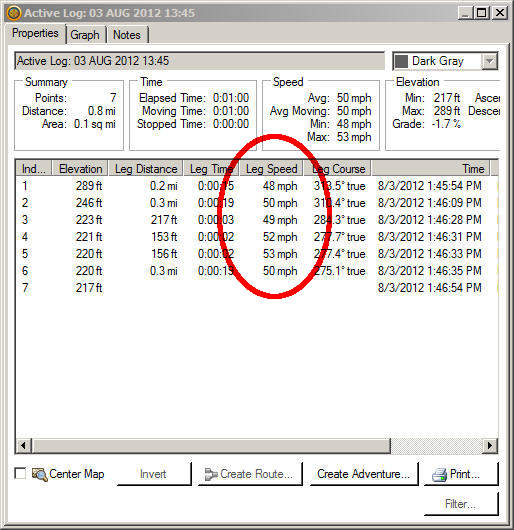
Feel like you got an unjust speeding ticket? Your GPS may or may not get you out of it. But it is fairly easy to recover speed data from a Garmin nuvi. Here’s what you need to do…
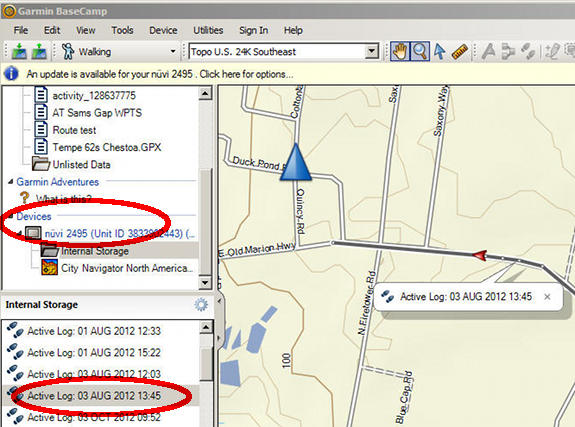
- Install Garmin’s free BaseCamp app
- Connect the nuvi to your computer
- Open BaseCamp; the nuvi should show up on the left side under devices as shown above
- Further down on the left side, under Internal Storage or the model name, you should see a list of Favorites and Tracks (Active Logs) from your nuvi
- Double click on a track to get the info below
Thanks Rodney!
 About Rich Owings
I just purchased a MagellanMaestro 4250 for 15 bucks but came with no power cord, If this unit works is it worth purchasing a new cord for it or better off just getting another GPS?
Thanks, Larry
If it works, that’s a pretty good price. But there are better models out there.
Hi, Are you able to advise on a problem I am having with my nuvi? I bought 2 No 2460 units (one LMT for me and one LT for my daughter). Both worked fine for a while, until I added extra maps on mine (in the Map directory on the unit and in a Garmin directory on the SD card). After that mine would not respond to 3 voice commands, viz. find address, find town and find junction. It just responded with ‘not available’. Since I like to use these commands I removed all traces of the map images in the hope that the voice commands would return, but they did not. I wrote to Garmin (twice) to explain my problem, but their answers were not helpful (update software, reinstall maps, etc.). Can you help, please? I like my 2460 and do not want to replace it whilst it works (mostly). Thank you..
I would suggest backing up your favorites and then doing a hard reset.
How do you retrieve data greater than 30 days old from Garmin Nuvi? Basecamp app woks great but I’m only able to get data up to 30 days old. I need data a few days older than that. your help would be greatly appreciated.