
UPDATE: This model has been discontinued. For a current alternative, check out the Garmin Edge 500.
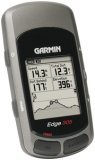
The Garmin Edge 305 is a new GPS-enabled cyclometer. The 305 comes in three models — the 305CAD includes a cadence/speed sensor, the 305HR includes a heart rate monitor, and the 305HR+ comes with both. All the Edge 305 series utilize a barometric altimeter.
 is a new GPS-enabled cyclometer. The 305 comes in three models — the
The more basic Edge 205 offers neither the cadence/speed sensor nor heart rate monitor, and elevation data is based on GPS readings. All the Edge units, be they the 205 or 305, include the SiRFSTARIII chipset, which has been getting rave reviews for acquisition time and awesome coverage under canopy, in urban canyons and even indoors!
Compare prices on the Garmin Edge 305
More Garmin Edge 305 reviews
- Arena Red has an excellent, in-depth Garmin Edge 305 review.
- Pocket GPS World has posted their Edge 305 review.
- Several consumers have posted about their experience with the Edge at Amazon. Here are their Edge 305HR reviews.
- Swaits.com posts this Garmin Edge 305 review.
- Consumers are also starting to post Edge 305 reviews at CNet.
- Business Week has also posted a Garmin Edge 305 review.
- Here’s a good, detailed Garmin Edge 305 review listing pros and cons.
- 2 Speed has a brief Edge 305 review.
- O’Grady’s PowerPage posts a Garmin Edge 305 review, complete with screenshots.
- The Suitcase of Courage has posted a Garmin Edge 305 review.
- RoadBikeRider.com gave a 4 out of 5 star rating in their Garmin Edge 305HR review.
- Sprenzy reviews the Garmin Edge 305 in tandem with MotionBased.
- Singletracks.com posts an Edge 305 review.
- Here is a Garmin Edge 305 review with a few screenshots
- K-Man posts screenshots in his an Garmin Edge 305 review too.
- Cat/Dev/Random has also posted an Edge 305 review.
- Here’s a UK mountain biker’s Garmin Edge 305 review.
- Cycling in S.A. reviews the Garmin Edge 305.
- Daily Spin News has posted a Garmin Edge 305 review.
- About.com reviews the Garmin Edge 305 HR, giving it a 3-1/2 out of 5 star rating.
- Top Ten Reviews looks at the Garmin Edge 305.
- A brief Garmin Edge 305 review.
- MTB Path reviews the Edge 305.
- Life and Bikes has posted their own Garmin Edge 305 review
- The Rotor reviews the Edge 305
I’ll be posting more hands-on reviews as they appear, but in the meantime, here are some…
Additional Garmin Edge 305 resources
- A PDF version of the Edge 305 owners manual.
- Want to see how the Edge 305 stacks up against other units? Use this handy Garmin GPS comparison tool.
- Over at Yahoo there is a Forerunner, Foretrex and Edge message forum.
- How to transfer race plans and workouts to your Edge.
- The official Garmin Edge 305 web page.
Compare prices on the Garmin Edge 305 at these merchants:
- Check the current Edge 305 price at Amazon.com.
- Get the
Garmin Edge 305 Deluxe Wireless Bike Computer
at REI.com, where satisfaction is guaranteed and members get 10% back on eligible purchases. - Buy the
Garmin Edge 305 Bundle with Cadence Sensor and Heart Rate Monitor for Cyclists
at TigerGPS. - Find a great deal on the
Garmin Edge 305 HR+Speed/Cadence Sensor GPS Receiver
at TheNerds.net. - Get the Garmin Edge 305 for an amazing price at eBay.
 About Rich Owings

Now custom map support is enabled for the Garmin Edge and Forerunner series using http://coursemapper.hostsnake.com/
This website let’s you create your own maps which you can load solely or combined with a course to your Garmin.
Unleash the power of your Edge or Forerunner and start creating maps at http://coursemapper.hostsnake.com/
Looks cool. Thanks for the tip Henk.
Just to let you know that the CourseMapper pages have been moved to another server and now has a new URL as well.
To access CourseMapper go to: http://www.CourseMapper.com
The old server is out of service, so I suggest you update your bookmarks since you will not automatically be re-directed to the new location.
Oh, and also made some more improvements to the site itself..
Have a nice day!
Henk
Hi all!
Thought I would let you know what I?ve been working on till dawn (and a little more) this night:
I created the “CourseCompacter” application to compact (compress) the size of Courses for my Edge 205.
However, I made it compatible with .crs & .tcx and .gpx files so that most GPS devices should benefit from this “track compacter”.
I have done some tests, and they are pretty amazing.
The results vary depending on what kind of Course or GPX file you load.
If you have a file with many curves the compression is a little less, but with files with some long more or less straight streches
the reduction can be to less than 15% of the original file size.
With my usual tracks that i recorded while mountainbiking on the winding paths in the mountains I could achieve a reduction to a good 25%,
but with roadbiking the reduction is far better because of the straight parts.
The tool lets you specify the accuracy of the track that you wish to maintain. I used settings of 10 to 15 meters with very good results.
Because the GPS accuracy is normally no much better than 5 meters going below that limit is pretty useless anyway.
During the conversion of both courses (.crs & .tcx) and tracks (.gpx) the original timestamps and elevation of points is retained.
This ensures that the “Virtual Partner” and “Elevation Profile” of your GPS device maintains fully functional!
When compacting courses you can even choose to maintain CoursePoints so you don’t loose important indications.
I would say, test it for yourself! Please tell me your findings and recommendations.
I?m pretty happy with the result and hope you are as well.
You can find the online tool at http://www.CourseMapper.com click the [Compact Courses or Tracks] tab to load the application.
Good luck, I will try to get some sleep now 😉