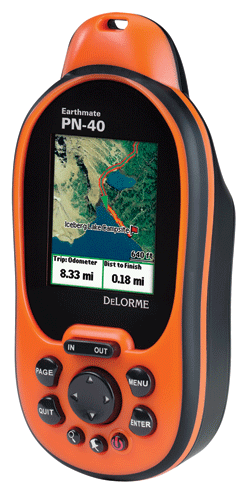
UPDATE: Check out my hands-on DeLorme PN-40 review
I'm fortunate to have a DeLorme Earthmate PN-40
Like the PN-20, this new model lets you view your position on aerial imagery. But a number of upgrades promise to make this an even more popular handheld than the original:
- A dual-core processor makes map redraws and menu navigation very fast, and I can already attest to this; even at 60 MPH, map redraws were nearly instantaneous — I saw only brief flashes of blank areas on the screen
- Tri-axial compass (meaning there is no need to hold it dead level)
- Barometric altimeter
- SDHC high-capacity SD card support
- A more detailed base map
And hardware isn't the only improvement. The previous ala carte imagery plan is gone; an annual, all you can eat
 About Rich Owings

Hello Rich,
How do you think the units will work in Canada?
Or is Delorme’s SW as dumb about Canada as some others?
Mind you that is my personal Rant, the ever popular National Geographics people wont even return my emails or phone calls when I tell them it’s about Canada…
But I look forward to your review and opinions as always. Keep up the good work.
…Brent…
Actually my PN-40/Topo 8 bundle came with DeLorme maps for Canada and Mexico along with the entire US. Unexpected surprise.
Brent,
I don’t think its very Canada friendly, but here is a thread on the DeLorme forums that might help…
http://forum.delorme.com/viewtopic.php?p=86507#86507
If you’re willing to buy XMap (it’s discounted for PN-40 buyers), and expend some time, it could work out.
Pero… ¿esa pantalla tan pequeña!?
Yes, Topo USA (ha!) v8 now includes Canadian roads, but not topos.
Would not advise this GPS I had a disk that didnt work, It just happens to be the one that the state i live in. The tek support told me i had to spend $70 for the new up dates because they dont have any more copies. They sold me a usless GPS. They dont return your phone calls and unless your a computer geek, there are no manules and the tutoral educates you only how to turn it on. Id highly recomend saving up and getting a reputable companies GPS
Wow, I’m surprised. DeLorme has a pretty good reputation for support. I wonder if it’s worth another call or taking your issue to http://forum.delorme.com/.