Hands on with the DeLorme Earthmate PN-40
UPDATE: Two newer models have now been introduced, the DeLorme PN-60 and the DeLorme PN-60w.
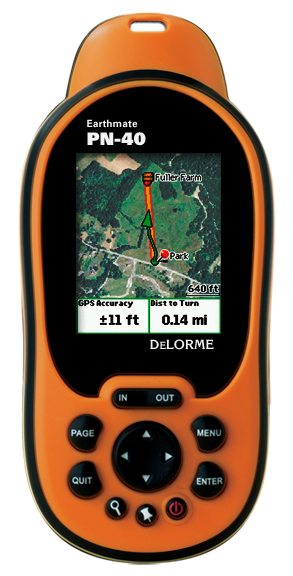
The DeLorme Earthmate PN-40
- A dual-core processor makes map redraws and menu navigation very fast, correcting the biggest flaw in the PN-20
- Tri-axial electronic compass (meaning there is no need to hold it dead level)
- Barometric altimeter
- SDHC high-capacity SD card support
- A more detailed base map
Quick links
More DeLorme Earthmate PN-40 reviews
DeLorme Earthmate PN-40 resources
How much does it cost?
And hardware isn’t the only improvement. The previous ala carte imagery plan is gone; an annual, all you can eat download $29.95 subscription plan now gets you aerial imagery, USGS topos and NOAA marine charts galore. It’s an incredible deal.
With that overview,lets take a detailed look at the PN-40.
DeLorme PN-40 interface
The interface can seem a bit complex at first, but I found it to be fairly intuitive. Here’s a tip — the Menu button will bring up a different set of options for each screen; you’ll end up using it frequently. For example, to search for geographic POIs, you press Find > Menu > Natural Features.
Like many Garmin handhelds, the PN-40 sports Page and Quit buttons, with the former advancing through pages and the latter doing it in reverse order. I love units that offer this easy way to navigate screens. I typically put the most important screens just ahead or behind the map screen, knowing I can easily access them with this feature.
The placement of the Power button makes it easy to accidentally press, but you have to confirm that you want to shutdown by pressing Enter, so this isn’t really that big of a deal.
Tones to warn of turns default to little chirps; great in the woods as they sound kind of like bird calls, but they’re a poor substitute for spoken directions for auto navigation.
The screen is relatively small compared to other recently released GPS units (see below), but it is much more visible in various daylight conditions than some of the high-resolution units on the market.
DeLorme PN-40 imagery
While the PN-40 comes with DeLorme’s Topo USA 7.0, giving you detailed vector topo maps for the unit, I can’t imagine anyone getting the PN-40 and not ponying up for the $29.95 annual imagery plan. It includes:
- 1:24,000 scale USGS topo maps
- B/W aerial imagery
- Color aerial imagery
- High-resolution color aerial imagery for 133 U.S. cities
- NOAA marine charts
- SAT 10 imagery
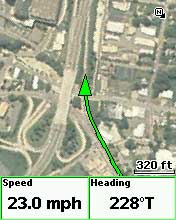
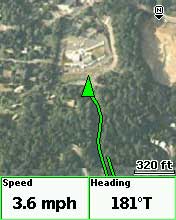
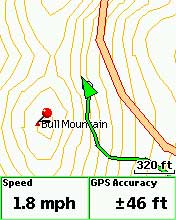
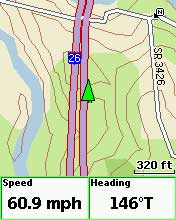
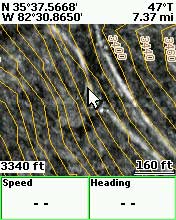
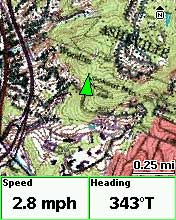
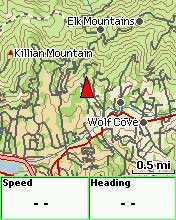
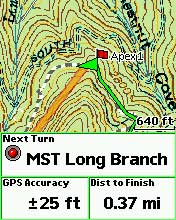
These are downloaded and transferred to the unit via Topo USA. Don’t expect super sharp imagery at every zoom level; this would require additional raster imagery and dramatically increase memory requirements. The PN-40 handles this pretty well though, switching from one type of imagery to another as you zoom in or out. This layering of map data can be customized by the user. Here are some sample screen shots of the different types of imagery…
DeLorme PN-40 on the road
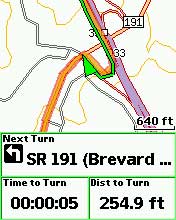
While the PN-40 can be used for highway routing, it’s really not comparable to having a dedicated auto GPS unit. You’ll only get a 2-D view, like the screen to the right. The worse drawback is that there are no spoken directions, just beeps and chirps. The maps are not as complete or current as those found on most auto units either.
EDIT: My testing was more extensive on the trail than on the road. For a more detailed look at the PN-40’s highway routing capabilities, see this comment below.
DeLorme PN-40 on the trail / Using TOPO USA
It’s really wonderful to have access to USGS topos and aerial
photos right on the PN-40. I live back east now, underneath dense
southern Appalachian hardwood canopy, where aerial photos are of
limited value on single-track trails. But the imagery really shines in more open landscapes, urban areas, fire roads, etc. Folks using the PN-40 in such settings may find aerial photos very helpful indeed.
In my experience, the PN-40 did an excellent job of navigating to individual waypoints and trackbacks.
When I prepare for a hike, I typically load a track showing the exact location of the trail. I usually find these to be much more accurate than the trail placement on any maps. If the trail is new to me, I search for tracks online at places like MotionBased.com. One of the great advantages of the PN-40 and Topo USA is the ability to convert such .gpx tracks to routable lines, giving you an accurate “distance to destination” rather than straight line mileage. This is really wonderful — accurate trails on the map, showing accurate distances.
Nevertheless, I found taking advantage of this to be a frustrating experience. Topo USA is very powerful mapping software, but is renowned for its learning curve, partially due to a non-standardized interface. Neither downloading and transferring maps, nor importing tracks and waypoints was that difficult. But I found that converting tracks to routable lines, utilizing them in routes, and getting them to work the way I wanted on the PN-40 to be the most challenging aspect of using the package.
Oh, one quick backcountry tip before I leave this section — to navigate to a point on the map, pan the map and then mark a waypoint there.
Geocaching with the DeLorme PN-40
With the recent public beta 2.5 firmware (you must be logged in to see the download links), the PN-40 now supports paperless geocaching (screen shots below).
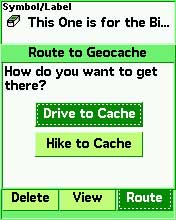
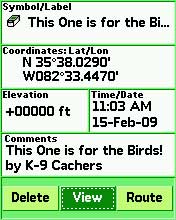
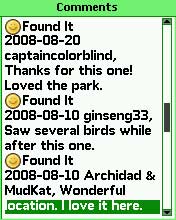
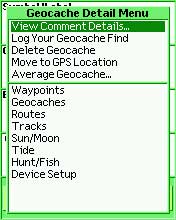
DeLorme has a “Send to GPS” feature on geocaching.com, and pocket queries will be easier to handle once they release their Cache Register widget.
DeLorme PN-40 pros
- Aerial imagery, USGS topo maps
- Reasonable priced all you can download imagery subscription plan
- Detailed hard-copy owners manual included
- Topo USA included in purchase
- Triaxial electronic compass
- Fast redraws
- Paperless geocaching
- Good visibility in various daylight conditions
- Excellent support forum
DeLorme PN-40 cons
- Small screen
- Detailed maps and imagery are limited to the U.S.
- There is no altimeter / elevation screen, and while you can display the maximum and minimum elevation in user-selected data fields, there is no way to see your overall elevation gain; likewise, while you can display the ambient pressure, you cannot view a pressure plot over time
- Unintuitive software (Topo USA)
Conclusions and recommendations
The PN-40 is, hands down, the best GPS on the market with aerial photos and USGS topo maps. It is also one of the best units on the market for geocachers.
I still like the Garmin Oregon’s paperless geocaching interface better than the DeLorme, but urban cachers and others in open landscapes may find aerial imagery more important.
If you go to Groundspeak, geocaching.com’s message board, you can clearly see that DeLorme has captured the hearts and minds of many in the geocaching community.
I am recommending the PN-40 as the best handheld for anyone interested in aerial imagery and USGS topo maps. I’ll also be updating my
geocaching, hiking and biking pages, adding the PN-40 to my list of recommended units. It’s that good.
The powerful but complex Topo USA program must be considered as well, however. As a result, I am reluctant to recommend the PN-40 for first-time GPS owners, people who have difficulty learning new software, or anyone who wants a grab n’ go unit letting them hit the trail with minimal prep time.
One final comment — I’m not sure how big of a market share DeLorme can grab with the PN-40, but for the first time in years, Garmin has some real competition in the handheld GPS market. And that is a good thing because monopolies don’t foster innovation.
More DeLorme PN-40 reviews
- Consumer-authored DeLorme PN-40 reviews
have been posted at Amazon
- GPSReview.net has posted their own DeLorme PN-40 review
- About.com gives a 3.5 out 5 star rating in their PN-40 review
- A personal review of the PN-40
- SingleTracks.com has also posted a DeLorme Earthmate PN-40 review; here is part 2
- A PN-40 review from TripleBlaze.com
- A first impressions review of the DeLorme PN-40
- Waterfall Chasing reviews the PN-40 and DeLorme’s Topo USA 7.0
- A negative PN-40 review on Groundspeak
- DailyHiker.com reviews the PN-40
- A geocacher’s DeLorme Earthmate PN-40 review
- TripleBlaze.com reviews the DeLorme PN-40
- Geocacher reviews of the PN-40
- Rave and Review has posted their own DeLorme PN-40 review
I’ll be posting more hands on GPS reviews as they appear, but in the meantime, here are some…
Other DeLorme PN-40 resources
- A PDF version of the DeLorme PN-40 owners manual
- The DeLorme PN-40 message forums are excellent resources
- The official DeLorme Earthmate PN-40 web page
- A DeLorme PN-40 wiki
- My DeLorme RAM mount review
Compare prices on the DeLorme PN-40 at these merchants:
- Check the current DeLorme Earthmate PN-40
- Get the DeLorme Earthmate PN-40 Handheld GPS with Topo 7.0 & 1GB SD Card
at TigerGPS, where you get free shipping on orders above $250
- Check out the deal on a DeLorme Earthmate PN-40 GPS Bundle
at REI.com, where satisfaction is guaranteed and members get 10% back on eligible purchases
- Get the DeLorme Earthmate PN-40
for an amazing price on eBay
 About Rich Owings

Rich,
How does the position acquisition speed and accuracy compare with Garmin units?
Leszek,
The more I learn about these units, the more I realize how hard it is to compare them. In less than scientific tests, the tracklogs seemed comparable to the 60CSx. TTFF was slow when I first got the unit, but following firmware updates, seemed greatly improved. With the latest update, it is quite fast indeed. Hope that helps.
Then it seems like the biggest downside in terms of the hardware is the screen size. If it were the same size as the 60Cx screen, I’d seriously consider buying it now.
“While the PN-40 can be used for highway routing, it’s really not comparable to having a dedicated auto GPS unit. You’ll only get a 2-D view, like the screen to the right. The worse drawback is that there are no spoken directions, just beeps and chirps. The maps are not as complete or current as those found on most auto units either.”
Not sure you tested this very much, PN-40 is on the verge of abysmal for road routing.
I feel it is pertinent to compare this to even the other Garmin “on the trail” handhelds loaded up with City Navigator, not just the dedicated car units.
The routable included maps are terrible..and there isn’t any premium option for road based navigation. Topo-based roads (as opposed to dedicated maps such as Navteq) which are often in the wrong location on the map (try overlaying different map sets..) and not tabulated for one-way etc. Bridges across interstates are often interpreted as ramps. State Road designation (“Take a left on SR1323”.. no, I want to take a left on Main Street!) often supersedes the road name. Auto-routing (i.e route re-calculation after taking a wrong turn is slow and buggy). POI are topo-based as well, so sparse and often irrelevant. Why Delorme can’t release a copy of their autonavigation maps for their handhelds is beyond me.
Great review otherwise, PN-40 is getting there. It just depends, as you state, how much you value imagery over other features. The geocaching paperless can only get better…. you might want to mention that someone has baked up a script to send GPX files to the unit rather than just one-by-one via the “send to” plugn on the gc.com page. You can find it on the Delorme community support forum (a great place for support Qs)
If you want the aerial imagery and USGS topos, I don’t think the screen size would bother you that much. It seems much more of an issue in deciding to purchase than how people feel about it in the field.
Thanks maingray. Good info for prospective buyers. I definitely did more testing on the trail than on the road. My highway testing was limited to around Asheville, NC. I’ve linked to your comment from the “PN-40 on the road” section above.
I think my iPhone does more than this thing.
I’m looking at this unit and the Lowrance ifinder hunt c. I will be using it mainly for upland bird hunting in the Dakotas, Minnesota, Texas, etc. Specifically hunting elevations and marking locations are important to me. I’m wondering if you’ve compared the two units and could give me feedback as to why the Earthmate would or wouldn’t be best for me.
I haven’t used a Lowrance unit in awhile, so can’t really comment there. The PN-40 is a great unit, and the aerial imagery could be a nice plus for your use, but the accompanying mapping software can be difficult to learn. If you’re comfortable learning new programs, it’s probably fine though.
Does the PN-40 discard any information when a tracklog is saved (e.g. time stamps are lost on a Garmen Legend when a TL is saved)?
Brad
I don’t think so, but I suggest asking at http://forum.delorme.com/viewforum.php?f=131
You mentioned the non-intuitive UI in Delorme’s software but not requirements for running it. Are those of us who dumped Windows back in the 1990’s out of luck? Can I get maps into and track logs out of it using Mac OS or GNU/Linux?
Does Delorme make hardware APIs available to developers so that their software can be written to work with the unit? Can I put my own maps (e.g., scans of my Green Trails maps) on it without using Delorme’s software? Does the $30/year subscription require use of this tricky software, or does it simply give me access to files I’d download then transfer to the device via USB with it acting as a mass storage device that any modern computer can transfer to?
It’s not reputed to be that Mac friendly. I’d suggest looking at http://forums.delorme.com for more info. Not sure about the API. You would need their XMap software to make your own maps for the device. As far as downloading, the folks at the DeLorme forums will be more knowledgeable than me, but I think you have to use TOPO USA to transfer the imagery to the unit. Sorry I can’t be of more help.
It’s unfortunate that these companies (Delorme, Garmin, Magellen, et. al.) won’t focus on hardware and stop trying to rope us into purchasing software. If there was some open standard for communicating with these units (other than the NMEA sentences they’ll all produce nowadays) we could get past this trouble, as third parties could develop software that works with any modern GPS and can run on whatever operating system(s) people like. As for the software the hardware manufacturers provide with their units: I resent being forced to do business with a nasty monopoly like Microsoft just to get maps onto a GPS receiver I purchase.
Rich, of course none of this is directed at you, but it *would* be nice if in your reviews you’d mention that in order to use all the functionality of these devices, purchasers will also need to have a new version of a certain operating system from a certain company.
Windows has the majority of American desktop users now, but that balance is changing (Mac OS has made huge inroads, Google’s pushing Linux-based Android, and Linux will initially be the only option on the ultra-low-power ARM-based laptops that should be available in the next year or so), and there’s no reason to help them keep that position by taking for granted that GPS users are also Windows users (though Microsoft would undoubtedly prefer that we all do so).
Lots of people who are fed up with horrible UI, network security as an afterthought, and the forced upgrade treadmill use something other than Windows. UNIX-like operating systems including Mac OS and GNU/Linux are absolutely feasible alternatives nowadays. GNU/Linux provides freedom that simply cannot come from proprietary OS’s. Mac OS puts an excellent UI on top of a solid BSD UNIX base. People generally use Windows because they don’t know any better or just settled for what was already there. (Or, of course, because companies like Delorme help Microsoft retain its stranglehold.)
Thanks Phil. I used to try to cover Macs and GPS a bit, but I’m not a Mac user, so it was mainly just linking to other sources. Garmin seems to have the best Mac support of any of the major manufacturers, but I’m hesitant to venture further into a subject I’m ill-equipped to cover.
Remember that “not Windows” doesn’t imply Mac. There are other operating systems, the most popular of which is GNU/Linux. It is entirely free — not just as in free of charch (gratis) but also as in free speech (libre). It was written and is maintained by volunteers all over the world, and unless you’re doing quite specialized work, all the software — typically also free — you need to go with it is available. Most servers on the Internet run Linux, and increasing numbers of desktop users use it. Some foreign governments have standardized on it in recent years so that their data is not tied up in software controlled by for-profit companies in a foreign nation (ours).
Software *can* be written in such a manner that it can be used directly on any of these operating systems, or it can be written in such a manner that the authors can relatively easily produce different versions of their software for each OS. It’s generally easier for them not to do so.
Anyway, without having to know any of the details, when you discuss software that comes with these devices, you could mention what is required to use that software (“note that in order to use many of the features of this device, you’ll need to have a computer running at least version N of the M operating system; everyone else is out of luck”).
This is an important point, as the computers that GPS receiver purchasers own (if they do own one) vary widely in capabilities, and a decreasingly-large proportion of them are running Windows.
I made the assumption that you, like me, are in the United States. Apologies if that is incorrect.
It seems that one thing that typically escapes some tech-users, is when new innovations appear in many categories, photo, computers/ software etc., is that these are tools, developed to be available to users at all levels of abilities. The only requirement is desire to work with it. When tools become flawless, all the fun, and required thinking, will be gone.
I enjoyed reading your posting and review of the Earthmate Pn40, I did see you did not recommend this item for first time users, I do appreciate that… what would you recommend for the casual hiker in the New Jersey PA area?
The Garmin Dakota 20 (http://gpstracklog.com/2009/10/garmin-dakota-20-review.html ) or one of the Garmin Oregon series.
Upside? Accuracy. It is the best I have ever seen. Downside. The duration of the charge. It last about 30 minutes if you charge with AC and less if you use the card charger. Not very ideal for Cachers. Also, no software available for PC users. DeLorme puts out something called Cache Register that is supposed to work as a widget for the Macs but I installed on several units and it just crashed all of them. No tech support available either.
Another potential gotcha for buyers. While a subscription (about $30) gets you a whole ton of available downloads, my understanding is those items/maps you downloaded items deleted/not accessible if you don’t continue your subscription. Is that correct?
I don’t believe so, but am not in a position to verify right now.
DeLorme says imagery that you download can continue to be used after your map library subscription has expired.
hi mam/sir,
we would ask for GPS a tracking device..what GPS available do u have the cheapest one?i hope for your soon response.thank
nympha
UP Los Baños
I don’t sell anything. I just link to sites that do.
Thanks for checking Rich. I wish I could remember the forum I read that in so I could go back and correct the poster.
After surfing the web for the last week looking for information and reviews about what would be the best GPS for me to purchase, your site seems to be the most complete and informative one that I have found. This will be my first GPS unit that I have purchased and just wanted to get your opinion on which unit would best fit my specific needs. You seem to have a lot of great general information on a number of units. I’m looking more at something that I will use mostly for fishing & hunting. As for the fishing I notice that the PN-40 has the NOAA marine charts included in the subscription fee and just wondering if you knew how those compare to the different aftermarket lake map chips available for handheld units? I’d use the unit to mark and catalog fishing spots and trolling routes, decide and find fishing locations based on the lake contours using aftermarket lake chip or NOAA charts. As for hunting I’d like to use it to map trails, property boundaries, stand & food plot locations and estimate acreage. As for driving features just looking for something basic that will show roads, towns, and basic map info, but don’t necessarily need turn by turn directions. I’d be new to using a GPS but am fairly good and picking up new programs and applications that are computer related. I don’t really want something that is a base model but don’t necessarily need something that is top of the line with a bunch of options that I’d never use. The units that I’ve been looking at most and are in the price range I’m looking for have been the DeLorme PN-40, Garmin 60CSX and the Lowrance Endure Safari (only because the salesman at the store recommended it but have noticed that it has had mostly negative reviews online). Any other recommendations would be appreciated as well. Sorry for the long post just trying to get and opinion from someone that actually knows what they are talking about rather then a salesman that probably has never used one outside of the store.
If you’ll go to this page you can click on the map and zoom in to get a detailed look at any area you want…
https://buy.garmin.com/shop/shop.do?pID=1404&pvID=2691#coverageTab
I imagine there is an online source of the NOAA charts to compare; just not sure where.
The Lowrance units were pretty bad when they came out, but they’ve gotten some fans after the latest software updates.
There are a couple of other Garmin units you should look at too — the Colorado 400i (recently discontinued, but will be supported for many years to come) and the Oregon 400i.
Hope that helps. Feel free to follow up with more questions.
I was planning on getting this unit but see that the “detailed maps and imagery are limited to the US” we are moving to BC within the next year so does this mean that you aren’t even able to download international info? Is there a gps you’d recomend that we will be able to use mainly in Canada and the US and possibly other countries. Prime usage will be for geocaching, hiking, fishing but also sometimes in cities but not as important. In the 200-350 price range. Thanks!
For Canada and other countries, I would definitely recommend a Garmin, the Oregon 450 if you can swing it. Some people are seeing it for around $300 now, after the current $50 rebate. This would give you access to free maps (http://gpsfiledepot.com), custom maps (http://gpstracklog.com/tag/garmin-custom-maps) and BirdsEye aerial imagery (http://gpstracklog.com/tag/birdseye).
I need mapping software that shows land use – BLM, state, private – accurately along with topo features.
I am looking at the delorme pn40, the garmin 60CSx, and the lowrance enduro sierra. (I was looking at the oregon 550, but bad reviews have made me reconsider).
I know that the lowrance has great BLM land use maps with good topo, but it seems their machines are slow and lock up.
I have not been able to see comparable map displays on the delorme or garmin pages.
Can you help?
What state are you in? I just came across these…
http://www.huntinggpsmaps.com/
You hit a home run with that answer. I’m in Montana and I need it for both hunting and fossil collecting, and those maps are perfect, or as close as I’m going to get to perfect.
I’ll probably go with the garmin 60CSx since it seems to be the most universally appreciated workhorse, is being heavily discounted right now, and these maps work with it.
Any comments will be appreciated.
Cool!
The 60CSx is probably getting ready to be discontinued. It will still be supported, but you may want to look at its successor, the forthcoming 62st, or the Oregon 450, which has a much better screen than the 550. Unlike the 60CSx, either one should let you load aerial imagery, which could be nice.
Although the PN-40 attaches by USB, it does not show up as a device or port in the system. Basically, you can use it with Delorme software and little else. Too bad (after spending the money).
Yes, they have a Serial Emulator. It does not work with 64-bit systems, nor Windows 7.
So, you’d think a query to Delorme tech would give some answer with hope. The answer was that they DO NOT intend to support 64-bit systems and NEVER support Windows 7. Great. Put it in your advertising, huh?
It was a pretty nice unit until this find.
Delorme needs to stick with what they do best (maps), fire their software designers and partner with someone who can make a more functional GPS!
After considerable research, I purchased my first GPS, a PN-20, primarily because of Delorme’s reputation for great maps. The PN-20’s graphics were terribly slow, so I returned it and made the mistake of buying the newly-released PN-40. One would think that the second generation would have incorporated many more improvements, but the only difference I found was better graphics speed.
Some of the main problems/complaints I have about the PN-40 are:
– It’s slow to acquire satellites.
– It’s not reliable. You can’t rely on it to self-start – you must turn it on, wait for it to acquire satellites, and make sure the tracking is working before you start to walk. Even in open areas, it may not acquire satellites if you start moving first. PLUS, after a period of time it just quits trying to acquire satellites and displays a “should I continue trying” message (duh – the answer is “yes” if I have it on!) If you don’t tell it to continue, it stays on, doing nothing but wasting batteries.
– Once it is on and working it sometimes will lock up – and you’ll never know it until you stop to check it. Also, there have been several occasions where it just quit working until I could get it home to install new software.
– The map on the screen can give great detail, but it’s awkward to use to view a larger area. Zooming out decreases detail in dramatic steps, panning at higher zoom/detail is slow, and zooming out, panning and then zooming in on where you want to see detail is hit-or-miss (and also slow).
– It eats up batteries! One simple solution would be to have the screen turn off after an adjustable time period, and add a button to quickly toggle to screen on and off.
– It’s too heavy and bulky. To mount it on a shoulder strap, the type of case needed to hold it securely would make it less accessible. I’ve tried various things to mount it for easy access, but haven’t come up with anything that works well.
– It’s not practical for highway use. The graphics have a hard time keeping up and sometimes get stuck. On longer trips, the tracks file gets too large the unit locks up.
Several months ago I was in the backcountry with my brother, who had a Blackberry. The blackberry was faster and the practical use of its map (zooming, panning, etc.) was MUCH better. (Not to mention the blackberry costs less, is lighter and can do other things.) A side-by-side comparison didn’t last long – my PN-40 locked up and wouldn’t restart until I got it home updated its software.
The software interface for the computer, Topozone, is one of the most non-intuitive programs I’ve ever had the displeasure of using. I’ve had almost two years to become familiar with Topozone, but still find it very difficult and awkward to use. It WILL do almost everything I need and want it to, but each time I have to re-learn exactly what/where to click to get what I want.
Now Delorme has the PN-60 (with some great advertised features) and an updated version of Topozone. However, I don’t think it’s possible for a company that made a product with such a lack of “fundamental” functionality and performance to make a decent product, regardless of its features. While I don’t expect perfection in the first generation or two, I DO expect something with better basic design and is easier to learn and use.
Worst purchase ever. It won’t hold a charge. Says fully charged, but dies within minutes. I have it on power save and know how to use it. I’m good with computers and have never had problems figuring anything out. That is not the case. The USB cord won’t work to connect to the computer in order to upload maps either. I wrote to their support email and they recommended using alkaline batteries. Who wants to buy a new pack of batteries every time they use a GPS without any maps on it! Do not waste your time and money!!!
What kind of batteries are you using? You’re not trying to charge them thru USB are you? The PN-40 has a miserably short battery life, but it shouldn’t be that bad.
I ran my new PN-40 today for 4 hours straight today with the GPS and back light on full time , calculated several routes ; using 50 % memory on first charge rechargable batteries and only consumed 25 % of the battery life .
I was getting about 12 hours out of cheap budget grade Ray-0-Vac “AA” Alkaline cells from a Wal*mart 30 package . The same type of batteries that came included with the unit .
I planned a familiar 413 mile trip from PA to Indiana and got almost identical turn by turn directions as mapquest . Beeps prompting approaching next turn were loud enough that I could distinguish them over road noise and I’m hearing impaired .
Trip function isn’t as highly detailed as a dedicated automotive unit , however ; I find it suitable for basic road trips road trips without a navigator .
Sounds good. I’m not sure you can trust the battery level indicator though. You’ll need to run a set all the way down to get a good idea of battery life.
There is also an option to choose from 4 different battery types from a menu to calibrate the GPS unit and the battery meter for greater accuracy .
Device setup > system > System > Battery Type
[ ] Alkaline
[ ] Lithium
[ ] Lithium Ion [rechargeable]
[ ] NiMH
and 3 power option
[ ] Normal [GPS use]
[ ] Power Savings [back lighting parameters]
[ ] Dis-able GPS function
I’m presently using 2 marked pairs of NiMH – AA cells .
I couldn’t be more pleased
NOTE : Read your instruction manual thoroughly .