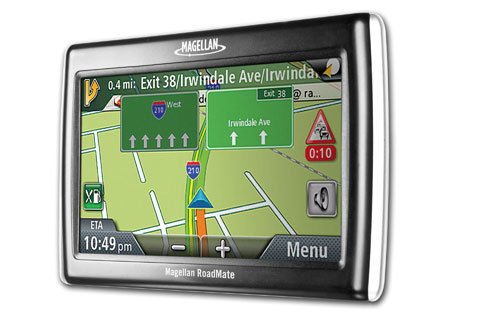
Magellan RoadMate 1475T with lifetime traffic
Magellan has announced the RoadMate 1475T, their first product with lifetime traffic. The 1475T is identical to the RoadMate 1470 I recently (and favorably) reviewed, with the addition of the traffic receiver. It carries a suggested retail price of $299 and will be available immediately.
Read on for the news release:
Following the recent release of the Magellan RoadMate series, MiTAC Digital Corp. is introducing the Magellan RoadMate 1475T to round-out the highly acclaimed series. In addition to the premium features available in the 4.7" Magellan RoadMate 1470, the Magellan RoadMate 1475T is equipped with traffic – enabled device (VPA) that offers subscription free, real-time traffic alerts, incidents and road congestion reports.
The free traffic solution is ad supported, where valuable offers and promotions of participating companies are delivered conveniently to the user. "Magellan is committed to providing navigation solutions that provide the best possible experience to consumers," said Mike Wagner, senior director of product marketing for Magellan. "The new Magellan RoadMate 1475T takes that commitment to the next level by offering users an enhanced ease-of-use and convenience with premium features like the built-in traffic link and the exclusive OneTouch user interface."
Like all new models in the Magellan RoadMate series, the Magellan RoadMate 1475T offers the revolutionary OneTouch(TM) favorites menu that puts personally selected addresses and searches just one click away. After the user identify and store preferred banks, restaurants and other destinations into the OneTouch favorites menu, the user can instantly obtain directions to closest preferred destinations anywhere they travel.
The Magellan RoadMate series also gives users searchable AAA TourBook(R) listings that include AAA Diamond Rated restaurants and lodgings, along with attractions, events and campgrounds – taking the guesswork out of planning a trip. Users can also access listings for AAA-Approved Auto Repair shops and businesses that offer AAA member discounts. All listings include the exact GPS location.
The new series also provides a toll-free menu for AAA members to access North America’s largest roadside assistance network.
The new Magellan RoadMate 1475T offers the following features:
- New 4.7-inch, WQVGA – color, anti-glare touch-screen display in an ultra-thin design
- Acclaimed easy-to-use OneTouch favorites drop-down menu with personalized search icons to easily find favorite places
- Features AAA TourBook listings and member Roadside Assistance menu
- 6 million points of interest (POI)
- Spoken street name guidance tells the user the street name and which way to turn before each maneuver
- Highway Lane Assist points the user in the right direction and ensures the correct lane will be chosen before the next interchange or exit
- Highway Exit POI search let the user find gas stations, restaurants and hotels near upcoming exits
- QuickSpell(R) with New SmartCity Search intelligently narrows searches and checks spelling when entering addresses
- Offers multi-destination routing with route optimization lets the user plan trips with multiple stops in the order they want or optimize a trip for the most efficient route, saving them time and money
- Includes NAVTEQ(R) maps of the United States, Canada and Puerto Rico
The manufacturer’s suggested price for the Magellan RoadMate 1475T is $299.00 and is available for purchase. The Magellan RoadMate series ships with a windshield mount; a 12-volt vehicle power adapter; an adhesive disk for alternative, on-dash mounting; and a quick reference guide. For additional accessories, including cases, pouches and additional mounting options, visit www.MagellanGPS.com. Map updates for Magellan products can be purchased separately.


I can’t seem to find this Magellan RoadMate 1475T for sale anywhere. Can anyone post to this site where to get in Pittsburgh, PA??
I found it at Cosco for $129.
I got the 1475T at COSTCO in Phila area: $149.99 with $20.00 instant rebate; think it’s good until 2/28. I’ve had a MIO C520 for years and like the map detail better but new Magellan features are great!
I purchased mine at BJ’s wholesale club, and it cost me 159.99, but beware…there is only one voice available. It is a computerized version of a woman and it sounds like a 60 year old bowling aley attendant who smoked too many cigarettes, and drank too much whiskey while yelling across the bowling alley for the pinsetter to reset lane #12. It sort of feels a little like finger nails on a blackboard.
P.S. I know I missed an “l” in the word alley.
TigerGPS lists it, but only for pre-order.
BJ’s has a coupon in their monthly coupon book valid 6/24/09 to 7/31/09 instant rebate $50.00
total cost $229.00 for the 1475T
Indeed, I just purchased mine from BJ’s for that price. Excellent deal given all the features. I’m not sure how ad-supported traffic will pan out, but for $30 more than the 1470, it seems like it’s worth the extra coin.
I recently purchased at bj’s with coupon. Map did not give Eastern L.I. streets or map south of a main road that my old Magellan 800 had shown. Traffic did not work on main NJ/NY highway (even though I was in bumper to bumper traffic). Anyone have similar problems? This may be returned. Magellan told me they don’t have coverage in some areas, but I was in NYC/NJ and shouldn’t be a problem.
I have spotted coverage in Fairfax, Va too. The Navteq Traffic Map shows cover well in Fairfax, VA. When I compared 1475T to my wife’s Garmin 265WT, Garmin has no problem aquire traffic signal while the 1475T is aqiring…..
Check to see if those roads show at http:/navteq.com. If not, they won’t show up on any device with NAVTEQ maps.
Live traffic is not ready for prime time. Too many false negatives and false postives.
Just got a 1475T from BJ’s for $229.00. It is a nice size GPS at 4.7″! My biggest complaint is a advertising gimmick from Best Western that shows up in the “Header” at the top of the screen for a “1200 point coupon” toward your next stay…and try to get rid of it! Does anyone else get this or am I the only lucky winner of the Magellan golden ticket to a Best Western?
I HAVE BEEN GETTING THI SUBCRIPTION TO BEST WESTERN ALSO……AND THIS CAN BE VERY ANNOYING ,IM STILL TRYING TO GET RID OF IT..
UPDATE: I contacted Tech Support about the touch screen being soooo slow. They knew about the problem (a software calibration glitch)and offered to have it replaced at no charge. Incidentally, I thought the Customer Service was outstanding. No complaints there!
I also asked about the Best Western coupon and was told that it was an ad for Best Western being transmitted via a radio broadcast for the “FREE” – live traffic updates. No way to remove it. (Dad alway’s said nothing in life is free)
I reluctanly ended up taking the GPS back to BJ’s. It was nice and had nice features like the screen size, Quick Spell and Turn Assist but I was bothered by the slowness of the touch screen and sometimes poor accuracy. If my expectations weren’t so high, I probably would have kept it!
I really wanted a GPS with with FM broadcasting to my vehicle stereo. That is very important to me because I have a hard time hearing if the window is down, people in the car are talking or the stereo is playing. For some reason I thought the 1475t had that but it does not. NOT Magellans fault, I just wasn’t paying attention when I bought it. I’m going to hold off for a while and wait for Magellan to sell a reasonably priced version of the 1475t with FM bradcasting.
I too am seeing the ads for best western. And am not able to get rid of it. It also persists for 5 minutes. I like the unit, but if these keep popping up I may return it as the ads are irritating.
I haven’t seen the ads on the Magellan units. They are pretty low key on Garmins and don’t appear very often nor for very long. I’ll have to see if I can get a 1475T to test. Thanks for sharing!
Costco just started selling the 1475t for $175. I picked one up today and love it. Haven’t seen the ads yet but it’s only day one. Good Luck!
I am in the market for a GPS unit and I need to get it fast as I am moving to a new city. My budget is around $ 200 give or take. I am tring to figure out whether I should buy the magellan 1475T from Costco at $ 175 or a Garmin 265WT for $ 199.
The screen on the Magellan looked much brighter and the map views did look better too but I am concerned about reports that Magellan has patchy satellite reception.
Need your recommendations please – soon.
Why not buy the Magellan 4700 at Amazon. I think it’s $159 and have is sent 2 day delivery?
Get the 9.99 holder for your a/c vent while you’re at it. It’s what I ordered.
I would go with the nuvi 265wt. I think their units are clearly superior.
I just purchased the 1475T from Costco. So far so good. I compared it against the Garmin 765T. The colors and mapviews on the Garmin are a lot sharper than the Magellan.
My Magellan 1475T purchased 3 months ago at BJ in New Jersey can not be used for the last 2 months, the problem is described on Magellan site, promissing a cure in September 2009, it is the end of October and no cure in sight, stay away from this model until they fix the software.
Q: Your unit displayed the following message “Your device needs to be restarted to increase performance. Please wait while your data is saved.”
A: We have received isolated reports of this issue and are currently working on a firmware update solution due to be released by the end of September. Please check back with our website at http://www.magellangps.com/support at that time, enter your model number in the downloads/updates section and check for the latest software update.
Thanks for taking the time to share that.
I purchased a 4700 when I plot a route to Florida, it will reboot ifself repeatedly with the same message “Your device needs to be restarted to increase performance. Please wait while your data is saved.”. I posted it on Youtube.
I am happy to inform you that Magellan has posted a new update to the 1470/1475, the update is version 2.04.
I have installed it this morning and it has curred the bug.
I upgraded it to the new firmware. I am having now different problem. The audio instructions are correct and they are pointing to the correct direction vs. the visual is showing time delay. If I depend on visual, I skip the right or left turn. If I depend on audio only it is accurate. In short, the new firmware update causes mismatch sync between audio and visual. I will return it if Customer service does not respond.
Glad to hear it!
I just bought the Magellan 1475T from Costco for $179 and noticed that the Traffic feature is out-to-lunch! The website recommends a specific traffic-enabling power cable that looks very different from the basic one that came in the box! The one recommended (matched to the 1475T’s serial number,) has a little cylinder halfway down the cable, the one that was in the box doesn’t… its also much shorter. Does anyone know if I need to buy another power cable for the feature to work? The box says “Lifetime” Traffic equipped!?
I bought two 1475T from Costco today, both come without the Traffic Link power apdator. I talked to the Costco return staff, they claimed they never heard the traffic link. I finally convinced a higher up person to contact their buyer.
Whoa, I looked at their website and it is downright confusing. It looks like lifetime traffic is included, but then I saw this.. http://www.magellangps.com/products/1475t_vpa_instructions.asp
RE: Traffic
The Magellan manual states “The hardware needed for traffic is included with the magellan RoadMate 1475T and no additional accessories are required”.
The one i purchased form BJ’s Club ($179.00) came with a power cable with a small rectangular contraption attaced about half way on the Power cable and it works fine.
There is a new software upgrade for the 1475T version 2.05, i have installed it and it works fine.
Thanks for the reply Dr. Roth. I have a (green) traffic icon triangle on the right side of the screen, but after a couple of weeks of traveling the Garden State Pkwy, the NY State Thruway, Rt. I-95, Rt. 195, I have not acquired traffic updates once, even though delays encountered should have involved same! Neither has the icon gone “RED” with the requisite delay in minutes displayed to it’s left. I have a Garmin 755T ordered (also from COSTCO,) and as soon as it arrives, I will be driving to Ohio with both the Garmin and the Magellan on the dash… I will advise all here of the results and my choice as to which I will keep!
I got a “1475 Bundle” from Costco, ($175) which consists of a 1470 GPS unit, and the power cable that has the Traffic Link module built in.
I downloaded the 1475T update from Magellan’s site, but before installing it I saw the serial number on the unit and on the status screen calling the unit a 1470. Seeing how there were up
According to tech support, I STILL have to use the 1470 software updates, NOT the 1475T updates. Their must be some OTHER version of the 1475T, since there IS an update for 1475T models- which would be unnecessarily if ALL 1475T’s were just a 1470 plus the Traffic Link cable.
Is it too much to ask that Magellan at least got to the trouble of labeling their products correctly? The manual is too vague in describing the difference between the units, and a small insert in the package is easy to miss.
Now, after several hours spent online and the phone I appear to have some sort of 1475T, and can finally get on with the business of seeing if I like how it performs!
Looking forward to the trip report!
Today (11/14/09) I purchased a 1475T from Costco in the Chicago area. As soon as I got it home, I opened the box & checked the power cable. Sure enough, it was NOT the Traffic Link power cable that was supposed to be included, but a plain one of the type that probably comes with the 1470. I immediately called Magellan Tech Support & spoke with one of their agents & they are supposedly Fed-Exing the correct part to me free of charge (5-7 day wait time) & are letting me keep the incorrect cord.
Also, I notice that the mount now seems to allow the power cord to be connected before the unit is attached to the mount. I will verify this once I get the unit into my vehicle tomorrow & follow-up this post with my findings.
I guess I should have dialed the phone instead of writing Magellan Customer Service. I received this reply:
Hi Alfred,
Thank you for contacting Magellan Technical Support. As I understand, you purchased the RM 1475T. Now, the
power cord that came in the box doesn’t match the power cable depicted as the compatible “Traffic receiver” cable in the product’s description.
Regarding this concern, included on the package is the traffic link cable which also serves as a power cable for your unit. Please check on the picture attachment if this is included on your packege. This is the actuall traffic link.
Let me also provide you this link to see the users manual for the RM 1475T.
http://www.magellangps.com/assets/manuals/Magellan_RoadMate_147X_EN.pdf
If you’ll copy the above link (sent to me by Magellan,) you will see the picture of the CORRECT TRAFFIC POWER CABLE…
So Paul… you got a free new Power/Traffic cable, AND I GOT A PICTURE!
I guess I should feel fortunate then, but I would rather have had the correct cable right out of the box!!
Also, thanks for sending the link, the info shown is more detailed than that in the manual that came in the box.
I also bought the Magellan 1475T from Costco in Maple Grove,MN and it has the wrong power cord in it. So I called Magellan customer service and they told me I was wrong. So I asked to talk to a manager and he had me send a picture of the serial number and model number in the GPS data and I will be recieving the correct cord in 5-7 days. (I HOPE BECAUSE THAT IS WHAT THEY SAID). I had the Garmin Nuvi 765t and this Magellan I like better. The garmin had to many features you will never use. I like the chime on the Magellan just before your turn and I love the 1 touch display on the Magellan beats the Garmin by miles.
Costco has newer ver.2 of 1475T, that does not require the traffic link power cable. Ver. 2 1475T has On/Off/Reset switch, the label on the bottom of the GPS state as 1475T. the older 1475T is consisted of 1470 and a Traffic Link power cable. only On/Off switch.
When I talked to the Magellan customer service agent about the replacement cable, she specifically asked about the type of switch in my unit (it’s on/off/reset), then I gave her the model number of the power cord that came with my unit. After digesting that info, she agreed that I needed the Traffic Link power cord!!! So……according to your info, it sounds like I have one of the Ver.2 1475T units, but the rep. is agreeing that I need the Traffic Link cord!?!?? I’m confused!! However, I’ll soon have both types of cords & I’ll use whichever one enables the unit to work properly.
Where do you get this info from? Because that is not what Magellan told me today. They said it needed the traffic cord. What should the software version be then?
And then if your theory is correct why are the units from costco not picking up traffic? I purchased mine yesterday turned it on put in my address and got stuck in traffic without warning and Minneapolis is on the traffic list. My Garmin 765t was picking up traffic on the way to costco.
I lived in Northern Virginia, and I have no problem to pick the traffic signal without the traffic link power cable, but this ver.2 1475T have TTS problem, only pronounce left or right and mile to turn. the ver.2 1475T has newer map 37, Firmware 1.01.
I have a software version 1.01 and hardware version 01. Is this the newer version? I wonder why mine is not picking up if it is the newer one then. Everyting is setup correctly.
I have traffic problem with the old 1470 with traffic link in northern Virginia comparing to my Garmin 755T, but this Ver.2 1475T compare to Garmin has the same coverage. FW 1.01 and HW 01 is ver.2.
Well then there must be bad units out there then. I even went and exchanged the unit before calling Magellan and the second one did not pick up either. Maybe I will go get my Garmin back.
I am debating between Magellan 1475T and Garmin Nuvi 755T. Which one to buy? Please advise ASAP. Have to order one by tomorrow. Thx.
Personally, I’d go with the nuvi.
Rich. Have you tested the two side by side and if you have what is your result
btw- nuvi 755T is atleast $50 more than Magellan 1475T. Rich- may I ask why? How is Nuvi better IYO. I know nuvi is always ranked at the top. Thx.
@Ryan – I haven’t tested the 1475T; the 1470 is the closest I’ve come… http://gpstracklog.com/2009/06/magellan-roadmate-1470-review.html
@Ron – I think the nuvis are more intuitive and less glitchy.
I have both 755T and 1475T, and did a side-by-side test.
1. Map screen: Garmin has smoother scrolling map, but no POI and lack of street names on map(very boring Screen when you drive 700 mile trip on HWY all it show is the road you’re on). Magellan is little jumpy, has POI and street names.
2. POI search: Magellan is better, specially with One-Touch setup.
3. Customed POI: Garmin is better, Use POI-Loader to load your special POIs which can download from many websites.
3. Routing options: Garmin does very well, but prefer Magellan has more option and shows you times from 3 routes.
4. Speed: Garmin shows speed limit next to actual speed.
5. Map Update: Garmin has more updated maps and additional maps avaible.
6. Lane Assist: Garmin is doing better job. Has more HWY signs than Garmin, and stay up longer.
6. Why I buy: I bought Garmin because it is very easy to use and traffic is very reliable, but lack of details on the map, that makes me bought a Magellan for backup. I do RV travel with kids, and kids wants a lot of unplan stops, so I would like to see POIs on HWY area before I make exit.
Correction:
6. Lane Assist: Magellan is doing better job. Has more HWY signs than Garmin, and stay up longer.
RVGPSVA- Thank you for your wonderful post. However, I am more confused now as I’ll buy one GPS
If you can have one which one would you suggest. Thank You Sir.
Two weeks ago I bought the Garmin 265WT for $200 from Costco. Since then, they have dropped the price of the Magellan 1475T to $150 and the Garmin 755T to $200 plus some shipping – I think $8.
I am upgrading from a 4 year old Garmin I5, so anything is going to be better – or is it?
The 265WT has a Bluetooth telephone connection that works very well. But I find some strange route selections that I know I can do better at. I have had the system tell me to make a turn ‘after’ I have already made the turn. I find the digitized voice street names a little irritating – the old ‘turn left’, ‘turn right’ “analog’ voice of the I5 was much easier on the ear.
For the same price, the 755T loses the Bluetooth telephone connection, but gains MP3 player, Audio books, Headphone jack connector and some other features not the least of which is the Lane Assist.
The Magellan is $50 less than the Garmins (at Costco of course) and offers a fair amount of features including Lane Assist and others mentioned here including a larger screen.
I’m trying to decide what to do. Keep the 265, or take it back and go with one of the others. I do like the Lane Assist feature since I have been caught out a few times before with the I5. But I also like the Bluetooth. Don’t really want to spring a whole lot more for the 765 that is the 755 with Bluetooth. A little worried about the Magellan – don’t know why, just a feeling.
Maybe the only way to compare is to get all three from Costco, try them out side by side at the same time on various routes and see what happens…..
Any further thoughts appreciated.
Wish I had more time for this today, but I do want to add my 2 cents. As far as the Map version 37 and the 1.01 version S/W… the Magellan I got from Costco 2 weeks ago is identical in every respect to the one RVGPS refers to:
“I lived in Northern Virginia, and I have no problem to pick the traffic signal without the traffic link power cable, but this ver.2 1475T have TTS problem, only pronounce left or right and mile to turn. the ver.2 1475T has newer map 37, Firmware 1.01.”
I don’t know how you are picking up FM broadcasts of Traffic info without an antenna-equipped power cable!?!
On a brighter note, to answer to Ron’s question above, I have used both the Mag. 1475T and the Garmin 755T side-by-side, in my Audi for only 3 days and am already leaning heavily towards keeping the Magellan!
I drive an Audi because I am obsessed with excellence, I am afraid if I leave the Garmin in my car too long, the Audi might start picking up bad habits!
1) The Magellan’s 5″ screen makes a big difference when typing with your fingernail… the Garmin misinterprets letters almost 30% of the time, and I have to “TAP” the Garmin’s screen twice way too often.
2) The Mag.’s One-Touch Menu, and the Quick-Spell with Smart City-Search are worth their weight in gold, unless your time is worth nothing!
3) The Magellan’s “ding-dong” announces “time to turn events” which allows me to turn the volume down on the highway; ignoring the repetitive “stay on the highway” verbal reminder every time you pass an exit, and STILL know when it’s time to get off.
4) The Magellan’s Lane Assist and Highway Sign depictions are longer in duration and more in number.
5) I typed into the Garmin’s POI search: “Atlanta Bread” and it found two of the franchises in the neighboring township, but didn’t show the one down the street that’s been there for over three years!
6) The Garmin’s voices are at the very best: embarassingly bad!
7) I will give the Garmin’s windshield mount a big KUDO for the fact that I can leave the mount on the windshield (which has the power cable attached to IT,) and take the unit with me, whereas with the Magellan, I have to unplug the cable every time to remove the GPS.
Well, I gotta go. I will either post a review after driving round-trip: NJ-to Ohio, and back… or I might just trash the Garmin before leaving, and just ENJOY the ride, knowing I have added an accessory (the Magellan,) to my car that’s in keeping with “it’s” polished, intuitive, and well-executed design.
(Told you I was already heavily leaning towards the Magellan!)
I had the 765t from garmin. The Bluetooth through the speakers for the phone is horrible. I had more problems with the Garmin 765t than anyother unit I have had. I have gotten them all fom costco. I like the Magellan 1465t after using it a few days. The lane assist is way better than the garmin. And you do not have to hear some stupid voice screw up street names it is just left or right and the chime just before the turn is awesome.
Today I installed my new 1475T(Software Version 1.01, Hardware Version 01)that I purchased at Costco last Saturday & here are some of my impressions based on the first day’s experience:
1. Compared to my old Roadmate 1412, the map screen is much more detailed & the vehicle cursor moves much more fluidly.
2. The satellite acquisition is very rapid compared to the 1412.
3. The One Touch menu is a handy feature that was not on the 1412.
4. The menus seem to be more intuitive than on the 1412.
5. I have not yet had any traffic event notifications on this first day, but, as noted in a previous post, I did not get the Traffic Link power cord with my unit. Customer Service is sending me a Traffic Link cord & I will report the results I experience once I receive it (got a shipment notice from Magellan today).
In summary, so far I consider the 1475T to be a worthwhile upgrade over my old 1412.
I’ve had a number of Garmin over the last 4 years and wanted to see if something else was more reliable and durable… So, I just purchased the Magellan Roadmate 1475T at Costco.
Based on a lot of the reviews I’m not sure whether I should take it back and get another Garmin (755T). I have yet to try it out and would like to hear more from others that have experience with both models.
I also got a 1475t from Costco. Got it last night, was disapointed to see no traffic updates on the way to work today. Went to the Traffic menu and noticed the little antenna had a red X by it. I searched around and found nothing about activation so I called the 800#. The rep told me it takes 24hrs to validate the signal and to just be patient…sure…
Then I found the Traffic Link cable on their site that has a specific 1475t model number, even asking to check the first of the serial number to make sure you get the correct one (apparently there are 2 versions).
Then I find this site, I called the 800# again and the new rep took my complete serial # and had me on the line for 20 minutes but finally told me that it should have come with one in the box and if I fax them my reciept they will validate my purchase and then send me an email to call them back and place the order for the free replacement. Kind of a hassle and was hoping to have it for a Thanksgiving road trip but I think I’ll give it a whirl and see if it all works out.
Has anyone purchased this at Costco and actually either had the cable in the box or got the traffic to update? Does everyone have the red X on the traffic menu? (in the upper right corner)
Thanks,
Andy
Andy the cord you have is wrong. Read the posts above. They made me take pics and send them a proof of purchase.. That was Monday and I recieved the correct cord today. It was like 3-4 days and I had it. Make sure you call tonight the number on the inside lid of the box
Hmm, i think you have my post confused with another. I called the number in the box 2x today. They asked me to fax a receipt (which I did), they said they would validate it and send me the correct cable.
My question was, has anyone actually found the box to contain the correct cable? And/or has anyone had the Traffic update work without the Traffic Link Cable?
These questions were based on reading the prior posts where some say that the “new” 1475t should work without the cable…
Thanks
I got the 1475T from Costco. It had the plain traffic link with no serial numbers. It doesn’t work – no traffic info.
I called the company and said that I have no coverage, but now I realize that I simply don’t have the right link.
Matt, I had the garmin 765t and hated it. I now have the Magellan 1475t and it is superior to the Garmin. Read the guy above that used them side by side and that is exactly what I would of wrote
Received my 1475T unit two days ago from Costco with what appears to be Traffic link power cord. I too have the red X in the upper corner even the traffic enabled box is checked.
I am a newbie to GPS technology and this is my first portable GPS although I have OnStar in my Chevy. I am not sure if OnStar has traffic since I’ve never been alerted by it.
So my question is how do I download the latest version of the software to be up-to-date as well as enjoy the traffic feature.
Also, the 1475T is not as accurate as OnStar.It has yet to say that I have arrived at my final destination since it says there is 0.10 miles left to my destination although I am sitting in my driveway or at work. Nonetheless, the unit works as well as OnStar and the satellite pick-up is much faster as well.
Looking forward to hearing from others about how to download updates.
I compared 1475T one has ver.2 with FW 1.01 and another has FW 2.05. It seems the 1475T with FW 2.05 acquires traffic signal much better. I did call Magellan Tech Support too couple days ago, they told my 1475T with On/Off/Reset switch HW 01 FW 1.01 Map 37 needs traffic link cable too, but my 1475T power up by its battery still received traffic info. I wish I can post my pictures here. My old 1475T consist of 1470 and traffic link cable, if the traffic link cable is disconnected from the unit, you will not see the Triangle Traffic icon on the screen. If you can see the Triangle Traffic icon on map with regular power cable that means your unit has internal Traffic Sensor, and do not require Traffic link cable.
Phieus:
register your unit in Magellan website, and there is a link to check for FW update and map purchase.
Magellan knowledges the TTS issue and the map position off than actual position. FW update will be release soon.
I’m also not hearing any street names on my 1475T, it will say “left turn in .5 miles” etc but has never read a street name.
Has anyone else had this problem?
I have the same problem (TTS). I bought the 1st 1475T four days ago from Costco. Did a firmware update to 2.05 then test the unit. No spoken street name (TTS) also. Talked to customer support and he suggested exchange for a different one. That one might be defected. I did an exchange yesterday and left all default settings (ver. 1.01) as is. Tested the unit, still no TTS. I called customer support again today. They aware of this problem and said they’ll post a patch update today 11/20/09. They suggest to log in their site tomorrow and do the firmware update. That should fix the TTS problem. Hope they are right. We’ll see by tomorrow.
Regarding traffic link, my unit works fine (just not as accurate as my iPhone google map). Traffic link only works with the power cord plugged in and will not work if unplugged.
Albert,
Great info! I’ll try mine with the power cord and check the site for new FW Monday.
Thanks!
Andy
Update,
I had two issues (1) traffic link and (2) accuracy of the unit.
Before I downloaded software version 2.05 I called tech support (she was in the Philippines but very pleasant and knowledgeable). I learned that I in fact had Traffic link but in addition to checking the box marked “Enable Traffic” I should also switch to “Show Traffic Along Route” that way I will be able to get traffic alerts.
I did exactly as she said and voila traffic link was activated. But after downloading firmware 2.05 the traffic icon disappeared. I have to assume that perhaps it is because of the lack of traffic in the suburbs.
Regarding the accuracy of the unit, for all addresses it works fine but fails to indicate that I have arrived at home. Perhaps the problem is the position of my house. When I checked my current location it shows that I am on an adjacent street. Perhaps the closeness of the streets is confusing the unit but I wanted that reassuring voice to say “you have arrived at your destination”. Close enough but no cigar.
Overall, the RoadMate 1475T is a great unit and I am enjoying it with undiluted pleasure. I particularly like the ease of use, the chime to alert you just before the turn and highway lane assist. My wife was impressed with the unit that she ordered one for her daughter and three of my coworkers have also ordered it through Costco.
I also have FW 2.05, I put the power cord in mine and the traffic link popped up, I have it set to show “all traffic” not the “along route”. Maybe try the “all traffic” and it will work in the suburbs…
Still no updated FW with Text To Speach (TTS) on their site.
I live in Minneapolis MN. I have not had 1 problem with the location on my unit. So what is the final word is is better to upgrade to 2.05 or leave well enough alone?
I too was considering buying the 1475t at Costco and I do certainly appreciate all the feedback available on this forum. Costco also carries the TomTom XL335S for $150, but on black Friday, this unit will have a $55 discount coupon for a net price of $95. I read the user manual online and it seems the features are plenty. I am now leaning to buy the TomTom. All the posts compair Magellian to Garmin. Does anyone have any comments about TomTom and especially the XL335S?
Bob, what I have read is tomtom is a wanna be gps. They have minimal services and have crappy customer service. I guess you can call it the poor mans gps
I guess with the TomTom available for $95, you can certainly call it a poor man’s GPS. It may be worth a try. When you buy from Costco, you know you can try it out for 90 days.
Also for you Garmain fans, Costco has a $100 black Friday coupon available. I forgot the model number but it is the one selling in the stores now for $350 (5″ screen, blue tooth). On Black Friday, this unit will be $250.
Whatever model I buy, it will be my first unit. I want something that is easy so the Mrs can feel comfortable with it. I understand the TomToms are user friendly.
I bought a magellan 1475t from costco today for 149.99 after $30 off
I noticed that my traffic link is not working!
Is my area not covered by traffic link?
I live in Irvine, CA
check this http://www.navteq.com/ for traffic coverage.
I was dumb … i forgot to check enable live traffic haha
My GPS’s TTS does not work just like Andy’s
does anyone know if magellan got solution for this?
Oops! my bad. As Andy said Traffic Link only works when the power cable is connected. Meanwhile, yesterday I gave the 1475T a real test drive and it performed flawlessly and I learned many shortcuts in the process.
….but there is one issue that is still bugging me and that is the unit’s ability to tell me I have arrived at home destination. When I apprach from the opposite direction, it is dead on accurate but from the right side it is 0.10 miles off. I believe the problem might a huge tree (planted by Paul Revere)that is blocking the signal. Later today I will change the adress to see if that fixes the problem.
This is a common problem, since road databases interpolate from the range of addreses within each block. Here are a couple of things to try. See if there is a setting to use your current location as home. Set that at the intersection of your driveway and the road, rather than at your house.
[quote=Rich Owings says:]
Here are a couple of things to try. See if there is a setting to use your current location as home. Set that at the intersection of your driveway and the road, rather than at your house.[/quote]
Thanks Rich, I tried it and it works like a charm; but it does disclose my house number just the street.
Apparently, the unit is so sensitive that at my garrage end of the house it gives a totally different address but at my front door it’s perfect.
Now I am as happy as a kid in a candy store. Thanks to you, I am finally home.
Glad to help! I understand how frustrating that can be.
I have now returned 2 Magellan 1475t’s over the last few days.
1st 1475t was actually noted as 1475t on the underside of the unit. The cord was shorter and received traffic. The unit did not announce street names.
The address book was great with icons and full addresses diplayed.
2nd 1475t was noted as 1470 with traffic cord.
The address book was awful.
If before I had La Quinta- Macon with their icon I now got no icon and only La Qui. I might have 10 La Q’s in the address book; now which one?
I will wait for the real 1475t and not this poser bait and switch from Magellan
what’s up with the unit restarting by itself
anybody have similar problems?
Folks,
Per: Magellan 1475T
If you’re talking about:
“The unit did not announce street names.” – go to the magellan web site support page to download to 2.05 to solve this issue
“Traffic link” is not needed FYI – works nicely here in Seattle without one EVEN without the power cable – just need to enable it if not already
I think this is huge upgrade compare to my first and old magellan 3225 – traveled thousands of miles between Alaska & lower 48
A lot of my co workers have Garmin – I don’t like it at all but 1475T has some of similar features that Garmin has making it unbeatable with screen size
Only problem I have with this 1475T package – the auto power adapter cable sucks (just like Garmin) – I’ll order the coiled cable
*thumbs up to Magellan*
I’ve been running 2.05 since last Thursday and still no TTS (street names). It also sends me on strange routes wanting me to go up and around the whole block (4miles vs 1mile).
I think it may be the last straw… based on the huge lack of knowledge from their customer service (telling me it takes 24hrs for Traffic Link to work, then telling me I need a cable and the actual issue was that the car power cord needed to be attached…) and the lack of any kind of on-line documentation. I still have not recieved my “verification of purchase” email they said would take 24 hrs (I faxed to them Thursday morning).
I had a Garmin a year ago that I sold because I didn’t use much, I never had a problem with them… I love the screen size on this but seems they really missed on quality and customer service with this one…
Update: I just downloaded the 2.05 FW again, I noticed the file name changed from Rel3 to Rel6. Funny they don’t call it out anywhere, you have to actually save the file to see the name.
I’ll test it out on the way home and see if it speaks names now.
I returned the original 1475t before I saw the download to try and make the unit speak street nammes; bummer.
The only units Costco now has are 1470’s boxed as 1475t with the traffic cord. It is not the same. The address book for the 1470 is awful compared to the actual 1475.
1470= slider on/of
1475=on/off/reset and has newer maps.
If you get a 1470 instead I would return it and let Magellan eat the cost.
I have had 3 Magellans and while not perfect I still prefer and will wait for the correct 1475t
Purchased one yesterday from Costco and returned it today. The car movement on Magellan’s map was soooo sluggish. I would pass an intersection and the triangle would still be on the street prior before entering the intersection. I had the car parked on my drive way (50-80 feet off the street) and the gps would show it right in the middle of the street. I stopped by a red light, completely for about 2 seconds, and the speedometer was still coming down from 20 mph to 0, thought I was frozen for more than a few seconds. The software upgrade didn’t help at all. What I liked best compared with my actual Magellan 4250 was the fact that it would recalculate the route without the annoying “recalculating route” line. Oooohhh, and the street names pronunciation…it was so muffled at best. Screen, poi’s and aaa are amazing.
Just did the 2.05 update. Everything works perfect now. I have to say it speaks the street names way more clearly than Garmin. I am traveling 700 miles this week to visit family. I will go through 3 big cities. I will write an update on how it did. Because Chicago is always so much fun to drive through and alot of traffic.
I recently bought the 1475t from BJ’s.
It came with the old firmware and two things were obvious issues based on this site:
1) Text to speech did not work
2) The unit hung with the error reported in this thread.
I updated the firmware to 2.05 and everything now appears to work correctly.
I had some concerns about all of the issues with the power cord (did it have the traffic link or not) and what I have found out is that based on the serial # there are two different types of cords. At first I thought I had the wrong one, but after checking on the Magellan site, I in fact, did receive the correct one.
Oveall I am very happy with this unit. It does a lot of good things and was a real value for the $ (I think)…I paid $179 at BJ’s.
But….with all the good, there is always the bad. I am finding that the accuracy of the unit is not what I had with prior magellan units. It says it is accurate to 10-15 feet but when I get to a turn or pass a street, the map is slow in showing that I have reached that turn or street. For example…I came to an intersection today and was going to make a right. The map showed I was still a good distance from the turn. When I am passing a street I have already passed it before it shows on the map I am passing it. This is very frustrating as though it knows when I want to make a turn the map does not seem in sync.
Anyone else having this issue?
I have now had this unit 2 weeks. Even before the update I never had an issue with the mapping portion of the unit. Like I said before the only issue I had was with the unit speaking the street names and now that I have done the update it is perfect. I have put 1700 miles on before the update and no mapping problems. I had the Garmin 765T before this and nothing but problems with it…
After the latest 2.05 FW the TTS works fine but as others have mentioned the jerky and slow map were just too much. I just got back from Costco with the Garmin 265WT. Out of the box it worked perfect and was smooth and intuitive to use.
I loved the large screen of the Magellan and the chime before turn but just couldn’t deal with the choppy scroll and delayed screen…
So, thanks to everyone for all the help/advice but I imagine I’ll return the Magellan tomorrow before the Christmas rush.
dang should i get garmin too?
Even though im at the intersection
gps says im far away from it
Just came back from Boston’s Logan International Airport and the 1475T worked flawlessly even in over two miles of tunnel under the Boston harbor and zig-zag travel between and around the terminal buildings.
What is great about 1475T is its ability to provide directions in the tunnel even though there is no satellite link. It does that by showing the turns and exits with arrows (apparently stored in its database). And when you get out of the tunnel, the satellite link is instantaneous with voice prompts of where to turn. Wow! The only thing it did not do was to warn you to pay toll ahead….and I’m that might be coming soon as a firm ware update.
The TTS pronunciation for most names is very good except for numbers. For example, Exit 20 (exit twenty) is pronounced as exit “TWO-OH”. It’s a little awkward at first but you’ll soon get used to it.
One feature that was a pleasant surprise was the name of buildings appearing on the screen while in the parking lot. And when entering a commercial zone such as a hospital area it gives a parking option. With so much assistance it feels like you’re traveling with your own concierge attendant.
Hat’s off to Magellan. Great unit. Great price.
For those who are having problems with your unit, I feel your frustration but don’t be too quick to criticize because as to customer service, that is one area in which they excel and should be given their props.
“For those who are having problems with your unit, I feel your frustration but don’t be too quick to criticize because as to customer service, that is one area in which they excel and should be given their props.”
I have to disagree with the “great customer service” comment. I called them 3 times and faxed them my receipt, each time I got a different answer why the unit didn’t work and never did hear back about my faxed receipt.
I learned more on this board from “customers” than I did from Magellan’s “customer service”…
Now my pathetic unit with confusing model #’s, sketchy graphics and other unknown bugs is back at Costco.
I must say the Garmin that replaced it has been flawless…
I bought the 1475T from Costco last week and love it. Map is very detailed and love the lane guidance. I do not experience any of the issues mentioned here. My unit is software Ver 1.01 and i’m not sure I want to upgrade to V2.05 worried my system will not perform as now. Again, I DO NOT have the jerky moovement, position is accurate, and traffic alert is there even on battery.
My only compaint is the spoken voice is scratchy – like a blown speaker. I was going to return the unit to Costco for replacement but after reading these posts may not fearing getting worse unit as replacement.
Here’s what I know for sure after using my 1475T for two weeks now:
1. If you bought you unit from Costco & the serial number starts with 0791 – you DO NOT need the traffic link power cord to receive traffic info. To prove this, go to the Traffic option of the System menu & look in the upper right hand corner of the screen for an antenna symbol. Next to that symbol you should see vertical red bars (one or more) which indicate if traffic signal activity is going on. If, instead, you see a red X next to the antenna symbol, it indicates that NO traffic signal activity is going on (Make sure to check that the “enable traffic” option is activated on that same screen). My unit showed signal activity with the plain power cord that came with the unit, but as soon as I plugged in the traffic link power cord Magellan had sent me, I got the infamous “red X”. Nuff said!!
2. To cure the TTS problem, you need to down-load FW version 2.05, but there are TWO different versions. As a previous poster above pointed out, the later version, release 6, is the one that will solve the problem.
can someone give me the link to download the 2.05fw for tts and the support number. this is my fist magellan and does not look like it work. also can i have the model for the traffic cord please. thanks
http://www.magellangps.com/support/notes.asp?supportID=878
Be careful what you wish for because it will come back to bite you. Since I bought my Roadmate 1475T I have been whinning that I’ve never had a traffic event and wondered if the unit was working.
Well, yesterday I had my first traffic event but I didn’t know how to get around the traffic. Does anybody know how to create an alternate route and avoid a traffic jam?
Well I used my Magellan 1475t to get from Minneapolis to Detroit and it is now back at Costco. To stay. It took some way around Chicago that added an extra 45 minutes. My brother has the Garmin 1490t and was 30 minutes ahead of me. It brought him through Chicago . I went to Costco this morning and bought the Garmin 1490t and plus it was $100 off today. Do not buy anything but Garmin nothing else compares.
Okay…I have to be honest and say that I really do like the 1475T…but…
I brought the initial unit back to BJ’s today because I was very frustrated with the fact that the map always lagged behind. I would come to an intersection and make a turn and the unit was about 2-3 seconds behind. (PS: I was using firmware 2.05)
So I called Magellan Support and explained the problem to them. They told me that even though the unit is rated to be accurate to 3-5 feet, it is normal for the unit to be lagging 2 seconds—but they did say that if I could exchange the unit to do so—so I did today…
Out of the box (firmware 1.01) the unit did exactly as the first unit did…it lags behind. So this is very frustrating, but I did get another $30 off bringing the unit to $149. So now I have a decision to make…I really like the overall unit and the funcitonality it provides, but the lagging is quite frustrating. The audio part is accurate (the chime when to make a turn) so either I need to ignore the inaccuracy of the unit and accept the 2 second lag or return the unit outright and begin the investigation all over. PS: I dont think that the Garmin is the end all to everything…I have friends that have had Garmin units and hated them and went to Magellan—so I gues it is truly user preference.
“rated to be accurate to 3-5 feet, it is normal for the unit to be lagging 2 seconds”
When you walk, yes…..2 seconds lagging could be 3-4 feet but when you drive, let’s say on the highway, the 2 seconds lag is more like 100 feet. Unacceptable
Ken, resist the urge and keep your Magellan.
That one second delay you are experiencing (although mine works fine) is not a big deal considering all the other positive attributes of the 1475T.
Compared to OnStar, I find the Magellan a superior product–no contest. Besides the wide screen and larger graphics, the 1475T acquires satellite signals instantaneously, gives you four options for your planned trip and allows you to avoid undesirable segments of a route.
And the AAA tour book is invaluable for those long trips. Try getting that with a Garmin? or any other brand for that matter. For the price of $149, the Roadmate 1475T is a steal. Good luck with your decision but I think staying with Magellan is the corrrect decision.
The AAA POI’s is a joke. There were gas stations off exits on my trip this weekend and the 1475t did not even list. If you check my earlier posts you will see I really liked this unit. But then I went through major cities traveling and it fails…BAD… Plus I was thinking that if a company cannot launch a product and have it be ready from the box then it makes me question there quality. I am staying with the superior brand GARMIN
Hi,
I purchased my 1475t y’day , how do we know the map version and firmware version, unable to find this any doc supplied.
Also, “Product Compatibility for 2009 Spring Map Update” doesnot display 1475t map upgrade.
Please advice,
Regards,
Ashok
You’ll find the map & firmware versions listed as one of the options in the “System” menu.
The 1475T is not included in the “2009 Spring Map Update” because it’s so new that it already contains the latest map update.
Thanks Paul ..
Just got my 1475T at Costco tonight. Right out of the box I was able to get traffic. Like other post my units voice also sounds scratchy like a blown speaker and the volume goes up and down while tell exit names. It also does not say street names. Can anyone help on either problem?
Go into voice settings and make sure you have chosen a voice that says something like “computerized” or “text-to-speech (TTS).”
My 1475T with software verson 1.01 has no voice setting selection. Maybe when I upgrade to v2.05 the setting will be there.
Just found out that the 1475t that I thought I bought is a 1470. How can they do that and what can I do to get the right one.
Love the unit, but am disapointed in the POI/AAA list. I know someone said above that the 1475T was not part of the spring map update b/c it is so new, but I have POI’s showing on places that have been out of business for over 2+ years. I agree with Ryan, if the unit’s maps/POI’s are a few years behind out of the box, it makes me wonder how I can trust those POI’s in other areas I am not familiar with. Back to Costco it will be going.
I bought a Magellan 1475T from Costco on Friday and discovered it is actually a 1470. It works great but it is not what I purchased. It’s back to Costco tomorrow for a 1475 model.
Good luck finding the correct unit at Costco. I returned my original 1475 because the TTS did not work. Costco sold me another and it was the 1470in a 1475 box. I did not appreciate the bait and switch.
This time I had them open 3 units and they were all the 1470 in a 1475 box.
Yesterday I went back to Costco and had them check the serial numbers first and all started with 0782 which is the 1470. 1475’s start with 0791.
The address books are totally different with the 1475 much better IMO.
I like Magellan but this is crazy on their part. I believe they are dumping their defective units on Costco and they are getting most of them back.
AND now Costcos sale is over another added insult to injury!
The 1475T/1470 confusion is because the 1475T is a 1470 that has a traffic receiver in the box. It’s confusing but I don’t see it as deceiving. It gets more confusing because the units that start with serial # 0791 do not have the FM traffic cable because the FM receiver is built-in – I assume they no longer say 1470 on them. Magellan posted new firmware again dated 12-5-09 (2.20 Rel 2) that will hopefully fix the lag that at times seems pretty bad. Overall, I think the 1475T is good for the money but my local Costco only has the older units (pre 0791) so I will wait until they get the new ones to try the 1475T again.
Thanks Craig.
I have read on here that someone actually has a 1475. Were did you get it because I, like the rest of you, fell taken by this practice of labeling the old units as new ones and knocking $30 off to get you to buy. Thanks Keith for the info on the serial numbers. Mine is a 1470 and also starts with 0782. I like how inside the box they give you a list of contents and is says that “included in your 1475 box is a 1470 unit and traffic power cord”.
I bought my unit in Costco in Mountain View, CA. It’s 1475t, and I’ve verified it before buying by looking on the serial number posted on the box (starts with 0791). I immediately upgraded it’s firmware to the latest, and it works like a charm.
I bought mine (2-weeks ago) in Concord, CA and it is a 1475T; and work great. My only complaint is the voice prompts are scratchy like a blown speaker.
I want to updrade the software but cannot create a profile on the Magellan web site. It says, for the last 4-hours, “We’re sorry for the inconvenience. Our servers are currently undergoing regularly scheduled maintenance. Please try again later.”.
I hope to upgrade software soon.
Just FYI.
You do not need to open the box to see what unit is in it. Look at the side of the box. If it labels “Integrated Traffic Service” you have Ver.2 1475T. If it labels as “Traffic Link” you have a Ver.1 1470 with a traffic link power cable”. Both units will function the same way after you update the FW 2.05 R6. I actually like the Traffic Link power cable for future upgrade to a 4700, which I just bought 4700 from Amazon.com for $179.00.
In my opinion Magellan is not worth buying. Just remember u get what u pay for.
I have written Costco. Just keep returning them.
I just got back from Costco in Winter Park, FL (Orlando).
The boxed 1475t is still the 1470 in the box but now does not offer the AAA functions and does not mention AAA included and back to $179.99
You have to be kidding!
IMO Magellan 1475T (with 1470 in it) at $149 offers better value and is a pretty good GPS.
I too bought it from Amazon and received 1470 in it, flash to 2.05 firmware and tried it for a few days and like it.
I read many reviews and tested a few in stores, 1475T offers best bang for buck.
I do not understand why someone would just settle for the junk Magellan is putting on the market. The costco I shop at pull these units off the shelf.
Sounds like somebody’s sole purpose here is bashing Magellan.
Continuing your noble work.
Well, I opened the unit box and what I found inside was different than what the box said, the voice is crappy, the map lags behind even after the upgraded software, called Magellan and was disconnected after a while without knowing what is wrong with the unit…………..sorry my mistake.
“Thank you Magellan for your bait and switch tactic and for a great product that works right out of the box”
Happy now? BTW: I already own a 4200 and a 4250 and I considered buying a replacement instead of upgrading the map. Meanwhile I gave a try to a Garmin 265WT. Oh my God! Simply amazing not to mention that I got the latest map update for free from Garmin and to replace the second garmin unit I ordered another Garmin 255 from Amazon. Now I’m all Garmin
Okay…I have had the 1475T for a few weeks now and still have the lag issue. I was pondering returning it for a Garmin but a few things have me leaning towards keeping it awhile longer…
1) There is a firmware update out that will hopefully help with some performance issues
2) I have seen a Garmin Nuvi 655 (or close to that) in action and guess what? It lags too. Maybe not as bad as the 1475 but none the less, it was noticeable. So maybe it is something I can live with on the Magellan. Everything else is much better. For those that say that they like the voice on the Nuvi—no way. It is so much worse than what is on the Magellan. Just being in a car for a few trips with the Garmin turned me off totally.
I am going to do the firmware update and if that works…great. If not, I am keeping it. It has so many better features that than the Garmin
Correction: it was a Garmin 265 unit not a 655 and the new firmware update is 2.20
I am trying to find out some details about the firmware upgrade. It only says to improve navigation. Does anyone know specifically what is is supposed to fix?
The confusion continues.
I have had 2 units
1) Clearly marked 1475 on the unit itself with s/n starting with 0791 and a ON/OFF/RESET switch at the top. Came with the integrated cord. Address book is much nicer but TTS did not work.
2) Clearly marked 1470 on the underside of the unit with s/n starting with 0782 and a slider switch at the top to turn on and off with no reset. This one came with the traffic cord. The address book has less room for description.
Magellan seems to have dumped the 1470’s at Costco and Costco is guilty of accepting it.
We love Costco but BOO.
Keith…I dont know what Costco has…sounds like they did get a old lot. I purchased two units at BJ’s and both were the true 1475T with the integrated traffic.
Other than the problems noted prior about lag, I really like the unit. It will always be personal preference, but no garmin for me!
Ken,
I agree. I have had 3 Magellans and I like them too. Right now I have nothing and am waiting for the true 1475t. Except for the TTS not working the unit was very nice.
I kick myself for returning it to Costco because I was unaware of the download to fix it.
I had already entered in 50 addresses that I had to delete when returned.
I am hoping Costco will get the 1475 version once the 1470’s run out.
Keeping my fingers crossed.
Talked to my local Costco person last night looking for the new ser. numbers. I was told that her manager got a memo 3 days ago to pull all of the old units 0782. When we both looked through the units that were there they were all still the 0782’s. I told her what was going on and she was unaware of the issue until now. I too like my 1470 but like the rest of you I am going to hold on to it till the actual 1475’s come to the store.
I was at the Cranberry, PA Costco last night but they don’t know anything about this problem – all of their 1475T are the old ones (0782)
Okay…I installed the firmware update 2.20 and while I did notice some slight improvement, there is still a lag. I guess it is what it is. I am going to write customer service and continue to see if they can improve it…but compared to the competition, I am probably keeping this unit
Bought a 1475T unit at BJ’s. Received the unit and it had 1470T on the bottom of it. I wrote customer service at Magellan telling them I had a 1470T in a 1475T box. The serial # starts with 0782 which everyone on this post has said is the older unit.
Feedback Posters, Please let me know what I can do to get the real 1475T which starts with Serial # 0791.
I asked Customer Service to get me a unit with that serial number. not sure what they will respond back with but will keep everyone posted.
They told me the following trying to convince me that I have a 1475T.
Hi Scott,
Thank you for contacting Magellan Technical Support. I apologize for the inconvenience. I understand that you ordered a Roadmate 1475T but were given a Roadmate 1470T. Hence, you would like to know how to get the Roadmate 1475 which has an integrated Traffic Service.
I apologize for some confusion, however, base on the serial number that you have provided, your device is indeed, a Roadmate 1475T. In this regard, all you need is to connect the vehicle adapter since the traffic link is already integrated on it.
Please let us know if you need further assistance.
I hope I was able to provide you with the information needed.
Should you require further assistance about this or any other concerns with your Magellan unit please visit our website and review our extensive Self Help knowledgebase (www.magellangps.com ).
Emmily – AM20186
Magellan GPS Technical Support
I would have been happy to keep the “old” 1475T (0782) but I was having a problem with it refusing to power up if the traffic link cable was connected (which it pretty much always was) Any other power adapter works fine (std mini-usb) but there is a bug that some others have also reported that causes you to have to power it on 10 or more times if the traffic link cable is attached. Don’t know if 2.20 R2 fixes that problem.
The 1470 unit sells for $99 with free shipping on Amazon.com
I’d probably take a second chance around $50.
http://www.amazon.com/Magellan-RoadMate-1470-Widescreen-Navigator/dp/B001VEIYAC/ref=cm_pdp_rev_itm_title_1
Anyone knows if it’s worth upgrading 1475t to 2.20 firmware? Is it known what’s fixed in this firmware release?
just picked up one at costco in fountain valley and they have the 1475t in stock. 0791 serial number with integrated traffic with just a simple power adapter. already had firmware 2.20 installed. looks like these were either returns or magellan open box and updated the firmware. had the guy let me see a couple of box and they were all the same. just realized that you can not charge with usb cable to pc (requires 1AMP) so has to be charged in car (at least that’s what the manual states).
I just got my 1475T delivered today, purchased at Amazon. The box came sealed, everything appears new. The battery was dead when received, would not turn on when switch pushed to left, ON. I plugged it into the USB cable that came with it and to my PC. Within about 30 minutes, it powered on, gave me the opening screens. Therefore, it MUST get charged from the USB connection to a PC. Either that, or it magically charged from the air as did not plug it into the car and do not have the AC charger. It came with firmware version 2.20 installed, and the power cable for the car does not have any odd looking boxes or rectangles on it. I have not had the chance to try it on the road yet, will do so tomorrow.
However, telling it to take me to my office, and to not use freeways, it took the exact route that I drive every day. My daughter’s Tom Tom kept trying to get me back to the freeways, despite the fact that the freeway route is way out of the way. That impressed me quite a bit, it looks like this may be a friendly unit.
Was supposted to be buying garmin265wt but held out and bought magellan 1475T from Costco $150.00 instead because of multiple destination feature that Garmin didn’t have, plus the price was better. Looks like it is 1475t with serial #o791 so keeping fingers crossed that I don’t have problems already mentioned
Susie, you made a good decision. The 1470/1475T is a great navigation system that will take you to every corner of North America and back.
Pros:
–ease of use…even a techno klutz like could use it right out of the box.
–extremely good price at $149.95
–your friends and neigbors will be envious
–large screen
–loud and clear directions
–great 3-D maps
–extremely fast re-routing
–traffic link that really works
–well-built and sturdy (mine fell three times so, once on the hard parking lot asphalt and it still keep on working just fine)
Cons:
–short battery life (3 hours)
–takes 34 seconds to power up (although that is not a problem)
Phieus,
You must work for Magellan or expect a free unit for your glowing accolades.
I too like Magellan better than Garmin but am waiting until the REAL 1475s are sent to Costco rather than the lesser 1470.
Loud and clear directions? The voice is crackly and sometimes hard to understand and def. needs improvement.
3D? I couldn’t see much of a difference. Garmin does excel here.
My 2 cents.
Okay…I still have the 1475T (0791 s/n). I still like the unit but the lag is annoying–I am not sure enough to take the unit back yet though…
Magellan support has not been much help. They keep telling me that it is the fact that I am not receiving accurate satellite fixes…the unit shows it is good in that area.
So my question to this forum is: for those that have a 1475T unit (serial # starting with 0791) and firmware 2.20—is anyone else having a problem with a lag between where the unit shows you to be and where you are? Specifically, when you come to a cross street and pass it and the unit shows you passing it on the map about 2 secs after you did pass it?
I like the many features of the unit, and as I stated in a prior post, when I saw someone Garmin 265T unit it was inferior to the 1475T…so I dont want to get rid of this unit…I just want to find out if I am the only one in the world that is having this issue
Ken wrote:….”So my question to this forum is: for those that have a 1475T unit (serial # starting with 0791) and firmware 2.20—is anyone else having a problem with a lag between where the unit shows you to be and where you are? Specifically, when you come to a cross street and pass it and the unit shows you passing it on the map about 2 secs after you did pass it?”
I had a similar problem, not while driving, but at my final home destination. The unit would display that I had .10 miles left to go.
Rich Owings, a regular poster, offered this fix….”Here are a couple of things to try. See if there is a setting to use your current location as home. Set that at the intersection of your driveway and the road, rather than at your house.”
After following Rich Owings’ advice and downloading firmware 2.05 the discrepancy disappeared. Now the unit says “you have arrived HOME”
Also, when the streets are close together the unit might appear to lag with the chime coming on while you’re already in the turn. However, this is a minor nuisance and common to most, if not all, GPS systems using the Navtec mapping system.
Hi Guys!
I bought 1475T from BJs over the weekend for $149 using a coupon for $50, when I read the above comments, I understood that latest S/w is 2.05 and s/n : 0792xx but I see my s/n as 0782xx s/w ver1.12. I connected to the computer to using USB, it says ” follow the instuctions from PC application for updating maps & software and nothing happens. can someone guide me how to update the s/w version?
You have to register the device to magellan.com then download the latest software from the same magellan.com, and then update the unit. Actually once you register the unit you’ll see the upgrade instructions on the same site
Hi Guys,
Costco has this device for $149.00 with 2 years warranty. This product is goooood. A++ from my side.
Got a 1475T for Christmas. Wife bought it at Costco. It’s a 0791. I had been using a Garmin (which of OK). I liked the Magellan, but also noticed the slight lag. The thing that really bugs me is the Best Western banner that was popping up every 10 miles or so on our 100mi trip today. I would give up/pay for traffic updates to get rid of that banner! Anybody know if that’s possible?
Yes, you can give up the traffic service, and those ads, by going into the setup and turning off the traffic service. It is ON by default.
If I purchase a unit with the traffic, I then opt to use the traffic function, why the hell am I seeing ads. Some companies just do NOT get it. I am 20x less inclined to go to a Best Western or any place that mucks up my screen with their junk.
And when I do push the traffic button, it takes 5-20 seconds to load, and when ot does it goves me alternate views to what I was just looking at and several options based on, well… I dont know what.
Not useful, and as long as its ad supported, don’t bother…
BTW ad supported isnt really free is it… no, it isnt.
Having written a few times about my experiences I can now add that I purchased and recd. the 1475t and not a 1470 reboxed from Costco. I had them check the serial number before purchasing.
Out of the box the TTS worked (hooray!) but the unit does have a lag where the arrow icon does not line up with the cross street. Not bad but a little annoying but I’m sure I will get used to it. The chime seems in sync.
I did get a hold of Magellans C/S and they were actually helpful. I did a software download but it changed nothing.
I have had 3 Magellans; none perfect but I just prefer and hope this unit will satisfy me.
I bought the 1475T/1470 Serial #0782 with the adapter cord from BJ’s for $199.00 on Sunday and it worked perfectly with little or no lag. Having read this blog I went out and purchased the 1475T Serial #0791 for $149.00 at Costco with no adapter on the the power cord. The real 1475T had the lag. I had to program my position on the 0791 which I did not have to do with the 0782. The 0791 has several more useful choices on the menu’s for route picking and also will continuously show you elevations although I feel that they were inaccurate (high by 15 to 20 feet). I just did all this this morning. I am going to reprogram my location later today to see if I can get rid of the lag. I am going to run them simultaneously, and I will get back to this blog later or tomorrow.
I contacted magellan about the Lag. I have 1475T ( sn 0791). They told me to ugrade the firmware ( even though mine came with 2.200. I updated and still the Lag. Its really annonying. Have 2 other GPS ( not Magellan) and none are like this. Will wait to see if magellan fixes this or else back to costco
I called tech support to ask about the 2.20 firmware update. I was told that there is only one version of 2.20. They said it would not hurt the system performing the update, but that it would make no changes in anything either. He said 2.20 IS 2.20, no 2nd revision or anything else, there is only one 2.20 he said.
I also asked about the 1475T charging via the USB cable. He asked where I got that info. I told him that I did it, plugged it in via the USB and it did charge the battery. He said that officially, it will only charge via the car adaptor or the AC adaptor. He also gave my a line that it might not hold the charge when charged by the USB. So … the battery can tell the difference between an outlet or 12 volt car charge and a USB charge and not hold the USB charge as long. RIGHT!!! SURE!!!! It may take longer to charge, I’ll give them that … but the unit did power up and stay on after being charged overnight on the USB. IT sounds like a company line along the lines of “We don’t support that method of … fill in the blank …, Therefore we cannot make any real statements one way or the other and put ourselves on the line.” Of course, he didn’t know that I have years of both software and hardware tech support under my belt and am familiar with the “company stance.”
GPS elevation data is much less accurate than lat/long positioning.
Jeff—let me know if you have any luck with Magellan regarding lag. I can put up with this but it is annoying.
Nope
The lag is terrible. How can they sell as GPS if it showws you 30-40 feet from the location. Its oging back and I am getting a GArmin.I have a TOMTOM and Navigon and both track right to the spot
And when you read what people say is wrong with them as well … other than that they don’t lag … you gotta do what you gotta do. All the reviews I read on every manufacturer lead me to selecting the Magellan. A few feet isn’t going to kill me, nor be anywhere near annoying as a voice that isn’t loud enough to hear, or the unit freezing up, the great FM broadcast not being strong enough to reach an antenna in the back window or on the opposite side of the car on the front fender, the unit taking me in circles with it’s directions … Geesh .. have you read the reviews even? Apparently, none of these are perfect or even close. You gotta choose your poison basically. I’ve used my kid’s Tom Tom … I know they are horrible. I’ve read Garmin plots the same way as them. Good luck.
no luck. The tracking still is lousy. It shows your position at least 30-50 feet behind where you actually are.
Bought my 1475 from Amazon Christmas Eve, received it yesterday. So far, so good. One thing I posted above is that it DOES charge the battery when plugged into my PC with the USB cable that came with it, despite the Magellan site saying it does not charge via the USB to PC connection. When I opened the box, the switch was in the ON position. I turned it OFF and to Reset, then back ON, and no video. I do not have the AC adapter, and did not plug it into the car, and about 30 minutes after being plugged into the USB on the computer, it gave me screens whn turned to ON. It fully charged itself overnight.
Driving to work this morning was my first chance to try it out. I put in and saved my office address, a 20 mile drive, that I avoid the freeways and take a zig zag route on secondary streets, surface roads as we call them in California. It first plotted the freeway route, but when I selected the Options and sai Least Use Of Freeways, it plotted the exact zig zag route I’ve been using for the past 8 years. Kudos to Magellan for that.
There did appear to be some lag in the icon, but then again, it almost looked like it was putting the upcoming street in front of me rather than actually lagging. The turn ding dongs were right on the money. It alerted me to upcoming turns 2 miles and then 1/2 mile in advance. And then said I was approaching the turn when I was within a few hundred feet or so. It did not get excessive or annoying.
I also found the voice to be sharp, crisp, and easy to understand. It doesn’t have the choice of voices that others have, nor the choice of vehicle icons … but really, how much do you use those toys? I prefer having the AAA Guidebook as the gimmick, a very useful gimmick actually. And a good clear understandable voice with very good volume range … even for this guy with hearing aids.
I am very happy with my choice so far.
Neil, my experience is pretty much the same as yours. I too wear hearing aids and had no trouble discerning what the unit was saying which is pretty incredible because I am always asking people to repeat themselves.
I got mine for 149 for Christmas at BJs. (with $50 coupon) Once registered with magellan and updating to 2.2 I had no problems other than the lag everyone talked about. From a positive perspective, it seems to give you some time to identify your street before making the turn in advance. Replaced a 2 year old Mio C520 with a lot of features but no new maps upgrades. As others have pointed out the chime is on-time. I can live with it.
I received a TomTom 130 ($79.99 at Staples)and a Magellan 1475T ($179.99 at Costco)for Christmas. The TT130 had a much smaller screen. I hooked them both up and rode around while my gf drove. Each had its advantages. The TomTom seemed to have more accurate street names. It also had several nice features such as many voices to choose from, and different car icons instead of just a triangle, but it seems to me these are unimportant compared to basic functionality, and probably take up a good bit of the memory. It also had a neat feature where it not only told you your speed, but also the speed limit on that road. I also like the fact that you could see the time, ETA, speed, etc all at once. I also like the fact that TomTom users can submit map updates which other users can get for free. But, you had to subscribe for $9.99/month to get traffic reports.
I returned the TomTom and kept the Magellan.
I really wanted the traffic feature, and was ready to pay $35 – $80 for a traffic link cable, when I read on Magellan’s site that I did not need one, since mine has a ser# beginning w/ 0791. (It actually said I needed a certain cable, but when I found a picture of it, I realized it was the one I had.)
On Christmas day the traffic icon was red, and stated that there was “severe weather 11 miles north on I-95.” This alert remained active for 3 days; not very timely IMO.
I traveled to a different area and the traffic alert changed to green, where it has remained for the past 2 days.
When I go to traffic settings, it shows an antenna with four bars (as long as it’s plugged in, with either the car adapter or an AC adapter).
Navteq.com maps show plenty of coverage in my region (Phila., PA).
I did a test today at rush hour. Navteq.com showed many traffic jams within 15 miles. So did Google maps, and (my fav:) Mapquest.com. My 1475T showed nothing. I am disappointed with this feature.
I also have noticed a lag, or 10-15ft inaccuracy in position. Once I was in a left hand turn lane, and the 1475T showed me in the right-turn lane, and thus recalculated that I needed to make a U-turn ASAP. Once I made the left, it corrected itself.
Overall though, I am real happy with it.
I do like the AAA and Magellan POIs. While it does miss a few local stores or gas stations, and lists a restaurant or two which are closed, I do find the info useful, and very extensive.
I also found the “User Handbook” which came with it, very basic. I would recommend everyone download the “User Manual” which is much more detailed. It can be found at:
http://www.retrevo.com/support/Magellan-1475T-GPS-manual/id/23462ag310/t/2/
Many of the posts of complaints I’ve read here, seem to be operator error. Mine gave me crazy out-of-the-way routes too, until I realized I had the “avoid toll roads” box checked. I do like that it gives 4 options for calculating routes, but I still think mapquest.com gives the best directions.
This thing will help me if and when I get off my planned route, but I’ll still plan my route before getting in the car.
wrong
Its not operator error when it shows that you are 20-30 feet from you real position
I found the “real-time” traffic to be fairly useless but it’s sometimes good as a reminder of ongoing construction projects on roads you don’t frequent.
Yeah, fairly useless. I’m glad I didn’t pay extra for it. I really was looking forward to what they advertise:
* Receive traffic alerts for life with Traffic Link.
* Avoid upcoming road incidents with up-to-the-minute traffic alerts on your screen.
* Reroute around traffic delays to help reduce your drive time and save fuel.
(BTW, for the person who asked, the manual says it has to be set to “Show Traffic along route” to be able to reroute.)
Yes, I SURE WOULD LIKE TO RECEIVE “UP-TO-THE-MINUTE TRAFFIC REPORTS FOR LIFE.” That would be GREAT! Maybe they’ll update it, again. Mine is running software ver. 2.20.
And, I still get “Best Western” ad banners with the live traffic disabled. :/
OK, so it snowed about an inch this morning, and the traffic icon is now RED, showing severe weather just north of here on I-95. It corresponds with mapquest traffic alerts of bad roads, and shows me an alternative route. I guess it does work after all. Yeah!
OK, 3 days later the same weather related traffic alerts are still being displayed, even though there is no snow, and the roads are fine. I have turned traffic off, then back on (all while the unit is plugged in, since you get no traffic reception on battery power) and still the same weather alert is being broadcast. I don’t think this is a Magellan error, I think it is Navteq, which broadcasts the traffic alerts.
Took a short trip yesterday towards Philly from my area. Heading west on 38 traffic icon turned red and once I tapped on it found numerous traffic situtaions identifed on numerous local roads. It identified construction delays, weather related and normal congestion delays. I was not on a specific route and my selection was not “traffic along my route” I had all traffic incidents reflected. Worked great- More impressed everyday I use it. Note: I have not seen any pop-up hotel banners yet. I’m assuming they come up when you’re actually following a selected route.
Received the 1475T for Christmas. The thing has some REALLY great features and is a pleasure to look at. Unfortunately, it’s operationally a piece of cr*p. While I noticed some deficits immediately out of the gate, they became pretty obvious after a 7 hour drive up the East Coast. You’d think by the time the manufacturer got to V2.20 (that’s two point twenty, not two point two point oh), they’d have worked out the bugs. Instead, I have a really gorgeous piece of hardware with a display that freezes and point lists that randomly pop op and won’t go away on command. The thing that annoys me to no end, though, is the auto zoom at turns. Well, the auto zoom works fine but this incredibly stupid unit does not zoom out back to the original scale! So every time I come to a kink in the road, I have to manually unzoom my screen?! I mean, did these people actually test their code or are they asking their customers to do it for them?
Frankly, I’m a bit insulted. I’ve been developing software for 30 years and a POS like this should never have gone to users for beta testing let alone for sale with V2.20 software! I do find it fascinating, however, what folks are willing to put up with. To me, it’s inexcusable. The program manager should probably be fired, engineering restaffed. (Actually, this has all the hallmarks of offshore software development combined with inadequate test and integration. Shoot the executive team.)
So, my slick Magellan 1475T goes back to Costco where I’ll get a refund and use it to buy a GPS that can at least block and tackle.
Hope you find these comments helpful.
I, too, was a bit annoyed at the 1475T (v2.20) sometimes zooming out to the entire US after a turn, then having to zoom back in manually. Not always, but when I had zoomed all the way out before setting a route it did. If I had zoomed in to a certain level, it generally zoomed back out to that level.
One can, if one prefers, turn that function off by going to Menu > Tools > Map Options, then un-checking the “Auto-zoom after turns” box.
Nope, not helpful at all … more bitter actually. Version 2.20 does not mean that they went though twenty versions of version 2, and anyone who’s involved in software should very well know that. Software numbering is usually a code, as is the government software that I work with. We do not go from 1 to 2 to 3 to 4 and so forth. I have had none of the problems that you have with the same version … no locking up at all. Yes, there is a bit of lag as far as the on-screen location updating … but then too, that allows me to more easily read the streets at a quick glance without trying to keep an eye on a constantly moving display while also paying attention to the road. I do find the turn tones to be right on the money, so the unit is pretty accurate as far as knowing where it is.
Nor do I have any windows or lists that pop up at random, nor that won’t close on my command after I command them to open. Unless you are referring to the traffic report ads. If so, you won’t want to get the FM free traffic with any other either. You can always enjoy the Microsoft pay for subscription traffic … which goes away in another year. As the free traffic is ad supported, all devices that offer it will have those pop-up ads that you can’t control. And any traffic is only going to be as good as the service that provides it. Radio station traffic out here on the West coast is usually way off … alerts being delayed until they are reported and then delayed until they get to the traffic desk, and vice versa on clearing them. I remember them being pretty much the same in the NY area, almost more aggravating than useful.
You sound like Garmin fan to be honest. Perhaps a good shot of whiskey is in order to take the edge off?
I commented a few days a go about the 0791 versus 0782. I have been using the 0791 and I think that it is an excellent tool. This is the first GPS that I have ever owned and I feel that it lives up to its promise. I would much rather endure the pain of a 3/16″ wide Best Western Banner even constantly rather than pay 5 dollars a month. You people who would rather pay are the same people who have given the world cable TV, you are the same fools who used to watch 162 baseball games for free but now choose to pay for it!. I fortunately live in a spot where the TV reception is very good and can still get about 12 useful (I can get more than 12) Television channels for free, and so I do but I can’t watch the Yankees like I used to for the first 30 years of my life because some people think that it is logical to pay for the exact same thing that you used to get for free.
Going back to the the 1475T:
On Thursday Morning It got me out of a standstill snowy traffic jam 1.5 miles East of the Verrazano Bridge on the Belt Parkway. It told me to get off (which I absolutely would have done anyway) and swiftly re-routed me to the Bridge Entrance on the BQE side. I would have done this on my own but no where nearly as easily. The unit did it’s job superbly. Right after that it picked up a blocked route and sent me on a pretty circuitous route in Staten Island to get around it (it may have been the correct thing to do I am not sure on this one, It might have been better to slog through the blocked route). Later that day I picked up my Sister in Law at the Princeton Junction Train Station. I asked no one for directions the 1475T menu’s found the correct station and took me the fastest way through a part of town that I had not been through before (I live in Queens NYC). When you use the menus to find a POI if it does not show the exact address you should call and get the exact address because it may take you nearby but not right to the spot (that is a flaw that you must work around yourself).It worked well in 2 other instances getting off a crowded highway entrance rerouting me to another entrance and saving me a few minutes each time without me worrying at all about finding the alternate route. That is pretty damn good if you ask me. I am a construction manager and have nothing to gain by sharing these comments. The 1475T is a powerful tool that does what it is supposed to do. It is not perfect, you must use your own judgement in certain cases. I would highly recommend it.
Thank you. It is nice to see someone else who is happy with their unit. Some just want to pick it apart … and look at the devices they like … those are being picked apart on their own areas. The grass is always greener, and you can’t satisfy some of the people ANY of the time.
None of these are perfect, but you can make the best of what there is if you don’t moan about it non-stop.
Took the unit out for a drive last night to re-evalulate. No screen freezes (by which I mean the big arrow does not move, though the unit still responds to touch commands). It did, however, get lost at one point (by which I mean that it forgot where it came from if not where it was going — that’s something at least, isn’t it). No user input for about five minutes before that event. Not a critical failure as we’re more interested in the road before us than the road behind us, right?
Re versioning: LOL. Please. 2.20 means there was a MAJOR revision from pre-release 0.x to 1.0 (or 1.1) (normally) and then another from 1.x to 2.0 (or 2.1). Then there were twenty minor revisions between 2.0/2.1 and 2.20. I don’t know about your experience, but I’ve never skipped numbers in releases.
So, yeah, at least twenty revisions. Judging by this and other threads, at least a dozen have been released to the public since 1.0/1.1. Thing should be solid by now. ROCK solid. Yeah, bitter is a good observation. I love the concept, the big screen, the GUI is ok, and am frustrated as hell that they can’t get the software right. It’s not rocket science. Really.
Re turn lists: As I was driving down the street yesterday, I had the turn list pop up uncommanded. Turns out, it’s an “undocumented feature”. Very cool actually. When the unit loses satellite contact, it doesn’t know where to put its little arrow head, so it puts up the turn list so you can figure out manually where to go. Neat idea. Without the documentation, it’s confusing. (A banner that says sat comm was lost would be even more helpful.) In my case, I program the unit before I leave the house, turn it on when I start out the drive way, comm not yet established. The other time was when I was in a tunnel. So, “random turn lists”, not random, not a problem.
Re zooming: my unit gives me the option to zoom AT turns, not after them. I had assumed by deselecting that, the unit will no longer zoom in and out. I want it to zoom at turns… and unzoom after them. And I want it to do it right. Really, is that too much to ask? (I could probably just turn the unit off and all the problems would go away.
) I do tend to run highly unzoomed, probably 2 to 20 miles per window width. Your comment suggests you see the problem when zoomed out that far, too? Another “undocumented feature”? If so, I don’t see its upside. Zipster, did you start at V2.20 and, if not, did you have the zoom issue in prior versions? Do I understand you correctly that once you’re underway and zoomed way out, there is also no zoom issue (only zoomed out PRIOR to choosing the destination)? My experience is ongoing. It looks like it dezooms to a fixed magnification a step or two higher than the zoom scale.
Re garmin fan: I don’t know Garmin from Magellan from a hole in the ground. (I did use a Tom Tom for a month once, though. It had a smaller screen, didn’t have many (any?) bells or whistles, but it worked right.) I’m simply frustrated by shaky performance. The only experience I’ve had with GPS has been those with my flight computers, one of which resides on an 8-year old PDA with public source software (XCSoar). Slow hardware, great and free and (and generally reliable) software. Garmin and Magellan: sorry, no previous exposure. Tom Tom 1(?): reliable, frills free navigation. That said, I like features. Hope I don’t have to choose between features and reliability.
Re ad banners: you get what you pay for. I don’t find them too intrusive. I get only Best Western ads. That’s not a good sign for their business model nor ultimately for “free lifetime* traffic”. Anybody see anything other than Best Western?
Re traffic monitoring: indeed, only as good as what’s input. On my drive up to boston, we ran into a massive traffic jam, unannounced by the unit. In this case, it was an accident, just happened, I assume it hadn’t hit the transmitter yet. It is what it is. But it’s free and you get what you pay for, etc. And yes, the unit helped get us around it. But that’s why I bought it for crying out loud! No extra points. I drove off the off ramp, found another exit, followed the green line. Interestingly, it took me OFF another highway had me do a u-turn, then put me back on the same highway in the same direction at the same interchange as where it took me off! LOL. Ok, if I were flying, that would be a problem. Here it was somewhere between mildly annoying and amusing.
Mumbling: I love that it says street names and says them mostly right. The latter is pretty cool. But has anyone else noticed that it mumbles the street names? There seem to be three speech volume levels. The loudest is the direction: left, right, etc. The next loudest is the distance to the turn. The least loud is the new street name. Listen carefully next time. With road noise and all, I can easily hear “Turn left”, less easily hear “in 0.5 miles”, and “on Stowroad” is almost a mumble. Reminds me of my teenage sons. Kind of funny. But again, a software problem?
Re slow: Ok, here’s an interesting one. During my original usage, the unit was always behind. The little ding would go off after I made the turn or in the middle of the intersection. By the end of the long trip, that seemed to be getting better. During last night’s drive, the chime happened at the appropriate time. Adaptive?! Not likely, right? Turns last night were local roads. I’ll take it out on the highway on its way back to Costco to see if it’s a speed-of-vehicle issue.
Re picking apart: Look Neil, this isn’t a fan club board, is it? I’m posting my experiences with the device for other people interested in knowing it’s pros and cons BEFORE they buy. When I buy a commercial product (ok, so this was a gift), I expect it to work. Toasters, TVs, cars, sprinklers, computers, and software. GPS is a great invention, I love it both in the air and on the ground. But I expect the unit to work as well out of the box as anything else I buy. The Tom Tom I used did. This one doesn’t. And nobody is sorrier than I am because the 1475T has terrific potential.
My apologies for the expressed frustration. Shooting senior management was supposed to be tongue in cheek. Mostly.
Well, that is certainly more civil. Maybe you have a faulty unit, flaky chips or memory in it. I have not had freezing up on my screen in the week I’ve had mine now. I am not a Magellan fan per se, I am still playing with it. I am definitely not a Tom Tom fan though after that sucker did it’s best to get me lost driving in circles between the Seattle airport and Seattle proper. You wouldn’t think a major freeway, the 5, going to a crosstown freeway would be a major deal … that thing had me crossing streets it already took me down. I bought 3 for my kids two Christmases ago, one took it back right away, the other two rarely use it due to it’s flaky routing.
And no, as far as I know, its not a fan club board. But a post made out of anger is not exactly a fair assessment or review either. This post is more reasonable.
My 1475 has not lost its way yet, so perhaps that is why I have not seen any flaky windows popping up. My turn dings have always been right before I hit the corner, a very appropriate timing to say “Here it is, now.”
As for software or firmware versioning … I have been in the hardware and software business for quite a while myself, 8 years with my current software company, and a few good years before that with hardware companies. In each one, we did not have released versions that followed in exact sequence. In fact, our current scheme is a year – month – inhouse version. For example 9.9.1, our latest, being “2009 September release 1.” Our updates are mostly every other month to comply with/incorporate changing laws.
At any rate … good luck with whatever you buy next.
I have an old RoadMate 300 and it works well but way past time to update. So I saw the 1475t @ Costco and liked it features and in reading the comments above it seems most people do as well. But I have a couple of questions I haven’t seen addressed here. In the old 300 when you save a location, you can’t delete the entry so you end up with a long list to scroll through, is it the same with the 1475T? I understand I need to look at serial numbers to be sure it is a 1475t and not 1470, is the serial number on the outside of the box? And I guess you are stuck with the Magellan map updates @ $70 a pop? – Thanks Bob
When you save an entry into the One-Touch screen, where you assign saved locations to, you can select to Edit any of them. You can change any details in the edit screen, or you can click on the Delete button and free that location for another item. Not at home where the box is, so I can’t answer that serial number question. Mine came from Amazon, and was the one with a regular power cable, the traffic being built in to it.
If I go with the 1445t or 1475t, can I trust Magellan will be around for a while since they were bought out, rather than disappear like Navigon, or should I play it safe with garmin and get the 755T ?
Also, Does anyone know if the 1445T has these same problems written here…lag, etc.? Thanks
A feature is ” multi-destination routing with route optimization lets the user plan trips with multiple stops in the order they want or optimize a trip for the most efficient route, saving them time and money”
How do yo plan in advance and set up multi destinations?
thanks
You create a multi-stop trip by adding more destinations then you can edit the trip (optimize etc). I don’t use this much but sometimes it’s a good way to force the GPS to use a better route. My routine is to use Google or Yahoo maps to verify location/routing then check what the GPS shows because the GPS route is usually not as good – then use stops to force whatever route looks best.
I got my 1475T from COSTCO before Christmas for $150. It was a 1470 plus traffic link. The software version was 1.1 and had an issue of freezing first day of use. I upgraded it to 2.2 and it works fine now. The biggest concern is the lag as mentioned in the previous posts. It seems worst when you drive slowly on local streets.
Routing: The unit does a good job to guide you to the destination. However, the route may not be optimal. I believe this is the same to other brands. The fastest option chooses big roads as much as possible and the shortest option does the opposite. If you choose to avoid certain maneuver, it seems to provide a detour around the spot rather than a new clean route. It is helpful to review the turn list before driving and use multiple destinations to optimize the route if possible.
Traffic alert: It picks up the message but it is not easy to view where is the delay. It is better to look at the road. Otherwise you could be involved in an accident.
Lane assitant: It’s great and shows up about 0.5 mi ahead of major highway intersections.
GPS tracking: The lag is by and large 50 feet. It is really an annoyance but does not affect you to find the right street. I think it is a display issue and the GPS location is accurate. The ring for turn is right on the spot. I use the current location feature to set my driveway as the home. It will tell me “arrive at destination” right at the entrance without delay. I hope the next software update will correct the lag.
POI: Very helpful. It is extremely useful if you want go to a place where street address is not available, e.g. airport parking. The accuracy is 95%. It is good to call and confirm before you go to the POI.
In short, this is a decent GPS unit.
I bought the 1475T at Costco right before Christmas. It has the lastest firmware 2.20 and has traffic integrated into the unit (no cord necessary to get the traffic signal).
My only complaint is the lag (which many people are experiencing). As the previous poster indicates, it seems worst when driving slowly on local streets. And for me the lag seems anywhere between 50-150 feet.
Wondering if anyone knows if this lag is happening on the majority of 1475Ts. I’m considering returning my unit to Costco and buying another one to see if I have any better luck. Appreciate any comments.
the lag is bad. I have done a reset , a few times and it helps but the lag returns. There is something wrong with this unit. I am also thinking about returning it to COSTCO
even after turning traffic off I still get B3st W3st3rn offers, I considering throwing it away :/ I definitely wont be going to B3st W3st3rn or be recommending the T version to anyone
I thought mine lagged, but after using it for several weeks, it seems to me that the unit shows my position in the CENTER of the screen, while the little arrow is 3/4 of the way down the screen.
I can get used to that.
Folks,
Hello again (since Nov. 23) – since too many of you were misguided about this product once again *sigh* *shaking head*
Let me share my recent episode with this GPS and answer your questions / correct the wild accusations against Magellan.
I’ve traveled thousands of miles with Magellan GPS – more than 45,000 miles!!
1. But first let me clarify how you can identify the product:
I bought Magellan Roadmate 1475T from Costco – it matched and verified that it is 1475T product not 1470. If it is 1470 – go back to Costco and tell them it’s not the product supposed to be. If Costco defend and claim that it has travel link – true but it’s still a fraud to sell 1475T package that has 1470 GPS instead. Show them the bottom of GPS that state which model it is – they can be sued for selling wrong product. Otherwise they must change the advertisement to 1470 with travel link instead.
According to web site – 1470 has travel link cable that is required for traffic report to work. 1475T does not require travel link since it is built in.
2. Lagged issue – cry baby you people!!
Pay attention and get to know the equipment – do your homework!
It works fine for me – let’s discuss how it worked well:
A. Turn off the “auto zoom on turns” from Map Options under Settings (doesn’t work well – confusing)
B. Zoom out a bit to see when there’s upcoming turn to make
C. Pay attention to header on name of street and how much distance left before the next turn
D. I’m still working on “set gps position” to get better result
3. Best Western Header – Advertisement
Wow – bunch of cry babies – selfish – come on it’s free!
Think of this way – there are BUNCH of ADS on web sites – do your homework – because this keep the websites free and operational.
I prefer to avoid paying monthly fee – the ad on GPS doesn’t happen very often and last only short time before it disappear – does not interfere with the navigation process!
If you don’t want ads on GPS – then *salute* welcome to real world – pay up or no traffic report!
4. Traffic Report
It has been accurate and up to dated often enough – very reasonable – it’s functioning normally as expected without a problem. It might have to do with either city not communicating what’s the latest traffic report or you’re in weak coverage (ex: rural area, driving in tunnel, etc)
5. I bought this 1475T last November and someone broke in my truck – broke the driver side window and stole this GPS.
I wanted to share this with you in case you face this in the future.
Of course I reported it to:
A. Police
B. Insurance
C. Company who I work for
D. Magellan (with the police report)
Magellan is working with me to flag on this serial number so no one else can obtain service for it – they’ll notify the police agency involved. They also offered me loyal customer program including free map updates, discounts, etc.
I went back to Costco but this time it was different branch and guess what?! I got 1470 – I was upset and went back to different branch where I got 1475T – discussed this matter – they were surprised and agreed to work with me to be sure when I exchange it to get 1475T – and I got the refund and went in to open the new one to make sure it is 1475T
I noticed 1470 GPS came with travel link – bulky cable that it is required for traffic report. I told the representative(s) that they can be sued for this – they nervously agreed and made sure I get 1475T instead.
Once again people – if you have ideas or feedback on a particular product – you always can give feedback to Magellan to update the changes – that’s what new firmware is for! You just give up without doing homework / update the firmware / modify the settings that works for you!
6. My next feedback on this 1475T is:
A. When I enter an address – I want to start zip code instead of city but hey there’s no other GPS (even Garmin) offer both options (city and/or zip code)
B. Modify the GPS Position to update the actual location to fix possible lag issue for you guys
C. Coil power adapter instead of straight line cable – to keep it neat and tidy
D. Etc (still evaluating)
Overall I’m still impressed with this product comparing with Garmin, TomTom, etc – other GPS manufacturers are joke of year – am not biased – thank you very much!
*pacing away from this topic*
“I’ve traveled thousands of miles with Magellan GPS – more than 45,000 miles!!”
“– am not biased”
You fooled me. Shame on Magellan to resort on its own employees to write positive reviews.
“correct the wild accusations against Magellan.”
Wild accusations? Nah. After dealing with two units that died when I tried to upgrade the software I called Magellan and I said “thank you for making such great products. I wasted my time, and money, but it’s not a big deal. I feel horrible to return your junk.”
I’m glad the unit “works” for you
I have a number of postigs re 147/1475.
I finally got the true 1475 and like it.
The address book is waay (exagerated) better than the 1470 or others.
The ads disappear from my unit after about 30 seconds or less having only come on if the icon shows red and is better than paying for traffic service.
Lag; yes it is there but not bad. The chime is pretty much on which is OK for me as I listen more than look at the screen when driving.
My frustration is gone after returning 2 prior units.
Am I partial? Kind of but if I had gotten another 1470 or the TTS not working it would have been hello Garmin.
3. Best Western Header – Advertisement
Wow – bunch of cry babies – selfish – come on it’s free!
Think of this way – there are BUNCH of ADS on web sites – do your homework – because this keep the websites free and operational.
well something that’s ad supported isn’t actually free. some sites are ad supported and you get what you pay for. this is obvious.
I have the option of not using or going to those sites. if I could I would remove the traffic altogether and not see the ads.
it’s not whining, if I had known ahead of time there were ads I wouldn’t have purchased the unit. period.
same thing with OTA television, ad supported, guess what, I don’t watch it.
this idea of ‘deal with it’ is wrong headed altogether. again what did I pay for?
when I purchased my car I did t get the navigation system, the ONLY reason being the monthly subscription. whether it’s monitary or ads, I don’t want it
but if you pay for the T version which is the traffic version, then I shouldn’t be seeing ads. if I knew there would be ads I could not switch off, I would not have gotten that version. period.
My feeling is completely opposite. I will go out of my way to patronize Best Western Or Red Lobster. (I also got a couple of Red Lobster Flashes inviting me over this past Friday night). I feel that they are sponsoring my free traffic, AND I APPRECIATE IT. If the ad was blanking out the screen or a 1/4 of the screen or an 1/8 of the screen I could perhaps see some annoyance. But 3/16 of an inch? Robert you have a right to your preference as do I. Analytically speaking however, I agree with Spitfire, it is a very petty quibble.
Anyone who has a problem with the ads for free traffic has a rather serious bigger issue. They need to learn how to properly use the gps, and how to DRIVE SAFELY. Come on, the ad shows for 10 seconds and then clears. It is only 3/16″ wide, at the top of the screen as well, and is barely visible. If you find this annoying, you are looking at the screen way too much when you should be paying attention to the road ahead of you and the cars around you. Once you set the trip route, you should be going 95% by the voice and sound prompts, and perhaps occasionally glancing at the screen if desired for visual. If you are on the same roads as me though .. please pay attention to your driving!
If you don’t like the ad sponsored traffic, return the unit, that’s how it comes. It was not a secret.
“If you don’t like the ad sponsored traffic, return the unit, that’s how it comes. It was not a secret.”
“I agree with Spitfire, it is a very petty quibble.”
=-=-=-=-=-=-=
FROM THE SITE (http://www.magellangps.com)
“Integrated traffic service provides subscription-free, live traffic updates.”
“It’s frustrating to sit in traffic, waiting impatiently for traffic updates from your favorite radio station. Get out of grid lock- even avoid it before you reach it – because you’ve got integrated traffic service to give you subscription-free, live traffic updates.”
“Integrated Traffic Service provides subscription-free, live traffic updates. Traffic Coverage.”
=-=-=-=-=-=-=
Do you guys work for them? (Magellan)
Nowhere and I mean NOWHERE on their site do they say it is an ad supported service. Above are 3 sections of text taken from the site, the only text I can find that references this ’service’. This, in my opinion, is deceptive advertising. If the ads are part of the service, that should be clear.
Ad supported, is NOT free. The cost is, I have to be subjected to third party ads. and whether it takes 1/20th of my screen or the the entire screen, it is still a ‘cost’. In absolute terms, it IS a cost.
You get what you paid for?
I paid for :
“Integrated traffic service provides subscription-free, live traffic updates.”
I didn’t pay for:
“Integrated, ad supported, traffic service provides subscription-free, live traffic updates.” (which is text you’ll NOT find in any description I’ve found on the unit)
If they were up front with this option, I would have never purchased this unit. Like I said, I will be relieving myself of the unit as soon as possible, and getting a real GPS unit that doesn’t resort to these tactics for providing a ’subscription-free’ service.
If there was a way to turn it off, I would be happy. If I could turn of the traffic service, and not see the ads, I would be happy. But at this point, I have turned OFF the traffic, and I STILL get the ads. Really?!? Thats gone from ’subscription-free’ to intrusive. Now Im seeing ads for a service Im not even receiving.
In advertising, even a maligned product is a remembered product right? Good for B3st W3stern. I hope this is what they set out to accomplish.
And believe me, this unit is being returned.
I absolutley DO NOT recommend the Magellan 1475T or use of the Traffic Link™/Live Traffic Service to anyone.
No, I do not work for Magellan, nor for Garmin, or the others that also offer the “FREE” traffic service. The only other traffic service is Microsoft’s subscription service … which is going away at the end of the year according to MS. So you better hurry up and find a gps now that does not offer any traffic service at all … or forever hold your tongue. Watch out which Garmin you buy … they do it too … free Best Western ads.
Right, I get it. To have ‘free’ traffic I need to see ads. Something that isnt explicit in the product description.
But I have traffic turned off, and still see the ads. That is my issue.
cheers
George:
Seriously I do travel often – often as everyday since I’m the manager for 8 states – I just don’t make up 45,000 miles..
No I don’t work for Magellan – I’m just the customer speaking out the truth from my experience..
You probably travel few hundreds eh? Piece of cake! That explains how short fuse you had with this gps
“but if you pay for the T version which is the traffic version, then I shouldn’t be seeing ads. if I knew there would be ads I could not switch off, I would not have gotten that version. period.”
Wow – bother you that much?
Well it didn’t because it only appeared for few seconds then gone – again like I said it only appeared for few seconds and did NOT interfere with navigation use with this GPS
Piece of cake!
But you may have point if you turn off the traffice report to stop the banner then give the dang feedback to Magellan to have the option to work to show banner if traffic report is enabled otherwise banner to be disabled when traffic report is not in use
Like I said we’re the customers – the most powerful ones – the “boss” – go ahead and share the feedback to Magellan to put that in consideration and release new firmware 2.25 *waving hands* congratulations!
“My feeling is completely opposite. I will go out of my way to patronize Best Western Or Red Lobster. (I also got a couple of Red Lobster Flashes inviting me over this past Friday night). I feel that they are sponsoring my free traffic, AND I APPRECIATE IT. If the ad was blanking out the screen or a 1/4 of the screen or an 1/8 of the screen I could perhaps see some annoyance. But 3/16 of an inch? Robert you have a right to your preference as do I. Analytically speaking however, I agree with Spitfire, it is a very petty quibble.”
There you go dude – you’re seeing what I’m seeing – same point here
Guess everyone else is selfish to have everything free and go their way as well
I would complain if I am to pay $10.00 a month (remember that in the past?) and have to see the banner as well
But it’s free – scratching each other’s back – it’s strictly business and no brainer deal – works for everyone but not for rest of the customers – I’m shocked and confused
“Right, I get it. To have ‘free’ traffic I need to see ads. Something that isnt explicit in the product description.
But I have traffic turned off, and still see the ads. That is my issue.”
Understood – go ahead and share this feedback to Magellan to modify it to release new firmware with understanding if traffic is disabled then turn off the ads..
Hey folks,
After I played with the settings – so far *thumbs up* I’m happy with it
FYI: my background is in information technology with all fields and years of experience in computer field
It’s all about playing / experimenting / testing and give feedback to Magellan to release new firmware
I just played with setting GPS position – looks like it fixed the lag issue (that most of you claimed) – it’s pretty much accurate especially I turned off the auto zoom feature and zoom out a bit to see the upcoming turn to make..
It’s working nicely as I like to see – am gonna keep this nice toy for a long time
Unless Magellan release new GPS to be able to be tracked in case my GPS get stolen again – I can track this sucker to bust the theif
Just my 2 cents – I’m giving this product 2 thumbs up!
Wow guys…I posted something very early in this forum, mainly to say that I really liked the unit but the lag was very annoying. I wound up keeping the Magellan over returning and getting a Garmin 265 only because I saw one in action and it sucked.
So a few things–
1) The Lag issue is annoying but it is not the end of the world. The audio part works great in terms of turns it is just behind visually sometimes 30 feet. I have adjusted to this and live on. Spitfire—you mentioned a way that you may have corrected (or at least minimized this issue)—can you explain what you did by ‘playing with the GPS position’?
2) Magellan Support-overall I am okay with their service. They were very responseful when I logged the problem with the lag but after 3 emails back and forth they tell me that they turned it over to the right dept. I have had nothing back in a month. I also work in the IT field, and this looks like to me a classic case of sweep it under the carpet and hope that the customer does not pursue. I am hopeful that they see this forum and realize it is a problem with their unit..and they should fix it, but again–it is not the end of the world.
3) Ads-reiterating what others have said—deal with it. Nothing is free in life and any expectation as such is foolish, especially in the commercial market. The ads pop up for just a few seconds, I take a quick glance and it is gone….again, it is not the end of the world.
I have had the unit for about 2 months now (bought at BJ’s right before Thanksgiving) and other than lag, have never had a problem. True I am not driving hunderds of miles a day, but it does get used—and whether once or dozens of times, it is what it is—again, it a GPS—lets keep it in perspective.
I am sure that this post will trigger dozens of responses and so be it—it is personal preference—you can not please everyone all the time—
I posted a couple weeks ago about the software problems my 1475 appeared to have and was savaged by self-appointed magellan net police. Hoping he’s off at a donut shop now.
So, to finalize this for anyone interested, the problems with the 1475 (software V2.20) make its release beyond comprehension. To wit:
a) when zooming is auto and “normal” is “wide view”, unit does not return to normal after zooming in at an intersection. That one is pretty obvious. And massively annoying. Software problem.
b) sometimes it misses letters when I type; it SAYS them, it just doesn’t enter them. ?!! Software problem.
c) the voice mumbles at it gets further along. Its like getting directions from a teenager! “Turn right” is clear as a bell. “… in 0.5 miles” is subtly quieter”. “…Onto Tahanto Trail” is quieter still. Another software problem.
d) I can’t find documentation for the reset switch. Maybe it exists, I just can’t find it. The scary thing is that it’s part of the on/off switch so if I accidentally slide the switch to reset, does the unit smoke like Mr Phelp’s Mission Impossible tape recorder?
e) The unit often lags, but not always. And it has become lost once or twice. And it stopped tracking a couple times and had to be nudged.
Sorry, folks, I think a company who can release a product in this state does not deserve our money. Well, at least not mine. It’s inexcusable.
Wasn’t sure the state of things in the commercial GPS world, so I bought a Garmin 755T, about $50 more, to see if the product execution is as crappy. It’s not. The Garmin does exactly what it says it does. Haven’t run into any noticeable bugs. It unzooms, for example, and it doesn’t mumble. (You can even download different voices.
) The 755T has some really cool features, including a media player and FM transmitter you can use to pipe to your car radio. And some other nifty ideas. It has an “eco” mode that gives a route with best gas milage and monitors your driving to improve that. Etc. Both have traffic notices (and issues) and lane advice. By and large, however, I have to say I like the Magellan 1475’s user interface somewhat better. And the ability to add multiple destinations on the Magellan is head and shoulders above that of the Garmin.
But at the end of the day, the Garmin 755 works like a champ and the Magellan 1475 works like a prototype. Money is a bit scarce around here at the moment (the 1475 was a christmas gift), but spending $50 to get a unit that works was money well spent. The Magellan goes back to Costco this week.
No flames, please.
I use both 755WT and 1475T when I travel. 755WT has better traffic signal, inaccurate touch screen and simple(boring)sreen, no POIs display on screen, and much much lack of lane assist. From VA to Orland it only display lane assist only about 6 times.
Magellan 1475T has nice POIs on screen, One Touch is plus. Better search/find function, specially do much better on Find along on the Route, When I do in Garmin, it got stuck on search mode more than 20 mins that I have to reset it. Lane assit come up every main interstate HWY. I setup one touch with Flying J, Wal-mart, Camping and many frequen use POI in the One Touch Feature. try to do(spell) it in Garmin when you driving in 70+ mph.
Overall, I have to use both GPS to satisfy what I need in the road. Can someone combine the goods of these 2 into one?????
I use Garmin when I am home. Use Magellan in travel plus Garmin for Traffic info.
Has there been any firmware updates to clear up the 2.2 bricking and the lag of the vehicle on the screen ? Also, the 1475T is currently $149.99 at BJ’s…is it worth it with these problems? Does anyone know if the identical (but smaller screen) 1445T has any of the above mentioned problems? How is the routing ? I read the new company who bought Magellan (maybe here?) last year is already trying to unload it. Is it worth taking a gamble on a Magellan? These units are visually nicer than the others except for my friends’ Navigon. Need I settle for a Garmin?
Hey again,
I just got back from long road trip – 1475T did great job – noticed after I reset the gps position – it has greatly reduced the potential lag and much more accurate on the position instead of up to 100 ft off
But since I got new one after my gps stolen – didn’t upgrade the firmware yet because I don’t need voice.
The point is when I upgraded firmware on first gps – the gps position is no longer there, correct?
Like I said – I turned off the “auto zoom” feature and map viewing size – shift one step back instead of default view
Bingo the trick did work but again not sure if I should upgrade the firmware yet
The traffic report is pretty accurate here in Seattle
Has anyone checked out the new Cydle T45H online? You may have to go to their site as reviews are not in yet. I was in the market for the Garmin 755T/765T or the Magellan 1475T but may hold out for the Cydle.
Read this before you do:
http://forums.gpsreview.net/viewtopic.php?t=17350
Rich, somehow I liked the look and feel of the previous GPS Tracklog website better than this current iteration—or is the difference due to me now using Windows 7? Nonetheless, they say change is inevitable but in this case it is not for the better.
Sorry to hear that. Is it just the look, or does it have something to do with function? I’d love to get more feedback from you. Also, did you see the post about the new design? Perhaps it will help… http://gpstracklog.com/2010/02/new-look-for-gps-tracklog.html
just a heads up , since the traffic isn’t really free (ad supported) I was able to turn off traffic an the ads by using a regular cable (5v lighter adapter to mini USB) and no more ads! again, nowhere on the packaging or site do they tell you it’s adsupported , this could be a class action waiting to happen….
Having spent way too much time already researching PNDs I have a few questions to ask the from the collective wisdom of this group before making my final decision. Firstly, about me, this will be my first PND. All my life I’ve navigated using paper maps and and Google Maps. I have only used a PND twice in my life, both was through rentals via Hertz, which basically is a Magellan device. The first time I used it was in Brussels and got a bit lost despite the device because I have never used one before and I didn’t have a paper map as backup!
Anyway, reason for getting a device now – I travel for work a lot and getting just a bit tired of carrying paper maps, which requires advance planning of the route I need to take. Most of my travels are major US cities, although London and Brussels is always on the list.
My main requirements:
1) segment avoidance (e.g. I don’t want to take I-95 to New York) – this is very important for me because, being a female traveler I don’t want to be driving through neighbourhoods I shouldn’t be in.
2) some form of traffic info and ability to re-route
3) early and multiple warnings of upcoming turn to take
4) lane assist (junction view is bonus but not required)
5) basic pedestrian mode is very nice to have but I also have Google Mobile Maps on my Blackberry so I can fall back on that or onto StreetWise/StreetSmart laminated maps (which I own anyway for the cities I travel to often like New York and London)
Not important:
1) bluetooth
2) extras like MP3, photos, etc.
3) Pin-point accuracy isn’t a big deal, consumer PNDs will always have a margin of error
So, it is down to the following devices:
Magellan RoadMate 1475T or Maestro 4700
Garmin nuvi 765T/775T or 1490T
They all have their own pros/cons and problems.
Based on my research, what I do like about the Magellan is the ability to explicitly tell it avoid one or more roads in the set of maneuvers it had mapped out and will re-route. Does any of the Garmin have this feature? On a Garmin I know you can specify “avoid highways” but that’s not what I want.
That said, what I can’t find any information on is whether the Magellan can be used in a basic pedestrian mode? I know most of the Garim, based on research, can do that (at least the ones on my short list) and the newer 12xx, 13xx, and 14xx models also supports enhanced pedestrian features.
I’d also like to hear others thoughts on total-cost-of-ownership. In other words what’s the cost of map updates for the life of my owning the device? I see that Garmin now has a “lifetime map” upgrade program for what seems to be reasonable cost, but what’s about Magellan?
After all the reviews, comments, etc., on the various websites, including this one, the above is my short list, and my “short short” list is RM 1475T vs. nuvi 1490T.
I’m looking for any thoughts people have on my choices and answers to my three questions above. Thanks in advance.
After having the 1475T for 2 months now, I am very impressed with it. I’ve used it on 4 business trips, and it has done a fantastic job. One time, it did get a bit off track when I made a slight detour to grab a bite to eat. I had time to spare, and finding where I was heading was easy, so I followed it just to see what it would do. It took me in the wrong direction when I returned to the main road, but just for two streets, them had me make 3 right turns followed by a left to take me back on route. That was strange, but much less worse than a previously borrowed TomTom which got totally lost in Seattle, going off freeway and in circles. Even in the Washington State wilderness, the 1475 was right on. And the lane assist was fantastic and invaluable.
As for the Best Western ads, which is all I have seen so far … as long as they are not vocal, who cares! They appear briefly, almost transparent, and I have not seen them that much as I tend to watch the road as I drive, with occasional glances to the gps screen, but not to stare at it. It has also been great finding various stores in nearby cities. In fact, I used it once returning home from the airport after a trip. My wife had picked me up at the airport and we knew traffic was a nightmare on the 55 Fwy on a Friday evening at 6pm. So I plugged in the 1475 before leaving the airport and told it take me home with least use of freeways. It was fantastic! Definitely beat sitting in bumper to bumper traffic on the freeway. I’ve used it around town some to see what it would select when I went a different route. Which brings up another very strong point of the 1475. It doesn’t say it’s recalculating, but within a half block of taking a different turn that it suggests it comes right up with the proper next turn and uses the road you wish instead of trying to take you back to the road it wants to go on, as the TomTom was so fond of doing.
Neil, thank you very much for sharing your experience after 2 months use. Your last statement is very encouraging as it shows the device is “flexible”. Based on all the comments I’ve read here and on another forum, and someone on another forum confirming that the Garmin cannot accommodate explicit route exclusions from a list of maneuvers I will spring for the RM 1475T and give it a try. Thanks.
You are quite welcome InBoston
I honestly am enjoying the use of the 1475T both at home and on trips. I got it for business trips, mine all being in California and Washington states where our clients are. It really has performed extremely well. I’ll be using it again next week for a trip in Northern California, San Jose to Hollister CA, and between Hollister where the courthouse is and Gilroy where I’m spending the two weeks. It will come in handy finding restaurants as well as guiding me from and back to the airport in San Jose, an area I am not the least familiar with. Yes I know the way to San Jose, Southwest Airlines … but not my way around there
Well.. I went with this unit (Magellan 1475T)over the Nuvi 265WT. First of all, I went to the Costco in Cranberry Twp, PA (north of pIttsburgh) and they had already sent back all of the 1470’s in 1475T boxes. So the unit I received was the proper one. After one day on the road for sales calls I can honestly say that with the new software (2.20), this unit is FAST! It’s very intuitive, easy to use, and has a fast re-routing time. Also, it seems to just be quick when you navigate through it’s screens. Anyway, so far so good!
I bought a Magellan 1475T from Costco here in Los Angeles in November 2009. I upgraded to 2.2 software right after buying it. I liked the unit as it was very sleak and a decent size. Prior to this, I used to have a Plenio 7″ one that was stolen. My biggest problem was the lag. Although the lag is few seconds (may be 2-3) that translate to missing an exit or taking a turn. I go to all unknown places taking my son for audition. and it simply didn’t do the job. So eventually I returned it. Hoping that they must have fixed the issue by now, I bought another one from Costco last week. It has the exact same problem. It simply is not working for me because of the stupid lag. How can they mke a machine that fail to do the basic thing that it is supposed to be doing at the first place. Why have they not fixed it after this long.
Anyone is aware of any solution. If I can get the lag issue resolved I would like to keep it. I don’t mind the Best Western ad. Have no other complain.
Thanks for your help.
Ron,
it would appear that you are alone with this complaint as a two to three lag is unacceptable and renders the unit virtually worthless. Tell me, does the chime lag too?
I have no problems with my 1470/1475T (not quite sure which model), it works great and even exceed expectations. Perhaps you should consider firmware 2.03 (if still available). I downloaded it last November and it made a great unit even better.
I was under the impression that this lag is an established issue and some folks are willing to live with it and others may have found some solution. I was thinking the company must have done something about it. The chime, I don’t know. I’ll pay attention the next time I use it.
So you have no lag issue? Have to wait till weekend to do some research and check the 2.03 firware. Thx.
Ron, do you actually watch the screen as you’re driving … or keep your eyes on the road and go mostly by the audio prompts? I would hope the latter as you are driving in the L.A. area and may be on the same roads as me.
At any rate try turning off the auto-zoom at turns, and perhaps zoom out just a tad, one click from default, rather than looking at a close-up view. When zoomed out I find the display to be quite accurate. In either case though, the voice saying you are approaching your turn is just before the turn itself and is not a block or two off. Then the chime announcing the turn is pretty much right on 99% of the time, if not better. And if you do make a wrong turn, the 1475T is extremely fast and competent adjusting and getting you back on track without making you double back if possible.
On my current trip, the 1475T did a perfect job despite the construction detours at San Jose airport. I put my faith in it and followed its directions rather than trying to figure out the off road screen display, and it got me right through the confusing task of trying to exit the airport. I mean turns I was supposed to take were closed roads with detours going off in different directions. San Jose is about the worst airport I’ve encountered yet. The 1475T took me to Hollister, my destination, with ease.
Hi, I believe you are correct that the “lag” is an established issue. Its mentioned in other previous posts regarding the 1475T. From reading the posts in this site and others, it seems the lag is related to firmware 2.20. So if you have an earlier firmware versions, you won’t have the lag issue. Also, I don’t believe you can go back to an earlier version of the firmware once you’ve installed 2.20 (this is what I gather from the things I’ve read online).
Found at Costco for $129, also on Amazon for $149. The Costco price includes a $20 instant rebate that expires later this month…
I attempted to download the software update on my 1475T, which by the way I have been using with great success. I have had 1 or 2 instances of the unit locking up, but restarting solves it. The ad is a pain, but I can adjust. However, when I updated, explicitly following their instructions, my GPS was locked. It would not advance past the opening screen. I re-tried it and no change. I then called Magellan. When I explained the problem to them, the person immediately, without hesitation, and unquestioningly said that the unit must be returned and I would receive a new one! What? I have never heard of anything being this easy!!! It makes be believe that they were aware that there was this problem, knew that it was a fatal flaw, and did nothing to change it or make people aware!! Does anyone have any information or similar experience. I just get a bad feeling. If I could, I might take it back, but beyond the time frame. Thanks!
I returned my Magellan 1475T after about a week. I purchased a garmin Nuvi 780 which was ranked the #1 gps at top ten gps. it comes with MSN direct which gives you the same traffic info without the ads, plus weather and a whole lot more. it has an mp3 player that plays through your car stereo, and bluetooth for hands free cell phone calling through the gps, and much much more than the Magellan and although the Garmin sells for around $350.00 to $500.00 I found it on Amazon.com (brand new in the box, not refurbished) for $169.00 with free shipping, and no tax. It is far superior to the Magellan 1475T.
Only problem is that the subscription to MSNdirect is free for 90 days, then it is a one time payment of $29.00. until January 1, 2012, at which time the service will cease to exist unless there is a replacement. however, the MSN direct hrdware is in the power cord just like the traffic hardware is in the power cord of the Magellan 1475T is in the power cord. (without the power cord you have no traffic updates). That is why a new power cord for the Magellan 1475T is $69.00.
