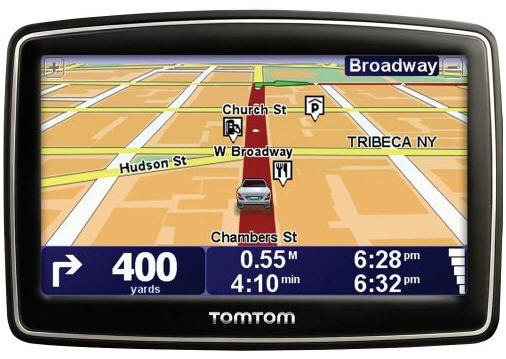
Hands on with the TomTom XXL 550TM
UPDATE: This model has been discontinued. For a list of current TomTom models and their features, please see our TomTom comparison chart.
The TomTom XXL 550TM


The 550 series includes preloaded maps of the US, Canada and Mexico, along with over 7 million points of interest (POIs). Additionally, you’ll get Advanced Lane Guidance, IQ Routes, Map Share and the EasyPort mount. I’ll go over those features in detail, but first let’s look at some other closely…
Related models
The TomTom XXL 540TM is similar, except that it gives up the EasyMenu interface and has a few more features and customization options; this despite the lower product number!
The XL 350 series (Amazon)
Portions of the following were adapted from recent hands on TomTom reviews on GPS Tracklog.
TomTom XXL 550TM interface
UPDATE: TomTom recently added more features to the XXL 550 series via a firmware update.
The interface is much simpler than most TomTom units. Quite a few options are missing, but most of the basics are there. The main screen, shown below, has two primary options (Plan Route and Browse Map), along with five additional icons at the bottom of the screen (mute sound, day/night, help, options and done).
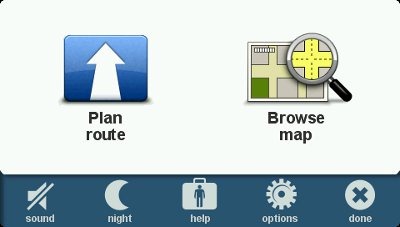
Once you select Plan Route, you’ll be given the options shown below.
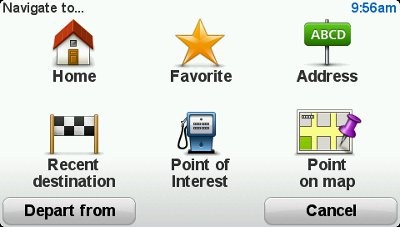
Going back to the row of options on the bottom of the main screen, most are self-explanatory, but a couple merit further discussion…
The Help screen produces a map and details of your current location, along with options to drive to or call for help, as shown below. There’s no Bluetooth capability on the XXL 550 series, so don’t expect to be able to make a call from the unit; however, you can easily access phone numbers for, and directions to, the nearest police station, fire station, hospital, repair shop, etc.
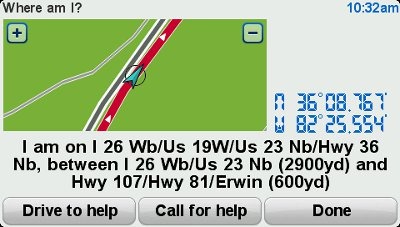
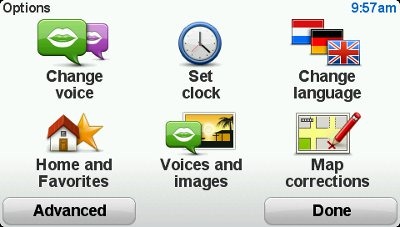
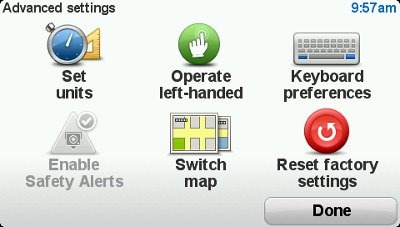
While the XXL 550TM doesn’t have the options of more advanced units, as you can see below, several are still available.
Navigating with the TomTom XXL 550TM
The XXL 550TM shows the next turn at the top of the screen, as you can see below. Lets take the three boxes at the bottom of the screen one at a time.
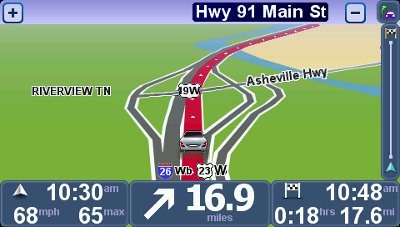
On the lower left you’ll see your current speed (and speed limit where available); this field turns red if you exceed the speed limit by more than 5 MPH. While speed limit coverage seems more limited than that offered by Garmin, posted speed limits tended to be more accurate on the TomTom in my experience. These results may vary widely by region. Current time and direction of travel are also shown. Note that you can tap this area to adjust the volume. While that’s not an intuitive placement, once you do it, I doubt that you’ll forget how.
In the center is the distance to, and maneuver at, your next turn. Tap this field to switch between 2D and 3D map views.
The lower right field provides information relative to your destination – estimated time of arrival, distance to destination and time to destination. Tap this field to see a route summary or to change your route.
Tap the map to return to the main menu.
There is a lot of data on the map screen, and it can certainly be confusing. It may help to think about it this way… the fields on the left are about current conditions, in the center is your next turn, while the fields on the right are related to your destination.
Shown below is the Change Route screen.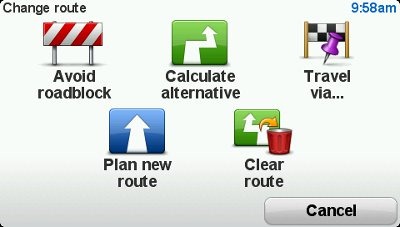
Advanced Lane Guidance
- TomTom’s Advanced Lane Guidance (ALG) coverage, in my experience, is more extensive than Garmin’s. Note though, that as at least one other reviewer has reported just the opposite. Perhaps Garmin is better in New England and TomTom better in the southeast!
- I like the fact that the green arrow flashes, drawing your attention to the proper lane (see below).
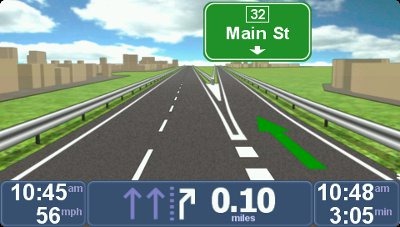
Picky reviewer that I am, I do have some complaints. You wouldn’t know it from the image above, but this is the exit for TN Highway 91. It would be nice if this was shown in addition to the exit number. In many cases the highway number is shown, but I did notice this happening on multiple occasions.
Traffic
I had limited opportunities for testing the traffic features. In general, the TomTom compared favorably to the Garmin nuvi I tested it against, Sometimes one unit was right on traffic; sometimes the other. The traffic announcements are well thought out: “The traffic delay on your route is now 6 minutes. Your arrival time is 5:37, You are still on the fastest route.”
IQ Routes
I’d be remiss if I didn’t mention IQ Routes in this review, because it’s one of the best features TomTom has going. It bases routing decisions on historical traffic data, broken down by the day of the week and time of day, the latter in 15 minute increments. As one reviewer has said, “it almost kills the need for a traffic receiver.” I was very impressed with this feature when it took me down a locally known and very popular shortcut, avoiding the highway that parallels it during a busy time of day. Quite simply, this feature greatly improves routing behavior.
Map Share
TomTom’s Map Share feature allows you to make and share map corrections.
EasyPort mount
I’ve got a kind of love / hate relationship with the EasyPort mount; mostly hate! On the positive side, I really like the twist suction base. I find it much better than lever type suction mounts. But instead of popping off the windshield unexpectedly, the integrated mount can easily become detached from the unit itself, typically when adjusting the angle.
TomTom XXL 550TM performance
The XXL 550TM did well in my testing, although it was a bit slower in recalculating missed turns than the nuvi I tested it against. I noticed no routing errors, and it actually outperformed my nuvi in that respect. At one point the unit reported my position on a road beside the Interstate I was on, but it quickly recovered. On another occasion, as I approached a destination which was 0.2 miles ahead on the right, the unit announced, “after 1/4 mile go straight.” Generally though, such errors were few and far between. If I have any complaints at all about the navigation interface, it would be that there is no way to get a list of upcoming turns.
The TomTom displays more names of surrounding streets than I see on Garmin nuvis. I find this particularly helpful in orienting myself when leaving a parking lot. It makes it much easier to figure out “which way does it want me to go!”
Another plus – startup time was very fast, 3-4 seconds compared to 19 seconds for my nuvi 765T. A negative note is that the screen is not as bright as Garmin’s nuvi series, though it wasn’t dull enough to cause any problems during my testing.
TomTom XXL 550TM pros
- Lifetime traffic and map updates
- 5” screen
- IQ Routes improves routing
- Advanced Lane Guidance coverage is very good
- Map Share
- Over 7 million points of interest (POIs)
- Displays names of surrounding streets
- Simplified menu
- Warns if speeding
- Very fast startup time
TomTom XXL 550TM cons
- No way to see list of upcoming turns
- EasyPort mount can detach when adjusting angle of unit
- Does not auto power on or off with car
- Screen not as bright as some other brands
Conclusion and recommendation
The TomTom XXL 550TM is a very nice unit that will serve most consumers well. My only significant gripes are the mount and the fact that you can’t get a list of upcoming turns for your route. Otherwise, it’s an excellent unit for someone who wants a simple interface. For those looking for more advanced features and/or customization options, I recommend looking at the TomTom XXL 540TM.
More TomTom XXL 550TM reviews
- Consumer-authored TomTom XXL 550TM reviews
- CNet gives a 3 out of 5 star rating in their TomTom XXL 550TM review
- PC World is a little kinder, giving it 3-1/2 stars
Other TomTom XXL 550TM resources
- Want to see how the XXL 550TM compares to other units? Check out our TomTom comparison chart
- The official TomTom XXL 550 series web page
- There are several good TomTom message forums:
- yourNAV’s TomTom forums
- GpsPasSion’s TomTom message forum
- A U.S.-based TomTom forum
Compare prices on the TomTom XXL 550TM at these merchants:
- Check the current TomTom XXL 550TM
- Get a great deal on the TomTom XXL 550TM
at J&R Computer/Music World
 About Rich Owings