Sunday, March 18, 2012

Garmin nuvi 40 review

Garmin-nuvi-40

Hands on with the best entry level Garmin nuvi yet

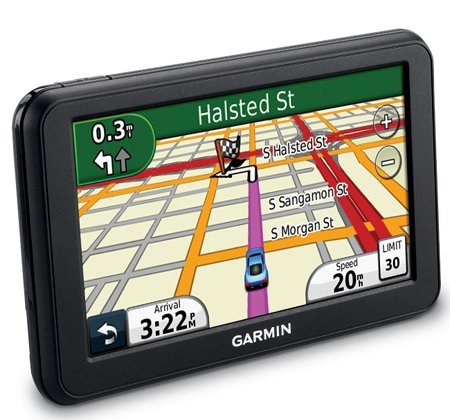
The Garmin nüvi 40 is a 4.3” navigator in Garmin’s new 2012 Essential series. The models in this series are meant to be basic navigators at a budget price, lower than what we’ve previously seen for Garmin entry-level models. Nevertheless, they do come with some features not previously found on low-end nuvis, such as speed limit display, lane assist and junction view.

Related units

  • Drop down to the nuvi 30 and you’ll get the same features, but with a smaller 3.5” screen
  • Step up to the nuvi 40LM, to get the 40’s feature set and 4.3” screen, plus lifetime map updates
  • Or move up to the nuvi 50 to get an ultra-wide 5” screen
  • To see how the nuvi 40 stacks up against other models, check out my Garmin nuvi comparison chart

Two versions

Two versions of the nuvi 40 series are available – one with the entire US except for Alaska and Hawaii, and one for all 50 states plus Canada.

Key features

Generally speaking, all nuvis will get you from point A to point B; when you pay more, you’re primarily doing it to get bells and whistles. Nevertheless, the nuvi Essential series has some nice features. Here’s a look at several:

Speed limit display and warning

As noted above, the nuvi 40 includes speed limit display. In my testing, I’ve seen speed limits not just on highways, but on many secondary roads as well.

nuvi-40-speed-limit

And if you exceed the speed limit, the current speed field will turn red…
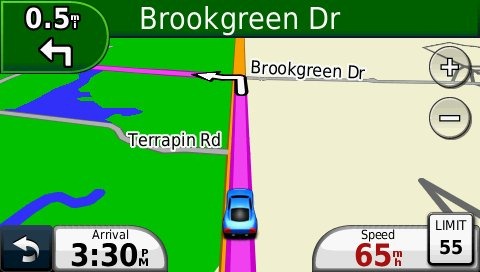
nuvi-40-speed-warning

Lane Assist

The next turn icon in the top left corner highlights the proper lane to be in. You’ll primarily see this on freeways and on some surface streets in urban areas. Coverage is fairly extensive.
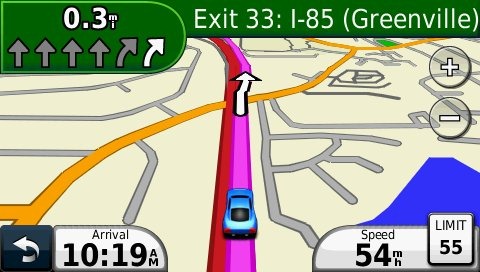
nuvi-40-lane-assist

Junction View

The model I tested was a pre-production unit, and it did not have the Junction View .jcv file installed. Nevertheless, it is a listed feature for the Essential series, and should look something like this…
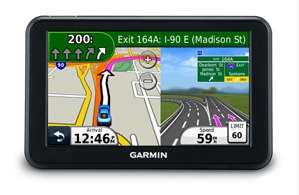
nuvi-essential-jct-view

Customizable data fields/display

If you tap the lower left data field, you can customize what is displayed there. Different choices are offered for whether you are or are not navigating.

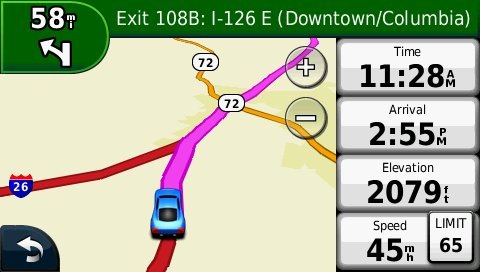
Want more info displayed? Go to Settings > Map, press the down arrow icon and select Map Data Layout > More Data, to get the setup shown below, giving you two extra data fields. Tap a data field to change what is displayed.
nuvi-40-more-data-fields

Trip Log

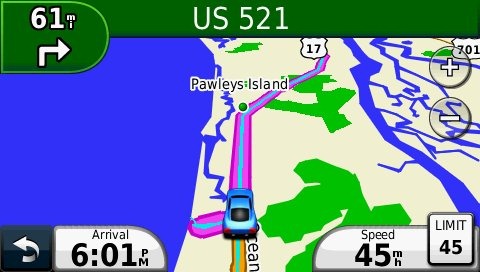
The trip log allows you to display where you’ve been (which can be a big help navigating mega-mall parking lots, and even in everyday city driving). The trip log is the thin blue line shown below.
nuvi-40-trip-log

There are options to Show or Hide this info, but unfortunately (unlike on other nuvis) there appears to be no way to clear the trip log short of a hard reset! Perhaps this is just an oversight that will be fixed in an upcoming firmware update; I’m certainly hoping Garmin hasn’t decided that privacy features should be limited to higher priced models!

Where am I?

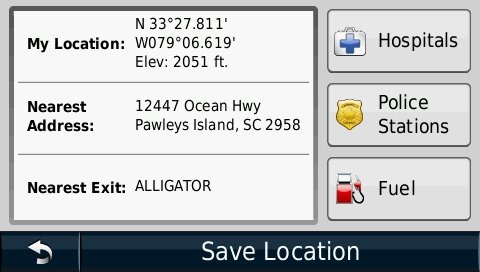
Tapping the car/current location icon on the map brings up the Where Am I? screen, with the options shown below.
nuvi-40-where-am-i

What’s missing?

Not much. There is no multi-destination routing (although you can add a single via point to a route) or powered mount, two popular options. The latter means that you’ll need to attach the mini-USB lead for the power cord each time you use the unit. Also, unlike other recent low-end models, you cannot add a traffic receiver. Here is Garmin’s rationale for this:

The nuvi 30, 40, and 50 series devices are not compatible with any traffic receiver or traffic service. Although these devices come with a variety of popular features, other features such as traffic compatibility have been left off so that we can provide our customers with the option of more basic devices at much lower price points.

Garmin nuvi 40 performance

I noticed no routing irregularities while using the Garmin nuvi 40, nor did I notice excessively long waits for satellite acquisition. Except for the missing bells and whistles, it performed as well as my other nuvis. I did have trouble getting it to go into USB mass storage mode when connecting to my computer, but this was solved by ensuring that the unit was on before connecting it. And this issue went away entirely once I updated to firmware version 2.10. The only other item of note is that I found the mount a little awkward to clip the nuvi into at first, but after awhile I got used to how it attaches and rarely had problems with it.

Garmin nuvi 40 pros

  • Low cost
  • Speed limit display
  • Lane assist and junction view
  • Customization options

Garmin nuvi 40 cons

  • No powered mount
  • Cannot add a traffic receiver
  • Can only hide Trip Log; cannot clear it without resorting to a hard reset
  • Only includes maps of 48 states (although a version that adds Alaska, Hawaii and Canada is also available)

Conclusion and recommendation

Highly recommended. This is without a doubt the best entry level navigator Garmin has ever released. It has a generous 4.3” wide screen along with features previously restricted to mid-range units. You can’t hardly go wrong with this one.

More Garmin nuvi 40 reviews

I’ll be posting more hands on GPS reviews as they appear, but in the meantime, here are some…

Other Garmin nuvi 40 resources

Compare prices on the Garmin nuvi 40 at these merchants:

StoreRatingBest PricesShopzilla Tracking
Compare all prices on the Garmin nuvi 40 GPS ranging from $89.99 to $174.68.
store-logo
In stock at Quill
$99.99
store-logomerchant-rating
In stock at Abt.com
$110.00
powered by

About Rich Owings

Rich is the owner, editor and chief bottle-washer for GPS Tracklog. Connect with him on Twitter, Facebook or Google Plus.

Comments

  1. Boyd says:

    The fact that you cannot clear the tracklog just shows how aggressive Garmin is getting about harvesting your track data for use with trafficTrends (and who knows what else). Are all the new 2012 models like this?

    • Rich Owings says:

      No. In the Advanced and Prestige series (according to the manuals), there is this option…

      Settings > About Device and Privacy > Clear Travel History

      • Stephen G. says:

        The [Clear Travel History] function does not clear the track data.. I just got the same in official response from Garmin Tech Support, that the only way to clear the track/breadcrumb data, is to do a master reset of the unit.. Which, on most GPS units, was a standard function to clear the track. Instead, you’re left with the screen cluttered with a flood of green lines.. Personally, I think this detracts from Garmin’s quality, because if it is indeed forcing you to retain the data, you’re left with a cluttered screen, and IF you do, do the master reset, you now must re-enter ALL favorite locations.. (which, I’m sure you could do with the Garmin Custom Waypoint loader, but not too easily unless you’re also lugging a laptop along with you on your trip.) What are they thinking? this has been a standard function! Why remove it, unless as someone said, they intend to harvest the info somehow. My suggestion to Garmin, there’s plenty of room.. Put the function back in the next firmware update..

        • Rich Owings says:

          Aargh! They absolutely need to fix this!

          Until then, the best solution is to backup the current.gpx file in the GPX folder before doing a hard reset. Then transfer it back to preserve your Favorites.

  2. Scott says:

    Rich,

    Any idea when you might be reviewing any other Nuvis in 2012 line?

    • Rich Owings says:

      Yeah, I lucked out and should be getting a 24×5 and a 25×5 today or tomorrow. Will get up a first looks post as soon as I can, so if you have any questions, let ‘er rip!

  3. Joey H says:

    Can’t wait for your review !
    Thank you

  4. Raghi says:

    I believe Garmin writes s/w so that after the ‘Life of Device’, the device takes (~3 min) to ask you if I still want to hook up to a satellite signal. Of course I say yes & then at 10 min it might catch signals finally. I belive this might be on way to force users to go & buy newer units. What about this one?

    • Rich Owings says:

      If you have a device that’s doing that, it could well just need to download the full satellite almanac. Leave it on, under open skies for half an hour. Do not turn it off as soon as it locks. Infrequent use causes this problem.

  5. Gene says:

    This is a good, succinct review. You did a good job at keeping it brief, knowing that your audience is likely largely familiar with the basics of how a Garmin GPS works. Seems that Garmin is able to put out refined products quite easily these days.

  6. J Stegall says:

    Thought this product would allow me to plan my own route on Mapquest and then give me turn by turn instructions while on the road. Nope. The Nuvi will override the route you planned on Mapquest, unless you break your trip into small waypoints and reset your destination at each waypoint while on the road. Also, the Garmin plugin software says it installs on my pc, but it will not communicate with my Garmin, so the optional data cord I purchased is worthless. I can use the memory card to connect the info from pc to the Garmin Nuvi. It does have a nice large touchscreen.

    • Rich Owings says:

      What won’t it communicate with? The Mapquest site? Will the unit show up as a mass storage device?

      The Garmin relies on its own data for routing decisions, which is why it’s behaving the way you describe.

      • Stephen G. says:

        When you connect any of the Nuvi units, (even back to the original, I imagine) it’ll act like a 2gb flash drive, but for a Windows-CE based computer. (which, majority of GPS units are now-a-days.) Garmin’s Updater software, sees the device, and determines where to place data, But I too, don’t see how you can put a route file onto a Nuvi, or any other car type GPS.. I usually copy the .gpx file from the GPX folder, to my computer, to review where I’ve been, but I usually will delete it (and along with it, the track data, still a thorn in my opinion,) from the unit, leaving the Favorites data intact.

        One thing I did notice with the 40, comparing to a 1300 it replaced. (Poor design.. I’ve run into a few Magellan devices with the same problem. the data/charging connector (the 5-pin USB socket) tends to separate from the internal PC board, because of sloppy soldering, and the direction the power cord pulls the contacts away from the surface. I imagine the 40 will do the same sooner or later.)
        A standard feature, the Eco-Route challenge software, is now a “You Pay” premium, while it was a standard feature in past models. and, when I say, You Pay, I mean, for $14.95, You get it.. otherwise, it’s not included.

        My opinion on the pop-up detail of lanes, is it’s a little too invasive.. when it pops up, there goes your direction/ETA/distance/speed info, until you’re past that intersection.

  7. Christopher says:

    Is this the lane assist junction view split screen something new they added? Is this something that they could add to older models like the refurbished 1490 I picked up a few months ago.

  8. Ray S says:

    Thanks for your research work, my question is can a Mexico map card be used with
    this unit.

  9. David Parks says:

    Hi.
    I have an older nuvi 260 and would like to upgrade to the nuvi 40 lm.
    My question is, with the 260 if I miss a turn (always my fault) the unit immediately
    recalculates a new route.
    Does the nuvi 40lm perform the same recalculation?
    Thanks for any help you can give.
    Dave

  10. Yeoh says:

    Hi, thanks for your review and i think this model is just good enough for me. However, may i know can i load different map? Like Malaysia map?

  11. Mark Leiner says:

    I plan on purchasing this gps and I am new to gps venue, my question is…does thus gps have free map updates? and how do I acquire the up dates?

    • Yeoh says:

      Hi Mark, if I’m not mistaken, the Garmin Nuvi 40 has another models that is Nuvi 40LM. This model come along with Lifetime Map Updates but slightly expensive than the Nuvi 40 model. You can get the map updates from Garmin website.

      • Mark Leiner says:

        thank you very much so then this model does not have map updates and I will check out the model you have suggested.

        • Rich Owings says:

          Yes, the 40LM adds lifetime map updates. It’s usually cheaper to buy them bundled with the device than pay extra for them later.

        • Stephen G. says:

          One side note, there is only 1 update when you get the unit new, and that’s it.. as others have suggested, it’s a bit more, but the LM model will allow constant updates.. Otherwise, purchase the Life Maps software/license.

  12. greg says:

    Just got a nuvi 40 on Xmas. I am having trouble with keeping a strong signal. appreciate any positive feedback. Thanks

    • Rich Owings says:

      When you start your GPS, it begins to look for satellites. Once it locks onto them, it also begins downloading the satellite almanac data for the next week or so, speeding satellite acquisition for that time period. It can take up to half an hour for this data to be fully downloaded.

      If you use the GPS infrequently, or for short five-minute trips, the data will expire or not get fully downloaded. Other things that can make satellite acquisition a challenge include environments such as urban canyons. Also, in my experience, units are slower to lock onto satellites while moving than when stationary.

      If possible, you should try leaving the GPS on, under open sky or on your windshield, stationary, for a full 30 minutes and see if that helps.

  13. Robert Jarvis says:

    I have a 30 day old Nuvi 40. Today when I turned it on, it forced me through a VERY lengthy calibration. (Like over 20+ touches, unfortunately I thought something was wrong so I rebooted the unit a couple times during the calibration sequence). Finally I just kept tapping the screen repeatly and then it rebooted naturaly. When it came back on, I had no maps installed and the “unlock code” file was missing.

    Tech Support emailed me a new gmmapprom.unl file with my unlock code, but my maps were still missing. I luckily am able to download the map update durring the first 30-60-90 days (or something like that) and it is installing all new maps now (3 hours to install – rediculous and requires Windows Media 11 and .net update – another rediculous feature I shall hold back additional comments….)

    My question, since this cheap device appears to have some serious flaws in software, has anyone come across any documentation to “backup my maps” and preferably “backup my software”? Ideally, I will try to make an image of the drive if possible, but I would welcome any specific instructions that anyone has already successfully discovered. Thanks to all! I love reading your posts!!!

  14. Robert Jarvis says:

    Rich, you sir, ROCK! Of course, it would be nice if most simple systems could be backed up so easily, which is why I rarely opt for the simple solutions and head right for Drive Image or other image programs. However, it appears this garmin software is of the simple nature, so I’m still confused how the maps could just disapear. Anyway, have a great day and thanks!

  15. CanIGetAWhatWhat says:

    Thanks for the review… it’s been a while, anyone know if Garmin has made it possible to clear the trip log without doing a full reset?

  16. Mona Reynolds says:

    recently in jax fl my nuvi 255w stopped calculating. went in to best buy store and was told that i probably need map updates, but it would be cheaper to purchase the nuvi 40lmt with lifetime maps, so i did. it kept losing satellite reception at the store. they suggested that i download new maps which i did (…5hours…). kept telling me the same thing as my the 255w…not on digitized road, when i really was. luckily i had mapquest when it stopped navigating. after no satellite reception for more than 1-2 hours i returned it to the store for a refund. what is the problem?

Speak Your Mind

Tell us what you're thinking...
and oh, if you want a pic to show with your comment, go get a gravatar!

*
