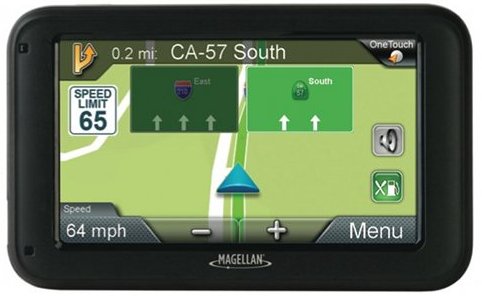
Hands on review of the Magellan RoadMate 5230T-LM
The Magellan RoadMate 5230T-LM
Quick links
More Magellan RoadMate 5230T-LM reviews
Magellan RoadMate 5230T-LM resources
How much does it cost?
Other items of note include junction view, multi-destination routing and speed limit display. The 5230T-LM includes preloaded maps of the US, Canada and Puerto Rico.
Landmark Guidance
This is the big new feature and it’s the first PND in the US to feature it as far as I can tell. I actually did a separate post on it, so I’ll just quote from that:
Basically, in addition to using street names for guidance, it will tell you to turn at “landmarks” like a McDonald’s or a Chevron station. You can see and hear it in action in the admittedly shaky video below. Apparently I need a camera with image stabilization, although the main point in this video is the audio.
Of course the big issue here is POI accuracy. For example, many BP gas station franchises around the country have changed brands since the Deepwater Horizon oil spill. Yet there are plenty of former BP stations in the POI database listed as BP. And therein lies the problem — without an accuracy level that we’ll probably never see, this feature will give you misleading directions. Is it cool? Yes. But it compromises the core navigation function of the device. Which is probably why we haven’t seen Garmin or TomTom introduce it (and hopefully never will). This is nothing but a gimmick and a likely deleterious one at that. Fortunately, Magellan has done two things which help – in almost all cases they give a street name for the turn too, and the feature can be disabled under Settings > Navigation.
Check out the rest of the post if you’re curious about where the data comes from.
Things I like
There are however a few things I like a lot, and many apply to Magellan units in general.
Speed limits and custom warnings
The 5230T-LM includes speed limit display, which is a relatively new feature for Magellan units. Also nice is the ability to set an audible and/or visible warning when you exceed the speed limit by a set number of MPH over the limit (in 5 MPH increments). When setting it at 10 MPH over, I noticed that it tended to warn at around 9 MPH over, so I ended up setting it for 15 MPH over. This is a nice feature but it would be better if you could set in 1 MPH increments to allow a bit more fine tuning. 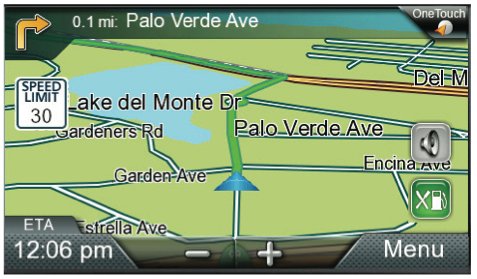
OneTouch
The OneTouch icon shows up in the upper right corner of the map screen (shown above) giving you quick access to a list of your most frequent destinations. Tap it to get the screen shown below, which you can customize with favorite locations or POI categories. 
Exit POIs
Magellan deserves a lot of credit for this feature, which they first introduced. It has since been implemented by Garmin under the name Exit Services. Basically, it allows you to see what services are available at upcoming exits when you are on a limited access highway. All you need to do is tap the Exit POIs icon on the map to get the screen shown below. 
Magellan RoadMate 5230T-LM performance
With a couple of exceptions the RoadMate 5230T-LM performed well during my testing. I did see one time when it showed me at a nearby location and it took several minutes to lock onto the correct position. This could indicate weaker than normal GPS reception, which would be problematic in urban canyons and other difficult environments. I also noticed one routing error that would have turned an hour drive into something closer to one and a half hours! My other complaint (of course) is Landmark Guidance, which called out turns at businesses which had changed brands.
Magellan RoadMate 5230T-LM pros
- 5″ screen
- Lifetime map updates
- Lifetime traffic
- Exit POIs
- Customizable alerts for speeding
- Comes with one year safety camera subscription
- Multi-destination routing
- Can select which categories of POIs to display on the map
Magellan RoadMate 5230T-LM cons
- Routing errors
- Landmark guidance can be misleading
- Cannot display ETA and current speed simultaneously
More Magellan RoadMate 5230T-LM reviews
- PC Magazine gives an incredibly weak 2-1/2 out of 5 star rating in their Magellan RoadMate 5230T-LM review
- Pocket GPS World gives it 5 out of 10 stars in their review of the 5230T-LM
I’ll be posting more hands on GPS reviews as they appear, but in the meantime, here are some…
Other Magellan RoadMate 5230T-LM resources
- The Magellan RoadMate 5230T-LM owners manual
- A Magellan RoadMate 5230T-LM FAQ
- There is a Magellan RoadMate message forum at GpsPasSion
- There is also a Magellan RoadMate forum at GPSReview.net
- To see how the 5230T-LM stacks up against other models, check out our Magellan auto GPS comparison chart
- The official Magellan RoadMate 5230T-LM web page
Compare prices on the Magellan RoadMate 5230T-LM at these merchants:
- Check the current Magellan RoadMate 5230T-LM 5-Inch Navigator with Lifetime Maps and Traffic
- This is a new release; I’ll add more sources once they become available
 About Rich Owings
Hello I have a question. Does it has lane assistance or similar feature? Thanka
Yes, although I believe it is limited to highways. You can see it in the top image.
Thanks very much for your reply. Please reply to me on your other posts. I asked few more questions. I am a new driver and bought magellan 3030LM but not satisfied. So that’s why want to buy good one this time.
Thanks
Get a Garmin.
And FWIW, new units will be announced early this coming week. We’ll have details on the home page here.
I think I should wait for new arrivals. Lets see what they offer. Will seek your opinion once they come. Many thanks.
I gave the Magellan RoadMate 5230T-LM a rating of 2 stars. It is slow to react and is a problem in mountainous areas of Maine and New Hampshire. I have passed destinations before it announced arrival and almost missed turns due to slow reaction. The landmark guidance is both confusing and misleading. Also it has twice provided street names for streets that do not exist. I found I need to constantly refer to the screen to verify information thereby creating a driving hazard. I strongly recommend against this product, and plan to return it to the purchaser if I can.
Kind of interesting, I’ve recently purchased my second GPS ever, my first was 4 years ago and was a Magellan, but I just got a Nuvi 2557lmt. The nuvi tells me to take dirt roads all the time and I have unpaved roads selected as an avoidance, and with crystal clear blue skies and no mountains or trees in sight it would lag up to 1/8 of a mile behind. I decided to test it a bit by missing a turn in a local town, it recalculated swiftly but didn’t vocalize for me to make the turn until I was AT IT. Sounds like the exact same problems this Magellan is having. Also my place of work, which has been there for 11 years (a grocery store) is NOT in their POI database. Go figure. Point being? If I have to live with such ridiculous failure I rather spend 120 dollars for the Magellan than 220 for the Garmin.
I was given a Magellan 5230T-LM as a gift. I tried it on a trip (17 miles) to a restaurant. I intentionally got off the route it had chosen. Rather than recalculate how to get to the place, it kept trying to get me back to the original route. I called Magellan and was told that the unit will always try to get you back to the original route? Odd, I thought. Can’t the unit realize I went another way and recalculate a new route to the destination? I called Garmin and asked the same question. They told me that their unit will keep trying to get you to your destination no matter how far off course you veer. We have renamed Magellan to Mother-Gellan as she insists on going the way SHE chose.
Marc
I’ve owned both the 1440 & the 1470. They didn’t have traffic or map updates included so that is an improvement in this unit. My brother had a TomTom unit and the Roadmate seemed to give better directions in the DC Area than the TomTom, so I bought the 5230 to give it a try.
Main complaint: faulty software and bad websites. Once you register a unit there’s no way to “unregister” it if you sold it. Some of the websites to register your unit were non-functioning. Amazing for a large company. Their 1440/1470 Firmware updates (i.e. 2.20 were known to be faulty and would turn your unit into a “brick), so it doesn’t give me much confidence in their FW updates.
When I tried to do a update to the 5230 it started downloading and said it would take 23 HOURS to download? I have verizon FiOS (fiberoptic 5 Mbps download speed). Obviously a problem with either Magellan’s ftp servers and/or their content manager software. I left it running overnight then when I checked it said a download failure had occured?
I retried the map update in the morning and it downloaded (after about 15 minutes), then it started to “install the update”, which it said would take 60 minutes! If the update fails during this process, presumably you could brick your unit too?
The content manager is sorely lacking in features and not intuitive to use. You have to right-click on the system tray icon to remove a device, instead of doing it within the Content Manager menu items, for example.
I think this company is going to continue to loose revenue and market share if they don’t get their act together with: firmware updates, speed of map updates, website problems, lack of support. Most retailers in our area of DC don’t even carry them anymore (i.e. Staples, Wal-Mart, etc.). You have to go to Best Buy and they don’t have many units on the shelves either and are deeply discounting them (probably to liquidate them).
For 10 years I used my Magellan Maestro – an excellent GPS. SO I bought another Magellan; the 5230. That was a big mistake. It is a very poor performing GPS; very slow, lost us a number of times.; took us back to origin rather than destination once. I bought it a week before a month long trip, so when I returned home and called Magellan, I got the stock answer ‘past 30 days, you cannot return…’ Stay away from this unit AND Magellan’s poor customer service!
I am looking at purchasing a RoadMate 5235T-LM. ’What is the difference between a Magellan RoadMate 5230T-LM and a Magellan RoadMate 5235T-LM? Is the 5235 just an updated version of the 5230?
Questions I have based on reviews/ user comments that I have read,
1) The Map update software only works with Windows XP. Is this correct or does it also work with later versions of windows ?
2) Does their Content manager software that you install your computer load up every time you power up your computer? Some comments said that it did and this slowed your computer down. I have a old TomTom and I know that for the unit I have, it only loads when you plug your TomTom into the computer.
3)I have also read comments about poor satellite signal reception compared to other models/ and other manufacturers. How would you rate the satellite reception?
Thank You