
Hands on with the Garmin GPSMAP 62s
It’s finally here… The Garmin GPSMAP 62s

With the 62 series (and the boater friendly companion 78 series, which shares the same interface), Garmin has married the best features of the 60/76 models, with many of the advantages of the Oregon line.
The problematic high-resolution screens found on the Colorado and Oregon lines did not make it to the 62 series (although I should note that this problem has largely been solved in the latest model, the Oregon 450). Before we get into the details, lets look at some closely…
Related models
- Drop down a notch to the GPSMAP 62 and you’ll lose wireless data sharing, the barometric altimeter, triaxial electronic compass and the micro-SD slot; still, this one has enough internal memory to satisfy most people’s needs
- Going the other direction, the GPSMAP 62st adds pre-loaded 1:100,000 scale US topo maps to the features found on the 62s, but with all the free maps available, there’s little reason to bump up to this model
- But you might want to step up to the 62sc to add a 5MP geotagging camera
- To see how the GPSMAP 62s stands up against other Garmin models, check out my Garmin handheld GPS comparison chart
I’ll discuss the display and feature set first, then look at performance
Portions of the following were adapted from my review of the previously released Garmin GPSMAP 78s and other units with shared features.
Garmin GPSMAP 62s display
With transflective TFT screens, the greater the pixel density, the less light that can be reflected back to the user. In order to maintain the bright screen found on the 60/76 series, Garmin left the resolution (160 x 240 pixels) alone. Screen size remains unchanged too, at 1.6 x 2.2”. The 62 and 78 series do enjoy an increased range of colors that can be displayed (65,000 vs. 256 in the 60/76 series). The result is a bright display, not quite as large or as high resolution as the Oregon series, but with much better visibility in a wide range of conditions. I definitely noticed the lower resolution, but these are the tradeoffs you make. The only time the screen seems cramped to me is when I have a dashboard showing on the map screen (discussed more below).
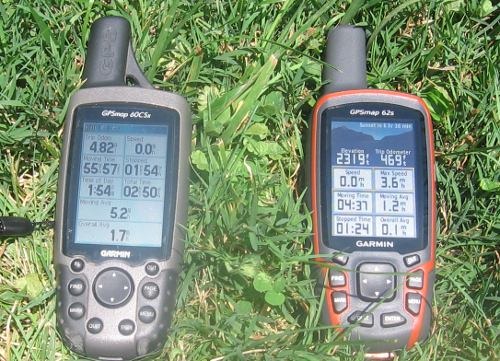
Shown above is a photo taken in full sun, without backlight, comparing the 60CSX and 62s. It is difficult to capture screen visibility on film, but I find these two displays comparable in a wide range of conditions.
Garmin GPSMAP 62s interface
Garmin hit a home run on the interface. They did an excellent job taking the best aspects of the Oregon series and making it work on a non-touchscreen unit. I think it is actually better than the Oregon except for when it comes to text-entry, where the touchscreen excels. The 62/78 series interface makes it much quicker to navigate main menu items.
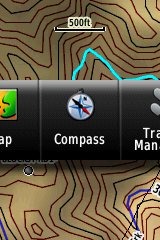 A Page Ribbon menu appears when you press the Page or Quit buttons (see image at right). Just like on the 60/76 series, these buttons advance through pages in forward or reverse order, respectively.
The Page Ribbon menu item that appears is the next screen in the sequence. After a second or two, that screen will automatically open. Or you can press Enter to go there right away, or continue pressing Page or Quit to advance to other pages in the sequence; stop on one and it will open. Page Ribbon items and their order can be customized. I prefer this interface to the old style, but you may not. In that case, you can set the unit to a classic style menu and get the old 60/76 series functionality, eliminating the Page Ribbon.
Here’s a quick video I shot, showing a bit of the interface:
Newer features on the Garmin GPSMAP 62s
The 62 series inherited a number of features from the Colorado, Dakota and/or Oregon series. These include the ability to utilize Garmin custom maps and BirdsEye aerial imagery, a tri-axial compass, new customization options, advanced track navigation, wireless data transfer and paperless geocaching. None of these were available on the 60/76 series; I’ll explore each in more detail.
Custom maps and BirdsEye imagery
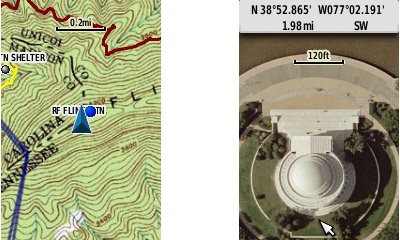
Garmin custom maps allows you to put just about any map image on the 62s. Found a PDF park trail map online? Add it to your GPS! The image at left below shows a custom map — a USGS topo (raster) image. You can read more about this feature by checking out my posts on Garmin custom maps.
With Garmin’s BirdsEye aerial imagery program, a $29.99 annual subscription allows you to add aerial imagery to the GPSMAP 62s. Since I don’t yet have a BirdsEye subscription for my unit, I’m showing a Jefferson Memorial aerial image using Garmin custom maps, but hey, you get the idea.
Tri-axial compass
Having a tri-axial compass means you don’t have to hold the unit level while navigating. The downside is that the calibration process is more complicated than that for a two-axis electronic compass. It’s the same procedure that is used on the Dakota 20 and Oregon x50 series — here’s a brief video I shot of it. The compass should be recalibrated every time you change the batteries in the unit.
Customizing the Garmin GPSMAP 62s
The 62s offers lots of options for customization. I highly recommend you take the time to set up the following.
Page sequence – You can customize the page sequence by choosing Main Menu > Setup > Page Sequence. This will allow you to select which pages appear in the page sequence and their order. The Page and Quit buttons move forward and backwards (respectively) through pages. I usually put the map screen as my first page and the trip computer last; this way I can toggle between them with the page and quit buttons.
Profiles – The 62s comes with recreational, geocaching, automotive, marine, fitness and classic profiles. You can switch profiles by going to Main Menu > Profile Change. Or create a new one by going to Main Menu > Setup > Profiles. Select the new profile to give it a name. Any changes you make in menus or other settings will be retained in that profile. So start changing things! Want track up when geocaching and north up when biking? No problem. How about a separate profile that just shows USGS topos or aerial imagery? The possibilities are nearly endless.
Data fields – You can change data fields on just about any screen that has these; simply press Menu > Change Data Fields.
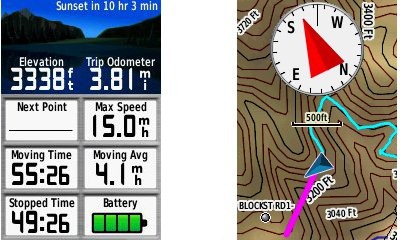
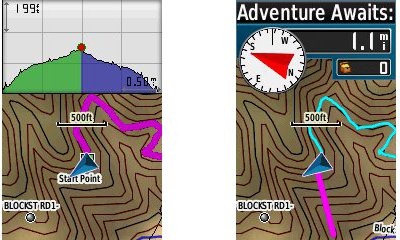
Dashboards – Instead of data fields (and in some cases in addition to), you can select a dashboard for the map, compass and trip computer screens. Choices (depending upon page) may include automotive, stopwatch, small or large data field, recreational, compass, geocaching or elevation plot. I’ve included screenshots showing the last four below. For the trip computer and compass pages, you access this via Menu > Change Dashboard. For the map screen, choose Menu > Setup Map > Data Fields > Dashboard. The one downside here is the small screen on the 62 series; using a dashboard can significantly reduce map real estate.
Track navigation
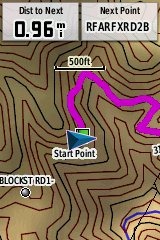 With the GPSMAP 62s, you can select a track to navigate and a route will be created. Waypoints are automatically generated for major high and low elevation points, and start and finish; these and any user waypoints along the track are added to the route. I’m a heavy user of track navigation. If I head out for a trail I’ve never traveled before, I do a search online for tracks (favorite search terms are .gpx, gps, trail name, and park name) and load the track to the device. One advantage of this new track navigation feature is that, unlike typical backcountry route navigation, you’ll get an estimate of actual trail distance rather than “as the crow flies” mileage. Screenshot at right.
Paperless Geocaching
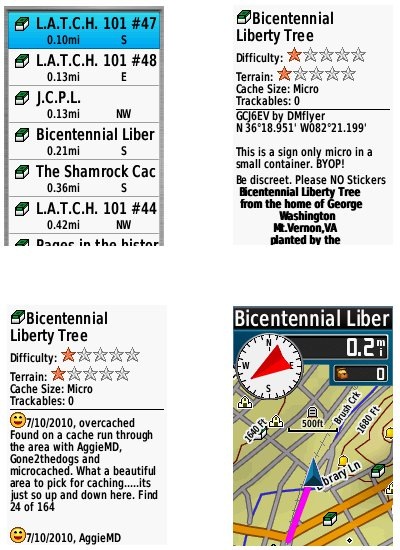
The 62 series is a nice GPS for geocaching, as it is set up for full paperless support, meaning you can see the description, logs, and hint, and you can log your attempt (find, DNF, etc.) for later transfer back to geocaching.com. Speaking of which, full access to these features requires a premium membership at geocaching.com. Shown below, clockwise from top left: closest geocaches, geocache description, map with geocaching dashboard, recent logs.
Wireless data transfer
The GPSMAP 62s is capable of wireless data transfer with other compatible Garmin units. You can transfer waypoints, tracks, routes and paperless geocache details.
Other features of note
Most of the following aren’t that new, but they are worth mentioning anyway:
Route, Track and Waypoint management 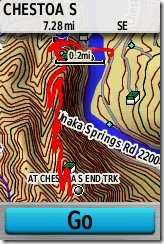
The GPSMAP 62 series has excellent route, track and waypoint management tools, including:
- Waypoints – The ability to project a waypoint, average location, set proximity alerts, and to reposition a waypoint at your current location.
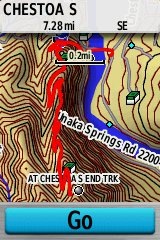
- Tracks – You can choose to hide or show multiple tracks on the map, view an elevation plot, and give them a custom color (17 colors are available). The image at the right shows a track in red (a record of a previous trip). The color of the active track may also be changed. There’s a good thread at the GPSMAP wiki that delves more into track archiving and storage. The 2.44 beta firmware update brought additional archiving improvements; hopefully this will make it to a non-beta release soon.
- Routes – You can view a map of the entire route, edit the route, reverse it and view an elevation plot.
Ability to utilize free maps
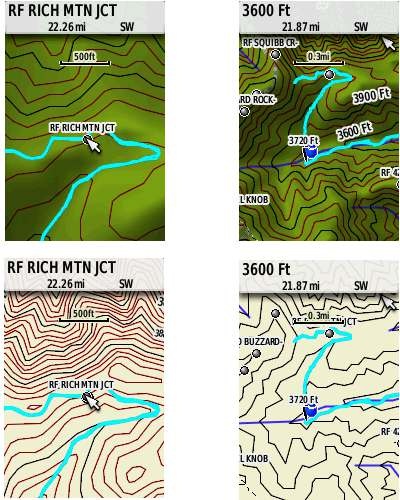
One of the most awesome things about Garmin mapping units is the huge number of free maps available. My favorite site for these is http://gpsfiledepot.com where you can find 1:24,000 scale vector topo maps for most states. You can see a sample in the bottom two screen shots below. If you want shaded relief though (shown in the first two shots), you’ll need to go with Garmin’s own product, either Topo US 100K or their new 1:24,000 scale series.
Auto use
While I would prefer the Oregon 450 as a dual use unit, due to its touch screen (which is significantly larger too), the 62 series is capable of giving turn-by-turn directions when loaded with City Navigator maps.
Under the flap and inside
Under the protective weather cap is a mini-USB port and MCX external antenna connection. Just so it doesn’t trigger questions, I’ll mention that the item beside the antenna connection is a screw. Inside the battery compartment is a micro-SD slot for additional map and data storage.
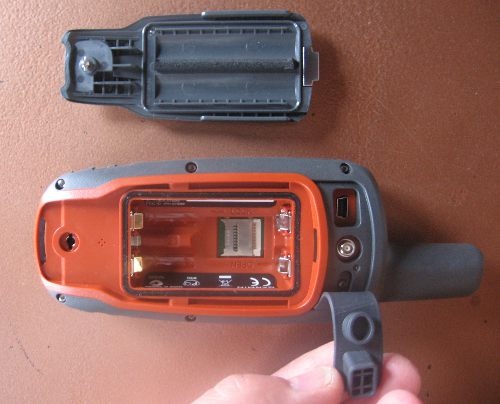
One hardware note here. The battery holders can be very tight with rechargeable NiMH batteries. I actually had to pry the batteries out of one unit I tested, though my wife could remove them with her amazingly strong fingernails! The batteries popped out of the other test units with a good slap, and I expect that even tight ones will loosen up over time.
Carabiner and mounting system
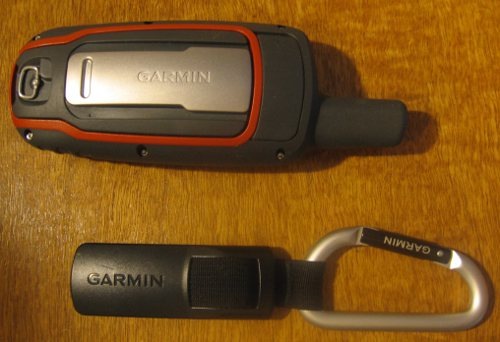
A rail mount on the back of the unit allows the included carabiner to slide onto the device (shown below). This is the same system used on the Colorado, Dakota and Oregon lines so the related accessories are interchangeable. I’ve heard some people say they don’t trust the carabiner mount, but after using it on my Oregon for a couple of years, I can say that I’ve never had any problems with it. Personally, I really like it and find it very convenient for clipping onto my pack.
Garmin’s bike mount
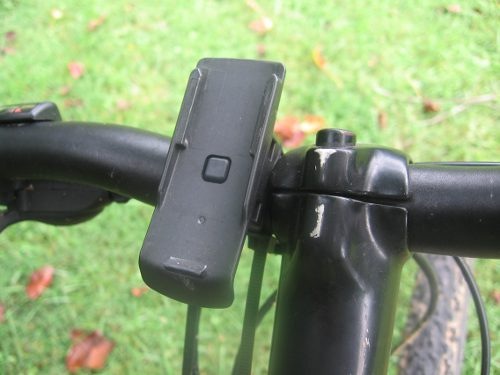
Auto mount kits
Garmin GPSMAP 62s performance
UPDATE: The issues discussed below seem to have been resolved, and I am now very happy with my own 62s.
A tale of three units
I requested a GPSMAP 62s from Garmin and immediately put it on my mountain bike and went out for a test run. I was pretty shocked at the tracklog errors I saw. The unit also exhibited some abnormal behaviors just sitting still under open sky, with a lot of cycling between low and high readings. I talked to Garmin support, tried a hard reset – everything I could think of, but still saw these problems. At this point, I assumed I had a defective unit and arranged for them to send me a replacement…
Unit # 2 was better, but I still saw high accuracy readings (80’+) and some tracklog errors when mountain biking. I was seeing no such problems reported in GPS forums, so what was going on? Unlike the first one, the second unit appeared to be a pre-production model, further muddying the waters. I was beginning to feel pretty unlucky. Had I really received two dogs in a row? The sister unit, the GPSMAP 78s, had been so good. What in the world was going on?
Third unit and a theory
So I decided I needed another unit to test and, suspecting that Garmin might take a dim view of sending me a third unit, I went down to REI and plunked down my own money’; I figured I’d end up buying one anyway. When it gave me less than stellar results, a theory started forming in my oh too slow gray matter.
I never tested the 78s on my bike, because it didn’t work with standard mounts. Could it be that these new models had problems under canopy, at speed? While I was seeing wide swings in accuracy readings, the tracklogs looked pretty good except on downhill runs. After a couple of weeks of struggle, I had a theory to test. So lets break down performance by use and environment:
Mountain biking (speed + canopy)
Notes on methodology – Tracks were set up to record points every five seconds, WAAS was enabled. The 62s and my 60CSX were both mounted on opposite sides of my handlebars, in a position closer to horizontal than vertical.
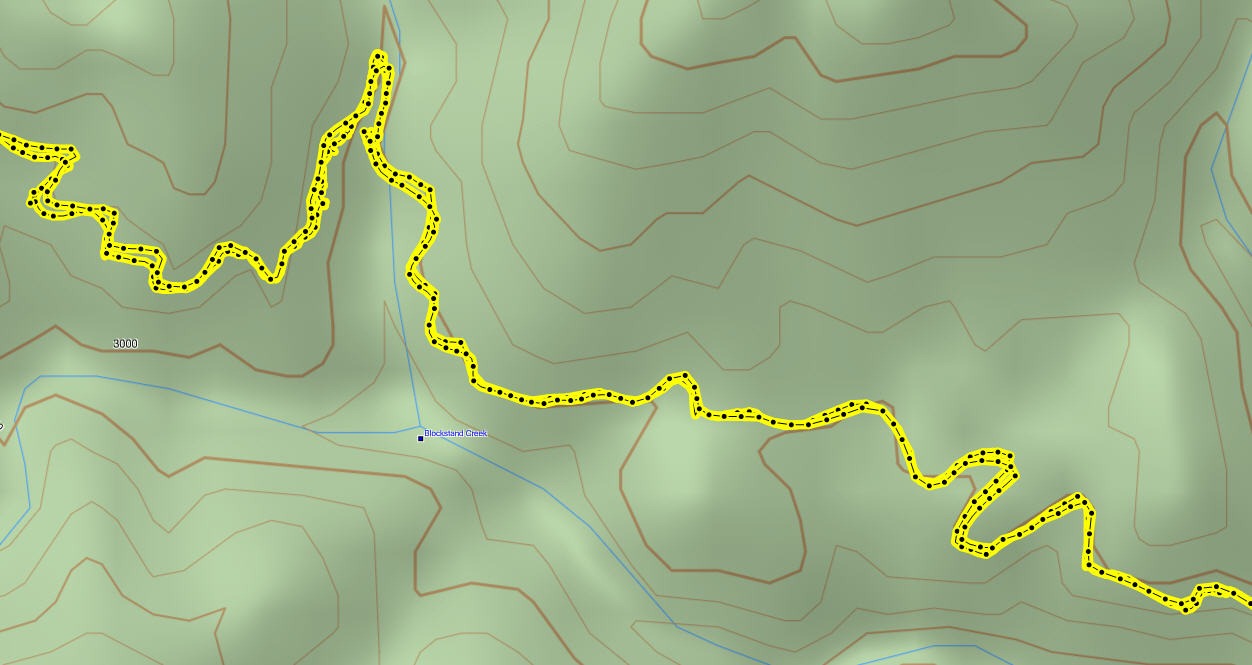
The image below shows a portion of the 62s tracklog from a representative out and back trip. On the downhill run there are numerous places where the track doesn’t match well with what was recorded on the way up. In one place the error approaches 250’.
 Compare this to the same section of 60CSx track below, where track separation maxes out at around 65’.
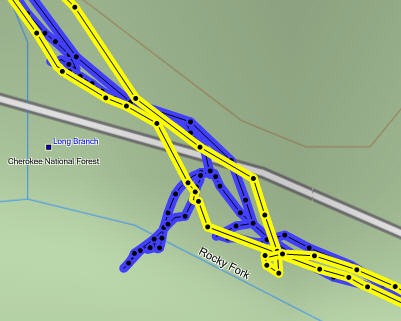
However, the 60CSx exhibited much worse spidering / scattering at rest stops, up to 150’ at one point, shown below (60CSx in blue, 62s in yellow).
Enter the beta
In my final round of tests before posting this review, I installed the 2.44 beta firmware, which also updated the GPS firmware to version 4.52. You can see in the 62s track below that these wild errors appear to be gone. I did see track separations of up to 110’ on the uphill and downhill runs, but nothing as large as the previous errors.
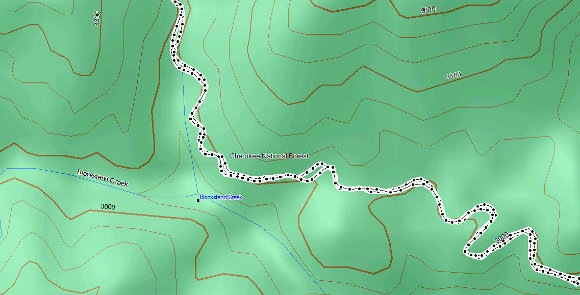
On the same ride, the 60CSx also showed track separation errors of around 110’, and once again exhibited significant spidering/multipath errors when stopped.
It appears that the 2.44 beta has significantly improved performance for mountain bikers and others who use their GPS receivers under canopy at faster than walking speeds. Except where indicated, the remainder of the tests discussed below were made using non-beta software.
Hiking under canopy
Here I used the same methodology I did when testing the 78s:
Recordings were made out and back, on foot, with the 78s in my right hand, and the 60CSx in my left. This meant that one unit may have been closer to a cut slope on the trip up, but the other unit was in this position on the trip down.
Tests were made in multiple locations. Basically, I saw more instances of tracklog separation with the 62s; these were in the 35-50’ range. I saw less of these with the 60CSX, but it threw larger variances, up to about 80’. And again, the 60CSx exhibited much more “spidering” when stopped.
Speed or canopy?
So going fast under canopy was problematic in my early testing, but going slow under canopy wasn’t so bad. How about speed alone? To test this, I stuck both units on my car’s dashboard and recorded tracks while driving. Both performed very well, though the 62s went off by about 70’ at one point. The issue appeared to be more about the combination of speed and leaf canopy, than about either alone, but again, it looks like the recent beta has largely fixed this.
Geocaching performance
I did some geocaching testing, but it is much harder to draw a conclusion here. Generally, the 62s put me a little closer and tended to settle down significantly faster than the 60CSx. One time, when standing 3 feet from a cache, it showed me 2’ away, with the compass pointing almost directly to the cache. Impressive! But alas, I am at the whims of the accuracy of the published coordinates when geocaching.
Battery life
I tested battery life using freshly charged Sanyo Eneloop batteries
Altimeter
In my most recent tests, with the 2.40 and 2.44 firmware, I found total ascent readings to be very accurate, on par with the 60CSx, which has always been my most reliable indicator of elevation gain. I was pleased to see this, since the Oregon series has bounced back and forth between accurate and inaccurate readings, depending upon firmware version.
Creaks and bugs
There have been a lot of reports on message boards about units that creak when pressed on opposite sides of the case. I have seen, um, heard this on each of the three units I tested. On the first, you could hear it when powering the unit of and off. It wasn’t as bad on the other two I tested. Whether this portends other problems over the life of the unit is unknown.
With new handhelds, you can typically expect some bugs in the early firmware. The 62s certainly has these, but many are minor or esoteric. One of the more common and unresolved complaints I’ve heard is that the reported battery level stays on full, and then drops to 3/4 charge shortly before the battery dies. Until this is fixed, when the battery level shows any drop, it’s nearly time to change to a new set!
Garmin GPSMAP 62s tips
I imagine there are more, but here’s a few tips:
- Use the zoom buttons to jump a full page in a menu
- When entering a name, the zoom buttons will switch between keypads
- You can create a custom startup message (e.g., if found, please call…) by connecting it to your computer and editing the Garmin/startup.txt file
- The 60 series header showing battery status is gone; you can check the 62 series battery level by briefly pressing the power button, but you may also want to dedicate a data field to it.
Garmin GPSMAP 62 pros
- Excellent menu system; fast access to features
- Bright screen
- Ability to load Garmin custom maps and BirdsEye aerial imagery
- Paperless geocaching
- Tri-axial compass
- Extensive customization options
- Advanced track navigation
- Wireless data transfer with compatible units
- Accurate total ascent readings
- Generally accurate tracklogs, especially with latest beta firmware
Garmin GPSMAP 62s cons
- Small, low resolution screen
- Text entry more difficult than on a touchscreen Oregon
- Relatively heavy (compared to Oregon series)
- Most units seem to sport a creaky case
- Firmware still seems a bit immature
Conclusion and recommendations (updated)
Updated to reflect my testing of production (non-beta) firmware version 2.50.
Recommended. Garmin has nailed the user interface, and the improved performance under the 2.50 firmware has eliminated my previous reluctance about tracklog accuracy. Is it as good as the 60CSx under any and all conditions? Possibly not, but it does show a lot less multipath error when standing still. And it seems to settle down a lot quicker. Those two factors alone could make this a great unit for geocachers.
The 62 series models are some of the best handheld units available today. If you’re sitting on a 60CSx and have been wanting to get a Garmin with new features like BirdsEye aerial imagery, custom maps, advanced track navigation, and paperless caching, it’s probably time to pull the trigger. The performance of the new models is pretty darn close to the 60CSx. You might want to wait for the price to drop a bit, but if you’re holding out for firmware nirvana, I can almost guarantee that when (and if) that day comes, there will be something newer and shinier waiting in the wings, with all the troubles we typically see on new units.
More Garmin GPSMAP 62s reviews
- Consumer-authored Garmin GPSMAP 62s reviews
- GPS Information reviews the GPSMAP 62s
- A comparison of the 62s and the older 60CSx
- CacheMania reviews the Garmin 62s
- A New Zealand geocacher has posted a Garmin GPSMAP 62s review
- Free Geography Tools tackles the 62s in a three part review: Parts I, II and III, with conclusions
- A very short 62s review from a marine perspective
- A long distance biker reviews the Garmin 62s
- Using the 62s while sightseeing in Europe
- FellFinder has posted their own Garmin GPSMAP 62s review
- The Wirecutter reviews the GPSMAP 62s
I’ll be posting links to more hands on GPS reviews as they appear, but in the meantime, here are some…
Other Garmin GPSMAP 62s resources
- Trying to decide between the 62 series and the Oregon 450? Maybe this will help
- The Garmin GPSMAP 62s owners manual
- Use this chart to compare the 62s to other Garmin handheld GPS models
- There are links to more handheld GPS reviews in our buyers guide
- A Garmin GPSMAP 62 and 62 series wiki
- The official Garmin GPSMAP® 62s
web page
- A video comparison with the older and now discontinued 60CSx
- And a video comparison of the 62s and eTrex 20:
Compare prices on the Garmin GPSMAP 62s at these merchants:
- Check the current Garmin GPSMAP 62s
- Find the Garmin GPSMAP 62s at GPS City, one of our favorite low cost vendors
- Get a great deal on the Garmin GPSMAP 62s 2.6-Inch Handheld GPS Navigator – World Wide
at BuyDig.com
- Check out the deal on the Garmin GPSMAP 62S GPS
at REI.com, where satisfaction is guaranteed and members get 10% back on eligible purchases
- Get the GPSMAP® 62s
- Buy the Garmin GPSMAP 62S Rugged High Performance Handheld GPS Receiver
at Tiger GPS
 About Rich Owings

Hi I have a gpsmap 62s . yesterday it was off and dont will be turn on .the battery is full sharg.when this conect to pc dont unknon for pc . how do i reestaring in soft ware
Are you saying it will or will not connect to the computer?
I’d like to thank you for the efforts you’ve put in writing this website.
I really hope to check out the same high-grade content from you in the future as well.
In fact, your creative writing abilities has motivated me to
get my very own website now 😉
I have a gpsmap 62stc which i bought from amazon last year. but unfortunately it was stolen sometime in january this year. is there a way i can track the device? i had registered the device on the garmin website immediately i bought the device.
thanks
Gideon Sachi
No, it has no transmitter.
Unfortunately I don’t know the answer to the question, but I think what Gideon asked was not exactly that.
Having the unit’s serial number registered with Garmin, maybe it could be possible to identify it and have it returned to the owner if, for instance, it is taken for repair. Or even in some other case. Garmin could even keep a database of lost/stolen units and when you connect it to basecamp, it recognizes the unit and Basecamp could send the info to Garmin who could inform the owner and the police.
Although not having a transmitter, it could be possible to track it, even if with some limitations.
Something like this could be implemented if Garmin wanted to.
No, Garmin does not do this.
Hi.
I am a geological student and will undergo mapping and stuff.
I am now divided between 62s and 60csx.
Many reviewers are in favor of their old 60csx than the new 62s.
Which one should I get? I would like it to last/not outdated until at least I finish my undergraduate.
Thanks
I’ve had a 60csx since they came out. They are the gold standard. I’ve had a 62st for two years now. With that said… I really do favor the 62st over my old 60csx. When I set both units up the same way (same parameters chosen), the two units generate very similar numbers. I would think that the variations between the two units would be the same when two of any units would be compared.
Features that favor the 62st: 3D rendering of topo maps, Upon saving a track, the 60csx strips out a lot of data and waypoints (max of 500 points saved per track) – The 62st saves all raw data and original number of waypoints up to 10,000 points. the 62st can handle a larger sd card then the 60. The 3-way tilt compass on the 62st is much better then holding it level for the 60csx. A clearer screen display on the 62st is a godsend. These and other features make it easier to use.
On down side to the 62st… The aggregate number for the change of elevation is not as accurate as the 60csx. So you need to calibrate the unit more often to fix this shortcoming. The 60csx is cheaper. so it comes down to money and personal preference. You can’t go wrong with either model.
Dave
Thanks for the reply.
I have no personal preferences since this is my first handheld GPS.
The price difference for these 2 units is not much in UK, around 150 for a used 60csx on ebay and a new 62s cost 220 from amazon. So I really dont mind spend a bit more on the newer one if it is better than the 60csx
Obviously the newer 62s will has better specs , faster rendering (?), but I just want to have a unit which is more accurate and practical to use in field.
Thanks.
I find the 62s much easier to use.
My 60cxs runs to about 990 waypoints, not 500.
If you are gong to use it with Mapinfo, get a 60csx. You will find it far better for downloading into Mapinfo using either DNR Garmin (freeware), or better still Garfile if you can find this eexcellent piece of freeware. I bought a 62s a couple of years ago and after a week’s use put it back in the box and got a another 60csx. I am a consultant geologist and use my GPS and Mapinfo every day to make a living. You will pick up a 60csx on ebay for about half the price of a 62s and there is sweet FA diiference between them except for the practicability of use with geological mapping applications.
Can any the the Garmins Switch from GPS to use the National Grid ?
Yes, you should be able to set the position format to US National Grid on just about any Garmin handheld.
I have GPSmap 62s. no doubt its good but I am having problem with my data transfer.
I wants to know how can i import my way points from Microsoft Excle sheet to my GPS.
So I can use those way points easily without putting then one by one.
Please reply me asap.
Both http://www.gpsbabel.org/ and http://www.garmin.com/us/maps/poiloader should work with properly formatted .csv files.
i am getting a garmin gpsmap62st lake to here more about it.
I am going on a 6 day backpacking trip and bringing my Garmin 62s. Does anyone have a suggestion for what battery type I should use and how many I may need? I will have the unit on for most of the day, each day for 6 days. I will not have the ability to recharge batteries.
Any suggestions are greatly appreciated.
I run a Garmin 60csx and it is in use just about every day for about 6-7 months a year and has been for the the last 4 years. I expect 1.5 days out of any batteries I use; I use lithium batteries. Of the various types of AA battery they are all made in China these days and the least useful that I have found are sold by Ever Ready. I have use el cheapo Ricoh AAs on many occasions, but there are other more expensive brands that don’t seem to last much longer (around 12 hours continuous running, maybe longer if I have been lucky). I don’t use the back-light.
Also take a map and compass and protractor. Then if your batteries or GPS fail, you can still navigate in the old way. I have heard that in the UK the search-and-rescue people have had far more call-outs to find lost hikers since the GPS came into popular use.
Have a good trip.
Bob
Yeah, you may want to look into lithiums.
Won’t be able to use a solar recharger on this trip. I’ll just have to bring enough batteries along. Are all lithiums non-rechargeable?
The lithium batteries don’t last as long as the rechargeables. My experience with the lithiums is about 4 hrs while the rechargeables lasts about 16 hours. I use PowerX batteries. Just google them, I think that I got them thru Amazon.
Unfortunately, there aren’t any batteries that are going to last that long. Your best bet is to use rechargeables – at least 2500 mah, slow discharge. Not for flash or other devices. Look at the solar rechargeable units to recharge batteries for the backpacking set.
i love my gpsmap62s that i use topos on for horseback rideing and i am getting auto tracks and tracks that lead from where i stopped using my unit and shut it off to where i go next like home.
How can i manage this problem,, where can i get more info on these auto tracks and how to stop them
Dan,
After you turn on your unit… let it acquire the satellites, then on the “trip computer” screen – Reset the Trip Data & Clear Current Track fields and that should solve your problem.
Dave
Back from a week backpacking on the Rae Lakes Loop in Kings Canyon NP, CA.
Very happy to report that the lithium batteries worked fine. The unit was on from 6am till dinner every day for 5 days. Used three sets of lithium batteries, changing them before I got low battery notices as I didn’t want to miss a low battery message while I was hiking and chance not collecting data. The backlighting was set to lowest setting except when reviewing data in the tent at night.
All worked out very nicely. Thank you all for you pre trip suggestions. For the 5 days of this trip, the lithium was great. If on a longer trip, and considering the intense Sun strength out in the Sierras, I would look into the weight of a solar charger and rechargeable batteries verses the weight of the lithium batteries.
Happy trails,
Jonathan
Nice! Thanks for sharing!
I finally got my hands on a 62ST today, and have to say I’m displeased, or rather horrified, with the user interface. I was expecting something pretty much like my 60CX with some new features, and the 62ST is NOTHING like the 60CX. It might well be a Lowrance or Magellan, it is so different. Why did Garmin have to take a proven UI that had almost every conceivable feature and tear it completely to shreds? It is as bad as what Microsoft did to the UI in Word and Excel 2007 when they added that ribbon thing. Not only is the 62 missing many features from the 60CX, the screen on the 62 looks fuzzy and muddy. My 60CX supposedly has the same pixel resolution as the 62, but everything looks sharper on it: text, lines, the boundaries of solid color areas. Here are two important 60CX features that I can’t find on the 62S: Faster vs Shorter Routing, and setting a zoom level at which the map switches from Track Up to North Up.
If this was a perfect world, Garmin would have taken the 60CX and upgraded functions that needed it, like upping the 2025 tile limit and making the map naming convention more flexible, but not totally re-designed the UI. Most of what the 62S does are the same functions as the 60CX and every other handheld GPSr: showing you where you are and how to get where you’re going, recording your track log, helping you navigate you car, and find geocaches. It’s logical that the Oregon and Montana should have all-new UI’s since they are touch-screen units with a totally different form factor than the 60 series, but the 62S looks and feels pretty much identical to the 60CX and I can’t see any good reason for the UI to have changed so much, and the 62S screen to be actually worse, and with a $100 higher price than the 62CX. I do very much like the open naming convention for user maps on the 62S, and no longer being stuck with a single 2025 tile gmapsupp.img. Garmin did get that right! But I already know that I won’t be replacing my 60CX with a 62. If I am going to have to put up with learning a whole new UI, I might as well get one with ALL of the new stuff like a touchscreen, so I’ll be looking to borrow an Oregon or Montana to play with before parting with several hundred more dollars to buy one.
I couldn’t agree more. I did the same; bought a 62s a while ago and after a week replaced it with a 60csx.. Refer to my assorted comments about its when it comes to dowloading into GIS map-making programmes.
need help just bought a 62s and cannot work out how to set the date and time.
manual and quick start do not help.
The date and time will be set automatically as soon as the unit downloads the “Navigation Message and Ephemeris data” from the satellites. You will probably need to be outdoors with a clear view of the sky for that to happen, and it will probably take seven full minutes the first time (it will be much faster after that, usually 1 minute or less). What you do need to set manually is the Time Zone and DST or Standard time for the location where you are currently using the unit. Find the “Settings” page in the menu system and look at all the sub-pages under Settings until you find the one that has the Time Zone. Sorry I can’t be more specific, I own a 60CX, not a 62S, and while they look the same externally, the menu systems are completely different. Remember that the “native” time for the GPS system is Greenwich (aka Zulu) time. That’s why you have to manually set your time zone; otherwise, the time displayed on the unit’s screen will be Greenwich.
My Garmin GPSMAP 62S continues to log distance on the odometer even when stood still. Why is this? I have only had the device a few days now and i am still finding my way around it, could i possibly have it set wrong? I changed the units from km to yards, is this the correct setting to measure distance in miles?
Transfer of data to Micro SD Card. Does this happen automatically when the unit’s memory fills up, or does it have to be done on a computer at an appropriate website, i.e., Basecamp? My unit, according to Garmin Express, is 86% filled. I have some extra maps saved on the unit for my part of the southwest, but only a very few tracks. Thanks for any insights.
When does data in the GPSMap 62st transfer over to the Micro SD Card? Does this happen automatically, or does it have to be done on a computer through a Garmin website?
The 62S series is set up much more like the Oregon/Montana than it’s predecessor, the 60C. The 60Cx and 60CSx wrote the tracklog file in GPX format in real time to two places: internal storage and the external MicroSD card if one is installed. The unit would create a new file each time the unit was powered on, and also at Midnight if it was running. So with the 60C, you didn’t have to worry about it: once the external MicroSD card was set up, and the options selected to write the tracklogs to the external card, it was all automatic. With the 62S series, Garmin radically changed the way GPX tracklogs are written. They are only recorded in real time to Internal Storage. Whenever the current tracklog approaches it’s 10,000 point capacity, a set of points representing about 1/3 of those 10,000 points is sent to the External MicroSD card as an “archive”. I read somewhere that Garmin made this change because writing to the MicroSD card in “bursts”, instead of continuously in real time, uses less battery power. My Oregon 600 works pretty much the same way; you have to download the Internal Memory to be sure you are getting everything, as the External MicroSD card tracklog archives may not reflect everything that has been recorded in main memory, since “archiving” of the tracklogs to the external MicroSD card is not continuously synchronized like it was on the 60C series units.
Thank you for your helpful response. Does the Micro SD card need to be “configured” and if so, how is that done and where – under Settings / Storage? How does one download data to the internal memory – same location? I have had the GPSMap 62st for a number of years, and it is the only GPS unit I have ever owned. So far, I have used it only for trail hiking.
Sharon- I am assuming you don’t have the Owners Manual. You can download it from here: [https://static.garmin.com/pumac/GPSMAP62_OM_EN.pdf]. Unfortunately, Garmin’s owner manuals have never been as detailed or comprehensive as they should be (in my opinion), so the manual doesn’t really answer your question. I don’t own a 62S, but I have a friend that has one that I can borrow over the weekend. I will investigate it and see what “configuration” steps have to be done to set up the external MicroSD card for archiving Tracklogs and installing User Map (img) files. I own an Oregon 600 and a 60Cx, and I know that the 62S’s operating system works much more like the Oregon than the 60Cx. Do you have a USB Card Reader that accepts MicroSD cards? If you do, mount the card on your computer, then open Windows Explorer and look to see what files are on the card (if any). If the card is blank, go ahead and put it in your 62S. If there are files on it, back those up to your PC, then Format the MicoSD card. To do this in Windows Explorer, right-click entry in the Tree on the left side of Explorer’s window (it will be a Removeable Disk) and select Format from the dialog box that pops up. You want to Format it as FAT-32, and use the Quick Format option. When done, Right click again, and select Eject. This will dis-mount the card so you can unplug the card reader from the computer. Now put the card in your 62S.
From the Owner’s Manual, here is the only section that says anything specific about setting up the MicroSD card:
“You can view archived or loaded tracks by selecting Track Manager from the main menu. Managing Track Log Recording:
1. From the main menu, select Setup>Tracks>Track Log
2. Select Record>Do Not Show
or Record>Show On Map.
If you select Record>Show On Map
a line on the map indicates your track.
3. Select Record Method
4. Select an option:
Distance—records tracks at a specified distance interval.
Time–records tracks at a specified time interval.
Auto—records tracks at a variable rate to create an optimum representation of your
tracks.
5. Select Recording Interval
6. Select an option to record tracks more or less often.
NOTE : Using the Most Often interval provides the most track detail and fills up the device memory quicker. ”
I don’t see anything in the Owners Manual about Formatting the MicroSD card, like you would typically do in a digital camera, so I guess the 62S doesn’t have the capability to Format the card internally – you would have to do it on a PC computer using a card reader. I also don’t see anything in the manual about configuring how often the device sends Tracklog data to the Archive on the MicroSD card. I guess that interval is hard-coded in the firmward and you can’t change it. I read somewhere that the Archives are written in chunks of about 3500 tracklog points every time the current tracklog approaches it’s 10,000 point capacity. But again, I don’t actually own a 62S, and frankly, the Tracklog archiving on my Oregon doesn’t even seem to work the way that Garmin says it’s supposed to in their documentation. Bottom line: (and this is a suggestion based on how I use my Oregon), when you get home from a hike or road trip where you used your 62S, you should download it into Basecamp as soon as possible. Make a folder on your computer for the date(s) of your trip. In Basecamp, extract the tracklog(s) for the specific dates of this trip and Export those tracklogs as GPX or GDB files into the folder you created. If you are a photographer, you can put your photos into that folder too, so you have all the photos and GPS data for that trip or hike in a dated folder so you can find it easy in the future.
Another thing you need to know how to do is create and manage map sets. In BaseCamp or MapSource, there is a tool for selecting a set of tiles from the Map that is currently in use. This could be City Navigator, TopoUS or TopoCanada, Garmin Blu Charts, Inland Lakes, etc. After selecting the tiles you want, Garmin will pack them into an IMG file and download that file to the “device” you select. Depending on the version of BaseCamp or MapSource you are using, the destination for your IMG file can be Internal Storage or the MicroSD card in your 62S, or if the MicroSD card is mounted on your PC in a USB Card Reader, some versions of BaseCamp and MapSource can send the IMG file to that. Then there are Custom Maps that you can create using aerial photo images like from Google Earth. I have only briefly experimented with Custom maps and don’t really know enough aout how those work to describe the process to you in this forum. There’s info on the Internet you can learn that from if it’s something you want to try. Hope my blatherings here are of some help!
Thank you very much. Yes, I do have the Owner’s Manual. I printed it off and three-hole punched it and put it in a small binder. I own two sets of Garmin TOPO U.S. Maps – Southwest and West. I use the MapInstall feature on BaseCamp to select tiles and send them to the 62st. I am sure they are sitting on the internal memory. I sent Garmin a couple of e-mails. They are not exactly forthcoming. I guess I will have to figure out how to save the “tile selections” to the Micro SD Card, but then I will have to figure out how to “link” the two so when I turn on the GPS and select the Map Source I want to use (if it is saved on the SD Card) that it will appear on the screen. Garmin should make all of this much easier for customers, if you ask me. . . . Your comments are most appreciated, and I will refer to them when I want to attempt setting things up. I do not believe my USB thumb drive has a Micro SD Slot, but I will check. If not, I guess I can buy one at Best Buy. Thanks again for your efforts and time.