Sunday, March 18, 2012

Garmin nuvi 255W review

Garmin_nuvi_255w_review

UPDATE: The nuvi 2×5 series has been officially discontinued. For current recommendations, see our auto GPS buyers guide.

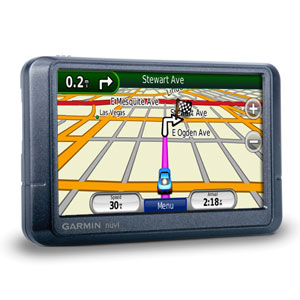
The Garmin nüvi 255W is one of Garmin’s entry level navigators and, as part of the nuvi 2×5 series, it’s loaded with features previously unavailable in the nuvi line or found only in high-end models. More about that in a moment; first the basics.

The 255W sports a 4.3″ wide touch screen (hence the “W”) and includes pre-loaded maps of the U.S. and Canada. It also has text-to-speech, so you’ll hear “drive one-half mile, then turn left on Oak Street.” instead of just “drive one-half mile, then turn left.”

Related units

  • Step up to the Garmin nuvi 265W to add Bluetooth for hands free calling
  • Or choose the nuvi 255WT to add lifetime traffic
  • Going the other direction, drop down to the nuvi 255 and you’ll get the 255W’s feature set on a smaller, 3.5″ screen
  • Meanwhile, the nuvi 205W is identical to the 255W, except that you lose text-to-speech and maps of Alaska

I’ve been very impressed with the nuvi 2×5 series. The 255W is the nicest model in the series, which I dubbed the best entry-level GPS on the market in my hands-on review of the nuvi 205W. The next portion of this review is adapted from there.

Advanced features found on the Garmin nuvi 255W

None of the features below are found on this unit’s predecessor, the Garmin nuvi 250W.

Redesigned map screen

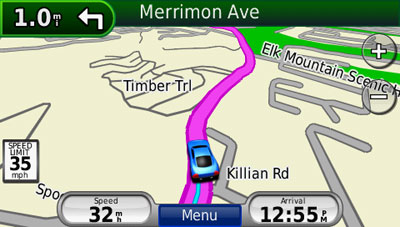
New to the map screen are the direction of and distance to next turn indicator in the upper left corner of the screen, which when pressed brings up a detailed turn preview as the unit speaks the next turn instructions. Moving this to the upper left freed up the bottom left data field which now shows your current speed. You can see all this in the screen shot below.
Nuvi_205w_map_screen

Speed limit

Speed limit icons display the speed limit for many roads, as shown above. I really like the proximity of this to the current speed display.

Trip log display

Trip log, or as I prefer to call it ;-) , tracklog display, can show where you’ve been and can be downloaded to your computer (tracklogs can be cleared and the feature disabled for those of you with something to hide!). The tracklog is the thin blue line trailing behind the car / current position icon, in the screen shot above.

Recent cities and streets

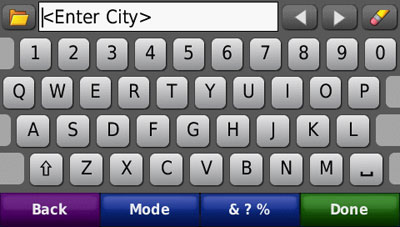
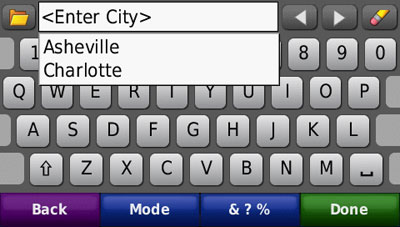
This feature was first seen on the nuvi 700 series. Tap the folder icon, as shown below, and a list of recent entries comes up.
Nuvi_205w_recent_entries

Nuvi_205w_recent_cities

Where am I?

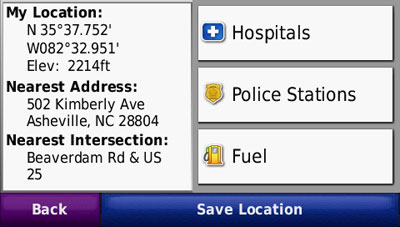
This emergency location feature provides your exact latitude and longitude coordinates, the nearest address and intersection, and the closest hospitals, police stations and fuel stations.
Nuvi_205w_where_am_i

Photo navigation

Though it’s not a feature that I find useful, you can download Google™ Panoramio™ pictures via Garmin Connect™ Photos and navigate to them.

Terrain modeling

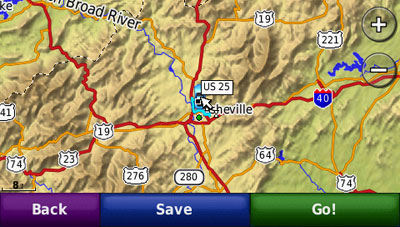
The nuvi 2×5 series includes a built-in digital elevation model, allowing you to visualize the surrounding terrain, as shown below. Unfortunately, this only works in 2–D mode when zoomed out to at least 8 miles. The result is a nice piece of eye-candy, as shown below, but one that you are unlikely to really use.
Nuvi_205w_terrain

MSN Direct or FM/TMC traffic option

You can buy an MSN Direct or FM/TMC traffic receiver as an add-on. This is often a better deal than buying a unit with MSN or FM/TMC, since the add-ons come with a full year subscription, rather than the 3 month trial included with a high-end nuvi. Physically, you end up with the same receiver.

Garmin nuvi 255W pros

  • High-end features (see above) at an entry-level price
  • Fast startup and satellite lock
  • The speaker is quite loud; I had no trouble hearing it under any circumstances
  • The ability to delete individual Favorites using the “My Data” feature
  • In addition to the above, you get a quality product and intuitive interface, as we’ve come to expect from Garmin

Garmin nuvi 255W cons

  • The power cord is not integrated into the mount, so you have to attach the power cord each time you mount the device

Recommendation

The Garmin nuvi 255W is a joy to use. I recommend it, or any other member of the nuvi 2×5 series, without hesitation. Garmin has set a new standard with this product line; the nuvi 2×5 series is the best entry level GPS on the market.

More Garmin nuvi 255W reviews

I’ll be posting more hands on GPS reviews as they appear, but in the meantime, here are some…

Other Garmin nuvi 255W resources

Compare prices on the Garmin nuvi 255W at these merchants:


About Rich Owings

Rich is the owner, editor and chief bottle-washer for GPS Tracklog. Connect with him on Twitter, Facebook or Google Plus.

Comments

  1. Rich Owings says:

    The 1300 doesn’t have speed limit display, which could push you to the 255W. On the other hand, the 1300 can use the mass transit features of CityXplorer maps, if that is important to you. Those maps usually cost $10 per city. I would only get them if I wanted the mass transit maps for a particular city, or if I was traveling to a city in Europe.

  2. Tyler T. says:

    Just purchased a NUVI 1300 for our 18 year old daughter heading off to college in the fall. Have not even opened the box. After reading some of the posts on here we are wondering if this was the best purchase for the money? Seems like a lot of people like the 255 or 265. She will be driving the most in rural Missouri and Arkansas. Thanks

    • Rich Owings says:

      The 1300 is a great unit. If you could get the 255W or 265WT cheaper, that might be a reason to go with one of them instead, but that’s about it. “T” units include lifetime traffic; if she’s going to be driving in large cities any, that “might” be helpful.

  3. I’m pondering the following choice:

    Garmin 255W for $130
    Garmin 1450T for $200

    The big screen of the 1450T is appealing, but probably not necessary.

    The fact that the 1450T is at least a year newer design is also appealing, but I wonder if anything fundamental has been improved (like speed in getting started up) in addition to the new bells and whistles.

    Most importantly, I’m concerned about the issue of the unit locking up. I don’t find much mention of this in 255W user comments, but I have seen a few mentions of it in the 1450 user comments. I’m a bit gun-shy about this issue because I just bought a Garmin 855W, updated the software, and then took it on a drive, and it froze up after 1.5 hours.

    Do you have any insight into the freezing issue? My previous GPS was a Garmin 750 that never locked up. (That unit was stolen.) It happens that the 750 was silver and the 855 was black. I wonder if temperature is an issue, and if black units get hotter under the windshield and if this might cause them to lock up.

    Any comments or recommendations would be appreciated.

  4. Mike Brady says:

    I took my Nuvi 260W to France last year (with Europe maps installed), but the unit would never acquire satellites. I let it sit and spin for hours (with a clear sky view) but it never acquired. The last use of the unit had been in Alabama…I’m guessing the extreme distance between uses was the problem. There were no problems acquiring satellites once I returned to the states. I’m heading to the UK in a week…what do I do to prevent the same problem?

    • Rich Owings says:

      That should have worked. I’d be sure the unit ran and had satellites locked for at least half an hour the day before leaving the states, and try to reacquire ASAP after you get there. This may or may not make a difference, as I don’t think the 260W has HotFix technology, which stores more data on where it expect satellites to be.

  5. Michele says:

    I really like the Nuvi 255W but have a few questions before solidifying my decisions to purchase. I’ve checked it out at RadioShack but many of the sales reps don’t know the details for each unit.

    1. Can pocket queries be sent to this device?
    2. Does it have the ability to download Whereigo to it?
    3. Is it waterproof?
    4. Is there a place to write field notes?
    5. As you can tell I like to do geocaching. Would you recommend this unit for this purpose in addition to doing lots of road trips across the US?

    Thanks for your help.

  6. Mary Macpherson says:

    I have a NUVI 255W.
    I love it and have never had a problem with it until now.
    I can’t shut it off and the screen is locked showing it attached to the computer. I tried taking it out to the Van and plugging it in put that didn’t help.
    What can I do?

  7. Mary Macpherson says:

    I fixed it. I went back and read some of the back logs and saw how to reset the NUVI. Tried it and it worked.
    Thanks a million.

  8. Ralph says:

    Can anyone kingly tell me how the trip log, or track log display can be reset, and/or disabled.

    Thanks

  9. MINDY says:

    does the 255w show quickest route?
    i am between buying the 1300 and the 255w

  10. Rich Owings says:

    Yes, all auto units purport to do this. Bear in mind though, that many won’t show local shortcuts, etc. They tend to calculate the fastest route based on major roads. Some exceptions would be newer TomTom units with IQ Routes, or the Garmin nuvi 3700 series. These use historical traffic speed data and tend to do smarter routing.

  11. Mark Barsamian says:

    I bought a 255w a month ago. I have been mostly happy with it overall. The user interface is good, and the unit has never locked up, like my 855 did after only 1.5 hours’ use. I did not find it at all difficult to download the most recent maps. I had read a few posts complaining about poor sound quality, but think the sound quality is fine (I’m a musician and I do a lot of sound recording and am picky about sound.)

    My only complaint about the 255w is that its display is dim. Mind is set for 100% brightness, but it is often hard to see the map in bright light. If there were no reflected glare on the screen, it would be okay. The screen has some amount of anti-glare coating (are all the Garmin screens coated comparably?) and I place the unit so as to minimize reflections.

    When I was shopping, Rich suggested that I consider the 1350, which has comparable features. Perhaps Rich knows something about the comparable brightness of the displays on the 255w & 1350.

    Thanks for all the great info!
    -Mark

    • Rich Owings says:

      Are you running it with the power cord attached? They are usually quite bright unless on battery power.

      I don’t recall the 1xxx series being any more or less bright, but I can tell you that the 37xx displays seem like the best yet. Unfortunately, that is a new series, and the prices on them are high.

  12. Mark Barsamian says:

    Definitely running it on car power, not battery power. I remember that in the display at the store, the 1450T had a noticeably brighter display than the 255W. The 1450 is a larger display as well, and the combined effect the brighter & larger display was pretty dramatic. But I didn’t want to spend the additional money for the 1450, and figured that the 255W would be good enough. I don’t remember if there was a 13xx unit running, and how it might have looked.

    -Mark

  13. Rich Owings says:

    The 1450T, since its a 5″, is definitely a different screen, so we can’t extrapolate from that. All 13xx units should have the same screen though. Not sure that really helps much though. Kind of stating the obvious, huh?

  14. Maureen Sullivan says:

    I purchased a 255W (my first GPS). Am I missing something with entering addresses? I tried to enter a destination to an address on 68th Street but when I typed “68th” it kept coming up with the selection of 68th Place—NOT where I was going. I could not find a way to escape the continual only selection of “68th Place”. Is there a way to enter an entire street name without the device jumping to a suggestion? Thanks!

    • Rich Owings says:

      Have you tried just entering 68? It is often better to go shorter when entering street names. I would also avoid entering East or E, etc., for E Main St, and just put Main.

  15. Garmin Owner says:

    The 265WT is the step up from the 255W which lacks the lifetime traffic (not very useful) and Bluetooth (don’t use so don’t care) and the PC cable!

    The 255W is MISSING the Mini-USB cable to the PC!!
    How the Heck does Garmin expect owners to upgrade their maps?!
    STUPID GARMIN!

    Other than that, the 255W is almost exactly alike the 265WT so wait until the 265WT is on sale (which it is every few months) as it’s a better deal!

    Also, Garmin lacks a Zip Code feature in the Destination feature which is REALLY STUPID! It would make life a whole lot easier as the touch screen can and IS a pain to use!!

  16. Jason says:

    I’m really considering getting the either the 205W or the 255W. I had a GPS built into a stereo unit but that system died which is causing me to look at the two systems I mentioned. But I had a couple of questions. First, is there a difference between these two systems? If so, what are they? Second, my old GPS would show right on the display the points of interest, things like food, gas station, service shop, bank, etc., does either of these units do that? I know they have the “Where am I?” feature, but do they show up constantly on the display? And finally, do these units have built in points of interest? Thanks for the help!!

  17. Rich Owings says:

    The 205W won’t call out street names, whereas the 255W will. Also, the 205W doesn’t include Alaska and Canada maps; the 255W does. Neither show POIs on the map (they may if you zoom in as much as possible; not sure). Each has around 6 million POIs.

  18. Augustus says:

    The Garmin 255W is a fine unit, worked well for me…emphasis on the WORKED, this unit worked for exactly 15 months, June 2009 to Sept 2010…just enough to crap out of the 12 month warranty period. The screen went blank, the Master Reset did not work, the software upgrade did not work, nothing worked to bring this thing back to life. So now it is a $245.00 paper weight…I called Garmin and after the 35 minute wait, I was told I needed to be connected to the web for the tech to talk to me…so I called later and waited another 40 minutes,explained the problem and what I had done and was then told that the unit was out of warranty and the repairs were $79.00 plus shipping costs back to Kansas City. For another 79, I can get a brand new unit.
    I say Garmin does not get my vote for customer service, I will definitely not be buying a Garmin replacement unit. I would not recommend them at all due to their lousy customer service.

    • Rich Owings says:

      The customer service reps have quite a bit of leeway. It may take another hour plus of your time, but it may be worth calling and talking to someone else. Or ask to be escalated.

  19. Paul says:

    I am anticipating purchasing a 255W. I would also like to use it on my boat to chart a course on the lake I live on. Are their maps of lakes that can be downloaded and used for that purpose?

  20. Rich Owings says:

    Yes, but they can be expensive and you won’t have all the features available. Also, realize that most nuvi models are not waterproof.

    http://www.garmin.com/garmin/cms/us/maps/onthewatermaps

  21. Raymond Williams says:

    I purchased a 255wt with lifetime updates on 17 August 2009 and have not updated maps, and now the unit shows that I need too. I registered the unit right after I got home with it. What and how do I get updates?

  22. angie says:

    can bluetooth be installed onto the nuvi255w?

  23. Stephen says:

    Suggested (easy) improvement for your ‘compare nuvi’chart: Add the Garmin model introduction year (would fit easily just below the model number on the left col.). If two units seems to be close in features and price, I would prefer to buy the “newer” model as it will continue getting Garmin support for a longer period of time.

    • Rich Owings says:

      Thanks. What should be in the chart, and what will fit, is always a balancing act. Interesting idea though and I will take it under consideration.

    • Gatorguy says:

      Garmin also supports their old discontinued models too. I saw application updates for the nuvi 3xx and 6xx and one of the StreetPilots in the past 12 months. All have been retired from Garmin’s lineup for some time. They might be old, but not forgotten.

  24. Brad Martin says:

    Is ther a way to view the GPS coordinates of my stored favorites? Nuvie 255w

  25. Jose says:

    A nice way to see your trip log and favorites is installing Google Earth and copy the current.gpx from your GPS to your hard disk and open with Google Earth. The trip log and favorites will be showed on your screen. If you press right button over the imported track and select show elevation, you will see all the details in every point of your trip. Very nice.

Trackbacks

Speak Your Mind

Tell us what you're thinking...
and oh, if you want a pic to show with your comment, go get a gravatar!

*
