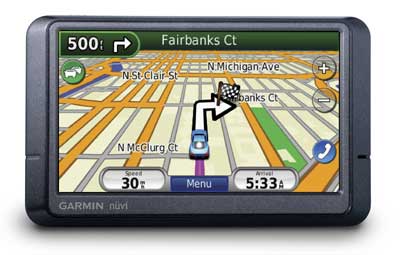
Hands on with the Garmin nuvi 265WT
UPDATE: The nuvi 2×5 series has been officially discontinued. For current recommendations, see our auto GPS buyers guide.
The Garmin nüvi 265WT
Related units
- Step down to the nuvi 265W, and you’ll lose the traffic receiver
- With the nuvi 255WT, you’ll get the same feature set as the 265WT, minus Bluetooth
- The nuvi 275T includes maps of Europe in addition to the U.S. and Canada, but only has a 3.5″ screen
- To see how the 265WT stacks up against other models, check out my Garmin nuvi comparison chart
Ad-supported lifetime traffic
The most controversial feature on the nuvi 2x5T series is the ad-supported lifetime NAVTEQ traffic. Yet not only have I found the ads to be low key and unobtrusive; for whatever reason, they actually showed up less on the 265WT than on the 755T that I recently tested. In fact, I saw so few on the 265WT that I was unable to capture a screen shot of them! Therefore, the next couple of screenshots below are taken from my nuvi 755T review.
On the 755T, I only saw ads appear when my vehicle was stopped; they showed up in the following places:
- On startup at the top of the main menu (the only place I ever saw them on the 265WT)
- At the bottom of the traffic menu screen
- On the map once you have reached your destination
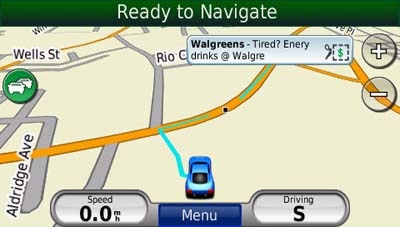
If you touch the ad, you’ll go to a screen showing the nearest locations for that advertiser. Selecting a location will take you to the detail screen. In the case of the BP gas ad below (seen on the 755T), a click on the coupon gave me a number to text to enter the contest.

The ads are so low key that I would much rather have them and free lifetime traffic than pay extra for traffic service. The biggest problem I have with the ad-supported traffic is the limited coverage (see image below). With data for only 50 U.S. cities, NAVTEQ Traffic coverage lags far behind that of other traffic services. Detailed coverage maps are available on the NAVTEQ website.

There is also an option to add MSN Direct traffic service (which includes gas prices, weather and more), but you’ll need to buy the receiver, which comes with a one year subscription.
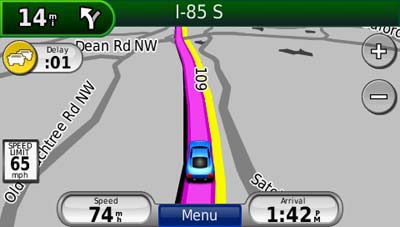
If you enable the traffic map, the moving map screen goes to greyscale, so that traffic flow (indicated in yellow or red) will show
up better.
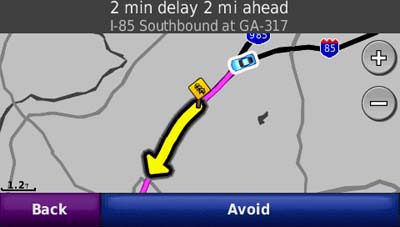
Here’s an incident detail screen…
Bluetooth
The nuvi 265WT easily connected to my phone, an LG VX8300. However, I was unable to pair it with my wife’s Motorola V325i.
|
|
I remain less impressed than with the Bluetooth sound quality though. It’s fine for the person in the car, but it’s a mediocre experience for the one on the other end of the call. It’s got a bit of a tunnel effect and I found myself asking the caller to repeat themselves sometimes when I couldn’t understand them.
Other nuvi 265WT features of note
As I mentioned earlier, the nuvi 265WT has all the great features already found on the first generation nuvi 2×5 series. These include:
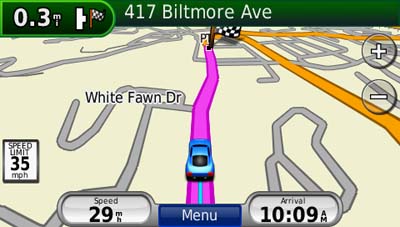
- A redesigned map screen that provides a third data field showing your current speed (screen shot below)
- Speed limit display (the number of roads with this coverage seems to be increasing dramatically too)
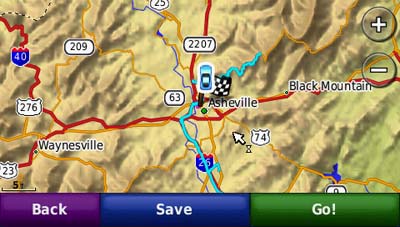
- Tracklog display to show where you’ve been (can be disabled and/or erased); this is the thin blue line in the image above
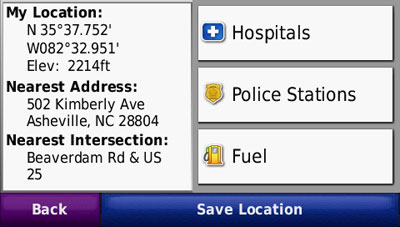
- A “Where am I” safety feature that gives your current location, nearest address, nearest intersection, along with quick access to POIs for the nearest hospitals, police stations and gas stations (screenshot below)
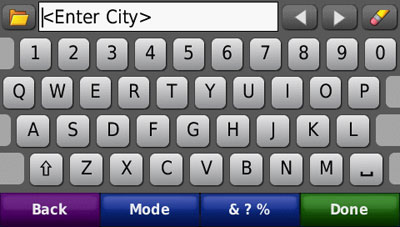
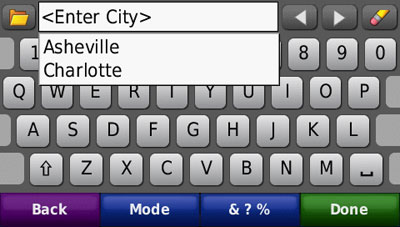
- Recently searched for cities and streets can be accessed from search screens (screen shots below)
- While it’s not a feature that I find useful, you can download Google™ Panoramio™ pictures via Garmin Connect™ Photos and navigate to them
- Terrain modeling is a nice piece of eye candy, though it only works in 2–D mode when zoomed out to at least 5 miles (see screenshot below)
What’s missing
The nuvi 2x5T series does not include an MP3 / audio book player or an audio out jack. If these features are important to you, I suggest you consider the nuvi 700 or 7x5T series.
Conclusion and recommendation
As the only wide-screen model in the nuvi 2x5T series, the 265WT is sure to be popular. It is best suited for (a) those in an area served by NAVTEQ traffic and /or (b) anyone wanting a Bluetooth GPS at a reasonable price. If you don’t fall into one of those categories, I’d suggest the Garmin nuvi 255W instead. Don’t get me wrong; the 265WT is a great device, but this specific feature set limits its appeal.
More Garmin nuvi 265WT reviews
- Consumer-authored Garmin nuvi 265WT reviews
have been posted at Amazon
- More consumer-authored Garmin nuvi 265WT reviews are being posted at GPS Now
- GPS Magazine does their typically thorough job in reviewing the nuvi 265WT
- CNet gave 3-1/2 out of 5 stars in their Garmin nuvi 265WT review
- Consumer Reports has posted a brief first impressions of the nuvi 265WT
- Digital Trends gives an 8.5 rating and their Editor’s Choice award in their Garmin nuvi 265WT review
- Al Dente has also posted a nuvi 265WT review
- Rick Nakama has also posted a Garmin nuvi 265WT review
- This video highlights the nuvi 265WT and compares it to the Mio Moov 200
- A Garmin nuvi 265WT video review:
I’ll be posting more hands on GPS reviews as they appear, but in the meantime, here are some…
Other Garmin nuvi 265WT resources
- The Garmin nuvi 265WT owners manual, in the language of your choice
- Confused about so many models and choices? Use this Garmin nuvi comparison tool or check out my own Garmin nuvi comparison chart
- There is a dedicated Garmin nuvi message forum at GpsPasSion and another nuvi forum at GPS Review
- The official Garmin nuvi 265WT web page
- Five tips for nuvi newbies
Compare prices on the Garmin nuvi 265WT at these merchants:
- Check the current Garmin nüvi 265WT
- Get a great deal on the Garmin nuvi 265WT Widescreen North America City Navigator GPS
at BuyDig.com
- Find the low price on a Garmin nuvi 265WT at GPS Now, where shipping is free on orders over $99 (and the upgrade to overnight shipping is dirt cheap!); order by 5 p.m. Central Time for same day shipment
- Get the Garmin nuvi 265WT
for an amazing price on eBay
- Check out our GPS deals site for current specials and rebates on a wide range of GPS receivers
 About Rich Owings