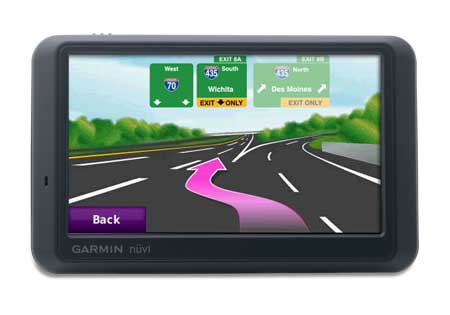
Hands on with the Garmin nuvi 765T
UPDATE: This model has been discontinued. For current recommendations, please refer to our auto GPS buyers guide.
The Garmin nüvi 765T
Related units
- The 755T has all of the features found on the nuvi 765T, with the
exception of Bluetooth - Going the other direction, upgrading to the 785T adds an MSN Direct traffic receiver with a trial subscription (but you lose the lifetime NAVTEQ traffic)
- The trans-Atlantic 775T mimics the 765T’s feature set, adding maps of Europe in addition to the U.S. and Canada
- To see how the nuvi 765T stacks up against other units, check out my Garmin nuvi comparison chart, or use this handy Garmin auto GPS comparison tool
Let’s look at the newest features on the nuvi 7×5 line…
A2DP stereo Bluetooth
The 7x5T series brings us the first nuvis with A2DP stereo Bluetooth, the exception being the 755T, which doesn’t include Bluetooth at all. This allows for a number of interesting things. For example, you can stream music via the nuvi’s MP3 player to a stereo Bluetooth headset. At the same time such an audio link is established, you can connect your phone to the nuvi as well.
|
|
Yet what impressed me most about the 7x5T’s Bluetooth feature was how good the sound quality was of calls made from the nuvi. It has nothing to do with A2DP, but rather with dramatic improvements in Garmin’s echo-cancellation technology. Units I’ve tested in the past have been pretty bad for the person on the other end of the call. But the sound quality using the 7x5T was quite good.
My wife and I took turns on both ends of several calls, as we do every time I have a test unit with Bluetooth, so she’s been exposed to as many of these units as I have. And she agrees with me, this one is good enough for everyday use. She even went further, saying she would use it if we had one of our own (was that a hint?). It may not be as good as using your phone or a headset directly, but it is a huge improvement.
We were able to successfully pair and use both our phones – an LG VX8300 and a Motorola V325i.
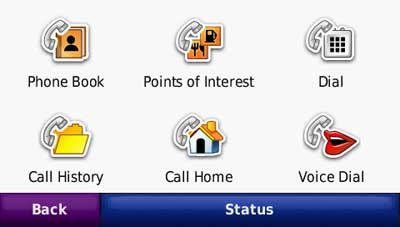
Here’s a video showing how to pair your nuvi with a compatible Bluetooth car stereo:
Lane assist
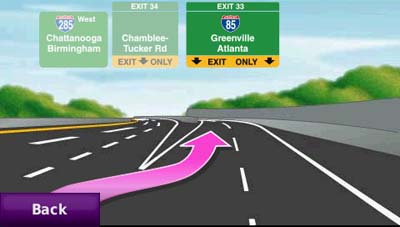
To me, the lane assist feature is the nicest addition to the the 7×5 series. It shows up in two places on the device. The flashiest is for major freeway interchanges, as shown below. This screen appears as you approach your exit.
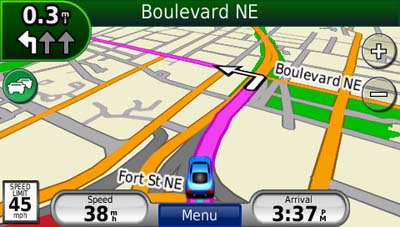
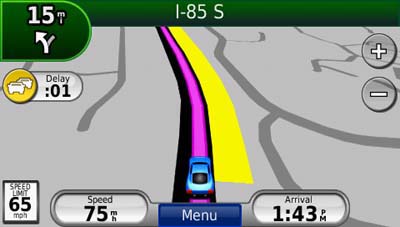
Just as useful, and perhaps more so, is the lane indicator shown in the upper left portion of the map screen (see below). These don’t just show up on interstate highways; I found them to be ubiquitous in downtown Atlanta.
3-D buildings
This feature adds some flash, but in my mind is less helpful than lane assist.
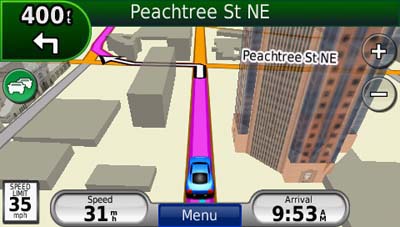
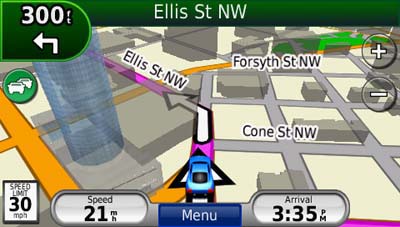
I’ll give Garmin credit for making the 3-D buildings transparent, but the feature can still obstruct navigation somewhat, as shown below.
Ad-supported lifetime traffic
Without a doubt the most controversial feature on the nuvi 7×5 series is the ad-supported lifetime NAVTEQ traffic, yet I found the ads to be low key and unobtrusive. I only saw ads appear when my vehicle was stopped; they showed up in the following places:
- On startup at the top of the main menu
- At the bottom of the traffic menu page
- On the map screen once you have reached your destination
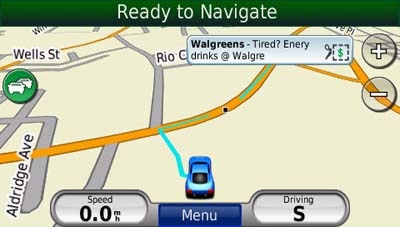
If you touch the ad, you’ll go to a screen showing the nearest locations for that advertiser. Choosing a location will take you to the detail screen. In the case of the BP gas ad below, a click on the coupon gave me a number to text to enter the contest.

The ads are so low key that I would much rather have them and free lifetime traffic than pay $60 a year for traffic service. The biggest problem I have with the ad-supported traffic is the limited coverage (see image below). With data for only 50 U.S. cities, NAVTEQ coverage lags far behind that of other traffic services. Detailed coverage maps are available on the NAVTEQ website.

There is also an option to add MSN Direct traffic service (which includes gas prices, weather and more), but you’ll need to buy the receiver, which comes with a one year subscription.
If you enable the traffic map, the moving map screen goes to greyscale, so that traffic flow (indicated in yellow or red) will show up better.
Here’s an incident detail screen…
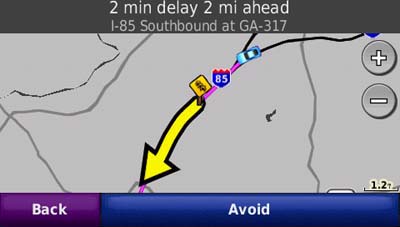
New customization options
New to the 7×5 series are customization options for the lower right field on the map screen. Press this field to bring up the options listed below. When not navigating, the options are:
- Direction of travel (default)
- Elevation
- Time of day
When navigating, the options are as follows:
- Estimated time of arrival (default)
- Distance to destination
- Estimated time to destination
- Direction of travel
- Elevation
- Time of day
Garmin nuvi 765T mount
The nuvi 765T mount has an integrated power/traffic receiver connection, so you don’t have to plug a cable into the device each time you mount it. Unlike the nuvi 2×5 series, all you need to do is snap it into the mount.
Other nuvi 765T features of note
The nuvi 7×5 series has inherited some other features from the 2×5 and/or 800 series units.
These include a redesigned map screen that adds a third data field (current speed). And while photo navigation is not a feature that I find useful, you can download Google™ Panoramio™ pictures via Garmin Connect™ Photos and navigate to them.
Finally, as I mentioned earlier, the nuvi 765T has all the great features already found on the first generation nuvi 700 series. These include:
- Multi-destination routing
- Automatic sorting of multiple destinations to provide an efficient route
- Tracklog recording
- Speed limit display for many interstates and highways
- Automatic marking of your last position when the unit is turned off (to help you find your car in mega-mall parking lots)
- A “Where am I” safety feature that gives your current location, nearest address, nearest intersection, along with quick access to POIs for the nearest hospitals, police stations and gas stations
Conclusion and recommendation
The Garmin nuvi 765T is a superior navigation device and I highly recommend it. The only caveat is that it is more appropriate if you are in an area with NAVTEQ traffic coverage. The lane assist feature and improved Bluetooth performance are the best reasons to upgrade 2x5T series, which also has the lifetime traffic feature. Like all Garmin nuvis, the 7×5 series is intuitive and a joy to use. Garmin has created yet another excellent product, and it’s no wonder that they dominate our top ten GPS list and Amazon bestseller list
More Garmin nuvi 765T reviews
-
Consumer-authored Garmin nuvi 765T reviews
have been posted at Amazon.com
- GPS Lodge has posted a Garmin nuvi 765T review
- GPS Magazine does their typically thorough job reviewing the nuvi 765T
- Terry White reviews the Garmin nuvi 765T
- Trusted Reviews gives an 8 out of 10 rating in their Garmin nuvi 765T review
- My Point of View has also posted a brief Garmin nuvi 765T review
- Garmin nuvi 7×5 reviews are being posted by owners at GpsPasSion
- CNet gives a 3-1/2 out of 5 star rating in their nuvi 765T review
- The Pool Bar has also posted a review of the nuvi 765T
- I’ll be posting more hands on GPS reviews as they appear, but in the meantime, here are some…
Other Garmin nuvi 765T resources
- A PDF version of the Garmin nuvi 765T owners manual
- There is a dedicated Garmin nuvi message forum at GpsPasSion
- And another nuvi forum at GPS Review
- Comparing the nuvi 765T to the nuvi 760
- GPSInformation.info compares the nuvi 7x5T series to the nuvi 7×0 models
- The official Garmin nuvi 765T web page
- How to access archived nuvi trip logs
- Five tips for nuvi newbies
Compare prices on the Garmin nuvi 765T at these merchants:
- Check the current Garmin nüvi 765T
- Get the
Garmin nuvi 765T Portable Bluetooth Automotive GPS System with Lane Assist & Lifetime Traffic
at TigerGPS, where you get free shipping on orders above $250
- Get the Garmin nuvi 765T for an amazing price on eBay
- Check out our GPS deals site for current specials and rebates on a wide range of GPS receivers
 About Rich Owings
Best Buy has the 765T on sale at its stores and at Best Buy.com for only $219.99+ tax. This sale is good until 11/25/09. This price includes free shipping. Have not found anyone close to this price on a 765T.
I will not buy anything at Best Buy even if it is a lower price. They have the gall to wish Moslims a happy holiday but don’t mention anything about having a Happy Thanksgiving. Furthermore, their re-stocking fee, when you return something, is outrageous. If it is going to cost you to return something, it is just not worth it.
Does the 765T have a faster map refresh rate (when recalculating) than the 855T?
Yes, it looks like the refresh rate was set slower, even though it has the same processor…
“The 2×5 series got a bump to ~4hz and the 7×5 series got a bump to ~8hz, both up from the long-time standard of 1hz. According to the review, the 8×5 did in fact get a bump up but only up to the 2×5’s ~4hz. It may be that the processor is in fact the same speed as the 7×5’s but just regulated to the level of the 2×5’s to compensate for the voice recognition overhead. This will be revealed as soon as users post the processor info (if it’s listed) from the diagnostics mode.”
From http://www.gpspassion.com/forumsen/topic.asp?TOPIC_ID=121713&whichpage=2
Hello, I am looking for a gps with one touch drop down menu of turn by turn directions, a current time and arrival time display on the same screen, blue tooth capability, mp3 capability, text to speech capability, auto populate of either recently found states, cities or street names, or of street names in the vicinity, ability to select route based on where I might want to go, ability to decide which highway I may want to take and the ability to select a new route if there is an accident. Traffic alerts is also a plus. Any ideas on one that would be good for me?
I can’t think of a single model that has all of those features. What do you man by “ability to decide which highway I may want to take?” And which features are less or more important to you?
I bought the 765T, I had a Garmin 660 and liked it. Short, sweet and simple. The 765T is the worse GPS I have ever used. It plan out sucked at most everything it did compared to the 660. Garmin can not figure out what they are doing. A model lineup that makes since is the first thing Garmin needs to get a grip on .
Hello
I wonder if the model 765 the Tracklog records so as to bring the tracklog out for the computer.
Yes. Once you connect it, look under Garmin > GPX > Current.gpx.
PC Richard (NY area chain) has discontinued carrying the 765T. Every store in my area is pushing the 255W. I really wanted the 765T for the better bluetooth capabilities. Is Garmin discontinuing this model as well? Have they come out with a model that has an even better feature set? I know you preferred this model over the 1390…
Thanks
It wouldn’t surprise me to see both the 7×5 and 2×5 series discontinued in the near future. Garmin will however continue to support them for years to come, with firmware updates, etc.
I think the best models out there right now are the 7×5, 8×5, 1390T, 1490T and 1690. The 7×5, 8×5 and 1690 are the only ones of those with a powered mount, which I prefer.
I really like what I’m seeing in the 765 (After my Tomtom died) except that it seems like last year’s model. However, the new models in the 1xxx series seem to be lacking, especially with the non-powered mount and some of the other features like MP3 playback and FM transmitter mode.
(Which, though it may seem like one of those freebie features they just throw in to get an extra bullet point, actually can be useful. With the right unit and Bluetooth, FM transmitter, and MP3 you can get functionality very close to what you would have from a car manufacturer’s built in GPS unit at a fraction of the cost.)
So… does Garmin historically stick by their older units? I’d guess there would be little chance of bringing new features to the older GPS boxes, but at least updates for bugs and fixes?
Do I strike now with the 765T on the edge of being discontinued and get a good sale, or wait to see what is next. Decisions, decisions.
I think you nailed it. There’s little chance of getting new features, but they will continue to roll out fixes and updates for years to come. I’m expecting new models to be announced soon and on store shelves by mid-June at the latest. But that’s just an educated guess.
I bought the Garmin nuvi 765T for Christmas for my husband. We used it twice and loved it, it worked perfectly. Used it this weekend for the third time and the voice announcing turns, lane changes, etc no longer works. The volume is turned up to 100% and nothing there. Any help for us?
Is it muted? You could try updating the firmware and/or go in and change to a different voice.
I am going back and forth between the 765T and 1350T. We currently own a Magellan Roadmate 2200T with very few features but it works (biggest issues – takes minutes to secure a satellite and maps are outdated). My top priorities – free traffic updates (live in Wash DC area), assistance with exits/lanes, and an ability for lifetime map updates would be nice. Right now Costco is offering a deal with the 765T.
Seems like a big deal is made of voice prompts with street names for the Garmin’s, but our older Magellan already did that, as well as provide “basic” exit routing.
Any assistance would be great. Thanks.
Lane Assist is very limited on the Garmin units. Not sure how it is in DC. In my testing, it was fairly extensive in Atlanta, but non-existent in Charlotte. That would likely be the biggest issue, given your requirements.
Based on that, would I be better off with a Magellan, even though they are definitely viewed in reviews/ratings as lower than a lot of the Garmin’s? Also, I noticed various comments about Garmin’s “Free Lifetime traffic updates”, specifically that it might be going away real soon. Or has that been addressed with the “ad’s” via NAVTEQ?
Thanks.
Unless you talk to people in your area, it’s going to be hard to know who will have the best lane assist coverage. I’d go with a TomTom before Magellan, but thats just me. 😉
I don’t think the NAVTEQ ad-supported lifetime traffic will go away. MSN Direct service is ending on 1/1/2012, but that only affects nuvi x8x models.
Thanks Rich.
I have made the decision to buy the Garmin 765T, I am going to purchase it online from a retailer that is located in my area in case I have to return the unit. Best Buy and Sams Club are the only two in my area that offer this unit online.
My question, is one of these retailers a better choice?
From which one might I get the more updated version?
Thanks,
Best Buy will charge you a restocking fee IF they agree to take it back. It is a hassle with them
Sams will take it back, no questions asked if you have the receipt. No hassel.
@bettyanne – Thanks for chiming in
@Mark Sparks – I haven’t read all the details of their return policies lately, but I believe bettyanne is right.
Hello Rich,
I’ve found your site very helpful researching my next GPS purchase. Keep up the good work!
Without scouring a massive amount of comments from your site, have you seen any reports of issues with the refurbished models I keep seeing advertised on some of the e-tailer deal sites? Anything to watch out for?
We currently have a Nuvi 350. My wife saw the Lane assist feature described on TV and is looking for a model that supports this. I’ve read your comments on lane assist coverage, but am still interested in getting the new features and a fresh set of maps. I’ve read several reviews commenting on touchscreen issues with this series. This also concerns me if I’m ordering an refurb unit online… I’ve heard there may be steps to ‘recalibrate’ the screen to solve the problem.
From an earlier comment, it sounds like Garmin historically does their model refresh in the summer (June mentioned above). Any word coming down the grapevine about new models? The Nuvi 350 still works, so I’m in no real rush, so I can wait for a deal or a new model.
Thanks again for the great site!
Jason
I wrote a post some time back on this… http://gpstracklog.com/2008/11/should-i-buy-a-refurbished-or-older-gps.html
Here’s Garmin’s official line (from a garmin.com support search for “refurbished)”:
Question: Is a discounted device purchased new, or newly purchased refurbished unit still covered under warranty?
Answer:
Yes. All devices purchased new from a retailer are covered under Garmin’s Warranty policies. A refurbished device still carries the same 1-year Warranty that all of our new products carry. A proof of purchase may be required for any Warranty services.
A refurb may or may not qualify for the nuMaps guarantee (http://gaarmin.com/numaps)
Screen calibration issues were a problem with early 7×5 models, but I think this was cleared up in later batches. Be aware that lane assist coverage is very limited. I’ve only seen it in Atlanta.
These are the newest models:
http://gpstracklog.com/2010/05/garmin-nuvi-295w-with-wifi.html (available now)
http://gpstracklog.com/2010/04/garmin-nuvi-3700-series.html (available this summer)
Hope this helps!
Thanks for the quick response!
Its good to know about the warranty and maps. Even with the warranty in place, I was wondering if you have had any reports of quality issues. I’d hate to have to send my “new” GPS in for service immediately… even if its covered. I guess the likelihood of getting a ‘early’ 7×5 model is higher with a refurb…
As a curiousity, how does Garmin know the ‘first use’ of the GPS? Does the GPS report its first aquisition date when the USB/WebUpdater is used?
My wife saw the TomTom XL350TM on TV (where she saw the lane assist-type feature). Any info beyond the announcement article?
The new Nuvi models look very nice, but I’m thinking for our needs, a 255W or 7x5T would be a much better buy in the $150-225 neighborhood.
Thanks again!
I think those are risks you are taking with a refurb. Generally, people seem pretty happy going this route though.
The nuvis record first satellite acquisition and report it back when you register the unit and check for map updates.
The TomTom 350/550 will use the EASE interface and will have fewer options. I should have a 550 in for review soon, but it will be a month before I complete tests and post it.
If you keep an eye on prices, you can get a good deal on a 7×5. I bought a 765T recently for $189. There’s apparently a bug in the latest firmware that causes it to hang briefly on text entry, but I’ve been told this will be fixed with the next firmware update. The 255W seems to have been less problematic for them, FWIW.
The Garmin 765T has many great features including a wide screen, lifetime traffic, mp3 player and a wireless transmitter for playback through a vehicle’s FM radio receiver. The unit however, has too many quality control issues to achieve a green-light recommendation. First, there is a lengthy delay when acquiring the satellites even when the unit has an unobstructed view of the clear sky. Often, there is an annoying lag time between screen changes as if there is an inadequate amount of RAM or processor speed required by the unit for consistent and efficient operation. The touch screen is habitually inaccurate, which means the user will press a certain button but the screen will behave as if a different button was pressed. I sought help after a 31 minute hold time, from Garmin technical support but a hard reset did nothing to solve, what many owners of the 765T believe to be inherent manufacturing defects with this particular unit. Flaws that Garmin has yet to admit or own up to. Always purchase with your AmEx card because the Buyer’s Assurance Program will double the manufacturer’s original warranty up to one year.
A second tech support call to Garmin proved overall ineffectual, following a screen re-calibration. According to Garmin, they will replace a defective GPS device with new one within the first 60 days of the unit’s initial satellite connection. There is no other unit that has exactly the same features of the 765T except for the 770T which is designed for those requiring navigation in Europe. It is also considerably more expensive. My fear is that all of the 765T units behave in the same erratic manner.
Garmin did replace my defective 765T but the replacement unit was a refurb., not a new one as Garmin customer support had promised. When questioned, Garmin would not admit to the unit being refurbished despite the fact that it was clearly indicated on the package. The refurbished unit suffered from the same touch screen inaccuracies as the unit it replaced until a software upgrade greatly improved the problem. The Mp3 player still behaves badly when playing some files and the volume of the 765T decreases if unplugged from the 12 volt power source, even if the internal battery is fully charged. I would not purchase any electronic product without using my American Express card. AmEx, as noted in a previous post, will double the manufacturer’s original warranty up to one year.
I upgraded from a 760 to a 765T a year ago and one of the first things I noticed was that the Bluetooth phone connection, which reconnected with your phone automatically upon power up after it was paired the first time, requires one to enter about 12 taps each time power is turned on to get reconnected.
I found this hard to believe. Why would a more advanced unit have a worse feature? I contacted Garmin support two times and they said that this issue would be fixed in a future update. It has been almost a year now and still no fix. They refused to tell me the responsible firmw
are engineering manager so I could find out if my engineering change request was in fact in the pipeline. With the hands free laws now days, I consider this a major annoyance considering that I take the Nuvi off the dashboard each time I leave my car. Sometimes I forget to reconnect and receive a call and can not safely extract it from my jeans pocket even to put it in speakerphone mode.
I have a feeling Garmin is just ignoring my request. If they do not want to fix the problem, which some people might consider a feature, they should just tell me that they will not add the code from the earlier unit to the 765t.
Just on the outside chance that this will help you or someone else who finds this discussion… I assume your firmware for the unit is updated, but have you ran WebUpdater (http://garmin.com/webupdater) a couple times to check for a Bluetooth firmware update?
I have been updating periodically and have the latest version. Does your 765T automatically reconnect with your phone each time you turn it on?
I don’t tend to use the Bluetooth function (my noisy truck isn’t the greatest environment for it!), but I just tested it and yes, it does automatically reconnect with my Droid when I power up the nuvi.
That is strange. I was using the same Motorola RIZR phone and it reconnected every time when I had a 760. With the 765T, it has never reconnected by itself.
As far as I know, there is no setting option to make that happen.
Researching a replacement for my still functional but no longer supported SP2610, I am considering the 765T… even though it is now 2 years old. It seems to offer most of teh features I would like. The new 3760T sounds nice, but at twice the price, I don’t see the value.
Is it safe to assume that the firmware and maps are easily updatable, as was the SP2610? Sadly, Garmin no longer supports the 2610 and my maps are so old that traveling with the 2610 is somewhat problematic.
How would the 765T compare to a service like Verizon’s VZNav? The downfall of VZNav is twofold:
1) limited to cellular service areas
2) limited to the battery life of the device (unless an auto charger cord is used.. but mine is not functional)
With the 765T being two years into the product cycle, I am somewhat concerned that Garmin will discontinue support (maps and firmware updates) in the not too distant future, leaving me with another functional, but rapidly outdated device with maps that cannot be updated. Is this a valid concern?
Garmin has a history of supporting products long after they are discontinued, so I’m surprised they don’t offer map updates for the SP 2610 anymore.
Hmm, looking at their site, I see nothing to indicate that the unit can’t be updated. Have you confirmed this with them?
Yes, Garmin told me there were no more updates available for the 2610. I have CN NA v8. I’m not sure, but think it may be a hardware limitation regarding the ability to upgrade the maps.
So now I’m considering the 765T, the 1490T, the 1690 (although it’s more than I care to spend) and the beautiful screen on the 3760T (way too pricey).
In perspective, I think I paid about $650 for the 2610 back in 2003. I’d rather keep the costs as close to $200 if possible. The 1690 is appealing but for the $312 price (Amazon.com) and the subscription fee after the initial subscription expires.
The 855 ($138 on Amazon) is attractive except for the lack of BT.
Sigh. No one unit seems to have it all. I don’t need the fluff like mp3 player, etc. But do like BT, multi-point routing (assume it’s the same as my current via point capability) and lane assist with junction view. That narrows down the field pretty rapidly.
Yeah, they must not be able to handle the newer NT style maps.
The 7×5 series has the best Bluetooth of any of the ones you mentioned, so that could steer you towards the 765T. In terms of your desired features, be aware that junction view and lane assist coverage still seems to be pretty limited.
You can add one via point to a route with any nuvi, but only the multi-destination units will let you have 3+ points in a route.
Hope this helps. Feel free to follow up.
Thanks for your input Rich. Your site is a wealth of knowledge and information.
I’m sorta in analysis paralysis right now. Which means it’s a good time to just sit on it for now.
Yes, that was the terminology that Garmin used when I called about updating my 2610. They said it was not compatible with the NT style maps (whatever they are… and I have no idea how they differ from the 2610 style maps). I have a 2 gig CF card in the 2610 with the entire US on it.
We’ve had some major changes in the roads in my area that my 2610 has no knowledge of… and will never know about. Sure would be nice to be able to use them in figuring the best way to travel different places.
If junction view and lane assist are of limited usage, my desire for BT and multi-point routing is still limiting my choices.
Nothing in the 2×5 line has both BT and MPR.
The 765T, 1490T and 1690 have both BT and MPR.
I don’t need European maps, so the 775T is out.
Argh. Leaning to the 1690 now… must study on it some more.
One via point only? I often use many more than that. I’m surprised at that limitation figuring GPSes nowadays will be much more robust and feature rich than my 7 year old 2610.
Trust me, you’re not alone in lamenting the loss of features previously found on the StreetPilot line.
I would like to know how you get the GPS grey and how to activate the traffic flow.
If you’re in an area with coverage and have the traffic receiver connected, the traffic icon should appear on the map screen. It could take awhile to appear initially. Touch the traffic icon and then tap Show Traffic Map to switch to the grey map showing traffic in color.
I am looking to get a GPS unit as we transition to Phoenix. We want it to have traffic on it and I am looking at the 755, 765 or 775 T versions. We have never used bluetooth so it is not a priority although may be nice. Comparing this to the 465T (which I realize is made for truckers after reading your site) or the 1490 or 1690 which would be our best option for just a well-functioning, user friendly GPS with traffic. I also looked into the 255, 265 options but they do not have multi-destination or lane assist, and those seem to be good features from what I read.
The 755T, 765T, 1490T and 1690 are all good choices. The 1490T lacks a powered mount, so you have to connect another cable each time you use it. The 1690 has Google Local search, which is nice, but the 7×5 models may be cheaper. Those are the main things that come to mind; hope it helps! Feel free to follow up with more questions.
where plug goes into base of gps holder of my garmin 765t went bad in first year. Haven’t been able to use it since. Where or how can I get one? Thanks, bob
Is the problem in the mount or the cable? And how old is the unit?
cradle mount. I might have it takein care of.
Rich,
My wife and I have never owned a GPS in our vehicles mainly because I have been in the military for 21 years and the map is cheap and easy to use. Well technology of GPS’s now has my wife insisting I get one. I have looked a the 765T 1490 and 3760T and others but can’t decide for the money which is best. Here is what we are looking for:
1. Speaks street names
2. Touchscreen
3. Lifetime Traffic
4. Lane assist
5. Sleek design
6. Portable
7. Fast at calculating destinations
8. Accurate computations and redirecting.
What is your experience with the 3760T? I read a couple reviews the system gets very hot. I don’t think that is good for a slim high tech GPS.
Your thoughts and recommendations are greatly appreciated.
Thank You
Jim
They are all good units. The 37xx series uses a historical road speed database, which can slow routing, but it can be turned off. If you see that as an issue, I think I’d suggest the 1490T.
Rich,
I love your site! Thanks for all of the research that you put into evaluating new products!
I have a couple of questions about the 765T and/or GPSs in general.
To start with, I believe the auto plug or the wire leading from the 765T’s plug is bad. I would like to keep the traffic feature. I know I can buy a new cord for $90 to $120, but it is not worth the price for this GPS. Thus I am thinking about replacing just the plug. I am concerned are GPSs polarity sensitive?
If I purchase an AC charger for my Garmin GPS will this device prevent the battery in the GPS from getting over charged?
Thanks in Advance,
John Braun
First of all, there’s a fuse in the tip. Check it. There’s more info in the manual (PDF).
The problem we see with third-party chargers is that the device goes into mass storage mode with many of them. This is probably available cheaper from various online stores…
https://buy.garmin.com/shop/shop.do?pID=1371
Rich,
Thanks for your prompt reply.
I have already checked the fuse in the auto plug. The fuse is good.
As for the replacement cord that you recommended, it doesn’t have the FM antenna in the wire for receiving traffic reports.
The cord that I referred to is the “GTM™ 20 with Lifetime Traffic” It can be found at https://buy.garmin.com/shop/shop.do?pID=36249 Garmin’s price for this cord is $120. Newegg.com has the same cord for $82. You can find it at http://www.newegg.com/Product/Product.aspx?Item=N82E16858108361
As for the charger, it is a Garmin product. You can find it at https://buy.garmin.com/shop/shop.do?pID=63949
Thanks Again
John Braun
OK, sorry, I missed that you asked about an AC charger. Unfortunately I don’t know about polarity or over-charging.
As one above mention features wanted:
1. Speaks street names
2. Touchscreen
3. Lifetime Traffic
4. Lane assist
5. Sleek design
6. Portable
7. Fast at calculating destinations
8. Accurate computations and redirecting.
Add to those wants, voice command and life time maps. Mo mention in review for either which surprised me.
As for #5 the sleekness, I’s think that goes with the how made so it shouldn’t matter & #6 portable most are except for those installed into the dash. Handhelds are a different breed I’d say. Same with wrist worn units.
Hopefully at a good price.
Thanks
This is an older, discontinued unit. They were not doing voice command and lifetime maps back then. Suggest you check out the nuvi 2495LMT or 2595LMT.