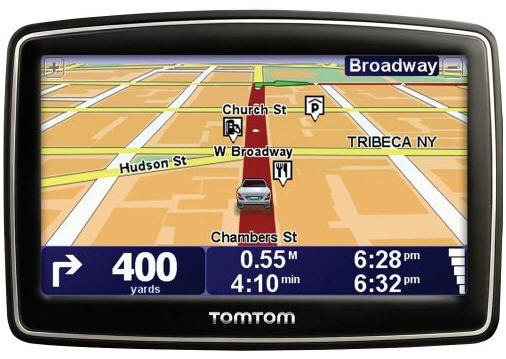
Hands on with the TomTom XXL 550TM
UPDATE: This model has been discontinued. For a list of current TomTom models and their features, please see our TomTom comparison chart.
The TomTom XXL 550TM


The 550 series includes preloaded maps of the US, Canada and Mexico, along with over 7 million points of interest (POIs). Additionally, you’ll get Advanced Lane Guidance, IQ Routes, Map Share and the EasyPort mount. I’ll go over those features in detail, but first let’s look at some other closely…
Related models
The TomTom XXL 540TM is similar, except that it gives up the EasyMenu interface and has a few more features and customization options; this despite the lower product number!
The XL 350 series (Amazon)
Portions of the following were adapted from recent hands on TomTom reviews on GPS Tracklog.
TomTom XXL 550TM interface
UPDATE: TomTom recently added more features to the XXL 550 series via a firmware update.
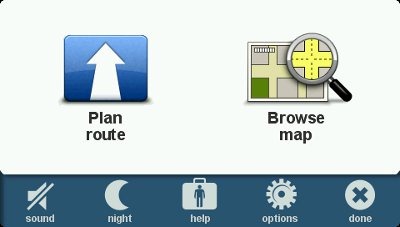
The interface is much simpler than most TomTom units. Quite a few options are missing, but most of the basics are there. The main screen, shown below, has two primary options (Plan Route and Browse Map), along with five additional icons at the bottom of the screen (mute sound, day/night, help, options and done).
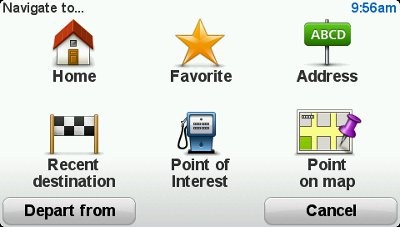
Once you select Plan Route, you’ll be given the options shown below.
Going back to the row of options on the bottom of the main screen, most are self-explanatory, but a couple merit further discussion…
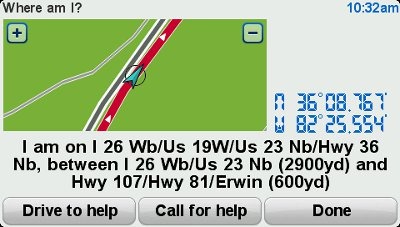
The Help screen produces a map and details of your current location, along with options to drive to or call for help, as shown below. There’s no Bluetooth capability on the XXL 550 series, so don’t expect to be able to make a call from the unit; however, you can easily access phone numbers for, and directions to, the nearest police station, fire station, hospital, repair shop, etc.
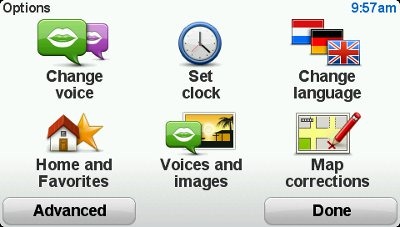
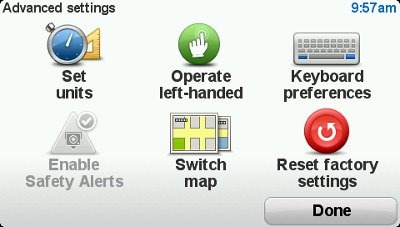
While the XXL 550TM doesn’t have the options of more advanced units, as you can see below, several are still available.
Navigating with the TomTom XXL 550TM
The XXL 550TM shows the next turn at the top of the screen, as you can see below. Lets take the three boxes at the bottom of the screen one at a time.
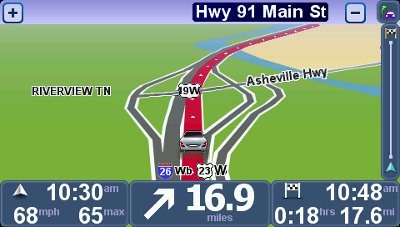
On the lower left you’ll see your current speed (and speed limit where available); this field turns red if you exceed the speed limit by more than 5 MPH. While speed limit coverage seems more limited than that offered by Garmin, posted speed limits tended to be more accurate on the TomTom in my experience. These results may vary widely by region. Current time and direction of travel are also shown. Note that you can tap this area to adjust the volume. While that’s not an intuitive placement, once you do it, I doubt that you’ll forget how.
In the center is the distance to, and maneuver at, your next turn. Tap this field to switch between 2D and 3D map views.
The lower right field provides information relative to your destination – estimated time of arrival, distance to destination and time to destination. Tap this field to see a route summary or to change your route.
Tap the map to return to the main menu.
There is a lot of data on the map screen, and it can certainly be confusing. It may help to think about it this way… the fields on the left are about current conditions, in the center is your next turn, while the fields on the right are related to your destination.
Shown below is the Change Route screen.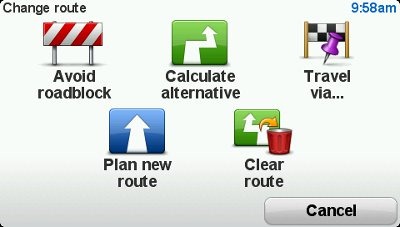
Advanced Lane Guidance
- TomTom’s Advanced Lane Guidance (ALG) coverage, in my experience, is more extensive than Garmin’s. Note though, that as at least one other reviewer has reported just the opposite. Perhaps Garmin is better in New England and TomTom better in the southeast!
- I like the fact that the green arrow flashes, drawing your attention to the proper lane (see below).
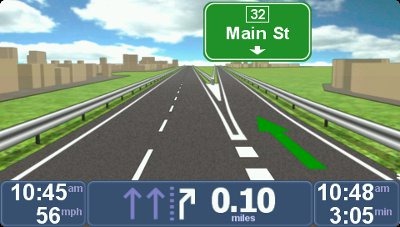
Picky reviewer that I am, I do have some complaints. You wouldn’t know it from the image above, but this is the exit for TN Highway 91. It would be nice if this was shown in addition to the exit number. In many cases the highway number is shown, but I did notice this happening on multiple occasions.
Traffic
I had limited opportunities for testing the traffic features. In general, the TomTom compared favorably to the Garmin nuvi I tested it against, Sometimes one unit was right on traffic; sometimes the other. The traffic announcements are well thought out: “The traffic delay on your route is now 6 minutes. Your arrival time is 5:37, You are still on the fastest route.”
IQ Routes
I’d be remiss if I didn’t mention IQ Routes in this review, because it’s one of the best features TomTom has going. It bases routing decisions on historical traffic data, broken down by the day of the week and time of day, the latter in 15 minute increments. As one reviewer has said, “it almost kills the need for a traffic receiver.” I was very impressed with this feature when it took me down a locally known and very popular shortcut, avoiding the highway that parallels it during a busy time of day. Quite simply, this feature greatly improves routing behavior.
Map Share
TomTom’s Map Share feature allows you to make and share map corrections.
EasyPort mount
I’ve got a kind of love / hate relationship with the EasyPort mount; mostly hate! On the positive side, I really like the twist suction base. I find it much better than lever type suction mounts. But instead of popping off the windshield unexpectedly, the integrated mount can easily become detached from the unit itself, typically when adjusting the angle.
TomTom XXL 550TM performance
The XXL 550TM did well in my testing, although it was a bit slower in recalculating missed turns than the nuvi I tested it against. I noticed no routing errors, and it actually outperformed my nuvi in that respect. At one point the unit reported my position on a road beside the Interstate I was on, but it quickly recovered. On another occasion, as I approached a destination which was 0.2 miles ahead on the right, the unit announced, “after 1/4 mile go straight.” Generally though, such errors were few and far between. If I have any complaints at all about the navigation interface, it would be that there is no way to get a list of upcoming turns.
The TomTom displays more names of surrounding streets than I see on Garmin nuvis. I find this particularly helpful in orienting myself when leaving a parking lot. It makes it much easier to figure out “which way does it want me to go!”
Another plus – startup time was very fast, 3-4 seconds compared to 19 seconds for my nuvi 765T. A negative note is that the screen is not as bright as Garmin’s nuvi series, though it wasn’t dull enough to cause any problems during my testing.
TomTom XXL 550TM pros
- Lifetime traffic and map updates
- 5” screen
- IQ Routes improves routing
- Advanced Lane Guidance coverage is very good
- Map Share
- Over 7 million points of interest (POIs)
- Displays names of surrounding streets
- Simplified menu
- Warns if speeding
- Very fast startup time
TomTom XXL 550TM cons
- No way to see list of upcoming turns
- EasyPort mount can detach when adjusting angle of unit
- Does not auto power on or off with car
- Screen not as bright as some other brands
Conclusion and recommendation
The TomTom XXL 550TM is a very nice unit that will serve most consumers well. My only significant gripes are the mount and the fact that you can’t get a list of upcoming turns for your route. Otherwise, it’s an excellent unit for someone who wants a simple interface. For those looking for more advanced features and/or customization options, I recommend looking at the TomTom XXL 540TM.
More TomTom XXL 550TM reviews
- Consumer-authored TomTom XXL 550TM reviews
- CNet gives a 3 out of 5 star rating in their TomTom XXL 550TM review
- PC World is a little kinder, giving it 3-1/2 stars
Other TomTom XXL 550TM resources
- Want to see how the XXL 550TM compares to other units? Check out our TomTom comparison chart
- The official TomTom XXL 550 series web page
- There are several good TomTom message forums:
- yourNAV’s TomTom forums
- GpsPasSion’s TomTom message forum
- A U.S.-based TomTom forum
Compare prices on the TomTom XXL 550TM at these merchants:
- Check the current TomTom XXL 550TM
- Get a great deal on the TomTom XXL 550TM
at J&R Computer/Music World
 About Rich Owings
I guess the A->B planning and Itineray routes are missing from the new EasyMenu models?
Yep, only one destination at a time. Not even a Via point!
What does the “depart from” button do? Sounds like it may be an A->B preplanner? I also read about a method to pull up a route demo on these new models. Glad I bought a 335TM with full menus.
Ah, yes, I see what you mean. Yes, you can pre-plan from another starting point. But it doesn’t do multi-destination routing.
You can add one via point. See the “travel via” icon on the “change route” image above. You cannot travel via multiple locations like you can on the 540
It does do multi routing with Itinerary planning
Yeah, I think this was added to the x50 series with a recent firmware update.
I recently bought this GPS system and I’m really impressed by the features it offers. A really decent piece of electronics, the navigation is extremely precise.
Very nice review. I’m glad I didn’t wait and picked up the XXL 540TM last month. I like to be in control of as many features as possible and the 550 does not give you many features which can be changed. It seems as though it was “dumbed down” to compete with Garmin rather than to continue to stand out on its own. Keep up the detailed reviews for all of us. Any word on when you will review the Nuvi 295 ? Thanx
Thanks! The 295W review was posted a couple weeks ago, BTW…
http://gpstracklog.com/2010/06/garmin-nuvi-295w-review.html
Nice review! I’m trying to buy “just the right” GPS unit for my girlfriend, and when she saw TomTom’s “voices” option, it sort of settled things in on it being a tomtom, now just to figure out which model.
I am/was thinking the XXL 550 TM is the one to get (although the tomtom site doesn’t list the XXL as being supported by “voices”, I’m assuming this is just an oversite?), being big screen, lifetime traffic and maps, and that is it their “lastest” model, thus making it supposedly the most advanced? However in your review you mention that the 540 has “a few more features and customization options”, but don’t provide any details that would help me understand if perhaps those options are ones I’d like to have. And looking at the tomtom website make it almost seem like these two models are virtually identical.
From the comments above, it appears as though perhaps the 540 supports multi-point travel?
Of the “features and customization options” missing from the 550, are there any that stand out as being specifically valuable?
Thanks
-Robert
There are many reviews for the XXL 540S which is the same as the 540T,M,or TM except for the traffic or map options. Do not make the mistake of buying the 550 (or smaller 350) ! Unless it’s for an older person who just wants to go from A to B, the 540 allows for not just a few but many, many more options the user can choose. There are too many to list, but if you look at Amazon for reviews of the 540, you can bet most of the options are NOT on the 550. My favorite is not only the speed limit warning with a choice of 20+ tones, and also allows for custom spoken warnings for POIs like, “Honey, look out for the school ahead”.
Thanks Geoffrey, that helps a lot. Sounds like the 540TM it is!
Hi
Under cons I noticed the comment “No way to see list of upcoming turns”. I notice in the manual there is an option called “Browse as text” to see directions in a text list. This might be a work around for this deficiency.
browse as text is available in the 540. It is not available in the 550.
“browse as text” available on XXL 550-TM purchased 10/21/10 at Costco.
Yeah, this was added in a recent firmware update. Costco has enough turnover to already have the newer version…
http://gpstracklog.com/2010/09/tomtom-eases-in-expanded-feature-set.html
Hey, I just bought this device! 🙂 I have a question though, how do I turn on the “Advanced Lane Guidance” feature? Right now I’m only using my map like this: http://gpstracklog.com/wp-content/uploads/2010/06/xxl550tmmapscreen.jpg
Thank you
It comes up automatically on freeways in areas with coverage.
@mvl – Thanks for helping out answering questions. Good to see you here!
Rich, I have an older Garmin unit that needs to be updated. I’m trying to decide whether it is worth it to go ahead and break down and purchase a new unit (tomtom xxl 550tm) or just update my older Garmin unit by purchasing the lifetime map updates for $120. (My Garmin does not have the ability to provide traffic information). Assuming that you are willing to spend around a maximum of $200, would you pick the tomtomxxl 550tm, or use that same $200 toward a Garmin unit (assuming that you want both lifetime traffic and lifetime map updates). I know my question is a bit vague, but I’d appreciate any help you can provide. Thanks and happy 4th of July!
Here are a couple of things that might help…
I’ve seen lifetime map updates (nuMaps Lifetime) available online for as low as $75. Looks like they are running around $83 at Amazon right now.
Also, Garmin is selling a few units with lifetime map updates now…
http://gpstracklog.com/2010/05/garmin-nuvis-with-lifetime-map-updates-lmu-hit-market.html
Personally, I prefer Garmin over TomTom, but there are plenty of fans of the latter out there.
Hope this helps some.
as a senior citizen I am concerned about price as well as ease of use. the Garmin 1490t and the tomtom xxl550tm are within 30 dollars at Costco, but the lifetime maps on Garmin is costly, every year our trip would cost 120.00 for the map update. what do you suggest?
I’ve seen Garmin lifetime map updates (nuMaps Lifetime) on sale at Amazon for as low as $80.
I just bought one of these & before I could even power it up the suction cup fell apart & I can’t put it back together. If that will happen every time I put a little pressure on it it’s uselss. For that reason alone I’ll return it & get a Garmin.
I don’t blame you. I’m not a fan of that mount. If it came off like I think it did, you can just pop it back on. You can see me do it about 1:20 into this video…
http://www.youtube.com/gpstracklog#p/u/5/PokR5n9FOlk
I think the part of the mount you were trying to move will loosen up over time, so it should soon become less of an issue.
Is there a way to search for a store by name on this unit? Example: Search for Office Depot close to current position?
Yes, now whether Office Depot is in their database is another question. I believe the 540 has more points of interest (POIs).
Can you tell me how to do that kind of search?
Thanks,
Plan Route > Point of Interest. You can then narrow the options and you should be able to type in a portion or all of the name.
I bought Tom Tom xxl550 TM at $169.00 and think it’s a great unit for the money. Personally I don’t need all the phone call bells and whistles , I am very impressed with the features, I have to admit that just out of the box it had basicily nothing , but after downloading the sTom Tom software to my computer and all the updates , the adjustable screen brightness, the lane assist , and other features, plus map updates for free.I have no complaint , I just tossed out a Magellan mastro with many more features, but if it gives you unrelable information who needs it!
So far the Tom Tom XXL 550 TM is serving me well.
Glad to hear. The new update added some nice features.
I have a TomTom XL30 I am selling. I am either going to get a Tom Tom XL 340TM or 350TM. What does one have that the other doesn’t. Do they both have text to speach
Yes, both have text-to-speech. A recent software update brought improvements to the x50 models, but the x40 units still have a lot more options re: preferences:
http://www.gpspassion.com/forumsen/topic.asp?TOPIC_ID=137412
When I go to the TomTom website to see whaat model my GPS is, it comes back with XL (30 Series) TTS* / 330S – 1GB. Does this mean I have a XL 330S?
Is there much difference between the model I have and the XL 340TM (beside the lifetime traffic and maps)?
It sounds like that is what you have. TTS means text-to-speech (i.e., it calls out the names of streets for turns). 1 GB is the internal memory.
The most noticeable difference is that the 340 series added IQ Routes, TomTom’s historical road speed database, which should result in improved routing around routine traffic problems.
I haven’t updated my map since I bought the XL 330-S in April 2009. I am going to go to New York City in about 2 weeks. Do you think I would be safe with the map I have now or do I need to update the map before I go (I couldn’t imagine that much has changed in NY since Apr 09). Rather than update the map on mine, I would probably get the XL 340TM.
Does the 340TM contain for POI’s than the 330S
I wouldn’t update, but that’s just me. Are you driving there, because that might make a difference?
It’s possible the 340 series has more POIs. It says it has 7 million, while the 330 series simply says “millions,” often a code word for a reduced number.
No, I am flying there. I will be driving only after I get there.
You might check major routes before you go (airport to where ever you are staying, etc.) You could compare them on your device vs Google Maps. Even if there are changes, there’s no guarantee they would yet be incorporated into new maps for the device.
I am looking for a GPS unit that has the best route coverage in Mexico. The TomTom XXL550TM seems to be a well featured unit that includes maps for Mexico. Do you have any information on how good they are. It is impossible to buy maps in Mexico that are up to date with the new roads and signage is frequently misleading or just missing.
Thanks,
Chris
You can browse Tele Atlas’s current Mexican maps here…
http://mapinsight.teleatlas.com/mapfeedback/index.php
They should match up pretty well with what TomTom is using.
With the Black Friday sales tomorrow, if you had to choose between the TomTom XXL550TM selling for $130 or the Garmin nuvi 1450LMT selling for $160, which would you choose?
I also noticed that other GPS models have a built-in AAA TourBook guide, which seems to be a really nice feature to have. What’s your take on this feature?
Thanks,
Allen
Personal preference comes into play here. I prefer the Garmins, if for no other reason than the brighter screen.
The AAA feature is alright, but not nice enough to push me to Magellan!
…I prefer the Garmins, if for no other reason than the brighter screen…
Could you tell me the reasons? Thanks.
Hoe
Brighter screen? Seriously, it’s kind of subjective. Generally, if you want a no fuss, drop dead easy interface, go with Garmin. If you want to tinker with settings and customize things, choose a TomTom.
The Garmin 1450LMT deal at Target for $159 is sold out. I certainly tried to get one yesterday. One Target store rep told me that another location nearby had 20 in stock when in fact they had none. Among other things, I found out that Target’s inventory management system is totally antiquated at they only update their system wide inventory status once a day at 8AM. Beyond 8AM, their internal inventory system has no clue what’s actually in stock at other Target locations.
Price Club and other vendors are selling the Garmin 1450T for about $200. Radio Shack is selling the 1450T for $150 but they are currently out of stock. I will check with Radio Shack today to see if I can order one anyway for that price. I can see where it might be very useful to get lifetime traffic updates but is it worth spending more to get lifetime map updates too? How important is it to get lifetime map updates?
Price Club and Best Buy are selling the TomTom XXL 550TM for $130 through Sunday, which looks like a very good deal. I’m thinking of buying the TomTom XXL 550TM by Sunday and if a better holiday deal comes along soon with the Garmins, I’ll return the TomTom.
Rich, In December 2008, you posted the following comment regarding traffic updates:
“Traffic – I recently saw that 50% of people with live traffic on their GPS don’t use it. Great idea, but it ain’t ready for primetime yet. You’ll get plenty of erroneous reports, and you’ll also come across lots of bottlenecks that go unreported.”
Is the above comment still valid? Are the traffic updates still of minimal usefulness? Is it worth spending more to get traffic updates?
Yes, traffic still has plenty of false positives and false negatives. I think that, in general, the larger of a metro area you are in, the better it works. If you’re in one of the top ten traffic metros, I imagine its worth it. Really, it doesn’t add much to the cost if you buy a unit with lifetime traffic, and it may prove worthwhile if it just helps you once in a while. I’d just take the reports with a grain of salt.
Here’s a deal on it for $149…
http://bestgpsdeals.net/gpscity-com-black-friday-deals/960/
Rich, Thanks for the hot tip on the Garmin 1450LMT deal for $149. I ordered mine online last Saturday and look forward to receiving it this week.
i just bought a xxl 550tm for 130.00 at best buy. i’ve never owned or used one before. hope i’m not disappointed!!!!!!!!
I think its a very good unit and I expect you’ll be happy with it. There’s been a recent firmware update that brought some new features…
http://gpstracklog.com/2010/09/tomtom-eases-in-expanded-feature-set.html
Yours may or may not have come with it. To update it, connect it to your computer and let it install and run TomTom Home.
Hey Rich,
Thanks for making this easy to use and helpful website/guide.
I was planning on getting the TomTom XXL 550TM but I noticed that it had been said that it does not offer a list of upcoming turns. Is there another GPS that is really close to this model but has that feature?
Once again thank you for your help and time.
ST
A recent firmware update added this feature…
http://gpstracklog.com/2010/09/tomtom-eases-in-expanded-feature-set.html
Even so, the XXL 540TM has more options and capabilities (despite the lower model number!)…
http://gpstracklog.com/2010/05/tomtom-xxl-540tm-review.html
Allen,
Glad you got the deal. If you get a chance, once you have had some time to play with it, please consider posting your impressions on our nuvi 1450LMT page.
Rich,
Just picked up the XXl540tm. Thanks.
Enjoy the holidays.
Rich, great review… I’m glad I stumbled on it. I’m now in “analysis paralysis” with deciding which unit to go with (TomTom XXL550TM or Garmin Nuvi 1390LMT). I’ve pretty much settled on the TomTom, but I have two concerns: 1) Will 2MB be enough memory to download updated maps, safety cam info, and other TomTom Home features (mostly concerned with map updates and safety cam info), and 2) Are there any options for running TomTom Home with Windows 7 64 bit? For the latter, I’ve read that you can run it in XP mode; is that true?
Thanks, again, for the great review. I appreciate your help!
1. No, a lot of people report problems with this, having to clear off extra voices and other extraneous files before doing map updates.
2. Not sure about this. I can check, but it will be sometime tomorrow before I can.
Thanks, Rich, and tomorrow is fine for the Windows 7 question. Regarding the memory issue, it almost seems pointless to have a lifetime map feature if you can’t update the maps without running out of memory; am I being overly concerned? I really like what I’ve read about this unit, but I am concerned with not having enough memory for map updates and safety cam info. It seems like these advantages are misleading. Everything else seems to favor the TomTom over the Garmin (other than bluetooth, which is not really necessary). Now I’m leaning back to the 1390LMT. Hmm…
No, I don’t think you’re being overly concerned. Another option would be the GO 740, which has an expansion slot, but it will probably cost quite a bit more to get lifetime maps with it (as opposed to the models you’re currently looking at).
I bought both the XXL550TM and the XXL540TM on sale last week at $130 each.
As Rich has stated the 540 has a more comprehensive menu of items whereas the 550 has minimized the menu to EasyMenu. More importantly the 550 has 1GB of memory vs the 4GB in the 540. I am keeping the 540 and returning the 550.
Chris,
Somebody else brought this up recently, but I don’t recall if it was resolved. The TomTom 540 series page says it has 2GB…
http://www.tomtom.com/en_us/products/car-navigation/xxl-540-series/#tab:specifications
Can you verify what it actually has?
Correction. The 540 WTE has 4GB but the 540 TM has 2GB and the 550 TM has 1GB.
I bought the TomTom because it includes Lifetime maps for the US and Mexico and it has had some excellent reviews.
Thanks to Rich Owings for making this the best site for GPS reviews.
Thanks for checking and thanks for the kudos!
Just for comparison, what are the memory specs on the Garmin 1450LMT?
Internal memory is undisclosed, but it has a micro-SD slot too.
I have 1490LMT. It’s internal memory is 2 GB but it has expansion [microSD] slot. I think 1450LMT is same as 1490LMT with the exception of Bluetooth
Thanks!
I think the 559tm has 2GB. Is that a sufficient amount?
Sorry. 550tm.
No, 2GB is common across most of their line. So it includes models people are reporting update problems with.
For what it’s worth, I just spoke with a very helpful person at TomTom, who addressed some of my concerns.
1. Memory: 2GB should be sufficient for one map (e.g., 1 map = US/Canada/Mexico). People have had problems because of not deleting the current map before updating to the new one. Where it gets tricky is in Europe, where some maps need to be regionalized.
2. Word 7 64 Bit: There is a workaround
3. Not speaking destination on left or right: True, but arrow on unit will point left or right.
Hope this is helpful (and true!).
Thanks Larry. It took me a bit longer than I thought to get around to it, but I did install TomTom Home on my Win 7 64-bit laptop. It seemed to be okay and would run, though I didn’t do anything with it. But… when I tried to start back up, Windows had to repair itself. Yikes!
Definitely yikes! Well, I know that if I pick one up at Costco I’ll have no trouble returning it if it doesn’t work out, so I think I’ll take a chance. I’ve had a couple of Garmins that I’ve been happy with, but I’d like to try something different.
By the way, you’ve got the most helpful GPS review site out there. Thanks for all the info and the quick and insightful replies!
Thanks — I enjoy it!
FWIW, if you install TomTom HOME, I would set it up to run under XP compatibility mode BEFORE shutting down and restarting your computer!
Why can’t one remove the unused or unnecessary languages from the TomTom 540 XXL TM since I only speak (US) English and have no need for the 21 others?
I’ve eliminated the other foreign language voices with TomTom Home, but see no way to rid the unit of the other languages, nor see how much of my precious, (Not 2 Gb, but 1,885.6 Gb is tied up). Total capacity shows as 1,885.6 Gb of which only 116 Mb are “free” after the latest map update and 1,769 is in use, so not sure where the 2 Gb came from. TomTom Home doesn’t concede that part of the OS is using it. Instead, it says “total capacity is 1,885.6 Gb”, but I digress.
Just wondered if anyone else had been able to remove the unneeded languages?
You should be able to do this with “manage my device” in TomTom HOME.
You “should”, but no where in the list of folders in “Manage my device” does it list languages. “Voices” are there, but not “Languages” unfortunately.
Yeah, I think you can only remove voice files, not language files.
I recently bought a 550, and while I HATE the mount, I’m otherwise pleased. A couple questions:
1.) What are concrete differences from 540? See lots of comments that 540 has “more” custom features, but what am I actually missing beyond multi waypoints?
2.) Anyone else have problems w unit seeming to mute itself randomly? I sent one back already, and waiting to see if we have problems again. Nav worked fine but sometimes no sound..
3.) Any way to keep the route in place after shutting off the unit? Old garmin would resume routing when turned back on, but 550 seeems to flush the route if you shut down? Real pain on long trips when you stop often for fuel, etc..
Thanks for your help!
Jason
Try a friction / dashboard mount…
http://www.youtube.com/watch?v=PokR5n9FOlk&feature=player_embedded
1. Not sure. The recent firmware update brought back the most important ones, like being able to call up a list of turns.
2. Haven’t seen it.
3. Don’t think so, but the Recent destinations choice is very helpful for this.
I also purchased the 550, but I haven’t used it yet (Christmas gift). I’ve sent many questions to TomTom’s customer support e-mail box, and I have found them to be quite helpful and responsive.
I also found some information on how to download the old menus to the 550 if you so choose. Check out these links I found:
Comment from Amazon
http://www.tomtomforums.com/tomtom-one-start-ease-xl-xxl/22302-how-get-more-menu-options-models-easymenu.html
I’m not sure you’re giving up too much with the 550, and it’s priced less than the 540. Just some food for thought.
Oh… I’m also a huge fan of friction mounts (I just ordered one for the TomTom, and I’m currently using one for my Garmin). Best to avoid the suction cup mark on your windshield.
Rich, first off, great site. I have been using the old TomTom One XL i believe it was and I decided to upgrade to the unlimited maps. Anyways I was watching prices pretty closely on a few models of TomTom and finally the deal was ok at the time so i ordered the XXL 550TM for 119.99, ill get it today, but of course the new deal came out for the XXL 540TM for the same price. I would of jumped on that but it was too late and i didnt want to cancel my order and have to wait longer. Anyways my question is this, I know the 540 have more favorable reviews, but quite honestly, I just need a GPS that basically did the same thing as my One XL, will i get that with the 550?
Sure i messed with my One XL changing things but it was just for fun. All i really would want to do is to change the day/night colors, car icon, and maybe the voice thats it. Any comments would be much appreciated, thanks
According to the PDF manual (http://download.tomtom.com/open/manuals/xliqr2/ReferenceGuide-US/refman/TomTomXL-en-US.pdf) you’ll still be able to do those things.
It should definitely handle all the basics.
Thanks for the reply, one last question, i have had my xxl 550tm for a week now, my question to you and/or anyone else here, does the back mount come off of the unit easily? mine does, everytime i try to adjust the unit on my friction mount the unit would come off of it exposing the 3 prongs on the unit. Thanks in advance
I’ve found with my TT XXL 540 TM, that when I’m pulling outwards on the suction part of the mount with the thumb and two fingers of my left hand and cradling it with my right hand, I’d better have my right thumb on the ring attached to the speaker or it will pop off every time! (First time that happened, I thought I’d broken it!)
I pull outwards on the suction/knob part to around 90-100 degree angle from the back of the unit, making it easier to reach under the unit and turn the suction knob to the right when I’m attaching it to the glass. Once I have it tightened down securely to the windshield, then I push down on the unit with both hands to the angle I want it. If I’m pushing the unit towards the suction knob, it’s pretty secure, but if I need to angle the screen upwards (pulling it towards me) I reach around with both hands and hold that ring against the unit with both index fingers. I just make it a habit to support that ring because I’m not sure how much tugging and popping off it can stand, and a new one at Best Buy is $25, so I try to protect it.
Harder to explain, than actually do, but this little procedure is second nature now and I find the mount is very secure once you get it anchored to the windshield. I’ve had the lever-type of suction mounts fall off, but not this one! When I need to remove it, I angle the screen upwards to that 90-100-degree angle, reach under and turn the knob to the left, releasing suction, and then use a fingernail to push under the right, clear, plastic tab to break the suction, and it releases from the windshield right into my left hand.
Hope it works for you–best of luck!
Yep, they definitely tend to pop off. I think it gets better with time as the swivel part of the mount loosens up.
Update.. I called TomTom support and they said that it is not suppose to pop off easy and they think it might be a defective one so they will send me a new one to pop on and it should fit without popping out too easily. i dont really believe it is the back at all but i will see once i recieve it within 3-5 business days. will update back soon..
Thanks Mike. Looking forward to hearing how it goes.
Alright, got my mount yesterday and it still pops off the unit pretty easy. Called TomTom and they said that its the unit and that i should return it. I went on my amazon page and requested an exchange. I thought it would be a hassle but nope, went through their steps fairly easy and printed out the ups tracking. I have until January 31st to return it or i will be charge for two units. Checked my amazon account this morning and it has already been sent out with an estimated shipping date of the 27th or 28th can’t remember.
I want to give props to TomTom customer service and Amazon for a no hassle return and help.
Amazon is great about these things. Much less hassle than dealing with the manufacturer. I’m still not convinced that it’s defective BTW. I’ve had that problem with most of the TomTom’s I’ve used until the swivel points loosen up. Keep us posted.
Mike, I hate to say it but I think Rich is right. I have the 550 and have the same problem with it popping off. It seems to be getting better after about 1mo of ownership, so hopefully it will continue to improve. It also has a tendency to come unstuck from the windshield, at least in recent cold weather. I see a dash friction mount in my future…
Jason
I use a friction mount, and I’ve been happy with it. I used to stick my previous units on the windshield, but they all tend to pop off. If you’re going to stick it to the windshield, I suggest a couple of drops of water on the suction cup. Works every time.
Given the problems that other posters were reporting with their TomTom mounts, today I decided to mount my Garmin 1450LMT onto the dashboard. Right after I peeled off the adhesive from the bottom of the mounting disk, I was unable to even place the disk on the dashboard as there was so little adhesive on the disk.
For the most part, I like my Garmin unit but I’m very disappointed in the cheap mounting disk that comes with the unit.
Allen
Why are you writing about the Tom Tom mount if you have a Garmin. You could always get a different mount for a GPS, so the GPS is what should be important not the mount.
Hi! Very interesting site!
We bought the tomtom 550 recently and love the ease of use. The only problem is that the tips/features scrolling advert keeps coming on after about 3 minutes and you have to keep tapping the screen to go back to the map. A bit frustrating.
Is there something we have to shut off? I’ve been through the options but can’t find anything. Any advice?
It doesn’t appear to be an option, though they may go away with time. Have you checked for a firmware update? Its possible that an option got added back in when they added more features in a recent update.
Hello,
Is this problem ONLY related to the 550Tm, or is also present in the 540TM.
I don´t really mind to have some add, but it should be really annoying, if you have to press the map to return.
Common sense is that the ads disappear by itself within a certain time.
Regards
Eduardo
There should be an option to disable this in the x40 models.
Just noticed that the compass pointer is off on the 540TM It’s accurate for north & south, but is 180-degrees off when driving east or west. I’ve never seen anything like it before on any GPS.
That’s weird. Have you checked for a firmware update?
Yes. Did that the first night when I got it. Loaded new firmware and the map update without a hitch. Not sure if it was ever right since I didn’t use it before the updates.
Hello, what a great and informative website!!!
One of your cons on the Tom Tom XXL 550 TM was that there is no way to see a list of upcoming turns..does the Tom Tom XXL 540 have that feature?
thanks again.
Yes. From the Route Summary screen, tap Details > Browse as Text.
Looking at a 550MT for $127. How can I tell if it has old or new firmware? (or how old this model is). Is new firmware available at no cost? Do all 550MT models have speed limit feature? I saw no mention of it on the packaging. If it does, what is the warning system: color change; blinking; tone or all the above. My son has 3 yr. old Tom Tom that he got an update with speed limit posting. His has a tone warning over 5 mph over the speed limit. This has become a important feature to me after recently getting a cheezy speeding ticket in one of those “rapidly changing speed zone areas”.
?
Firmware updates are free. Yes, they all have the speed limit feature. I don’t know if there is a tone, but it turns red when you go 5+ MPH over the limit. But TomTom speed limit coverage is very limited, at least in my area. Garmin seems much better.
If they’re the same, then like the XXL 540 TM the speed limit indicator flashes a red background behind the speed and you can choose from numerous sound effects to alert you. The police siren sound effect always sent the adrenalin surging when it went off, so I went back to (silence), or no sound effect.
Thanks for the feedback on the Tom Tom. I currently have a Garmin 1300 and have always had a screen sensitivity (touch) issue. This is my second 1300 (first one returned for another problem) and it was the exactly the same: it doesn’t like my finger, takes multiple heavy taps to activate a key, icon or for panning. I did find out that my finger nail works, even light pressure. I assume its an area sensitivity adjustment problem, but I don’t have all day to wait for a Garmin technical helper to come to the phone. I also don’t want to keep using my fingernail on the screen. I have an old Garmin streetpilot that, overall, works better than the 1300, which is why I’m looking at Tom Tom. Which brings up another question: Is Tom Tom’s traffic any better than Garmin’s? My Garmin cannot be trusted for traffic info. So far I’ve have 90% false positives and 100% failure on major traffic problems. Updates have not helped on either of these problems.
No, I don’t really think TomTom’s traffic service is any better. They are now rolling out “HD traffic” in the US, but lots of folks have doubts as to whether it will be much better. Generally speaking, traffic data is better in the largest metros (think LA).
Have you updated the 1300’s firmware? I’d try that first, then do a screen calibration. From Garmin.com support:
To recalibrate the touchscreen on your nuvi, please follow the instructions below:
Make sure the nuvi is turned off
Press and hold the top left corner of the touchscreen
Power the unit on while applying pressure on the top left corner
Release the power button when the screen turns on, while continuing to apply pressure to the top left of the screen
After about 30 seconds a small dot will appear on a white screen
Release the touchscreen and accurately touch the dots as they appear (The dots will change location as touched)
Once complete a message will appear, ‘Calibration Complete’, Touch OK
The touchscreen is now calibrated.
For those people who are having issues with the GPS navigator traffic alerts, if they are at home or at work and have access to a computer, the following suggestion might be very useful:
Before heading out the door, go to maps.google.com on your computer. Enter your zip code in the Search Maps field and press Search Maps. Then press the Traffic link on the right side of the screen. You can now see the real-time traffic situation of the area you’re in and then plan your drive accordingly.
Since I can use Google’s traffic map tool to see the real-time traffic situation of the entire metropolis, I’ve found it to be a very useful complement to my GPS navigator traffic alerts.
Tom Tom 550XXL is a horrible product. I doesn’t show you the address when you have arrived at ;your destination so you may be a house or two off. It happened to us and prohibited us from finding the party we were looking for. Then it wouldn’t recognize an address street number. Today when we arrived at a destination, it told us to turn right when we were already at the destination on the left. Don’t waste your money on this piece of garbage.
Tomtom 550 worked ok for two years then it die. I replaced the battery and now it will not hold a charge. I call tomtom they said it was the new battery? I used three different new batteries ? I think it’s the tomtom?
Has any one had this problelm?