I received a PM from the Adirondack Forum today that said:
"…I just bought the Garmin 60CS. I have a question about the maps. Do I need the Garmin Mapsource United States Topo or… the one from National Geographics Topo that I think is better for hiking? If I don’t buy the Garmin Mapsource Topo, can I download maps in my GPS?…"
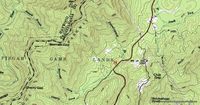
This question comes up so often that I felt obligated to post an answer here. The answer is no, you cannot load National Geographic TOPO! maps
The National Geographic TOPO! maps look just like a paper map from USGS (example above, at right). That’s because they are scanned images, also known as raster imagery. Since they are scans, they have a pretty big file size. That’s why it takes 10 CDs to cover the state of California. And that’s one of the main reasons that GPS manufacturers have taken a different approach.
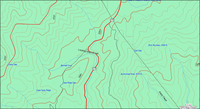 Instead, most GPS receivers utilize vector maps, like the one on the left. This appears to the user as an image, but it is really created from a data file rather than an image file. It is made up of lines and points, so it requires much less space than a raster (image) file. The vector map at left is from Garmin’s MapSource US Topo
There are always exceptions though, and you can make your own maps for most models of GPS receivers, avoiding the need to buy proprietary software. It’s not a fast process, but there are step-by-step directions in my book, along with chapters on programs like National Geographic TOPO! and much, much more. Finally, my publisher would be displeased if I didn’t tell you that you can get GPS Mapping direct from them or from Amazon
Related links:
 About Rich Owings
Hi, I have a Garmin 60csx and Nat Geog TOPO Arkansas state map. I recently hiked in Arkansas and entered several waypoints into the GPS. When I try to download these to TOPO it starts the process then locks up my computer. have you encountered this problem and might the answer be found in your book?
Bill,
The 60CSX uses a different interface than the older 60CS. The best place to ask about this would be in one of several message boards:
http://groups.yahoo.com/group/GarminGPSMAP60C_60CS
http://groups.yahoo.com/group/Garmin_GPSMap_60Cx_60CSx
http://forums.groundspeak.com/GC/index.php?showforum=11
I bought an iWay 500 about a year ago, but then got transferred to Qatar in the Middle East. Is there a way to get software / maps for my iWay to use here?
Hi Robert-
There may be Garmin maps of Qatar, but I’d be surprised if there are any Lowrance maps. I think your only option is to make your own. There may be data for Qatar that you can use to do this with. Here’s a link with some resources. Please let us know if you have any luck with this.
http://gpstracklog.com/2005/11/creating_custom.html
Hello,
First allow me to apologize, the only experience I have with GPS units and software is using the OEM system in my Cadillac which is pretty idiot proof -thank goodness-. Having said that however, I recently put 2 and 2 together and discovered the Jeep or Mopar Trail Guide (http://www.garmin.com/products/trailguide/)is really just the Garmin Quest with a nifty charging station designed specifically for the Jeep Wrangler and Rubicon. I ordered the Quest from a online retailer and the base from Jeep (Saving over $400.00 in the process). My primary focus for this unit is offroading. We get extremely remote out here in the desert, so I am planning to blow away the stock loaded city streets software that the unit comes with and load Garmin’s topo software (in truth I would like to be able bounce back and forth between them as I travel extensively for business).I am wondering if I need to plan on carrying my laptop with me when I go out rock crawling and off roading for transfer of maps, waypoints etc. A typical run for us is 4 or 5 days on a trail.
Thanks I appreciate any advise you can offer.
Jack
Las Vegas NV
Jack,
That sounds like fun. The Quest has 115MB of memory, which is quite a bit. Unless you’ve got a cross coutry drive or some major urban areas loaded, that should be plenty of space.
As long as you can do all your trip planning ahead of time, you should be able to transfer everything you need. However, IF you want to retain all the track info for a record of where you’ve been, I assume that the Quest, like other units, truncates those tracks down to 250 points, stripping the timestamps out. This can be solved with the purchase of a datalogger. That’s the only major problem I can foresee.
I made a map of Doha for my iFinder. if you are interested, send me and email, I can send it to you.
Thanks. You might want to post it in the files section of http://tech.groups.yahoo.com/group/mapcreate_format/
dear rich owings, would you like to send me your doha map please,
my email is [email protected]
thanks in advance
Thanks Amer, but I really don’t have a use for it, though I wish my travels took me that far!
I got a new Garmin 60CSx for hiking use in Israel. Unfortunately, there are no topo maps available from Garmin. I do have good raster maps of the area. Is there any way to use them with the Garmin, other than by manual tracing ?
No, but you may be able to find vector data (contour lines, etc.). You can use scanned rasters on your computer and then layer tracks and waypoints onto them.
Thanks for your answer. I found partial vector data (contour lines only) and will use it with tracks and waypoints as you suggested.
can you put tom tom software on a magellan go 300 sat nav
Rob,
As far as I know, no one has developed a way to do this. Here are a couple of resources to check out though…
OpenTom – A TomTom open source project – http://www.opentom.org/Main_Page
MobileMapper 2 discussion group – This group supports development of custom maps for Magellan devices – http://groups.yahoo.com/group/mobilemapper2/
HTH
Hi, I got a Garmin GPS street pilot C340 and I´m going to Israel I´ve been serching the Israel maps garmin doesn´t made it how can I get it, which web site I can down load the maps
Alex,
Garmin has no maps of Israel, other than their WorldMap, which has very little detail. Follow this link and check out the MapSource Map Viewer in the upper right-hand portion of the page, to see how much detail is available for the areas you are interested in.
http://www8.garmin.com/cartography/mapSource/WM.jsp
I know a little about GPS. Just about enought to make wrong decisions on purchase. My main interests are kayaking and kayak fishing. My secont interest would be as a combination between marine and auto. I wiil eventually purshase a Garmin 276c that I thinkBecause of cost I would like recommendations on hand held devices. I recently purchased a lowrance Globalmap 100. Even thought this is an older unit it’s cost makes it acontender. If I chose a 60CSX the detail would be similar. I would like your opinion.
Hank Fish
The 276C seems large for a kayak. Have you thought about the 76CSx? I’m a big fan of Garmin. I’ve found few matches in terms of quality, intuitiveness and service. I’m a little wary of Lowrance but have had only a little direct experience with them.
Hi. I have the Nuvi 360. I’m traveling to Israel and wonder if I can use it there. HELP!
AFAIK, there are no Garmin maps for Israel. There are some user generated maps at http://mapcenter.cgpsmapper.com/catalogue.php?country=100
You might need to download MapSend to transfer them to your nuvi. Not sure about that though. Maybe they can just go on the SD card. Sorry, no time to try it myself. HTH
I have a Garmin Nuvi 670 and I’m going to Israel and can’t find software for Israel.
Judy,
Did you see the comment above yours?
Rich, can you upload your DOHA map somewhere please? or you can email to my name above at gmail dot com
It’s not my map, but I sent a request to the person who posted it, along with your email address.
Here’s a link for the Doha map discussed above.
http://gpsvietnam.googlepages.com/Doha2.zip
Remember, this is in Lowrance / LCM format. Thanks to “Vietnam” for supplying the link.
Here’s a link for the Doha map discussed above.
http://gpsvietnam.googlepages.com/Doha2.zip
Remember, this is in Lowrance / LCM format. Thanks to “Vietnam” for supplying the link.
Has anyone been successful in adding a map of Israel to the Tom Tom 910? Thx.
Not that I know of. I did find this, but none of the maps mentioned work on TomTom units…
http://www.yournav.com/forum/index.php?s=c1bc437542fef3e63300e69d4fe8b30f&showtopic=9227&pid=78459&st=0&#entry78459
Is is possible to get/make topo maps (trail maps) with something like the Pioneer AVIC-Z2 in-dash navi system?
Hello I am traveling to Israel with a Nuvi 260 does some one know which one is the best and most complete map to download for Israel?
Thanks
Bruce
Bruce,
Check out this post:
http://gpstracklog.com/2007/12/free-maps-for-y.html
You’ll find Israeli maps at
http://mapcenter.cgpsmapper.com/catalogue.php
How do i download maps on to my streetpilot c330 Gps ?
If you are talking about custom maps, the end of this post discusses one way…
http://gpstracklog.com/2007/12/free-maps-for-y.html
Or you may be able to use SendMap.
Can I use topographic maps for hiking on my garmin nuvi 370?
You can add Garmin Topo U.S. 2008 maps to it, but the nuvi is not waterproof, is fragile, and has no compass screen.
We just purchased the Garmin nuvi 350. I was wondering if there is a way to record your trip with the nuvi, transfer that information to your computer and print it out for others to use? My husband is a biker and he sometimes likes to map out new bike routes.
No, I’m afraid not. Most handheld units have that capability though, and a lot of people mount them on their motorcycles just for that purpose. Many are much cheaper than auto units too.
I have purchased a Garmin Etrex specifically for geocaching however am a newbie with GPS. I am going to Israel next month and am wondering if the Etrex will work OK to find caches in Israel?
Yep. Go to the Satellite screen and hit menu. You should see an option called New Location or something like that. You’ll want to select that and give the unit 1/2 hour or so to rebuild the satellite almanac upon arrival.
I know that the Magellan Triton series has a bad reputation, but I own a Triton 300 and you CAN download maps from the National Geographic TOPO series. I just recently updated the firmware on that unit and it works with both XP and Vista computers. My only problem, which is my own fault, is that I have limited memory for that unit. I didn’t purchase the model that takes a SD card.
Keep in mind that the topo maps from TOPO are not detailed city maps.
Good luck.