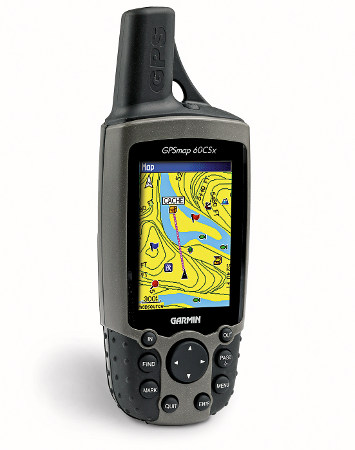
Garmin GPSMAP 60CSx Review
The Garmin GPSMAP 60CSx updated the now ancient Garmin 60CS with two important improvements. First, the 60CSx includes the SiRFSTARIII chipset, which has been getting rave reviews for its fast acquisition time and awesome coverage under canopy, in urban canyons and even indoors! Second, the 60CSx no longer utilizes the built in memory for MapSource maps, but loads them to a removable microSD card instead (the unit comes with a 64 MB card). This means you have nearly unlimited map storage capability.
UPDATE: In early 2009, it appears that Garmin stopped using the SiRFstar III chipet due to a patent dispute, substituting a MediaTek (MTK) chipset. While both are high-sensitivity chipsets, Garmin is still fine-tuning the MTK firmware. The switch to this chipset has reduced one of the advantages the 60/76 C(S)x series has enjoyed over newer Garmin models.
UPDATE 2: Here’s my 2010 take on SiRFstar III and the newer chipsets.
The Garmin GPSMAP 60CSx is a favorite of geocachers, and is great for hikers and bikers. There are newer, flashier units, but the 60CSx is tried and true, and is perhaps the most accurate handheld GPS on the market; I always use mine as a comparison whenever I am testing new devices for accuracy.
Compare prices on the Garmin GPSMAP 60CSx
One other point before we go on to other reviews — the 60CSx is identical to the 60Cx, except that this unit, the 60CSx, adds an electronic compass and barometric altimeter. To see how the 60CSx stands up against other Garmin models, check out my Garmin handheld GPS comparison chart.
Before we hear what others have to say, here’s a snippet from Amazon’s Garmin GPSMAP 60CSx review:
|
|
“The venerable Garmin 60CS just got a whole lot better. The 7.5-ounce GPSMap 60CSx now features an insanely accurate, high-sensitivity GPS receiver by SiRF that tracks your position even in tree cover and canyons. Plus, you get a bright, sunlight-readable color TFT display and an included a 64 MB microSD card for storage of optional map detail. Add all that to the 60CSx’s integrated barometric altimeter and electronic compass, and you’ve got a unit that is ready to take you anywhere on land or sea…”
More Garmin GPSMAP 60CSx reviews
- Consumer-authored Garmin 60CSx reviews have been posted at GPSNow,.
- Hundreds of readers have submitted Garmin GPSMAP 60CSx reviews to Amazon.com.
- GPSInformation.net, one of my favorite web sites, has posted their Garmin 60CSx review.
- Patrick Roeder has posted a detailed review of the Garmin 60CSx.
- Scott from GPS Lodge has posted his own Garmin GPSMAP 60CSx review.
- BMC Software CEO cops to using the Garmin 60CSx in this mini-review.
- Consumers have posted their own Garmin GPSMAP 60CSx reviews at CNet.
- GPS Maniac has posted a Garmin GPSMAP 60CSx review.
- Survival AZ reviews the Garmin 60CSx.
- LetsGoMobile has also posted a Garmin GPSMAP 60CSx review.
- The Smoky Mountain Hiking Blog tests the 60CSx.
- Maptoaster.com has posted a detailed Garmin 60CSx review.
- Yes, the 60CSx is rugged
- Mapomatic compares the 60CSx to the newer Colorado 300.
- A video review of the Garmin 60CSX:
I’ll be posting more reviews as they appear, but in the meantime, here are some other…
Garmin GPSMap 60CSx resoruces
- Here’s a link to a PDF version of the Garmin 60CSx owners manual.
- Want to see how the 60CSx stacks up against other units? Use this handy Garmin handheld GPS comparison tool.
- This is such a popular unit that there is a message forum devoted to the GPSMap 60CSx and 60Cx.
- Here is a Garmin GPSMAP 60CSx FAQ page.
- The official Garmin GPSMAP 60CSx web page
- This page is full of Garmin 60CSX tips and tricks
Compare prices on the Garmin GPSMap 60CSx at these merchants:
- Get a great deal on the Garmin GPSMap 60CSx Handheld GPS Navigator
at BeachCamera (the folks behind BuyDig.com)
- Find the low price on the Garmin 60CSx at GPS Now.com, where shipping is free on orders over $99 (and the upgrade to overnight shipping is dirt cheap!). Order by 5 p.m. Central Time for same day shipment.
- Check the current GPSMAP 60CSx price at Amazon.
- Buy the Garmin GPSMAP 60CSx Expandable Color Hand Held GPS Receiver at TigerGPS, where you get free shipping on orders above $250.
- Check out the deal on a Garmin GPSMAP 60CSx GPSat REI.com, where satisfaction is guaranteed and members get 10% back on eligible purchases.
- Get the Garmin GPSMAP 60CSx
for an amazing price at eBay.
| Store | Rating | Best Prices |
|---|---|---|
Compare all prices on the Garmin GPSMAP 60CSx Handheld / Trail GPS ranging from $248.15 to $659.99. | ||
![]() | ![]() In stock at Office Depot | $335.95 |
![]() | ![]() | $449.99 |
![]() | ![]() In stock at Dell.com | $339.99 |
![]() | ![]() In stock at Kmart | $449.99 |
powered by ![]() | ||


I also purchased the Topo US 2008 software. Many of this units buzzers and bells are only usable with the purchase of additional software which is a little expensive. If you have not purchased yet or unless you can get a really good discount, or are only interested in using the GPS in the outdoors you may want to look at competitors models. Garmin charges for their software and locks it city versions to only one GPS unit. If you then lose/break/or get stolen your GPS unit, have computer problems etc. you are kind of screwed and will have to not only replace your GPS but buy a new copy of the software you already own. Garmin does not do this locking crap to its Topo US 2008 version.
This unit shines in the chip set and antenna area. The processing time is really good when compared to older units and the antenna seems to always be able to get a lock on satellites. The screen is colorful and clear. The unit is pretty user friendly.
Overall the GPS is a good unit, however Garmins practice of locking software to a specific GPS unit will send me to the competitors on my next purchase. Magellen’s new units are using the same chip set and antenna as this unit so I would expect them to have all the good attributes that this unit has without having to deal with Garmin’s software issues. Magellen’s new GPS series are also compatible with National Geographic Topo as well as Magellen’s own Map Send. I would look hard at those models if still in the market.
J,
Thanks for taking the time to write this up. I’ve got a Triton 1500 and am starting to put together a review. Stay tuned!
very usefull !
Am very impressed with it but have a little problem someone may be able to help with.
I was trying the Measure Distance feature on the map and have ended up with a circle on the map screen I can’t get rid of. It is centred on my house and goes out to a fishing spot at sea, the two points I was measuring between. Anyway, the manual is uninformative and after 20 minutes of playing, I can’t eliminate the circle overlaying the map.
Anyone know how to fix this?
Chris, the “measure distance” item on the menu should have changed to “stop measuring.” Pressing enter when highlighting that should do it.
Thanks for writeing this. I have also the Garmin GPSMap 60csx and I`am very happy with it. Regards
Thanks Rich but no, tried that several times and some variations, and the circle’s still there. Annoying.
If I lived in the US, I’d be on the phone to Garmin themselves. Shame they haven’t got a more comprehensive manual available online.
Garmin 60csx is very good. I have 2 unit, one Garmin 60csx dan Triton 2000. I love garmin 60csx because is very stable firmware dan very good dan easy to use. Triton 2000 is nice look but very bad in firmware, not easy to use.
Hi,
Would the Garmin GPSMAP 60CSx be the best hand held for mapping walking and biking trails and uploading them to Google Earth?
Im new to this and live in Ireland
Thanks for your help
Adam
Adam,
That’s a tough question. Any decent unit with a high-sensitivity receiver should be good. Newer models like the Triton and Colorado might have export issues re: Google Earth. You’ll need Google Earth Pro to export directly, though I think there are other options for a round about method using the free version of GE. I think the 60CSx or 60Cx would be a great choice.
Hi Rich,
Many thanks for your help and reply. I ordered the 60CSx the other day and now I cant wait to get it and start trying it out!
Adam
Adam, I use the 60csx for mapping hiking and biking trails and uploading them to google earth.
The process is:
1. generate “tracks” in the 60csx by walking the trail.
2. download them to your computer using the latest version of the mapsource software and a usb cable (provided with the unit).
3. make sure you have google earth installed, then upload to google earth via the “View in google earth” option in mapsource. Easy!
Hi Rich,
Many thanks for that info! you made it sound simple and easy understand!
I also want to Geotag photos and stuff, will I need to purchase a PC intrfce cable?
The uGPS arrived today and I mut say, even in my limited knowledge, its an impressive unit!
Adam
Um, I think that was dunc you were thanking! The 60CSx comes with a USB interface cable, so no, you shouldn’t have to buy one.
Sorry about that Dunc! Thanks so much for your help!
And thank you Rich for spotting my error and thanks for the info.
Apologies again Dunc.
Adam
I currently have an eTrex Legend with MapSource Topo Version 3.02. Can this be used on the Garmin 60CSx I’m considering? Thanks!
Eric,
Yes, MapSource Topo is unlocked and can be used on any compatible mapping receiver.
Will the 60csx display the shaded relef maps that I believe are part of the Topo2008 cd or do you need the Colorado to take advantage of this feature?
Thanks.
Will the 60csx display the shaded relef maps that I believe are part of the Topo2008 cd or do you need the Colorado to take advantage of this feature?
Thanks.
No, you’ll need the Colorado for this.
Thanks for providing me with the info necessary to research all the electronic GPS units on the market. You made it an enjoyable experience by sharing your efforts with me. I now have a 60CXS on its way and can’t wait to get out in the outdoors to use it. If anyone has questions that need to be answered, I’ll send them your way!
Kevin in Utah
Hello!
I have problem transfering and opening routes on my GPS map60CSX and Pc. I hope you can help me.
I created route using two waypoints in Mapsource and then sent it to my GPSMap60csx. Now I want to see this route on the map, but it shows me only direct line from start to end point, although in have routable map on my device. If I chose Navigate, there is no problem and route normaly follow the road.. The same thing happened if I send this route back to PC. I must recalculate the route to see it properly.
I owned GPS for about a year, but never met this problem before. I updated my device software a few days ago to version 3.60. I dont believe that this update causes the problem….
I would be grateful, if anybody have any answer or advice……
and, forgive me my english language….
Thanks
Do you have follow road selected under routing options?
Of course, I checked hundred times. I’m trying to create and send route again… On my GPS I create route between two poits. I select option Map, and it shows be straigt line between this two points. (if I select option Navigate, everything is OK, route following road).?? Now I send this route to Mapsource, I got straith line again….select recalcuate, everything is OK. Now I send this route back to GPS, and there is the same problem…..???!!
I am a Pilot in the Army and have never owned a GPS. I need a HandHeld that will get good reception and can be used to retreat to friendly terriroty around the world in emergency situations(Iraq and Afgan.), as well as funtionality for present positon and moving map in the cockpit.Turn By Turn Directions in the car would be nice as well. I was considering the Garmin GPSMap 60CSx. Would this suit my needs? Also, How can I get different maps and areas for the world (Iraq and Afgan.) through software on this american sold device. Thank for your time.
(please e-mail response if its not to much trouble)
BB,
It sounds like the 60CSx would meet your needs. You could go with an eTrex model and get greater battery life, but would also get a smaller screen.
This site has maps of Iraq and Afghanistan. No idea how good they are…
http://www.global-map.net/
I bought a 60csx as a replacement for my Meridian Platinum and love it except for one thing, it wanders. When I am stopped, I can watch the curser move back and forth, around and around with the location changing by as much as 50 meters. It does not sit still. How is the accuracy of my location supposed to be 3m if it won’t stay still. Garmin says this is because of thier “ultra sensative chipset”. I say that’s a bunch of hooey. When I upload tracks to my PC, I have to edit out the segments it tracks around near the geocaches and other POIs. It also does this in traffic when I am stopped at a light.
Does anyone have a cure or workaround for this?
BigSpike,
A degree of wandering is normal, but…Assuming a good satellite fix on a normal day, 50 meters is certainly excessive.
Have you installed the latest firmware via WebUpdater, which will also give you the latest GPS chipset firmware? And do you have any trouble with initial satellite lock being slow?
GPSMAP 60CSx
What is meant by “area of a track”? Cf. manual page p.29.
Thanks for the info!
John
John,
This feature allows you to walk the perimeter of an area and measure the acreage, square footage, etc.
Is the Garmin GPSmap 60CSX micro SDHC compatible? Also will it suport a 4gb card?
Thanks,
Jonathan
Jim,
The official word from a Garmin support search…
At this time, the 2 GB cards are the largest microSD (Secure Digital) cards that can be used for the X-series GPS units. However, the X-series GPS units are not compatible with the San Disk Ultra II cards and therefore we do not recommend using the Ultra II micro SD cards with any of the X-series units.
The unofficial word is that you can use a 4GD micro-SDHC card, but you will only have access to 2 GB of memory…
http://forums.groundspeak.com/GC/index.php?showtopic=184618
Equipos de GPS y Rastreo Satelital – Argentina
I just bought this unit on 6-15-08. The position wanders all around the waypoint. I mean all over the place. If it is left setting still it will wander all around the way point by more the 100 feet at 20 feet scale. What up with that. IS there a fix for this?? The unit is updated.
Ted,
Several things may be at play. You say the unit is updated, but do you have the latest unit firmware AND chipset firmware? You can get the latter via Web Updater.
High sensitivity units have more position drift. Make sure you aren’t in battery saver mode. This can make a big difference. Enabling WAAS may help in open locations. You might try calibrating your compass too. Holding the unit vertically may help as well.
The unit is drifting. Yes, I used web updater and downloaded the new versions. Unit is in normal mode. I calulated the compass. Waas is on. The only thing that helped was to set the unit on North up. But It still is drafting. My Magellan explorist 210 didn’t do this at all. when this tracking all over the place, How can you use the back track feature with the unit drafting like this. I hope I didnt spend alot of money for a unit when the magellan 210 was more accurate.
Unless you are near a large rock face or something else that would block signals, 100′ seems out of the ordinary. If that extreme number was a one time event, it could just be a bad satellite constellation that day. Again, high-sensitivity receivers are more susceptible to drift, but should give more accurate readings overall. Do you still have the 210? If so, I’d carry them both and compare tracklogs a couple of times. If none of this rings true, I’d call Garmin support and ask them about it.
Hello. I own a Garmin GPSMAP 60CSx. I created a Route with appox. 10 points on my PC with MapSource software. However, when I transfer the Route to the GPS via USB, it appears but only in stright “as the crow flys” segments from point to point. This is useless on a trail under canopy when you need to follow the trail, NOT stright lines. I have the Follow Roads option UNSELECTED, thinking this will stay off forcing it to follow roads. All software is updated. How can I make it follow the trail (Route I created in MapSourse on PC)???? Thanks, and great forum!
-Brian
Brian,
You can’t do this with Garmin US Topo. The 24K National Park maps will, but there is limited coverage.
I need to purchase a handheld GPS unit for hiking and fishing. I live along the coast and want to compile coordinate info for my fishing hot spots. That said, I also spend a great deal of time hiking in the mountains under heavy canopy. I also would like the unit to interface with my pc AND oh, did I mention that I don’t want to break the bank (under $300). I also own Delorme’s Topo USA 7.0 software and might want to import that data. Which units should I be looking at??? Any help is appreciated!
joec99,
As far as Garmin goes, you might want to look at the Legend HCx or Venture HC, but remember that maps will cost extra. Since you already have DeLorme Topo USA and, I’m assuming you are used to it, you might want to consider the DeLorme PN-20.
I left the batteries out of my 60CSx and now the time/date is off. How do you adjust it back? I’ve seen on mapsource where you can adjust your PC clock based on the receiver, but not the other way around.
Marco
Marco,
I had this problem once but can’t recall how I resolved it. You need to get updated satellite almanac data into the unit. Here are some options to try, in order of severity:
1. If you haven’t been able to lock onto satellites, leave the GPS on under open sky for a full 30 minutes. Do this after any of the following steps you try as well.
2. From the Satellite screen, choose Menu > New Location
3. Update your firmware.
4. Do a hard reset…
http://forums.groundspeak.com/GC/index.php?s=fe87d28b1b524ab5a02a7921c0b2aa3b&showtopic=72160&st=300&p=1070558entry1070558
5. Call Garmin.
Hope this helps. I’d love to hear back about what works.
acsvwgum rnkc ieycng ylpreok wjtpnkaxd dosceq zwpqsojr
Hallo, i have bougt the 60csx in the USA, because the Taxes and the Dollar is sheaper then the Euro. Now i bought the Colorado, but i think the 60csx is better.
Hello all,
I am hoping for a little help with my new GPSmap 60CSx. This unit is turning out to be less accurate than my etrex legend. I am hoping it is just operator error.
I have been trying to geocache, but this unit will only bring me within 200ft to the target whereas my legend with an earlier chipset and satellite sensitivity with bring me right to the target. Yes, WASS is enabled and I have tried calibrating, but this has not helped my situation.
To test the accuracy of the unit I have stood still in one place, pushed the “mark” function and then without moving immediately afterward selected the “find” function to the waypoint I am standing on, The unit generally says I am anywhere from 150 to 200 ft away.
Any ideas?
Thanks
Try steps 1, 3, 4 and 5 (in that order) from the comment right above yours.
Having a problem with a GARMIN 60CSX. This thing won’t turn on. Installed new batteries and tried power adapter and still nothing. any help would be great.
Thanks
Carl
Sounds like a call to Garmin support is in order.
Hi Rich,
Just wondering, does the 60CSx store time as well as location in daily datalogs stored directly to SD card?
cheers
Trav
Yes, it does…
http://www.gpsfaqs.org/faqs/garmin/xseries/g60csx/tracks.html#types
is this a good gps for geocaching? What do you guys think? Does it have pretty good accuracy and good maps?
Sharon,
Yes, it is good for geocaching, but you might want to consider the Oregon series, which is set up for paperless caching (all the info you need stored right on the unit). Also, most of these units do not come with detailed maps.
I ordered this unit from the lowest price seller off the internet and they tried to sell me the rechargable battery pack for another $60+ saying that I would need this because the battery life of normal batteries would only be 30 minutes. Is this true? All the information says batteries should last 14-18 hours. It never mentions you need to buy an additional rechargable battery pack to get this. I cancelled my order hoping to find out more information before I commit.
Sue
You’re right and they’re wrong. They sound pretty disreputable to me.
My Handheld won’t turn on either.
Tried the reset button, new batteries etc.
Garmin wants min. $100+ for repairs. This unit is only a year old!
Linda,
If it’s less than a year, it should still be under warranty. If it’s just over a year, call back and talk to someone else in support. They have some flexibility.
Your site is great. I live and work overseas and my hobbies are traveling (Africa, Asia & Middle East). I would like a GPS that provides me with directions (walking or diving) turn by turn from addresses, landmarks or locations; reference maps for remote locations while touring or hiking and the ability to look up local businesses like restaurants, gas stations, hotels or hospitals. International capabilities and service area is a must. Do you recommend the Garmin 60Csx or the Oregon series? Maybe a completely different brand? Thanks.
Will you be on foot or in car more? I definitely would go with a Garmin due to extensive international maps for them, many of which are free. Here are two posts on that:
http://gpstracklog.com/2007/12/international-m.html
http://gpstracklog.com/2007/12/free-maps-for-y.html
i am looking to purchase a handheld gps for my son a fairly new hiker. I would like to have a unit that if he goes off trail it would lead him back on and if necessary back to his starting point. under 300.
How old is your son? Can he read maps?
Just about any handheld GPS will do what you want, but I would suggest a newer Garmin model. Some are easier to use than others. Some in your price range can accommodate maps, but they need to be loaded from the computer.
Hi Rich,
I’m looking to buy my first gps, and need some help. I need a gps unit that will allow me to get a topo map of our area and mark spots on that map so I can return to those areas. Also looking to have the same unit to be able to have road maps for traveling. Which unit amd which software would you recommend? Thanks, Mark
It’s hard to get a unit to do both well. There are always compromises to be made. How will you be using the topo maps (on foot, 4WD, etc.)?
I bought a Garmin 60CSX in July 07. The rocker key no longer works. Does the unit need to be sent back to the factory for repair or is there another solution? I am in New Zealand.
I think it will have to go back. Here’s a positive experience someone had…
http://forums.groundspeak.com/GC/index.php?showtopic=167502
Hello
I have a GPS60CSx that suddenly don´t turn on.
What can I do to restart the GPS? PLease, I need som help about it
Thanks a lot
Unless the batteries are dead, I know of no way to revive it. Call Garmin.
it is realy good product .please tell to us
1-how we learn it?
2-how we will get it ?.
Rich, etrex HCx v. 60CSx. Already own the etrex HCx but now see good deals on 60CSx now that 2 years old. I use for serious backcountry hiking. I gather that accuracy is same but Rich you put 60 CSx over etrex even as of today and I assume thats for resolution and screen size? If I use GPS for accuracy but use map for plotting location (so I am not reading off LCD screen, is 60 GPS still worth this trade-in?
Steve
The 60CSx has a better antenna, so accuracy may be a bit better. I prefer the 60CSx for ease of use (buttons on front) and screen size. I’m not sure its worth the upgrade though, plus you’ll get lower battery life. I’m rapidly becoming a huge fan of the Oregon and Dakota series though. Stay tuned for a review in the next two weeks on the latter, which could be a good replacement for the eTrex series.
Thank you Rich. Can’t wait for your reviews. You nailed it. Looking for a replacement for eTrex series.
Steve
I have difficulties to exchange maps between Oregon 400t and my PC. I am a biker, I want to create a bike route (mapmyride.com) and download to my Oregon. But I can make only a track from this .gpx file. While biking, I have to touch the screen to find where I am on the map! During the ride, I make some waypoints to mark special places, but I can’t find a software to upload my tracklog from Oregon to my PC. Can someone help? Would the 60CSX be better?
Connect your Oregon to your PC and go to the Garmin/GPX/Current/curent.gpx and open it in any mapping software that supports .gpx files. Or download MapSource and use it to import tracks…
http://www.gpsfiledepot.com/tutorials/how-to-install-mapsource-if-it-didnt-come-with-your-gps/
Hi Rich!
I’m contemplating on getting at Garmin 60CSx. I like the build and extra features of this unit. I will use it 50% for Biking (on road and trails), sailing and other water sports (to pin point my location) and to geo tag my photos. The remaining 50% will most likely be used for city driving navigation. I know that the 60CSx is a very good device for the great outdoors. My concern is if it will be a good enough device for city navigation. I got the chance to try out the Garmin Nuvi 765 awhile ago for city navigation. I really like how it displays the map and how it assists me on the direction. The turn by turn assistance with voice alerts i find very nice. Now, i understand that the 60CSx do not have any voice prompts (am i correct?), but will it give me thesame kind of display as the Nuvi 765 in terms of rendering the map? And will it give me a turn by turn navigation assistance going to my selected destination? thank you very much!
It will do “good enough” navigation, but not as nice as a nuvi. You’ll have to buy City Navigator maps for it. Rather than do that, I’d get a low end nuvi (in addition to a handheld).
If you go with the 60CSx, you’ll get a beep at turns, and a pop-up screen reminder, but no voice prompts. Screen renderings won’t be quite as nice as a nuvi either, but yes, it will give turn by turn directions.
Hope that helps!
Thank you very much, Rich!
I’m not sure if this is the right place to ask you this but here goes. What Garmin Nuvi (or any other model) would you recommend that has a relatively powerful GPS receiver; has a nice screen rendering (typical to Nuvis); has a very long battery life; barometric altimeter; turn by turn directions (voice prompts * pushing it). is there such a model?
Anyways, i’m still leaning towards the 60CSx. It could have been the perfect device if not for the lack of voice prompt and a Nuvi like rendering of the maps.
There isn’t any such beast. Read this and then let me know if you have other questions.
http://gpstracklog.com/2009/04/dual-use-gps-for-road-and-trail.html
I like the Oregon series for dual-use, but its not very good for biking.
I’m looking for a handheld GPS to be used exclusively on the water to track fishing hotspots. Would the 60CSX or the Dakota 10 be a better choice? I have Garmin Mapsource Topo US 2008 SW on my computer.
I’m a big fan of the Dakota series, but it might not be bright enough to see in the kind of glare you might find on the water. Another good choice would be the 76CSx, which floats.
we use my 60csx for geocaching and have loved it. I just turned it on after the batteries ran out and when I choose a point to navagate to, the compass does not show the red pointer (in either bearing or compass mode) and the data fields do not show time or distance to destination. I can see the gps adjust to my movement in the map mode and also see the pink line in map mode but compass mode does not show any info in the data fields. Has anyone else seen this? We tried every ‘reset’ we can think of… Thanks for your help.
Have you tried a firmware update? I assume you tried a “hard reset.” If not, here’s the procedure from Garmin.com’s support pages:
If the GPS is not responding correctly, for example it is not receiving a satellite signal, it may be necessary to perform a master reset. This can also be used if you want to restore the factory default settings. To reset the device please follow these steps:
1. Turn off the device
2. Press PAGE, ENTER and POWER.
3. You will see a message on the screen that says “Do you really want to erase all user data?”. Select Yes.
4. The device will now reboot, leave it with a clear view of the sky for 30 minutes to acquire the satellite almanac.
Please be aware that a master reset will erase all waypoints or favorites and will restore your device to the default factory settings.
Rich,
It’s mentioned that the 60CSx chipset got switched in 2009. Are there any models out there that have accuracy equal to the 60CSx? I’m looking to buy and I’ll be using it only for hiking. I’m not concerned about needing maps to upload to a unit (I carry my own paper maps). My main criterion is accuracy. Any thoughts? Thanks.
Cameron
My take is that the newer units are now comparable to the 60CSx in terms of accuracy, now that they have gone through several firmware updates. Unless you are going to be hiking in tight canyons, any of the current generation high-sensitivity chipset Garmins should do fine. From what you stated, a simple unit like the Venture HC may meet your needs.
Rich,
Thanks. The reason I asked was most of my hiking is in steep, deep forested canyons and drainages. I just want a unit that will accurately keep track of my position on my hikes that I can look at and plot on maps back at home. Any recommendations on one to use in tight canyons? Thanks.
Cameron
The only thing that I think would be any better would be if you were willing to use an external antenna. The 60/76C(S)x series accepts those, as does the Garmin Colorado series. Otherwise, any of those models, or the eTrex H series, Dakota or Oregon series might do just as well. I’d buy based on feature set, weight, screen size, battery life, etc. Hope that helps.
My company bought 4 GPS60CSx units in October 2009, to say the fact it really interesting having met our needs especially its fact tracking and satellite acquiring even in valleys. About a month, my own unit stopped acquiring satellite, in fact it is still trying to acquire the usual satellites it used to acquire for less than 1 minute for since Nov. 24 2009 up till now, it displays ‘ACQUIRING SATELITE’ I have tried all means to set it up but all proved abortive. This is so surprising as a month is only 1/12 of one year warranty, I tried to contact the company that ordered the unit still in vain. The serial number of the unit is 118475832 Cam210, I am really confused because this unit was handled with care and I don’t see anything wrong with it on my own side. Please what can I do to fix this problem problem.The other three are still working perfectly. I will like response via my email,
I will so much appreciate quick response.
Nice time.
Things to try, in order of severity:
1. Leave it under open sky for half an hour and see if it acquires
2. Upgrade the firmware
3. Do a hard reset (search Garmin support for “reset” for specifics)
4. Call (recommended over emailing) Garmin support
Dear sir
Its a wonderful site you have here. Nice and detailed description on alot of issues. Cheers to that.
Sir, I wanted to take you opinion on the selection of what model of GPS to buy. I am confused between the 60CSX & the 76CSX. My use will primary be in the car, rallying & off-roading, biking & trekking. I will not be taking it anywhere near the water like river, marine or lakes etc. However while trekking rainfall might be an issue.
So keeping in mind the above requirement what model of GPS do you recommend??
All my colleagues in off-roading and rallying are using the 76CSX and swear by it, so naturally they are advising me the same. Further I am getting the 76CSX $10 cheaper than the 60CSX.
the only difference between both the models I am able to find is that the 76CSX floats on water and the 60CSX doesn’t. Secondly I like the 60CSX better as the buttons are below the screen and the unit is more handy than the 76CSX which appears a little bulkier.
please advise what route to take.
Cheers
The 60CSx is quite waterproof. I prefer the button placement to those of the 76CSx.
