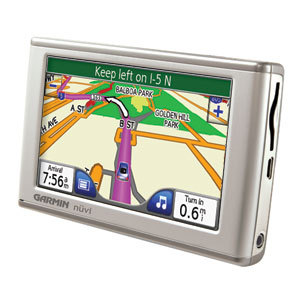
UPDATE: Though still available and supported, Garmin has discontinued the nuvi 650. For newer models, check out my Garmin nuvi comparison chart.
The Garmin nuvi 650
Step up to the nuvi 660 to get an integrated traffic receiver, Bluetooth for hands-free cell phone use, along with an FM transmitter to stream music, directions and phone calls through your car stereo speakers. The nuvi 670 adds European maps to the 660’s feature set, while the nuvi 680 adds MSN Direct services to the 660’s features.
To compare other nuvi models, check out our Garmin nuvi comparison chart.
Compare prices on the Garmin nuvi 650
More Garmin nuvi 650 reviews
- The first consumer-written Garmin nuvi 650 review has been posted at GPSNow.
- Consumers are also posting Garmin nuvi 650 reviews
- Geek Gadget has posted a Garmin nuvi 650 review.
- And you can also find user reviews of the Garmin nuvi 650 Portable Automotive GPS System
at TigerGPS.
- Consumer-authored Garmin nuvi 650 reviews are being posted at CNet as well.
- Jeff Chin reviews the Garmin nuvi 650.
- Here’s a user review of the nuvi 650 at GpsPasSion.
I’ll be posting more hands on GPS reviews as they appear, but in the meantime, here are some other…
Garmin nuvi 650 resources
- A PDF version of the Garmin nuvi 650 owners manual.
- Confused about so many models of GPS receivers? Try the Garmin mobile GPS comparison tool or our own Garmin nuvi comparison chart.
- There is a dedicated Garmin nuvi message forum at GpsPasSion, along with a thread comparing the nuvi 650 to the nuvi 260.
- There is another nuvi forum at GPS Review
- And here is a comparison of the Garmin nuvi 650 and TomTom GO 720.
- Five tips for nuvi newbies
- The official Garmin nuvi 650 web page.
- Here’s a brief video demo of the Garmin nuvi 650:
Compare prices on the Garmin nuvi 650 at these merchants:
- Find the low price on a Garmin nuvi 650 at GPS Now, where shipping is free on orders over $399. Order by 5 p.m. Central Time for same day shipment.
- Check the current Garmin nuvi 650
- Buy the Garmin nuvi 650 Portable Automotive GPS System
- Get the Garmin nuvi 650 for an amazing price on eBay.
 About Rich Owings
garf?
Just bought the Nuvi 650 last week, and was diappointed to find that there are no street names for secondary roads in the Comox Valley outside the primary city groupings pretty much anywhere south of Capmbell River. This is a huge area of concern for me, & Garmin’s response to the omission is that they have no data in the 2008 update.
Not good enough – coupled with the fact that the text-to speech option quit working on day three, will send this puppy back for refund. The idea is great, but the functionality doesn’t seem to be ready yet.
Fred,
Sorry to hear you’ve had a bad experience. I have two questions, just in case…Regarding street names, are you zoomed in all the way? And is the voice you have chosen labeled TTS (text-to-speech)?
Nuvi failed to list street names on the west side of streets as I was traveling south on several main north south streets in Burlington Ont. The streets were named ok on the east side. Some of these streets are over 100 years old!
The Nuvi also tries to take me 1 mile east and go north up a congested street to hook into a west highway route when it should direct me to turn East and then turn north up another main route to the east bound highway.
The Nuvi routes I have used are dead wrong. Yes they will get you there but will weave you through the city streets and congested traffic and ignore express ways.
To add insult when I am on the express highway against its wishes. it tries to direct me off the highway back to congested city streets.
The unit in my area will not name the streets on the west side as I travel south.
This is a fun toy but not an accurate tool.
If the streets are there, I’m assuming the routing issue is Garmin’s fault, not NAVTEQ’s.
Will it show west side streets if you zoom in more?
HOW LONG DOES IT TAKE TO FULLY CHARGE GARMIN 650? 1 HOUR, 2 HOURS OR MORE?
HOW LONG DOES IT TAKE TO FULLY CHARGE GARMIN 650? 1 HOUR, 2 HOURS OR MORE?
I’m not really sure, because I’ve never had my nuvi die (unlike other GPS units). And I do tend to spend time with it out of the car. So it must be pretty fast.
I just bought the Garmin Nuvi 650 from Costco for $299 before tax (about $337 total). The only others close to this price were the 200W and 250W (both priced at $249 and $299). This seemed like too good of a deal to skip. I did find the 660 at Amazon for $399 and thought about it briefly but didn’t think the FM transmitter and Blue tooth capabilities were needed. What are your thoughts?
Jeremy,
The 650 is a great unit. I’m not a big fan of Bluetooth for phone calls. I do use the FM transmitter a lot because I like the MP3 player. Of course, some people report that the transmitter is weak. You could always go with a line out if your stereo has a front panel input. It really just depends on what features you need.
I LOVE my Garmin-I saw a comment about how it only took them side roads…it depends on what setting–whether you want shortest or fastest route, etc.
I absolutely love it and am happy with it…BUT…is there a way to update it? The streets are all five years old–it doesn’t have newer streets. Can I update it or would I have to buy another higher number Garmin?
Yes, you can. Start here…
http://www8.garmin.com/unlock/update.jsp
Thanks for linking me! I added a few comments to add onto my review…
http://jeffchin.com/2008/02/14/review-garmin-nuvi-650-gps/
Hi All,
My Garmin 650 on connecting to my laptop thro USB shows a charging screen and does not show the map. When I connect it to the car 12V Charger it does the same thing. I have seen other Garmin models display the map while connected to the charger in the Car. I guess this must be a fault. Any ideas?
Prasad,
Are you using the charger that came with the 650?
Yes. It’s the one that came with Garmin.
Prasad,
Then it sounds buggy to me. Call Garmin support. I’d love to hear the results of your conversation with them if you get a chance to post back here.
I have a Nuvi 650. I am planning of vacationing in Europe this summer – Netherlands, Germany, Czech, Austria and Brussels. How do I upgrade my existing pre-loaded map or purchase new one?
You need to buy City Navigator Europe NT.
http://www8.garmin.com/cartography/mapSource/citynavntEurope.jsp
Jeff:
I have found that when you unplug the USB cable and the unit begins to start up, plug the USB cable back in when Loading Maps is displayed across the bottom of the screen and the unit will display the map.
My Garmin 650 doesn’t recognize a major exit on a major freeway in Silicon Valley. (Union Avenue). It calls it by a side street’s name. Very confusing for someone who doesn’t know where they are going. It also tried to get me to take non-existent roads while exiting Yosemite on Rte. 140. Then it would tell me to make a U-turn to nowhere. I wonder how often it updates major freeway information. I find I have to Google an address first and then go by it. The Nuvi will “re-calculate” and pick up where I actually am.
Doris,
Garmin offers (for a fee) map updates once a year. A new one was recently released. Here is an update link…
https://my.garmin.com/maps/updates.htm
I have a Garmin Nuvi 650 purchased in 2007.I understand there is a 2009 update of maps, but when I went on the Garmin site they said they cannot ship to Canada (Ontario).How do I get the updates? Costco- where it was orinially purchased does not have updates
Bob,
I’d call Garmin support and ask.
I’m brand new to this fun special toy. It seems that I must buy Topo maps … that they are not included.
Already I’ve seen that it shows goofy street names.
I’m waiting for a good book because the ‘manual really doesn’t tell me much. So far I haven’t read how to load photos.
Are you looking at the quick start guide or the full manual (http://www.garmin.com/manuals/nuvi650_OwnersManual.pdf)? You can load images to the nuvi or to an SD card. For a how to, press Travel Kit > Help > Picture Viewer.
There are some free topo maps available for some (mainly western) states…http://www.gpsfiledepot.com/maps/
My 12V charger fell apart and I don’t know how to reconstruct it so the fuse is properly fitted (it fell apart the first time I used it!). Can you help me with step-by-step instructions to put the charger back together again?
Sorry, I don’t have any experience with that. I suggest asking at http://forums.groundspeak.com/GC/index.php?showforum=11