Free user-generated U.S. and international maps
UPDATE: Here’s a step-by-step guide to putting routable OSM maps on your Garmin GPS.
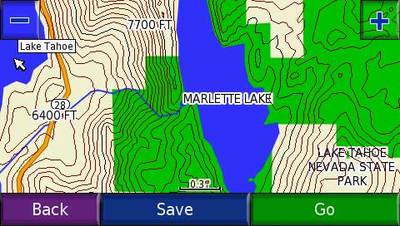
This was originally intended as a follow up to my international maps for your Garmin GPS post. Yet those sticking closer to home should investigate this too — the sources below include road maps of U.S. cities and some very nice topo maps of greater detail than you can find elsewhere. The image below is from a 1:24,000 scale Lake Tahoe map.
Besides being free, these maps are often available for areas not covered by Garmin and other commercial providers. Unfortunately though, turn-by-turn routing is less likely to be found with these maps.
One other thing before we get to sources of these maps — they utilize the Garmin .img format, and will require some special techniques for loading them to your unit. More on that below.
Sources of free maps for your Garmin GPS
Here are the best places to start looking for these maps:
- Map Center – Undoubtedly the most comprehensive source of user-generated maps for
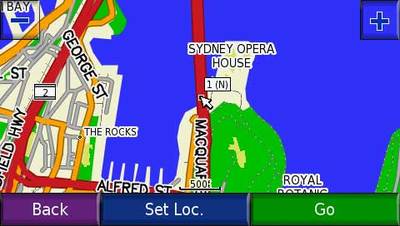
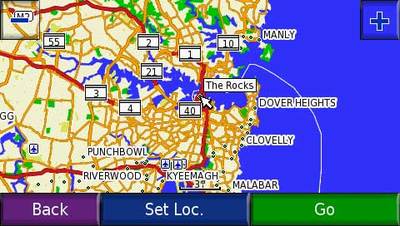
Garmin GPS receivers. The screen shots at the top of this post and below show maps of Sydney, Australia that I downloaded and transferred to my nuvi. - Free Garmin maps – Another comprehensive list.
Specifc areas:
- Australia – Tracks 4 Australia
- Canada – Canadian topo maps
- Caribbean – This Caribbean maps site also has maps of Japan, Bermuda and Antarctica
- China – Yunnan Explorer
- Greece – Greece GPS maps
- Maps of Morocco
- New Zealand – New Zealand Open GPS project
- South America – Argentina, Uruguay and more in the works. Turn by turn routing too.
- U.S. topo maps – 40 foot contour interval maps of Colorado and Wyoming
Thanks to Free Geography Tools for several of the above sources.
OpenStreetMap
OpenStreetMap is “a free editable map of the whole world.” They aren’t quite there yet, but they are making progress.
- Here’s a how to post from Free Geography Tools on how to convert OpenStreetMap data to Garmin compatible maps.
- OpenStreetMaps that have already been converted to Garmin format.
Tips for searching for free international maps
When searching for international maps, try using the country name + “.img” + “Garmin” + “maps”.
Loading user-generated maps using IMG2GPS
There are many ways to skin a cat and likewise, there are many ways
to load these custom maps to your Garmin GPS. This gets to be a
complicated subject and I will only go through one method here.
This technique allows you to upload multiple maps using IMG2GPS, so called because it transfers the Garmin-compatible .img map files to your GPS. Here are the steps I followed…
- If you have pre-installed maps on your GPS, make a copy to back
them up. I have a nuvi 660 and I simply copied the nuvi’s “Garmin”
folder to my hard drive. While I did not have any problems with this process
replacing the pre-loaded maps in my nuvi, it is still a highly
advised safety precaution. - Using one of the sources above, download the .img map files you want to send to your GPS.
- Download and install IMG2GPS.
- Run IMG2GPS. I could not get a direct upload to work with my nuvi,
so I used IMG2GPS to create a file and then copied that to the “Garmin”
folder on my nuvi. To do this select “Folder/Card” and “Create File
instead of Upload” as shown below. Then click “Load Folder” and
select the .img map files you wish to transfer. Finally, click “Create
File.” A window will briefly appear on your screen as IMG2GPS compiles
a GMAPSUP.IMG file. You will be prompted for a destination
directory for the file.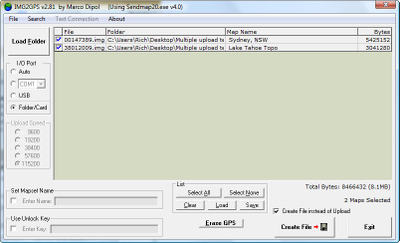
- Copy the GMAPSUP.IMG file and the .img map files to your GPS (I sent mine to the “Garmin” directory on my nuvi).
- You should now be able to zoom in and see the detailed maps of areas you transferred to your device.
Finding other GPS data
If you’re just looking for waypoints and tracks, you might want to check out my GPS data search engine.
Related post:
 About Rich Owings
Dear Rich,
I would appreciate it very much if you could please give further details and steps to get Morocco’s maps functional in a Garmin Nüvi 1390T device.
I mean, after installing the morocco.img.zip file (I hope it’s the right one) and extracting it directly into the used MicroSD card, what steps are left or what is wrong since I still don’t find Morocco as a country when entering the destination address?
Even the map when viewed, it doesn’t have any further streets’ details related to Morocco.
So, how can I make my device consider the newly installed file in its MicroSD card?
Many thanks in advance for your efficient help!
Yassine
It sounds like you may have loaded the maps properly, but not enabled them. Try this…
http://www.gpsfiledepot.com/tutorials/how-to-change-which-map-is-displayed-on-a-garmin-gps/#nuvi
Thank you for your prompt reply.
I verified but I don’t have Morocco in the list (I only have the original Europe selection).
Should I copy the file to one of the folders POI or GPX in the device (instead on the MicroSD)?
I noticed that the file format in POI is gpi (not img).
Thanks once again!
Yassine
Yassine, the maps need to be in the Garmin folder. I’m travelling and unable to verify, but I believe you can create a Garmin folder on the microSD card and have it work too.
Rich, it is getting worse… I installed the morocco.poi.gpx.zip file and extracted it directly into the the POI folder in the main Garmin folder.
Now my device doesn’t start at all, I even can’t access any more its contents when connected to the PC since it doesn’t start too!!!
All what I see (when pressing on) is the “GARMIN” logo then it turns off after trying unsuccessfully with “loading the map”!!!
I tried many times in vain!
Please, can my device be restored to its functional configuration (without the extracted file that crashed it?
Thx,
Yassine
Okay, I’m assuming it’s not on an SD card, so you can’t just pull it. And it won’t go into mass storage mode?
Where did the file come from? Cloudmade?
I’m afraid you’ll probably need to do a hard reset, which means losing your favorites. Here’s the procedure…
http://iqc.garmin.com/eCustomer/KODSelfService/request.do?create=kb:garmin&view()=c%7B51c35d50-3dbf-11df-e655-000000000000%7D
Yes, Cloudmade 🙁
The provided link is for backing-up favorites from Garmin device.
in the mean time, I already tried unsuccessfully a “Soft Reset” (by holding the ON button pressed) and a “Master Reset” (procedure below) and none of them worked for my device :((
I’m very disappointed for having such experience.
Thx for your concern and help.
+++++++++++++++++++++++++++++++++++++++++++++++++++++++++++++++++++++++
How do I perform a master reset on my nuvi 200, 205, 465, 500, 600, 700, 705 or 1000 series device?
To perform a Master Reset on the nuvi 200, 205, 465, 500, 600, 700, 705, 1100, 1200, 1300, 1400 or 1600 series device:
Note: A master reset will erase all waypoints or Favorites and will restore your unit to the default factory settings. If you would like to back up your Favorites to your computer, you can find instructions to do so here.
1. Start with the unit OFF and unplugged from power
2. Touch and hold the lower right corner of the screen with an index finger or the eraser end of a pencil
3. Continue touching and holding the lower right hand corner of the screen then power the unit ON
4. Release the power button when the device powers ON
* You will see a new message: Do you really want to erase all user data?
5. Remove your finger from the touchscreen when this message displays
6. Touch Yes
The device will automatically reset. Follow the on screen prompts then place your device in an area with a clear view of the sky until it acquires satellites.
How far into the hard reset process did you get? And how old is the unit? If its less than a year, its still under warranty.
Hi, Im hoping im in the right place. i was directed here to find “free” gps maps for my garmin..I am looking for the LakeMaster Minnesota and / or the InlandLakes Vision – North central. I own a Etrex legend HCX… anything you can tell me?
Yes. I’ll tell you that any free copies of the above are illegal.
I’ll also share that there is a $40 rebate right now on Inland Lakes…
http://bestgpsdeals.net/garmin-us-inland-lakes-40-rebate/1052/
and that you can get free maps legally at http://gpsfiledepot.com
The site you mention above, http://mapcenter2.cgpsmapper.com/catalogue.php, seems to no longer exist.
You’re right. The original http://mapcenter.cgpsmapper.com/catalogue.php still works (for now) but those maps are getting pretty old. But the topo maps there are probably worth checking out for anyone interested in them.
Dear
I do have Garmin Nuvi 710
i need USA map for it to down load ?????
thanks
You can get topo maps for free, and you can get inferior routable highway maps for free. Or you can pay for Garmin’s City Navigator.
This is not exactly on this topic, but related: I have paid for the Garmin lifetime maps for my Nuvi 200w, but what a PAIN it is getting the updates.
It seems that with every quarterly update, I have to update to the latest version of .Net, and that is a mess with unreliable updates (see http://windowssecrets.com/patch-watch/keeping-you-up-to-date-say-no-to-net-again/ ), besides having to keep a PC updated with Windows (XP) just to use it safely on the ‘Net (I don’t need Windows for much of anything else – Linux suits about all the rest of my personal PC needs). So now I have a PC with .Net 2.x, 3.x, and installing 4 as I type (on my main Linux PC), and probably have several MORE reboots to go to get to the object of this exercise, new maps.
Is this really necessary for just downloading their map file(s) once a quarter, and extracting the region-specific subsets? Is there some manual way to do this with some archive manager type software (lots on Linux to choose from)? Are Tom-Tom and Magellan as restrictive and convoluted about this process for their map updates?
TIA,
RO
Unfortunately, your life is going to get more and more difficult using Windows XP. It’s old software and the world is moving on. I “get” the whole linux thing – I was using BSD unix on a VAX 11/750 back in 1985, have been a sysadmin, hand-write c and html code with vi, etc. I primarily use Macs which are BSD unix at the core.
But Windows 7 is the latest and greatest and that’s where things are heading. You could always get a cheap netbook with Win 7 and use that for your map updates, or even a Mac.
Well, I have another PC with Win7 (maybe try that one next quarter), but that’s not the issue. I seriously doubt the process is much different since the dot-Net 4 framework, and code using it should work about the same on Win7 as on XP. With either version my gripe is about having to use any sort of Windoze once a quarter along with all the time it takes for downloading/verifying/”installing” to PC storage since the 200w does not have enough internal storage). So far I have spent an hour or more with that, and still have not gotten to the final part of actually running the program to pick and choose the map “segments” to put on internal storage and SD card (gotta review the docs for that as usual each quarter).
You would think with all that “cutting edge” dot-Net programming power Garmin could figure out how to examine the current distribution of map segments on the internal storage and mounted SD card, and just refresh with the updated equivalents, but no, I need to spend more time doing that really “complex” bit myself. Seems like this is a lot of complexity and human time involved for doing something a program should be capable of doing for us – isn’t’ that the idea of programming?
They could make it much more platform-neutral with Java if they want to keep secret (more like obscured) their proprietary little code tricks to verify that you are legitimately entitled to the update (where I suspect most of the coding effort is expended). Then I could run the Java applet on Windoze or Linux (with the correct JRE, which I would likely use for other apps, also).
BSD on VAX? That’s cool – I was a VMS DEC VAX admin for a while in the mid-90’s, and started a migration for the app to DEC-Unix on an Alpha. Then I went on to Solaris and web admin’ing, work as a “step up”. I have used Windoze all along for desktop usage since Win 3.0 days, but I got over the gee whiz factor fairly quickly after picking up on OS/2, and Linux. I like to leave my Windoze use at work for my work PC, and have fun with a more flexible OS environment for personal use 😉
Heh, I don’t know… I don’t subscribe to the map updates myself. The only reason I use Windows is that I make my own maps, and the tools for that just aren’t there under MacOSX or other operating systems.
And as you said, “this isn’t exactly on topic” as a comment on an article about free maps :). Garmin’s support forum would be a better place for this – the software developers participate ther and you can gripe at them directly 😉 https://forums.garmin.com/forumdisplay.php?f=180
Still happy I made the switch to Mac earlier this year!
Bookmarked – Thanks! I’ll go whine over there 😉
BTW, I rediscovered that the update process is more complex than just extract/copy – the longest part of it is building indexes to all the map data, sort of like creating indexes for an Oracle database to make the expected searches a lot faster, so I guess the dot-Net programming comes into play there (although how do they do it on a Mac I wonder…).
RO
Hi guys!
I was wondering if anyone knows how to get a free version of the actual Garmin city navigator Australia and New Zealand NT 2012 maps? Or anything close to the same quality?
Cheers!
No.
Hi,
I need free maps for my Garmin Nuvi 205W. I got some IMG files form Cloudmade and Wiki, but them on my SD card, and tried openeing them on my GPS, but it does’t comes with new map. Do i need to remove old IMG file from Garmin main parent folder named as Gmapsupp??
Please let me know
The first two things to check:
1. Did you create a folder named Garmin on the SD card and put the map files in it?
2. Have you gone into map setup to enable the maps?
I’ve got a Garmin Nuvi 205W. I’m traveling to Costa Rica for vacation in March and I’d like to download the maps for Costa Rica. Do you know where I can go to get free maps of Costa Rica? How exactly will the maps work after I upload them to my Garmin? Will the unit work the same as it does when I use it in the US (show my speed, give my location, provide turn by turn directions, include waypoints and Points of Interest, etc.)?
I’ve heard that it’s necessary to rent a GPS, but I’d rather not pony up an extra $100 if I can avoid it.
This might help…
http://forums.gpsreview.net/viewtopic.php?t=11534
please help me get new zealand map for free!!!!
http://garmin.openstreetmap.nl/
Free Canada NY map
???
Hi Rich,
I cannot find your email anywhere, so I post this message.
I just release a new version 5 of ‘ImgMaps’, an iPhone app to navigate and view Garmin img maps. (Version 4 was called ‘ImgOsm’ and it has been available in Cyndia Store).
I have benefited from the information in your website and I would to give you a free copy of the app. Would you like to have it?
Please let me know how I can send you the promotion code, you can use it at Apple AppStore to download the app for free.
Cool. I don’t think I have time to test it, but will try to include it in my link roundup this weekend.
I would like to update my Garmin 255W with the latest maps for free. I went into http://www.garmin.com/numaps and http://www.garmin.com/mapupdates however, they are not free they are $89.95. I would like free map updates to download and not pay for. Where can I go on the internet for a free! download of updated maps? Please let me know by email asap. Thank you.
They are significantly cheaper on Amazon.
I have a Garmin Nuvi 710 and I need maps as I am going on a road trip to USA. However when i try to buy the maps on the garmin website, i notice that they are not compatible with my nuvi 710. How do i go about getting a SD card that is compatible to my device? If i try to download, it says not sufficient memory. What do i do?
Looking at the maps tab on the UK site, they seem to be compatible… https://buy.garmin.com/en-GB/GB/on-the-road/discontinued/nuvi-710/prod9809.html
Garmin often doesn’t keep their compatibility list current. I’m pretty sure the microSD card will work.
Hello to every one, it’s in fact a good for me to visit this site, it contains priceless
Information.
I’m not adept at GPS because I don’t have one. I only rely to printable vector maps. Maybe I’m old school but it has been useful to me, http://vectormap.info/category/free_vector_maps_downloads/free_vector_world_maps/.
Garmin is connected to GPS receivers, avionics, wearable technology, public, technology, e-commerce, enterprise, B2B, B2C, consumer savvy, their customers and industry analysts. On the customer’s eye, their competition is companies like Google Maps, Fitbit, TomTom. If you want to update your Garmin software and facing any technical issue or have any query related to Garmin map updates then call our Garmin customer service number.
Garmin Map Updates are specific to cater adventurous subscribers with uniform standards. It helps in making the helpful decision with utmost confidence.
Intuit Quickbooks is a accounting Software is used for accounting. This accounting software have strong accounting features and tons of report as well as integration. Quickbooks Desktop technical Support accounting software is famous in these days. It gaining continuous popular in accounting software. Because it is user friendly and reliable features. Quickbooks desktop first version was launched in 1992 this accounting tool you can easily manage account accurately and high accuracy. If you want any support contact our desktop Support team at 18444420333 for any technical support.
Hello,
I am experienced full perused your blog, I have revered overview the change and all the tenacious work you’ve got put into your spectacular home. My maximum cherished became seeing the completed outcomes of the stencil divider and the parking area. I look for you have an outstanding rest after anything is left of 2018, and a happy 2019, pal. extra information.
Quickbooks payroll customer service:+1-855-441-4417 is for the users who want help regarding Quickbooks and Quickbooks payroll has the advanced features and improved version of Quickbooks 2019. If you want any kind of help and have issues regarding Quickbooks then you can contact Quickbooks payroll customer service by call, email, chat and live chat support also. So, now you don’t have to worry about your Quickbooks related issues, queries.
Very nice article. I hope you will publish again such type of post.
we make sure that we deliver success rates to your business in a user-friendly database. You can dial our QuickBooks data recovery support number whenever you lose your data mistakenly.
Hi
A debt of gratitude is in order for perusing this article – I trust you thought that it was useful. I have perused your blog great data in this <a Garmin Map Updates article. it was a great learning article site your blog. Your blog is a decent motivation for this subject.
Brillant piece of work shared. Thanks. Keep on sharing similar information in the future