 UPDATE: Read my Magellan Triton 1500 review.
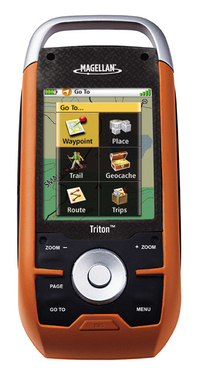
I’ve had a few days to try my new Magellan Triton 1500 and have decided to post some initial impressions, since a full review isn’t likely till after the holidays.
Cable snafu
After a stumbling introduction, Magellan seems to be going the extra mile to assist folks who received units without cables (short of moving their tech support back to the U.S.!). If you were one of the unlucky recipients of a Triton 1500 sans cable, email me at rich at makeyourownmaps dot com and I’ll try to put you in touch with someone who can help.
Hardware
The Triton 1500 fits nicely in my hand and feels solid. I like the touch screen and am finding it relatively easy to move back and forth between it and the button controls. I am not finding it necessary to use the stylus that often.
The buttons are stiff, and will take a little getting used to. They are backlit, which is a nice feature. One of the worst things I can say about the hardware at this point is that the screen isn’t that bright. You have to hold it at the proper angle to view it in sunlight, and even then it is difficult. It is nowhere near as bright as my Garmin 60CSx. I’m assuming that Magellan made compromises here to save some money and to be able to bring the unit to market at a lower price point.
Triton 1500 Interface
The Triton 1500 shows these primary screens as you toggle through them with the Page button…Map, Current Location, Data, Speedometer, Compass, and Satellite.
While the Triton interface doesn’t necessarily seem highly intuitive, it doesn’t seem that bad either. I’m withholding judgment until I can do further testing, though I do hope that Magellan will continue to update the firmware, as quite a few improvements could be made. For example, the Time Zone field is under Profiles. If you are a hiker, geocacher and marine user, I guess you’re supposed to change it under all three! Another example…I haven’t found a way to delete waypoints other than one at a time. This feature may be there; it’s always possible that I just haven’t found them yet.
Lockups
In preparing for some holiday fun, I transferred 120 geocaches near my sister’s house to the unit yesterday. This was apparently enough to bring the Triton to its knees, resulting in very sluggish behavior and then the screen locking up. The reset button failed to fix this, and now I can’t even get in to delete the waypoints manually. I’m certainly hoping this is a firmware issue that can be resolved. Otherwise, I may have a very expensive paperweight on my hands!
Geocaching
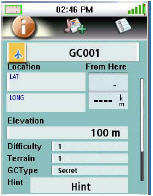
Geocache fields include hint, difficulty and terrain, but not description or container. The geocaching screen is shown at left.
VantagePoint Software
I haven’t succeeded in getting Magellan’s VantagePoint software (required for data and map transfer) to completely work on the Vista OS. I have been able to transfer National Geographic TOPO! maps, but can’t open VantagePoint independently for data transfer.
On XP, I can send TOPO! maps and do data transfer without problem.
Also, I have not been able to figure out how to, or if I even can, get MapSend Topo 3D maps to open in VantagePoint (and transfer them to the Triton).
There is definitely a bit of a learning curve to VantagePoint, but here’s an attempt to shorten it…
Tips for loading National Geographic TOPO! maps
- If you already use TOPO! and have any problems, you should probably just do a clean install. Backup your data files and then delete the existing TOPO! software and its program folder if it remains.
- Make sure you use the latest version of the TOPO! upgrade, downloading and installing it according to the instructions available here. Version 4.4.2 includes some improvements for users running Microsoft Vista.
- If you are on Microsoft Vista, you may need to right-click the TOPO! icon and choose “run as administrator.”
- In the Triton, press Menu and then View > Settings > Connectivity and set the USB mode to VantagePoint.
- Make sure VantagePoint is closed.
- Open National Geographic TOPO! and transfer the maps.
- If TOPO! says the maps were successfully transferred but the Triton says “Waiting to connect” and “ESC to cancel,” don’t panic, just hit
the ESC button on the Triton. - On the Triton, press Menu and then View > Maps. You can only view one detail map at a time. Press on the words “raster map” which
should turn blue, then press OK. - You should now be able to see your TOPO! map on the map screen.
National Geographic TOPO! maps
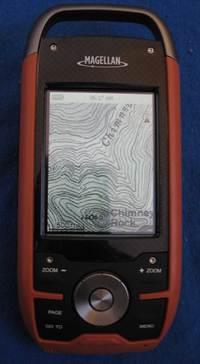
This is where the unit really shines. Despite any problems it may have, it’s awesome having USGS topos on your GPS screen. Compare the
images below, showing roughly what you would see on a Triton with National Geographic TOPO! maps (left) versus what you would see on a Garmin 60CSX running Garmin MapSource TOPO U.S. It’s not quite at the same scale, but it should be enough to give you an idea of the difference.
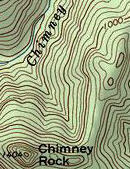
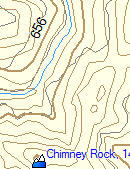
Note that you can only zoom in or out so far and still be able to see National Geographic (NG) TOPO! maps. I start to see NG TOPO! level 4 (1:100,000 scale) maps when the map showed a scale of one mile. These switch to level 5 (1:24,000 scale maps) at 1/4 mile and disappear after 300 feet. This is one reason it would be nice to be able to load MapSend Topo 3D maps, for more detail above one mile and below 300 feet.
Withholding judgment
This unit will appeal to folks who want USGS topo maps on their GPS screen. As such, I believe the best comparison is to the DeLorme PN-20, the Triton’s main competitor in this category. I’m trying to withhold judgment on the Triton, though it does seem very bleeding edge, perhaps more suited for beta testing than general release. Until I ran into the problem with lockups, I was impressed with the speed of map redraws, but unfortunately it now appears to me that the Triton shares the PN-20’s sluggish behavior. I hope to resolve the problems I’m having and put the Triton to a thorough test for my full review.
I’m also hoping that other folks out there with Tritons will chime in with comments, and perhaps convince me that these problems are anomalous.
Magellan Triton resources
There are two message boards that focus on the Tritons:
- The Yahoo! Triton GPS discussion group
- The TritonForum.com message board
The Yahoo! group has posted manuals for the Triton series:
More Magellan Triton resources:
- The official Magellan Triton series web page
- The official National Geographic Maps Triton web page
- The TOPO! and Magellan Triton how-to guide (PDF)
 About Rich Owings

Sure sounds like they shipped these too soon in order to meet the Christmas shopping season. I hope the problems can be fixed by a firmware update. And they’d better get it out soon! If not, the bad taste they leave in the mouths of new customers could be the death of Magellan.
I also have a Triton 1500 and was unable to connect up to Vista. I had no problems with Windows XP though. I like the unit and I feel it has much potential but Magellan needs to work some of the bugs out with another firmware update or two.
I will say that domestic customer support dealing with getting me a new unit to replace the one I received with the old firmware and no cables really good and fast but you need to get past their outsourced support first which was a pita. I am definitely keeping the unit I think it is pretty cool but I am not getting rid of my 60csx anytime soon
Thanks Matt. I knew I could count on you to chime in!
I read in another forum that their fulfillment house goofed up and sent them out early without checking that everything was in the boxes. I got a 1500 and was contacted by someone at the company after this happened, who told me they’d ship me a complete new unit. Got it a couple of days later, but haven’t had a chance to run it through its paces yet.
I read in another forum that their fulfillment house goofed up and sent them out early without checking that everything was in the boxes. I got a 1500 and was contacted by someone at the company after this happened, who told me they’d ship me a complete new unit. Got it a couple of days later, but haven’t had a chance to run it through its paces yet.
I read in another forum that their fulfillment house goofed up and sent them out early without checking that everything was in the boxes. I got a 1500 and was contacted by someone at the company after this happened, who told me they’d ship me a complete new unit. Got it a couple of days later, but haven’t had a chance to run it through its paces yet.
Can I load maps other than National Geographic onto my new Triton 1500? I like the photo maps (although they are a bit grainy at high zoom levels), but would also like the option of loading basic (i.e. smaller) topo maps onto the device.
Martin,
There are reports that you can load other Magellan maps. As soon as Magellan releases a firmware update and I can verify this, I’ll post the process. I have their Topo 3D USA and am wanting to try it myself.
Received the 2000 on the 24th. I’ve played around with it for a while. I’ve noticed some functions that are either missing, or not working properly. Overall it’s working great, redraws lightning quick, and no lockups. The National Geographic maps look a bit fuzzy when fully zoomed. I suspect the detail level has been turned down for a “safe” release. I’m holding off on the official review until the next firmware upgrade. C’mon Magellan, show us what you’re made of!
Thanks Craig. Can’t wait to see more from you on this. Feel free to drop the URL in a comment here when you post your review.
I have the Triton and it looks like it could be a great GPS after some needed firmware upgrades (not available that I could find… just being hopeful).
After loading some trivial number of Geocaching waypoints the system will become sluggish, actually so sluggish it is unusable. To resolve this I found you need to clear the memory then reset it to factory defaults. Pages 26 and 27 of the near useless User Manual.
If you do not mind keying in your waypoints this is a fantastic GPSr (ok not really quite that bad). It is very responsive, locks onto the GPS birds amazingly quickly, and gives very accurate readings.
At this point it is NOT a Geocaching ready system though. You will NOT be able to load up waypoints like on the 60c?? series Garmins.
The display of the 1500 is amazing! Unfortunately the map download of the NG Topo maps can not be done without all the graphic noise. See the side-by-side comparison in the associated article, sometimes the display on the left is nice, most the times the less noisy display on the right is nice.
Does anyone know if the SD card can be loaded with waypoints and have the GPSr read the card?
With all this, I think the unit is a “keeper”. I’m treating this unit as a mid alpha or early beta system at most. VantagePoint is at about the same developement level.
I posted this on my forum tonight, I feel the same way as you.
Here’s some things that aren’t working right now:
– searching for poi’s/Geocaches by distance is wrong. Shows the wrong order
– You currently cannot search the NG map for poi’s
– Date and time reset EVERY time unit is shut off, unit will always start in southern California
– There is currently no file system on the SD card. I believe this will change because of the description from Magellan “SD-card compatibility an invaluable feature enables you to use an unlimited amount of map data for topographic, marine and vehicle navigation. Store tracks, routes, geocaches and more”
– Custom fields on map page, and compass page reset to defaults when unit is turned off
As you can see, all of the issues I have found are not hardware related. A firmware update can correct. This is what I think is happening – There are units that do not have an SD card slot. This is why both VantagePoint and the Triton do not currently use the SD card for poi’s/Geocaches. The software and firmware was written for the “masses”, so to speak. While I don’t agree with this, this is a safe way to release all units to market, and not have to write different software for each unit. This is all speculation, of course. Time, and firmware revisions, will tell.
Curious how the touchscreen fairs outside on cold days?!
I’ve certainly had my laptop screen freeze on my while working in the field! (came back without problems)
I think I’ll hold off on the Tritons for a couple months!
(Would’ve had a Delorme PN20 by now except they only sell it with US maps — I’m holding out for a canadian set)
I’ll try leaving it outside for a while, and add the results to my review. Good suggestion!
I have successfully loaded a map region to the Triton from Directroute. This is what I did:
– Open Directroute, and select a map region.
– Select upload region
– Select the Save to hard disk option
– Enter in as much of the serial # from your Triton that fits. Leave off the first 0 if there is one (This might be the key, a “0” might force Directroute to output an .img file, which is not recognized in VP)
– Let the map create. (why does this take forever?)
– Import it into VantagePoint, you will be prompted to connect your GPS to authorize the map.
– Transfer to the Triton.
– Lather, rinse, repeat.
It works! POI’s are searchable, and whole map shows with no issue. No turn by turn though, but I expected that. I’m assuming that this will also work with Topo3D, but I haven’t tested it yet. I’d love to hear if this works for everyone.
I probably should mention as well that I uploaded over 200 Geocaches to the 2000 this morning, and there’s no difference in speed. The sort by distance is still wrong though. C’mon firmware!
Topo3D works this way as well! Same procedure as above.
Craig,
Thanks for the tips. I’ll try loading some maps tomorrow.
I got a Magellan Triton 1500 for Christmas. Just posted this review on Amazon.
OK, so I try to avoid being an early adopter, but I’ve been waiting a long time for the next step in GPS technology, so I jumped at the chance of buying a Triton 1500.
FYI, the 1500 is the same as the 2000 minus the camera. I carry a Canon on top of my pack so I did not need it.
The User Interface rocks, totally intuitive, easy to understand and the touch screen is awesome. I laugh a little at the micro stylus, that’s going to get lost on the first 5 miles on the trail. Magellan includes a bag of extras, probably because they exepect this to happen. Good news is that a finger or a twig will do just fine.
The ability to add voice notes is great and one of the reasons I bought it. You’ll need to add an SD card to take advantage of this excellent feature. Same deal if you want to add some MP3s. I can see myself listening to Dave M or a good book on tape while in camp.
The LED flashlight is ok. Enough for an emergency but it will not replace my head torch.
I’m not sure about the choice of colours, I’m sure its rugged but it looks a little cheap.
The cicular navigation button offers too much resistance. Maybe it’s designed that way to avoid unwanted data entry, but I don’t like it.
Now onto the not so good. The software/PC set up is far from plug and play. In fact I’d go as far to say I’ve never seen anything so complicated.
The biggest selling feature is the integration with National Geographic’s Topo maps. In order to take advantage of this feature you have to sign up for and download Magellan’s VantagePoint. If you don’t do that you don’t get the drivers.
Once you have done this you have to download a patch for the NG maps that adds Triton support. This also provides more of the drivers you need for your PC to recognize the Triton via a USB port.
I’ve done all the steps above, achieved connectivity with VantagePoint and my Triton, but I have tried everything execept voodoo magic and I cannot get NG Topo maps to see my Triton. This raises a good point.
Magellan make the GPS but NG make the maps, who do I contact for support?
I emailed both Magellan an NG for help. Got some very responsive support from NG but all they could do was refer my email to their development team and I have yet to hear anything from them. Magellan have yet to respond in any way.
I’m sure this problem will get resolved soon and as Colorado is sitting under piles of white stuff I will not be needing my GPS until the spring but it’s more than enough to take the shine off a great product.
In summary:
Good:
Great UI
Intuitive
Fast
Not bad:
Flashlight
MP3 player
Micro stylus
Needs work:
NG Maps interface
OMG the set up is COMPLICATED
Ben,
Great review — thanks for sharing.
I had to do a complete uninstall of NG TOPO! and then a clean install of the latest full version. Just upgrading NG TOPO didn’t work for me.
HTH
Not sure if you’ll let me post this here, but I wanted to share some instructions based on my experiences. It might save others A LOT of time.
http://brownetrout.blogspot.com/
I recieved the 300 for Christmas and I was absolutely thrilled! The thing is really easy to use out of the box, in fact it was easier than I expected. So, I was pretty happy with the unit.
Then it started locking up for no apparent reason and has done several times. The only way I can reset it is by removing the batteries which causes other problems. In doing so I have lost waypoints and an uploaded NG map. I find that absolutely unacceptable.
The software included is also a pain in rear. I can live with the software having a learning curve, after palying with it I’ll figure it out. What I have found frustrating is trying to get the thing to connect and then figuring out if everything is working the way it should be. That could be user error however, it’s just frustrating at this point. I also couldn’t figure out how to upload waypoints from the unit to my computer. I’m really hoping that’s a feature I overlooked.
Overall I’m not happy with it, I got it for backpackig trips and at this point it’s not reliable enough so it’s being returned. I’m sure most of the problems are software related and will be fixed but, I’m not betting $150 that it will be. I’m gonna hold on to my money until spring and then make the decision if I should give the Triton series another chance or should check out another brand.
Even though this has been generally negative I will stress this, THE UNIT HAS A LOT OF POTENTIAL! I really hope the problems are fixed!
Ken,
Thanks for chiming in with your review. I think I need to get a non-touch screen Triton to test.
I got the 500 for christmas. I love the idea of it but it seems like they did rush it. They say the go-to trail menu is not in the initial release. That is really what I wanted it for most.
I tested it on Vail Mountain today snowboarding. I can not get the backlight to turn off, so my batteries went quick.(button cycles through the shades but will not stop on any but full) It locked up after the first 45 minutes. so my track was missing some of the runs.
I think they need to work on the firmware a bit. I am hoping this will be a great backcountry tool.
Matt,
Thanks for sharing that. I’m hoping to get a 500 to test too.
I have a Garmin 76CSx and was looking for a GPS that could import topos other than Garmin proprietary, i.e. USGS. At first I was impressed with the Magellan Triton, but have read other reviews at REI that pretty much expressed the same frustrations of too early a release. I think I will wait until the kinks are worked out. I have the Magellan Roadmate 800 and have used it in the US and Europe with great results and was hoping that Magellan could have done the same for trail GPS that they did for the highway models.
The Triton 200, 300, and 1500 firmware updates are available on Magellan’s web site. The 400 will be available later this week. Firmware for the 500 and 2000 has not been released yet. I will post when it does.
Thanks Craig. I updated as soon as I got your comment. Hope to test it out today. Have you posted what all is included in these firmware updates?
I haven’t. I’m waiting for a forum member, or Magellan to clue me in.
I recently picked up a Triton 2000 and so far I am very impressed with the feature set. The firmware is buggy and they certainly need to provide some updates. With that said, I ride high performance snowmobiles in the mountains and we cover a lot of ground in a short time. The NG topo maps are incredible. For that reason alone, I will keep the Triton as IMO the mountain mapping is just that superior relative to the cheasy Garmin maps. I am also eyeing the new Colorado but after using the NG maps I don’t think I can go back. And the touch screen is sweet as well. Great unit with incredible potential but they need to complete the package and get some new firmware updates out ASAP.
Remmy,
Thanks for sharing. Glad you’re enjoying it. I agree; I love the NG maps!
I got the Triton 1500. I haven’t had any problems connecting it to either XP or Vista… the only problem I have is that I can’t get any of my detail maps from MapSend Topo Canada 3D to go onto it through VantagePoint. It seems that when you create the .imi files in MapSend and save them to your hard drive, it will only let you upload them onto a GPS that has a specific serial number. I can get VantagePoint to see that .imi file, but it will give me an error saying that my Triton is not authorized to use that file.
Any ideas out there? Maybe again a firmware update or do we have to wait for new detail maps to be released?
Liam,
Try the procedure shown here:
http://www.tritonforum.com/forum/viewtopic.php?f=16&t=144
I got Topo 3D USA to work.
Thanks a ton! That worked like a charm. I’m having no problems with the device now.
Got the 2000 for Christmas. This is my first experience with GPS. Wish I knew more then maybe I could provide a better review, nevertheless, I am not satisfied w/ the Triton so far. Screen is kind of dull. Seems to hang up a lot. The batteries didn’t last on my 9 mile hike and I couldn’t get the track to show up only the arrow. I havn’t been able to use any of the advanced features easily. The screen seems quirky for example the stylist diagnostics does not work. I was able to set waypoints of the water falls and attach a pic which was cool. The time and date is wrong and I can’t figure out how to change it. Can I load road maps on this unit? Haven’t used the vantage point software yet or firmware, I was waiting for my new computer w/ vista. Not so sure that is the best OS for it after the reviews. Hopefully vantage point, firmware, and my higher learning curve will ease my concerns. In short, I think I am having a hard time unlocking its full potential. Can’t help but wonder if I should have gone with my first choice the 60csx.
Barry,
It looks like you can load DirectRoute road maps…
http://www.tritonforum.com/forum/viewtopic.php?f=6&t=144
I got a Triton 2000 early this January. I must say its a nice reciever, to bad about the rushed firmware. I got Mapsend topo 3D to load up and work. However does anyone know why all of the back roads and 4wd trails show when the map is viewed in VantagePoint but the do not show on the triton screen. Oddly the name of the roads are there, and if you move the curser to the spot wear you know it should be then the name of the road will apear above the curser just the way it should. It would seem the road is on the map, you just cant see it. Does anyone Know what this is about. Any ideas?
Simple question…how do you install an SD card on the Triton 500…can’t seem to find a way to open the slot. Thanks
On the 1500 and 2000, its under a rubber flap on the side. Where is it on the 500?
Great info on loading MapSend Topo 3D, but can I load my MapSend Topo USA into the Triton. MaspSend Topo USA is a 2001 product. I don’t see a screen asking for a serial number; just directly load to a M330 or SportTrack Pro.
It should work. Try asking at http://tritonforum.com.
Walmart has the 1500 bundle with the Topo! software for $199.00. Seems like a good deal, but…..
I’m afraid I will be getting into the issues I had with my eXplorist 400, meaning the unit was knowingly released with both hardware and issues, then deeply discounted at Sam’s & Walmart. Magellan refuses to support that model, only a few years after it was released. The eXplorist series had much potential, but was abandoned by Magellan.
My question is, has Magellan customer service/product support improved? I remain disappointed by my unit for the poor documentation and terribly complicated pc connections. Additionally, the software developers at Magellan seem to be having a contest to see who can hide the most used features in the most arcane menus. Anyway, has Magellan gotten their act together or is this another one of their great idea / poor execution releases?
Really? all these bad reviews?
I bought a tritan 1500 from wall-mart on sale and with a additional discout because they didnt have the box for the display model. Cost me just under 150 bucks.
Got it home and was thrilled. The touch screen is super easy to use. Iv been testing it these past few days in the heavy forests of north idaho and it hasnt skipped a beat as far as satelite reception goes.
I found if your having trouble with features the unit has and certain settings, allot of this is controlled in the profiles area, by hitting page it moves through various options.
Listen to music, have all your photos on hand, the ability to record personal notes about your location and findings. I would say all and all its a pretty damn good unit.
Allthough it did freeze up on me once and I had to remove the batteries to reboot the gps, but had no loss of info.
Hope this helps.
Also Downloaded the topo map off the magellan website and fount it to work well and is very detailed as far as elevaion, trails, roads, waterways, creeks……….
I think it was worth the 59.99
My understanding is that recent firmware upgrades have improved the Triton series significantly. Glad to hear you’re happy with the unit. Have you used Vantage Point yet?
the maps are poor at best my magellan meridian with the old topo maps is far far better. they need to get the maps to be usable below 300 ft. the 1500 unit is ok, hard to see outside without the back light on. overall my old meridian is a better unit by far.
I have just recently purchased the Triton 1500, and intially quite excited about the product. However, after reading some forums I discovered the reason why my PC ‘blue-screened’ when connected to unit was the drivers are out of date, especially if you are using Windows 7.
Currently, I am awaiting for driver updates before re-connecting the unit to my PC. Luckily, I am able to borrow a Garmin 60 series unit – not the same, but does the job for now.
Cheers.
je viens d avoir mon triton1500 mais pas moyen de le faire reconnaitre par mon pc ‘windows7)
faut il qu il soi connecter pour telecharger des cartes et ou peut on aller pour trouver des cartes marines a mettre sur une sd
I’d suggest asking at http://www.tritonforum.com/forum/