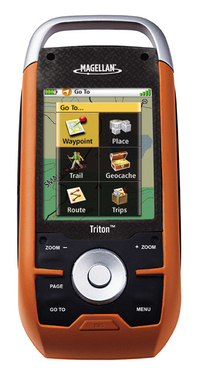
 UPDATE: Read my Magellan Triton 1500 review.
I’ve had a few days to try my new Magellan Triton 1500 and have decided to post some initial impressions, since a full review isn’t likely till after the holidays.
Cable snafu
After a stumbling introduction, Magellan seems to be going the extra mile to assist folks who received units without cables (short of moving their tech support back to the U.S.!). If you were one of the unlucky recipients of a Triton 1500 sans cable, email me at rich at makeyourownmaps dot com and I’ll try to put you in touch with someone who can help.
Hardware
The Triton 1500 fits nicely in my hand and feels solid. I like the touch screen and am finding it relatively easy to move back and forth between it and the button controls. I am not finding it necessary to use the stylus that often.
The buttons are stiff, and will take a little getting used to. They are backlit, which is a nice feature. One of the worst things I can say about the hardware at this point is that the screen isn’t that bright. You have to hold it at the proper angle to view it in sunlight, and even then it is difficult. It is nowhere near as bright as my Garmin 60CSx. I’m assuming that Magellan made compromises here to save some money and to be able to bring the unit to market at a lower price point.
Triton 1500 Interface
The Triton 1500 shows these primary screens as you toggle through them with the Page button…Map, Current Location, Data, Speedometer, Compass, and Satellite.
While the Triton interface doesn’t necessarily seem highly intuitive, it doesn’t seem that bad either. I’m withholding judgment until I can do further testing, though I do hope that Magellan will continue to update the firmware, as quite a few improvements could be made. For example, the Time Zone field is under Profiles. If you are a hiker, geocacher and marine user, I guess you’re supposed to change it under all three! Another example…I haven’t found a way to delete waypoints other than one at a time. This feature may be there; it’s always possible that I just haven’t found them yet.
Lockups
In preparing for some holiday fun, I transferred 120 geocaches near my sister’s house to the unit yesterday. This was apparently enough to bring the Triton to its knees, resulting in very sluggish behavior and then the screen locking up. The reset button failed to fix this, and now I can’t even get in to delete the waypoints manually. I’m certainly hoping this is a firmware issue that can be resolved. Otherwise, I may have a very expensive paperweight on my hands!
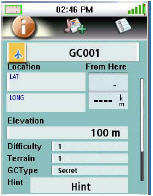
Geocaching
Geocache fields include hint, difficulty and terrain, but not description or container. The geocaching screen is shown at left.
VantagePoint Software
I haven’t succeeded in getting Magellan’s VantagePoint software (required for data and map transfer) to completely work on the Vista OS. I have been able to transfer National Geographic TOPO! maps, but can’t open VantagePoint independently for data transfer.
On XP, I can send TOPO! maps and do data transfer without problem.
Also, I have not been able to figure out how to, or if I even can, get MapSend Topo 3D maps to open in VantagePoint (and transfer them to the Triton).
There is definitely a bit of a learning curve to VantagePoint, but here’s an attempt to shorten it…
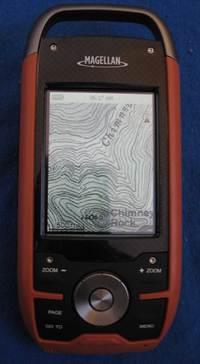
Tips for loading National Geographic TOPO! maps
- If you already use TOPO! and have any problems, you should probably just do a clean install. Backup your data files and then delete the existing TOPO! software and its program folder if it remains.
- Make sure you use the latest version of the TOPO! upgrade, downloading and installing it according to the instructions available here. Version 4.4.2 includes some improvements for users running Microsoft Vista.
- If you are on Microsoft Vista, you may need to right-click the TOPO! icon and choose “run as administrator.”
- In the Triton, press Menu and then View > Settings > Connectivity and set the USB mode to VantagePoint.
- Make sure VantagePoint is closed.
- Open National Geographic TOPO! and transfer the maps.
- If TOPO! says the maps were successfully transferred but the Triton says “Waiting to connect” and “ESC to cancel,” don’t panic, just hit
the ESC button on the Triton. - On the Triton, press Menu and then View > Maps. You can only view one detail map at a time. Press on the words “raster map” which
should turn blue, then press OK. - You should now be able to see your TOPO! map on the map screen.
National Geographic TOPO! maps
This is where the unit really shines. Despite any problems it may have, it’s awesome having USGS topos on your GPS screen. Compare the
images below, showing roughly what you would see on a Triton with National Geographic TOPO! maps (left) versus what you would see on a Garmin 60CSX running Garmin MapSource TOPO U.S. It’s not quite at the same scale, but it should be enough to give you an idea of the difference.
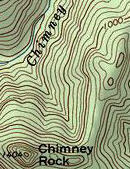
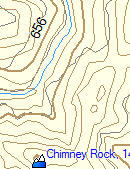
Note that you can only zoom in or out so far and still be able to see National Geographic (NG) TOPO! maps. I start to see NG TOPO! level 4 (1:100,000 scale) maps when the map showed a scale of one mile. These switch to level 5 (1:24,000 scale maps) at 1/4 mile and disappear after 300 feet. This is one reason it would be nice to be able to load MapSend Topo 3D maps, for more detail above one mile and below 300 feet.
Withholding judgment
This unit will appeal to folks who want USGS topo maps on their GPS screen. As such, I believe the best comparison is to the DeLorme PN-20, the Triton’s main competitor in this category. I’m trying to withhold judgment on the Triton, though it does seem very bleeding edge, perhaps more suited for beta testing than general release. Until I ran into the problem with lockups, I was impressed with the speed of map redraws, but unfortunately it now appears to me that the Triton shares the PN-20’s sluggish behavior. I hope to resolve the problems I’m having and put the Triton to a thorough test for my full review.
I’m also hoping that other folks out there with Tritons will chime in with comments, and perhaps convince me that these problems are anomalous.
Magellan Triton resources
There are two message boards that focus on the Tritons:
- The Yahoo! Triton GPS discussion group
- The TritonForum.com message board
The Yahoo! group has posted manuals for the Triton series:
More Magellan Triton resources:
- The official Magellan Triton series web page
- The official National Geographic Maps Triton web page
- The TOPO! and Magellan Triton how-to guide (PDF)
 About Rich Owings
