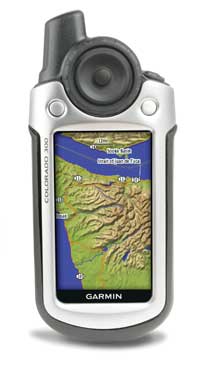
Hands on with the Garmin Colorado 300
UPDATE: I’m recommending the new touch-screen Garmin Oregon series instead of the Colorado. It has a superior interface, along with almost all the other good things found on the Colorado. Read my hands-on review of the Oregon 400t for more information. I’ve also posted a page on the comparable model in the Oregon line — the Garmin Oregon 300.
UPDATE 2: This model has been discontinued. For more current recommendations, please refer to our handheld GPS buyers guide or our Garmin handheld GPS comparison chart.
The Garmin Colorado 300
Before we get into the details of my hands on review, lets compare the major differences between the four Colorado models:
- 300 – Worldwide basemap with shaded relief, no pre-loaded detail maps
- 400t – Worldwide basemap with shaded relief, U.S. topo maps pre-loaded
- 400i – Worldwide basemap with satellite imagery, U.S. inland lakes and navigable rivers charts pre-loaded
- 400c – Worldwide basemap with satellite imagery, U.S. coastal waters and Bahamas charts pre-loaded
To see how the Colorado 300 stands up against other Garmin models, check out my Garmin handheld GPS comparison chart.
Compare prices on the Garmin Colorado 300
Since this is a landlubbers blog, I’ll mostly ignore the marine units. So the key question is whether to buy the Colorado 300 or the 400t. The 300 is a great unit for those that already own Garmin’s Topo U.S. 2008. Otherwise, you may want to buy the 400t, which comes with those maps pre-loaded. On to the details of the Garmin Colorado 300 review…
High-resolution screen and shaded relief
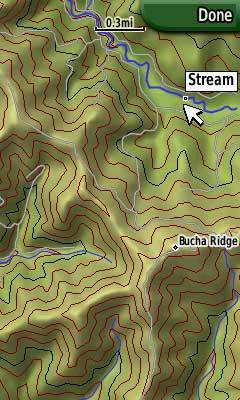
The Garmin Colorado series uses a large 3″ (diagonal) screen with a 240 x 400 pixel resolution screen, allowing it to deliver some beautiful imagery. Unfortunately, the high res screen isn’t as bright as previous handheld models. I don’t think it’s a deal killer, but it is something to be aware of.
The high-resolution screen, along with the DEM data embedded in Topo U.S. 2008, allows it to display gorgeous shaded relief maps (see image at right) and 3-D terrain. This allows much better visualization of the surrounding terrain, a great improvement for backcountry enthusiasts.
A new interface
The Garmin Colorado series has things in common with both previous Garmin handhelds and with their auto navigation line. This is an entirely new platform and interface that will require a little getting used to if you’ve ever used an older Garmin handheld.
Garmin has managed to greatly reduce the number of buttons on the unit. My 60CSx has ten buttons; my Colorado has four (including the power button). The big change that allowed this is the “rock n roller” button at the top of the unit. It’s three distinct types of motions are shown below (image courtesy of Garmin).
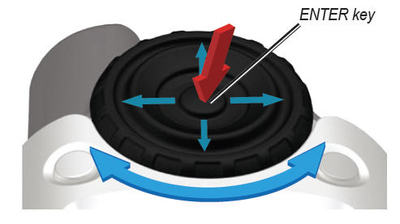
- When pressed, the center acts as an Enter key.
- You can move the cursor in four directions to select menu items, highlight the map, etc.
- And then there is the outer wheel, which can be rotated to move through menus and zoom the map; I love that last feature!
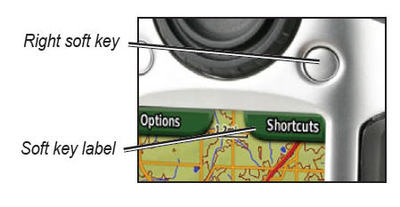
Another big change to the interface is the context sensitive left and right soft key, pictured below (image courtesy of Garmin).
The shortcuts menu
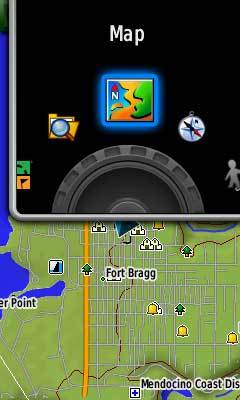 Hit the right soft key in the image above and you get the shortcuts menu (shown at right), which you can spin through with the rock n’ roller wheel. Here you have access to what were termed “pages” on the 60CSx. They include map, compass, elevation plot, setup, trip computer, where to, add page, others and mark waypoint.
The latter function can also be accomplished by holding down the center of the rock n’ roller.
Items under “others” can be added to the shortcuts menu using “add page.” These “other” items include share wirelessly, image viewer, 3D view, geocaches, Whereigo, sun and moon, hunt and fish, waypoint manager, route planner, active route, area calculation, alarm clock, calculator, stopwatch, calendar, profile change, recent finds and the satellite screen.
Garmin Colorado features
All the current Colorado units have an electronic compass and barometric altimeter. They also come with a picture viewer, an SD card slot, and a high-sensitivity chipset for superior reception in difficult conditions,
The Colorado has a number of interesting new features too:
- If you have a friend with a Colorado, you can wirelessly share basic waypoint, route and geocache data between units
- The Colorado can display data from an optional heart-rate monitor and/or speed and cadence sensor
- It also supports Whereigo activities, from the folks behind geocaching.com, speaking of which…
Geocaching
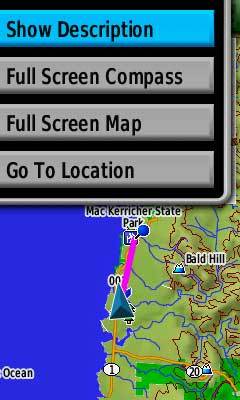
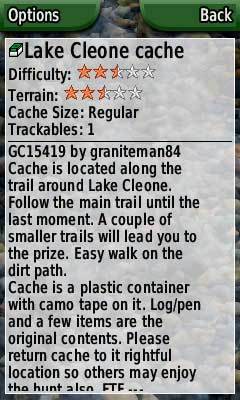
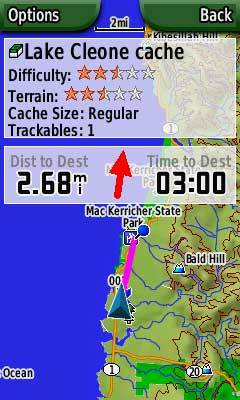
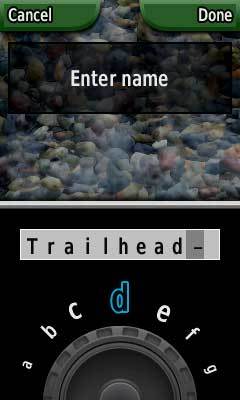
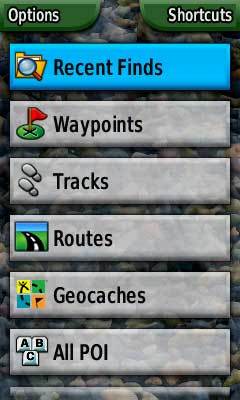
The Colorado series appears to be at least partially targeted towards geocachers, with an effort to make the Colorado a “paperless geocaching” tool. Unlike previous Garmin handhelds, the Colorado will accept and display the full description, cache size, difficulty and terrain ratings, and recent logs. I really like this feature, and it will probably get me out geocaching more. Geocaching mode screen shots follow.
A replacement for the 60CSx?
What is less clear is whether Garmin intends this to be a replacement for the 60CSx or not. The Colorado does not (at this time) have the full complement of features and options found on the 60CSx. The Colorado has inherited some nuvi-like features (e.g., USB mass storage mode). I hope it hasn’t inherited the nuvi’s lack of options and flexibility as well. Read on for more on this.
Deficiencies?
UPDATE: Garmin has released new firmware for the Colorado series, which improves or fixes some of the issues below. Here is a link to a discussion thread that leads off with the fix list.
A number of perceived deficiencies in the Colorado series have been documented by forum participants at Groundspeak, which has been compiled into a Garmin Colorado issues list. I won’t go into all of them here, but the worse, IMHO, are the following:
- Won’t show geocaches on map without a workaround
- Cannot mark a geocache as found
- Several key geocaching mode functions are missing — there is no find nearest/next, nor can you select by symbol / type
- Backlight setting not stored when powering off
- No busy indicator during lengthy processes
- No single place to reset trip data
- No waypoint averaging
- North up / track up option not available from the map page (you must go to Setup>Map)
- Cannot change track color
- Cannot display multiple saved tracks
- NiMH battery reserve not properly reported, so the unit automatically dims the backlight even though significant NiMH power reserves remain
- Cannot pan the map and then search from that point of reference
- Can’t zoom in below 80 feet on the map
Continuing improvements
Having listed those issues, I must add that Garmin has a reputation for frequent firmware updates and has demonstrated a continuing commitment to improving their products following release to the public. You can verify this by going to the download page
for any Garmin product and looking at the change history. Garmin has already released one firmware update for the Colorado series and I’m sure more will be forthcoming.
Recommendation
I’m giving the Colorado series a qualified recommendation, keeping in mind the screen brightness and the fact that some firmware issues remain to be addressed.
 For geocachers, if you can bear with Garmin while they improve the unit, I think it is a real winner. The paperless geocaching feature is a huge improvement.
UPDATE: I’ve decided against recommending the Colorado for backcountry navigation (hiking, mountain biking, etc.) for the time being, due to some navigation deficiencies in the unit.
More Garmin Colorado 300 reviews
- Consumers are posting their own Garmin Colorado 300 reviews at GPSNow
- And there are more consumer-written Garmin Colorado 300 reviews
- GpsPasSion has started a thread of user-generated Garmin Colorado 300 reviews
- Here is a review comparing the Garmin Colorado 300 with the older Garmin 60CS
- Mobile Arsenal reviews the Garmin Colorado 300
- Trailspace.com posts a brief review of the Colorado 300, giving it only 2-1/2 out of 5 stars
- OutdoorsMagic.com gives a UK perspective in their Garmin Colorado 300 review
- This Garmin Colorado 300 review looks at it as a companion for a metal detector
- LetsGoMobile has also posted a Garmin Colorado 300 review
- Mapomatic reviews the Colorado 300, comparing it to the Garmin 60CSx
- Cache Mania has posted a Garmin Colorado 300 review
- LiveForTheOutdoors has posted a video review of the Colorado 300:
Other Garmin Colorado 300 resources
- The Garmin Colorado 300 owners manual in the language of your choice
- GPS Fix is a blog that focuses on the Garmin Oregon and Colorado series
- A Garmin Colorado mini-site
- Compare the Garmin Colorado 300 to other Garmin handhelds
- Compare the Garmin Colorado and Oregon series
- And another Oregon / Colorado comparison
- Compare the Colorado to the Garmin 60CSx
- An FAQ by Garmin
- Another Garmin Colorado FAQ — see GC16 for info on multiple geocaching views
- There is a Garmin Colorado message forum at Yahoo!
- And another Colorado forum /li>
- The official Garmin Colorado 300 web page
Compare prices on the Garmin Colorado 300 at these merchants:
- Find the low price on a Garmin Colorado 300 at GPS Now, where shipping is free on orders over $99 (and the upgrade to overnight shipping is dirt cheap!). Order by 5 p.m. Central Time for same day shipment.
- Check the current Garmin Colorado 300
- Buy the
Garmin Colorado 300 GPS
at REI.com, where satisfaction is guaranteed and members get 10% back on eligible purchases.
- Get the
Garmin Colorado 300 Color Hand Held GPS Navigator
at TigerGPS, where you get free shipping on orders above $250.
- Find the Garmin Colorado 300 for an amazing price on eBay.
- Check out our GPS deals site for current specials and rebates on a wide range of GPS receivers
 About Rich Owings

One thing I’ve wondered about on the 400t is the resolution of the included topo maps. Do you know if they’re the equivalent of the Topo 2008 maps (i.e. 150-ft. contours), or whether they’re better/worse?
Leszek,
They’re the same as Topo 2008, which uses 1:100K USGS data. Maybe we’ll get tighter contours in Topo 2009…
http://gpstracklog.com/2007/08/speculation—g.html
I’ve only the manual at my disposal, but I imagine having noticed another Colorado flaw compared to the 60 series: proximity waypoints (and proximity alerts) seem missing.
Firmware upgrade: I have difficulties to recall a 60C upgrade adding any new feature. I agree with you that the Colorado is not a (straight) successor of the 60 series, but I have my doubts whether there will be one: with (among others) Nüviphone announced, Garmin seems to bet on the more profitable online map updates (as opposed the old Garmin-modell with once-a-year updated, static maps tied to a single unit).
A well written (and fair) review. Thanks for referencing the FAQ and Issues List.
Couple of notes:
Some of the FAQ links are broken because I reorganized the FAQ into multiple pages yesterday. Sorry, but it was getting hard to follow as one big page!
One other big issue that I’m surprised that didn’t get mention but is probably also worse for 400t users:
– Startup performance is slow with the 400t full map set. It takes about 40 seconds to get to the first screen from power on. Garmin really needs to give 400t users the ability carve out pieces of the entire map (e.g. Mapsource) if startup time can’t be improved.
– Geocaching performance. If you only have a few hundred caches loaded you won’t notice this issue but if you load 1000-2000 caches, which isn’t uncommon for serious cachers, you’ll see a significant slowdown in both startup time and the time required to view geocaches.
-Scott (aka g-o-cashers and GO$Rs)
http://garmincolorado.wikispaces.com/
I can’t live without topographic quad maps at 1:24000. Today’s vector maps are still missing too much detail. Delorme has a much better offering.
Just started a short series on creating custom waypoints for the recent Garmin mapping GPS units:
http://freegeographytools.com/2008/creating-custom-waypoint-icons-for-garmin-gps-units-i
And was wondering, does the Colorado series support custom waypoints? Manual doesn’t mention them.
Leszek,
I assume you can (don’t know for sure), but won’t have a chance to check it out for awhile. Thanks for the nice comment on the Asheville post BTW.
Do you have some tracklog comparisons with a Garmin 60CSx?
Vidar,
Not yet, but anecdotal evidence suggests that it may be superior. I’m in the midst of a cross country move, but I hope to get my bike and be able to post a comparison within a couple of weeks.
The Colorado does not have support for custom waypoint symbols. Obviously many people are hoping it gets added as a feature in an upcoming release.
GO$Rs
What is the antenna sensitivity like? How does it compare to the 60Cx with the SirfStar III chipset etc…?
Sorry if this was mentioned somewhere before.
Thanks GO$RS.
Ryan, sorry, I posted a bad link. Try this…
http://gpstracklog.com/2008/03/garmin-colora-2.html
I bought one and suffered water damage. The unit is much less water resistant than my old garmin GPS 60. I googled garmin water damage and see others are talking about it as well. it looks like the current generation does not resist water properly and its a pretty big flaw.
Otherwise i like the unit but found the software annoying- especially the inability to create a route by simply clicking on the map intead of saving waypoints first.
Needs some work this unit!
Yeah, I’m starting to hear about some water damage reports. Thanks for letting me know.
I though I would post this picture on the net just to show how bad this is.
http://www.willyhoops.com/garmin_colorado_300_water_damage_review.htm
Mine is dead now but I tried running under the tap for a few seconds to see how bad the water proofing is. Yes, water runs right through the clasp. Before you ask, attaching the Lanyard does not improve things.
This has got to be the wrost design ever. If then don’t fire a few people at Garmin over this it beggers belief.
Now I’m using sofware beta 2.51. The problem is Colorado 300 can’t not make long route. I try to route follow road with long 300 km and colorado calculate error.
Colorado 300 dose not have :
– power off function,
– many commands are not in good place,
EX: NorthUp/TrackUP must be in Map view , not in setup
Tracks function must be accessible from Map view, not in setup,
Compass dose not work with satellite,
We can not cheek memory for track and route and waypoint,
Picture viewer too slow.
…
My Colorado 400t no longer works. It is not waterproof!
upaboveclimber,
What happened? I’ve heard some reports that water can enter when you remove the battery cover.
Does anyone know if I can use the MapSource United States Topo Maps (V 3.02) that I got in a package deal with my eTrex on the Colorado 300. They are 1:100,000 scale just like the new Topo 2008 maps with the Colorado 400t.
Chris,
Yes, they will work fine.
Congratulations on the well written and informative article. Keep more of those coming!
That’s a pretty extensive review. I was thinking about looking into one, but I guess I can find everything I need to know here.
great information, thank you
Hi Folks – I have an eTrex Summit, and am now considering getting the Colorado. Can anyone tell me if it supports multiple Position Formats – lat/long, UTM etc?
[I use GPS in my work as an engineer and UTM is useful for me.]
Yes, you should be able to display UTM on any Garmin handheld. There is an issue on the Colorado with entering UTM coordinates though. “When entering UTM coordinates (Edit Waypoint->Change Location) there is no space between the easting and northing making it hard to track where you are in the entry a very long string of numbers.” (From http://garmincolorado.wikispaces.com/Issues+List#toc8)
BTW, I am recommending the Oregon over the Colorado, due to its superior interface and the lack of the tracking error often seen in the Colorado series…
http://gpstracklog.com/2008/05/garmin-colora-2.html
It should be mentioned that the Colorado does not have support for custom waypoint symbols. Obviously many people are hoping it gets added as a feature in an upcoming release. I heard it may be out by early next year.
i have changed from a Vista to the colorado 300 due to the larger screen, but so far very disapointed. My unit seems to have a faulty conection USBcable to unit, has to held back to maintain conection, and it will not down load tracks, but does down load waypoints.
Has anybdy had the same problems.
John,
I haven’t heard of that problem before. Do you have an extra mini-USB cable you can try, to eliminate the cable as a possibility?
Hi Rich
I have a USB cable Ex Sony Camara, with the same mini plug, this does not work at all.
When trying to down load with the garmin cable, the power from the laptop also cuts in and out, but when used on power cable from a car lighter no problems saving tracks or way points, and the power supply remains constant.I intend to take the unit to a South African agent in Durban during December to see if they can test the unit and the cable to identify the problem.
Yeah, sounds like one for Garmin support to figure out. Have you tried a different USB port on the laptop?
Now that Colorado 300’s are going for about $250, is the Oregon still the way to go?
I’d say so. Garmin certainly seems to be focusing more on the Oregon with firmware updates, which have been adding features. And I’m still lovin’ the touch screen.
salam
The GPS is awefull in daylight….. notice in the video you never see him using the GPS, however what you see is the GPS being used in a very dark setting….. the video is misleading and very unrealistic
I think it works fine as a handheld, where you intuitively angle it for the best view, but its a real shock to anyone expecting it to be like a color eTrex or GPSMAP series unit.
I just purchased this unit two days ago as my first gps…. the guy at mec told me that it was better then the cx60…. I used it to do some geocaching the last couple days and it has worked great. Ive pretty much had it on for three days straight and the batteries just died, which doesnt really mean much to me because i have nothing to compare it with… I noticed that the back cover wasnt sitting on the unit properly so i called garmin and they said that it has been redesigned and sent me a new one for free without any questions (which was awesome, but i have to pay duty taxes which sucks).. Ive been trying to get the free topo that this dude from calgary has released for canada but it has been a major pain being that i am a mac user…. i kind of regret not getting the delorme pn40 as it has an all you can eat buffet of maps for 30$ a year where garmin is charging 150 per map download for north america (150 for the road map, 150 for the topo, 150 for……) which is kind of crazy! im just not sure how the delorme is for caching!
This should help…
http://www.gpsfiledepot.com/tutorials/how-to-load-maps-on-my-garmin-gps-unit/#mac
There are so many free maps available for the Colorado, I think you’ll be happy with it. Do you know about this?…
http://gpstracklog.com/tag/garmin-custom-maps
I used mine and liked it, somewhat.
PROS
– Pretty good screen readability in varying conditions
– Quad Helix Antenna
– First “Next Generation” model from Garmin.
– Able to view terrain shading and aerial photographs via Garmin BirdsEye
CONS
– In my opinion, clunky interface (wheel)
– Put it in your pocket and the turn wheel would always change screen settings
– Battery compartment can be a pain to open
– Numerous problems upon release. Many issues resolved since.
The Colorado line had its issues but if you can pick one up cheap then go for it.
3 stars from me.