Monday, March 15, 2010

Garmin nuvi 255W review

September 8, 2008 by Rich Owings  

Garmin_nuvi_255w_review

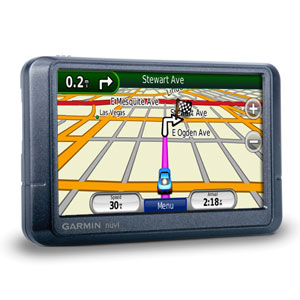
The Garmin nüvi 255W is one of Garmin’s entry level navigators and, as part of the nuvi 2×5 series, it’s loaded with features previously unavailable in the nuvi line or found only in high-end models. More about that in a moment; first the basics.

The 255W sports a 4.3″ wide touch screen (hence the “W”) and includes pre-loaded maps of the U.S. and Canada. It also has text-to-speech, so you’ll hear “drive one-half mile, then turn left on Oak Street.” instead of just “drive one-half mile, then turn left.”

Compare prices on the Garmin nuvi 255W

Dropping down to the nuvi 255, you’ll get the same features on a smaller, 3.5″ screen. The nuvi 205W is identical to the 255W, except that you lose text-to-speech and maps of Alaska.


I’ve been very impressed with the nuvi 2×5 series. The 255W is the nicest model in the series, which I dubbed the best entry-level GPS on the market in my hands-on review of the nuvi 205W. The next portion of this review is adapted from there.

Advanced features found on the Garmin nuvi 255W

None of the features below are found on this unit’s predecessor, the Garmin nuvi 250W.

Redesigned map screen

New to the map screen are the direction of and distance to next turn indicator in the upper left corner of the screen, which when pressed brings up a detailed turn preview as the unit speaks the next turn instructions. Moving this to the upper left freed up the bottom left data field which now shows your current speed. You can see all this in the screen shot below.
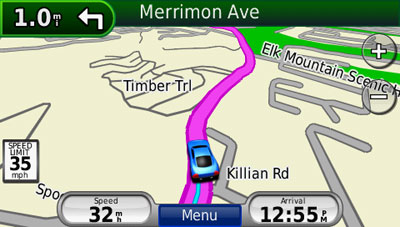
Nuvi_205w_map_screen

Speed limit

Speed limit icons display the speed limit for many roads, as shown above. I really like the proximity of this to the current speed display.

Trip log display

Trip log, or as I prefer to call it ;-) , tracklog display, can show where you’ve been and can be downloaded to your computer (tracklogs can be cleared and the feature disabled for those of you with something to hide!). The tracklog is the thin blue line trailing behind the car / current position icon, in the screen shot above.

Recent cities and streets

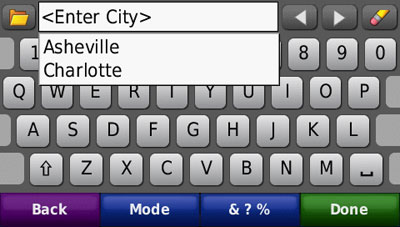
This feature was first seen on the nuvi 700 series. Tap the folder icon, as shown below, and a list of recent entries comes up.
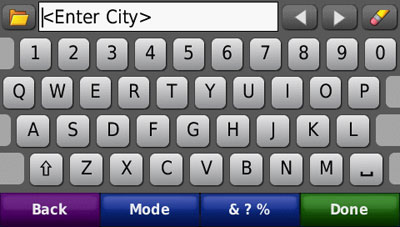
Nuvi_205w_recent_entries

Nuvi_205w_recent_cities

Where am I?

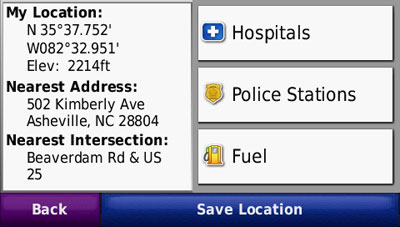
This emergency location feature provides your exact latitude and longitude coordinates, the nearest address and intersection, and the closest hospitals, police stations and fuel stations.
Nuvi_205w_where_am_i

Photo navigation

Though it’s not a feature that I find useful, you can download Google™ Panoramio™ pictures via Garmin Connect™ Photos and navigate to them.

Terrain modeling

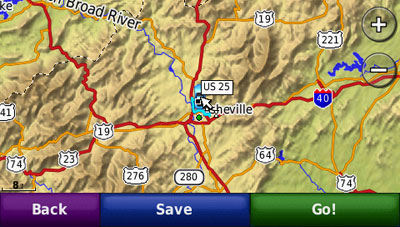
The nuvi 2×5 series includes a built-in digital elevation model, allowing you to visualize the surrounding terrain, as shown below. Unfortunately, this only works in 2–D mode when zoomed out to at least 8 miles. The result is a nice piece of eye-candy, as shown below, but one that you are unlikely to really use.
Nuvi_205w_terrain

MSN Direct or FM/TMC traffic option

You can buy an MSN Direct or FM/TMC traffic receiver as an add-on. This is often a better deal than buying a unit with MSN or FM/TMC, since the add-ons come with a full year subscription, rather than the 3 month trial included with a high-end nuvi. Physically, you end up with the same receiver.

Garmin nuvi 255W pros

  • High-end features (see above) at an entry-level price
  • Fast startup and satellite lock
  • The speaker is quite loud; I had no trouble hearing it under any circumstances
  • The ability to delete individual Favorites using the “My Data” feature
  • In addition to the above, you get a quality product and intuitive interface, as we’ve come to expect from Garmin

Garmin nuvi 255W cons

  • The power cord is not integrated into the mount, so you have to attach the power cord each time you mount the device

Recommendation

The Garmin nuvi 255W is a joy to use. I recommend it, or any other member of the nuvi 2×5 series, without hesitation. Garmin has set a new standard with this product line; the nuvi 2×5 series is the best entry level GPS on the market.


More Garmin nuvi 255W reviews

I’ll be posting more hands on GPS reviews as they appear, but in the meantime, here are some…


Other Garmin nuvi 255W resources


Compare prices on the Garmin nuvi 255W at these merchants:


StoreRatingBest PricesShopzilla Tracking
store-logomerchant-rating
In stock at Sonic Electronix
$154.99
store-logomerchant-rating
In stock at Sears.com
$191.99
store-logomerchant-rating
In stock at Sears.com
$119.99
store-logomerchant-rating
In stock at Kmart
$119.99
store-logomerchant-rating
In stock at Dell.com
$149.99
store-logomerchant-rating
In stock at Sears.com
$179.99
powered by

Comments

126 Responses to “Garmin nuvi 255W review”
  1. mile wilder says:

    I’ve been considering the Garmin Nuvi 250 – anyone know if this is any good for the UK?

  2. Rich Owings says:

    If you want one for both sides of the pond, go with a nuvi x70 or x75.

  3. Andrew says:

    The comment is made in the review that the tracklog can be downloaded to a PC. I have just bough a 255W on this basis but I can’t find out how to do this. There is nothing that looks like a track file (no GPX, csv, xml, etc.) when the unit is viewed as a mass storage device.
    Please help.

  4. Andrew says:

    Aha! Just worked it out.
    The current.gpx file holds the track log and can be converted using GPSbabel.
    Thanks.

  5. Rich Owings says:

    There should be a GPX folder in the “Garmin” directory, with a current .gpx file in it. Or if you have a copy of Garmin MapSource you should be able to import it.

  6. Rich Owings says:

    Hey, you beat me to it!

  7. John says:

    I just bought the 255W and really like it. I travel to Mexico and would like to purchase the map software for the unit. I believe you can download the maps or buy the SD card. Besides the obvious of having the card, is there any other benefit?
    Thanks in advance for your responses.

  8. Rich Owings says:

    The card can be used in any compatible Garmin unit, letting you move it from one device to another, or take it with you should you get a new Garmin unit.
    The download would probably be locked to one unit, as is the CD. You can use the CD for trip planning on your computer too, and you may be able to get a discounted upgrade with the CD, should you choose to do so in the future.
    There are other Mexican maps options too…
    http://gpstracklog.com/2007/12/international-m.html
    (scroll down to the Mexico maps section)

  9. Scott says:

    I’m looking for a nice GPS for my girlfriend for x-mas. Nothing too fancy as she really wouldn’t utilize all the bells & whistles. I was thinking that the 255W would be nice because of the text-to-speak feature, but Costco also has the 750 for $199.
    What would you recommend?
    thanks

  10. Rich Owings says:

    If she’s got a lead foot, I’d go for the 255W, which shows current speed on the screen. It also shows the direction of the next turn in the upper left corner. It shows the next turn direction on the 750 too, but only on the map. Unless one of those features is real important, I’d go for the 750.

  11. Scott says:

    Thanks for the info. Would you recommend any other model(s) priced around $200-$250 (or less) that would be a better option for her? or would these 2 be the best bang for my buck?

  12. Rich Owings says:

    I think the 255W is the best thing going without bells and whistles. Amazon has the nuvi 265WT, which has live traffic for major cities, for $234 right now. Could be worth considering, although traffic reports can often be wrong. If it were me, I’d go with one of those two.

  13. Scott says:

    Thanks again. So you like both these 200 series over the 750 then, right? And if the traffic is something she might want to go with the 265WT, correct?

  14. Rich Owings says:

    Yes, I like the 2×5 series models more than the 750. I can’t say whether she’d like the traffic feature or not, but it can be helpful. Here’s the coverage info…
    http://www.navteq.com/rdstraffic/

  15. Chuck says:

    I have the Nuvi 360, does the 255W also have the button for nearby restaurants? This is a nice feature when traveling.

  16. Rich Owings says:

    Yes, all nuvis have this.

  17. GPT says:

    Here is an easy way to get the tracklog out of the 255W:
    As mentioned, copy the current.gpx in the GPS folder to your PC. Open it in the free program G7toWin. This file has your tracklog and favorite waypoints. When you open the file you will see the favorites listed. Strip them out by: File>Clear>Waypoints. Then click Track>List and you will see a spreadsheet with all the track points. You will see the segments which are at every time the unit goes on and off.
    Save as a GPX file and you can view your track in Google Earth. Run this file through GPSVisualizer online, and you can create a KML file for G.E. with the track colorized for elevation (the tracklog records altitude.)
    If you took photos on your trip, combine them with your tracklog file in a program such as GPicSync and you can geotag your photos in bulk. (Note: the tracklog file records time in UTC.) You can now create a G.E. KMZ file which will have your track and photo thumbnails at location taken. Click on the thumbnails for larger photo.
    And we haven’t gotten into the things you can do with photos in the unit…

  18. Rich Owings says:

    Ah, another GPS addict! ;-)

  19. kathy says:

    hi~ i want to buy a gps – mostly for local travel in NE US. i have been unable to find a comparison btw Nuvi 255W and 265W. can anyone point out the major differences? there was some mention of ads popping up on the 265w – anyone have experience of how and when these pop up? and how distracting they are?
    Thanks so much!

  20. Rich Owings says:

    The 265WT adds Bluetooth and lifetime traffic. The ads aren’t too bad. You can read about them in this review…
    http://gpstracklog.com/2008/10/garmin-nuvi-265.html

  21. Kurt Beck says:

    I am looking at purchasing a GPS and trying to understand the differences between Garmin 750 and the Garmin 255W. Can anyone provide some insight?

  22. Jim says:

    I’ve had a nuvi 360 for over a year now and love it. i was thinking about the 255w. does the 255w show the satellite screen with the altitude ? (i can access this on the 360 via the main screen by touching the signal strength)
    thanks… I enjoy your reviews an find them very helpful

  23. Rich Owings says:

    Yes, it does. Glad you like the site!

  24. Jimi says:

    I have a nuvi 255 Please could so tell me if i can upgrade to have TMC traffic updates and if so how do I do this.
    Many Thanks in advance

  25. Rich Owings says:

    Yes, just buy the proper traffic receiver (it will replace your existing power cord) from Garmin or a third-party vendor. It can use NAVTEQ lifetime traffic, MSN Direct and probably TMC. Be sure to check coverage maps if there is any question about that service being offered in your area.

  26. hsb says:

    How decent does the computer generated street name voice sound? I am in between a 205W and 255W for this reason. I don’t want to be annoyed if the names get constantly butchered. Also, can you switch to different types of voices or accents? Please let me know. Thanks.

  27. Rich Owings says:

    I think the Garmin units are pretty good at it, but they too can mangle them occasionally. And yes, you can change voices and choose something like a British voice, for example. I do think text to speech is a nice feature worth paying extra for BTW.

  28. Dave says:

    Hi, I am a realtor and frequently type in a route of 5-10 homes to see on Google maps. I then move the addresses around to create the best, most logical route. I carry the print outs with me. Obviously I need to get a GPS. Do you know of a unit that allows me to plan out a route on my desktop/laptop and then download it to the GPS??? Or, do i need to plan on google and manually enter the addresses into the unit? Thank you!

  29. Rich Owings says:

    I’d suggest a nuvi that does multi-destination routing. You can see which ones have this feature on this chart… http://gpstracklog.typepad.com/gps_comparisons/garmin-nuvi-comparsion-chart.html . This feature includes the ability to “optimize” your route to, as you say, “create the best, most logical route.”

    You can plan them on your PC, but the best way to do it would mean buying a disc copy of Garmin City Navigator to go with the nuvi. You *may* be able to talk Garmin support out of a copy for shipping & handling after you buy a nuvi.

  30. Amanda says:

    I am buying my first gps, I want the text to speech feature, so I was looking at the 255w and the 205w is that the only difference. According to Best Buys web site the 205w is waas enabled but they say the 255w is not. I emaild Garmin and they said none of the 200 nuvis have waas. Do you know which is right.I would like to have the waas.
    Thanks!

    • Rich Owings says:

      No, the 2×5 series is not WAAS-enabled. WAAS is of little use in an auto GPS, but it will drain your battery much faster.

  31. Al says:

    I am looking to buy my first gps. I have heard from several best buy reviews that the garmin 255w has horrible robotic sound, but no one mentions that the 255 has any sound problems at all. Has anyone heard of this being true? I thought it was the same model, but the 255w was just widescreen? Also, is the 260w any better quality than the 255? Thanks!

    • Rich Owings says:

      The 255 has the same voice engine as the 255W. I have to wonder if these comments are from people who have never used a GPS before. I didn’t notice anything like this when I tested the 2×5 series, but then I’m used to GPS units. These are computerized voices and they are not perfect. You can get more natural sounding voices by choosing a model without text-to-speech, but it won’t call out the name of the street you need to turn on; it will just give the distance to it (the name appears on the screen regardless).

  32. Rich Owings says:

    Sorry. Didn’t answer that part. No, I think the 255W is better, but mainly due to more features. I don’t think there is much quality difference otherwise.

  33. Alex says:

    NIGHTMARE!!!
    bought this device 2 months ago, used it on short distance trips, and it worked OK.
    I am in Michigan at a conference, punched my home destination – London Ontario, which is 500 kms away, and the GPS sends me around great lakes to Montreal and then back , with a total distance 2100+ kms!
    no matter what setting changes i made – it is still the result, even when i chose the “shortest” navigation.
    calling for tech support – 30 min waiting time, that’s with $1.60 per minute roaming charges.
    Garmin should provide a better service, and decent updates for maps.

  34. Rich Owings says:

    Interesting. I wonder if it’s a NAVTEQ issue. You might try recreating the route on MapQuest or MSN/Bing and seeing if you get the same results.

  35. r j evans says:

    whats wrong with my garmin 255 lady?? she is speaking slower and has got everything out of place. bad directions, wrong roads, dosnt know left from right, even the trip home would have sent me to bumbooger egypt, had i not known better. also didnt want to speak at all at beginning of trip, any suggestions?? rolfjoel in sw ga.

  36. Rich Owings says:

    Try running Garmin WebUpdater to get new firmware… http://www8.garmin.com/products/webupdater/howtoinstall.jsp

    If that doesn’t help, backup all your favorites and do a hard reset. Copied from Garmin support…

    Note: A master reset will erase all waypoints or favorites and will restore your unit to the default factory settings.

    Start with the unit OFF and unplugged from power
    Touch and hold the lower right corner of the screen with an index finger or the eraser end of a pencil
    Continue touching and holding the lower right hand corner of the screen then power the unit ON
    Release the power button when the device powers ON
    You will see a new message: Do you really want to erase all user data?
    Remove your finger from the touchscreen when this message displays
    Touch Yes
    The device will automatically reset. Please follow the on screen prompts on the nüvi and when completed place your device in an area with a clear view of the sky until it acquires satellites.

  37. r j evans says:

    thanks for reset info on Nuvi 255. rolfjoel

  38. Mike says:

    Great reviews and advice. I’m buying. There was a story in the Sacramento paper today about how NC affiliates were being cut off by Amazon. What sites still provide an incentive to affiliates like you? I would prefer to reward good work.

    Thanks, Mike

  39. Rich Owings says:

    Thanks Mike. Any links other than Amazon still work for me (at least for now!).

  40. Renee says:

    I’m contemplating the 255W vs the 760. Both are currently under $200 on Amazon. Never used GPS before but am heading west on a road trip. Which do you recommend? Looks like you prefer the 255W over the 750, but want opinion on the 760. I really like the idea of the “where’s my car?” feature on the 760.

  41. Rich Owings says:

    The biggest reason to go with the 255W would be if you want your current speed displayed on the map screen. If you don’t have a lead foot, the 760 may be a great choice.

  42. Heather says:

    Amazon has the Nuvi 255 for $157 right now and Sam’s Club has the 260 for $128.68. Is the 255 worth the extra $30? Are there any main feature differences? This is my first GPS system and I want to make sure I get one that I can easily work and understand, but I want a good deal too. Thanks in advance!

  43. Rich Owings says:

    Yes, I think it is worth the difference. The major ones are shown above under “Advanced features found on the Garmin nuvi 255W.”

    The speed limit and display of your current speed is great if you have a lead foot. Trip log display can be useful. The recent cities and streets feature is a big time saver. Those are the biggies.

  44. Terry says:

    I purchased my first GPS May 31 from Amazon. It is a 255w. Very easy to operate and understand. It gives great directions and is easy to understand. I used it a couple of times and was completely satisfied. One July 5 I turned it on and the screen was frozen. I called Garmin and they had me download new updates for the unit. It did not work. I tried the reset tool that did not work. I contacted Amazon. My 30 day return ended on July 3. They agreed to replace the unit and sent me a pre-paid UPS shipping label to return the defective unit. My new unit should be here tomorrow. I read many reviews prior to purchasing the unit and this problem did not appear anywhere..Anyone else had a problem of this nature with the 255W..I am “directionally challenged” and the GPS is great for me

  45. SAH says:

    Now that the Garmin Nuvi 1300 is out, do your recommend it over the 255w!

    Thanks for all the help!

  46. Joe Stroup says:

    I deliver rural paper routes and have looked at getting a Garmin 255W GPS unit. Will I be able to setup approx 100 different points using the Favorites feature? Does this have removable memory so thaat different routes could be created?

  47. Rich Owings says:

    @SAH – Only if it is cheaper (or the same price) or if you are going to use it in the city for mass transit / pedestrian use with CityXplorer maps. I just don’t see the value otherwise.

    @Joe Stroup – You can save 100 different points, but not a route. You might want to look at a 700 or 7×5 series unit, which does allow that. You can have 10 routes of up to 50 waypoints each, so you would need to use two to cover 100 stops. And the unit will optimize the order of the stops. I’m not sure how well it would work in actuality if stops are close together though (a few houses apart).

    • Ken Johnson says:

      I want a GPS for my Aug trip to England and France. Upon return I will use it in the US. One option is the 255w + Euro map ($139?). I see some units with NA and Euro maps but they seem more….suggestions. I have been using an iPaq 310 but I can’t see how to get a Euro map.

  48. Rich Owings says:

    If you’re willing to get a slightly older and non wide-screen model, the nuvi 270 is only $145 at Amazon. Slightly newer, the 275T is $214.

  49. John says:

    I will be traveling in Italy in September and will be doing a lot of local driving as we are renting an apartment for a couple of weeks. Does the Nuvi 255W accept Italian maps? If so, where would I order these?

    Thanks for any help.

    John

  50. Rich Owings says:

    Yes, you can get them here… https://buy.garmin.com/shop/buymaps.do

    Have fun!

  51. billy says:

    does the 260w have recent streets feature on it?

  52. Rich Owings says:

    No. But the nuvi 255W does, and has the same core features as the 260W, plus a few more.

  53. Devorjak says:

    I was looking at getting a 255W or a 265WT and I was wondering, is it worth getting the FM Traffic? Maybe you could tell me how the FM Traffic works too. I am on the east coast Maryland/Virginia area. I am wondering if it is really that nice or just an FYI kind of thing. Thanks your site has been very helpful

  54. Rich Owings says:

    IMHO, GPS traffic just isn’t ready for prime-time yet. It will work great lots of times, but you can also expect plenty of false negatives and false positives.

  55. Abruzz says:

    I just got the 255W and have a friend with the 200W. How come we get different routes when entering the same destination? We stood next to each other, verified that all settings (Naviagation preferences for fastest route, etc.) were all identical, but got different suggested routes. On my 255W it chose to take me on local roads, on the 200W it chose to take the highway. The 255W route is shorter by mileage but has lots of signal lights, lower speed limit. The 200W route, while a longer distance is a more preferable route. Again, we verified that all the settings were the same on both units (though the 255W has some features not present on the 200W)…why the different routes…I like the 200W route better and can’t get my 255W to default to that route? Thanks!

  56. Rich Owings says:

    I’m not sure what could be going on. But your nuvi learns from your driving habits (how fast you drive) and takes that into account when estimating travel times. I wonder if their algorithm is sophisticated enough to use that info when making routing decisions as well.

  57. Kenneth Robinson says:

    I think it would be great to have the voices of Beavis & Butthead for directions. Is that feature available on any of the Garmin units?

  58. Rich Owings says:

    Not that I know of, but you might suggest it to these guys…
    http://pigtones.com/home/

  59. Judy Sandler says:

    where can I get a complete guide for use of my Nuvi155wt???? P

  60. Mike says:

    I have a Garmin 255w just received Aug. 29 09. So far I love it. I have read a lot of reviews on this 255w some good some bad. On some of the reviews I’ve read noticed that when it comes to download the map update. Lot of them say they would download and loose everything in the unit. Would call Garmin and try to fix or send back. I think the unit is 08 version not sure. Liked to have feed back PLEASE.

  61. Rich Owings says:

    First of all, register it immediately…
    http://gpstracklog.com/2008/06/upgrade-your-ma.html

    If the problem is losing favorites, you can back these up with MapSource…

    http://www.gpsfiledepot.com/tutorials/how-to-install-mapsource-if-it-didnt-come-with-your-gps/

    If the device doesn’t have enough room for the maps, that’s another issue entirely, but I haven’t heard of this problem before on nuvis. I’d talk to Garmin support if you have concerns. Response is much better by phone than email BTW.

  62. ZDF says:

    I would give 0 stars to this product.
    1. I have bought this product from a Romanian shop, in Bucharest, called MediaGalaxy. I have paid ~300 USD (900 lei) for a “full Europe” product. Yes, 300, and this was the lowest price I managed to found.
    2. The thing that infuriates me most is the [Tools | Settings | Map | Map Info] command. It says: [1] Ro.A.D.2009 BETA. I am a software-developer. I have never had the nerve to sell a BETA version to our clients.
    3. I bought this product in the eve of a trip to Thasos, Greece. I took the decision based on Amazon’s review. Bad idea. The first thing I did, before leaving Bucharest, was to look for updates. There were none.
    4. I encountered the first problem in Bulgaria. For some reason the device froze to “99%” every time it tried to compute the route to Thasos Town, Thasos, Greece. The only way to get out of this was to ask for many shorter routes. Yes, I have reset the device. Several times.
    5. The second problem was the “Drawing…” problem. It frozen again.
    6. The third problem was the refresh problem. Sometimes it forgets to draw when it scrolls. You drag the map to the right and the left side remains white. Other times it paints garbage.
    7. There is one thing to have an incomplete map, and a completely different thing to have an erroneous map. Garmin sold me a faulty Bulgaria map. Instead of taking me to Dimitrovgrad, a fairly large town, it took me to Gorsky-Izvor. Imagine how puzzled I was when Garmin’s map said “Dimitrovgrad” and the road sign said “Gorsky-Izvor”. Garmin wasted my time, my neurons, and my money. But I didn’t know that. I was so dazzled by the previously described problems I didn’t notice that Dimitrovgrad is Gorsky-Izvor. I have notice this problem when I made the same mistake, the second time, on the way back from Thassos. Needless to say there was a much shorter way to Dimitrovgrad.
    8. Once I reached Greece Garmin took the decision to take me to Thassos by mountains, not by highway. Nice scenery, but I was too tired for this, there were no gas stations and my tank was almost dry. I finally found a gas station but it was so questionable I didn’t dare to fill more than two gallons. I finally reached the highway and a gas station. Garmin took again a curious decision and drove us away from highway and then again on the highway.
    9. After 14 hour I have finally reached Thasos, a route a “trained” driver would make it in about 10 hours.
    10. In Thasos I have discovered that we can drive through sea. Clear sky, open space, satellites signal, asphalt road, yet the blue “trail” said we are in the water or off-road.
    11. We have tried to reach a monastery located in the mountains. Garmin drove us on dirt roads in a very chaotic way. So chaotic we had do abort the trip at the advice of two kind German excursionists: “The road is getting worst. You will need a pick-up or a jeep.” The next day we have discovered there is an asphalt road to that monastery. We were guided by villagers.
    12. The way back from Thassos took us 10:30 hours of effective driving. The hotel owner explained us which roads and towns to follow: “Forget about Garmin”. Yet I still wanted so much to see it work… so I drove again to “Dimitrovgrad” and realize I am stupid.
    13. “3D Terrain Maps” Don’t be fooled by this. You won’t get anything near to GoogleEarth. It works only for small zooms (-) and it does not offer any additional information. It is just a “we have it, too”.
    14. The next year I would like to go to Croatia. Therefore I have entered Porec as destination. Garmin is set to “Shorter distance”, yet it tells me that from Bucharest I should drive 250 km east to Constanta , then back to Bucharest and then, finally to Croatia.
    15. There are more bugs, which I consider “minor”, like:
    a. The Romanian translation. The most obvious is the translation of “spell” which is translated as “rostiti” (“say” )
    b. The odd spelling of towns.
    c. The language spelling mixing.
    d. The lack of zoom cache.
    e. No blending.
    f. The car icon is not scaled.
    g. The width of roads.
    h. In pedestrian or bike mode the icon is still a car.
    i. The speed warning repeatedly pops-up even if you are managing your settings.
    j. The interface.
    k. The map accuracy touch requires a stylus, yet you do not receive one.
    l. Non null speed when standing still.
    m. Etc., etc., etc.
    I would like to return this device. Unfortunately there is a 24 hours return policy. I received a free map of Bulgaria from a gas station, a simple road map, which was more accurate and had more detail than Garmin.

  63. Rich Owings says:

    Sounds frustrating. What you bought had a third-party map. Garmin also offers City Navigator, but it only has partial Romanian coverage.

    • ZDF says:

      It also says “CN Europe NT 2010.10″, so only the map of Romania is made by a third-party. Anyway this is not important since it is approved by Garmin and the device is carrying the Garmin logo.

      I have posted three, unedited, videos on Youtube with some of the above bugs. Search for user TheFailureByDesign.

      • gatorguy says:

        I can nearly guarantee that the Romanian map you posted details of is a pirated map based on a pre-release version supplied to beta-testers and then pirated. That specific beta-version map is available from several pirated-software sites and was never a Garmin release to the public. It is NOT an official Garmin-sancitioned product. Blaming Garmin for “someone” loading a pirated product to a nuvi 255 is obviously unfair. No surprise that the map still had some issues. It says Beta for a reason. Maybe that’s why the 255 you bought was the cheapest you could find. The Romanian map was free.

        • ZDF says:

          Before posting the first post I have checked again for updates and I wrote to Garmin about all above issues. I did not receive any answer, yet. I doubt the shop is dealing with pirated merchandise. The price difference was not that big to make it questionable. A pirated map does not explain all the problems.

        • ZDF says:

          One more thing: the first two clips were shot in Thasos, Greece.

          And yes, I blame Garmin for this map, too. Pirated or not. I have used the Garmin “comunicator” to check for updates. I have provided the serial number of the device. Garmin should have warned me if the map was not approved.

          How about the mess in Bulgaria’s map? Or the wise decision to take me to the mountins of Greece instead of highway?

          I am sorry but they have no excuse. It is one thing to have major bugs in a game, and another thing to have major bugs in a device like this.

  64. gatorguy says:

    GArmin won’t offer an updated Romanian map for your device. Almost certainly it didn’t originally ship from Garmin with the map, and in any case Garmin’s map updater will not recognize it as being valid. . . it’s a beta version. I won’t dispute that the 255 gave you routing you didn’t agree with. Every user of every pnd has had the same complaint or concern at some point. Sometimes the offered route has in fact turned out to be the best route. Ohter times a faster route is available, but the device didn’t find it. Not every available road is sampled during route creation. Now add the additional limitation that not all the roads in Bulgaria and Greece have been mapped yet by Navteq. Yes, Navteq creates the maps, not Garmin. IIRC, Greece is approx. 80% coverage and I think Bulgaria is only major roads and city connectors, but could be mistaken. But the primary job is to get you where you want to go, and hopefully, but not guaranteed, the fastest available route. An incomplete road network makes the fastest route computation uncertain. But in nearly every case, it will get you there.

    • ZDF says:

      I did not receive any answer from Garmin.

      Meanwhile I have solved the BETA mystery. The manager of the company (rqa dot ro) who built the map (also the representative of Garmin in Romania, and the one who uploaded the BETA version, I assume) offered a refund but I have insisted for an update. He invited me to headquarters (?) to upload the “right” version. I have demanded to download it via internet, which he reluctantly (?) agreed. After few final thoughts I have decided to return the device and wrote him about this. I hope I can get my money back and get a wiser decision.

      I have unchecked the RO.A.D map, from Map Info (strange place for options). This way the route to Croatia seems to be correctly computed.

      Does anybody know if the maps updates are for free? It seems unfair to buy a faulty map and pay to get a right one (see Dimitrovgrad above). Are there any GPS companies that do this for free?

  65. gatorguy says:

    Garmin guarantees that the maps that ship on your device originally (from Garmin) are the latest release(s). If a newer map becomes becomes available within 60 days of purchase/first use, then Garmin will give you the updated map at no charge. That is the most liberal LMG (latest map guarantee) that I’m aware of. Most companies do not offer an LMG at all, while Garmin’s main competitor offers a 30 day LMG. Garmin also offers a Lifetime Maps subscription. For one flat fee they will give you every map update, generally 4 times a year, for a specific map as long as you own your workable nuvi. As an example, for the North American map you can buy a lifetime subscription for as little as $85 from someone like Amazon, or directly from Garmin for $99. Or if you buy a nuvi with NA and European maps, it’s about $150 to subscribe to the combo.

    There is no manufacturer AFAIK that offers truly free map updates to your existing map beyond either a 30 day or 60 day period.

  66. Rich Owings says:

    I’ll second the thanks gatorguy. I see you quite a bit on other forums and its nice to see you here too.

    • gatorguy says:

      Your name comes up once in awhile Rich, talking with Tim at GPSR. Between handling mod duties at three different forums and putting at least SOME time into my paying job, I just don’t have the time to check in here as often as I like. But I do use you as a research source several times a month. You’ve got a great site here, often with more details than some of the other gps forums can offer. Keep up the work buddy. I’ll see if I can visit a little more often.

  67. Rich Owings says:

    Hey, those are real compliments coming from someone as knowledgeable as you! I understand the time constraints; there’s so much more I’d like to do with the site.

  68. gatorguy says:

    I appreciate the comments and the fact you didn’t call me out on two errors in my posts. LOL!

    First, Garmin’s nuMaps subscription for North America is $119 direct from Garmin and not $99. Secondly, the Romanian map cited above is not available for purchase directly from Garmin. It’s simply a Garmin-compatible map with no official Garmin support. So in the end it was a beta version of a 3rd party map, nothing Garmin has any responsibility for. So the basic post was correct, but one of my details was not.

    That’s what happens when I get in a hurry. Thanks Rich!

    • ZDF says:

      I have received my money back. I came to the conclusion that I could live with most of the problems (except for “Dimitrovgrad”). I guess Garmin should chose more careful the representatives.

      1. All shops I have checked sell Garmin products with RO.A.D. and advertise them as “Full Europe plus Romania”, inducing the idea that ROAD is a “must” and without it there is no Romania map. Furthermore ROAD is checked by default in “Map Info”.

      2. When I returned the device I have asked for a device without ROAD. “We never had.”

      3. If you go to Garmin Romania, automotive section, you will notice that all products are listed with the product name in grey. The “with/without ROAD included” is in black, bold. Which is, again, designed to induce the idea that you cannot manage it without ROAD? If you select, for instance, “255W, without ROAD” then a new page opens and three options are displayed: with ROAD installed, without ROAD, with ROAD installed and on CD. The most expensive option is selected by default. The product will be delivered in 2-3 WEEKS. They clearly do not wish to sell anything.

      4. Of course I’d rather buy a lifetime subscription than ROAD, but I couldn’t find it on Garmin Romania.

      All this lead me to the conclusion that the only purpose of Garmin Romania is to sell ROAD, so, again: Garmin should chose more careful the representatives.

  69. Michael Schojer says:

    I just got me the nuvi255wt. It is nice, but I bouhgt me the trail/maps and it said it would work with my model. But it does not. Customer service worked on it for 2 days to figure this out. But the trail/map is listed under maps compatable with my model. Does anyone know if it works or not. I mainly liked the idee to have trailheads for hiking in points or interest.

  70. Rich Owings says:

    It should work. Which Topo product did you get? I know there have been some compatibility issues recently with some nuvi models, but I haven’t seen it reported for the 2×5 series.

  71. Spencer Tracy says:

    I recently purchased the Garmin 255w. One feature of the 255w’s is the ability to choose the mode of transportation (example auto, foot, marine).
    There have been times during the busy Xmas season my wife has lost her car in the parking lot of the mall. Does the 255w have a feature or method by which she can put the 255w in her purse and find her car after she finishes shopping?

  72. gatorguy says:

    A quick way is to touch the vehicle icon and “save the current location”. Then you can just navigate back to it. Note that it probably won’t get you right to the car door. Consumer gps devices aren’t that accurate yet. But it should get you within 50 feet or so once you’ve exited the mall. Don’t expect that you’ll get enough signal reception inside to get you to the right exit tho.

  73. Rachel says:

    Hi Rich,

    Thanks for the review & comparison chart, it’s been very helpful! I just have two questions for you…

    I am looking to buy a GPS for my dad – he’s never used one before ever, so I need it to be a nice starter system but with good features. I think I’ve narrowed it down to the 255W. Good choice for someone new to the whole GPS thing?

    Also, you listed 1 “con” for the 255W is that “the power cord is not integrated into the mount, so you have to attach the power cord each time you mount the device.” Can you explain this a little more? What power cord are you talking about? I thought they run on battery and then you just recharge them?

    Thanks!

  74. Rachel says:

    One more…just read a review that said that the 255 didn’t work in someone’s 2009 Toyota Highlander because of the type of coated glass that Toyota uses. Does this apply just to the 2009 or all models?

  75. Rich Owings says:

    Rachel,

    I’m not sure about the Toyota issue. It’s a rare problem, but it does occur. If you can get a GPS to test in the vehicle, if one works, they all should.

    I think the 255W is an excellent choice.

    These units all come with power cords that attach to the cigarette lighter. With a powered mount, you only need to clip the unit into the mount. With a non-powered mount, you need to plug the other end (mini-USB) into the device AND clip the device into the mount.

  76. Brenda says:

    Hi Rich,

    I adopted my daughter’s old, old Garmin and used it until it died. I’m excited about the features on the 255W, however I have a few questions about it that will help me with my decision.

    * Am I able to choose (or design) my route on the 255W? On my old model it took me one route going from point A to point B, but another way from point B to point A. I would like to see the options and then save that route.

    * Is there a way to easily see the entire trip on the map so I can anticipate what is ahead? My last model was able to pull out but it was almost impossible to obtain any details from the map.

    * Is the screen/map manipulated via directional arrows or can it be manipulated by touching & dragging?

    Thanks in advance for your assistance!

  77. Rich Owings says:

    *The B to A difference is due to more or less left turns, where you encounter divided roads, etc. You can only choose one via point with the nuvi 255W. If you want more or if you want to save a route, you’ll need a unit that does multi-destination routing, found on some of the more advanced nuvis. This chart will show which ones… http://gpstracklog.typepad.com/gps_comparisons/garmin-nuvi-comparsion-chart.html

    *You should be able to see the entire trip (and zoom and pan) by touching the next turn information bar on the map screen.

    *Yes, you can touch and drag.

  78. KT says:

    I cannot decide between the 255w and the 1300. Any suggestions? I have found the 1300 cheaper than the 255w, but not by much.

  79. Rich Owings says:

    If it’s cheaper, go with the 1300. They are very similar units.

  80. Brenda says:

    I purchased the 255W and found it to be good but it has a lot of vibration and buzzing (I think) related to the volume. I reduced the volume to 70 or 80% and it still has the same issues, just to a lesser extent. I thought it might be the unit and exchanged it and the replacement is doing the same thing. I tried it in different cars, using different voices and there is no change. The only time it does not perform like this is when I hold the entire unit in my hands and my hands seem to absorb the vibration. Have you or anyone else heard about this issue?

  81. Rich Owings says:

    No. You might want to try updating the firmware if a newer release is available.

  82. janis says:

    I cant register my nuvi 255w, it will not find the device. after I enter the serial number it looks but can not get past the “Connect your device to your computer and click Find Devices to continue ” I tried several usb wires and get same result. the dashboad gets same result. what am i missing?

  83. Rich Owings says:

    Try downloading the Garmin Communicator plugin…
    http://www8.garmin.com/products/communicator/

  84. jerry says:

    Wonder if you can transfer life time upgrade maps to another device?
    I mean if I decide to buy a Garmin nuvi 1690 , would this work?

  85. Rich Owings says:

    Nope. They are locked to a single unit.

  86. Ralph says:

    Where am I?

    This emergency location feature provides your exact latitude and longitude coordinates, the nearest address and intersection, and the closest hospitals, police stations and fuel stations.

    I love the where am i feature. When it is used, one has the option to save the location, My question is, how do you access the saved location for future use ??

    Thanks

  87. Rich Owings says:

    I believe it is saved under Favorites. if not, try Recently Found.

    • Ralph says:

      Rich,Thanks you so much. I found it under recently found. I guess i was trying to make it to complicated.

      This is a great site, tanks again

  88. stephanie says:

    Love my GARMIN NUVI 255W except it only take me on back roads. I have tried everything I can think of to change this. What settings do I need to use so that it will take me on the highway?

    • Rich Owings says:

      Check Tools > Settings > Navigation > Avoidances and make sure you don’t have Highways checked.

      • stephanie says:

        I have nothing checked under avoidances, in fact that area is now disabled because nothing is checked. I’m going to try “fastest” route and see if that helps.

        • gatorguy says:

          Ussing “Shortest” is probably the most common cause. I just did the same thing this morning with an unfamiliar nuvi. I was checking last year’s map againt the most recent version. I set the same destination on each , but noticed the 255 was taking some local/back roads for the route that my 760 didn’t. The 255’s owner had changed to “Shortest”, while my 760 was “Fastest”. I asked him why and he said he thought that “Shortest” meant the shortest time to his destination.

  89. Rich Owings says:

    If that doesn’t work, here’s what I would try (in this order):
    1. Check to see if you have the latest Garmin firmware installed. If not, install it.
    2. Do a hard reset. You’ll need to backup your favorites first. Go to http://www.garmin.com/garmin/cms/site/us/support/searchsupport and search for “favorites” and “reset” for instructions.
    3. Call (don’t email) Garmin support.

  90. stephanie says:

    Thanks Rich and gatorguy, I’m heading out on a trip right now and will see if the change to fastest route works. If not, I’ll contact Garmin.

  91. Sandy says:

    I found a 1300 for $150.00 before I found your site. I’ve never had a GPS so I really didn’t know what I was looking for. Would I be better off with the 255 W??

  92. Sandy says:

    Where would I find a powered mount and how much would I expect to pay for it?

  93. Rich Owings says:

    Re: the 255W vs the 1300, go with whichever is cheaper unless you want the 1300’s ability to use CityXplorer mass transit maps…
    http://gpstracklog.com/2009/06/garmin-cityxplorer-review.html

    The only nuvis that can use a powered mount come with it. They are the 7×5 and 8×5 series and the 1690.

  94. John Goto says:

    No more trying to decide which GPS device to buy. The young’uns gave me the Garmin nuvi 255WT for Christmas. (I think they may have gotten tired of hearing me talk about GPS and they might think that the ol’ man may need nav help down the line).

    OK, the suffix “W” indicates Garmin’s wide screen units. Right?

    Does the suffix “T” indicate free lifetime traffic info included (like the 265WT)?
    The words “nuvi 255WT” are prominently displayed in large letters on four sides of the package carton; however; nowhere else can “255WT” be found–either outside or inside the package.

    In fact, once the package is opened, the only “how to use” information is a skimpy “Quick Start Manual” and an, obviously lawyer written “not liable for anything” document in 10 or so languages. It seems that if one ever wants to know how to use something, go to a website. Everything refers to internet access. Reading your comments, one is reffered to maps this, SD memory that, update, etc. Nowhere does anybody or anything tell anyone they must have internet access.
    Note this even applies to registering the GPS unit!

    Obviously, I have internet access, but I have many friends that don’t have access. Too bad they can’t use an updated Garmin GPS device.

    Perhaps I can learn how to use the 255WT. If I run across novice interesting and basic uses of the 255WT I’ll hope to pass them on to this site. Until then, thank you for your efforts.

  95. Rich Owings says:

    Yes on the W and T questions. The best guide is the full online manual. This isn’t an official version. It’s basically the 255W + traffic, or the 265WT minus Bluetooth. I’d recommend checking out the 265WT manual… (PDF) http://www.garmin.com/manuals/2675_OwnersManual.pdf

  96. Ron Byram says:

    I have a older 260W and got my son a 255W for christmas. I discovered the Tracklog feature!

    anyway in the past I would use both my 260W and my 60 CSX to track where Ive been and then import the log into my Delorme TOPO software as I do alot of Off Road travel and hiking.) ANd on trips using both takes up room on the dash.

    Anyway does anyone know how I can import the track log into the Delorme software? using the 60csx its no issue.

  97. Rich Owings says:

    I don’t think you can do that with the 260W. On the 255W, connect it to your computer and copy the current.gpx file in the Garmin folder. You should be able to open that in Topo USA.

  98. Brian says:

    it gives terrible directions. i tried to find a couple unknown places with it and it says i’m arivving at destination when i’m still in the middle of the road with no intersections for half a mile. it tells me to turn left (south) onto a divided highway with no access to the southbound lane. when i went around the block and tried to find a way onto it, it tried to send me down 2 dead end roads. and on the way home (i knew where i was going), it wanted to send me on a route that was 5 miles longer than the main road i usualy take. otherwise it’s easy to use and good display. just bad directions, which may just be the norm for all gps units.

  99. Seema Gokharu says:

    I have a 200W, and have been satisfied with it. I have the option of buying any of these used items:
    - Garmin 255W for $80 (I like the fact it would have a Canadian Map and the TTS)
    - Garmin 260W for $60 (Also has Canada map and TTS)
    - Garmin 1250T for $100 (I don’t like the small screen but I am assuming the traffic feature might somewhat help in the Dallas area. The fact that MSN direct is expiring in 2012, does that affect the Lifetime traffic feature? This GPS would also come with a Canadian map, TTS and cityExplorer (helpful when we are travelling in the city)
    - TOM TOM ONE 125 SE for $55
    I don’t want to spend much but since I am buying and probably giving away my 200W to a friend it makes sense to upgrade. Which one would you reccommend?

  100. Rich Owings says:

    Either the 255W or 1250T. Traffic on the latter is from NAVTEQ and not MSN Direct. The 260W is an older model. There are some good TomTom’s, but this one is too basic. Hope that helps!

  101. James says:

    Is the traffic feature defeatable on the 255wt? Can it be turned off? On a rare occasion, BB currently has the 255wt on sale for $20 less than Amazon. I’m seriously considering this unit, but if the traffic feature turns out to “Not be ready for primetime” as you stated Rich, and gives out too many false indications, I’d like to be able to just switch it off. Thanks for your help and for an incredibly informative website.

  102. Rich Owings says:

    I think you would have to buy a regular power adapter (that’s where the traffic receiver is housed) and use it instead. That’s the only way I know to disable it.

  103. zmarvelous says:

    1-Can anyone tell me what year maps come with the Garmin Nuvi 255W 4.3″ GPS Navigator and/or the Garmin nuvi 1200 3.5″ GPS?

    2-Any opinion on which is better?

  104. Rich Owings says:

    255W – US & Canada
    1200 – US only (49 sates, no Alaska maps)

    Register the unit as soon as you get it and if there are newer maps available, you’ll get a free update.

    I’d go with the 255W for the wide screen and speed limits unless the ability to use CityXplorer mass transit maps is important to you.

  105. curtis says:

    hi i brought the garmin nuvi 255w from a pawn shop and was trying to find instruction on how to use it

Trackbacks

Check out what others are saying about this post...


Speak Your Mind

Tell us what you're thinking...
and oh, if you want a pic to show with your comment, go get a gravatar!
