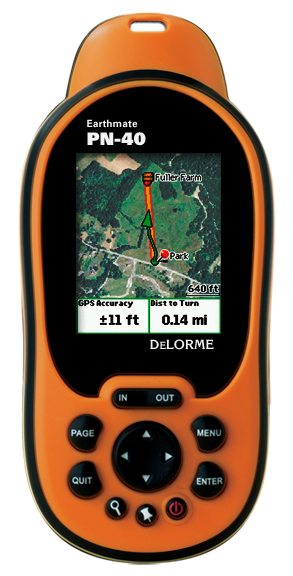
Hands on with the DeLorme Earthmate PN-40
UPDATE: Two newer models have now been introduced, the DeLorme PN-60 and the DeLorme PN-60w.
The DeLorme Earthmate PN-40
- A dual-core processor makes map redraws and menu navigation very fast, correcting the biggest flaw in the PN-20
- Tri-axial electronic compass (meaning there is no need to hold it dead level)
- Barometric altimeter
- SDHC high-capacity SD card support
- A more detailed base map
Quick links
More DeLorme Earthmate PN-40 reviews
DeLorme Earthmate PN-40 resources
How much does it cost?
And hardware isn’t the only improvement. The previous ala carte imagery plan is gone; an annual, all you can eat download $29.95 subscription plan now gets you aerial imagery, USGS topos and NOAA marine charts galore. It’s an incredible deal.
With that overview,lets take a detailed look at the PN-40.
DeLorme PN-40 interface
The interface can seem a bit complex at first, but I found it to be fairly intuitive. Here’s a tip — the Menu button will bring up a different set of options for each screen; you’ll end up using it frequently. For example, to search for geographic POIs, you press Find > Menu > Natural Features.
Like many Garmin handhelds, the PN-40 sports Page and Quit buttons, with the former advancing through pages and the latter doing it in reverse order. I love units that offer this easy way to navigate screens. I typically put the most important screens just ahead or behind the map screen, knowing I can easily access them with this feature.
The placement of the Power button makes it easy to accidentally press, but you have to confirm that you want to shutdown by pressing Enter, so this isn’t really that big of a deal.
Tones to warn of turns default to little chirps; great in the woods as they sound kind of like bird calls, but they’re a poor substitute for spoken directions for auto navigation.
The screen is relatively small compared to other recently released GPS units (see below), but it is much more visible in various daylight conditions than some of the high-resolution units on the market.
DeLorme PN-40 imagery
While the PN-40 comes with DeLorme’s Topo USA 7.0, giving you detailed vector topo maps for the unit, I can’t imagine anyone getting the PN-40 and not ponying up for the $29.95 annual imagery plan. It includes:
- 1:24,000 scale USGS topo maps
- B/W aerial imagery
- Color aerial imagery
- High-resolution color aerial imagery for 133 U.S. cities
- NOAA marine charts
- SAT 10 imagery
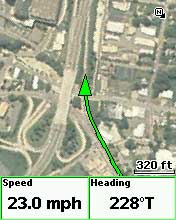
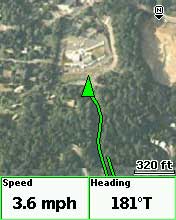
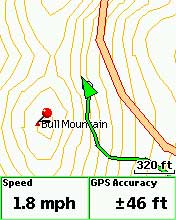
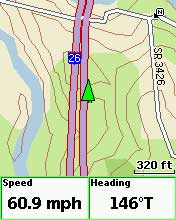
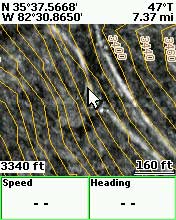
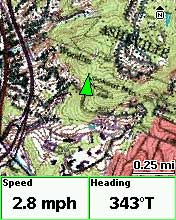
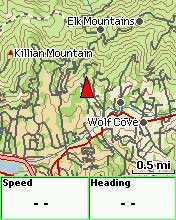
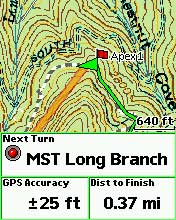
These are downloaded and transferred to the unit via Topo USA. Don’t expect super sharp imagery at every zoom level; this would require additional raster imagery and dramatically increase memory requirements. The PN-40 handles this pretty well though, switching from one type of imagery to another as you zoom in or out. This layering of map data can be customized by the user. Here are some sample screen shots of the different types of imagery…
DeLorme PN-40 on the road
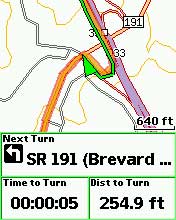
While the PN-40 can be used for highway routing, it’s really not comparable to having a dedicated auto GPS unit. You’ll only get a 2-D view, like the screen to the right. The worse drawback is that there are no spoken directions, just beeps and chirps. The maps are not as complete or current as those found on most auto units either.
EDIT: My testing was more extensive on the trail than on the road. For a more detailed look at the PN-40’s highway routing capabilities, see this comment below.
DeLorme PN-40 on the trail / Using TOPO USA
It’s really wonderful to have access to USGS topos and aerial
photos right on the PN-40. I live back east now, underneath dense
southern Appalachian hardwood canopy, where aerial photos are of
limited value on single-track trails. But the imagery really shines in more open landscapes, urban areas, fire roads, etc. Folks using the PN-40 in such settings may find aerial photos very helpful indeed.
In my experience, the PN-40 did an excellent job of navigating to individual waypoints and trackbacks.
When I prepare for a hike, I typically load a track showing the exact location of the trail. I usually find these to be much more accurate than the trail placement on any maps. If the trail is new to me, I search for tracks online at places like MotionBased.com. One of the great advantages of the PN-40 and Topo USA is the ability to convert such .gpx tracks to routable lines, giving you an accurate “distance to destination” rather than straight line mileage. This is really wonderful — accurate trails on the map, showing accurate distances.
Nevertheless, I found taking advantage of this to be a frustrating experience. Topo USA is very powerful mapping software, but is renowned for its learning curve, partially due to a non-standardized interface. Neither downloading and transferring maps, nor importing tracks and waypoints was that difficult. But I found that converting tracks to routable lines, utilizing them in routes, and getting them to work the way I wanted on the PN-40 to be the most challenging aspect of using the package.
Oh, one quick backcountry tip before I leave this section — to navigate to a point on the map, pan the map and then mark a waypoint there.
Geocaching with the DeLorme PN-40
With the recent public beta 2.5 firmware (you must be logged in to see the download links), the PN-40 now supports paperless geocaching (screen shots below).
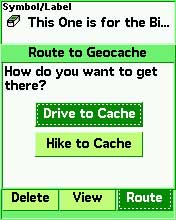
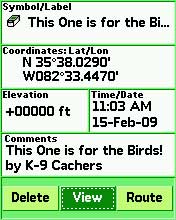

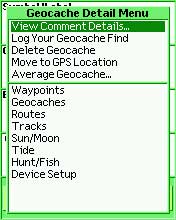
DeLorme has a “Send to GPS” feature on geocaching.com, and pocket queries will be easier to handle once they release their Cache Register widget.
DeLorme PN-40 pros
- Aerial imagery, USGS topo maps
- Reasonable priced all you can download imagery subscription plan
- Detailed hard-copy owners manual included
- Topo USA included in purchase
- Triaxial electronic compass
- Fast redraws
- Paperless geocaching
- Good visibility in various daylight conditions
- Excellent support forum
DeLorme PN-40 cons
- Small screen
- Detailed maps and imagery are limited to the U.S.
- There is no altimeter / elevation screen, and while you can display the maximum and minimum elevation in user-selected data fields, there is no way to see your overall elevation gain; likewise, while you can display the ambient pressure, you cannot view a pressure plot over time
- Unintuitive software (Topo USA)
Conclusions and recommendations
The PN-40 is, hands down, the best GPS on the market with aerial photos and USGS topo maps. It is also one of the best units on the market for geocachers.
I still like the Garmin Oregon’s paperless geocaching interface better than the DeLorme, but urban cachers and others in open landscapes may find aerial imagery more important.
If you go to Groundspeak, geocaching.com’s message board, you can clearly see that DeLorme has captured the hearts and minds of many in the geocaching community.
I am recommending the PN-40 as the best handheld for anyone interested in aerial imagery and USGS topo maps. I’ll also be updating my
geocaching, hiking and biking pages, adding the PN-40 to my list of recommended units. It’s that good.
The powerful but complex Topo USA program must be considered as well, however. As a result, I am reluctant to recommend the PN-40 for first-time GPS owners, people who have difficulty learning new software, or anyone who wants a grab n’ go unit letting them hit the trail with minimal prep time.
One final comment — I’m not sure how big of a market share DeLorme can grab with the PN-40, but for the first time in years, Garmin has some real competition in the handheld GPS market. And that is a good thing because monopolies don’t foster innovation.
More DeLorme PN-40 reviews
- Consumer-authored DeLorme PN-40 reviews
have been posted at Amazon
- GPSReview.net has posted their own DeLorme PN-40 review
- About.com gives a 3.5 out 5 star rating in their PN-40 review
- A personal review of the PN-40
- SingleTracks.com has also posted a DeLorme Earthmate PN-40 review; here is part 2
- A PN-40 review from TripleBlaze.com
- A first impressions review of the DeLorme PN-40
- Waterfall Chasing reviews the PN-40 and DeLorme’s Topo USA 7.0
- A negative PN-40 review on Groundspeak
- DailyHiker.com reviews the PN-40
- A geocacher’s DeLorme Earthmate PN-40 review
- TripleBlaze.com reviews the DeLorme PN-40
- Geocacher reviews of the PN-40
- Rave and Review has posted their own DeLorme PN-40 review
I’ll be posting more hands on GPS reviews as they appear, but in the meantime, here are some…
Other DeLorme PN-40 resources
- A PDF version of the DeLorme PN-40 owners manual
- The DeLorme PN-40 message forums are excellent resources
- The official DeLorme Earthmate PN-40 web page
- A DeLorme PN-40 wiki
- My DeLorme RAM mount review
Compare prices on the DeLorme PN-40 at these merchants:
- Check the current DeLorme Earthmate PN-40
- Get the DeLorme Earthmate PN-40 Handheld GPS with Topo 7.0 & 1GB SD Card
at TigerGPS, where you get free shipping on orders above $250
- Check out the deal on a DeLorme Earthmate PN-40 GPS Bundle
at REI.com, where satisfaction is guaranteed and members get 10% back on eligible purchases
- Get the DeLorme Earthmate PN-40
for an amazing price on eBay
 About Rich Owings
