 The Garmin nüvi 2595LMT
I’ll delve into new and returning features shortly, but first, let’s look at some…
Quick links
Related models
- Drop down to the 2555LMT and you’ll lose Bluetooth and voice command
- Or keep those features but drop down to a 4.3″ screen with the nuvi 2495LMT
- To see how the nuvi 2595LMT stacks up against other models, check out my Garmin nuvi comparison chart
NOTE: Much of the following is based on my hands on reviews of the nuvi 2495LMT , which offers the same feature set, and the 5” 2555LT.
Garmin nuvi 2595LMT hardware notes
My biggest disappointment with the Advanced series is that these models do not have a powered mount. So you’ll have to plug the mini-USB connector into the back of the unit each time you use it. Nevertheless, the 2595LMT does sense when you remove it from the mount while powered on, and records that as your last parking spot. To be guided back to it, choose Apps > Last Spot. There is a magnet in the lower portion of the mount that allows it to accomplish this.
Powering on and off
The nuvi 2595LMT powers off and on automatically when connected to the charger in your car. When you press the power button to turn it off, it actually goes into sleep mode. According to the manual, “a battery charge lasts for weeks” in this mode. The advantage here is an almost instantaneous power on from sleep mode. To fully shut down the device, hold the power button down for three seconds.
NuFeatures
Much of this section was covered in my first looks post. One exception is at the end of the “Map changes” section, where I discuss browsing the map for POIs; the other is the final section, “Menu improvements.”
Dashboards
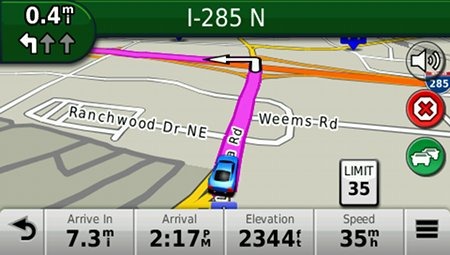
There are eight different dashboards available on the 2595LMT. Basically, these are data field layouts, and are accessed via Settings > Map & Vehicle > Dashboards. You can see one in the image below.
Map changes – Buttons, layers, and more, oh my
The icons on the right side of the map screen are termed map buttons. You can have up to three of the following: Traffic, Mute, Stop, Phone, Detour, Exit services, Where am I?, Trip computer, Map layers, Brightness, Where to? and Audible. This is a nice feature. BTW, see the menu icon (three horizontal lines) in the lower right portion of the nuvi screen above? You can tap that to bring up all twelve of the items available for the map buttons, so it’s easy to reach the other nine.
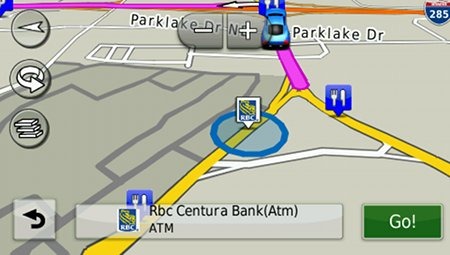
Map Layers also offers three choices. You can choose to display any or all of the following on the map: Traffic, Trip log and Places along the road. Enabling the latter will display points of interest (POIs). In the screenshot below, you can see that more information appears on the screen if you tap a POI icon. Oh, and which POIs feature corporate logos seems to be solely related to which ones are available to Garmin; it has nothing to do with zoom levels.
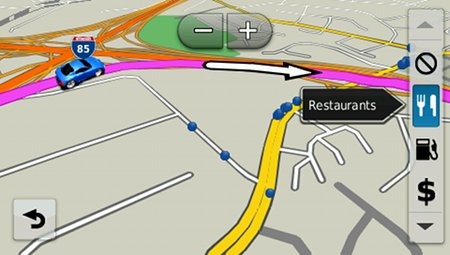
While you cannot customize which POIs to display on the 3D moving map, it’s a different subject when you go into browse map mode. There you can drill down through many categories, as you can see below.
Selecting a destination
Tap Where To? and you’ll see the following screen…
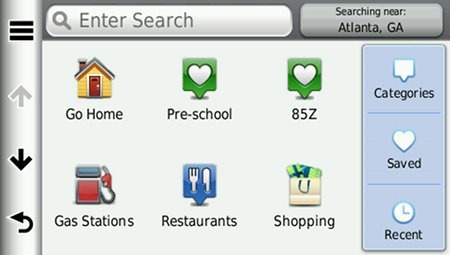
There are a few things to note here:
- You can add a shortcut to a favorite search (e.g., Starbucks), a category or subcategory, a saved place, etc.; this is one of the more helpful new features, IMHO
- Note that you can remove any of the shortcuts shown above
- And you can have up to six screens, for a total of 36 shortcuts
- The Categories icon gives you access to the full range of POI choices, in addition to any shortcuts showing
- You can do a universal search, entering an address or a POI name
- Tap the Searching Near field in the upper right hand portion of the screen to access options such as My active route, My destination, etc.
- To move items around, simply press and hold them for a second until they start to jiggle; then move them to a new position
Exit services
First seen on the dezl trucker series, and similar to Magellan’s Exit POIs, this is another new feature that I think people will find very helpful indeed. So much so that it will undoubtedly end up as one of the buttons on my map screen. It shows you POIs for upcoming exits…
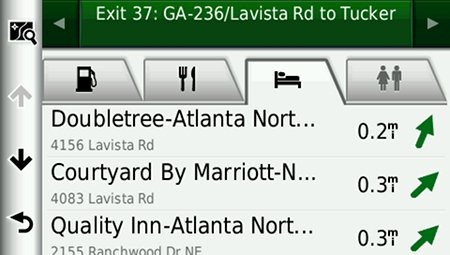
Menu improvements
Recent nuvis had deep menu options that were painful to access. Improved nesting and better use of check boxes have reduced many steps. For example, on 2xx0 series units, you had the following sequence to set avoidances: Tools > Settings > Navigation > nuRoute > Avoidances. On the 2xx5 series, it’s Settings > Navigation > Avoidances.
Returning features
Voice command
Voice command on the 2×95 series functioned very well in my testing, even in my noisy truck. I’m estimating that accuracy was at least 90%. In addition to the options shown below, there are also commands for Detour, Volume and Brightness.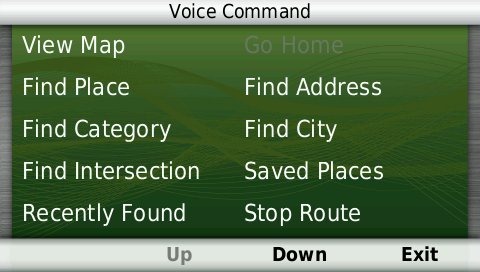
As with other recent models, you can use a customizable wakeup phrase (“voice command” is the default).
You can do one shot address or POI entry on the 2595LMT. Just say Find Address and then rattle off the entire address. Another improvement is that Find Place seems to work with nearly any POI in the database now. The voice command on this latest nuvi is getting very good indeed.
Junction View and Lane Assist
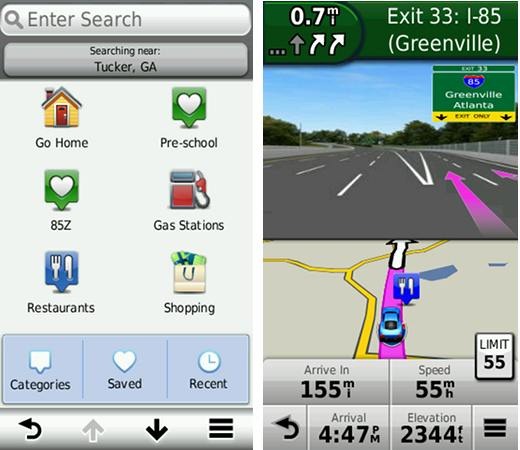
There has been a huge increase in the number of exits showing Junction View imagery (pictured below on the right side of the screen). It seems to pop up at almost every exit in cities where I’ve never even seen it before. I’ll also note that this series includes what Garmin terms photoReal Junction View, where the background scenery should generally match reality.

Lane Assist is displayed in the upper left portion of the screen above, letting you know which lane you need to be in for an upcoming turn. This feature shows up not only on freeways, but on some urban surface streets as well.
Lifetime traffic
Traffic is ad-supported, just like on previous T models. I’ve included some screenshots below.
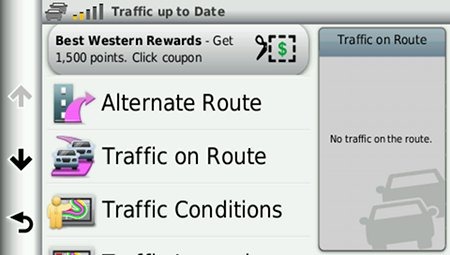

 Unfortunately, the coupon icons are starting to show up a bit more frequently, as you can see in the image below. In the past, it seems like I wouldn’t see these unless I was stopped or on the traffic screen, but note my speed in the screenshot below.
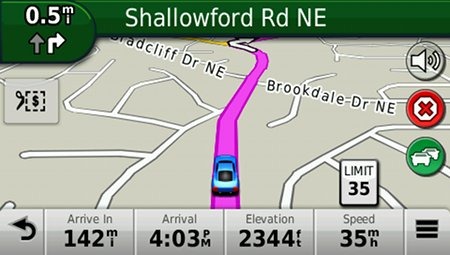
One new option is to purchase the GTM 60 traffic receiver, giving you access to Garmin’s new HD traffic service and eliminating the ads as well.
Trip Planner
Trip Planner, used for planning multi-destination routes, is now found under Apps. It seems that Garmin is continuing to make improvements here. While I didn’t do extensive testing of this feature, I did note a couple of things. For one, Time to Via and final destination arrival times seem to be accurately reflected on the dashboard (although it still doesn’t take into account duration of stop, if you’ve entered that info). Also, I successfully transferred a multi-destination route from BaseCamp, using City Navigator POIs converted to waypoints.
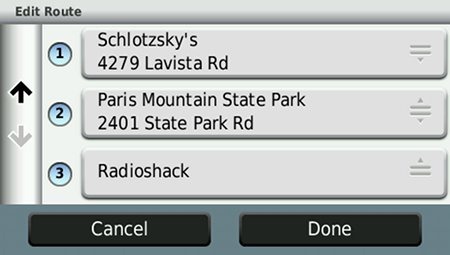
Despite the improvements to this feature, some users prefer the old system where you could add Via points without using the Trip Planner. With the Trip Planner, you need to interact with it briefly after each stop, selecting the next destination.
Your choice of routes
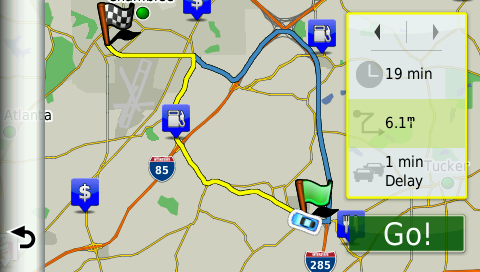
This feature was buried so deeply on the 2xx0 series that I missed it entirely. Now, when you enter a search and tap a result, you’ll see a drop down box labeled Routes. Tap it and you’ll get your choice of faster time, shorter distance and less fuel routes (according to the manual; they aren’t labeled, but you can see them below).
Other returning features
Some other important features introduced on previous generation nuvis, which are also found on the 2595LMT:
- Orientation (portrait style shown below) can be set by by going to Settings > Display > Orientation, but this must be done manually; the 25×5 series does not appear to have an accelerometer built in
- Custom avoidances – Allows you to exclude a road or area from routing
- Advanced detours – Lets you exclude roads from the active route on the fly
- Trip log – Now part of “Where I’ve Been,” you can clear it from within the app and enable/disable and clear it from Settings > Device
Bluetooth
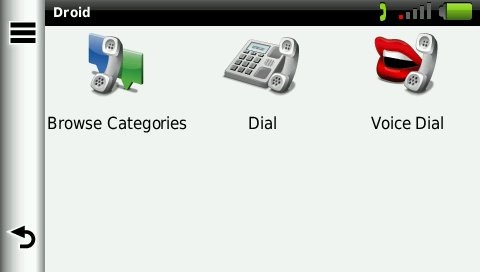
In testing the 2×95 series, the nuvi paired with my Motorola Droid on the first try. The next couple of times it tried to connect though, it would not stay connected. After a shutdown and restart of the nuvi, it worked fine, but I will admit to limited testing of this feature. When I called my wife, she said it was “damn good,” almost like talking to me directly on my phone.
Garmin nuvi 2595LMT performance
These notes are from my hands on tests of the nuvi 2495LMT and 2555LT:
POI searches seem significantly faster than on other recent models. And routing speed is somewhat faster than on my 2360LT with the trafficTrends historical road speed database enabled on both units. While I’ll admit it’s a bit subjective, routing does seem to be a little smarter on these second generation trafficTrends units. I definitely see differences and they generally seem to be better choices.
Names of nearby roads appear on the map – sometimes there are more of them and sometimes less than on the 2360. Occasionally I’ve noticed a slight lag in menu responsiveness of the 25×5 series. It’s not always there, and it’s short enough when it does occur (less than a second) that many users wouldn’t even notice it.
Garmin nuvi 2595LMT pros
- 5” screen
- Strong customization options
- Exit services
- Lifetime map updates included
- Lifetime traffic
- Excellent Bluetooth sound quality
- POIs can be displayed on the map
- Offers several choices of routes
- Extensive junction view and lane assist coverage
- Excellent voice command functionality
- Advanced detours allow you to exclude roads from active route
- Custom avoidances allow you to exclude roads or areas from all routes
Garmin nuvi 2595LMT cons
- Traffic is ad-supported and is beginning to get more intrusive with coupon icons appearing on the map screen when moving
- No powered mount
Conclusion and recommendation
Highly recommended. Even with my love of powered mounts (missing here), the nuvi Advanced series rocks. New (and very useful) customization options, exit services and other strong features will tempt many nuvi owners to upgrade. It looks like Garmin has another winner.
Other Garmin nuvi 2595LMT resources
- The Garmin nuvi 2595LMT owners manual
- Want to see how the 2595LMT stacks up against other models? Check out this Garmin auto GPS comparison tool or my own Garmin nuvi comparison chart
- There is a dedicated Garmin nuvi message forum at GpsPasSion
- And another nuvi forum at GPS Review
- Our auto GPS FAQs, which includes quite a few nuvi tips and tricks
- The official Garmin nuvi 2595LMT web page
Compare prices on the Garmin nuvi 2595LMT at these merchants:
- Check the current Garmin nüvi 2595LMT 5-Inch Portable GPS Navigator
- Get a great deal on the Garmin nuvi 2595LMT at GPS City
- Find the Garmin nuvi 2595LMT 5.0 GPS Navigation System with Lifetime Map and Traffic Updates
for a great price at BuyDig.com
- Buy the Nuvi 2595LMT with 5″ Touchscreen, FREE Lifetime Traffic & Map Updates, and Voice Activation
direct from Garmin
 About Rich Owings
I have some questions about the “Avoidances” and “Advanced Detours” options. I have both options disabled on my device, is it best leave the options disabled to get you to where you’re going in the most direct simple way? I also have my device set to “Shortest distance.” I read how “Shortest distance” is more accurate in directions and routing than “Quickest distance” is because the device doesn’t try to route you all over the place around traffic and so forth, it keeps it more simple. “Quickest distance” increases the odds of it routing you the wrong way or down a dead end road etc. I have no problem if I encounter traffic, that doesn’t bother me, I just want the device to be as accurate in routing and directions as possible to get me to where I’m going in the least complicated and simplest way.
This should help with custom avoidances and advanced detours…
http://gpstracklog.com/2011/02/custom-avoidances-and-advanced-detours.html
I always use “fastest route” and have no reason to believe it causes significant routing errors. It will definitely not increase the chance of you being sent down a dead end road. The only time it will automatically reroute you around traffic is when it reports a severe traffic incident. You can disable this in the avoidances section of the settings.
OTOH, “shortest distance” often results in significant problems.
hmmmm thanks for the info and tips. I didn’t know that, I read on amazon.com once from someone’s review that they had better success with “Shortest distance.” What significant problems will one might encounter or have encountered using “Shortest distance”? Also, what is the difference between “Fastest route” and “Quickest distance” ?
Will setting the Map Detail to High really slow down the response of the screen?
Well, shortest distance could send you down a forest service road in the middle of the winter. That has gotten people stranded and killed. I don’t think there is a quickest distance option. I haven’t tested screen response in terms of map detail settings.
Ok thank you, I have Calculation Time set to “Faster Time.” Should I just keep “Avoidances” disabled and “Advanced Detours disabled”? I clicked on the link you posted above but it didn’t recommend a setting for best results. I have no problem if I encounter some traffic, I rather not be routed all over the place and make my trip more complicated.
There’s no need for custom avoidances unless there is a specific road or area you want to avoid. Enabling Advanced Detours will allow to exclude a road from a route, giving you some additional flexibility. But if you want simple, don’t use them.
Yes, but only if it is displaying the 4WD roads in question, and displaying them as roads.
Seems I’ve at least asked-around this question several times before, but … “how do you determine if 4WD drive roads/trails that appear on Garmni’s 24k Topo are being displayed as “roads”? If they’re visible/apparent on the map, might the 2595 not consider them roads, but just “topography”? I imagine I’ll find out when my 24k topo arrives and is loaded but we do hope to be able to “route” on the fire-trails and old roads that are so previlent in our area of the SW.
They should have a different line type. If you click on them in BaseCamp, it will say trail or unpaved road or whatever. You probably just need to hit the (4WD) road with it to find out!
does the 2460LMT or the 2595LMT show red light cameras?
There is a subscription available for the 2460LMT…
https://buy.garmin.com/shop/shop.do?pID=69781
But you can’t use this on the 2595LMT (link), although you can use third-party red-light camera databases on either unit.
A somewhat silly side-question on the 2595; can more than one “voice” be used with the speech-recognition feature? It appears not from practice and reading the manual. For multiple users I assume you must refresh (re-record the activation words) for each.
I’m not sure what you mean. Are you talking about the voice that says “Say a command?” I assume this changes if you change your language settings.
I was actually referring to the voice the 2595 “recognizes” as issuing commands. If I programmed the activation phrase, (“Hey Nuvi”) my wife (for example) can’t use the voice-command feature as the device does not recognize her voice.
Ah, I see. I’m not sure voice matters. It may just be the words. Perhaps it doesn’t recognize how she says them. It may be worth playing around with a few different phrases.
My new 2595 was delivered 2 days ago, and I love it!
Does the split screen Junction View and Lane Assist appear automatically, or does the 2595 have to be set in a specific mode?
I’m pretty sure the junctions up here in Alaska are not in the data base.
But I’ll be taking my Garmin to the Asheville, North Carolina area in a few weeks and will be driving in areas that are covered by Traffic and Junction View/Lane assist. Thanks.
Automatically. Enjoy the trip to Asheville – the coolest city in the east! You’ll see junction view and lane assist there, but not live traffic.
Chad, have you checked all the volume settings? To do so, from the Main Menu, tap Volume, the the wrench icon, then Audio Mixer.
Thanks again, Rich;
“Yes” I set the audio mixer during the initial set-up and played with it again when I realized it was very hard to hear “Marilyn” talking if there was background noise. Phone connections are arguably audible, but marginaly and only if the radio is off, windows up and traveling at low-speed. Guess of all the possible difficulties this is somewhat tolerable, but a disappointment when compared to my previous Garmin 276C – which I would very likely still be using if Garmin supported it.
Strange. I haven’t noticed any volume problems on my 2495.
Some of the issues people are having with volume may be related to volume settings in their phones rather than the GPS. This was our experience and the volume is no longer an issue.
Excellent point.
Guess the primary lesson for me is “look before you leap”. I triple checked the mixer settings last evening and two of three had been reset; Phone to 80% and Media to 60%. Not sure how, but …. I have had several “interested” friends playing with the GPS since I received it, so I’ll tactfully shift the blame to one of them. I also tried Brucito’s suggestion and it noticably helped the phone volume. Many thanks!
Cool!
Just purchased a 2595LMT. This is my second gps, first one was a TomTom oneXl and I hated everything about it. Slow start-up, wrong directions, etc.
Reading the reviews on here helped me make my decision, thank you Rich.
Jim Hanna…….
Just purchased a 2595LMT based on the info on this site. Thank you Rich.
What an improvement over my TomTom One XL. Never been happy with it. Slow start-up and many direction errors.
Looking forward to learning the many features.
Good to hear!
Will the GPS send me down any dirt roads/unpaved roads if I don’t have that option checked to avoid in the Avoidances menu?
I have my GPS set to Faster Time in Calculation Mode.
EDITED: Yes, if that is the fastest way.
Rich: I’ve been using the 24k SW Topo for a couple of four-wheeling trips. Most of the geo features, (color shading etc) with the exception of the basic topgraphical countour lines vanish after a few miles. They periodically come back, only to go-away again leaving a white-screen again, with “just” the contour lines and the vehicle position remaining, within a few seconds. Seems like the unit simply runs out of memory? I have not deleted the City Navigator files; concerned re-loading them might be an issue. Any thoughts?
Hmm, have you gone into map setup and disabled City Navigator? Don’t delete it; that will likely cause a lot of problems.
“Disabled” may be the issue. I selected (checked) the 24k SW Topo on the device, which “un-checked” City Navigator. Is there more to this than what I did?
Nope, that should do it. Did this happen on both trips or just one? Also, I’m not quite sure from your description what exactly is happening. Are the contour lines going away? What information is missing from the map. And are you in 2D or 3D mode?
The screen loses all color highlights; the display turns white with only the contour lines and vehicle position depicted. And “yes” – this happened on both trips. Seems to start the route fully functional, but both times within a few minutes, it begins flashing to a white background as described, finally remaining white thou periodically it returns to the normal color display for a few secondsbefore reverting to white, with the described limited detail. After the first occurance, I reloaded the selected sectors of the topo (about 36-sectors highlighted)but experienced the same results yesterday.
Oh …. I was in 2D mode. Tried 3D and “both” but no-change.
First of all, use WebUpdater (http://www.garmin.com/webupdater) and make sure it’s got the latest firmware. If that doesn’t cure it, it could be defective. You’re using Garmin’s 24K map, right? I’d give them a call (works better than email for this sort of thing). Where did you buy it? Can you return it and swap it for another one? If so, that is preferable to sending it back to Garmin.
Rich: Excellent suggestion; there were two (what appeared to be pertinent) updates for my 2595, plus some language updates for English. Downloaded these and will check on our next 4X4 trip. Thanks for your continued support!!
Sure thing. Keep me posted.
I just used my new nuvi 2595LMT for the first time on a trip from NJ to the Bronx and back. Amazing. Two questions, though. Is there any way to add a shortcut for the category of custom POI’s? Is there any way to get the voice command to recognize a request for “custom POI’s” and their sub-categories? (I have a custom loaded database of kosher restaurants and synagogues for all of North America courtesy of the website “kosherrestaurantsgps.com”) Thanks.
I don’t think so, but it seems like a reasonable request, and something they should add.
Fred, check your email.
A question about the unit’s satellite reception. I drove to Boston’s Logan Airport earlier and I lost satellite reception/connection when I went through an underground tunnel and it didn’t pick up satellite repception when I got out of the tunnel, it took a while to get reception, the GPS satellite reception eventually reconnected and went back on course but I didn’t notice how long it took because I was focussed on the road and using my own judgment since I couldn’t rely on the unit. I was panicking and didn’t know if it would pick back up the signal again or not. How long usually does the 2595 reconnect with satellite reception after it loses it, and will future firmware updates improve on this?
Also, using the GPS while driving on route to your destination…what if you accidentally hit the “back arrow” at the lower left corner of the screen that sends you to the previous screen? Will it screw up the route and disconnect and will I have to pull over and reset the course? How can I quickly get the unit back on the driving route screen so it picks right back up my current destination and doesn’t miss a beat while driving?
It shouldn’t take long, and will try to estimate your position in long tunnels.
Just tap the View Map button. It will not mess up your route. Even if you don’t, you’ll still hear voice commands.
Need help? When I got my 2595LMT I could turn it on and do things with it when it was connected to my computer. Now it turns off and will only charge.
What changed or what did I change? Thank’s in advance
It should go straight into mass storage mode. It must not have connected to your computer if you could do anything with it.
how does the 2495lmt compare to the 2360lmt and 2460lmt models.
I have a 650 which I just found out maps can’t be up updated.
Don’t want that memory problems again
The 2495LMT and 2595LMT add several new customization options, improved search functionality, Garmin Smartphone Link capability and Exit Services.
But the 2360/2460LMT have a powered mount similar to your 650.
If you’re just out of memory on the 650, you can put the update on an SD card. But I think you’d be happy with the new features on the more recent models.
hi . .we are from australia and will be road tripping around America in oct…we are thinking of buying a gps from the us as it’s already loaded with the maps and it’s much cheaper to buy it online than here in Oz, and to hire them is too expensive through the car rental companies. Also to buy one here in Australia and then have to load it up with US maps is also expensive so my question is once we return to australia and we download Aussie maps will we lose the American maps or will we have both?
Both may not fit on the internal memory, so it might be easiest to get the Aussie maps on a micro-SD card. That way you can have both loaded to the device at the same time…
https://buy.garmin.com/shop/shop.do?cID=253&pID=36360
Thanks for the advice which leads to my next question . . when we download the aussie maps will we be able to access all the features that are available with the USA maps . . Dumb question maybe but remember I am a female and technology is not my greatest understanding 🙂
Looking at Garmin’s Australian site, it looks like most of the key features are available. But I’m not sure if you’ll get the Junction View file when you buy the Australian map; you may have to contact Garmin and ask them to find out.
How often does Garmin release new maps and software updates? Once every 2 or 3 or 4 months or??
Also, regarding the length of the time it takes to download and install new maps onto your computer and gps, does it depend on how fast your computer is and internet speeds or is it the same for everyone?
New maps generally are released every three months. Software updates vary.
It depends upon your Internet connection speed, and is possibly also impacted by the number of other people downloading it.
Hi!
How big is 2595LMT internal memory totaly and how much is free in the unit now?
How big micro secure digital memory can this gps use, 8Gb memory cards or only 4Gb?
Thanks for helping me before i but it becouse i cant find this information…
Probably around 8 GB, but Garmin usually doesn’t provide this specification. My 2495LMT is showing 7.85 GB capacity with 3.44 GB available. This may help…
http://www.poi-factory.com/node/33586?page=1
It should be able to handle a 16GB card (link)
OK Rich, thanks for information 🙂
Regards
slave
Any GPS with MP3 Player, BLue tooth and Euro Maps?
Not since the (now discontinued) nuvi 775T.
I saw on another forum that some of the high end 3xxx units have mp3.
Reading through the forum just wanted to comment on a few observations and problem. Noticed the bluetooth hands free picture in the review didn’t download contacts. I just went through this as I upgraded my old flip phone to a Droid smart phone. No contacts showed up on rhe 2595. I noticed a message at the top of the phone for about one second. Opening the notifications showed that phonebook download was blocked with an option to enabling them. This solved the problem. I tried two different Droid phoned and both had the problem.
The 2595 has 8 gig of memory and SD card slot. MAPs can be downloaded to the SD card. I hope this isn’t a violation of rules but instructions how can be found in the stickies of the gpspreview forum.
Download of the map data takes about one hour on a 6 meg line, two hours on a 3 meg line. Your download speed can be monitored on the Task Manager in windows. Another hour or so to load on the device.
Not a problem pointing people to the gpsreview.net forums. Good site.
I *think* the 3xxx models with an MP3 player are for audiobooks only, but I could be wrong.
OK Bill, thanks for information 🙂
Regards
slave
I still cannot get my 2595 to operate when it is plugged into my computer. It goes into a charge mode only.
Please help?
The new NUVI’s will not operate when they are plugged in the computer. They show up as a drive on your computer. If you want to operate it on the desk get a lighter adapter for 110 to 12 volts and plug the cable that came with the 2595 in it. You can handle files on them just as you can any other drive. Are you using Webupdater to update the firmware on the nuvi? It needs to be in that mode to uodate the maps and firmware on line.
Thank’s Bill…….
I love your site. I am torn between the 2460 and the 2595. Is the routing engine the same? You talk about some minor customization improvements on the 2595, what are they? I don’t really care about the live services as I plan to use this on my motorcycle. Does the 2460 support junction view?
Any other major changes? I assume the 2460 doesn’t have the Garmin Guidance 2.0. Is this a major upgrade from what is on the 2460? So the 2460 has a powered mount and the 2595 doesn’t. I find that to be a pretty handy feature. Are the screens’ visibility similar in direct sunlight? Is the home screen on the 2460 as customizable as the 2595?
I have a 3760 now and love the high res screen. The downside is when used on a motorcycle, I can’t wear gloves and still operate it thanks to the capacitive screen. If it wasn’t for that, I’d consider the 35xx series. So as it was I am considering the 2595 and the 2460.
I am not a motorcyclist so can’t say much about it’s use. I have seen a number of complaintson the GPSPreview NUVI forum. There is a lot of experienced people so you might getsome good help there. You should search the Garmin site for specific use models. I can’t see the 2595 or any automotive model being a good choice.
Bill- thanks for the quick reply. Are you saying a lot of complaints for the 2460? I’ve used the dedicated motorcycle ones (Garmin Zumo and TT Rider) and neither of them impressed me much. So I slap up my auto one, use a BT headset, put it in shielded enclosure and away I go. So far it has worked well in about 30,000 miles of riding. In really heavy rain I put in my special bag to protect my camera when diving.
It looks like the 2595 might be a slightly better option for me because it looks like the 2460 won’t do portrait mode. The 2595 will do it but it is a manual process unlike the 37xx series which does it automatically. I find the portrait mode to be very handy at times. The powered mount though is really handy on a motorcycle because I can just grab it and go.
The complaints are NUVI in general. I can only comment on 2595 as I have no experience with the others. The lack of power mount was about the only disapointment going from the 765 to the 2595 but I did it for the voice control.
Wavshrdr,
The routing engine should be similar although I believe that trafficTrends is disabled by default in the new models liken the 2595. The 2460 does supports junction view. The 2595’s home screen is much more customizable and it has exit services, which isn’t found on the 2460. The 2595 looks brighter to me than the 2460. One big problem though… I don’t think either model will work with a Bluetooth headset: link.
My nuvi 2595 started freezing up when the traffic/charging cord was plugged in during a recent trip. The touch screen became unresponsive requiring a restart with the power switch. It seemed to work fine on battery mode. Any ideas? Thanks.
No. I’ve had one of the 2xx5’s freeze on me once. Had to hold down the power button for 30 seconds to revive it.
Fred I have the same problem with my 2595lmt. It was good for 2 weeks then started freezing up when the unit is pluged in. When I switch to battery power it works fine. I use it for work and its driving me crazy. Thank God I have my I-phone as a backup. Your the first person I have seen with this problem. I would like to know if you have found a fix yet. Please Contact me.
Thanks in advance Brian R. brianstang at msn dot com
Is your firmware up to date? You might also try, while it is plugged in and non-responsive, holding down the power button for 30 seconds until it reboots.
Garmin 2595LMT freeze: I issued a voice command to “Find City”. In a subsequent menu, the 2595 offers the ability to change country. I requested Canada and the unit disiplayed an option button indicating ‘Use Keyboard’ which didn’t make any sense to me since there is no keyboard. However, I found the the unit froze and would not accept voice or touch inputs. I was forced to press the on/off button on the 2595 to force a reboot. This happened twice. Since I was not actually traveling to Canada, I decided to leave the issue alone and simply use it without requesting Canada. Other than this issue, the 2595LMT is a really great device. We also have a 1490LMT and are very pleased. The 2595LMT seems to have a faster processor and provides more lead time on turns when citing directions during travel. Overall, the 2595 is a good requisition. I would not trade it for a different model.
It seemed to lock up my 2495LMT when I tried it, but it became responsive again in 30 seconds or so. Definitely seems like a bug.
I sent the relevant discussion related to the freeze to Garmin. There response is to update the software and maps and then do a master reset to factory defaults. The software and maps were recently updated on 3/30/2012, only a few weeks ago. I don’t intend on resetting the Garmin to factory defaults. This sounds like a boilerplate response to the problem. Garmin didn’t acknowledge that there may be a bug.
Garmin states there was a release of new software updates for this device (2595LMT) since March 30th. So, I’ll rerun the updates and see if it cures this issue with the freeze.
My 2595LMT goes to sleep (more like a coma!) after different delay periods – sometimes after only 15 minutes, sometimes more than an hour. Regardless, a ‘tap’ of the power button does NOT revive it. It requires the 10 second press to get its attention again, and then you must reenter your destination! I returned it to the store and got a second unit, which behaved in an identical way. BTW, I registered both devices at the Garmin website, downloaded new software, and updated the maps before taking them on the road. AVOID THIS PRODUCT. Garmin admits of no bugs in their firmware or software. This is my last Garmin.
It behaves the same on mine. Change country to canada and it hangs at use keyboard for a minute then asks for a city in Canada, Wait for 75 seconds and it comes back with ‘What city in Canada. You have to use both city and state to get the right answer, both canada and US. Also if you leave the country as Canada and request find city it hangs for about the same on find city. Looks like it is in a big search loop. Probably pose it to Garmin support.
I bought both the 2460 and 2595. One issue that might be important for some people is the power connector. On the 2595 it is mini USB. On the 2460, it is a micro USB. A lot of times I want to recharge my GPS by a portable USB charger as I carry it or have it on a bicycle and not always have it in the car. Many modern phones use a micro USB except for the Apple lineup. I have 3 phones , 2 tablets and they take micro USB so that is what I normally carry with me.
It likely is because Garmin thinks the mini USB port will be more robust than the micro. Obviously a consideration since they aren’t using a power mount.
One thing on the 2595 I miss from the 2460 is the quick tap of the power button to bring up the brightness menu. I think it is because the 2595 just goes into a sleep mode instead of total power off when you push on the power button. This is like what my 3760 does (sleep). Also it doesn’t look like you can really customize the home screen on the 2595 like you can on the 2460. It the GPS Tracklog review it as in the “nu Feature: Customizable main menu”. Is feature really removed in the 2595?
This is such typical Garmin, add a few new things and take some really good things away or am I missing something here? The GPSTracklog reviews are definitely some of the best on the ‘Net.
I have to say the voice recognition on both GPSs are good. I was very impressed with some of the more complex addresses they both recognized.
Personally I am torn. I love the micro USB and powered mount of the 2460. The customizable home screen is a great feature too, less taps to get where you want. I hope I am just missing this on the 2595 and that is there somewhere but I doubt it. I also like the quick tap of tapping the power button for quick access to the brightness. Very similar to my original Nuvi 360 but it also had both volume AND brightness. A perfect example of Garmin going backwards.
OTOH the Live features seem to work well so far on the 2595. The weather is pretty slick. Not much use of the traffic yet in a really congested city like Atlanta or LA. The voice recognition on the 2595 is slight better and one significant difference for me is when you ask for a city, the 2595 allows you to specify city and state whereas the 2460 seems to just default to the state you are in. This might be a significant issue for some. Say for example you live on the border of 2 states (like I do). I could only be 10 miles away from a city across the border and the 2460 doesn’t seem to easily allow me to use the voice rec to find it. I also found the 2560 will pick up my voice a wee bit better when talking softly.
I also compared the brightness back to back. They are very close as to almost be negligible but the difference is more in the color of the icons the 2595 uses that makes it seem slightly brighter. One difference though where there is more of difference is the volume. In back to back testing, the 2595 is definitely louder than the 2460. OTOH that is slightly more distortion on max volume with the 2595 but no so much as to make it unusable. Both though are very good and better than my 3760 when on its powered mount. I also like the customizable map buttons but 3 seems too limiting.
I’ll play with the 2595 more and see if I decide to keep it. The2460 was about $75 cheaper at the moment at retail prices in my area. For the 2595 I wish they had the higher res screen in the non-capacitive touch screen so I could use it with gloves. Also a powered mount would be a big plus and the use of a micro USB. A customizable home screen like the 2460. A quick tap on the power button like the old Nuvi 350/360/370 series to customize volume and power as well. At least the 2460 gives brightness but you can waste a customize button on the 2595. Neither of them seem to offer Garmin lock but maybe I missed that as well. The powered mount seems to hold the 2460 more securely than the 2595’s mount does it. I am still waiting for a chance to view them both side by side in direct sunlight. The 2460 does pretty well in direct sunlight. I could read it pretty easily on a bright, sunny, 80 degree today while riding the bike.
Based on how well the voice command worked for me on both of them, I’ll only consider one that offers voice command from now on. The last Nuvi I had a 8xx series, this feature was pretty weak. I thought this info might be helpful for anyone shopping them both.
Thanks Wavshrdr. Hey I never even checked on the customizable main menu. Maybe someone else with a 25×5 can chime in on that.
I am on the latest software and no issues so far. It has been very stable unlike some of my other Garmins.
Just a few more follow-up thoughts They both (2460 and 2595) worked great with my phone. It does take a while to learn the interface of the 2595. In some ways it is easier to get to some things. The shortcut menu is nice. OTOH I think it takes more clicks to add favorites. Why can’t I just go into the saved menu and have a + button to give me the option to add recently found items or add an address directly? I do like how the favorites sync up with the app on my phone. Now what can’t I add other addresses there as well?
Garmin has this incredible ability to get it not quite right. Instead of hitting a home run, the turn a great hit somehow into a single or double. The 2595 is an example of this yet again. Always a few steps forward and then one back, sometimes even 2.
I’ll probably keep both of them for a while to decide. Then I’ll probably give one to my mom. In general they both have worked very well on my motorcycles. The large screens are easy to see. I do wish they still incorporated a MP3 player and a headphone jack. Bluetooth is NOT the answer to everything. I’ve found a very heavy duty ziplock back can see the units from all but the most torrential rain. A Zumo isn’t worth the extra cost for me.
Some other things are annoying about the word suggestion option in the 2595. It is a great idea but it took them too long to implement. One issue with it is let’s suppose you want to search in a different area. You click on the search box and type in the word, there is no auto-complete nor does it remember what you recently typed. It only relies on the suggested words. So lets suppose you want to search in Minnesota. As luck would have it, there is a city somewhere that apparently starts with Minnesota. I had to type out Minnesota in its entirety as it kept offering all the cities that started with Minnesota. Then when I wanted to search again, it didn’t remember what I had typed before.
Another issue with Garmin in general, why can’t I just have the option of putting in a zip code like TomTom has done since day one? That would already tell the unit city AND state. It shouldn’t be an issue to implement this for them. What is odd is years ago I could use the zip code to search on European addresses.
So even though Rich possibly missed the customization the main screen, he still has some of the best reviews around. I ALWAYS start here when shopping for a new GPS. Still looking at the 3590 as I liked my 3760 a lot but I don’t know if I need yet another GPS. If it would have worked with gloves on, it would have been my first choice and I wouldn’t have considered either the 2460 or 2595 for the bike. I must say though in general I’ve been impressed with them. The more I use the 2595 there is absolutely no way I’d consider the less 25xx models. Better off to buy the 2460 and save a lot of money.
The BT, live services integration and voice command is a big plus over the less models. The only thing you really give up with the 2460 is the live services. Unfortunately that is very important to me. Which is probably the factor that will ensure I keep the 2595 over the 2460. That powered mount though and very customizable home screen a very big pluses to me especially when using it on a motorcycle.
Keep up the good work Rich!
Thanks, and thanks for taking the time to share your thoughts!
Here is Garmin’s reply to my question about their Topo map background detail (color) being very intermittent; appears for a few minutes, then drops-out – and repeats a few minutes later.
“Thank you for contacting Garmin International. Unfortunately, the nuvi 2595lmt is not compatible with TOPO mapping and this is why some of the map-detail disappears. There are several street navigating devices that can support TOPO Mapping but have limitations.”
It would seem to this layman that as long as the background detail/color DOES show some of the time, a modification to Garmin’s Firmware could solve the issue. IF (of course) Garmin wished to do-so.
Sounds like a lame response by a low level tech. I don’t really think that is the issue.
I did another firm-wear update before my last off-road outing, and the color background and detail stayed displayed for about 60% of the trip – an improvement from about 15% – however the display still periodically and intermittently dropped-back to a white background with terrian contour-lines and vehcile position shown. I would really like to resolve this; may contact Garmin again thou my experience is they demonstrate a “one reply to a customer” policy. Background detail is arguably “astetics” as the nav functions seem to continue to work. None-the-less …….
I’d ask nicely to speak with a supervisor or be transferred to cartography.
Just took our 2595LMT from central Mass to Cape Cod for 3 days with no problems, got us every where we wanted to go. On the way home we encountered a massive 6 mile long back up at a snails pace from the Sagamore Bridge, the gps automatically rerouted us around the traffic down a side street and saved us a good 10 to 15 minutes. All the detour options were disabled on the device too. The devie is brilliant!
I’ve had a lot more time to play with the 2595. I am definitely keeping it. I still can’t find any way of customizing the home screen but the Smartphone Link for me is a killer app. I love that I can just click on an address in my smartphone (Android) and have the 2595 show up as one of the options to route me there (in addition to Google Navigation and TeleNav).
This is so handy for me as often the POIs I want don’t show up in the the Nuvi. Previously I looked them up on my phone and then had to manually input on my Nuvi. Now it is just a quick click and it is ready to go. I also like the fact that it syncs the favorites to the phone as well.
OTOH the POIs still are terrible in a lot of a ways. I recently went to the capital of a large state and a Mexican restaurant that has been open for at least 2 years that I know of still doesn’t show up. This is just crazy. At least now I have a way around it.
I also found a mini USB cable that allows me to recharge without a special adapter for the 12v cigarette lighter. I had a few spare USB cables and tried a few of them. Some mounted it as a drive to the computer for data transfer and updates, 2 of them just powered it up. This is really useful for me as I can either use my PC or a USB power port to recharge it when using it as a handheld device off the bike our out of the car.
So far I’d say it is one of the better Garmin’s I’ve owned. I do wish Garmin would stop de-contenting their PNDs. In some ways my favorite ever was the earlier models 360/370 series with all the quick little shortcut to volume, external antenna, and so on. The price is pretty reasonable for what you get however on the 2595. Haven’t had much chance though to check out the new traffic connection with the smartphone link but hopefully that will be good. I took a flight this weekend and found that it did take much longer to acquire a lock in its new location than either my 3760 or 2460.
When it came back to where I first bought it, it was about as fast as the other 2. All 3 lagged behind my smartphone which was slower than my HTC tablet. Go figure, the PNDs are much slower than my smartphones at sat acquisition and that is their sole purpose. Shows the power of assisted GPS though on the newer smartphones and tables. I have both my phone and tablet setup to download the A-GPS data ever few hours.
Thanks, good info! Hey, can you elaborate on “I also like the fact that it syncs the favorites to the phone as well?” Is it adding nuvi favorites to your contacts or what?
Sure, it is how it syncs up the favorites in the Garmin Smartphone Link. I’ll call it GSL for now. It looks like GSL will in effect allow me to sync between multiple Garmins that have this feature. I am buying a 3590LMT soon so will test this out.
I had to hard reset my 2595 since for some reason it wouldn’t seem to recognized the updated TOUs for the Tracker software. GSL had them all saved and put them back on my 2595 after all the user data was wiped out and I connected it back to my phone. It looks like the GSL isn’t device specific (I hope but haven’t tested). So perhaps I can keep all my favorites in GSL.
One other possibly life saving use of GSL is the Tracker function. Since I ride my motorcycle a lot, it could possible come in very handy in a life threatening situation. Maybe not as good as SPOT but still pretty useful.
Suppose you are going on a trip somewhere on your motorcycle but it could be any vehicle for that matter. I’ll set up the Tracker for my friends and family to follow my course. In the unlikely event I don’t reach my destination, my family will know at least where my last reported position was. Makes it easier to know where to look for me in the event I was in an accident or the vehicle broke down. Of course it helps if there was cell coverage where I was at but at least there would be some point at least not too far away from where I lost coverage.
I ride a lot in the mountains and I don’t always have cell coverage but at least it would likely reduce the search radius required thus improving my odds of survival if I had a crash. I’ll still probably but a SPOT but this will be good for about 95% of the riding I do. I’ll think of it sort like have a flight plan but for my motorcycle. I typically tell my friends and family where I will be riding and what my destination is. If I fall off the map somewhere and they know my destination, they can follow the possible routes from the last point of contact and to my destination. Definitely useful on a bicycle too. Might be some pretty cheap insurance in the long run.
I am still sort of irritated though why it wouldn’t update some files from either webupdater or the My Dashboard.
Thanks. I’ll check out the Favorites syncing. BTW, have you seen this…?
http://phantomtracking.com/crash-detection-technology.aspx
I assume its more expensive than SPOT though.
That is a pretty cool device. I’ll have to look into it. Thanks for the link Rich. I might have to pick one up. If I do I’ll write a review on it.
I live in Massachusetts and I can’t get the 2595LMT to calculate routes to the west coast (LA and Malibu) it says the route is too long.
My 2495LMT does the same thing, when I set the location to Boston and try routing to Malibu. But it looks like it actually is calculating the route in the background. Try leaving the “route is too long” window up for a couple of minutes, then dismissing it and see if it the has the route. Either way, it sounds like a bug and you may want to call Garmin. You might also want to see if you have the latest firmware.
I recently purchased a Garrmin 2595LMT and having problems finding blue tooth cell phones that are compatible.
I have tried 3 different HTC (Android) phones with my 2595 and no issue. I have found though there is sometimes a flaky connection process for the Garmin live services but I’ve developed a workaround. For basic phone connection it always has been great at connecting once paired. The Garmin HD traffic is MUCH better in my area than the basic bundled one.
No problem with my Galaxy Nexus either.
I am officially sold on the Garmin Live Services. I will not buy another Garmin without it. We had some major storms yesterday and tornado warnings. I got a warning more quickly on the Nuvi than I would have ever thought. The live traffic works very well where I was using it. Much more info about things like road being narrow or other construction info.
I am on the latest version of all software and the 2595 has been very stable with one minor glitch. I had an incoming call will accessing the weather menu and it froze. I had to perform a soft reboot to get it going again. No directions, voice or anything else. It worked fine after the reboot.
Do I have a defective 2595?
When utilizing bluetooth to make a call, I have to turn the volume up to 100% and roll up the windows just to barely be able to hear.
Bluetooth works great, but the speaker is so weak….thoughts?
Try another 2595 with your phone. I can’t say mine is really loud but it is usable. Sometimes there is an issue with the phone as well and not the GPS. Is your phone Android or Apple? Just for reference I have an Android phone (HTC). Did you use your volume control on the phone to max it out as well? IF I do that on my phone, I can get by with 80-90% volume on the Nuvi most of the time. If I am running over 75 mph on the interstate then I need 100%
From the main menu, tap Volume, and then the wrench icon. then Audio Mixer. Is Phone set to 100%?
New map available (2013.10) on Garmin’s Lifetime Updater.
Much better…thanks guys!
Anyone know if the 2595 has the ability like the 2460 to input new speed limits on a road by just tapping the MPH sign? I thought mine originally allowed me to do it but I can’t seem to do it with the latest firmware update. Anyone else try it? It still works on my 2460 ok. The 2595 has the speed wrong on a major highway (I-75) outside of Atlanta. No excuse for that.
I’ll check my 2495LMT when I go out this afternoon.
Mine is on the current firmware, but no, that option isn’t showing. I don’t recall it being missing but I can’t find any screenshots or anything to verify that it was there before.
Thanks Rich. So this might be another feature the 2460 has the 2595 doesn’t. Maybe I was mistaken on my 2595 but I just checked my 2460 and it still has it. It sure is nice to have the option to easily adjust the speeds listed for the road.
I’m digging a little more, trying to get an answer. Stay tuned.
Rich ..I sold my Oregon 450 the other day…great unit but it was hard for me to use and to view…..I need a unit that I can use on my ATV when I ride..I need a larger screen and something to load micro Topo 24K maps into…I’m not sure what unit I should purchase…would like to keep the cost down under $200…I just need a unit that keeps me from getting lost on the trails..just a basic in and out unit would be fine. If you could mention some good units I would be greatful..thanks
You won’t get a larger screen than the Oregon on a handheld for under $200. Did you have it connected to a 12V/DC charger? It should have been plenty bright if you did.
@Wavshrdr – It looks like that is a “Guidance 3.0” feature now, and is only found on the 34xx and 35xx in the newer models.
Thanks Rich, that is very helpful. Garmin giveth and then taketh away. 🙂 There used to be a way to edit the files to adjust the speed but I don’t remember the link to it again. Now I guess my best hope is that Garmin will update the maps more frequently with the speed info.
Hi, I am thinking on buying a garmin 2595, and would like to know if they have audible alerts for exceeding the posted speed limit?
thanks in advance
Rex
No, but some TomTom models do.
An older TomTom app on my Dell WM5 PPC, has the option to set the speed limit with an audible alarm. So if you say over 5mph, it will sound a “bing-bong” in my case. The catch though is having an updated map since the speed limits can change.
I am looking at the Garmin 2595 but do not want to mount on windshield.
What is recommended alternative mount? Anyone have experience with AKRON Cup holder mount?
I prefer having it in my field of vision, so that I don’t have to look down. This is what I use:
Garmin Portable Friction Dashboard Mount
Questions about the routes option and active route. Sometimes I save an address and log it into the Garmin and after it calculates the route I press the green “GO” button at the bottom right corner and a menu pops up asking me if I want an alternate route which I don’t want and I can’t get back to my original route logged in. How do I get the Garmin to accept the original route I first saved and avoid that menu that pops up asking me for an alternate route?
I can’t replicate that behavior. Are you using Where To and then Add to Active Route? And is your firmware up to date?
My maps and software are all up to date.
When I’m inside looking up locations/addresses on the internet off websites I’ll load them into my Garmin right there indoors. When I get into my car and turn on the gps I click on the stored location and click on the green “GO” button and sometimes a screen/menu pops up asking me if I want a alternate route and to add it to active routes, which I don’t want to do.
The only thing I see in that case is “Add to active route” or “Start new route.”
I have the 2595 and trying out before I go on long road trip. Two issues”
1. Voice activated address search is unusable. No matter what I say, it cannot understand an address. Street numbers, street name and town, state all wrong. I need to use manual address input.
2. Gives wrong instructions to address. In trying it out, I am using it to places I know. I then stop at unmapped location to see if it can get me back to route, but several times it gives wrong instruction (i.e. right instead of left, make uturn, etc., etc.)
Has anyone else experienced this?
thank you
As far as #1 goes, I haven’t heard many complaints about it, and my 2495LMT works great. Unless you have a heavy accent, the two questions I would ask are (a) is your firmware up to date (run WebUpdater multiple times to be sure there aren’t new voice recognition files) and (b) have you tried pausing ever so slightly between words? I try to use good diction but I don’t get carried away with it. My speech input is pretty natural.
2. Any GPS can give bad directions occasionally. Database errors do occur and it is usually just that – site specific.
I am returning it to store. I have had so many problems with wrong routes, freezing, etc. While driving, I had to pull over and reboot to get it to start over. The final straw is when I tried to download updates and my “device is not recognized”. I have contacted customer service who tried to trouble shoot but it does not work. I now do not know what to get . Garmin and TomTom are now out.
1) Make sure the GPS is not in the path of airflow from an air vent. The air turbulence will disrupt the GPS ability to understand speech.
2) Try setting the GPS back to factory defaults in case some settings were altered inadvertantly.
The 2595LMT is a great unit.
Question is what is the difference between the City Navigator Europe NT (UNICODE) 2013.10 Map and the std City Navigator Europe NT 2013.10 map?
Are they both used on this unit or not.
Or is the (UNICODE) version only used on the 3700 Series.
Thanks Asprin624
This may help…
http://www.noeman.org/gsm/garmin-tutorials/218790-differences-between-cneu-nt-cneu-ntu.html
This looks like a fully packed model. One of the main features I need from a GPS is a way to easily add my own POIs and have the device set the best route. Any experience with this? My older Garmin would let me import the POIs, but the usage was a bit of a PITA as it didn’t really save them as a route. From your review it looks like this is an update of a previous process (via points). I don’t have a problem buying an older model if I get the functionality I need.
I have to compliment you on your site, it’s organization and usefulness. Trying to compare GPS models would have otherwise been a nightmare!
Yes, using the Trip Planner, you can create a route with saved locations or custom POIs, and have the device optimize the route.
@RGarvin – That’s bizarre. I haven’t heard of many issues with that series.