Sunday, March 18, 2012

Archives for August 2005

Flying with GPS on commercial airliners

Air_nc
Well, I finally did it. I pulled out my GPS on an airline flight to record the track. Just what brought about this happy event, and why hadn’t I done it before? First of all, you have to be flying on an airline progressive enough to allow the use of GPS devices.  The excellent, all things GPS website, GPSinformation.net maintains a list of airlines that allow / disallow use. It seems that many of them haven’t figured out that these devices, with notable exceptions, aren’t capable of transmitting anything, only receiving. And before you get too excited about your next flight, note the line that says “This actually means pilot discretion in all cases.”  I was flying Southwest, which clearly states in its in-flight magazine that GPS receivers are allowed once you reach cruising altitude (10,000 feet). UPDATE: Southwest no longer allows use of GPS while in flight.

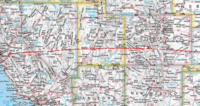
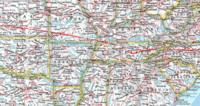
In the past, I found myself flying airlines with draconian, Luddite-inspired policies, but not this time. With flights so crowded these days, I often opt for an aisle seat too. You would think that someone who enjoys canyoneering wouldn’t be bothered by confining spaces. I guess some of us react differently to wilderness than we do to being cooped up in a flying box with a few hundred strangers. This time though, my wife was with me, and the first leg of the flight wasn’t full, so we grabbed an entire row and I settled into the window seat. We were flying from Raleigh-Durham, NC (RDU) to Oakland, CA (OAK), returning from a NC tour promoting my book, GPS Mapping – Make Your Own Maps. I alternately held the GPS up to the window or set it on the tray to record the flight. There was a stop in Nashville, and the flight was going to be full from that point on, so we switched to a two-seat exit row. There was no window seat, but I found that I could stick my GPS, a Garmin GPSMap 60CS, in the seat back pocket (of the row in front of me) next to the window. That worked pretty well, though I did get some loss of coverage at times. I had my GPS connected to my laptop, which was running National Geographic TOPO! The clickable image at right above is the first half of the journey, superimposed on a map from TOPO! See that dogleg flying into Nashville? Man, I sure felt that turn! 

Air_utah
The next image shows is the second half of the flight. I was busy working on my laptop, so I wasn’t paying a lot of attention, but did manage to spot some favorite haunts in Utah — Moab, Wall Street (a climbing Mecca), Canyonlands, and the San Rafael Reef.

I’ve heard some people suggest using a Gilsson external antenna with suction cup mount attached to the aircraft window as a way to save your arm and get better reception. That sounds great, but they have more chutzpah than me. In this post 9/11 world, you can just imagine the reaction of fellow passengers and the cabin crew!
Interview with Fugawi’s Robin Martel

In my book, GPS Mapping – Make Your Own Maps, I included a chapter on Fugawi GPS Mapping software, a program that allows you to use maps downloaded from a variety of sources. While at Outdoor Retailer recently, I was fortunate to be able to spend some time speaking with Fugawi’s Robin Martel of about the future of mapping software and GPS. Robin was kind enough to agree to an interview, and here it is…

Robin, can you tell us about any new products or features that you are working on, and when we might see them available?

We are always working on new product or new features. The claim to fame of Fugawi is its support for a very wide variety of third party map formats. Currently we are working on adding support for yet more formats, including several vector formats. We are also working on a variety of niche market map-based products, which capitalize on our tried, and true map engine.

Do you anticipate offering aerial photos at any point in the future?

We currently offer complete aerial photography of England and Wales (Fugwai SkyView UK). This photography is seamless and can be viewed in standard ortho ‘map mode’ or viewed in stunning 3D.


Fugawi Global Navigator, supports USGS air photo images. Because Fugawi Global Navigator (USA Edition) is supplied with complete elevation data of the USA, any of these images can also be viewed in 3D.

What are the primary limitations inhibiting development of mapping software?

Mapping software can be made to do almost anything. Generally speaking, the most difficult aspect of producing mapping software products is licensing. Most map data (with the exception of some US government data) is copyright by the data owner and can only be reproduced with permission, or under a commercial license agreement. This becomes very difficult when other governments or commercial interests, who are not involved in consumer applications, own the data.


What improvements would you like to see in GPS receivers?


The GPS manufacturers are doing an excellent job with innovation. While GPS receiver design continues to evolve and improve, most of the development now is in better and faster on-board operating systems with greater processing power and memory. This is not related to the GPS receiver but rather to the device in which the receiver is embedded. We would like to see growth in more ‘outdoor suitable’ hand held computer devices with embedded GPS. This is happening now and is evident in a variety of PDA devices, but there is still a way to go to produce the ideal GPS enabled handheld computer platform for outdoor use. As these hardware platforms proliferate, with standard on-board operating systems such as Pocket PC, Palm, Linux, etc., we should see a new growth in mapping applications designed for use on these systems.


What is way out there, years in the future, for your company or for the entire industry? What  would your ideal GPS unit of the future look like?


The ‘GPS’ component of the GPS enabled device is becoming insignificant. More devices, with faster processors, more on board memory and better data storage, and better suitability for use outdoors will lead to a new generation of mapping and location based services.


Topo overlays for Google Earth

Following a sideband comment, I had resolved to review the differences between Google Earth and MSN Virtual Earth.  I misread the email though. It wasn’t saying that Virtual Earth shows topos, merely that it will show both road maps and aerial photos, something Google Earth and Google Maps already manage to do quite well.

I thought it was worth a comparison of the programs though, but in researching the topic I stumbled across people using topo maps in Google Earth.  A search for "contour" and/or "topo" on the Google Earth Community message board should turn up some examples. Find a likely looking message and then click "Open this Placement" in the messsage header. You’ll have to have Google Earth installed to see the results of course.

Unfortunately, I have no time right now to check out how this is done. Maybe a reader already knows and will share?…


Outdoor Retailer: GPS Mapping Software

As I said in my last post, the mapping software companies have been much more willing to discuss forthcoming developments. So much so that I’m not sure where to begin. Delorme, National Geographic TOPO!, and Fugawi all indicated that improvements are coming. Outdoor Retailer is a chaotic environment and it wasn’t always clear what they were and were not willing to talk about, at least for publication. In order to avoid any journalistic faux pas, and ensure accurate reporting, I decided to do formal interviews with their staff. I’ll get those rolling early in the coming week. If you have any questions you would like to see included, please send a comment below. I’m hoping we develop a strong community here at gpstracklog.com. There is a lot of expertise out there and I can only look at so many programs.

I can go ahead and tell you a couple of things to watch for. I’m sure we’ll be seeing increased compatibility in terms of file formats, and look for software manufacturers to move even further into the hardware arena. I hope to be able to share more ASAP.

One other thing; I saw a Motion Based software demo that I was quite impressed with. I shied away from including them in my book, for a couple of reasons. One, I wanted to see it actually published, and not become a perpetually expanding monster. Also, I have to admit a bias towards low-cost and free software that caused me to ignore a fee-based package like Motion Based, though I would be remiss at this point if I didn’t mention that their free mode carries only minor limitations. I must say, what I saw today was pretty impressive. This is the first software I’ve seen to integrate (and I hope I’m getting the details right) high resolution b/w USGS aerial photos, color aerial photos, topo maps, street maps, and even Google Earth! It was not clear if these could be layered, and I’m already in the Salt Lake City airport, so I can’t ask that question right now. Regardless, this could be the answer to my earlier post bemoaning the lack of topographical maps in Google Earth / Google Maps. A slight digression here – an astute reader commented on that post side-band, noting that MSN Virtual Earth integrates aerial photos and topo maps, which I hope to explore in an upcoming post. Anyway, back to Motion Based, I plan to test this software in the near future and file a report here. That will likely have to wait until next month, due to a crazy travel and work schedule. In the meantime, are there any comments from readers on their experience with Motion Based?

Outdoor Retailer: New Garmin and Magellan GPS units

Outdoor Retailer is a beast of a trade show. There are literally thousands of people here. In fact, there are probably 1,000 exhibitors. Fortunately, except for book promotion, I’m confining my rounds to GPS and mapping software companies. It’s been interesting so far. The GPS companies are very tight-lipped, and not inclined to discuss anything that hasn’t been released (big trade secrets!). The software companies are much more forthcoming. I’ll go ahead and get some of the hardware stuff out of the way with this post, and give you the low-down on software when I have more time.

Garmin just announced the release of the Rino 520 and Rino 530. Both units have a color screen, USB interface, and a more powerful GMRS transmitter (5 watts) that boosts the listed range to 12 miles. Both also auto-route, and come with a rechargeable lithium-ion battery, and while the website doesn’t say so, the Garmin reps here told me there is a AA option. They also mentioned ergonomic improvements. The 530 adds an electronic compass, barometric altimeter and NOAA weather radio. Anticipated retail prices are $450 and $500.

read more

Google Maps and Google Earth – Where are the topos?

"Wow, Google Earth  is amazing!" Such hyperboly drips from blogs and discussion boards these days, yet for those of us who love topographic maps, Google Earth is more style than substance. Weak waypoint management and an inability to show contour lines make it close to useless for GPS / backcountry trip planning.

I am amazed at how many blogs (like Ogle Earth, via The Map Room ) are popping up, focused on Google Earth. They even have their own newsgroup! And Google Earth isn’t nearly as popular as Google Maps. Sheesh! What is driving this Google geomania? Well, the hacker crowd loves the fact that they can customize these applications. And there is a lot of potential there, but what about topo maps?

In researching this, I found a nice hack that allowed you to integrate Google Maps with Microsoft’s TerraServer. This lets you to toggle back and forth between Google’s map and satellite views, and TerraServer’s topo maps and more detailed b/w aerial photos. Despite my avowed antipathy to hacks  (granted this is primarily due to a lack of skills on my part), I decided to give it a shot. It really wasn’t that hard…

read more

Geocoding photos with TopoFusion

UPDATE: Check out ten reasons TopoFusion rocks.

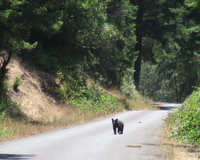
My wife and I devote one day most weekends to a mountain bike ride and, while I was going to wait to do a post on this subject, a bear cub just gave me a great opportunity to showcase an easy method of geocoding photos. We had only gone a few miles today when my wife said, "bear cub!" Sure enough, a couple hundred feet away, a cub was ambling back and forth between the logging road we were on and the roadside vegetation. I quickly got out my camera and snapped a few shots, including the one at right below.

When we returned home, I immediately launched TopoFusion, and downloaded Img_0310_cropped_4the track. This software has a feature called PhotoFusion , that automatically links digital photos to where they were shot. How? Your GPS records a timestamp for every track point, while your digital camera records a timestamp in the EXIF data. About all you have to do with TopoFusion is tell it what directory the photo is in. I have yet to see an easier and more elegant solution, especially in software that has such an extensive demo mode that you might not even pony up the $40 for the program.

Better yet, one click creates an HTML image map, allowing you to post a clickable map to your website, which my webmaster/wife did for today’s trip. Before clicking to see it, here are a few things to be aware of:

  • Click in the upper-right corner to toggle between aerial photo and topo.
  • Move the cursor over the camera icon near the center of the map to see a thumbnail in the upper-right corner.
  • Click the camera icon to open the image.
  • An elevation profile and metrics are at the bottom of the screen.

Okay, check it out! Pretty cool, huh? Note the crappy satellite coverage though. Granted, it was in a redwood canyon, but it was extraordinarily bad today. And Bear Haven, aptly, is the name of the creek we biked up!

Oh yeah, one last thing. There is a full chapter on TopoFusion in my book.

A GPS Buyer’s Guide

NEW: Check out our updated Automotive GPS Buyers Guide and Handheld GPS Buyers Guide.

This post was inspired by The Map Room’s recent posting of their reader survey results. It was suggested that there might be interest in a GPS buyers guide, so I took the bait. I figured, as long as I’m just starting this blog, we could begin with some basics. I hope this won’t deter more advanced aficionados; there will be some very exciting things coming up next weekend. Here’s a hint.

Where to start?

The first consideration is your use. Are you going to be using your GPS receiver for outdoor adventure, highway navigation, running, boating? Your use will help guide your decision. Read on for more…

read more

Welcome to GPS Track Log

Welcome to GPS Tracklog. This weblog is devoted to the convergence of GPS and the personal computer. With your help, I’ll be exploring mapping software and all things GPS. If you use the cable that links your GPS to your computer, you should feel at home here. One other thing — I’m going to focus on user-friendly applications here. I don’t know an API from a hole in the ground. This site isn’t about code, this is mapping for the masses. I’m not a programmer, but I might occasionally try some simple hacks. When I do, I’ll try to lead you through them step-by-step.