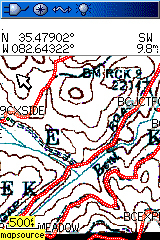
Last month, Leszek Pawlowicz of Free Geography Tools hinted at a new project code-named MOAGU. He may ascribe a different meaning to the acronym for legal reasons, but let’s call it what it is — MOAGU is the mother of all Garmin utilities. What Leszek has created is a utility that will place a USGS topo map on your Garmin GPS. Actually, it will put any scanned, georeferenced map on your Garmin. It won’t work on just any Garmin mapping handheld yet; I haven’t been able to get the maps on my Colorado 300, though I’m hoping some of our more technically inclined readers can figure that one out.
I have used it on my Garmin 60CSx and I have to say that Moagu rocks! This really is revolutionary. Handheld users have been asking for 1:24,000 scale USGS maps for their GPS units for years. The DeLorme PN-20 and Magellan Triton series have implemented this, more or less successfully (respectively), but we haven’t had an easy solution for Garmin devices until now.
Let’s start out by taking a look at the process and limitations.
Installing Moagu
The installation process is very straightforward, though you will need to have the free version of cGPSmapper installed first.
Creating a map with Moagu
Moagu includes step-by-step instructions for the process that are very easy to follow. This is the simplest map creation method I have seen using cGPSmapper
 About Rich Owings
Rich,
What did you see on the Colorado? When I download to mine I see the area where the map is supposed to be, the cGPSMapper banner but the map area is a dark gray color. Is this what you’ve observed?
-Scott
Scott,
All I could see was background shading that looked like it might have been the underlying DEM. I did not see a dark grey box where the map was supposed to be, and I don’t recall seeing the cGPSmapper banner.
I don’t understand why other cGPSmapper maps would work on the Colorado but these don’t.
I’ve tried a 1.0m B/W ortho and a 100k Topo (for some reason the 24k Topos aren’t available in my area).
In both cases if I have the Topo2008 maps enabled I can see the map tile for the Moagu map but in the case of the ortho image I see a dark gray box in the case of the 100k Topo I see a white box. In both cases I see the cGPSmapper banner along one side.
If I look closely the boxes don’t appear to be 100% solid color but as you say that could be the Topo2008 DEM showing through.
Unfortunately I don’t have a 60csx to try it on to make sure my maps are good.
GO$Rs
Is there any chance this would work on a GPS V with it severely limited (~20MB) internal map memory?
This statement, “Since the maps are based on raster imagery, they will eat up much more memory than a vector map for the same area.” led me to believe there might be an issue.
Thanks,
Mark
It appears – at first glance – that he is pulling this off utilizing custom area types – breaking the image into n x n chunks and creating a custom type for each chunk. If true it is surely stretching the capability and limits of that feature… Very cool though – will definitely download and check it out.
Hi Mark,
As the author of Moagu, I can answer your question – there’s no way to make these maps work on a GPS V. It’s not the memory that’s the issue – you can fit about 1/2 a USGS 7.5′ quad in 20 MB. The firmware has to support custom color types, which limits it to Garmin color GPS units made after 2005 or so. And even with those, lower-end units like the Venture HC will display the maps so slowly that it’s really not practical. Don’t know about the Legend series – I’m hoping to get some feedback on that.
Leszek
Hi Leszek,
Thanks for the quick and informative reply.
Maybe its time for me to get a modern GPS 🙂
Thanks,
Mark
PS Moagu sounds like an excellent project.
Has anyone tried it out on a Vista CSx? I was just about to buy one, but if Moagu will not work on it, then I’ll go for the 60 CSx.
thanks
rock-licker
Oh man this is cool. I guess the limiting factor is the color displays? My year old mobile unit probably won’t work (I’ll try it out just in case), but if I get an upgrade over the summer you can bet I’ll try to determine if it will work before buying.
Interested to hear if this works with the Vista HCX or Rhino 530 HCX too.
Hi All,
You may be interested in similar free utility:
http://bmap2mp.webhop.org/bmap2mp.rar
No tutorial, no GUI, no web support – but it works in some way 🙂
Below I give you a couple of links to pages in Russian language but actually you may be interested in links you can find on these pages.
Here you can find a link to example of the program work (Moscow region map):
http://w.bookwar.org.ru/
Here you can find links to some screenshots of program work results in Mapsource compared to source screenshots in OziExplorer:
http://www.gps-forum.ru/cgi-bin/forum/showpost.pl?Board=gpsgeneral&Number=100188
Thanks,
bmap2mp
BMaP2MP was moved to the new address http://ysbits.net/bmap2mp
I’ve had good success with the Vista HCx.
Good to hear. Thanks for sharing.
Just tried the demo version of Moagu and created a topo for CO and loaded it up on my Venture Cx. Worked great not even that slow – of course demo version only allows one small tile. May be very slow with a whole 7.5 quad. Going to try the demo with a quad around home if it works, I’ll buy Moagu.
Nice piece of software. Curious, many quads and orthos are now also available in MrSid format will Moagu handle sid files?
MRSID files are not supported by the graphics library I use, so the answer is no. You can always use a program like GlobalMapper or MicroDEM to open a MRSID image, and save it as a GeoTiff. Two things to watch out for:
1. MRSID images tend to be very large, and the largest image size that Moagu can handle is roughly 10,000 x 10,000 pixels
2. MRSID uses image compression, which modifies the color palette substantially. So you can’t use the USGS Topo setting with these images, which in turn means that they will display much more slowly than comparable TIFFs created from the original USGS Topo imagery.
i have a rhino 530hcx. the problem i have with the mapsend progrm is that it does not name forest roads. will the moagu solve this problem and also does it have trails mapped.
Robin,
Moagu will show whatever the scanned image shows. To get US Forest Service road names, you might want to check USFS quads, which I discussed here… http://gpstracklog.com/2006/10/source_for_us_f.html
Theoretically, you could even scan in a large scale USFS, non-topo map. As far as trails go, I’d say the same thing; if it’s on the scanned image, it will be on your Moagu map.
Hello
I have tried this.
for the momekt i have not sucseeded.
I intend to use a simmple paper maps, which were scanned to simple Tiff.
Can you recomend me a proper (as much simmple as possible)softweare for geocentering the tiff image map and converting it into a suitable GeoTiff format.
I have tried Canvas 11, but the maps imported to my gps by Moagu was not displayed correctly and with the wrong coordinates.
I dropped Leszek a note to see if he would respond, but I know he’s having Internet access problems this week, so he may be slow getting back with a response.
There are a number of programs that you can use to georeference a map; see the help file for more info. Probably the best starting point, especially if you don’t know what your map’s original projection was (doubly especially if you don’t know what a map projection is) is the online map rectifier at:
http://labs.metacarta.com/rectifier/
I’ve had little problem in transferring maps from usgs to an garmin legend hcx. but the detail is a bit much at 1/24k. what i’d really like is to transfer the usfs 1/2 inch/ mile recreation map with good road detail to gps. but its in 1927 datum, utm. any suggestions out there? thx, darrell
Hello.
Is there possible to have the closer Display level than 300ft/80m Display. Or it is only demo version limitation of the softwere?
Darrell:
If your file is in GeoTiff format, with the datum and UTM data embedded, then you can go ahead and use it in Moagu – it will re-project it to WGS84, lat/long automatically. If you only have a worldfile, then you can create a GeoTiff from it using MicroDEM; see the help file for more info.
Bezobrazas:
The true zoom limit for Moagu maps is actually 500-ft./120m. The 300 ft. limit is sort of a hack – the image is oversampled so that there are no gaps in the image at the 300 ft. level, but at the cost of a much larger filesize and slower display time at 500-ft..
Maps created with the BMap2MP utility can be zoomed in closer than 300-ft. without breaking up.
I’m heading home (After 20 years) with my family to Steamboat Springs for a month to re-hike some of my favorite trails in Mt. Zirkel Wilderness. Can I use this to download the Zirkel map to my Garmin “GPSMap 60CS”? If so….sign me up.
You can use it to convert map images for use on your 60CS, but don’t expect them to perform as well as vector maps.
Hello,
I am wondering if the use of such heavy-duty imagery will result in a shortened battery life. I noticed with garmin’s colorado, the battery life was terrible when using the more detailed image-intensive features. This resulted in me returning the unit and going with a 76CSx. Anyone have experience with this?
Thanks,
Mark
I don’t think so, but I could be wrong. My take is that Colorado battery life is due to the hardware and not the imagery. You pretty much have to use NiMH for the Colorado and Oregon series.
I just generated a mapset with 20 X tiles (in default large size tile and zoom levels at 120m ), total mapset size is around 20MB. I haven’t test it by actually moving around outside yet but I noticed if I use the 60CSX’s ROCKER pad to move the pointer around the map, the redraws will take place with the screen go blank as soon as the pointer move across tile borders, within a tile you can move the map very quick without any blank screen re-draw. I wonder if this blank screen re-draw will take place if I go outside and walk across tile borders or the GSP will buffer surrounding tiles in advance in real time tracking mode?
No, I don’t think it will buffer in advance.
This is Myint Naing From Myanmar.
I’ve a VISA Card from USA, but i have some difficult for registration.
I want to known fill the Address of Billing and phone nos.
I’ve this error
eSellerate server reports error:
An unexpected error occurred. Please try again.
(error = 0044:9378)
pls Reply
Myint Naing
If you’re trying to contact the Moagu creator, his info is here…
http://moagu.com/?page_id=11
what we need is a GPS unit with wider screen that changes coordinates as we move on the ground and that allows us to do mapping right on the screen. unfortunatelly GPS units are still in the 19 century time. No improvements at all. Less than basics to where we are now.
What do you mean by “do mapping right on the screen?”