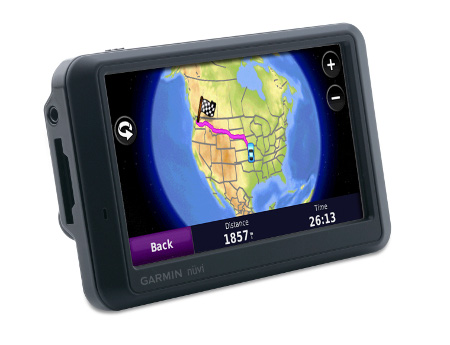
Hands on with the Garmin nuvi 775T
UPDATE: The Garmin nuvi 1370T is a newer model transatlantic navigator
UPDATE 2: This model has been discontinued. For current recommendations, please refer to our auto GPS buyers guide.
UPDATE 3: The latest trans-Atlantic navigators to be introduced are the Garmin nuvi 2475LT and nuvi 2370LT.
The Garmin nüvi 775T
The 4.3″ touch screen unit also includes stereo Bluetooth and text-to-speech, so you”ll hear “drive one-half mile, then turn left on Oak Street,” instead of just “drive one-half mile, then turn left.”
Compare prices on the Garmin nuvi 775T
A closely related unit, the 765T, has the same feature set as the 775T, minus the European maps. This review incorporates relevant parts of a review I did on another 7x5T series model, the nuvi 755T.
To see how the nuvi 775T stacks up against other units, check out my Garmin nuvi comparison chart, or use this handy Garmin auto GPS comparison tool.
More on the European maps shortly, but first let’s look at the newest features on the nuvi 7x5T line…
A2DP stereo Bluetooth
The 7x5T series brings us the first nuvis with A2DP stereo Bluetooth, the exception being the 755T, which doesn’t include Bluetooth at all. This allows for a number of interesting things. For example, you can stream music via the nuvi’s MP3 player to a stereo Bluetooth headset. At the same time such an audio link is established, you can connect your phone to the nuvi as well.
|
|
Yet what impressed me most about the 775T’s Bluetooth feature was how good the sound quality was of calls made from the nuvi. It has nothing to do with A2DP, but rather with dramatic improvements in Garmin’s echo-cancellation technology. Units I’ve tested in the past have been pretty bad for the person on the other end of the call. But the sound quality using the 775T was quite good.
My wife and I took turns on both ends of several calls, as we do every
time I have a test unit with Bluetooth, so she’s been exposed to as
many of these units as I have. And she agrees with me, this one is good
enough for everyday use. She even went further, saying she would use it
if we had one of our own (was that a hint?). It may not be as good as using your
phone or a headset directly, but it is a huge improvement.
We were able to successfully pair and use both our phones – an LG VX8300 and a Motorola V325i.
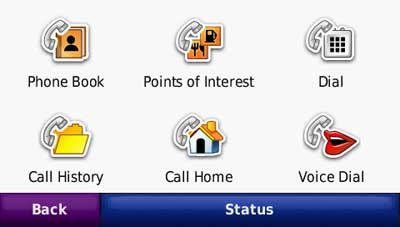
Here’s a video showing how to pair your nuvi with a compatible Bluetooth car stereo:
Lane assist
For me, the lane assist feature is the nicest addition to the the 7x5T
series. It shows up in two places on the device. The flashiest is for
major freeway interchanges, as shown below. This screen appears as you
approach your exit.
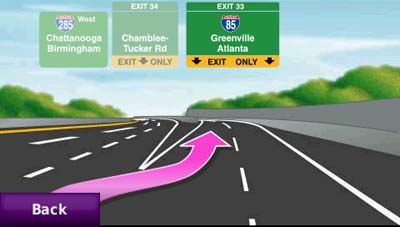
Just as useful, and perhaps more so, is the lane indicator shown in
the upper left portion of the map screen (see below). These don’t just
show up on interstate highways; I found them to be ubiquitous in
downtown Atlanta.
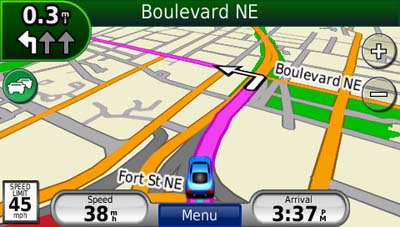
While the lane assist feature was very helpful, I only saw it appear
in Atlanta. It did not show up during my testing in the smaller cities
of Greenville, SC and Asheville, NC.
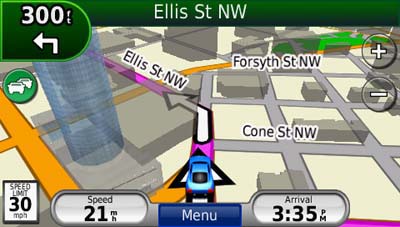
3-D buildings
This feature adds some flash, but in my mind is less helpful than lane assist.
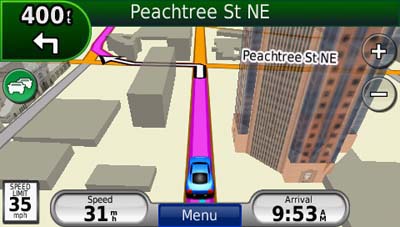
I’ll give Garmin credit for making the 3-D buildings transparent,
but the feature can still obstruct navigation somewhat, as shown below.
Ad-supported lifetime traffic
Without a doubt the most controversial feature on the nuvi 7x5T
series is the ad-supported lifetime NAVTEQ traffic, yet I found the ads
to be low key and unobtrusive. I only saw ads appear when my vehicle
was stopped; they showed up in the following places:
- On startup at the top of the main menu
- At the bottom of the traffic menu page
- On the map screen once you have reached your destination
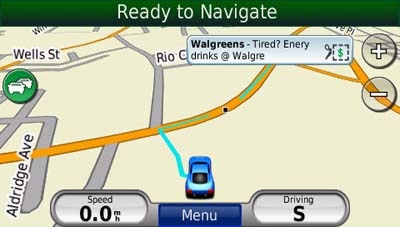
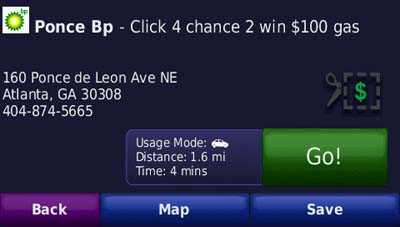
If you touch the ad, you’ll go to a screen showing the nearest
locations for that advertiser. Choosing a location will take you to the
detail screen. In the case of the BP gas ad below, a click on the
coupon gave me a number to text to enter the contest.
The ads are so low key that I would much rather have them and free
lifetime traffic than pay $60 for traffic service. The biggest
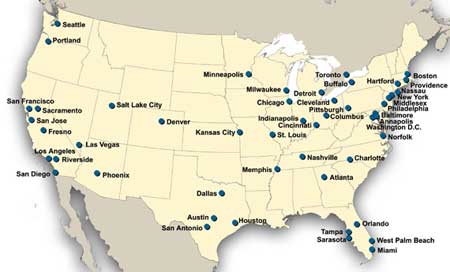
problem I have with the ad-supported traffic is the limited coverage
(see image below). With data for only 50 U.S. cities, NAVTEQ coverage
lags far behind that of other traffic services. Detailed coverage maps are available on the NAVTEQ website.
There is also an option to add MSN Direct traffic service (which
includes gas prices, weather and more), but you’ll need to buy the
receiver, which comes with a one year subscription.
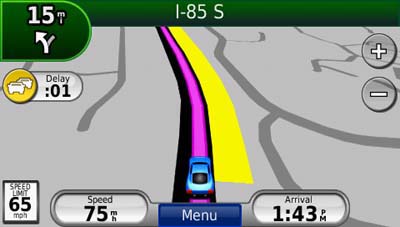
If you enable the traffic map, the moving map screen goes to
greyscale, so that traffic flow (indicated in yellow or red) will show
up better.
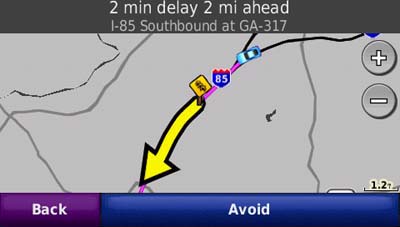
Here’s an incident detail screen…
New customization options
New to the 7x5T series are customization options for the lower right
field on the map screen. Press this field to bring up the options
listed below. When not navigating, the options are:
- Direction of travel (default)
- Elevation
- Time of day
When navigating, the options are as follows:
- Estimated time of arrival (default)
- Distance to destination
- Estimated time to destination
- Direction of travel
- Elevation
- Time of day
Garmin nuvi 775T mount
The nuvi 775T mount has an integrated power/traffic receiver
connection, so you don’t have to plug a cable into the device each time
you mount it. Unlike the nuvi 2×5 series, all you need to do is snap it
into the mount.
Other nuvi 775T features of note
The nuvi 7x5T series has inherited some other features from the 2×5 and/or 800 series units.
These include a redesigned map screen that adds a third data field
(current speed). And while photo navigation is not a feature that I
find useful, you can download Google™ Panoramio™ pictures via Garmin Connect™ Photos and navigate to them.
Finally, as I mentioned earlier, the nuvi 775T has all the great
features already found on the first generation nuvi 700 series. These
include:
- Multi-destination routing
- Automatic sorting of multiple destinations to provide an efficient route
- Tracklog recording
- Speed limit display for many interstates and highways
- Automatic marking of your last position when the unit is turned off (to help you find your car in mega-mall parking lots)
- A “Where am I” safety feature that gives your current location,
nearest address, nearest intersection, along with quick access to POIs
for the nearest hospitals, police stations and gas stations
European maps
The image below shows European map coverage included in the nuvi 775T.
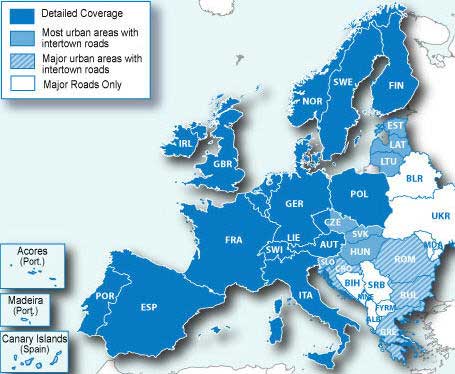
Unfortunately,I was not able to get to Europe to test these maps directly. Hmm, maybe I’ll do that the next time Garmin releases an x7x model!
Conclusion and recommendation
The Garmin nuvi 775T is a superior navigation device and I highly
recommend it. The only caveat is that it is more appropriate if you are
in an area with NAVTEQ traffic coverage. The lane assist feature and improved Bluetooth performance are the
best reasons to upgrade from the 275T, which also
has maps of Europe and lifetime traffic. Like all Garmin nuvis, the 7×5 series is
intuitive and a joy to use. Garmin has created yet another excellent
product, and it’s no wonder they dominate our top ten GPS list and the Amazon bestseller list
More Garmin nuvi 775T reviews
- Consumer-authored Garmin nuvi 775T reviews
have been posted at Amazon
- A comparison of the nuvi 7x5T and 7×0 series
I’ll be posting more hands on GPS reviews as they appear, but in the meantime, here are some…
Other Garmin nuvi 775T resources
- The Garmin nuvi 775T owners manual, in the language of your choice
- Want to see how the 775T stacks up against other models? Check out this Garmin auto GPS comparison tool or my own Garmin nuvi comparison chart
- There is a dedicated Garmin nuvi message forum at GpsPasSion
- The official Garmin nuvi 775T web page
- How to access archived nuvi trip logs
- Five tips for nuvi newbies
Compare prices on the Garmin nuvi 775T at these merchants:
- Get a great deal on the Garmin nuvi 775T North America City Navigator GPS
at BuyDig.com
- Find the low price on a Garmin nuvi 775T at GPS Now, where shipping is free on orders over $99 (and the upgrade to overnight shipping is dirt cheap!). Order by 5 p.m. Central Time for same day shipment
- Check the current Garmin nüvi 775T
- Get the Garmin nuvi 775T Transatlantic Bluetooth Automotive GPS System with Lane Assist & Lifetime Traffic
at TigerGPS, where you get free shipping on orders above $250
- Get the Garmin nuvi 775T
for an amazing price on eBay
 About Rich Owings