Thursday, September 2, 2010

Garmin nuvi 855 review

April 5, 2009 by Rich Owings  

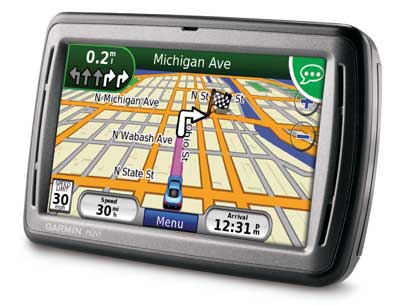
garmin-nuvi-855-reviewThe Garmin nüvi 855 is one of Garmin’s excellent voice command navigators. Updating the nuvi 850, the 855 adds junction view, lane assist and a speed limit indicator. It is also compatible with the third generation of MSN Direct services (an optional add-on), including doppler radar and flight status.

Comparing the nuvi 855 and 7×5 series

Despite these improvements, the 855 does not include all the features found in the 7×5 series. It is missing the following:

  • 3-D buildings
  • A2DP Bluetooth
  • ecoRoute
  • Recent cities and streets folders that speed searches (though these aren’t really necessary if you’re using voice commands)
  • Customizable data fields

On the other hand, the 855 has the following features which are not present on the 7×5 series:

  • Removable battery
  • Dual speakers
  • Voice command
  • Custom avoidances (avoid specified streets or areas)
  • Backup camera input

This is unfortunate – there really isn’t one top of the line Garmin nuvi. If you want the best, you’ll need to choose between a 7×5 series and an 8×5 series unit.

Compare prices on the Garmin nuvi 855

One other note; the nuvi 885T adds Bluetooth and an MSN Direct receiver to the 855’s feature set. Since the models are so similar, much of the information below is taken directly from my hands-on review of the 885T.

To see how the 855 stacks up against other models, check out my Garmin nuvi comparison chart.

Using voice commands with the nuvi 855

The nuvi 8xx series offers the best voice command feature of any GPS unit on the market. I covered this extensively in my Garmin nuvi 880 review and rather than repeat myself, I’ve shot a quick video demonstrating the voice command feature:

I remain impressed with this feature. Popular Places even had ‘”libraries” and “rest areas.” Nevertheless, it is much faster to enter many things by hand, though the voice recognition feature is nice for anything that would involve a lot of keypad entry, like addresses and cities.

Custom avoidances

The nuvi 8xx series allow you to set custom avoidances. Follow the link for a full run down on this feature. You can select streets (or portions thereof) or rectangular areas to avoid. The only other nuvi with this feature to date is the nuvi 5000.

http://gpstracklog.com/gps_tracklog/


Lane Assist and Junction View

I had previously experienced this feature using the 7×5 series in Atlanta, and I think Garmin has done an excellent job with it. Unfortunately, coverage is woefully lacking, as I did not see any signs of it in Charlotte or Greenville / Spartanburg. I can understand the latter, but c’mon, Charlotte is the 18th largest metro area in the country. Maybe it’s because I stuck to the northeast side of town, but I thought I would at least see it on I-85.

Other features

On top of all this, the nuvi 8×5 series includes:

  • Pre-loaded maps of the U.S. and Canada
  • Multi-destination routing (and auto-sorting)
  • Text-to-speech
  • Where Am I? (find closest hospitals, police & gas stations, nearest address & intersection)
  • Garmin Locate™ (marks position when removed from windshield mount)
  • Photo navigation (navigate to geotagged photos)
  • MP3 / audio book player
  • FM transmitter

Garmin nuvi 855 recommendation

If you do most of your driving alone, and especially if you succumb to the temptation to use the GPS touch screen while driving, I highly recommend the Garmin nuvi 855. The voice command system makes it one of the safest GPS units to operate, and it is without doubt the best voice command navigator on the market.

However, if you usually have a passenger with you who can operate the device, or have the self-restraint to not operate it while driving, you might choose the nuvi 785T instead.

Finally,a recommendation for Garmin — charge what you will, but please, give us a top of the line unit that combines the features of the nuvi 7×5 and 8×5 series!

More Garmin nuvi 855 reviews

I’ll be posting more hands on GPS reviews as they appear, but in the meantime, here are some…

Other Garmin nuvi 855 resources

Compare prices on the Garmin nuvi 855 at these merchants:


StoreRatingBest PricesShopzilla Tracking
store-logomerchant-rating
In stock at Zappos.com
$399.99
store-logomerchant-rating
In stock at PCNation
$341.12
store-logomerchant-rating
In stock at Walmart.com
$127.54
store-logomerchant-rating
In stock at RadioShack.com
$147.40
powered by

Comments

51 Responses to “Garmin nuvi 855 review”
  1. n00b says:

    Costco has them for a promo price of $299.99 wont last.

  2. Todd Lake says:

    Actually costco is selling them at a price of $267 with shipping and handling included. Already bought mine because of the low offer. The deal goes on until I believe July 5th, or whenever they run out of units.

  3. Ted Heuser says:

    Available on eBay for under $200 incl. shipping.

  4. Ken Schweizer says:

    Don’t wast you money on purchasing MSN traffic.

    I purchased the Nuvi885T for a trip from Orlando Florida to McMinnville Tenn. The directions were great. The approaching a turn warning was extremely helpful, especially going through the east coast’s nightmare city, Atlanta.

    The one BIG drawback is MSN traffic. It told me about an accident after I was stuck in non-moving traffic on I75 for a half hour; then it predicted a 20 minute delay. Also, MSN only updates when you have been in a city for at least a half hour. I was constantly seeing yesterday’s gas prices or the gas prices 100 miles ago.

  5. Rich Owings says:

    And now it’s going away entirely…

    http://gpstracklog.com/2009/10/msn-direct-to-end.html

  6. Chase Hamil says:

    Amazon.com has the 855 at 199.99 – just purchased one and it arrived in three days. Amazon also offers a further discount if you purchase the carrying case for the 855 and the dashbgoard portable friction mount – all three at less than the three iterms purchased separately.

  7. Rich Owings says:

    That’s cool. Thanks for the tip.

  8. gmc says:

    I’m trying to decide between the 855 and the 755T. My main needs are to have route mapping (I’ll be having to travel to 5-6 destinations daily in a relatively rural area I don’t know well; these destinations will change every day and I’d like to know the most efficient route). Both nuvis have this feature but I’m admittedly intrigued by the voice recognition capabilities of the 855. I don’t need Bluetooth or traffic alerts. Are there any specific advantages of the 755T vs. the 855? Any guidance would be appreciated…

  9. Rich Owings says:

    I’m not a huge fan of voice command. I find it quicker to use the touchscreen, which you can still do on the 855. If it were my choice though, I’d go with the 755.

    These seem like they could impact your decision though… If the ads will bother you, go with the 855. Another reason for the 855 is that you can exclude certain streets or areas from routes. Hope that helps!

  10. Jay says:

    do tomtoms have a feature similar to “custom avoidances”? I would like to avoid unsafe parts of town

  11. Rich Owings says:

    No, they don’t.

  12. Jay says:

    Do you have to speak extremely clearly in order for the voice to work? Never used a GPS voice unit but voice technology is often frustrating

  13. Rich Owings says:

    I found that it worked well for most commands without me having to be extra careful about how I spoke.

  14. Jay says:

    I’m trying to understand the traffic difference between nuvi 265WT and 285WT. 285WT gives you traffic for how long before you need to start paying a fee?

  15. Rich Owings says:

    9 months. But the MSN Direct service will cease operations on 1/1/2012 and you will not be able to renew after that date.

  16. Jay says:

    do all garmins offer public transit mode? what about tomtoms?

  17. Rich Owings says:

    No, TomToms don’t have it. It’s found on the nuvi 1xxx series, but you have to buy CityXplorer maps to enable it. Google Maps Navigation for Android appears to have a public transit option as well.

  18. Jay says:

    ah I see, thanks Rich. How much is CityExplorer subscription per year?

  19. Rich Owings says:

    They aren’t subscription-based. They run $10 to $15 per city. More info…

    http://gpstracklog.com/2009/06/garmin-cityxplorer-review.html

    and

    http://www.garmin.com/garmin/cms/us/maps/cityxplorer

  20. Rhonda says:

    I was needing to load a route into the garmin. It says that the 700 and 800 series can receive computer uploads of good maps with route points. Has anyone used this feature? Is it possible to have multiple routes?

  21. Rich Owings says:

    I prefer to use Garmin MapSource / City Navigator to do this, but it can also be done with Mapquest online: http://help.mapquest.com/jive/entry.jspa?externalID=562&categoryID=11

    • Rhonda says:

      So, Mr Owings, you recommend that I use the 700 or 800 series with another type of map service? I have map points loaded in a spreadsheet that google maps plot on a map, I need to be able to use these points for a delivery route. The mapsource/city navigator will accept a spreadsheet?

  22. Rich Owings says:

    You can use the spreadsheet to generate custom POIs. This is an old post, but it should help get you started…

    http://gpstracklog.com/2006/03/custom_pois.html

  23. Rich Gliding says:

    In entry #10 you (Rich Owings)mention to go with the 755 vs. the 855. You mention something about ads and that you recommend going with the 755. What ads are you referring to and why specifically do you prefer the 755 vs. the 855?

  24. Rich Owings says:

    The lifetime traffic on the 755T is ad supported. They are small and don’t bother nme, but they do annoy some people. Otherwise, I gave the pros and cons of each unit there, in #10.

  25. Rodger Latham says:

    Any comments on the 855/885 models and the need to remove the battery to completely shut the unit off? I like you like the idea of the voice command, but don’t like the idea of having to remove the battery after using it or face it being dead after 3 or 4 hours. With so many subtle little differences between all of the Garmin models, what really is the best unit overall?

  26. Rich Owings says:

    The best unit overall depends entirely upon your needs. The 8×5 series has an instant on feature. If turned off, the battery can drain all the way down, but it should take 4-5 days, not just a few hours. Hope this helps.

  27. JAMES says:

    What is the difference between nuvi 885T and 885?
    Is it worth spending more money on the 885T, what will I get with this model
    That makes it more money.
    I did notice that you mentioned MSN will be discontinued after a certain date.

    I would also like to know how the speakers work.

    I really don’t care about looking at the screen; I would rather hear the prompts clearly.

    I had a 765T and it worked will, but I was very disappointed in the speakers. It wasn’t load enough and I couldn’t understand what was being said when driving.

    Are the duel front speakers on the 885T or the 885 any better then the other models?

    I would like some feed back on this.
    Thank you
    James

  28. Rich Owings says:

    There is no standalone 885, only the 885T. I don’t recall the speakers being any louder than on other nuvis.

  29. JAMES says:

    You say there is no standalone. Can you explain what you mean by that?
    i have seen two different types, the 885 and the 885t.

    Thank you for the info on the speakers, have you noticed and differences in the clarity From the 765t or the 885.

    This is a major concern to me. I’m always on the road; i like to listen to my music. But i have missed a couple of exits because the speakers weren’t load enough to hear.
    i don’t play my music that load that it would interfere with the gps.

    Can you recommend a good quality gps that has a higher volume control and you can hear clearly.

    thank you
    James

  30. JAMES says:

    I WOULD LIKE TO THANK YOU FOR YOUR HELP.

    YOUR SO RIGHT I WAS SEEING THE 885 AND THE 885T AS TWO DIFFERENT UNITS.

    I THINK I’M GOING TO BUY THE 855, I ALREADY HAVE BLUE TOOTH IN MY CAR AND MSN WILL BE DISCONTINUED.

    THANKS FOR ALL YOUR HELP.

    JAMES

    P.S If anyone thinks I shouldn’t buy the 855. Please let me know.
    Like I said before I returned the 765t, for two reasons,
    1) It wasn’t loud enough to hear when I was driving.
    2) It heated up fast. Man did that thing get hot.

    • Rich Owings says:

      You’re welcome!

      Hey, I’m not sure you can connect the 885T Bluetooth to your car’s stereo. The 765T’s A2DP Bluetooth should allow it. If you’re interested in that feature, you might want to download the manuals and read those sections.

      • JAMES says:

        thanks for the info on the bluetooth.
        i’m glad to say i have bluetooth built into my car and the speaker system.
        like i said i use my car for work and i’m just trying to find a good GPS.

        YOU HAVE BEEN A GREAT HELP.
        i’m not going to make a dicesion on whitch on to buy yet.
        i’m still toying with the 855 and the 755t.

        if you or anyone you know has any more input on either one of these two system i would love to hear them.

        thanks once again
        James

  31. Wayne Quernemoen says:

    I just recently purchased a 1690…and discovered there is no “area avoids” feature. Bummer! I know the 855 does area avoids; does it also do a track log? Do you know if there is a “back door” way to do a track log on the 1690?

  32. Rich Owings says:

    Yes, the 855 does have a tracklog feature, as does the 1690. But you can’t add the area avoidances feature to the 1690, if that’s what you’re asking.

  33. JasonM says:

    Hello Rich,

    I just bought one of these units and I was wondering if you’d be able to shed a little light on how the external traffic receivers (GTM20 in this case) behave. I didn’t see a traffic specific posting, so I’m posting it here…
    I’m seeing new units (claiming lifetime traffic) in the $80+ neighborhood. Used/Refurb items on eBay are maybe in the $30s but most in this range claim no subscription.

    A Garmin.com GTM20 FAQ states: “Clear Channel provides a lifetime subscription for $60.00 once the free trial subscription that comes with the GTM 20 has expired. Navteq provides a lifetime sponsor based traffic subscription for devices that come with a Navteq traffic subscription.2 A non-sponsor based lifetime Navteq subscription can also be purchased for $49.99.”

    This implies that a receiver without a ‘premium’ subscription may still access the ’sponsored’ traffic data. To your knowledge, is this the case?

    I would be completely happy with ’sponsored’ traffic from a used receiver…

    Thanks for all the GPS help!

    Jason

    • Rich Owings says:

      The NAVTEQ lifetime subscription is tied to the traffic cable, not the unit. As long as you have a compatible model (and the 855 is), any working GTM 20 cable should do the job.

      • Jason says:

        Its good to know its tied to the cable. When you say lifetime subscription, is that the ‘premium’ or ’sponsored (ad-based)’ NAVTEQ traffic? The terminology could make or break my plan :) I think you’re telling me what I want to hear, but I guess I just want a more solid confirmation.

        I’m seeing GTM20s on eBay that have no claim of a traffic subscription. I would assume they’d advertise the ad-based traffic support, but its highly possible the seller has no idea of how it actually works (like me!). If *any* GTM20 in a NAVTEQ supported market can at least get ad-based traffic… I could be a little less discriminating in my purchase.

        Thanks again! Jason

        • Rich Owings says:

          The GTM 20 lifetime traffic is ad supported. It does appear that you have the option of paying extra to eliminate the ads.

          • JasonM says:

            OK. I think a little more careful reading and a response from a similar question to Garmin support is leading me to believe this may not work. The line in the FAQ quote “…for devices that come with a Navteq traffic subscription” means ‘traffic receivers that come with xxxT model devices’. The Garmin rep also mentioned that they only sell GTM20s with lifetime subs. Other vendors may sell receivers w/o sub. So… the traffic receiver from a xxxT device or a ‘new’ GTM20 (including lifetime traffic) are eligible for the sponsored NAVTEQ traffic. Other receivers aren’t blessed and need an independent $50-60 sub (which wouldn’t be ad-based). Let me know if this sounds correct.

            As a side technical question, since the subscription travels with the ‘antenna’, do the ‘blessed’ traffic cables have a serial number that is keyed to be recognized by GPS devices as ‘ad-based NAVTEQ eligible’? I can’t imagine they have some small memory inside the antenna to store the activated state. How would a purchased lifetime sub travel with the cable if that was the case? The engineer side of me likes to know how this stuff works :)

            Thanks!!!

  34. Rich Owings says:

    Yeah, I just don’t see how that would work. It might be worth another call, as you may get a different answer from a different tech. Apparently there are NAVTEQ lifetime GTM-20s and Clear Channel GTM-20s too! I saw that this morning at http://forums.gpsreview.net/viewtopic.php?t=12438. Maybe that is what the tech meant. I still think you’ll be okay if you buy the NAVTEQ lifetime GTM-20, even used.

    • JasonM says:

      Thanks for all the help!

      I have what’s supposedly a ‘new’ (picture shows old design) unit on the way. No claim of active or inactive subscription… so we’ll see if the gamble pays off :)

      So I know what to look for, do the new lifetime receivers (included with xxxT or standalone GTM20s) include the unlock key on a piece of paper to enter into the GPS? The key is tied to the receiver ID, so this should be possible, right?

      I’ll keep you updated. Thanks again!

      • Rich Owings says:

        Nope, the lifetime receivers should work just by plugging them in. It may tale awhile to get reception, so don’t panic if it doesn’t happen right away. Yes, please do report back and let us know how it goes.

        • Jason says:

          I received the item from the eBay seller. I don’t think the ‘new’ claim was 100% true. When I connected the receiver, the ‘System/Traffic’ icon is reporting that the ‘Total Traffic Network’ subscription is expired. I’m assuming the trial period had run out.

          No free ad-based Navteq subscription was available for this older unit. A (non-ad based) lifetime Navteq sub did end up working, so I’m getting the traffic data. Not ideal for my cheap approach… but its working now.

  35. Rich Owings says:

    That sucks. Well, thanks for letting us know how it turned out. I’ve made a note of this conversation so I can refer others back to it. Hopefully it will benefit someone else further down the road. Garmin certainly makes this all far from clear.

  36. Mac says:

    Please tell me more about that backup camera input for the 855.

  37. Pam says:

    I’m looking at the 855 and like it so far. With the voice recognition on, will it activate with regular conversation in the car or while I’m listening to a book thru my iPod? Or is that remote I saw on the steering wheel to turn the voice recognition on? Thanks!

    • Rich Owings says:

      Yes, that is what the steering wheel remote does. Alternatively (but more expensive), you could look at the new 3690T, which uses a customizable wakeup phrase to allow voice commands.

Speak Your Mind

Tell us what you're thinking...
and oh, if you want a pic to show with your comment, go get a gravatar!
