
The Android-based Garmin nuvi 3592LM
It turns out that there’s an Android-based Garmin nuvi available right now — if you live in Singapore or Malaysia. But this may be a hint of things to come for other markets too, so let’s take a look. read more
GPS reviews, news, tips, tricks and deals
The Android-based Garmin nuvi 3592LM
It turns out that there’s an Android-based Garmin nuvi available right now — if you live in Singapore or Malaysia. But this may be a hint of things to come for other markets too, so let’s take a look. read more
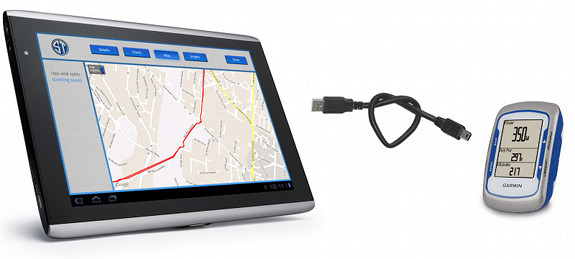
Sportablet running on an Android tablet
Sportablet is an Android app that allows you to connect many Garmin devices to Android tablets. Primarily intended for fitness buffs, it gives access to stats, allows you to post to Garmin Connect or Facebook and more. While it’s not designed for Garmin handhelds, it does appear to work with many of their more recent introductions. There is also a smartphone version – the Uploader for Garmin. read more
 DigiTimes has a brief article up today, citing several GPS navigator (PND) trends for 2011. Among them…
While most PNDs are based on Linux or Windows CE, some vendors are developing Android models to minimize R&D costs, and to leverage the availability of Android-based applications and connectivity with tablet PCs, handsets and other hand-held devices, the sources analyzed.
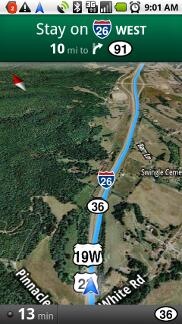 Not the nav app you’re looking for
Google Maps Navigation (referred to hereafter as GMN) is a free navigation app for Android version 1.6+ phones in the U.S. I bought the Motorola Droid
One important thing to be aware of — this is a beta application. Google has been known to keep their products in beta for a long time, but this one is pretty new and the beta label definitely applies.
The first part of my review is basically a tutorial, walking you through the interface, and offering useful tips. For my overall take, head on down to the conclusion.
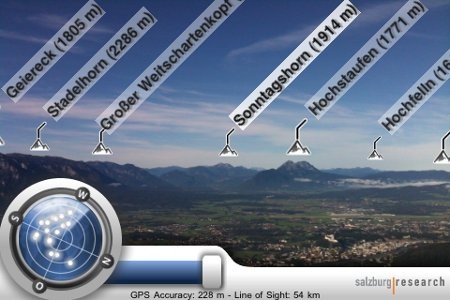 Hey What’s That goes mobile
It’s been quite a while since I wrote about Hey What’s That?, a website that helps you identify mountains on the horizon. Well, today comes news that they have a mobile app for Android and iPhone (here is their mobile FAQ). So I tweeted about it and @CompeGPS turned me onto…
Peak.AR (iTunes link) is a free augmented reality app that looks much better. There’s a screenshot at the top of this post (note that both English and German languages are supported). It’s limited to the iPhone now, but an Android app is expected by the end of February.
